Table of Contents

Reach SOC 2 Compliance in 6 Weeks or Less.

  / ISO 27001 Internal Audit Explained: Key Steps and Best Practices

ISO 27001 Internal Audit Explained: Key Steps and Best Practices

Achieving ISO 27001 certification signifies excellence in information security management, demonstrating your organization’s dedication to protecting sensitive data. However, this process involves careful steps, with one of the most important being the internal audit. This crucial phase verifies that your Information Security Management System (ISMS) meets ISO 27001 standards and is strong enough to reduce risks.

Watch the Loom Video for a detailed explanation of our internal audit services, check out our Loom video, where our Principal Consultant Ali Hayat breaks down the process step-by-step and shares tips for seamless ISO 27001 compliance. Click here to watch the Loom video.
ISO 27001 Internal Audit

What is an ISO 27001 Internal Audit?


An ISO 27001 internal audit is a structured review of your ISMS to check its compliance with the standard’s requirements. Unlike external audits done by certification bodies, internal audits are performed by the organization itself or by a third-party auditor to find gaps, evaluate risks, and ensure readiness for certification.

The main goal of an internal audit is to ensure that your ISMS meets ISO 27001 requirements and effectively reduces risks. It also offers a chance to find areas for improvement and strengthen your organization’s security efforts. By conducting a thorough gap analysis during this stage, you help set your organization up for success in the certification process.

ISO 27001 Internal Audit Requirements: Understanding Clause 9.2


Clause 9.2 of ISO 27001:2022 establishes the specific requirements for internal audits, forming the backbone of audit governance. This section mandates that organizations establish and implement audit programs to evaluate the effectiveness of their ISMS at planned intervals.

The standard specifies several critical requirements within Clause 9.2:

Clause 9.2.1 – Audit Program Requirements: Organizations must define audit objectives, scope, frequency, and methodologies. Your audit program should establish criteria against which the ISMS will be evaluated, ensuring that all relevant information security controls are systematically reviewed over a defined period.

Clause 9.2.2 – Auditor Competence and Objectivity: This is perhaps the most critical requirement. Auditors must be objective, impartial, and free from conflict of interest. The standard explicitly prohibits auditors from evaluating areas for which they hold direct responsibility, as this compromises independence and undermines audit credibility.

To meet Clause 9.2.2, auditors should possess documented competence in ISO 27001 standards and audit methodologies. Many organizations require auditors to hold certifications such as Certified Information Systems Auditor (CISA) or ISO 27001 Lead Auditor. Reference to ISO 19011 – Guidelines for auditing management systems – provides additional guidance on selecting, evaluating, and managing auditors.

Who Can Perform an ISO 27001 Internal Audit?

Internal audits can be carried out by your organization’s own internal audit team or outsourced to a third-party auditor or an ISO 27001 consulting firm. Unlike external certification audits, you can choose the most suitable approach for your organization. However, it’s crucial to follow Clause 9.2(e) of the ISO 27001 standard, which stresses the importance of selecting an internal auditor who is objective and impartial. This means avoiding any potential conflicts of interest—specifically, the auditor should not have been involved in developing the ISMS or in operating or monitoring any of the controls under review. The reason for this requirement is simple: reviewing your own work can undermine objectivity and hinder a thorough evaluation.

Essential Auditor Qualifications

When selecting an auditor, ensure they meet the following criteria:

In-Depth ISO 27001 Knowledge: Auditors must understand the standard’s requirements, Annex A controls, and how they apply to your organization’s context.

Audit Methodology Expertise: Knowledge of audit planning, sampling techniques, evidence collection, and report writing.

Relevant Certifications: ISO 27001 Lead Auditor (IRCA or equivalent), CISA, or similar credentials demonstrate formal competence.

Industry Experience: Understanding of your sector’s specific security challenges and regulatory landscape adds significant value.

If internal expertise is limited, hiring an experienced third-party auditor or consulting firm can provide a fresh, unbiased perspective and valuable insights tailored to your organization’s unique environment.

Internal Audit vs External Certification Audit: Key Differences

Understanding the distinction between internal and external audits is crucial for effective compliance strategy. While both serve important roles, they differ significantly in purpose, scope, and outcome.

Aspect

Internal Audit

External Certification Audit

Conducted By

Organization (internal or contracted third party)

Accredited certification body

Primary Purpose

Identify gaps and prepare for certification

Verify compliance and issue certificate

Focus

Detailed improvement; addresses specific findings

Overall conformance; verifies readiness

Flexibility

High – customize scope and approach

Low – standardized audit procedures


Internal audits serve as your organization’s opportunity to address vulnerabilities proactively before the certification audit. They foster a culture of continuous improvement and ensure that any gaps are remediated well in advance. This strategic advantage makes internal audits invaluable in the certification journey.

How to Conduct an ISO 27001 Internal Audit: Key Phases

Conducting an ISO 27001 internal audit involves a series of well-defined steps to ensure that your Information Security Management System (ISMS) is thoroughly evaluated. Below is a detailed breakdown of the process:

Phase 1: Determine the Scope of the Audit

The first step is to clearly outline the audit’s scope, specifying the systems, functions, people, and processes that will be assessed. This scope ensures the audit comprehensively covers all necessary areas to meet compliance objectives. Defining the boundaries early on helps the auditor focus on the most relevant elements of the ISMS, particularly considering your organization’s specific ISMS scope boundaries and the applicability of controls.

Phase 2: Documentation Review

Before proceeding with on-site evaluations, the internal auditor will review all key ISMS documents to verify that they align with ISO 27001 requirements. An effective ISMS requires a well-defined scope, a comprehensive Statement of Applicability (SoA), a robust Information Security Policy, a thorough risk assessment and treatment plan, and clear definitions of responsibilities. Additionally, identifying individuals responsible for implementing and operating controls, and documenting evidence of control implementation, provides valuable context for the field review.

Phase 3: Management Review and Approval

The audit plan must be reviewed and approved by senior management. Regular meetings should be scheduled to set expectations, discuss timelines, and maintain open communication. Management also plays a critical role in reviewing the internal audit findings, collaborating with the auditor to assess the organization’s readiness for an external certification audit, and ensuring that all significant issues are addressed beforehand.

Phase 4: Pre-Audit Preparation

Preparation is critical for a successful audit. This phase includes developing detailed audit checklists, identifying key personnel for interviews, scheduling on-site activities, and gathering necessary documentation. A well-prepared audit checklist aligned with ISO 27001 requirements and your organization’s context ensures comprehensive coverage and consistency.

Phase 5: Conducting the Field Review

The field review is the core of the internal audit process. During this phase, the auditor evaluates the ISMS through multiple evaluation methods, gathering evidence to support findings and determine the effectiveness of controls.

Audit Tests: Assessing controls to ensure they are effectively implemented and functioning as intended. This involves testing a sample of control activities to verify control effectiveness.

Audit Evidence Collection: Reviewing documented information and audit trails to confirm compliance and identify gaps. Evidence should support all audit conclusions.

Staff Interviews: Engaging with employees to gauge their understanding of and adherence to ISMS policies. These interviews provide crucial insight into whether controls function as designed in practice.

Observations and Documentation: Recording findings, highlighting areas of non-conformity, and identifying strengths. Clear documentation enables transparent reporting and actionable recommendations.

This comprehensive review enables the auditor to pinpoint what’s working well and what needs improvement, providing a clear roadmap for corrective actions.

ISO 27001 Internal Audit Checklist: Essential Items

A well-designed audit checklist is fundamental to conducting a thorough and consistent internal audit. The checklist should cover all ISO 27001 requirements and be tailored to your organization’s context. Below are the essential categories and items to include:

Organizational Context (Clauses 4.1-4.3): Verify that the organization understands its internal and external context, interested parties, and scope of the ISMS.

Leadership and Governance (Clauses 5-6): Confirm management commitment, information security policy, allocation of roles and responsibilities, and evidence of management review.

Planning (Clause 6): Assess risk assessment methodology, risk treatment plans, and management of information security objectives.

Support and Operation (Clauses 7-8): Check resource availability, competence assessments, awareness and training programs, and operational control implementation.

Performance Evaluation (Clause 9): Review monitoring and measurement of controls, incident management procedures, and evidence that internal audit has been appropriately planned and conducted.

Improvement (Clause 10): Evaluate management of non-conformities, corrective action effectiveness, and documented information control.

Incorporating Annex A controls into your checklist ensures that all 114 control objectives are evaluated within the scope of your ISMS. Many organizations create control-specific evaluation criteria linked to this comprehensive checklist.

Addressing Non-Conformities


Non-conformities can range from minor documentation gaps to critical security flaws. Identifying and addressing these issues promptly is essential to maintain the integrity of your ISMS. By developing comprehensive corrective action plans and monitoring their implementation, organizations can ensure continuous improvement and long-term compliance with ISO 27001 standards.


Common ISO 27001 Internal Audit Findings

Understanding typical non-conformities helps organizations proactively address vulnerabilities. Here are the most frequently encountered findings:

Documentation Gaps: Missing, incomplete, or outdated policies, procedures, or records. For example, risk assessment documentation that doesn’t clearly link to implemented controls.

Access Control Deficiencies: Inadequate user access reviews, orphaned accounts, lack of segregation of duties, or insufficient multi-factor authentication implementation.

Incident Management Issues: Incomplete incident logs, lack of timely incident classification, or insufficient root cause analysis documentation.

Training and Awareness Gaps: Insufficient security awareness training records, lack of role-specific training, or no evidence of competency assessment.

Change Management Failures: Changes implemented without proper authorization, risk assessment, or documented approvals.

Backup and Recovery Defects: Untested backup procedures, unclear recovery objectives, or lack of documented restoration testing records.

The Corrective Action Process

Addressing non-conformities requires a structured, documented approach. The standard corrective action process includes:

Classification: Categorize each finding as Major (major risk or complete absence of a control) or Minor (temporary deviation or incomplete implementation that doesn’t significantly impact security).

Root Cause Analysis: Investigate why the non-conformity occurred—whether due to lack of awareness, insufficient resources, or inadequate procedures.

Corrective Action Plan: Develop specific, measurable actions with defined timelines and responsible parties. Plans should address root causes, not just symptoms.

Implementation Monitoring: Track progress toward completion and verify that actions are implemented as planned.

Effectiveness Verification: Re-audit completed actions to confirm they have resolved the non-conformity and prevented recurrence.

Major non-conformities must be resolved before certification, while minor findings require documented action plans with appropriate timelines. Organizations should also review common mistakes during ISO 27001 implementation to avoid repeating the same errors across multiple audits.

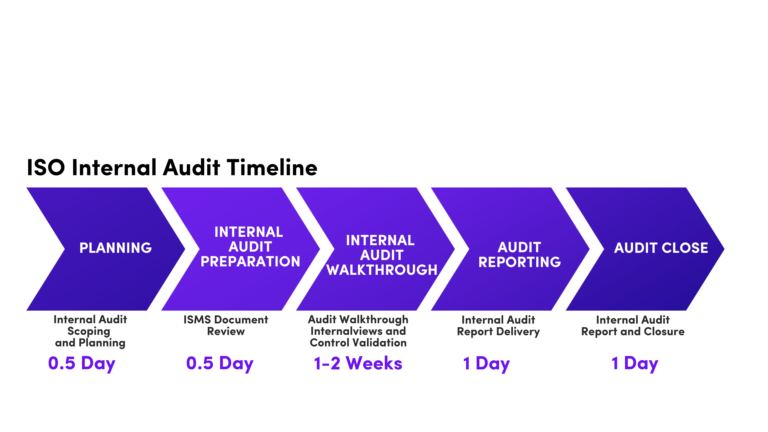
Timeline of Internal Audits

A successful ISO 27001 internal audit requires careful planning and execution. Here’s a detailed breakdown of the key phases and estimated time required for each, though actual duration depends on organization size, ISMS complexity, and control maturity.

Planning (0.5 days): Define the audit scope, objectives, and methodology. Develop an audit plan, including the schedule and resource allocation. This phase establishes the foundation for all subsequent work.

Preparation (0.5 days): Review relevant documentation, develop audit checklists, and identify key personnel to be interviewed. Preparation ensures efficiency during field activities.

Audit Execution (1-2 weeks): Conduct interviews, document reviews, and observations. Verify the implementation of controls and procedures. Identify non-conformities and opportunities for improvement. This phase is the most time-intensive and involves active on-site engagement.

Reporting (1 day): Prepare a detailed audit report, including findings, recommendations, and corrective action requirements. Review the report with management to ensure accuracy and completeness.

Closure (1 day): Finalize the audit report and distribute it to relevant stakeholders. Monitor the implementation of corrective actions. Schedule follow-up audits to verify the effectiveness of corrective actions and ensure sustainable improvement.

The audit execution timeline varies significantly based on organization size. A small organization with a well-defined scope might complete field activities in 3-5 days, while a larger enterprise with multiple business units could require 2-3 weeks. The complexity of your ISMS and the maturity of your existing controls also play significant roles in determining realistic timelines.
ISO 27001 Internal Audit Timeline

Benefits of a Well-Executed Internal Audit

Conducting a comprehensive internal audit provides key benefits for organizations aiming for ISO 27001 certification:

Certification Readiness: Identifying and fixing gaps before the certification audit greatly boosts the chances of passing on the first attempt and minimizes the need for re-audits.

Enhanced Security: Internal audits reinforce your ISMS by verifying control effectiveness, reducing weaknesses, and increasing your organization’s resilience to security risks.

Operational Efficiency: The process reveals inefficiencies and overlaps, helping you streamline workflows and better allocate resources for security efforts.

Stakeholder Trust: Showcasing strong, documented security practices through internal audits builds confidence with clients, partners, regulators, and other stakeholders. This often provides a competitive edge and supports business growth.

Culture of Improvement: Regular audits foster a mindset of continuous enhancement, motivating ongoing review and improvement of security measures beyond mere compliance.

Understanding Your Path to Certification with Axipro


Axipro’s internal audit services are designed to simplify the ISO 27001 compliance process. Our team of experienced auditors conducts thorough assessments, identifying gaps and providing actionable insights to strengthen your ISMS.

We tailor our approach to your organization’s unique needs, offering guidance from planning to corrective actions. With Axipro, you can streamline your internal audit process, reduce complexity, and achieve ISO 27001 certification confidently.

Conclusion


An ISO 27001 internal audit is a cornerstone of effective information security management. It ensures compliance, enhances security practices, and prepares your organization for certification success. By following a structured approach and leveraging expert support, you can make the audit process smooth and impactful.

Frequently Asked Questions

What is the purpose of an ISO 27001 internal audit?

The primary purpose is to verify that your ISMS aligns with ISO 27001 standards, identify gaps and non-conformities before external certification, ensure controls are effectively operating, and prepare the organization for successful certification audit.

Internal audits can be conducted by your organization’s internal audit team or outsourced to qualified third-party auditors or consulting firms. However, auditors must be objective, impartial, and free from conflicts of interest as required by Clause 9.2.

After completion, the audit report is distributed to management. Non-conformities are categorized and corrective action plans are developed. Organizations then implement and monitor these corrections. Follow-up audits verify the effectiveness of corrective actions. Once major non-conformities are resolved, the organization proceeds to schedule the external certification audit.

ISO 27001 requires audits at planned intervals, typically at least annually for certified organizations. Pre-certification organizations should conduct audits multiple times (3-6 months before certification). Focused audits can be conducted quarterly or as-needed after significant changes.

Simplify your ISO 27001 compliance journey with Axipro’s expert internal audit services.

Axipro Author

Picture of Abeera Zainab

Abeera Zainab

Blog Highlights

Explore More Articles

HIPAA and GDPR are the two most consequential data protection frameworks any healthcare or technology organisation is likely to encounter. They share a common purpose, protecting sensitive personal data, but they differ significantly in scope, enforcement mechanisms, and compliance obligations. For organisations operating across the Atlantic, understanding where they align, where they clash, and how to satisfy both simultaneously is not optional. It is a legal necessity. What Is HIPAA? The Health Insurance Portability and Accountability Act was enacted by the U.S. Congress in 1996. Its original purpose was to modernise the flow of healthcare information and ensure the portability of health insurance coverage. Over time, it became primarily known for its data protection requirements, administered by the U.S. Department of Health and Human Services (HHS) and enforced by the Office for Civil Rights (OCR). HIPAA is built around three core rules. The Privacy Rule governs how Protected Health Information (PHI) may be used and disclosed. The Security Rule sets standards for safeguarding electronic PHI (ePHI). The Breach Notification Rule establishes mandatory reporting timelines when PHI is compromised. Who Needs to Be HIPAA Compliant? HIPAA applies to covered entities, healthcare providers, health plans, and healthcare clearinghouses, and to their business associates: any third-party organisation that handles PHI on their behalf. If you build software that processes patient data for a U.S. hospital, you are a business associate. If you store medical records in the cloud for an insurance company, you are a business associate. A Business Associate Agreement (BAA) is the formal contract that governs this relationship. What Types of Data Does HIPAA Protect? HIPAA protects Protected Health Information (PHI): any individually identifiable information relating to a person’s past, present, or future physical or mental health condition, the provision of healthcare, or the payment for healthcare. This includes names, dates of birth, Social Security numbers, medical record numbers, and any data that could be used to identify a patient in connection with their health. Electronic PHI, the subset stored or transmitted digitally, is subject to the Security Rule’s additional technical requirements. What Is GDPR? The General Data Protection Regulation came into force across the European Union on 25 May 2018, replacing the 1995 Data Protection Directive. It is the world’s most comprehensive data privacy law, and its extraterritorial reach means it extends well beyond Europe’s borders. The GDPR is enforced by national Data Protection Authorities (DPAs) and coordinated at the European level by the European Data Protection Board (EDPB). Unlike HIPAA, GDPR is not sector-specific. It applies to any organisation processing the personal data of EU residents, regardless of industry. Who Needs to Be GDPR Compliant? Any organisation that processes the personal data of individuals located in the European Union, regardless of where the organisation is based. A U.S. hospital treating European patients, a SaaS company offering services to German users, or a health app collecting data from French residents all fall within GDPR’s scope. The regulation applies to both data controllers (organisations that determine how and why data is processed) and data processors (third parties that process data on a controller’s behalf). What Types of Data Does GDPR Protect? GDPR protects all personal data: any information relating to an identified or identifiable natural person. Health data is explicitly designated a special category under GDPR Article 9, commanding heightened protection alongside biometric data, genetic data, racial or ethnic origin, religious beliefs, and sexual orientation. HIPAA vs GDPR: Key Differences at a Glance Feature HIPAA GDPR Jurisdiction United States only EU + extraterritorial reach Sector Healthcare only All sectors Regulatory body HHS / OCR National DPAs / EDPB Data covered PHI only All personal data Consent model Treatment-based exceptions Explicit consent required Breach notification 60 days (proposed: 72 hours) 72 hours Max fine $1.9M per violation category/year €20M or 4% of global turnover DPO required No Sometimes Right to erasure Limited Yes Scope and Geographic Reach HIPAA’s reach is defined by entity type: it applies to covered entities and business associates operating within the United States. Whether a patient holds EU citizenship is irrelevant to HIPAA jurisdiction. What matters is whether the organisation providing care or processing health data operates within the U.S. healthcare system. GDPR’s reach is defined by the location of the data subject, not the organisation. Article 3 of the GDPR gives it explicit extraterritorial effect. If your organisation targets or monitors EU residents, GDPR applies, regardless of where you are headquartered, where your servers are located, or what industry you operate in. Types of Data Protected: Personal Data vs Protected Health Information (PHI) This is the sharpest structural difference between the two frameworks. HIPAA is focused exclusively on health data in the context of healthcare delivery or payment. GDPR covers all personal data, from email addresses and IP addresses to medical records and genetic profiles. Health data under GDPR is a subset of the broader personal data category, not the totality of it. An organisation that is fully HIPAA-compliant may still be in violation of GDPR if it mishandles employee data, marketing data, or website analytics. Legal Basis for Data Processing GDPR requires organisations to identify a valid legal basis before processing any personal data. For health data, that typically means explicit consent or one of the specific derogations in Article 9(2), such as processing necessary for medical diagnosis or the provision of healthcare. This is a meaningful threshold; pre-ticked boxes, bundled consent, or vague terms of service do not meet GDPR’s standard. HIPAA takes a different approach. It permits covered entities to use and disclose PHI for treatment, payment, and healthcare operations without obtaining patient consent. Authorisation is required only in specific circumstances, such as disclosures for marketing purposes or release of psychotherapy notes. Important: GDPR’s explicit consent requirement creates real friction for U.S. healthcare organisations treating EU patients. A hospital cannot rely on its standard HIPAA-compliant intake forms to satisfy GDPR. The legal bases must be documented separately, and consent forms must meet the GDPR’s granularity requirements. Regulatory Authority and Enforcement HHS OCR is

31% of organizations have caught former employees accessing SaaS applications after their departure (source). Seventy percent of intellectual property theft happens in the ninety days surrounding a resignation announcement. The pattern is so consistent that auditors now treat termination day as one of the highest-risk windows on the security calendar. This article is a working employee offboarding checklist for IT, security, and HR teams who want to close that window cleanly. It walks through ten steps that revoke access without leaving gaps, then covers edge cases (remote workers, hostile exits, lost devices), the manual-versus-automation tradeoff, and post-offboarding monitoring. Use it as a baseline and adapt it to your environment. What Is Employee Offboarding and Why Does Access Revocation Matter? Employee offboarding is the structured process of separating a person from an organization: removing their access, recovering company property, documenting their exit, and updating records. The access revocation piece is the part where most programs fail quietly. Accounts get disabled in the identity provider but stay active in a dozen SaaS tools. Badges get collected but VPN tokens stay valid. The person is gone; the keys to the building are not. Why Employee Offboarding Is a Critical Security Risk Offboarding fails because access has multiplied faster than the processes designed to manage it. The average enterprise now operates somewhere between 275 and 660 SaaS applications depending on size, with employees touching dozens of them each week. Each application is a separate place that needs to be cleaned up, and each one creates an independent point of failure. The departing employee is a particularly acute version of this risk because the motivation to walk away with something often peaks during the same window that access is supposed to be revoked. The Cost of Leaving Access Open After Departure The financial picture is well documented. The 2025 Ponemon Cost of Insider Risks report puts the average annual cost of insider-related incidents at $17.4 million per organization, with containment taking an average of 81 days. Even when a departed employee never actively misuses their access, the existence of a forgotten account is enough to compromise a SOC 2 audit, trigger a breach notification, or create the credentialed beachhead that an outside attacker eventually exploits. The cases keep appearing. Cash App was breached in 2022 when a former employee accessed the records of 8 million customers after leaving. In May 2024, FinWise Bank disclosed that a former employee accessed internal systems after departure because access had never been fully revoked. Intel sued a former engineer in 2024 for downloading roughly 18,000 sensitive files in the days before he left. Ponemon’s 2025 report found that containment costs scale steeply with time. Incidents resolved in under 30 days averaged about $11 million, while those over 90 days averaged $17 million. The biggest variable is not detection capability. It is how fast access actually came down on day one. Compliance and Legal Implications of Incomplete Offboarding Access revocation is not a “best practice.” It is an explicit control requirement in nearly every framework against which an organization is likely to be audited. NIST SP 800-53 control PS-4 requires that on termination, organizations disable system access within an organization-defined time period, terminate or revoke any authenticators, and retrieve organizational property. ISO/IEC 27001 includes equivalent expectations under its Annex A controls for termination of employment. The AICPA Trust Services Criteria for SOC 2 cover this under Common Criteria CC6.2 and CC6.3, and auditors routinely pull a sample of terminated employees and verify timestamps in the identity provider against the HR system. GDPR adds a separate dimension. If a former employee still has access to the personal data of EU residents, that constitutes unauthorised processing under Article 32, and it is the controller’s responsibility, regardless of intent. HIPAA does the same for protected health information. Whatever the framework, the question an auditor or regulator will ask is the same: how quickly was access revoked, and can you prove it? Who Is Responsible for Employee Offboarding? Offboarding fails most often because no one owns the whole process. Four groups need to be in the loop, and each one has a distinct job. HR and People Operations HR is the source of truth for the termination event. Their job is to capture notice of departure, set the official last day, communicate timing to the rest of the business, and serve as the trigger that starts every downstream task. If HR does not record the termination in the HRIS, nothing automated will fire. IT and Security Teams IT executes the access teardown. They disable accounts in the identity provider, revoke SSO and OAuth tokens, remove SaaS application access, suspend email, and recover devices. Security teams typically run the audit trail and post-offboarding monitoring, and they are the ones answering when an account flagged six months later turns out to belong to a person who left in March. Legal and Compliance Legal handles NDA reminders, IP assignment confirmations, non-disclosure obligations, and any contractual surprises. Compliance owns the documentation: the evidence trail that proves the offboarding actually happened and met the relevant control requirements. For regulated industries this becomes audit evidence; for everyone else it becomes legal cover. Direct Managers Managers know things HR does not. They know which shared drives the person owned, which third-party vendors they had standing access to, which client passwords they may have rotated themselves, and which projects need a transition plan. A solid offboarding process forces the manager into the workflow with a checklist of role-specific items, because no central team can guess them. Employee Offboarding Checklist: 10 Steps to Revoke Access Without Leaving Gaps This is the core sequence. The order matters: starting with notification and inventory before disabling accounts means you do not lock the person out of a system you still need them to hand off. Step 1: Initiate Offboarding Immediately Upon Notice of Departure The moment notice is given — resignation, termination decision, or end of contract — the offboarding workflow should start. This means

The Drata Agent is the part of Drata’s compliance stack that actually touches employee devices. It is a lightweight, read-only desktop application that runs in the system toolbar, reads a narrow set of security configuration settings, and reports them back to the Drata platform on a daily schedule. If a SOC 2 or ISO 27001 audit depends on showing that every endpoint has disk encryption, screen lock, antivirus, a password manager, and automatic updates enabled, the Agent is the thing that produces that evidence. This guide covers exactly what it does, how it works, how to install it on macOS, Windows, and Linux, and what to do when it stops syncing. What Is the Drata Agent? The Drata Agent is a desktop application built with Electron, the same framework used by Slack, VS Code, and Discord. It uses osquery, an open-source endpoint instrumentation tool created at Facebook and now maintained as a Linux Foundation project, to query the operating system for specific configuration values. The Agent runs from the system toolbar — the menu bar on macOS, the system tray on Windows, and the indicator area on Linux — and synchronises once per day with Drata’s backend. The full source code of the Agent has been open source since June 2023. Anyone can audit the code on Drata’s GitHub organisation, including security teams that need to validate it before deploying to the fleet. The Agent supports the latest two major versions of each operating system. On macOS, that currently means macOS 26 (Tahoe) and macOS 15 (Sequoia), with Agent version 3.9.0 or higher. On Windows, it covers the two most recent stable versions Microsoft actively maintains. On Linux, only LTS distributions are supported; Ubuntu 22.04 LTS and 24.04 LTS are the current supported targets.   What the Drata Agent Does (and Does Not Do) The Agent collects a tightly scoped list of configuration data points — specifically the items that map to typical SOC 2 and ISO 27001 device-level controls. The Agent does read: disk encryption status (FileVault, BitLocker, LUKS); screen lock and screensaver configuration; installed antivirus or endpoint protection software; installed password manager applications; operating system version and update status; the list of installed applications and browser extensions for Chrome, Firefox, and Internet Explorer (used to detect AV and password manager presence); and the operating system identifier and machine serial number for asset attribution. The Agent does not read keystrokes, browsing history, file contents, clipboard data, screen contents, network traffic, or any application data. Access is strictly read-only at the system-preferences level. The Agent cannot make changes to the device, push configuration, or remediate failed controls. If a check fails, the employee or IT team fixes it manually; the Agent simply observes whether the fix worked on the next sync. Important: Read-only does not mean invisible. The Agent enumerates installed applications and browser extensions to detect antivirus and password manager presence, and this list is sent to Drata. If that level of visibility is a concern for privacy or works council requirements, address it before rollout — not after. How Does the Drata Agent Work? Once installed and registered, the Agent runs continuously in the background. It performs scheduled checks, reports results to Drata, and updates itself when new versions ship. Synchronization Process The Agent syncs once per day. The sync runs at the first opportunity each calendar day: typically, the first network connection after the device was off or asleep, the moment the user logs in if the Agent autostarts, or any manual trigger from the toolbar menu. The data sent is small — a structured report of the configuration values the Agent read, plus the Agent version and machine identifier. There is no telemetry of user activity. When the sync succeeds, the device’s compliance status in Drata updates within a few minutes. When it fails, the device may show an Unable to get data status, and the corresponding controls in Drata will appear unconfirmed until the next successful sync. Automatic Updates The Agent updates itself. When a new version is released, the Agent shows a notification asking the user to allow the update. Updates are mandatory — running an outdated Agent eventually causes registration and sync failures. Linux installations through Ubuntu’s package manager auto-update via the system updater starting with version 3.6; AppImage installations and Arch AUR builds need to be updated manually or through the AUR helper.   Prerequisites Before Installing the Drata Agent Before installation, three things need to be in place. First, the device user needs an active Drata account with employee onboarding tasks assigned. Second, the operating system must be a supported version. Third, the user needs administrator rights on the device to install the application, since it registers a startup item. The user will also need access to their work email during installation. Registration uses a magic-link verification flow, and the verification email arrives within a minute of clicking Register Drata Agent in the Drata UI. How to Install the Drata Agent on Mac There are two practical paths on macOS: install through Homebrew Cask, or download the signed installer directly from MyDrata. Installation via Homebrew The Drata Agent is published as an official cask in the Homebrew repository, which is the cleanest install method for engineers who already use Homebrew for package management. The cask requires macOS 12 (Monterey) or newer. The install command is: brew install –cask drata-agent After Homebrew finishes, open Drata Agent.app from /Applications, then return to MyDrata and click Register Drata Agent. A magic-link email arrives shortly after. Open the link, copy the token portion of the URL, paste it into the Agent’s register dialog, and confirm. Run or Build the Drata Agent on Mac For organisations that want to build from source rather than use the published package, the GitHub repository contains the full Electron build pipeline. Build prerequisites include Node.js and electron-builder, and the osquery binaries need to be supplied separately. Drata explicitly notes that locally built packages are not signed and that production registration requires an