
Most Drata reviews are written by Drata’s competitors. Scroll the first page of Google and you’ll find review posts from rival compliance platforms, each one ending with a pitch for their own tool. This one is different, and the bias runs the other way, so let’s put it on the table: Axipro is a Drata Gold Partner, and our consultants configure the platform for clients every week. That means we profit when companies choose Drata. It also means we know exactly where it saves you months, where the invoice grows faster than you planned, and when you should pick something else. This review covers all three. What Is Drata? Drata is a compliance automation platform (the industry calls the category GRC, for governance, risk, and compliance) founded in 2020 in San Diego by Adam Markowitz, Daniel Marashlian, and Troy Markowitz. Its core job: connect to your cloud infrastructure, identity provider, HR system, and code repositories, then continuously test your security controls against frameworks like SOC 2 and ISO 27001, collecting timestamped evidence as it goes. When your auditor shows up, most of the evidence is already packaged. Funding, Valuation, and Market Position Drata has raised $328 million, most recently a
Roughly 60% of data breaches still trace back to a person rather than a system, according to Verizon’s 2025 Data Breach Investigations Report. Earlier editions of the same report put the figure as high as 74%. That single statistic is why every framework Drata supports — from SOC 2 to HIPAA — treats Drata security awareness training as a required control rather than a nice-to-have. Drata gives you three ways to run that training: automatic tracking across your personnel and recurring resets that keep evidence current for auditors. This guide covers how each piece works, how to configure it, and the quiet mistakes that break compliance. What Is Security Awareness Training in Drata? Security awareness training in Drata is the annual cybersecurity education your workforce completes to satisfy personnel-related controls across frameworks. The control language is consistent across audits: security awareness training is provided to all employees on an annual basis. Drata’s job is to deliver or track that training, then hold the completion evidence in one place so you can show an auditor that every current employee and contractor met the requirement for the current cycle. The discipline itself is well established. The broad concept of security awareness maps
The Drata Agent is the part of Drata’s compliance stack that actually touches employee devices. It is a lightweight, read-only desktop application that runs in the system toolbar, reads a narrow set of security configuration settings, and reports them back to the Drata platform on a daily schedule. If a SOC 2 or ISO 27001 audit depends on showing that every endpoint has disk encryption, screen lock, antivirus, a password manager, and automatic updates enabled, the Agent is the thing that produces that evidence. This guide covers exactly what it does, how it works, how to install it on macOS, Windows, and Linux, and what to do when it stops syncing. What Is the Drata Agent? The Drata Agent is a desktop application built with Electron, the same framework used by Slack, VS Code, and Discord. It uses osquery, an open-source endpoint instrumentation tool created at Facebook and now maintained as a Linux Foundation project, to query the operating system for specific configuration values. The Agent runs from the system toolbar — the menu bar on macOS, the system tray on Windows, and the indicator area on Linux — and synchronises once per day with Drata’s backend. The full source
Risk analysis failures sit behind 76% of HIPAA enforcement actions in 2025, according to The HIPAA Journal’s annual breach report. That single statistic explains why healthcare organizations and their business associates are rethinking how they manage HIPAA. Its no longer enough to conduct an annual policy review, it is now a continuous control problem. Drata fits that shift. It is a security and compliance automation platform that connects to the systems where PHI lives, maps controls to the HIPAA Privacy, Security, and Breach Notification Rules, and keeps evidence current between formal assessments. This guide covers what Drata actually does for HIPAA: which rules it addresses, how the automation works in practice, what it leaves to humans, and how readiness compares to running parallel frameworks like SOC 2. What Is HIPAA and Why Does Compliance Matter? The Health Insurance Portability and Accountability Act of 1996 (HIPAA) is the U.S. federal law governing the protection of protected health information (PHI). It applies to two categories of organizations: covered entities (health plans, healthcare clearinghouses, and most providers) and business associates, a category that captures any vendor, SaaS company, or service provider that creates, receives, maintains, or transmits PHI on behalf of a covered
In late 2025, Drata became one of a small group of compliance platforms to earn a FedRAMP 20x Low Pilot Authorization, completing the modernized review track that GSA designed to compress federal cloud authorizations from years into weeks. That milestone matters because most “FedRAMP-ready” tools still rely on narrative documentation built for the old process. Drata’s authorization is proof that its automation pipeline can satisfy the standards the federal program now wants every cloud service provider to meet. This guide explains what Drata actually does for FedRAMP, where it fits in the authorization workflow, what it costs, and where its limits show up, with current context on how FedRAMP 20x is reshaping the entire process. What Is FedRAMP and Why Does It Matter for Cloud Service Providers? FedRAMP is the U.S. government’s standardized program for assessing, authorizing, and continuously monitoring cloud services used by federal agencies. Established in 2011 and codified in law through the FedRAMP Authorization Act of 2022, it operates on a do once, use many principle: a cloud service offering authorized once can be reused across federal agencies without each agency repeating the entire security assessment. The program is administered by GSA through a Program Management Office,

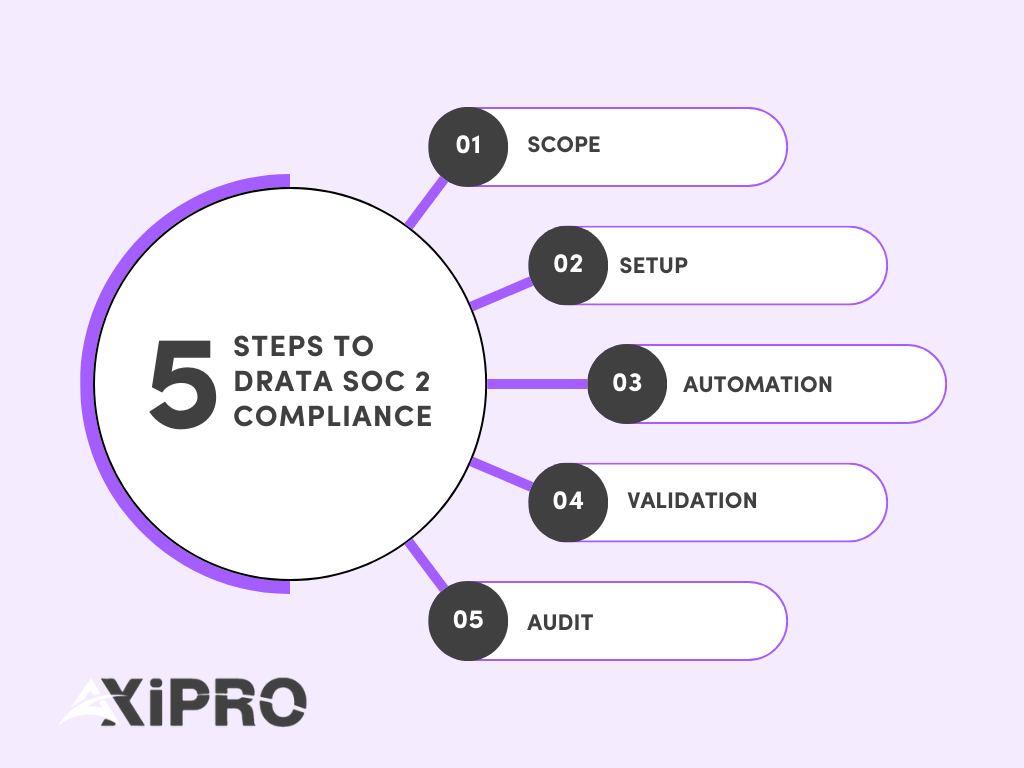
Drata is a powerful tool. It can transform a slow, resource-draining activity into a value-added automated task. But in order for it to work, it needs to be set up properly. This guide explains how SOC 2 actually works inside Drata, what you need before you begin, and how to avoid the most common mistakes that slow teams down. It is written for founders, CISOs, compliance leads, and non-technical executives who want a semi-automated approach to compliance. Drata does not replace your SOC 2 program. It operationalizes it. The platform helps you manage controls, evidence, and monitoring, but decisions, ownership, and execution still matter. A successful Drata SOC 2 project follows a predictable flow: scoping, setup, automation, validation, and audit. Before You Start: What You Need to Run a SOC 2 Project in Drata Before logging into Drata, your organization needs to be aligned. 1- Decide your SOC 2 target: Type 1 vs. Type 2 and realistic timelines SOC 2 comes in two formats defined by the AICPA. SOC 2 Type I evaluates whether controls are designed correctly at a point in time.SOC 2 Type II evaluates whether those controls operate effectively over a period, usually three to twelve months.
WhatsApp us