Table of Contents

Reach SOC 2 Compliance in 6 Weeks or Less.

  / Drata SOC 2: A Practical, Step-by-Step Guide to Getting Audit-Ready Faster

Drata SOC 2: A Practical, Step-by-Step Guide to Getting Audit-Ready Faster

Drata is a powerful tool. It can transform a slow, resource-draining activity into a value-added automated task.

But in order for it to work, it needs to be set up properly.

This guide explains how SOC 2 actually works inside Drata, what you need before you begin, and how to avoid the most common mistakes that slow teams down. It is written for founders, CISOs, compliance leads, and non-technical executives who want a semi-automated approach to compliance.

Reach SOC 2 Compliance in 6 Weeks or Less

Schedule Your Free SOC 2 Assessment Today

Drata does not replace your SOC 2 program. It operationalizes it. The platform helps you manage controls, evidence, and monitoring, but decisions, ownership, and execution still matter.

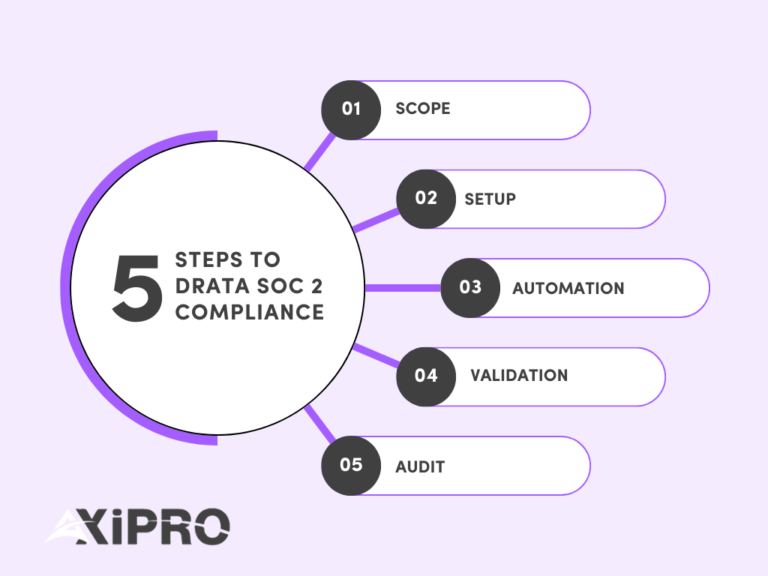
A successful Drata SOC 2 project follows a predictable flow: scoping, setup, automation, validation, and audit.
Before You Start: What You Need to Run a SOC 2 Project in Drata

Before logging into Drata, your organization needs to be aligned.

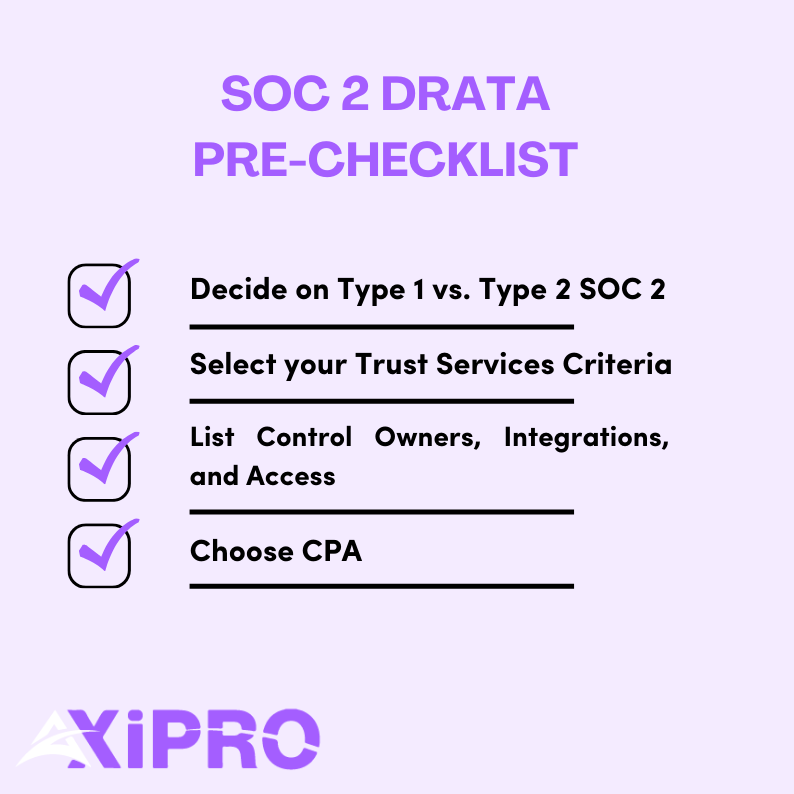
1- Decide your SOC 2 target: Type 1 vs. Type 2 and realistic timelines

SOC 2 comes in two formats defined by the AICPA.

SOC 2 Type I evaluates whether controls are designed correctly at a point in time.
SOC 2 Type II evaluates whether those controls operate effectively over a period, usually three to twelve months.

Report Type

What It Evaluates

Timeframe

SOC 2 Type I

Whether controls are designed appropriately

Point in time

SOC 2 Type II

Whether controls operate effectively

3–12 months

With Drata, many of our clients reach Type I readiness in 6 to 8 weeks if controls already exist. Type II timelines depend on the observation period, which can range from 3 months to up to a year.

If you’re pursuing SOC 2 compliance due to a client’s request, he will till you which type he requires. If you’re proactively seeking SOC 2 compliance, then we recommend going for type 2 compliance. This allows you to cast a wider net of clients.

A successful SOC 2 program follows a predictable lifecycle. While tools and timelines vary, the underlying phases are consistent across most organizations.

  1. Scoping: Define the system being audited, select Trust Services Criteria, set the audit period, and confirm the auditor. Good scoping reduces downstream complexity dramatically.
  2. Setup: Configure Drata, connect integrations, publish policies, and assign control ownership. This phase turns abstract requirements into operational structure.
  3. Automation: Enable continuous evidence collection across identity, infrastructure, code, ticketing, and endpoints. Automation replaces manual tracking, but only when integrations reflect reality.
  4. Validation: Run a readiness review. Confirm that controls are operating as described, evidence is complete, and timing aligns with the audit window. This is where most hidden risks surface.
  5. Audit: Auditors independently test controls and evidence. Clarifications and minor findings are normal. Clear responses and preparation determine how fast this phase moves.
  6. Continuous compliance: After the report is issued, controls continue operating. Monitoring, reviews, and periodic reassessment prevent drift and reduce effort in future audit cycles.


2- Select your Trust Services Criteria

Every SOC 2 must include the Common Criteria for Security. Additional criteria are optional and must be justified.

These include Availability, Confidentiality, Processing Integrity, and Privacy.

The choice of additional criteria is driven by the service agreement with the customer, which may require specific criteria, or by the type of business pursuing SOC 2. 

If you’re a SaaS that handles a large amount of private financial data, it makes sense to pursue the confidentiality criteria, for example. Availability makes sense if you sell uptime guarantees or SLAs. Privacy should only be selected if you are prepared to meet the additional criteria around notice, consent, and data subject rights.


3- Gather prerequisites: Systems, Owners, and Access

Drata works best when you already know what is in scope. This includes cloud infrastructure, identity providers, repositories, ticketing tools, and endpoints.

You also need named control owners. Automation cannot replace accountability.


4- Choose or confirm an auditor early

An external CPA firm ultimately issues the SOC 2 report. Confirm your auditor before proceeding with deep configuration to avoid mismatches in expectations, evidence formats, or control interpretations.
Where Axipro Fits in a Drata-Led SOC 2 Program

Drata is excellent at operationalizing SOC 2. It centralizes controls, automates evidence collection, and enforces timelines that matter to auditors. What it does not do is make judgment calls, resolve ambiguity, or design controls in context. That work still belongs to the experts.

This is where Axipro fits.

In practice, Axipro supports Drata-led SOC 2 programs in four critical areas:

Scoping discipline

Before configuration begins, Axipro helps validate system boundaries, Trust Services Criteria selection, and audit periods. This prevents over-scoping, which is one of the most common reasons SOC 2 projects slow down or fail testing later.

Control ownership and execution clarity

Drata can track controls, but it cannot assign accountability. Axipro works with teams to ensure every in-scope control has a clear owner, a realistic execution process, and an evidence strategy that will stand up to auditor scrutiny.

Readiness validation before auditor access

Many SOC 2 delays happen after auditors are invited. Axipro performs structured readiness reviews to catch weak evidence, misaligned controls, and timing gaps before fieldwork begins. This reduces follow-ups, exceptions, and rework.

Audit navigation and exception handling

During the audit, Axipro helps teams respond to auditor questions, document compensating controls, and resolve findings clearly. This keeps the audit moving and avoids creating long-term issues that resurface in future cycles.

Drata provides the operating system. Axipro helps ensure the program running on top of it is coherent, defensible, and sustainable.

Step 1: Scope Your SOC 2 Program in Drata

Once your prep work is done, it’s time to open Drata and start the real implementation work. Scoping is the first and most important step. It defines what the auditor will test and, just as importantly, what they will ignore.

Create the audit container

In Drata, scope becomes “real” the moment you create the audit.

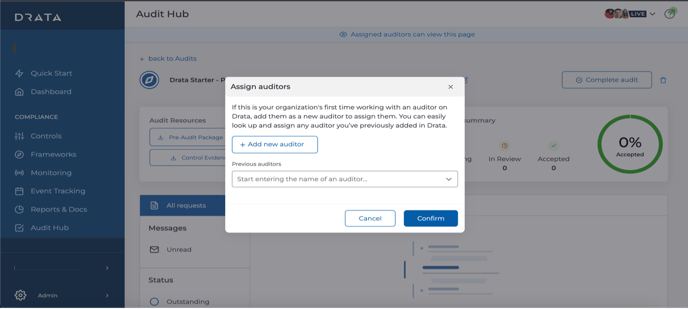
Navigate to Audit Hub, then select Create Audit. Choose SOC 2 as the framework and define the audit period.
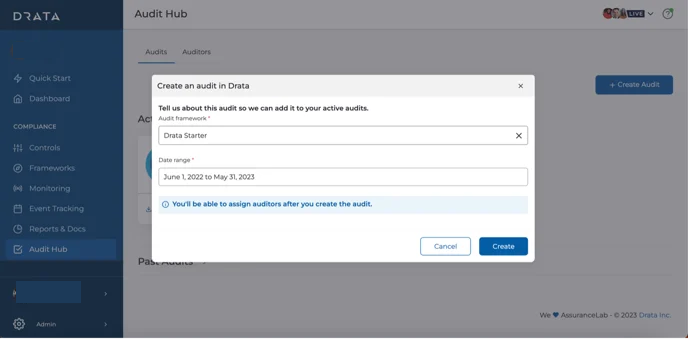
This date range matters more than most teams realize. Drata restricts auditor access to evidence strictly within this window. If your controls weren’t operating during this period, they effectively do not exist for the audit.

Add your auditor once the container is created. From this point forward, you are no longer “preparing”. You are in audit mode.

Define the system boundary before touching anything else

Before clicking deeper into Drata, pause and write a single sentence internally:

“This SOC 2 audit covers the systems, people, and processes used to deliver [Product or Service Name] to customers.”

That sentence becomes your anchor.

SOC 2 is not a company-wide certification. It is a system-level attestation. The American Institute of CPAs, which governs SOC reporting, is explicit about this.

Everything you include in scope must directly support that system. Everything that doesn’t should stay out.

This mindset alone can reduce audit scope by 30–50 percent for early-stage SaaS companies.

Identify what is actually “in scope” inside Drata

Now you translate that boundary into real systems.

A simple rule works well: if it stores, processes, or transmits customer data for the in-scope product, or is required to operate production, it belongs in scope.

Production environments are almost always included. Development and staging environments are in scope only if they use real customer data or are part of enforced change management workflows.

Infrastructure follows the same logic. Cloud accounts, databases, CI/CD pipelines, identity providers, logging, monitoring, and incident management tools typically qualify.

Third-party vendors matter too. SOC 2 explicitly requires the evaluation of subservice organizations that could impact system security or availability. Drata supports this through vendor inventory and SOC report review workflows.


Assign owners to everything that falls in scope

A control without an owner is an audit risk.

Inside Drata, each control mapped to your scoped Trust Services Categories needs a clearly assigned owner and a defined evidence source. Automated evidence is ideal, but manual uploads are acceptable if they are consistent and timely.
According to multiple SOC 2 readiness studies, unclear ownership is one of the top three causes of audit delays.

If someone cannot answer “who owns this?” within five seconds, you have a problem.


Final check: Does your time scope match your system scope?

Before you move forward, sanity-check one last thing.

Your audit period, your operating controls, and your evidence availability must all align. If your controls went live halfway through the audit window, the earlier period may fail testing.

Drata enforces this strictly, which is good, but unforgiving.

When these elements are aligned, auditors move faster, questions decrease, and SOC 2 stops feeling mysterious.

When scoping is done right

Scoping is complete when:

  1. Your audit exists in Drata,
  2. Your Trust Services Categories are intentional, 
  3. Your system inventory reflects reality, and 
  4. Your System Description matches both.

Step 2: Connect Integrations to Automate Evidence Collection in Drata
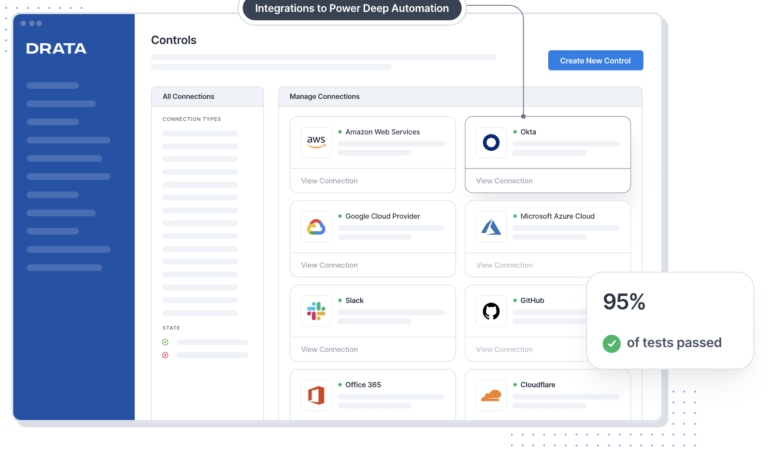
This is where Drata delivers real value. Automation replaces screenshots, spreadsheets, and human reminders, but only if integrations match how your company actually operates.

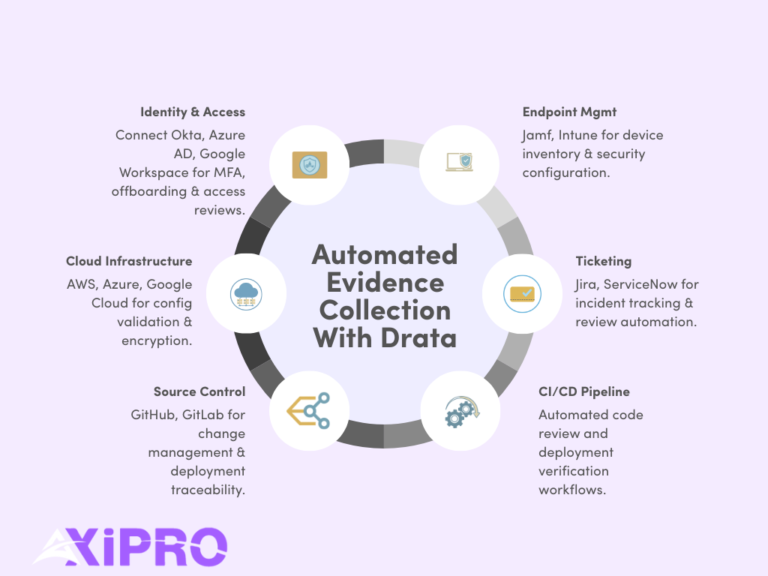
Start with identity and access management. Most organizations connect Drata to Okta, Azure Active Directory, or Google Workspace. This integration powers continuous monitoring for user access, offboarding, MFA enforcement, and periodic access reviews. Identity controls sit at the core of SOC 2 Security and are among the most frequently tested by auditors.

Next, connect your cloud infrastructure. AWS, Azure, and Google Cloud integrations allow Drata to automatically validate account configurations, logging, encryption settings, and change activity. Cloud misconfiguration remains a leading cause of security incidents, which is why auditors scrutinize this area closely.

For source control and CI/CD, integrations with GitHub or GitLab support evidence for change management, code review enforcement, and deployment traceability. These controls demonstrate that production changes are authorized, tested, and auditable.

Ticketing and incident workflows typically integrate with tools like Jira or ServiceNow. This evidence shows how incidents are identified, tracked, resolved, and reviewed. 

Endpoint management often includes platforms such as Jamf or Microsoft Intune, depending on whether your environment is Apple-first or Windows-heavy. These integrations support device inventory, encryption, and security configuration evidence.
Step 3: Run a Gap Analysis Using Drata’s Control Framework

Once integrations are live, it’s time to pressure-test reality. 

Drata maps every SOC 2 control directly to the Trust Services Criteria. This alignment allows you to evaluate readiness control by control, rather than guessing whether you are “mostly compliant.”

Start with Security controls, which are mandatory in every SOC 2 report. These cover access management, logging, monitoring, risk assessment, and incident response. Optional criteria like Availability, Confidentiality, or Privacy introduce additional operational depth, but also increase testing scope.

Inside Drata, review each control and assign a clear status: implemented, partially implemented, or missing. This step should be honest, not optimistic. Auditors test operating effectiveness, not intent. A “partially implemented” control is a signal that evidence will fail under scrutiny.

This visibility is the real value of the gap analysis. It allows you to prioritize remediation based on audit risk, not convenience. Industry data consistently shows that unresolved access controls and change management gaps account for a majority of SOC 2 audit exceptions.


Step 4: Implement and Map Controls Inside Drata

At this stage, controls shift from theory to observable behavior over time. Auditors do not care what should happen. They care what does happen, consistently.

Begin with access control execution. This means multi-factor authentication is enforced, single sign-on is actually used, access follows least-privilege principles, and user onboarding and offboarding are documented and repeatable. 

Change management must show evidence of discipline. Every production change should have an approval trail, testing proof, and a clear link between code, deployment, and release. Drata helps map this evidence, but the process must already exist. 

For incident response, auditors look for preparedness, not perfection. Detection mechanisms, response procedures, and post-incident reviews must be defined and followed when incidents occur. Even a “no incidents” period still requires proof that monitoring and escalation processes are active.

Risk management requires a maintained risk register, reviewed periodically, that demonstrates that leadership actively evaluates and responds to evolving threats. 

Vendor risk management must show due diligence before onboarding and ongoing monitoring afterward. Contracts, security reviews, and periodic reassessment matter because auditors treat key vendors as extensions of your system boundary.

If Availability is in scope, controls must demonstrate resilience. Backups should exist, recovery processes should be tested, and uptime should be monitored continuously. 

When controls are implemented this way, Drata becomes more than a tracker. It becomes evidence that your organization operates with intent, consistency, and accountability.


Step 6: Publish Policies and Align Employee Training

SOC 2 is not just about systems. It is about intent made visible. Policies are how auditors confirm that your organization understands its responsibilities and has formally committed to them.
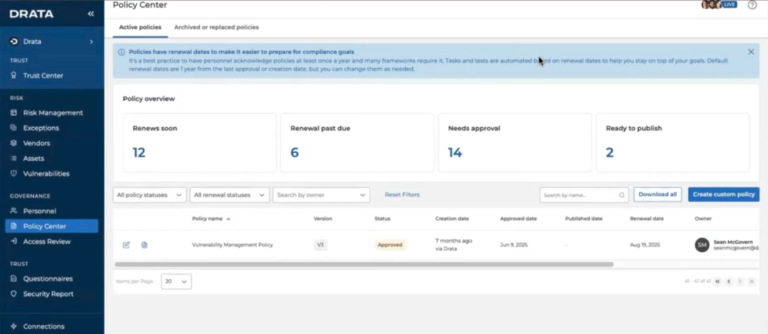
Inside Drata, finalize and publish your core policies. Security, access control, incident response, and vendor management policies must be customized to your environment, formally approved by leadership, and acknowledged by employees. Generic templates are easy to spot and often trigger follow-up questions during audits.

Policy acknowledgment matters more than many teams expect. SOC 2 auditors routinely test whether employees have actually attested to policies, not just whether the documents exist. Drata’s automated attestation tracking removes ambiguity, which is exactly what auditors want.

Employee security awareness training is also required. This is not about depth. It is about consistency and coverage. Auditors look for proof that training occurred, that it is relevant to employee roles, and that completion records are maintained.

Step 7: Collect Evidence and Validate Readiness

This is the moment to pause and verify the facts before the auditor does.

Drata automates a large portion of evidence collection, but automation is never 100 percent. Certain artifacts remain manual or point-in-time by design. Examples include policy approvals, management sign-offs, risk review notes, and incident postmortems. These must exist, be current, and fall within the audit period.

Before inviting the auditor, run an internal readiness review. Look for missing screenshots, stale policy versions, disconnected integrations, or controls marked “implemented” without supporting proof. 

The most common readiness mistake is assuming that evidence collected automatically is automatically sufficient. Auditors test relevance and completeness, not tooling.

Reach SOC 2 Compliance in 6 Weeks or Less

Schedule Your Free SOC 2 Assessment Today

Step 8: Prepare for the SOC 2 Audit Using Drata

Once the auditor is invited, Drata becomes the single source of truth for evidence requests, control mapping, and auditor questions. This centralization significantly reduces back-and-forth and prevents version confusion, which is one of the biggest time drains in traditional audits.

That said, auditors will still ask questions. Clarifications, compensating controls, and remediation plans are normal parts of a SOC 2 engagement. The AICPA explicitly frames SOC reporting as a dialogue, not a checklist exercise.


Teams that respond early and clearly tend to move through fieldwork faster and with fewer follow-ups.

Step 9: Pass the Audit and Respond to Findings

After testing is complete, auditors issue results. Minor findings or observations do not mean failure. They mean something needs to be clarified, adjusted, or formally documented.

What matters is how findings are addressed. Clear explanations, defined remediation steps, and realistic timelines signal control maturity.

Tracking remediation tasks in Drata ensures lessons learned carry forward rather than being rediscovered next year.

Step 10: Maintain Continuous Compliance

SOC 2 reports are issued annually, but expectations are continuous. Auditors and customers alike assume controls operate every day, not just during audit season.

Ongoing monitoring helps identify drift early. Access reviews, vendor reviews, and risk reviews should run on schedule, not be rushed weeks before renewal. 

This is the inflection point. Teams that operationalize compliance build confidence and speed over time. Teams that treat SOC 2 as a yearly sprint tend to burn out.

SOC 2 is not passed once. It is maintained deliberately.

Recommended Drata SOC 2 Timeline Example

Phase

Typical Duration

Scoping and integrations

Weeks 1–2

Control implementation and policies

Weeks 3–6

Readiness review and Type I audit

Weeks 7–8

Type II observation period

Months 3–6+

Conclusion: Your Next Steps to Get SOC 2 Audit-Ready in Drata

Drata can dramatically simplify SOC 2, but only when paired with clear scoping, ownership, and expert guidance. Automation accelerates good programs. It exposes weak ones.

If you want to shorten timelines, reduce audit risk, and avoid rework, a structured readiness approach matters.

Learn more about SOC 2 fundamentals from the AICPA SOC overview understand the background on SOC 2, and explore Drata’s platform capabilities.

If you want help scoping, implementing, or validating your Drata SOC 2 program, book a readiness assessment or request a demo. The right preparation turns compliance from a blocker into a growth asset.

FAQ: Drata SOC 2 Compliance

Does Drata guarantee I will pass a SOC 2 audit?
No. Drata provides structure and automation, not guarantees. Outcomes depend on control design and execution.

How long does SOC 2 take with Drata for a SaaS company?
Type I readiness often takes 6 to 8 weeks. Type II depends on the observation period.

What is the difference between continuous monitoring and the audit?
Monitoring tracks control health. The audit independently verifies control operation over time.

Which Trust Services Criteria should I choose first?
Security first. Add others only when justified by product behavior or customer demands.

What evidence is still manual?
Risk assessments, policy approvals, some vendor reviews, and exception documentation.

When should I involve an auditor?
Before heavy configuration to align expectations.

Can Drata help with vendor management?
Yes, but judgment and follow-up remain human responsibilities.

Axipro Author

Picture of Pedro Dias

Pedro Dias

Pedro has been writing online for over 10 years. With experience in all things programming, cyber security, and compliance, he is our editor-in-chief at Axipro.

Blog Highlights

Explore More Articles

On November 10, 2026, third-party certification becomes mandatory for most small defense contractors that handle Controlled Unclassified Information. That date, the start of Phase 2 of the CMMC rollout, is the one to circle in red.  The framework itself has been binding since the 32 CFR program rule took effect on December 16, 2024, and certification clauses began appearing in new contracts on November 10, 2025. Roughly 73 percent of the Defense Industrial Base (DIB) is made up of small businesses, and a 20-person machine shop now faces the same control set as a prime with a dedicated security team. This guide breaks down what the CMMC requirements for small business actually demand: the levels, the controls, the documentation, the real cost, and the route to certification. What Is CMMC and Who Needs to Comply? The Cybersecurity Maturity Model Certification is the Department of Defense’s program for verifying that contractors protect sensitive federal information on their own systems. For years, contractors simply self-attested compliance with NIST Special Publication 800-171. CMMC ends the honor system. It keeps self-assessment for lower-risk work and adds independent audits for everything else. Two regulations run the program. 32 CFR Part 170 defines the structure, the three levels, and the assessment rules. 48 CFR amends the Defense Federal Acquisition Regulation Supplement and embeds CMMC into contracts through clause DFARS 252.204-7021. The first sets the standard, the second makes it a condition of the award. Compliance is not optional based on company size. If you process, store, or transmit Federal Contract Information (FCI) or Controlled Unclassified Information (CUI) in the performance of a DoD contract or subcontract, CMMC applies. The requirement flows down from prime contractors to subcontractors and suppliers at every tier. The main carve-out is for companies that supply only commercially available off-the-shelf (COTS) products. The distinction between the two data types drives everything. FCI is information not meant for public release that is provided by or generated for the government under a contract. CUI is more sensitive: technical drawings, specifications, and procurement data the government requires you to safeguard. Which one you handle sets your level. The fastest way to check is your contract itself. Clauses such as DFARS 252.204-7012, 7019, and 7020 are strong signals that CUI is in scope. CMMC Levels Explained for Small Businesses CMMC has three levels. Most small contractors land at Level 1 or Level 2. Level 3 is reserved for a tiny fraction of the supply chain handling the most sensitive programs. Level 1 covers basic safeguarding of FCI. It maps to the 15 requirements in FAR 52.204-21, things most businesses already do, like using passwords and limiting who can access systems. Self-assessment is permitted and the cost is modest. Level 2 is where the majority of CUI-handling contractors sit. It requires all 110 security requirements in NIST SP 800-171 Revision 2, organized across 14 control families. Some non-prioritized contracts allow an annual self-assessment, but DoD estimates that around 95 percent of Level 2 contractors handle CUI critical enough to require a C3PAO assessment. Level 3 adds 24 selected enhanced requirements from NIST SP 800-172 on top of the full 110, for high-value programs targeted by advanced persistent threats. Assessments are conducted by the government’s Defense Industrial Base Cybersecurity Assessment Center (DIBCAC), and a contractor must already hold Level 2 certification before a Level 3 assessment can begin. Fewer than 1 percent of contractors will need it. To determine your level, read the solicitation and ask your prime directly. If any data you touch is CUI, plan for Level 2 and assume a third-party assessment until a contract tells you otherwise. Prepare Your Business for CMMC Compliance Get ready for the November 2026 CMMC deadline with expert guidance. Talk to a CMMC Expert Core CMMC Requirements Small Businesses Must Meet Level 2 requirements break into 14 control families covering 110 individual requirements and 320 assessment objectives. Access Control and System and Communications Protection are the two heaviest domains. In practice, these families fall into two buckets. The technical controls govern how your systems behave: limiting access to authorized users, requiring multi-factor authentication, logging system activity, hardening configurations, encrypting data, and detecting and responding to incidents. The administrative controls govern how your organization behaves: training staff, screening personnel, controlling physical spaces, assessing risk, and documenting everything. A small business cannot skip a family because it is inconvenient. There is no partial credit and no small-business exemption from the 110. Documentation Requirements for Small Business Compliance Assessors evaluate evidence, not intentions. Two documents anchor the entire effort. The System Security Plan (SSP) describes your environment, your CUI boundary, and how you implement each of the 110 controls. It is a living document and the first thing any assessor reads. The Plan of Action and Milestones (POA&M) records gaps, owners, and timelines for fixing them. CMMC scores Level 2 on a 110-point scale weighted by control importance. A score of at least 88 (80 percent) can earn conditional status, but only if certain high-value controls are fully met. Conditional status gives you 180 days to close every remaining item on your POA&M and pass a closeout assessment. Some critical controls cannot be deferred to a POA&M at all. Beyond the SSP and POA&M, you need written policies and procedures for each domain, plus concrete evidence that controls operate as documented: configuration screenshots, training logs, access reviews, and audit records. Pro Tip: Build your SSP Build your SSP before you spend a dollar on tools. Mapping your current state against all 110 requirements first tells you exactly where the gaps are, so you remediate the right things in the right order instead of buying software you may not need. Technical Requirements and Controls A handful of technical controls account for most assessment failures, and they deserve direct attention. The most effective cost and risk lever is scoping: isolating CUI into a dedicated enclave, a defined set of systems and networks, so the 110 controls apply only there rather than across your

Most security certifications were built for software that follows rules. AI agents do not. They consume data, draw conclusions, call tools, and take action, increasingly without a human in the loop. That gap is what AIUC-1 was created to close: it is the first auditable security standard built specifically for AI agents, and a few enterprise buyers have started asking vendors for it by name. This guide covers what AIUC-1 actually tests, the six risk domains it audits, how the certification process works, what it costs, how long it lasts, and how it aligns with SOC 2, ISO 42001, ISO 27001, and the NIST AI Risk Management Framework. It also covers the structural questions worth asking before you treat an AIUC-1 report as proof of anything. What Is AIUC-1 Certification? AIUC-1 is a certifiable standard for AI agents created by the Artificial Intelligence Underwriting Company (AIUC), a San Francisco-based, venture-backed startup founded by people with experience at organizations including Anthropic. The standard was developed with input from Orrick, Stanford, the Cloud Security Alliance, MIT, and MITRE, and launched in mid-2025. The framework comprises 51 requirements and 130 controls, organized across six risk pillars. It evaluates whether an organization has implemented and tested the technical guardrails, operational practices, and legal policies needed to reduce the risk of unsafe, unreliable, or unauthorized AI behavior. Certification applies to a specific AI system or product, not to the organization as a whole. An AIUC-1 certificate, audit report, and badge tell enterprise buyers that an agent has been independently tested against agent-specific risks. People describe AIUC-1 as the “SOC 2 for AI agents,” and the analogy holds in spirit. The difference is what it looks at. SOC 2 examines a service organization’s general controls. AIUC-1 examines how an agent behaves under pressure: when someone tries to jailbreak it, when it is asked to do something outside its scope, when it has access to data it should not expose. Worth Knowing: About AIUC-1 AIUC-1 does not define what counts as an “AI agent.” The vendor decides which system to certify and what falls in scope. That makes scope the single most important thing to check on any certificate, because a narrowly scoped audit may not cover the agent you actually use. Why AIUC-1 Certification Matters for Enterprise AI Adoption The business case rests on a simple problem: enterprises cannot reliably assess the security of their AI vendors, and the failures are expensive. According to EY research on responsible AI, 64% of companies with over $1 billion in revenue have already lost more than $1 million to AI-related failures.  That gap shows up directly in sales cycles. When security, legal, and procurement teams evaluate an AI vendor, they ask about hallucinations, prompt injection defenses, and what happens when an agent makes an unauthorized call. SOC 2 and ISO 27001 do not answer those questions. AIUC-1 gives buyers a structured, third-party-tested answer, which is why holding the certificate can move a stalled procurement review forward. The certification also produces real engineering outcomes, not just a badge. AIUC has reported cases where a customer service agent’s hallucination rate dropped from 11% to under 2% after strengthening its groundedness filter, and another where inappropriate-tone outputs fell from 9% to under 2% through better defensive prompting and output moderation. One company found and patched a PII exposure vulnerability during the certification process itself. The Six Core Risk Domains Covered by AIUC-1 AIUC-1’s 51 requirements are grouped into six domains. Each targets a category of risk that traditional security frameworks were not designed to handle. Data and Privacy Covers how customer data is used, retained, and protected. Requirements address input and output data policies, limits on what data the agent can access, protection of IP and trade secrets, prevention of cross-customer data exposure, and prevention of PII leakage. This is where the standard forces clarity on whether customer data trains the model and how long it is kept. Security The adversarial-resistance domain. It covers third-party testing of adversarial robustness, detection and real-time filtering of malicious inputs, prevention of prompt injection and unauthorized agent actions, enforcement of user access privileges, and protection of the deployment environment. This is the heart of what separates an agent audit from a general security audit. Safety Focuses on preventing harmful and out-of-scope outputs. Requirements include defining an AI risk taxonomy, conducting pre-deployment testing, preventing harmful and customer-defined high-risk outputs, and flagging high-risk outputs for human review. Safety is partly judgment-based, which means documentation alone can sometimes satisfy a requirement, so the testing behind it deserves scrutiny. Reliability Targets the failure modes that erode trust in production: hallucinations and tool misuse. Controls cover hallucination prevention and restrictions on which tools an agent can call and when. For a customer-facing agent, this is the domain that keeps it from inventing a refund policy or triggering the wrong workflow. Accountability Covers what happens when things go wrong. Requirements include AI failure response plans, vendor due diligence, and clear AI disclosure so users know when they are interacting with an agent. With human workers, accountability is built into org charts and chains of command. Agents need an equivalent, and this domain supplies it. Society The broadest domain, focused on preventing misuse with wider consequences: AI-enabled cyber attacks and CBRN (chemical, biological, radiological, nuclear) misuse. Most enterprise agents will touch only a few of these controls, but they matter for higher-capability systems. Insider Note: Of the 130 total controls, roughly 65 are mandatory, and 65 are optional. A straightforward agent typically needs to meet around 40 controls. A complex, multi-modal agent gets closer to 65. The scoping exercise determines which apply, so two AIUC-1 certificates can represent very different amounts of work. Ready to Earn Your AIUC-1 Certification? Accelerate Your AI Certification Journey Talk to an Expert Who Needs AIUC-1 Certification? AIUC-1 is built for any company developing or deploying agentic AI that sells into enterprises. The strongest fit is an organization whose product uses AI agents in customer-facing operations, handles

Most teams walk into a SOC 2 audit expecting standard requirements for their password policy: minimum length, 90-day rotation, one uppercase letter, one symbol, and so on. But there is no such checklist. The AICPA never published a list of mandatory password rules, and the federal guidance that most auditors lean on has thrown out half of what passed for best practice a decade ago.  Beyond compliance, this is remains a crucial cybersecurity control: Stolen and brute-forced credentials still drive a large share of breaches, and password policies are the main way to mitigate this risk. This guide covers what SOC 2 expects around passwords, where those expectations come from, and how to build a policy that satisfies an auditor without making your security worse. What Are SOC 2 Password Requirements? SOC 2 password requirements are the access controls that a service organization implements to govern how passwords are created, stored, enforced, and retired, all in service of the Trust Services Criteria. The important word is controls, not rules. SOC 2 does not hand you a specification. It asks whether your controls are suitably designed and operating effectively to keep unauthorized people out of your systems.   The Role of Passwords in the SOC 2 Trust Services Criteria The Trust Services Criteria, developed by the AICPA, are the evaluation standard for every SOC 2 report. Passwords sit inside the Security category, which is mandatory in all SOC 2 engagements, and specifically inside the Common Criteria series CC6, covering logical and physical access. Passwords are one of the most basic logical access controls you have, and one of the most scrutinized, because CC6 is usually the most evidence-intensive part of the entire audit. Relevant Common Criteria: CC6.1, CC6.2, and CC6.3 CC6.1 covers the controls that restrict logical access to systems, infrastructure, and data, this is where your password policy, MFA enforcement, and account lockout settings live. CC6.2 governs how access is granted, modified, and removed, meaning your provisioning workflows, access reviews, and offboarding processes are all evaluated here. CC6.3 focuses on the removal of access when it is no longer needed and the management of privileged credentials specifically. Together, these three criteria map to the full lifecycle of a credential: creation, ongoing use, and retirement. An auditor working through CC6 will expect evidence at every stage.   Does SOC 2 Mandate Specific Password Rules? No. The AICPA is explicit that the Trust Services Criteria do not define the controls an organization must have. You identify and implement controls that meet the criteria, and the auditor evaluates them. That means there is no AICPA-mandated minimum length, no required rotation interval, and no prescribed complexity formula. What the auditor checks is whether your stated controls exist, work, and reasonably prevent unauthorized access. Insider note: Auditors rarely fail you for choosing a 10-character minimum over 12. They fail you when your written policy says one thing and your actual system configuration says another. Consistency between the policy document and the enforced setting matters far more than the specific number. Why Password Requirements Matter for SOC 2 Compliance Preventing Unauthorized Access Credentials are the front door. The 2025 Verizon DBIR found that stolen credentials remained the single most common initial access vector, appearing in 22% of breaches, and that brute force attacks against basic web applications nearly tripled year over year. Strong authentication controls are the difference between an attacker hitting a wall and an attacker walking straight in with a valid login. Reducing Data Breach Risk Weak or reused passwords feed credential stuffing, where attackers replay username and password pairs harvested from earlier breaches against your login pages. Reuse is rampant: research from Microsoft’s Digital Defense Report routinely finds that the majority of people reuse passwords across services. A single leaked password elsewhere becomes a working key to your environment unless your controls catch it. Demonstrating Logical Access Controls to Auditors SOC 2 is an attestation. It is not enough to be secure; you have to prove it with evidence. Well-designed password controls produce exactly the artifacts an auditor wants: configuration screenshots, enforcement logs, MFA reports, and access review records. Good controls and good evidence are two sides of the same coin, and an internal audit process that routinely collects this evidence makes the formal engagement significantly less stressful. Core SOC 2 Password Requirements Although SOC 2 prescribes nothing specific, a defensible password policy almost always addresses the same set of controls. These are what auditors expect to see and what your peers in compliance treat as table stakes. Minimum Password Length Length is the strongest single lever for password entropy, and modern guidance favors it over everything else. A common defensible baseline is at least 12 characters for standard user accounts, with longer requirements for service and admin accounts. NIST SP 800-63B recommends that verifiers support passwords up to 64 characters so that passphrases and password-manager output are never truncated, an important implementation detail that many teams overlook. Password Complexity and Blocklists Old-style complexity rules, one uppercase, one symbol, one number, are fading, and for good reason. They push users toward predictable substitutions without meaningfully raising entropy. The more effective control is a blocklist: screening new passwords against dictionaries of common and previously breached credentials and rejecting matches. Tools like Have I Been Pwned’s Pwned Passwords API make this straightforward to implement. This stops Password1! from sneaking through even though it technically satisfies a legacy complexity rule. Password Rotation and History Forced periodic rotation is the control most teams keep out of habit, and it is also the one that modern guidance most clearly discourages. Rotation pushes users toward predictable patterns, Spring2025 becoming Summer2025, without improving security in any measurable way. Password history settings, which prevent the immediate reuse of recent passwords, still have a place, but blind calendar-based expiry should be replaced with event-driven resets: force a change when there is evidence of compromise, not because the calendar says 90 days have passed. Account Lockout After Failed Login Attempts An account