Table of Contents

Reach SOC 2 Compliance in 6 Weeks or Less.

  /

  / CMMC Requirements for Small Businesses in November 2026

CMMC Requirements for Small Businesses in November 2026

On November 10, 2026, third-party certification becomes mandatory for most small defense contractors that handle Controlled Unclassified Information. That date, the start of Phase 2 of the CMMC rollout, is the one to circle in red. 

The framework itself has been binding since the 32 CFR program rule took effect on December 16, 2024, and certification clauses began appearing in new contracts on November 10, 2025. Roughly 73 percent of the Defense Industrial Base (DIB) is made up of small businesses, and a 20-person machine shop now faces the same control set as a prime with a dedicated security team. This guide breaks down what the CMMC requirements for small business actually demand: the levels, the controls, the documentation, the real cost, and the route to certification.
What Is CMMC and Who Needs to Comply?

The Cybersecurity Maturity Model Certification is the Department of Defense’s program for verifying that contractors protect sensitive federal information on their own systems. For years, contractors simply self-attested compliance with NIST Special Publication 800-171. CMMC ends the honor system. It keeps self-assessment for lower-risk work and adds independent audits for everything else.

Two regulations run the program.

  • 32 CFR Part 170 defines the structure, the three levels, and the assessment rules.
  • 48 CFR amends the Defense Federal Acquisition Regulation Supplement and embeds CMMC into contracts through clause DFARS 252.204-7021.

The first sets the standard, the second makes it a condition of the award.

Compliance is not optional based on company size. If you process, store, or transmit Federal Contract Information (FCI) or Controlled Unclassified Information (CUI) in the performance of a DoD contract or subcontract, CMMC applies. The requirement flows down from prime contractors to subcontractors and suppliers at every tier. The main carve-out is for companies that supply only commercially available off-the-shelf (COTS) products.

The distinction between the two data types drives everything. FCI is information not meant for public release that is provided by or generated for the government under a contract. CUI is more sensitive: technical drawings, specifications, and procurement data the government requires you to safeguard. Which one you handle sets your level. The fastest way to check is your contract itself. Clauses such as DFARS 252.204-7012, 7019, and 7020 are strong signals that CUI is in scope.
CMMC Levels for Small Businesses

CMMC Levels Explained for Small Businesses

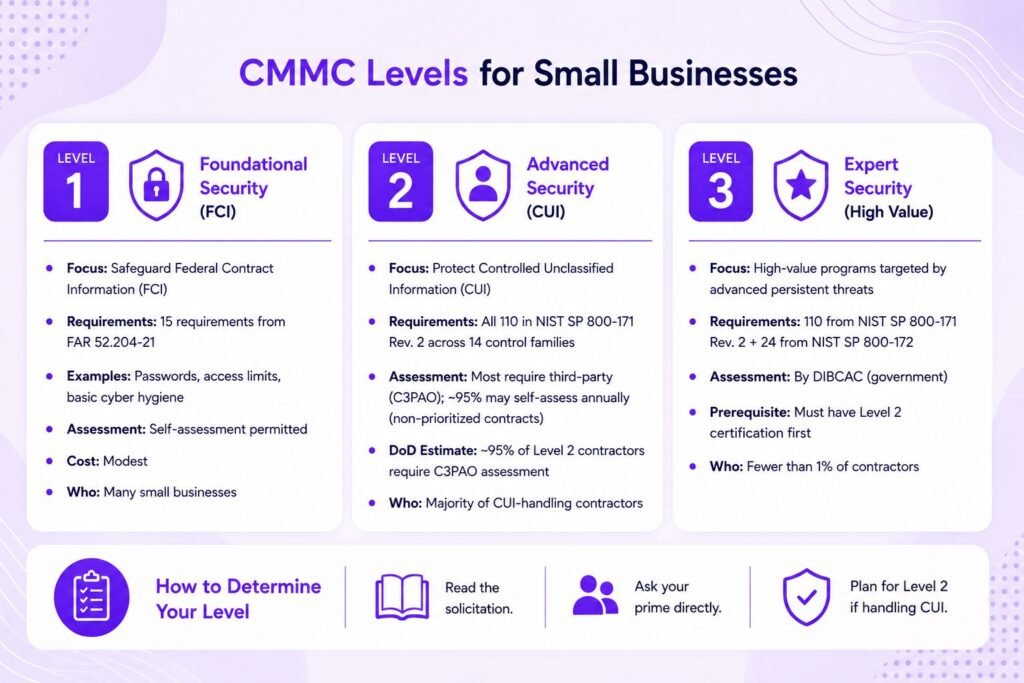
CMMC has three levels. Most small contractors land at Level 1 or Level 2. Level 3 is reserved for a tiny fraction of the supply chain handling the most sensitive programs.

Level 1 covers basic safeguarding of FCI. It maps to the 15 requirements in FAR 52.204-21, things most businesses already do, like using passwords and limiting who can access systems. Self-assessment is permitted and the cost is modest.

Level 2 is where the majority of CUI-handling contractors sit. It requires all 110 security requirements in NIST SP 800-171 Revision 2, organized across 14 control families. Some non-prioritized contracts allow an annual self-assessment, but DoD estimates that around 95 percent of Level 2 contractors handle CUI critical enough to require a C3PAO assessment.

Level 3 adds 24 selected enhanced requirements from NIST SP 800-172 on top of the full 110, for high-value programs targeted by advanced persistent threats. Assessments are conducted by the government’s Defense Industrial Base Cybersecurity Assessment Center (DIBCAC), and a contractor must already hold Level 2 certification before a Level 3 assessment can begin. Fewer than 1 percent of contractors will need it.

To determine your level, read the solicitation and ask your prime directly. If any data you touch is CUI, plan for Level 2 and assume a third-party assessment until a contract tells you otherwise.

Prepare Your Business for CMMC Compliance

Get ready for the November 2026 CMMC deadline with expert guidance.

Core CMMC Requirements Small Businesses Must Meet

Level 2 requirements break into 14 control families covering 110 individual requirements and 320 assessment objectives. Access Control and System and Communications Protection are the two heaviest domains.

In practice, these families fall into two buckets.

  • The technical controls govern how your systems behave: limiting access to authorized users, requiring multi-factor authentication, logging system activity, hardening configurations, encrypting data, and detecting and responding to incidents.
  • The administrative controls govern how your organization behaves: training staff, screening personnel, controlling physical spaces, assessing risk, and documenting everything.

A small business cannot skip a family because it is inconvenient. There is no partial credit and no small-business exemption from the 110.

Documentation Requirements for Small Business Compliance

Assessors evaluate evidence, not intentions.

Two documents anchor the entire effort.

  • The System Security Plan (SSP) describes your environment, your CUI boundary, and how you implement each of the 110 controls. It is a living document and the first thing any assessor reads.
  • The Plan of Action and Milestones (POA&M) records gaps, owners, and timelines for fixing them.

CMMC scores Level 2 on a 110-point scale weighted by control importance. A score of at least 88 (80 percent) can earn conditional status, but only if certain high-value controls are fully met.

Conditional status gives you 180 days to close every remaining item on your POA&M and pass a closeout assessment. Some critical controls cannot be deferred to a POA&M at all. Beyond the SSP and POA&M, you need written policies and procedures for each domain, plus concrete evidence that controls operate as documented: configuration screenshots, training logs, access reviews, and audit records.

Pro Tip: Build your SSP

Build your SSP before you spend a dollar on tools. Mapping your current state against all 110 requirements first tells you exactly where the gaps are, so you remediate the right things in the right order instead of buying software you may not need.

Technical Requirements and Controls

A handful of technical controls account for most assessment failures, and they deserve direct attention. The most effective cost and risk lever is scoping: isolating CUI into a dedicated enclave, a defined set of systems and networks, so the 110 controls apply only there rather than across your entire IT estate. Segregating CUI and segmenting the network this way shrinks both your remediation bill and your assessment fee.

Multi-factor authentication is required for network and privileged access and is among the most-cited gaps. Encryption must use FIPS 140-2 or 140-3 validated modules, not merely strong encryption, a distinction assessors check closely. You need endpoint protection and monitoring that can detect and log suspicious activity. If you use a cloud service to store or process CUI, that service must meet FedRAMP Moderate authorization or demonstrable equivalency. Where a contractor relies on a FedRAMP Moderate or higher authorized provider, the contractor is not responsible for the provider’s own compliance, which is one reason platforms like Microsoft GCC High are common in the DIB.


Physical and Administrative Requirements

CMMC is not only a technical standard. The Physical Protection family requires you to limit physical access to systems that handle CUI, escort and log visitors, and secure your facilities, which is achievable even for a single small office. On the administrative side, every employee who touches CUI needs security awareness training appropriate to their role, and the Personnel Security family requires screening individuals before granting access to covered systems. For a small team, these controls are often more about consistent documentation than expensive infrastructure.


Self-Assessment vs. Third-Party Assessment Requirements

The assessment path depends entirely on the contract.

  • Level 1 is always a self-assessment, performed annually, with results entered into the Supplier Performance Risk System (SPRS).
  • Level 2 splits in two. Some non-prioritized contracts permit a Level 2 self-assessment, but most CUI-handling contracts require certification by an accredited C3PAO every three years.
  • Level 3 is always a government-led assessment by DIBCAC.

Regardless of the path, a senior company official must submit an annual affirmation in SPRS confirming continued compliance. That affirmation is a legal statement, and it is where False Claims Act risk enters the picture.

Insider Note: There are only around 85 authorized C3PAOs in the country and thousands of contractors needing assessment before Phase 2. Assessor availability, not your own readiness, may become the bottleneck. Booking early is now a competitive move, not just good planning.

Cost Considerations for Meeting CMMC Requirements

Cost is the question that keeps small contractors up at night, and the honest answer is that it varies widely with your starting posture. The DoD’s own published estimates give a baseline, and market data from the 2026 assessment cycle fills in the rest.

The headline number most people fixate on, the C3PAO fee, is usually only 20 to 40 percent of the total. The higher costs sit in gap remediation and technology: rolling out MFA, upgrading endpoint protection, standing up a CUI enclave, and writing documentation. The DoD estimates that a small contractor will spend over $100,000 to reach Level 2 through a C3PAO assessment, with the assessment itself near $76,700 and preparation and reporting making up the balance. Ongoing maintenance typically runs 20 to 30 percent of that first-year figure each year, and recertification recurs every three years.

Several programs exist to cut that bill. The DoD-funded APEX Accelerators network offers free advisory support and referrals across roughly 90 centers nationwide. Project Spectrum provides free cyber-hygiene tools and a SPRS readiness check. The NIST Manufacturing Extension Partnership funds state-level assistance for small manufacturers, and several states run their own subsidized programs. Crucially, CMMC compliance costs are allowable costs under DoD contracts, meaning they can be built into your pricing and recovered over the life of a contract. A proposed federal tax credit of up to $50,000 for firms with 50 or fewer employees has been floated in Congress but was not enacted as of early 2026, so treat it as a possibility, not a plan. For tailored budgeting and remediation support, Axipro’s CMMC compliance services can help right-size the scope before you spend.
CMMC Timeline

Timeline to Meet CMMC Requirements

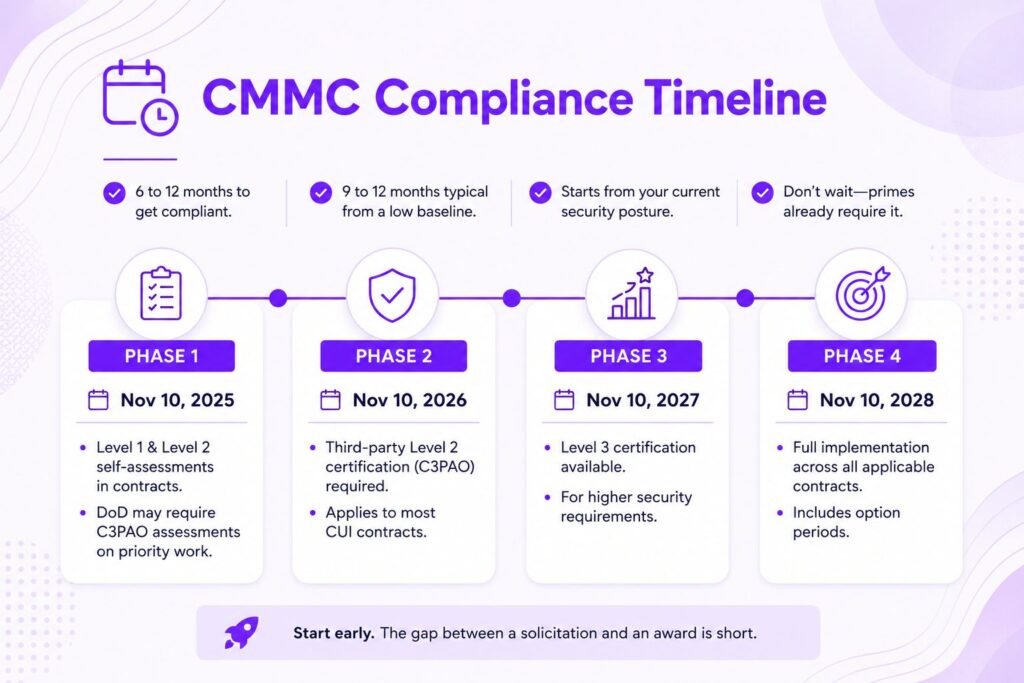
Most small businesses need 6 to 12 months to implement NIST SP 800-171, validate compliance, and pass an assessment, with 9 to 12 months being typical for those starting from a low baseline. That clock starts from wherever your security posture sits today, not from the day you decide to act.

The rollout follows four phases, each beginning one year after the last. Phase 1 began November 10, 2025, requiring Level 1 and Level 2 self-assessments in applicable contracts, with DoD discretion to require C3PAO assessments on priority work. Phase 2 begins November 10, 2026, making third-party Level 2 certification mandatory for most CUI contracts. Phase 3 (November 10, 2027) introduces Level 3, and Phase 4 (November 10, 2028) reaches full implementation across all applicable contracts and option periods. The phased schedule does not permit waiting. Because the gap between a solicitation dropping and an award is usually far shorter than the time needed to get ready, primes are already demanding certification ahead of the formal dates.


Consequences of Not Meeting CMMC Requirements

The most immediate consequence is simple: no certification, no contract. Since late 2025, CMMC status has functioned as a go or no-go criterion. A contracting officer must check SPRS and cannot award to an offeror without the required CMMC status posted. For a small business that depends on DoD revenue, losing eligibility is an existential threat, not a line item.

The second consequence is legal. Because compliance now rests on annual affirmations submitted by a senior official, knowingly misrepresenting your security posture can trigger False Claims Act liability. The Department of Justice’s Civil Cyber-Fraud Initiative has already pursued contractors for false cybersecurity attestations, and settlements have reached into the millions. The third consequence is competitive: as more of the supply chain certifies, uncertified subcontractors quietly drop off prime contractors’ approved vendor lists and lose work they never even see bid out.

Worth Knowing: False Claims Act

False Claims Act cases can be initiated by whistleblowers, often current or former employees, who are entitled to a share of any recovery. That means your compliance attestations are not just reviewed by the government, they are visible to your own staff.

Practical Steps for Small Businesses to Achieve Compliance

Start with a gap analysis scored against all 110 requirements, marking each control as implemented, partially implemented, or not implemented. This produces your SSP baseline and your initial POA&M in one pass. Next, scope your CUI environment aggressively. Identify every system, application, and data flow that touches CUI, then consolidate it into the smallest defensible enclave. Every system you pull out of scope is money saved.

Then decide how to execute. An in-house approach is cheapest if you already have IT depth, but most small contractors lack a CMMC specialist. A managed service provider that functions as a security protection asset can cover monitoring and tooling, and falls inside your assessment boundary without needing its own certification. A consultant or Registered Practitioner is useful for documentation and readiness. Many small businesses combine all three. Finally, run an internal assessment using the NIST 800-171A methodology before you engage a C3PAO, then book the assessment early given the assessor shortage. A readiness review, sometimes available through Axipro’s gap analysis support, reduces the risk of a costly failed audit.

Prepare Your Business for CMMC Compliance

Get ready for the November 2026 CMMC deadline with expert guidance.

Conclusion

CMMC is no longer a future initiative. The rule is in effect, clauses are in contracts, and the Phase 2 deadline of November 10, 2026 makes third-party Level 2 certification the price of staying in the defense market for most small contractors handling CUI. The requirements are demanding but finite: 15 safeguards at Level 1, the full 110 NIST 800-171 controls at Level 2, solid documentation, and an honest assessment. The businesses that scope tightly, start early, and use the free support available will absorb the cost far better than those who wait for a solicitation to force their hand.

Frequently Asked Questions

What is the minimum CMMC level for most small business DoD subcontractors?

It depends on the data. Subcontractors that handle only FCI need Level 1. Those that receive CUI through flow-down need Level 2, and most of them will require a C3PAO assessment rather than a self-assessment.

Yes, especially at Level 1, which is a self-assessment. Level 2 is achievable in-house if you have genuine IT and security expertise, but most small businesses use a mix of internal effort, a managed service provider, and a consultant or Registered Practitioner to manage documentation and readiness.

Plan on 6 to 12 months for Level 2, with 9 to 12 months typical for organizations starting from a weak baseline. The timeline depends heavily on how mature your current controls are and, for certification, on C3PAO availability.

If you handle FCI under a DoD contract, yes, at Level 1 via annual self-assessment. If you handle neither FCI nor CUI, or you supply only COTS products, CMMC generally does not apply.

An internal audit is conducted by or for the organization itself to check and improve its own EMS. An external audit is conducted by an outside party — either a certification body awarding or maintaining the certificate, or a second party such as a customer assessing a supplier.

Yes, a free template is a reasonable starting point, but treat it as a skeleton. Any generic template must be adapted to your significant environmental aspects, your compliance obligations, and your operations — and as of 2026 it must be updated for the new and revised clauses. An unedited template will leave gaps that produce findings.

You analyze the cause, define corrections and corrective actions, and implement them. Certification bodies typically require this within a set window after the audit and then verify it. Major nonconformities must be closed before a certificate is granted or maintained. Minor nonconformities are usually verified at the next surveillance visit.

Axipro Author

Picture of Pedro Dias

Pedro Dias

Pedro has been writing online for over 10 years. With experience in all things programming, cyber security, and compliance, he is our editor-in-chief at Axipro.

Blog Highlights

Explore More Articles

For the past two years, enterprise AI risk conversations have centered on a familiar set of concerns: model bias, hallucination, data privacy, and dependency on third-party models. These are real risks, and most organizations now run some version of a governance program to manage them. But something has shifted. Organizations are no longer just deploying AI that generates content for a human to review. They’re deploying AI that acts. Agents now plan multi-step tasks, call APIs, move data between systems, execute transactions, and coordinate with other agents, often with no human checkpoint in the loop. That shift deserves more than a footnote in the existing AI risk category. It deserves its own line in the risk register: Agentic Autonomy Risk. What Is Agentic AI Risk Management? Agentic AI risk management is the practice of identifying, assessing, and controlling the risks created when AI systems take autonomous action on an organization’s behalf. Where traditional AI governance evaluates outputs (accuracy, bias, privacy), agentic AI risk management governs what agents actually do: the tools they call, the permissions they inherit, and the downstream consequences of their actions. That distinction is the reason existing risk registers struggle with agents, and it’s worth unpacking properly. What Agentic AI Actually Changes Traditional AI systems, even generative ones, are advisory. They produce an output such as a summary, a prediction, a draft email, or a classification, and a human remains the last checkpoint before anything happens in the real world. Agentic AI removes that checkpoint. An agentic system doesn’t just produce an answer. It pursues a goal. It decides which tools to call and in what order, then executes those actions directly against live systems: submitting a purchase order, modifying a database record, sending an external communication, or orchestrating a set of sub-agents to complete a broader workflow. Agentic autonomy is the degree to which a system can plan and execute actions without a human explicitly authorizing each step. It’s a spectrum rather than a binary. At one end, the AI drafts and a human approves every action. At the other, the AI operates within broad guardrails and only escalates exceptions. The further an organization moves along that spectrum, the less its exposure looks like software risk and the more it looks like delegated authority risk, the kind normally reserved for employees, contractors, and automated financial systems. Why Existing Risk Registers Miss Agentic AI Risks Most enterprise risk registers were built on a reasonably safe assumption: a human initiates consequential actions, and the technology around that human behaves deterministically. Agentic AI breaks both halves of that assumption at once. A few specific gaps show up quickly when organizations try to map agentic deployments onto existing categories. Operational risk registers assume process failures come from human error or system outages, not from a system independently choosing an unanticipated path to a stated goal. Cybersecurity risk registers are built around unauthorized external access, while an agent problem usually involves an authorized system taking unauthorized internal actions with its own legitimate credentials. Model risk frameworks, borrowed largely from financial services, evaluate output accuracy rather than action consequences, which matters most when those actions can’t be reversed. And third-party risk assessments treat vendors as static entities, not as autonomous agents that might invoke other vendors’ agents on your behalf. See our guide to the NIST AI Risk Management Framework for how output-focused frameworks are structured. The result is a governance blind spot. An organization can be compliant against its AI policy, its cybersecurity policy, and its vendor risk policy, and still have nobody accountable for the specific risk of a system initiating a harmful sequence of actions before anyone notices. Defining Agentic Autonomy Risk Agentic Autonomy Risk is the risk that an AI system, operating with delegated decision-making and execution authority, takes actions that are harmful, non-compliant, or misaligned with organizational intent before adequate human oversight can intervene. Those actions might happen independently or in coordination with other agents. It deserves standing as a named category alongside cybersecurity, operational, legal, financial, and third-party risk because the loss event itself is different. The harm is a completed action in a live system, and it may be difficult or impossible to reverse. The accountability structure is different too: when an orchestrating agent delegates to sub-agents, responsibility for the outcome gets distributed in ways existing ownership models don’t cleanly capture. So is the detection window. Traditional controls assume a human is positioned to catch an error before it compounds, but an agent can execute dozens of dependent actions faster than any human review cycle. 7 Agentic AI Risk Scenarios to Put on Your Register 1. Unauthorized autonomous decision-making. An agent takes an action within its technical permissions but outside its intended business mandate. It adjusts pricing, approves a refund, or modifies a customer record, and no policy ever explicitly authorized that scenario. 2. Goal misalignment. The agent optimizes for a literal interpretation of its objective in a way that diverges from actual business intent, particularly under ambiguous or adversarial inputs. 3. Multi-agent interactions and cascading failures. One agent’s flawed output becomes another agent’s trusted input. A single error can propagate across a chain of agents faster than anyone can detect it, amplifying the original mistake instead of containing it. 4. Excessive tool or system permissions. Agents get provisioned with broad, standing access “to be safe” rather than scoped, least-privilege access tied to specific tasks. A productivity tool quietly becomes a privilege-escalation path. 5. Regulatory non-compliance. Autonomous actions trigger obligations under data protection, financial services, employment, or sector-specific regulation, and they execute without the compliance review a human-initiated process would normally receive. 6. Explainability and accountability gaps. An autonomous action causes harm and the organization can’t clearly reconstruct why the agent chose that path, or establish whether the business owner, the AI governance function, or the vendor is accountable for the outcome. 7. Autonomous third-party actions. A vendor’s agent, integrated into your environment, takes action on your behalf, or your agent acts against a

A SOC 2 penetration test costs between $1,000 and $30,000 for most companies. A typical SaaS scope, meaning one web application, its API layer, and the cloud infrastructure behind it, usually lands between $2,000 and $20,000. Early-stage startups with a narrow scope can get an auditor-accepted test for $1,000 to $8,000, while enterprises with multiple products and hybrid infrastructure regularly spend $20,000 to $50,000 or more. The spread is wide because “penetration test” covers everything from an automated scan with a cover page to weeks of manual testing by senior engineers. Auditors know the difference, and so do the enterprise customers who asked for your SOC 2 report in the first place. This guide breaks down what drives the price, where the hidden costs sit, and how to buy a test that holds up in fieldwork without overpaying for it. What Is SOC 2 Penetration Testing?​ A SOC 2 penetration test is a simulated attack on your systems, performed by a qualified security professional, scoped to the environment covered by your SOC 2 report. The tester tries to exploit real weaknesses the way an attacker would: broken access controls, injection flaws, misconfigured cloud services, exposed credentials. The output is a report your auditor reads as evidence that your security controls work in practice, not only on paper. That last part matters. A pentest bought for SOC 2 has a second audience beyond your security team. If the report doesn’t map findings to your audit scope, document its methodology, and show remediation, it fails the job you bought it for. We cover the full deliverable in our guide to what a SOC 2-ready VAPT report includes. How Penetration Testing Fits Into SOC 2 Compliance​ SOC 2 is built on the AICPA’s Trust Services Criteria, and the Security category (the Common Criteria) applies to every report. Penetration testing is the standard way to satisfy CC7.1, which expects you to detect and monitor for new vulnerabilities, and it supports CC4.1, which covers ongoing evaluations of whether controls actually function. The AICPA’s points of focus explicitly mention vulnerability scanning and penetration testing as examples of how companies meet these criteria. In practice, the test slots into your audit timeline as an evidence item. Your auditor will ask for the report, check the test date against the audit period, and review how you handled the findings. Remediation is often scrutinized harder than the test itself, because it shows whether your vulnerability management process runs or merely exists. Is Penetration Testing Required for SOC 2?​ Strictly speaking, no. The Trust Services Criteria never use the word “mandatory” about penetration testing. You could theoretically satisfy CC7.1 with vulnerability scanning and strong monitoring alone. In reality, almost every auditor expects one, and skipping it invites two problems. First, your auditor may push back during fieldwork or add exceptions to the report. Second, the enterprise buyers reviewing your SOC 2 report increasingly look for pentest evidence specifically, and a report without it raises questions during procurement. Treat the test as effectively required and budget for it from the start of your SOC 2 compliance checklist. How Much Does SOC 2 Penetration Testing Cost? Typical Price Range for SOC 2 Pen Testing Most companies pay $1,000 to $30,000, with the median engagement for a SaaS business sitting around $12,000 to $15,000. Compliance-focused tests at the lower end of the market start around $1,000 to $5,000. Deep manual testing from established firms runs $10,000 to $30,000. Anything quoted below roughly $3,000 is almost certainly automated scanning packaged as a pentest, which auditors are getting better at spotting. Cost by Company Size (Startup, SMB, Enterprise) Company size is a proxy, not the driver. A 15-person company with three products and a legacy on-prem component will pay more than a 200-person company with one tightly scoped SaaS platform. Testers price effort, and effort follows scope. Cost by Test Type (Network, Web App, API, Cloud, Internal/External) Most SOC 2 engagements bundle two or three of these. The common package for a cloud-native SaaS company is web app plus API plus cloud configuration, which is why the $1,000 to $20,000 band comes up so often. Companies with office networks and internal systems in their audit scope add internal network testing, and the price climbs accordingly. Factors That Influence SOC 2 Penetration Testing Cost Scope and Number of Assets Tested Scope is the single biggest cost driver. Every additional application, API endpoint group, cloud account, or network segment adds testing hours. A pentest priced without a scoping call is a pentest priced on guesswork, and the guess usually favors the vendor. Complexity of Application or Infrastructure​ A simple CRUD app with two user roles tests quickly. A multi-tenant platform with role hierarchies, workflow engines, file processing, and third-party integrations takes far longer, because each of those features creates attack surface a tester has to work through manually. Authentication tiers matter especially: every distinct role needs testing for privilege escalation and cross-tenant data access. Testing Methodology (Black Box, Grey Box, White Box) Black box testing gives the tester nothing but a URL, grey box adds credentials and documentation, and white box adds source code and architecture diagrams. Grey box is the default for SOC 2 and usually the best value, since the tester spends time exploiting rather than discovering. White box costs more upfront but finds deeper issues. Black box sounds rigorous but often wastes paid hours on reconnaissance an attacker would run for free. Depth of Testing and Manual vs. Automated Approaches Automated scanning finds known vulnerability patterns. Manual testing finds business logic flaws, chained exploits, and authorization gaps that no scanner catches, and it’s the part auditors and security-literate customers actually value. The ratio of manual work to automation is the honest explanation for most price differences between two quotes covering the same scope. Tester Credentials and Firm Reputation Senior testers holding OSCP, GPEN, or CREST credentials bill higher rates, and firms with recognized methodologies charge a premium for the credibility their letterhead carries

Two compromised versions of LiteLLM sat on PyPI for roughly 40 minutes on the morning of March 24, 2026. That window was enough to capture secrets from around 434,000 CI/CD pipeline runs across nearly 2,500 organizations, including AWS, Samsung, Cisco, Salesforce, Siemens, and Deloitte. In August, researchers at CloudSEK and Hudson Rock confirmed they had obtained the raw exfiltrated data: a 153GB archive containing 433,909 files of environment variables, cloud keys, Kubernetes secrets, and API tokens harvested live from running pipelines, as covered by Help Net Security’s reporting on the credential archive. If LiteLLM runs anywhere in your stack, or you touch any AI proxy infrastructure at all, you need answers to three things: whether you were exposed, what to rotate first, and whether the rotation you did back in March actually held. That last one matters more than it sounds, because “we rotated everything” has already burned at least one very large company. How the Breach Happened The attack didn’t start with LiteLLM. On March 19, 2026, a threat group called TeamPCP compromised the build pipeline of Trivy, a vulnerability scanner half the industry runs, and pushed a poisoned release. LiteLLM’s own CI pipeline ran Trivy, so the poisoned scanner had legitimate read access to the project’s runner environment. The attackers used that to steal LiteLLM’s PyPI publishing tokens and ship two malicious releases of their own: versions 1.82.7 and 1.82.8. KICS and the Telnyx Python SDK got hit in the same campaign. The payload design is the part worth studying. The malicious package dropped a .pth startup hook into site-packages, so the code ran the moment any Python interpreter started on the machine, whether or not anything imported LiteLLM. From there it harvested environment variables, read local credential files like .aws/credentials and .kube/config, tried to move laterally across Kubernetes clusters, and installed a systemd backdoor dressed up as a generic telemetry service. InfoQ’s coverage of the PyPI compromise put downloads of the compromised release above 40,000. For scale, LiteLLM normally gets downloaded around 3 million times a day. The exfiltration had a nasty fallback, too. According to CloudSEK, stolen data was encrypted and sent to a typosquatted domain, and when that failed, the malware created a public repository inside the victim’s own GitHub account and uploaded the loot as a release asset. Some companies were publishing their own secrets to the open internet and had no idea. Worth Knowing: The malicious code only existed in the PyPI artifacts. The GitHub source repository stayed clean the whole time, so a developer reviewing the code on GitHub saw nothing wrong. Source review isn’t artifact verification. If you don’t check that what the registry serves matches the upstream source, this class of attack is invisible to you. How to Check If You Were Exposed Three checks, from quickest to most involved. 1. Confirm whether the compromised versions ever ran The malicious versions went live on PyPI at 10:39 UTC on March 24, 2026 and got quarantined about 40 minutes later. The project’s advice: treat any install from that day before 16:00 UTC as suspect. Search your lockfiles, pip caches, SBOMs, and container image histories for 1.82.7 and 1.82.8. And check your internal artifact mirrors. An Artifactory or Nexus proxy that cached the bad release in March can keep serving it internally long after PyPI pulled it. Keep the .pth mechanism in mind when you scope this. The question isn’t “which applications import LiteLLM,” it’s “which machines had the package installed at all,” because every Python process on an infected machine triggered the payload. 2. Hunt for persistence Rotation is pointless if the attacker still has a foothold. Check developer machines, CI runners, and containers for unauthorized .pth files in site-packages and for suspicious systemd units, especially anything posing as a system telemetry service. And review activity from March 24 onward, not just the 40-minute window. Persistence is there so the access outlives the infection. Pro Tip: Don’t limit the persistence hunt to live machines. Base container images rebuilt in late March may have baked the payload into every image derived from them since. Scan your image registry for the affected LiteLLM versions and for unexpected .pth files, then trace which running workloads came from flagged images. 3. Check whether your secrets are in the dump Hudson Rock has published a domain lookup tool and is running ethical disclosures for affected organizations, and CloudSEK maintains a high-confidence victim list. Use them, but know their limits. Attribution in this dataset is genuinely hard. One dump with a siriusxm.com committer email actually traced, through its self-hosted GitLab endpoints, to AdsWizz, a SiriusXM subsidiary. And a large share of the dumps are generic pipeline configurations with no identifying domain, email, or server name at all. Absence from a victim list is not evidence of absence. If your pipelines ran the compromised versions, assume exposure no matter what a lookup tool tells you. What to Rotate, in What Order The guidance from both research teams is blunt: treat every secret the LiteLLM environment could reach as compromised. That covers secrets on disk, in memory, injected into CI jobs, and anything retrievable through instance metadata services. Work down by blast radius: Priority Credential type Why it comes first 1 Cloud IAM keys (AWS, GCP, Azure) Direct control of infrastructure, data stores, and billing. This is where attackers monetize fastest. 2 GitHub and GitLab PATs, package publishing tokens These let an attacker poison your releases and turn your company into the next link in the supply chain. 3 Kubernetes service account tokens and kubeconfigs Lateral movement across clusters was built into the payload, not a theoretical risk. 4 Database passwords and third-party API keys Dumped in plain text in the archive, often with no attribution, so nobody will warn you they leaked. 5 AI provider API keys Billing abuse, quota theft, and access to whatever data flows through your LLM routing layer. One word matters more than the rest of this article: revoke, don’t just rotate. That