

If you work with the U.S. Department of Defense in any capacity, CMMC compliance is not optional. It is the price of admission. And if you are not prepared, it could cost you your contracts, your reputation, and your seat at the table in the defense industrial base.
This guide breaks down everything you need to know about CMMC compliance clearly, honestly, and without the jargon overload.
What Is CMMC Compliance?
CMMC stands for Cybersecurity Maturity Model Certification. It is a framework developed by the U.S. Department of Defense (DoD) to ensure that defense contractors and subcontractors adequately protect sensitive government information from cyber threats.
In plain terms: if you handle federal data, especially sensitive technical or operational information, the DoD wants proof that your cybersecurity practices are up to standard. Not a promise. Actual, verified proof.
CMMC compliance means meeting a defined set of cybersecurity practices and, depending on your level, having those practices certified by an accredited third-party assessor, also known as a C3PAO (Certified Third-Party Assessment Organization). It is structured, tiered, and increasingly enforced, particularly since the final CMMC rule was formally codified into federal acquisition regulations in December 2024.
Why CMMC Compliance Matters for Defense Contractors
The defense sector is one of the most targeted industries for cyberattacks. According to IBM’s Cost of a Data Breach Report, the average cost of a data breach reached $4.45 million in 2023, and breaches involving government data carry consequences far beyond the financial hit.
Foreign adversaries, particularly nation-state actors, have been systematically targeting defense contractors to steal intellectual property, weapons designs, and operational intelligence. The DoD created CMMC specifically to close the gaps in the Defense Industrial Base (DIB) cybersecurity posture.
For defense contractors, CMMC compliance matters for three hard reasons:
- Contract eligibility. CMMC requirements are embedded directly into DoD contract solicitations. If you do not meet the required CMMC level, you cannot bid. Full stop.
- Legal and regulatory liability. Under the False Claims Act, misrepresenting your cybersecurity compliance when submitting to a federal contract can result in significant legal exposure, treble damages, and penalties.
Supply chain trust. Even if you are a subcontractor, your prime contractor is responsible for ensuring your compliance. Failure on your part puts their contracts at risk too.
The History and Evolution of CMMC
From CMMC 1.0 to CMMC 2.0: What Changed?
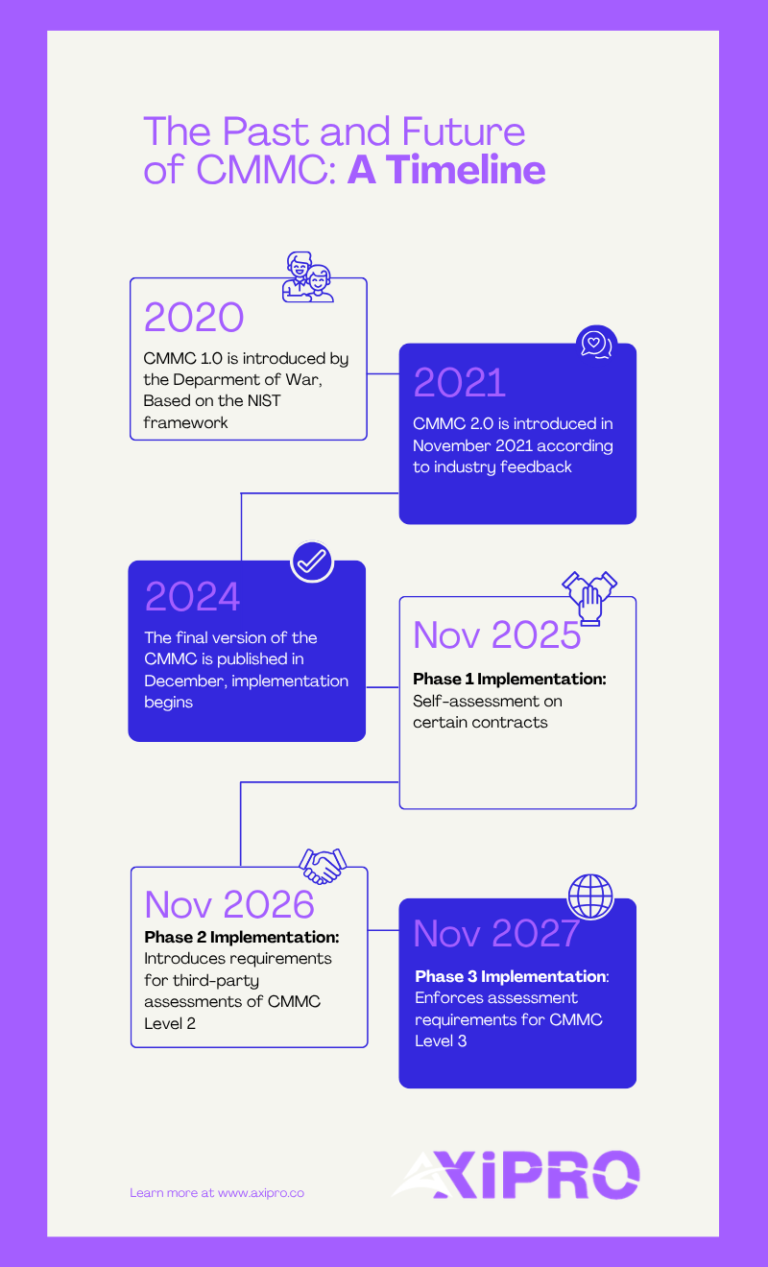
CMMC was first introduced in 2020 as CMMC 1.0, a five-level model that drew heavily from existing NIST frameworks. It was ambitious but widely criticized for being overly complex, expensive to implement, and difficult to scale, especially for small and medium-sized businesses in the defense supply chain.
In response to industry feedback, the DoD released CMMC 2.0 in November 2021, streamlining the model significantly. The five levels were reduced to three. The most notable change was the elimination of unique CMMC-specific practices, bringing the framework into direct alignment with NIST SP 800-171 and NIST SP 800-172.
CMMC 2.0 also introduced a critical flexibility provision: certain Level 2 contractors may be permitted to perform annual self-assessments rather than requiring a third-party audit, depending on the sensitivity of the information they handle.
The final CMMC rule was published in the Federal Register in December 2024, officially codifying CMMC 2.0 into the Defense Federal Acquisition Regulation Supplement (DFARS).
How CMMC Relates to NIST SP 800-171 and DFARS
NIST SP 800-171 is the foundational document underpinning CMMC Level 2. It outlines 110 security practices across 14 control families designed to protect Controlled Unclassified Information (CUI) in non-federal systems.
DFARS clause 252.204-7012 has long required defense contractors to comply with NIST SP 800-171 on a self-attestation basis. The core problem? Self-attestation created significant inconsistency and allowed non-compliant contractors to fly under the radar.
CMMC changes that by adding mandatory third-party verification for a large portion of the DIB, bringing real accountability into the equation for the first time.
The Three Levels of CMMC 2.0 Explained
CMMC 2.0 organizes compliance into three progressive levels. Each level corresponds to the type of information your organization handles and the sophistication of threats you may face.CMMC Level 1: Foundational
Who it applies to: Contractors who handle Federal Contract Information (FCI) but not CUI. Requirements: 17 basic cybersecurity practices drawn from FAR clause 52.204-21. Assessment method: Annual self-assessment with an executive affirmation submitted to the Supplier Performance Risk System (SPRS). Level 1 is the baseline. Think good cyber hygiene, things like using antivirus software, controlling who has access to systems, and keeping your software updated. Not glamorous, but non-negotiable.CMMC Level 2: Advanced
Who it applies to: Contractors who handle Controlled Unclassified Information (CUI). Requirements: All 110 practices from NIST SP 800-171, organized across 14 domains. Assessment method: Either triennial third-party assessment by a Certified Third-Party Assessment Organization (C3PAO) or annual self-assessment, depending on contract criticality. This is where the majority of the defense contractor community lands, and where most of the compliance effort (and cost) is concentrated. If your organization touches CUI in any meaningful way, Level 2 is almost certainly your target.CMMC Level 3: Expert
Who it applies to: Contractors supporting the DoD’s most critical programs, handling CUI that presents higher-risk threat vectors, often involving advanced persistent threats (APTs). Requirements: 110+ practices from NIST SP 800-171 plus select practices from NIST SP 800-172. Assessment method: Government-led assessment conducted by the Defense Contract Management Agency (DCMA). Level 3 is the top tier. If you are here, you already know what you are dealing with, and so do your adversaries.| CMMC Level | Information Type | Practices Required | Assessment Type |
|---|---|---|---|
| Level 1: Foundational | FCI | 17 (FAR 52.204-21) | Annual self-assessment |
| Level 2: Advanced | CUI | 110 (NIST SP 800-171) | C3PAO or self-assessment |
| Level 3: Expert | CUI (high-value) | 110+ (NIST SP 800-172) | Government-led (DCMA) |
Who Needs to Be CMMC Compliant?
Prime Contractors
Any organization that holds a DoD contract involving FCI or CUI must comply with the applicable CMMC level. Prime contractors are typically well-resourced enough to navigate the process, but that does not make them exempt from the hard work, or from the downstream obligations to their supply chain.
Subcontractors and the Defense Supply Chain
CMMC requirements flow down through the supply chain. Prime contractors are obligated to ensure that their subcontractors meet the required CMMC level for the work they perform. If a subcontractor touches CUI, they need Level 2 certification. No exceptions.
This creates a significant compliance burden across the Defense Industrial Base, which includes over 300,000 companies, the vast majority being small and medium-sized businesses.
Federal Contract Information (FCI) vs. Controlled Unclassified Information (CUI)
FCI is information provided by or generated for the government under a contract for the development or delivery of a product or service. Think of it as general contract-related information not intended for public release.
CUI is a broader and more sensitive category, technical data, engineering drawings, export-controlled information, and other sensitive but unclassified data designated by the government under the CUI Program. CUI triggers Level 2 requirements.
If you are unsure which category your data falls under, that ambiguity itself is a compliance risk.
Key CMMC Compliance Requirements
CMMC 2.0 at Level 2 maps directly to the 14 control families of NIST SP 800-171. Here are five of the most impactful domains, and where organizations most often fall short.
Access Control
This domain governs who can access your systems and data. It includes requiring multi-factor authentication (MFA), enforcing least privilege access, controlling remote access sessions, and managing mobile devices. Access Control contains 22 practices at Level 2, the largest domain in the framework, and often one of the most technically involved to fully implement.
Incident Response
You must have a documented, tested incident response plan. It needs to include detection, reporting, containment, and recovery procedures. Contractors must also report cyber incidents to the DoD within 72 hours under DFARS 252.204-7012. “Tested” is the operative word here, a plan that only exists on paper will not satisfy a C3PAO.
Risk Assessment
Organizations must regularly assess risk to their systems, identify vulnerabilities, and act on findings. This includes vulnerability scanning and remediation, an area where many small contractors have significant gaps. A risk assessment is not a one-time checkbox; it is an ongoing operational requirement.
System and Communications Protection
This domain addresses network segmentation, encryption of CUI in transit and at rest, and protections against unauthorized data exfiltration. If your CUI is sitting on an unencrypted laptop or flowing through an unprotected email server, this is where you will fail, and it is one of the first places a C3PAO will look.
Audit and Accountability
You need to generate, protect, and review audit logs. Your systems must record who did what, when, and from where. For C3PAO assessments, auditors will review your logging infrastructure closely.
How to Achieve CMMC Compliance: Step-by-Step
Step 1: Determine Your Required CMMC Level
Start by reviewing your contracts and solicitations. What type of information are you handling, FCI, CUI, or both? Your required level flows from that determination. When in doubt, engage your contracting officer for clarification. Getting the level wrong early cascades into misspent effort across every subsequent step.
Step 2: Define Your CUI Scope and System Boundaries
Identify every system, application, and network component that touches, stores, processes, or transmits CUI. This is your CUI environment or assessment scope. Reducing scope intelligently, through network segmentation, for example, can dramatically reduce compliance costs. Scope control is one of the highest-leverage activities in the entire compliance process.
Step 3: Conduct a Gap Analysis
Compare your current security practices against the requirements of your target CMMC level. A structured gap analysis produces a list of deficiencies and a roadmap for remediation, and is the foundation of your Plan of Action and Milestones (POA&M). Not sure where to start? Our gap analysis services are designed exactly for this stage.
Step 4: Develop and Implement Security Policies and Controls
Policies alone do not make you compliant. Controls need to be implemented, tested, and documented. This phase is where the real work happens, configuring systems, training staff, deploying security tools, and building operational procedures. Expect this to take weeks to months depending on your current posture.
Step 5: Create and Submit a System Security Plan (SSP)
The System Security Plan (SSP) is a formal document describing your system boundary, the security controls in place, how they are implemented, and the responsible personnel. It is a living document, not a one-time submission. A well-written SSP is one of the first things a C3PAO will request, and a weak one sets a poor tone for the entire assessment.
Step 6: Undergo a CMMC Assessment
For Level 2 contractors requiring third-party certification, you will engage a C3PAO authorized by the CMMC Accreditation Body (Cyber AB). The assessment includes document reviews, interviews, and technical testing. Results are submitted to the DoD.
For Level 1 and eligible Level 2 self-assessments, scores are submitted to the Supplier Performance Risk System (SPRS) along with an executive affirmation. Need a clearer picture of what the certification process looks like end-to-end? See our certification services.
Step 7: Maintain Ongoing Compliance
CMMC is not a one-time certification. It requires continuous monitoring, annual affirmations, and triennial reassessments for Level 2 third-party certifications. Your security posture must remain active, not just documented.
CMMC Implementation Timeline
The DoD has been phasing in CMMC requirements through a structured rollout. With the final CMMC rule published in December 2024, requirements are now being embedded into new DoD contracts on a phased basis.
Phase 1 (Nov 10, 2025 – Nov 9, 2026): Organizations must complete self-assessments for CMMC Level 1 and Level 2 on certain contracts. Phase 2 (starting Nov 10, 2026): Introduces requirements for third-party assessments of CMMC Level 2. Phase 3 (starting Nov 10, 2027): Enforces assessment requirements for CMMC Level 3. Full implementation (by Nov 10, 2028): CMMC standards are integrated into all relevant DoD solicitations and contracts.
The general expectation across the industry is that CMMC requirements will appear in the majority of DoD contracts by 2026, though specific timelines vary by contract type and program. Contractors should not wait for a contract requirement to appear before beginning preparation, the assessment pipeline is already forming, and C3PAO capacity is finite. Organizations that start late will find themselves competing for limited assessor availability under deadline pressure.
Common Challenges in Achieving CMMC Compliance
Scoping and CUI Identification
Identifying exactly what constitutes CUI within your organization is harder than it sounds. Many contractors discover they have been handling CUI without formally recognizing it, which retroactively creates compliance exposure. The National Archives CUI Registry is the authoritative reference for understanding what qualifies.
Resource and Budget Constraints for Small Businesses
The DoD’s own estimates suggest that CMMC Level 2 compliance can cost small businesses between $50,000 and $250,000 or more, depending on organizational size and current security posture. For many small defense contractors, this is a significant financial burden, but the cost of non-compliance (lost contracts, legal exposure) is typically far higher. The DoD’s Project Spectrum platform offers free cybersecurity resources specifically targeted at small DIB companies.
Documentation and Evidence Collection
Technical controls are only part of the equation. C3PAOs need documented evidence that those controls exist and function consistently. Many organizations have solid security practices that are not documented, and undocumented controls do not exist in the eyes of an assessor. This is one of the most common failure points we see, even among organizations with strong underlying security.
Meeting All 110 NIST SP 800-171 Practices
Meeting all 110 practices requires sustained organizational effort, executive sponsorship, and often third-party expertise. There is no shortcut here, but there is a smarter path. Organizations that scope aggressively, automate where possible, and use compliance management tools move significantly faster than those trying to manage everything manually.
CMMC Compliance Costs: What to Expect
Compliance costs vary significantly based on organization size, existing security posture, and required CMMC level. Below is a general framework, use it for budgeting orientation, not as a fixed quote:
Cost Category | Estimated Range |
Gap assessment | $2,000 – $15,000 |
Remediation (technology + implementation) | $10,000 – $100,000+ |
C3PAO third-party assessment (Level 2) | $10,000 – $100,000+ |
Ongoing compliance management (annual) | $10,000 – $50,000+ |
Managed Security Service Provider (MSSP) | Variable |
The biggest cost variable is almost always remediation, and remediation cost is driven by how wide your current gap is. A thorough gap analysis early on is the single best investment you can make in controlling total compliance spend.
Tools and Resources to Help Achieve CMMC Compliance
Several authoritative resources support CMMC compliance efforts:
- NIST SP 800-171 Self-Assessment Handbook and associated assessment guides are freely available through the NIST Computer Security Resource Center.
- Cyber AB Marketplace lists all authorized C3PAOs and Registered Practitioner Organizations (RPOs), ensuring you work with legitimate, vetted assessment bodies.
- DoD’s Project Spectrum platform provides free cybersecurity resources specifically for small businesses in the DIB.
On the technology side, organizations pursuing CMMC should evaluate tools across endpoint detection and response (EDR), SIEM, multi-factor authentication, and secure cloud environments, particularly those meeting FedRAMP or DoD IL2/IL4 requirements.
Compliance automation platforms can also significantly reduce manual overhead. If you are weighing your options, our comparison of compliance tools is a good starting point, or go deeper on Drata specifically, which is particularly well-suited to evidence collection workflows that CMMC assessors expect.
Ready to Get CMMC Compliant? Axipro Can Help.
CMMC compliance is complex, but it is entirely achievable, with the right expertise behind you. At Axipro, we work with defense contractors at every stage of the compliance journey: from initial scoping and gap analysis to SSP development, remediation support, and assessment readiness.
Whether you are a prime contractor preparing for a C3PAO audit or a subcontractor just trying to understand what level applies to you, we know exactly where the pitfalls are, and how to help you avoid them.
Explore our plans or contact Axipro to schedule a free CMMC readiness consultation. We will assess where you stand, what you need, and how to get there, without the fluff.


