A business continuity plan that has never been tested is, to a SOC 2 auditor, a document and nothing more. The Availability criteria do not award credit for a polished plan sitting in a shared drive. They ask for evidence that you ran the plan, watched it work or fail, recorded what happened, and fixed what broke. That gap — between having a plan and proving it works — is where most availability findings originate.
Business continuity plan testing for SOC 2 is the exercise that turns your plan into auditable evidence. It maps directly to Availability criterion A1.3, one of the few SOC 2 controls that explicitly requires you to test something rather than merely document it. This guide covers what counts as a valid test, the test types auditors accept, a step-by-step process, the exact evidence you need, and the mistakes that turn a routine review into a finding.
What Is Business Continuity Plan Testing in the Context of SOC 2?
Business continuity plan (BCP) testing is the structured validation of whether your organization can keep critical operations running — and restore them within defined targets — during a disruption. In a SOC 2 context, the testing is not freeform. It must produce dated, traceable evidence that the recovery procedures in your plan actually work, that the people involved know their roles, and that systems and data come back within your stated recovery objectives.
Why SOC 2 Requires Business Continuity Plan Testing
SOC 2 is an attestation against the AICPA’s Trust Services Criteria, and the Availability category exists specifically for organizations that make uptime or resilience commitments to customers. A plan you never exercise cannot demonstrate operating effectiveness over the audit period — which is the entire point of a Type 2 examination. Testing is the control that converts a static plan into a recurring, observable activity an auditor can sample.
SOC 2 Trust Services Criteria and BCP Testing Requirements
Availability is one of the five Trust Services Criteria, and it is optional, included only when your service commitments warrant it.
When in scope, it is built around three sub-criteria:
- A1.1 addresses capacity management.
- A1.2 addresses recovery infrastructure and backup processes.
- A1.3 addresses the testing of recovery procedures.
BCP testing lives squarely in A1.3, with A1.2 supplying the backups and infrastructure that the test validates.
Availability Criteria A1.2 and A1.3 Explained
Per the AICPA’s Trust Services Criteria, A1.2 requires the entity to design, implement, operate, and monitor environmental protections, recovery infrastructure, and data backup processes that meet its availability objectives. In plain terms: you need real backups, stored away from production, with recovery infrastructure ready to use. A1.3 then requires the entity to test recovery plan procedures supporting system recovery to meet its objectives. The two work as a pair: A1.2 builds the capability, A1.3 proves it functions.
Important: The most common A1.3 gap is not a missing test. It is a test that never validated the recovery objectives. Teams run a tabletop, write “no issues found,” and move on — but the plan claims a 4-hour RTO that no one ever measured against an actual restore. If your plan states recovery targets, your test evidence must show whether you met them. A test that does not measure against your RTO and RPO leaves the most important question unanswered.
What Auditors Look for During a BCP Test Review
Auditors want proof that the test happened, proof that it was meaningful, and proof that it led somewhere. Concretely, that means a test plan with a defined scenario, a dated record of execution with participants, results measured against your recovery objectives, a list of gaps or issues found, and evidence that those issues were remediated. A test that finds nothing and changes nothing is treated with suspicion — because real tests almost always surface something.
Types of Business Continuity Plan Tests Accepted for SOC 2
SOC 2 does not mandate a specific test type. It expects the rigor of the test to match the criticality of what you are protecting. The four common approaches sit on a spectrum from low-effort, low-disruption to high-effort, high-assurance.
Tabletop Exercises
A tabletop exercise is a facilitated discussion where key personnel talk through a disruption scenario and their responses. It is cheap, fast, and excellent for confirming that people understand their roles and that the plan reads coherently. Its limit is obvious: nobody actually recovers anything. For many organizations a tabletop is a legitimate annual test, especially in the first audit cycle, but auditors expect more rigor as a program matures.
Walkthrough and Simulation Tests
A simulation applies a specific scenario and asks the team to perform recovery actions, not just describe them. It is more involved than a tabletop and far better at exposing the gaps that only appear when people touch the tools. Simulations are where teams discover that a runbook references a system that was decommissioned, or that the on-call engineer lacks the access the plan assumes.
Full Interruption Tests
A full interruption test shuts down primary systems and shifts operations entirely to the recovery environment. It is the most comprehensive validation available and the only one that proves your failover genuinely works end to end. It also carries real operational risk, so it demands thorough planning and is usually reserved for mature programs and the most critical systems.
Parallel Testing
Parallel testing activates recovery systems alongside production without taking the primary offline, then compares the two to confirm the recovery environment performs as expected. It delivers much of the assurance of a full interruption test while sparing the business the disruption. For most SaaS and cloud-hosted services, parallel testing of failover and restore is the sweet spot between confidence and risk.
How to Test Your Business Continuity Plan for SOC 2 Compliance
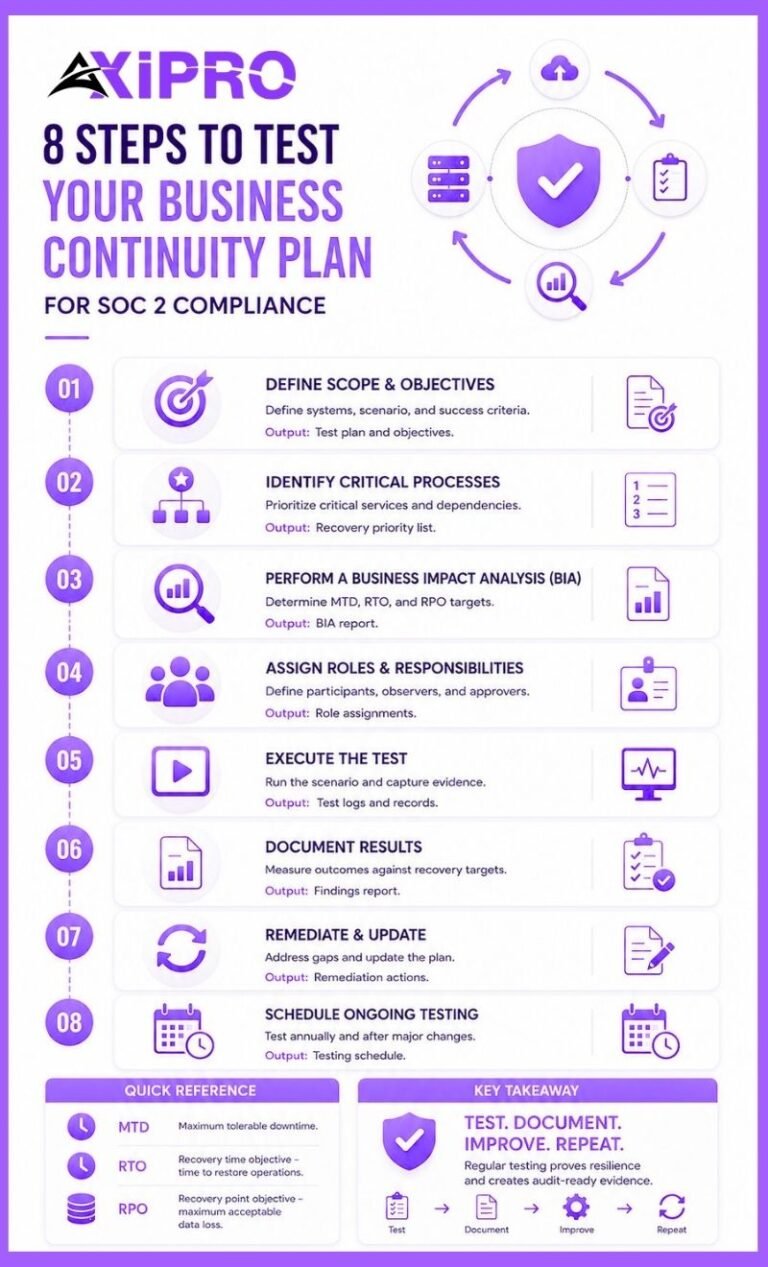
The sequence below aligns with the contingency planning process in NIST’s Contingency Planning Guide, SP 800-34, which auditors widely treat as authoritative for resilience practices. Each step produces an artifact, and the artifacts together form the evidence chain your auditor will sample.
Step 1: Define the Scope and Objectives of the BCP Test
Decide what the test covers — which systems and processes, which scenario, and what success looks like. Tie the objectives to measurable outcomes, such as restoring a specific service within its RTO. A vague objective like “test the plan” produces vague evidence; a specific one like “fail over the primary database and confirm recovery within 4 hours” produces evidence an auditor can verify.
Step 2: Identify Critical Business Processes and Recovery Priorities
Not everything recovers first. Identify the processes that must come back soonest and the order in which dependencies must be restored. This prioritization keeps the test focused on what actually matters to customers and to your service commitments, rather than spreading effort evenly across systems of unequal importance.
Step 3: Conduct a Business Impact Analysis Before Testing
A business impact analysis (BIA) is the foundation, and skipping it is why many plans test the wrong things. The BIA characterizes the consequences of losing each system over time and produces the numbers that drive everything else: Maximum Tolerable Downtime, RTO, and RPO. NIST is explicit that BIA results feed directly into contingency planning priorities, so run it before you design the test, not after.
Worth Knowing: NIST SP 800-34
NIST SP 800-34 defines three distinct outage measures that auditors expect you to keep straight. Maximum Tolerable Downtime (MTD) is the total outage the business can absorb. Recovery Time Objective (RTO) is the time to restore a system and must be shorter than the MTD. Recovery Point Objective (RPO) is about data, not time: how much data loss is acceptable, measured backward from the moment of failure. Confusing RTO with RPO in your documentation is a small error that signals to an auditor you may not have done the analysis.
Step 4: Assign Key Roles and Responsibilities for the Test
Name who runs the test, who participates, who observes, and who signs off. Pull in the functions a real disruption would involve: engineering, security, leadership, and, where relevant, legal and communications. Recording participants is not bureaucratic box-ticking — the attendee list is part of the evidence that the right people were exercised.
Step 5: Execute the BCP Test Scenario
Run the scenario as planned and let it play out honestly. Resist the urge to smooth over problems in the moment, because the problems are the point. Capture what happens in real time, including timestamps, decisions, and any deviation from the documented procedures.
Step 6: Document Test Results and Findings
Record what was tested, what happened, whether recovery objectives were met, and what gaps appeared. Measure results against the RTO and RPO from your BIA. This document is the single most important piece of A1.3 evidence, and it should read like an honest account, not a press release.
Step 7: Review, Remediate, and Update the Plan
Turn findings into assigned action items with owners and due dates, then update the plan to reflect what you learned. A test that exposes a broken runbook step and triggers a documented fix demonstrates a process that genuinely operates. Track remediation to completion — auditors will look for the close of the loop, not just the opening of it.
Step 8: Schedule Annual BCP Testing and Ongoing Reviews
Set a recurring cadence so testing is a program, not a one-off scramble before the audit. SP 800-34 recommends testing at least annually, with more frequent testing for high-impact systems. NIST 800-53 control CP-4 requires organizations to test plans at a defined frequency and document results. Annual is the floor; criticality and change drive anything more frequent.
Evidence Your SOC 2 Auditor Expects from BCP Testing
Availability is a heavily evidence-driven criterion, and A1.3 is among the most artifact-hungry. Four categories of evidence carry the weight.Test Plans and Schedules
A documented test plan shows intent and scope: the scenario, objectives, systems in scope, and the date. A schedule shows the cadence is real and forward-looking, not improvised. Together they let the auditor see that testing is governed, not accidental.Test Logs and Results Documentation
The results record is the heart of the evidence: what was executed, when, by whom, what happened, and whether recovery objectives were met. Timestamps matter enormously here, because evidence with no clear time reference is routinely challenged in a Type 2 review. Vague results are nearly as weak as no results.Remediation Records and Corrective Actions
When a test finds a gap, the corrective action and its completion are evidence in their own right. They show the test produced improvement rather than sitting in a folder. A finding logged with an owner, a due date, and a closure note is exactly the trail auditors want to follow.Sign-Off and Approval Documentation
A dated sign-off from an accountable owner closes the loop and demonstrates governance. It tells the auditor that leadership reviewed the test, accepted the results, and owns the follow-up. Without it, even a well-run test can look like an engineering side project rather than a managed control.Pro Tip: Assemble a single "Test Package"
Assemble a single "test package" per exercise that contains the plan, the scenario, the participant list, the timestamped results measured against RTO and RPO, the findings, the remediation items, and the sign-off. When the auditor requests evidence for A1.3, you hand over one self-contained file instead of reconstructing the story from calendar invites and Slack threads. Teams that maintain this package almost never take an availability finding for missing or incomplete evidence. A compliance platform can make assembling and maintaining that package significantly less painful.
Common BCP Testing Findings That Impact SOC 2 Audits
Insufficient Testing Frequency
A single test years ago — or none within the audit period — is an immediate problem. Type 2 reports examine operating effectiveness across the whole period, so a test that predates the window does not count. Annual testing within the audit period is the baseline expectation.
Incomplete Documentation of Test Results
Teams frequently run a real test and then fail the control on documentation. If the results lack timestamps, omit whether RTO and RPO were met, or simply say “test successful” with no detail, the auditor cannot verify the control operated. Strong execution with weak records still produces an exception.
Failure to Test All Critical Business Functions
Testing only the easy systems, or only the ones that failed over cleanly last time, leaves critical functions unvalidated. Auditors check that the scope of testing matches the scope of your availability commitments. A plan that covers ten critical services but only ever tests two has a visible coverage gap.
Lack of Defined Recovery Time Objectives (RTOs) and Recovery Point Objectives (RPOs)
Without defined RTOs and RPOs, a test has no standard to measure against, and “recovery” becomes a matter of opinion. This is one of the most common root findings, because it undermines every test that follows. Define these objectives in your plan, derive them from your BIA, and measure every test against them.
How BCP Testing Integrates with Disaster Recovery Plan Testing for SOC 2
Key Differences Between BCP Testing and DRP Testing
Business continuity and disaster recovery are related but distinct, and conflating them muddies your evidence.
Business continuity keeps critical operations running during a disruption, covering people, processes, communications, and workarounds.
Disaster recovery is narrower, focused on restoring IT systems and data after an outage. Put simply: business continuity keeps the business operating; disaster recovery brings the technology back.
Aligning BCP and DRP Tests for a Unified SOC 2 Audit Signal
Auditors do not need separate ceremonies for each, and running them in isolation wastes effort. A single well-designed exercise can validate the business continuity response and the underlying disaster recovery in one pass: simulate the disruption, recover the IT systems, and confirm the business processes resume. Aligning them produces a cleaner, more coherent evidence story and shows the two plans actually interlock.
Backup Testing as Part of Your BCP Testing Strategy
Backups are the foundation that recovery depends on, and untested backups are a classic false comfort. A1.2 expects you to take backups and store them appropriately; A1.3 expects you to prove they restore. Include restore testing in your strategy and capture the evidence, because a backup that has never been restored is an assumption, not a control.
Insider Note: Auditors have learned to distinguish a backup test from a restore test, and they ask about the difference on purpose. Confirming that a backup job completed successfully proves the data was written. It says nothing about whether you can read it back, decrypt it, and stand up a working system. The teams that get tripped up are the ones showing green backup dashboards as A1.3 evidence. The dashboard belongs to A1.2; A1.3 wants the restore.
Best Practices for SOC 2 Business Continuity Plan Testing
Testing Frequency Recommendations
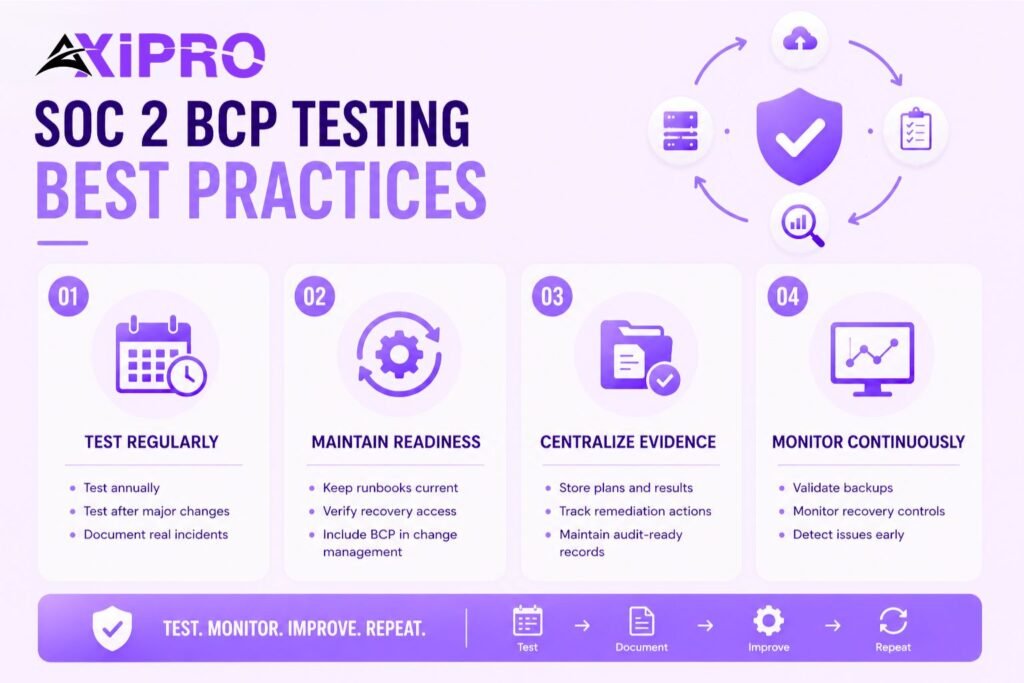
Test at least annually, and more often for high-impact systems or after any major change to architecture, staffing, or vendors. Treat a significant real incident as an unplanned test and document the lessons from it the same way. The cadence should be written into your plan so the expectation is unambiguous.
Maintaining Operational Resilience Between Tests
Resilience is not a once-a-year event. Keep runbooks current, validate that recovery access and credentials still work, and fold continuity considerations into change management so the plan does not silently drift out of date. The strongest programs treat the annual test as a checkpoint on continuous practice, not the only time anyone thinks about recovery.
Leveraging Compliance Tools to Streamline Evidence Collection
Manual evidence gathering is where good testing programs lose audit points — simply because artifacts get scattered. Centralizing test plans, results, remediation, and sign-offs in a compliance platform or a disciplined internal system of record keeps the evidence chain intact and retrievable. Compliance tools built for SOC 2 can automate much of this collection, reducing the risk that a well-run test goes undocumented simply because no one had time to file the paperwork.
Continuous Monitoring and Validation of BCP Controls
Pair periodic testing with ongoing validation: monitor backup completion, alert on failed jobs, and periodically verify recovery readiness rather than waiting for the annual exercise. Continuous monitoring strengthens the narrative across the whole audit period and catches drift early — which is precisely what a Type 2 examination is designed to assess.
Conclusion
Business continuity plan testing for SOC 2 succeeds or fails on evidence, not intentions. Define recovery objectives from a real BIA, choose a test type that matches the criticality of what you protect, run it honestly, measure results against your RTO and RPO, remediate what breaks, and capture the whole sequence with timestamps and sign-off. Map it to Availability A1.2 and A1.3, test at least annually within the audit window, and keep backup and restore validation in scope. Do that, and when the auditor asks to see your most recent continuity test, you can hand over a complete, dated, self-contained package — which is exactly what passing A1.3 looks like.
Frequently Asked Questions About Business Continuity Plan Testing for SOC 2
How Often Should a Business Continuity Plan Be Tested for SOC 2?
At least annually, and within the audit period for a Type 2 report. High-impact systems and organizations undergoing significant change should test more frequently. NIST SP 800-34 treats annual as the minimum baseline, with criticality driving anything more often.
What Evidence Is Required for BCP Testing During a SOC 2 Audit?
A documented test plan, a dated record of execution with participants, results measured against your recovery objectives, a list of findings, remediation records showing those findings were closed, and a sign-off from an accountable owner. Timestamps throughout are essential, since undated evidence is routinely challenged.
Does a Failed BCP Test Affect SOC 2 Compliance?
A test that surfaces problems is not itself a failure — it is the system working as intended. What matters is whether you documented the gaps and remediated them. An honest test with tracked corrective actions strengthens your audit position, whereas a test that conveniently finds nothing tends to invite scrutiny.
Who Is Responsible for Owning and Testing the BCP?
Ownership typically sits with a named role such as a security or operations lead, with accountability extending to leadership through sign-off. Testing involves a cross-functional group: engineering, security, leadership, and where relevant legal and communications. The key is that ownership is explicitly assigned and that the assignment is reflected in the evidence.
What Is the Difference Between BCP Testing and Backup Testing for SOC 2?
Backup testing validates that data is being captured and can be restored, supporting A1.2. BCP testing is broader, validating that the organization can maintain and recover critical operations during a disruption, supporting A1.3. Restore testing is a component of a complete BCP testing strategy, not a substitute for it.
Can a Tabletop Exercise Satisfy SOC 2 BCP Testing Requirements?
Often yes, particularly in an early audit cycle, since SOC 2 does not mandate a specific test type. A well-run, documented tabletop exercise with a clear scenario, findings, and follow-up can satisfy A1.3. As a program matures, auditors generally expect more rigorous testing — such as simulation or parallel tests — for critical systems.
How Detailed Should BCP Test Records Be for a SOC 2 Audit?
Detailed enough that an auditor can reconstruct the test without asking you to narrate it: scope, scenario, date, participants, timestamped execution, results against RTO and RPO, findings, remediation, and sign-off. The standard to aim for is a self-contained record that answers the obvious follow-up questions before they are asked.