A well-built SOC 2 runbook is the difference between a finding and a clean opinion. It converts the abstract language of a control into a sequence of actions someone actually performed, in a verifiable order, with a paper trail attached.
Auditors do not fail companies for having incidents. They fail them for not being able to prove how those incidents were handled.
This guide shows you how to build a runbook that holds up under scrutiny — covering what a SOC 2 runbook is, what makes it audit-ready, how it differs from a playbook, the components every runbook should include, the control areas where runbooks are expected, and how to keep them current between annual examinations.
What Is a SOC 2 Runbook?
A SOC 2 runbook is a documented, repeatable procedure that operationalises a specific SOC 2 control. Where a policy states what must happen and why, a runbook states exactly how: the trigger, the steps, the people, the systems touched, the evidence captured, and the sign-off that closes it out.
Runbooks live closest to the engineers and operations staff actually doing the work. They are the layer auditors care about most because they are where the control either operates or fails. A well-written runbook turns a control objective into something testable, traceable, and survivable across staff turnover.
SOC 2 Runbook vs. SOC 2 Playbook: Key Differences
The terms get used interchangeably, but they describe two different artefacts. The cleanest distinction is scope and audience.
| Dimension | Runbook | Playbook |
|---|---|---|
| Scope | One specific procedure | Multi-step strategy across functions |
| Audience | Engineers, on-call responders, operations teams | Leadership, legal, communications, incident response coordinators |
| Detail Level | Commands, queries, exact tooling | Decisions, escalation paths, stakeholder roles |
| Example | Isolating an affected EC2 instance using a documented AWS CLI command | Coordinating a ransomware response across legal, PR, and law enforcement |
| Length | Short, tactical, and scannable | Longer, narrative, and decision-oriented |
A mature SOC 2 programme uses both. The playbook frames the response. The runbook executes pieces of it.
Why SOC 2 Auditors Expect Runbooks
The AICPA’s Trust Services Criteria describe what auditors test, but at the level of objectives, not procedures. CC7.3 says you must respond to security incidents. It does not tell you how. The runbook is your answer to how.
Auditors are looking for two things when they evaluate a control: that it was designed appropriately, and that it operated effectively across the audit period. Runbooks are how you show both. The document itself is the design. The completed runbook artefacts (tickets, logs, sign-offs, post-mortems) are the operating evidence.
Which SOC 2 Trust Services Criteria Require Runbook Documentation
Every Common Criteria area benefits from runbooks, but the strongest expectation sits in CC6 (logical and physical access), CC7 (system operations, including incident detection and response), CC8 (change management), and CC9 (risk mitigation, vendor management, and BCP/DR). For a deeper look at how these criteria are structured and what auditors are actually testing, the Trust Services Criteria breakdown is worth reading before you start mapping your runbooks.
If your scope includes the Availability criteria, A1.2 and A1.3 will require runbooks for failover, restoration, and capacity management. Confidentiality and Privacy add data handling and retention runbooks on top. If you are still determining which criteria apply to your organisation, a structured gap analysis is the most reliable starting point.
Why Your Organization Needs a SOC 2 Runbook
The common failure pattern is not the absence of policies. It is the absence of a credible bridge between the policy and what people actually do at 2am during an incident.
How Runbooks Demonstrate Control Effectiveness to Auditors
Auditors sample. For a Type II report covering twelve months, they will pull a population of incidents, changes, access reviews, or vendor onboardings, and trace a sample of them end to end. Without runbooks, that trace usually breaks. Engineers describe what they did from memory, ticket histories are inconsistent, and the auditor has no baseline to test against.
With runbooks, the auditor compares the documented steps to what actually happened in the artefacts. If the runbook says approval is required, the ticket should show it. If it says evidence must be retained for ninety days, the log should be there. The runbook turns a subjective conversation into an objective trace.
Runbooks as Evidence: Avoiding the Audit Evidence Trap
A specific failure mode is what practitioners call the evidence trap: the control exists, the team is doing the right thing, but nothing was captured at the time. Three months later, the SIEM has rotated the logs, the on-call engineer has left, and the only record is a Slack thread no one can find.
Runbooks prevent this when they make evidence capture a step in the procedure itself, not an afterthought. A line in the runbook that reads export the relevant CloudTrail entries to the incident folder before remediation is what stands between you and a qualified opinion.
Pro Tip: Build evidence capture into the runbook as a numbered step, not a footer note. Auditors test what is written. If “save the screenshot” is step 7, it gets done. If it is buried in a paragraph at the bottom, it usually does not.
SOC 2 Type I vs. Type II: How Runbooks Support Each
A SOC 2 Type I report assesses the design of controls at a single point in time. For Type I, the runbook itself, together with the policies it references, is most of what auditors need.
Type II is a different beast. It tests operating effectiveness over a period (typically six to twelve months), and that is where runbooks earn their keep. Each completed run produces evidence: a ticket, a log entry, a screenshot, a signed approval.
Over twelve months those artefacts become the case for control effectiveness. Without runbooks, evidence collection is reactive and full of gaps. With them, it is a byproduct of normal work.
For a fuller picture of what to expect across both report types, the SOC 2 compliance checklist is a useful companion to this guide.
Core Components of a SOC 2 Runbook
Runbook formats vary, but the audit-ready ones share a common skeleton. Skip any of these and the runbook becomes harder to defend.
Scope, Trigger Conditions, and Impact Classification
Every runbook should open with what it covers, what kicks it off, and how to grade severity. Trigger examples include a PagerDuty alert from the production logging pipeline, a quarterly access review due date, or a deployment to the production environment. Severity classification (P1 through P4, or critical, high, medium, low) determines escalation timing and approval thresholds downstream.
Roles, Responsibilities, and RACI Framework
Name the roles, not the people. Incident Commander, Communications Lead, Subject Matter Expert, Approver. A RACI table (Responsible, Accountable, Consulted, Informed) prevents the standard audit finding where two people thought the other was reviewing access changes and neither did.
Step-by-Step Procedures Mapped to SOC 2 Controls
The body of the runbook. Each step should be atomic, verifiable, and tied to the SOC 2 control it supports. Disable the user account in Okta (CC6.1, CC6.2) is better than remove access. The control mapping is the line that lets your auditor walk from the runbook back to the control matrix without guessing.
Communication and Escalation Paths
When does this go up the chain, to whom, and through which channel? Auditors will ask, and the answer “we’d Slack the team lead” is not enough. Document the channel, the roles notified at each severity, and the timing.
Evidence Collection and Audit Trail Requirements
What gets captured, where it gets stored, in what format, and for how long. Tickets, logs, screenshots, approvals, post-incident notes. This is the single most under-documented section in most runbooks and the single most-tested.
Resolution Verification and Sign-Off
How do you know the runbook is done, and who confirms it? A closure step with a named approver is what distinguishes a finished procedure from an open thread.
SOC 2 Runbook Templates by Control Category
The following are the runbook archetypes most organisations need. These map to the bulk of the Common Criteria and the optional categories most often selected.
Security Incident Response Runbook Template
Anchored to CC7.3 and CC7.4. Should cover detection, triage and severity assignment, containment, eradication, recovery, evidence preservation, communication (internal and external), and post-incident review. The structure aligns naturally with the lifecycle described in NIST SP 800-61 Revision 3, which most auditors are familiar with.
Access Control and Logical Access Runbook Template
Covers CC6.1 through CC6.3. Three operational flows belong here: provisioning (joiners), modification (movers), and deprovisioning (leavers). The deprovisioning runbook is the single most-sampled control in SOC 2 audits because the failure pattern is so common, so build this one with extra rigour. Tie the trigger to the HRIS termination event, name the systems where access must be revoked, and require timestamped confirmation.
Change Management Runbook Template
Maps to CC8.1. Production change request, peer review, approval, deployment, post-deployment verification, rollback procedure. Tie it to your version control and ticketing systems so the artefacts (PR, ticket, deployment log) are the evidence.
Availability and Business Continuity Runbook Template
If Availability is in scope, A1.2 and A1.3 demand documented and tested procedures for failover, restoration, and capacity adjustments. Each scenario, whether a regional outage, a database failure, or a dependency degradation, should have its own runbook with named recovery time objectives.
Vendor and Third-Party Risk Management Runbook Template
CC9.2 territory. Onboarding (security review, contract execution, access grant), ongoing monitoring (annual review, SOC 2 collection), offboarding (access revocation, data deletion confirmation). One inventory, one runbook for each phase, one cadence.
Data Privacy and Confidentiality Runbook Template
If Confidentiality or Privacy are in scope, you need runbooks for data classification, encryption verification, retention enforcement, and deletion or subject access requests. These are increasingly cross-referenced with GDPR, CCPA, and other privacy obligations.
Pro Tip: Writing a Runbox Index
Auditors form an opinion on your programme in the first thirty minutes of fieldwork. The fastest way to set a positive tone is a clean runbook index that maps every Common Criteria control to a specific runbook by name. The map itself is not strictly required, but it transforms how the rest of the audit unfolds.
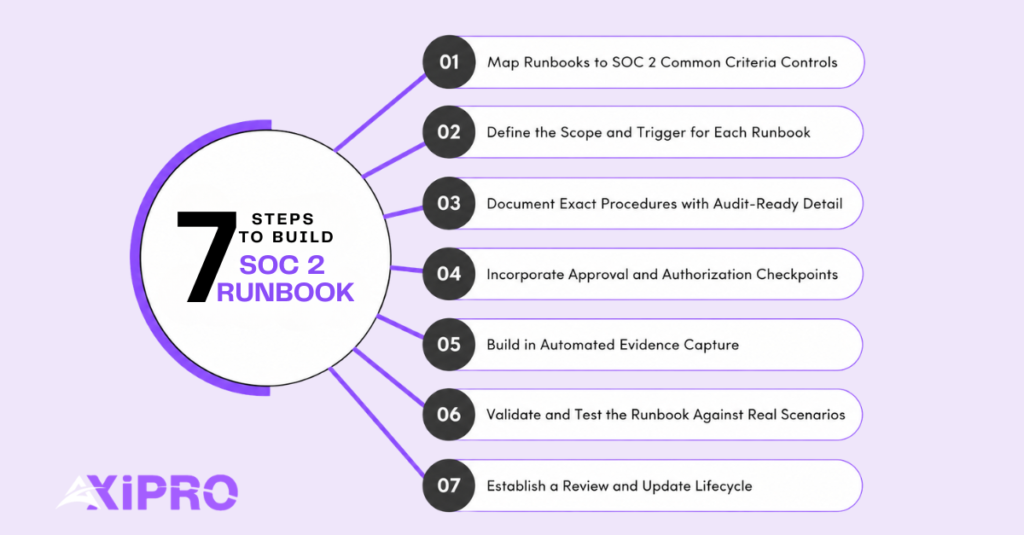
How to Build a SOC 2 Runbook Step by Step
A practical sequence for going from blank document to audit-ready procedure.
Step 1: Map Runbooks to SOC 2 Common Criteria Controls
Start with the control matrix, not a blank page. Pull your in-scope criteria, list every control, and identify which require an operational procedure. Most CC6, CC7, CC8, and CC9 controls do. Some CC1 and CC2 controls (governance, communication) need policies more than runbooks.
Step 2: Define the Scope and Trigger for Each Runbook
A runbook with no defined trigger gets used inconsistently or not at all. Be specific. Triggered by a Sev-1 PagerDuty alert, or triggered by a manager-submitted termination ticket in Workday. Vague triggers are why controls drift.
Step 3: Document Exact Procedures with Audit-Ready Detail
Write the steps in active voice, in the order they happen, with the system and the action both named. Run the access revocation script in Okta rather than remove access. If a step requires judgment, say so explicitly, and name who exercises it.
Step 4: Incorporate Approval and Authorization Checkpoints
Auditors test segregation of duties hard. Every runbook that touches production data, access rights, or financial systems should have a named approver who is not the same person executing the change. Document who can approve and what they are confirming.
Step 5: Build in Automated Evidence Capture
Where possible, let the tooling generate the evidence. Ticketing systems, SIEM alerts, deployment logs, and identity providers all produce timestamped artefacts that survive audit scrutiny better than manual screenshots. The runbook should call out which artefact each step generates.
Step 6: Validate and Test the Runbook Against Real Scenarios
A runbook nobody has executed is fiction. Tabletop exercises, dry runs, and chaos drills each surface problems before the auditor does. Document the testing itself: who participated, what scenarios were used, what gaps were found, and what changed as a result.
Step 7: Establish a Review and Update Lifecycle
Set a cadence, annual at minimum, semi-annual for high-volume runbooks like incident response, and assign an owner. Lifecycle expectations vary by control area, but every runbook needs a last reviewed date that auditors can verify is recent.
Important: The most common SOC 2 audit finding around runbooks is not that they do not exist. It is that the runbook on file does not reflect what the team actually does. When the auditor compares the runbook to the artefacts and finds mismatched steps, that is a control deficiency regardless of how good the procedure looks on paper.
Mapping SOC 2 Controls to Runbook Sections
The Common Criteria are organised into nine series, CC1 through CC9. The runbook map below covers where the operational expectation is heaviest.
Organization and Management Controls
CC1 covers governance, ethics, and accountability. Runbook content here is light; most evidence is policy and meeting minutes. The exception is the annual control attestation runbook, which formalises how leadership confirms the control environment each year.
Human Resources and Access Management Controls
CC1.4 (HR), CC2 (communication), and the entirety of CC6 (logical access). This is where runbooks earn their highest leverage: joiner, mover, leaver flows tied directly to your HRIS and identity provider, plus periodic access reviews.
Network, Infrastructure, and Physical Security Controls
CC6.4 through CC6.8, plus relevant points of focus under CC7. Runbooks belong here for firewall change management, cloud configuration baselines, and data centre access where applicable.
System Operations and Monitoring Controls
CC7 in full. Detection (alert tuning, threshold reviews), monitoring (log review cadence), and incident response. The detection and response runbooks here are usually the most heavily tested in any SOC 2 examination, and they benefit most from the kind of continuous monitoring for SOC 2 that produces a steady stream of artefacts rather than a burst of activity at audit time.
Change Management Controls
CC8.1. One core runbook for production changes, with sub-runbooks for emergency changes, schema migrations, infrastructure-as-code deployments, and any class of change that follows a different approval path.
Disaster Recovery and Business Continuity Controls
CC9 plus A1.2 and A1.3 if Availability is in scope. Failover, restoration from backup, and tabletop exercise runbooks. The tabletop runbook is itself an artefact: it documents how the exercise was conducted, who participated, and what was learned.
Keeping SOC 2 Runbooks Audit-Ready Year-Round
A runbook is only as good as its currency. The question to optimise for is not do we have a runbook, but does the runbook reflect reality.
Runbook Lifecycle Management and Version Control
Store runbooks in a system with version history. Confluence, Notion, GitBook, and Git-based wikis all work, with the caveat that whatever you choose, the version history needs to be exportable for auditors. Each material change should be reviewed and approved before publication.
How Often to Review and Update SOC 2 Runbooks
Annually is the floor for low-volume runbooks (vendor offboarding, BCP drills). Semi-annually fits most operational runbooks. After every material incident or change, the relevant runbook should get an immediate review even if the cadence does not require it. Tooling changes, organisational restructures, and new compliance scope all trigger ad hoc reviews.
Common Pitfalls That Fail SOC 2 Audits
Runbook content that contradicts what artefacts show. Steps that reference deprecated tools. Approver roles assigned to people who left. RACI tables with unfilled cells. Evidence requirements that name a system the team has migrated away from. Each of these is fixable in an afternoon, and each one, left alone, becomes a finding.
Key Metrics to Track Runbook Effectiveness
Time-to-acknowledge and time-to-resolve are the operational measures. For audit purposes, the more useful metrics are runbook adherence rate (how often the documented steps were followed) and evidence completeness (how often the expected artefacts were captured). Both can be tracked from your ticketing system without specialised tooling.
When to Retire or Replace a Runbook
Retire a runbook when the underlying control is removed from scope or when the procedure has been wholly absorbed by automation. Replace a runbook, rather than patching it, when the underlying tooling has changed enough that a step-by-step rewrite is faster than incremental edits. Document the retirement decision and retain the previous version for the audit period.
Automating SOC 2 Runbooks
The maturity curve runs from manual procedures to automated workflows with human-in-the-loop approvals. Most organisations sit somewhere in the middle and benefit from moving further along.
Benefits of Runbook Automation for SOC 2 Compliance
Automation enforces the runbook. A manual runbook can be skipped or executed inconsistently. An automated workflow runs the same way every time, captures evidence as it goes, and produces an immutable timeline. For Type II audits, that consistency is exactly what auditors are testing.
How Automated Evidence Collection Supports SOC 2 Audits
Automated runbooks generate evidence as a byproduct: timestamped logs, deployment records, access revocation confirmations, ticket state transitions. This eliminates the screenshot-scramble at audit time and produces a record that is more credible than manual evidence because it was captured at the moment of action, by the system, not reconstructed from memory.
GRC platforms that integrate with your identity provider, ticketing system, and cloud infrastructure can aggregate this evidence automatically — turning what was once a weeks-long evidence request process into a handful of system exports.
Tools like Drata are purpose-built for this, and a detailed comparison of leading options is available in the Drata vs Vanta breakdown.
Action-Level Approvals and Authorization Controls in Automated Runbooks
Automation does not mean removing approvers. It means embedding them as workflow gates. A production change deployment workflow can pause for explicit approval, log the approver’s identity, and only proceed once the gate is passed. The audit trail that emerges is stronger than the manual equivalent.
Tools and Integrations for SOC 2 Runbook Automation
Categories matter more than vendors here: identity providers for access automation, GRC platforms for control mapping and evidence aggregation, incident response platforms for response runbook execution, infrastructure-as-code for change management, and SIEM for detection and monitoring. The integration story matters more than any single tool: each runbook should produce evidence that flows into a central evidence repository.
Worth Knowing: SOC 2 Type II reports require demonstrating operating effectiveness over six to twelve months. Organisations with well-automated runbooks regularly complete audit fieldwork in weeks, not months. The gap between those two timelines is almost entirely explained by evidence readiness.
SOC 2 Runbook Best Practices
The principles that separate runbooks that work from runbooks that look good in a binder.
Writing Runbooks That Are Actionable and Accurate
Each step should be a verb plus an object plus a system. Disable the account in Okta. Export the alert log from Sentinel. Open a ticket in the SecOps queue. Narrative paragraphs slow people down and create ambiguity. Lists of explicit actions speed them up.
Making Runbooks Accessible to All Relevant Team Members
Runbooks help nobody if they are buried in a wiki nobody opens at 3am. Link them from the alerts that trigger them. Embed them in your incident management tool. Put them in the channels the on-call engineer is already in. Accessibility is a control quality, not a nice-to-have.
Standardizing Runbooks Across Teams and Environments
A common template across all runbooks reduces cognitive load and makes audit traceability simpler. Same headings, same RACI structure, same evidence section, same review cadence. Teams can specialise within the template, but they should not invent their own structure.
Incident Documentation Best Practices for SOC 2
Capture timestamps for every action. Record who took it, what tool was used, and what the resulting artefact is. Close every incident with a short post-mortem that includes detection time, response time, root cause, remediation, and runbook gaps surfaced. The post-mortem is itself audit evidence and feeds the next round of runbook updates.
Are runbooks required for SOC 2 compliance?
The AICPA’s Trust Services Criteria do not use the word “runbook.” They require documented and operating procedures for the in-scope controls. In practice, auditors expect to see runbooks (or their functional equivalent) for every operational control, particularly under CC6, CC7, CC8, and CC9. Calling them runbooks, SOPs, or response procedures is a stylistic choice. Having them is not.
What is the difference between a SOC 2 runbook and a SOC 2 policy?
A policy states the requirement: all production access changes require approval. A runbook executes the requirement: here is exactly how that approval happens, who grants it, what gets logged, and how it is verified. Policies set the rule. Runbooks are how the rule operates day to day.
How detailed should a SOC 2 runbook be?
Detailed enough that someone unfamiliar with the system could execute it with the runbook in front of them and produce the expected evidence. If a step assumes tribal knowledge (“you know which queue to use”), the runbook is too thin.
How do SOC 2 runbooks support continuous compliance?
A continuous compliance posture relies on controls operating consistently between audits, not just during them. Runbooks are the mechanism that makes that consistency possible. When evidence capture is built into the procedure, every execution generates audit-ready artefacts. By the time the next audit window opens, the evidence is already there — collected as a byproduct of normal operations rather than assembled under pressure. This is the foundation of effective continuous monitoring for SOC 2.
Can one runbook cover multiple SOC 2 trust services criteria?
How do you prove a runbook was followed during a SOC 2 audit?
Through the artefacts the runbook generates. Tickets, logs, approvals, screenshots, and post-incident notes are what auditors sample. The runbook is the design document. The artefacts are the operating evidence. A runbook with no corresponding artefacts is a control finding waiting to happen.
What happens if a runbook is outdated during a SOC 2 audit?
The auditor compares the runbook to the artefacts. If the artefacts show a different procedure than what is documented, the control is operating inconsistently with its design, which is a deficiency. The fix is twofold: update the runbook to match current practice, and document the gap in your management response. For a fuller view of how SOC 2 sits alongside other attestation standards, the SOC framework background covers the broader context.