Table of Contents

Reach SOC 2 Compliance in 6 Weeks or Less.

  /

  / AI Tool Usage Tracking: Why CASB & DLP Miss Shadow AI

AI Tool Usage Tracking: Why CASB & DLP Miss Shadow AI

One in five breached organizations last year traced the incident to shadow AI, and those breaches cost an average of $670,000 more than standard incidents, according to IBM’s 2025 Cost of a Data Breach Report. The worst part is that most of those organizations already ran a CASB, a DLP program, or both. The tools were on, but the traffic still got through.

That’s the visibility gap this article is about. AI tool usage tracking isn’t the same problem as SaaS discovery, and the security stack built for the SaaS era misses most of what matters about AI. Below, we break down what tracking actually requires, where CASB and DLP fail, which categories of AI usage slip through, and what a stack that works looks like in 2026.
AI Tool Usage Tracking

What AI Tool Usage Tracking Actually Means

Most teams that say they “track AI usage” mean they can see that someone visited chat.openai.com. That is app discovery, and it answers almost none of the questions a security or governance team actually needs answered.

Beyond App Discovery: Tracking Prompts, Data Flows, and Model Interactions

Real tracking covers three layers.

  • First, which tools are in use: chatbots, copilots, coding assistants, embedded SaaS features, agents.
  • Second, what data moves: the content of prompts, uploaded files, and pasted context, mapped against data classifications.
  • Third, how models behave in your environment: which endpoints get called, which OAuth grants exist, which agents hold standing permissions.

Seeing that an employee opened ChatGPT gets you nowhere. What you actually need to know is whether they pasted a customer contract into a personal account while they were there.

The Difference Between Detection, Monitoring, and Continuous Tracking

Detection is a point-in-time answer to “what AI is here?” Monitoring watches known tools on an ongoing basis. Continuous tracking is broader: it assumes the inventory changes weekly, correlates identity, data, and endpoint signals over time, and feeds a governance program rather than a one-off report. Frameworks such as the NIST AI Risk Management Framework and ISO 42001 assume the third mode. A discovery scan from last quarter won’t satisfy an auditor, and it certainly won’t slow down an attacker.

Let Axipro help you build a business continuity plan that's practical, compliant, and audit-ready.

Schedule Your Free Assessment Today

Why Traditional SaaS Monitoring Falls Short for AI

SaaS monitoring was built around a stable premise: an app is a destination with a domain, a login, and an admin console. AI breaks that premise in several ways at once. The risky activity is the content of an interaction, not the visit. The tool often isn’t a destination at all but a feature inside an app you already sanctioned. And increasingly the “user” isn’t a person but an agent acting on delegated credentials.

Why CASB Misses Shadow AI Usage

The Cloud Access Security Broker sits between users and cloud services to enforce policy, and for classic SaaS governance it still earns its keep. AI has structural blind spots that no amount of tuning can fix.

CASBs Were Built for SaaS Apps, Not Model Endpoints

A CASB catalog maps domains to applications with risk scores. AI usage doesn’t resolve neatly to a domain. The same api.openai.com endpoint serves a sanctioned enterprise deployment, a developer’s weekend experiment, and a data-leaking browser extension, and the catalog sees one “app”. Meanwhile, new model endpoints, wrappers, and niche AI tools appear faster than any vendor catalog can keep up with. Gartner research from late 2025 found 69% of organizations already suspect or have evidence that employees use prohibited public generative AI tools, catalog or no catalog.

Blind Spots in Encrypted API Traffic to LLM Providers

Prompt content travels over TLS. Without full TLS inspection, a CASB sees connection metadata: destination, volume, timing. It can’t see that the payload contained source code or patient records. And full TLS inspection is harder than the datasheet implies. Certificate pinning breaks it for many native apps and CLI tools, legal and works-council constraints limit it in the EU, and most organizations carve out broad exemption lists that AI traffic happily rides through.

The OAuth and Embedded AI Problem CASBs Can’t See

When an employee grants an AI meeting-notes tool access to their calendar and mailbox via OAuth, no proxy is involved at all. The vendor’s servers communicate directly with Microsoft’s or Google’s APIs using a persistent token. The same applies to AI features embedded inside sanctioned SaaS, think Notion AI, Slack AI, or Salesforce Einstein. The CASB sees approved traffic to an approved app, while the AI processing happening inside it, and whichever sub-processor it forwards data to, stays invisible.

Personal Accounts and BYO-AI Bypass CASB Proxies

Netskope’s 2026 Cloud and Threat Report found that nearly half of employees who use generative AI at work do so through personal accounts. Personal accounts on managed devices are hard enough; personal accounts on personal devices, home networks, and mobile connections never touch the corporate proxy path at all. Tenant restrictions help for a handful of major providers and do nothing for the long tail.

Browser-Based and Extension-Delivered AI Escape Network Inspection

AI browser extensions read page content and form inputs locally, then exfiltrate via their own backend, often to generic cloud infrastructure that categorizes as “technology” rather than “AI”. From the network’s view, it is routine HTTPS to a CDN. The riskiest interaction, an extension scraping everything an employee views, produces the most boring traffic signature.

Insider Note: In AI governance readiness assessments, the OAuth grant review is where clients get the biggest surprise. We routinely find dozens of AI tools holding live mail, calendar, or drive scopes that nobody in IT ever approved, granted by employees who abandoned the tool (and sometimes the company) months earlier. The tokens keep working anyway.

Why DLP Fails to Catch Shadow AI Data Exposure

DLP has the opposite problem. It can sometimes see content, but it doesn’t understand it, and AI interactions defeat the pattern matching it depends on.

Prompt-Based Data Loss Doesn’t Match DLP Signature Patterns

DLP fires on signatures: credit card regexes, SSN formats, keyword dictionaries, file fingerprints. Sensitive prompts rarely look like that. “Summarize why we’re losing the Meridian account and draft talking points for the board” contains no pattern a regex engine recognizes, yet it hands an external model your strategy and a customer’s identity in one sentence. The 2026 Verizon DBIR analyzed over 858,000 DLP events involving uploads to generative AI tools and found source code the most frequently exposed data type by a wide margin, and source code is precisely what signature-based DLP handles worst.

DLP Can’t Distinguish Between Sanctioned and Unsanctioned AI Endpoints

An enterprise ChatGPT tenant with a zero-retention agreement and a free personal account are, to a DLP engine, the same destination. The risk difference between them is nearly the whole risk model, and DLP has no concept of it. So policies end up blocking both, which pushes users to their phones, or allowing both, which governs neither.

Copy-Paste, Screenshot, and Contextual Leakage Blind Spots

Endpoint DLP can watch clipboard events into a browser, but it can’t evaluate what a paste means inside an ongoing AI conversation. Screenshots pasted into multimodal models bypass text inspection entirely. And context accumulates: ten individually harmless prompts across a session can jointly disclose a confidential deal. No DLP engine evaluates a conversation. They evaluate events.

Lack of Semantic Understanding of AI Conversations

The core failure is semantic. Whether an AI interaction is risky depends on meaning, intent, and the sensitivity of information in context. That judgment requires language understanding, which is to say it requires AI. Regex-era DLP inspecting LLM traffic is a typewriter auditing a printing press.

The Agentic AI and MCP Server Problem

Agents make it worse. An agent connected through MCP (Model Context Protocol) servers reads files and calls APIs on service credentials, with no human in the loop per action. These non-human identities generate traffic that looks like any other service-to-service integration. The Cloud Security Alliance’s May 2026 research on shadow AI applications found 53% of organizations have already experienced AI agents exceeding their intended permissions. Gartner projects the average Fortune 500 enterprise will run more than 150,000 AI agents by 2028. DLP was designed for humans moving files. This is neither.
Categories of AI Usage

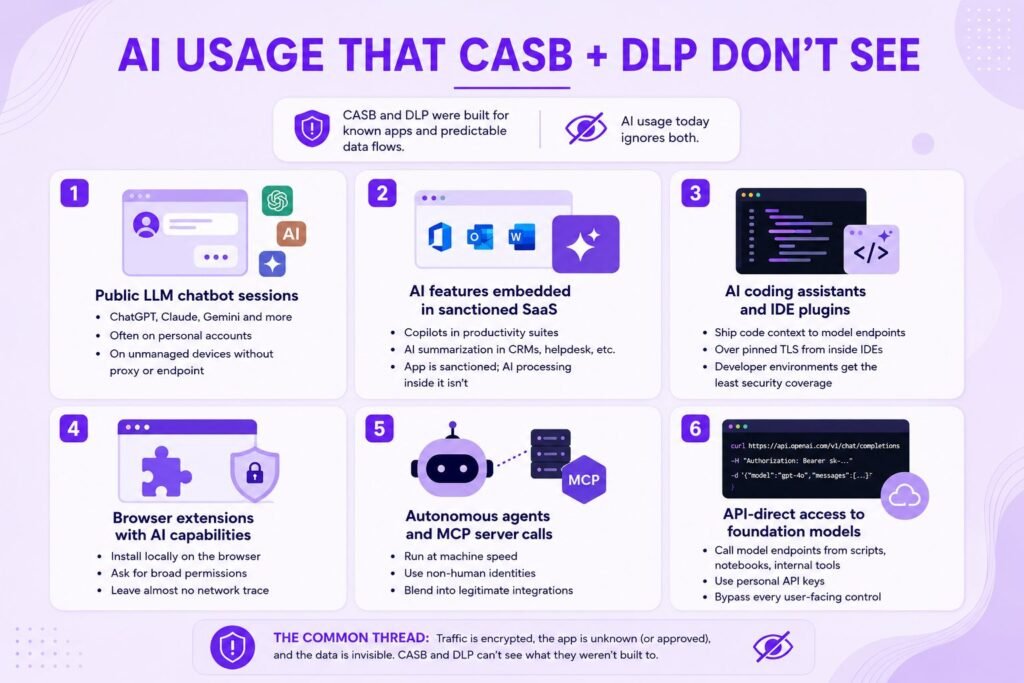
The Categories of AI Usage That Slip Through CASB + DLP

Put the two failure modes together and a consistent set of blind spots emerges.

  • Public LLM chatbot sessions. ChatGPT, Claude, Gemini, and the long tail, especially on personal accounts and unmanaged devices, where neither proxy nor endpoint agent is present.
  • AI features embedded in sanctioned SaaS. Copilots inside productivity suites, AI summarization in CRMs and ticketing tools. The app is sanctioned; the AI processing inside it never was.
  • AI coding assistants and IDE plugins. Assistants ship code context to model endpoints from inside the IDE, over pinned TLS, in developer environments that security tooling touches least. Given what the DBIR data says about source code exposure, this is arguably the single highest-value blind spot.
  • Browser extensions with AI capabilities. They install locally, ask for broad permissions, and leave almost nothing behind on the network.
  • Autonomous agents and MCP server calls. These run at machine speed on non-human identities, and their traffic blends into legitimate integration activity.
  • API-direct access to foundation models. Developers and power users calling model endpoints from scripts, notebooks, and internal tools with personal API keys, bypassing every user-facing control.

Let Axipro help you build a business continuity plan that's practical, compliant, and audit-ready.

Schedule Your Free Assessment Today

What Actually Works: A Modern AI Tool Usage Tracking Stack

No single tool replaces CASB and DLP for AI. What works is a layered stack that moves inspection to where AI interactions are actually legible.

Browser-Level Telemetry for Prompt and Response Visibility

The browser is where most AI interactions become plaintext. Enterprise browsers and browser extensions for security capture prompts, pastes, and uploads before encryption, tied to the logged-in identity, with no TLS inspection required. This is the fastest-growing layer of the AI visibility market for a reason. The honest downside is that it only covers browser-based usage on managed profiles, and rollouts meet real employee-privacy resistance, particularly in European works-council environments. Scope it to business identities and be transparent about what you’re capturing.

Identity-Centric Tracking via OAuth and SSO Signals

Your identity provider already logs a large share of AI adoption. New SSO registrations to AI tools, OAuth consent grants with mail, file, or calendar scopes, and token activity for departed users are all queryable today, with no new agents deployed. Reviewing OAuth grants is the single highest-yield first step in most environments and the cheapest.

Endpoint Signals for Local Model and Agent Detection

Endpoint telemetry (EDR or dedicated sensors) catches what the browser layer can’t: IDE plugins, CLI tools, local models running via Ollama or similar, and agent processes making API calls. Process lineage plus destination gives you the non-browser half of the inventory.

Prompt-Aware Content Inspection (Not Just Regex-Based DLP)

Once prompt text is visible, classify it with models, not regexes. Semantic classifiers can flag strategy discussions, unreleased financials, and source code exposure that no signature would catch, and can evaluate conversation context rather than isolated events. This is DLP rebuilt for language.

Behavioral Analytics for AI Interaction Patterns

UEBA-style baselining applies cleanly to AI: a finance user suddenly pushing large volumes to a new model endpoint, an agent identity querying systems outside its historical scope, prompt volume spiking before a resignation. Behavior catches the tools your catalog has never heard of.

Continuous SaaS-to-AI Integration Discovery

SSPM-style scanning of sanctioned SaaS reveals which AI integrations, plugins, and sub-processors are attached to your tenants, closing the embedded-AI gap that network tools can’t see. Run it continuously, because the integration list changes monthly.

Pro Tip: Sequence by cost.

Sequence by cost. Week one: pull OAuth grants and SSO logs from your IdP, free. Month one: turn on SaaS integration discovery. Quarter one: pilot browser telemetry with a high-risk group such as engineering or finance. Endpoint and semantic layers come after, once the inventory tells you where the actual risk concentrates.

Building an AI Usage Tracking Program That Scales

Tooling without a program produces dashboards nobody acts on. Four elements make tracking operational.

Establishing a Baseline of AI Interactions Across the Workforce

Run discovery across all layers for 30 to 60 days before enforcing anything. Expect the inventory to come back several times larger than anyone predicted. Knowing that in advance keeps leadership from reaching for a panicked blanket ban, which mostly drives usage further underground. The baseline also gives you the denominator for every metric that follows.

Defining Risk-Tiered Tracking Policies by Tool and Data Type

Not all AI usage deserves the same scrutiny.

A workable model uses three tiers:

  • Sanctioned tools with enterprise agreements (light-touch logging),
  • Tolerated tools (monitored, with data-type restrictions), and
  • Prohibited tools (blocked where feasible, alerted everywhere else).

Tier by data sensitivity as well: marketing copy in a chatbot and customer PII in a chatbot are different events, and under GDPR the second may be a reportable one.

Correlating User, Data, and Model Signals

The value is in the joins. Browser telemetry says what was pasted; the IdP says which identity; SSPM says which integrations that identity authorized; endpoint data says which agents run under it. Correlated, these answer the question that matters: which people and which agents are moving which data into which models.

Feeding AI Tracking Data Into SIEM and Governance Workflows

Route high-severity events into the SIEM alongside everything else, and route the aggregate picture into governance. ISO 42001 and the EU AI Act both presuppose that you know what AI systems are in use, and tracking data is the evidence base for the AI asset inventory, impact assessments, and audits those frameworks require. IBM’s 2025 data found 97% of organizations that suffered AI-related breaches lacked proper AI access controls. Tracking is how you find out whether you’re one of them before an incident does. If you are building that governance layer, our guide to implementing ISO 42001 step by step covers how the AI asset inventory and risk register fit together, and for organizations deploying agents, AIUC-1 AI agent certification extends that governance into auditable agent-level controls.
Evaluation Criteria: Choosing an AI Usage Tracking Solution

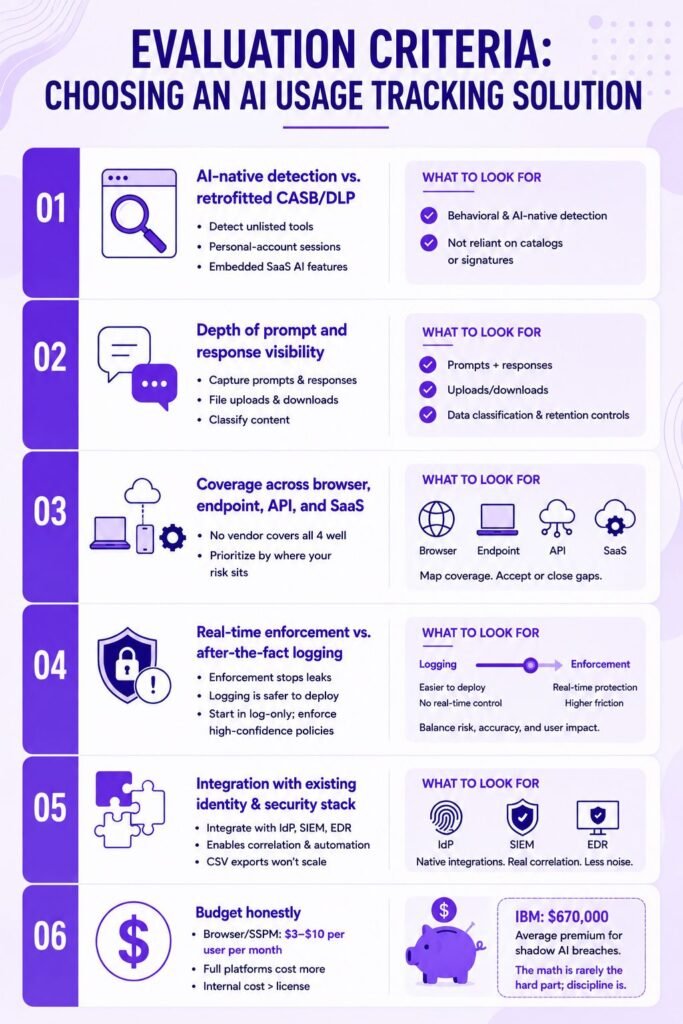
The market is crowded and the marketing is uniform, so evaluate on architecture rather than adjectives.

  • AI-native detection vs. retrofitted CASB/DLP.
    Ask vendors to show detection of an unlisted tool, a personal-account session, and an embedded SaaS AI feature. Retrofitted platforms typically pass the first test and fail the other two, because catalogs and signatures are still doing the work underneath.
  • Depth of prompt and response visibility.
    Some tools log that an AI site was visited, some capture prompts, and only a few capture responses and file uploads with data classification attached. Know which layer you’re buying, and check retention and redaction options, since prompt logs are themselves a sensitive data store.
  • Coverage across browser, endpoint, API, and SaaS.
    No vendor covers all four well. Decide which gaps you will accept or fill with a second product, and weight coverage by where your risk sits: engineering-heavy companies should weight endpoint and API coverage far above browser.
  • Real-time enforcement vs. after-the-fact logging.
    Inline blocking and redaction stop leaks but add latency and false-positive friction, while logging is safer to deploy and useless in the moment. Mature programs start in log-only mode and graduate specific high-confidence policies to enforcement.
  • Integration with existing identity and security stack.
    The correlation described above only happens if the tool speaks to your IdP, SIEM, and EDR natively. A brilliant detector that exports CSVs won’t survive contact with your SOC’s workload.

Budget honestly: browser-layer and SSPM-style tools commonly land in the $3 to $10 per user per month range, full platforms higher, and the internal cost of policy design and alert triage usually exceeds the license. Set against IBM’s $670,000 shadow AI breach premium, the math is rarely the hard part; the operating discipline is.

Shadow AI isn’t a gap you can close by tightening the tools you already have. CASB can’t see inside encrypted, OAuth-mediated, extension-delivered AI traffic, and DLP can’t judge the meaning of a prompt. Visibility has to move to the browser, the identity layer, the endpoint, and the SaaS integration graph, and the output has to feed a governance program that decides what happens next. Organizations that build that stack now will walk into EU AI Act obligations, ISO 42001 audits, and their own board meetings with evidence instead of estimates.

Frequently Asked Questions

Can CASB detect ChatGPT usage?

Partially. A CASB can see connections to known ChatGPT domains from devices routed through its proxy, and it can block them. It can’t see prompt content, can’t tell an enterprise tenant from a personal account, and sees nothing from unmanaged devices, personal networks, or API traffic. Seeing the visit isn’t the same as seeing the risk.

Not reliably. DLP can block pattern-matched data (card numbers, SSNs) from reaching known AI destinations if it can inspect the traffic. It doesn’t understand prompts semantically, so most sensitive-but-unstructured leakage passes straight through, and prompt injection is an attack on the model’s behavior, which DLP doesn’t evaluate at all.

Detection is the discovery step: finding unsanctioned AI tools in the environment at a point in time. AI usage tracking is the continuous program built on top: monitoring interactions, correlating identity and data signals, enforcing tiered policies, and feeding governance frameworks like ISO 42001 and the NIST AI RMF with evidence.

No. Keep them for what they do well: SaaS access governance and structured-data controls. Add AI-specific layers on top: identity-based OAuth monitoring, browser telemetry, SaaS integration discovery, and prompt-aware classification. Replacement is rarely justified; supplementation almost always is.

You mostly don’t decrypt it; you move the inspection point. Capture interactions at the browser or endpoint before encryption; use identity signals.

Axipro Author

Picture of Pedro Dias

Pedro Dias

Pedro has been writing online for over 10 years. With experience in all things programming, cyber security, and compliance, he is our editor-in-chief at Axipro.

Blog Highlights

Explore More Articles

One in five breached organizations last year traced the incident to shadow AI, and those breaches cost an average of $670,000 more than standard incidents, according to IBM’s 2025 Cost of a Data Breach Report. The worst part is that most of those organizations already ran a CASB, a DLP program, or both. The tools were on, but the traffic still got through. That’s the visibility gap this article is about. AI tool usage tracking isn’t the same problem as SaaS discovery, and the security stack built for the SaaS era misses most of what matters about AI. Below, we break down what tracking actually requires, where CASB and DLP fail, which categories of AI usage slip through, and what a stack that works looks like in 2026. What AI Tool Usage Tracking Actually Means Most teams that say they “track AI usage” mean they can see that someone visited chat.openai.com. That is app discovery, and it answers almost none of the questions a security or governance team actually needs answered. Beyond App Discovery: Tracking Prompts, Data Flows, and Model Interactions Real tracking covers three layers. First, which tools are in use: chatbots, copilots, coding assistants, embedded SaaS features, agents. Second, what data moves: the content of prompts, uploaded files, and pasted context, mapped against data classifications. Third, how models behave in your environment: which endpoints get called, which OAuth grants exist, which agents hold standing permissions. Seeing that an employee opened ChatGPT gets you nowhere. What you actually need to know is whether they pasted a customer contract into a personal account while they were there. The Difference Between Detection, Monitoring, and Continuous Tracking Detection is a point-in-time answer to “what AI is here?” Monitoring watches known tools on an ongoing basis. Continuous tracking is broader: it assumes the inventory changes weekly, correlates identity, data, and endpoint signals over time, and feeds a governance program rather than a one-off report. Frameworks such as the NIST AI Risk Management Framework and ISO 42001 assume the third mode. A discovery scan from last quarter won’t satisfy an auditor, and it certainly won’t slow down an attacker. Why Traditional SaaS Monitoring Falls Short for AI SaaS monitoring was built around a stable premise: an app is a destination with a domain, a login, and an admin console. AI breaks that premise in several ways at once. The risky activity is the content of an interaction, not the visit. The tool often isn’t a destination at all but a feature inside an app you already sanctioned. And increasingly the “user” isn’t a person but an agent acting on delegated credentials. Why CASB Misses Shadow AI Usage The Cloud Access Security Broker sits between users and cloud services to enforce policy, and for classic SaaS governance it still earns its keep. AI has structural blind spots that no amount of tuning can fix. CASBs Were Built for SaaS Apps, Not Model Endpoints A CASB catalog maps domains to applications with risk scores. AI usage doesn’t resolve neatly to a domain. The same api.openai.com endpoint serves a sanctioned enterprise deployment, a developer’s weekend experiment, and a data-leaking browser extension, and the catalog sees one “app”. Meanwhile, new model endpoints, wrappers, and niche AI tools appear faster than any vendor catalog can keep up with. Gartner research from late 2025 found 69% of organizations already suspect or have evidence that employees use prohibited public generative AI tools, catalog or no catalog. Blind Spots in Encrypted API Traffic to LLM Providers Prompt content travels over TLS. Without full TLS inspection, a CASB sees connection metadata: destination, volume, timing. It can’t see that the payload contained source code or patient records. And full TLS inspection is harder than the datasheet implies. Certificate pinning breaks it for many native apps and CLI tools, legal and works-council constraints limit it in the EU, and most organizations carve out broad exemption lists that AI traffic happily rides through. The OAuth and Embedded AI Problem CASBs Can’t See When an employee grants an AI meeting-notes tool access to their calendar and mailbox via OAuth, no proxy is involved at all. The vendor’s servers communicate directly with Microsoft’s or Google’s APIs using a persistent token. The same applies to AI features embedded inside sanctioned SaaS, think Notion AI, Slack AI, or Salesforce Einstein. The CASB sees approved traffic to an approved app, while the AI processing happening inside it, and whichever sub-processor it forwards data to, stays invisible. Personal Accounts and BYO-AI Bypass CASB Proxies Netskope’s 2026 Cloud and Threat Report found that nearly half of employees who use generative AI at work do so through personal accounts. Personal accounts on managed devices are hard enough; personal accounts on personal devices, home networks, and mobile connections never touch the corporate proxy path at all. Tenant restrictions help for a handful of major providers and do nothing for the long tail. Browser-Based and Extension-Delivered AI Escape Network Inspection AI browser extensions read page content and form inputs locally, then exfiltrate via their own backend, often to generic cloud infrastructure that categorizes as “technology” rather than “AI”. From the network’s view, it is routine HTTPS to a CDN. The riskiest interaction, an extension scraping everything an employee views, produces the most boring traffic signature. Insider Note: In AI governance readiness assessments, the OAuth grant review is where clients get the biggest surprise. We routinely find dozens of AI tools holding live mail, calendar, or drive scopes that nobody in IT ever approved, granted by employees who abandoned the tool (and sometimes the company) months earlier. The tokens keep working anyway. Why DLP Fails to Catch Shadow AI Data Exposure DLP has the opposite problem. It can sometimes see content, but it doesn’t understand it, and AI interactions defeat the pattern matching it depends on. Prompt-Based Data Loss Doesn’t Match DLP Signature Patterns DLP fires on signatures: credit card regexes, SSN formats, keyword dictionaries, file fingerprints. Sensitive prompts rarely look like that. “Summarize why we’re losing

Most SOC 2 preparation effort goes into access controls, encryption, and vendor reviews. Then the auditor’s first evidence request arrives, and item one has nothing to do with technology: show us your board charter, your meeting minutes, and proof that your board operates independently from management. That’s CC1.2, and it causes more last-minute scrambling than almost any technical control in the framework. This guide explains what CC1.2 requires, provides a board charter template with sample language that auditors accept, and covers the situation most startups actually face: satisfying the criterion without a traditional board of directors. What Is a SOC 2 Board Charter and Why It Matters for CC1.2 A board charter is a formal document that defines your board’s purpose, composition, authority, meeting procedures, and oversight responsibilities. Outside of compliance, it’s a corporate governance tool and a good idea in general for companies with shareholders.  Inside a SOC 2 audit, it’s the primary design evidence for CC1.2, the criterion that asks whether an independent body oversees management and the internal control environment. The charter matters because CC1.2 is one of the few criteria where the control is a document plus behavior. The charter establishes the structure. The auditor then tests whether the structure operates: did the board actually meet, did it review the security program, did it challenge management? A beautifully drafted charter with no meeting minutes behind it fails just as surely as no charter at all. If you’re earlier in your preparation, our complete SOC 2 guide covers how the full audit fits together. Understanding CC1.2: The Board Independence Criterion CC1.2 is part of the Trust Services Criteria published by the AICPA (American Institute of Certified Public Accountants). The criterion requires that the board of directors, in the AICPA’s words, “demonstrates independence from management and exercises oversight” of how internal control is developed and how it performs. That sentence hides two separate tests. Independence means the board isn’t just management wearing a second hat. Active oversight means the board actually reviews and challenges the control environment instead of existing on paper. Plenty of companies pass one and fail the other. How CC1.2 Fits Within the CC1 Control Environment The Common Criteria run from CC1 through CC9, and the CC1 series covers the control environment: the governance and people layer everything else rests on. CC1.1 addresses integrity and ethical values, CC1.2 addresses board independence and oversight, CC1.3 covers organizational structure and reporting lines, CC1.4 covers competence and hiring, and CC1.5 covers accountability. CC1.2 is the layer that makes the other four credible. A code of conduct means little if nobody independent of management ever checks whether leadership follows it. The COSO Principle 2 Connection The Trust Services Criteria are built directly on the COSO Internal Control—Integrated Framework and its 17 principles. CC1.2 maps to COSO Principle 2, which carries four points of focus: the board establishes oversight responsibilities, applies relevant expertise, operates independently of management, and provides oversight of the system of internal control. Those four phrases are worth memorizing, because they’re effectively the outline of a good board charter. Why Auditors Prioritize Board Charter Evidence Auditors test the control environment first because failures there cascade. If governance is weak, every other control claim gets harder to trust: who approved the risk assessment, who reviewed the incident report, who held management accountable when a control slipped? An exception at CC1.2 tells the auditor that nobody independent was watching, and they’ll read the rest of your evidence with that in mind. That’s why board charter requests sit near the top of almost every evidence list. Worth Knowing: Points of Focus Points of focus are not pass/fail requirements. The AICPA describes them as characteristics that assist evaluation, and the 2022 revisions changed points of focus without changing any criteria. In practice, though, they function as the auditor’s mental checklist, so drafting your charter against them is the safest move. What Auditors Actually Look For in a Board Charter Auditors don’t grade prose style. They scan for specific, verifiable commitments. Here’s what they check, roughly in order. Documented Board Independence from Management The charter must state how many members are independent, define what independence means (no operational role, no material financial relationship beyond board compensation or equity), and describe how independence is maintained. “The board includes members independent of management” without a definition is boilerplate; auditors want criteria they can test against actual member profiles. Defined Oversight Responsibilities This is the heart of CC1.2. The charter should explicitly assign the board oversight of internal control, information security, and risk management. If the charter only mentions financial oversight and strategy, it wasn’t written with SOC 2 in mind, and the auditor will notice the gap. Clear Authority and Decision-Making Powers What can the board approve, veto, or demand? Typical provisions include approving the risk management framework, reviewing audit results, approving executive appointments, and requiring management to report on control deficiencies. Authority without teeth reads as decorative. Meeting Cadence and Quorum Requirements The charter should commit to a minimum meeting frequency (quarterly is the common standard) and define a quorum. This clause matters more than founders expect, because it’s the one auditors test directly against your calendar: if the charter says quarterly and you met twice last year, that’s an exception you wrote for yourself. Committee Structures Larger organizations delegate through audit, risk, and compensation committees, each with its own mini-charter. Smaller companies don’t need committees, but if your charter mentions them, they must exist and produce minutes. Never copy a public-company template with a phantom audit committee. Conflict of Interest Provisions A disclosure and recusal process for conflicts, usually paired with an annual attestation. This clause supports the independence claim: independence isn’t a one-time status, it’s maintained through disclosed and managed conflicts. Evidence of Board Member Expertise and Qualifications COSO’s “applies relevant expertise” point of focus means the board should be able to ask probing questions about security and risk, not just finance. Charters increasingly include a skills expectation clause, and

Most Drata reviews are written by Drata’s competitors. Scroll the first page of Google and you’ll find review posts from rival compliance platforms, each one ending with a pitch for their own tool. This one is different, and the bias runs the other way, so let’s put it on the table: Axipro is a Drata Gold Partner, and our consultants configure the platform for clients every week. That means we profit when companies choose Drata. It also means we know exactly where it saves you months, where the invoice grows faster than you planned, and when you should pick something else. This review covers all three. What Is Drata?​ Drata is a compliance automation platform (the industry calls the category GRC, for governance, risk, and compliance) founded in 2020 in San Diego by Adam Markowitz, Daniel Marashlian, and Troy Markowitz. Its core job: connect to your cloud infrastructure, identity provider, HR system, and code repositories, then continuously test your security controls against frameworks like SOC 2 and ISO 27001, collecting timestamped evidence as it goes. When your auditor shows up, most of the evidence is already packaged. Funding, Valuation, and Market Position Drata has raised $328 million, most recently a $200 million Series C in late 2022 that valued the company at $2 billion. It passed $100 million in annual recurring revenue in early 2025, acquired the trust center platform SafeBase for $250 million the same year, and now serves more than 8,000 customers. In late 2025 it earned a FedRAMP 20x Low Pilot Authorization, which puts it in a small group of compliance platforms cleared through the U.S. government’s modernized FedRAMP review track. Together with Vanta, it’s one of the two platforms almost every compliance buyer shortlists. Who Drata Is Built For The sweet spot is cloud-native companies from seed stage to mid-market: SaaS businesses pursuing their first SOC 2 or ISO 27001, and scaling teams juggling three or four frameworks at once. If your infrastructure lives in AWS, Azure, or GCP and your team uses standard tools like Okta, GitHub, and a mainstream HRIS, Drata’s automation covers a large share of your evidence collection out of the box. The further you drift from that profile (heavy on-prem systems, exotic tooling, air-gapped environments), the more manual work remains. How Drata Works: From Connection to Audit The workflow runs in five stages. First, you connect your tech stack through more than 270 native integrations covering cloud providers, identity, version control, HRIS, MDM, and ticketing. Second, continuous control monitoring kicks in: automated tests run around the clock against your connected systems, checking things like MFA enforcement, encryption settings, and access reviews. Third, automated evidence collection captures timestamped proof each time a test passes, building the evidence library your auditor will draw from. Fourth, when a test fails, remediation workflows and alerts route the issue to an owner through Slack, Jira, or email, with guidance on how to fix it. Fifth, the Audit Hub gives your auditor a scoped login to review evidence directly in the platform instead of trading spreadsheets and screenshots over email. In our client engagements, that last piece cuts back and forth more than any other feature. Auditors ask fewer clarifying questions when they can trace evidence to its source themselves. Drata’s Core Features Reviewed Overview of the Drata platform and compliance management dashboard. Multi-Framework Control Mapping Drata maintains a single control set mapped across every framework you activate. Pass an encryption control once, and it satisfies the corresponding requirements in SOC 2, ISO 27001, and HIPAA simultaneously. For multi-framework programs, this is the feature that pays for the platform. Adding ISO 27001 to an existing SOC 2 program typically starts you at 60 to 80 percent complete rather than zero. The Drata Agent The Drata Agent is a lightweight application installed on employee laptops. It checks device posture: screen lock, disk encryption, password manager, antivirus, OS updates. It reads configuration states, not files, browsing history, or keystrokes. Employees sometimes push back on installing it anyway, which is why we advise clients to communicate what it does and doesn’t see before rollout, not after the first complaint. Companies with an existing MDM like Jamf or Intune can often pull device evidence from that integration instead. Risk Management, Vendor Risk, and the Trust Center The built-in risk register lets you score risks by likelihood and impact and tie them to controls and remediation tasks. Vendor risk management got a genuine upgrade with the August 2025 agentic AI release, which now collects vendor evidence, reviews SOC 2 reports, and drafts risk summaries with far less manual chasing. The Trust Center, built on the acquired SafeBase product, gives you a public page where prospects can review your certifications and policies under NDA. Clients in active enterprise sales cycles tell us it measurably shortens security review, though note it’s a paid add-on at most tiers, not a bundled feature. Policies, Training, and the Rest Drata ships editable policy templates for every major framework, embedded security awareness training with completion tracking, and an API for anything the native integrations miss. The policy templates are a real accelerator for first-time programs, with one caveat we see constantly: teams accept templates wholesale without adapting them, then get flagged in audit when their actual practice doesn’t match their written policy. A template you don’t follow is worse than no template. Supported Compliance Frameworks Drata supports more than 30 frameworks. The ones that matter for most buyers: SOC 2 (Type I and Type II) against the AICPA Trust Services Criteria, ISO 27001, HIPAA (where Drata operationalizes safeguards, since no formal HIPAA certification exists), GDPR under the EU data protection rules, and PCI DSS. Coverage extends to CMMC, NIS2, DORA, FedRAMP, and various NIST standards. You can also build custom frameworks by mapping your own control set, useful for internal standards or customer-specific requirements. What Users Really Say Drata holds a 4.8 out of 5 on G2 across more than 1,100 reviews, the highest score among the