One in five organizations has already suffered a breach traced back to shadow AI. Meanwhile, 63% of breached organizations either have no AI governance policy at all or are still drafting one. Below is a complete, copy-ready shadow AI policy template with twelve sections, plus guidance on adapting it for your company size, your industry, and the regulatory frameworks you answer to.
The template assumes one hard truth up front: your employees are already using unapproved AI tools. A policy that pretends adoption hasn’t started yet fails on day one, so this one starts from the assumption that it has.
What Is a Shadow AI Policy?
A shadow AI policy is a formal document that defines how your organization discovers, evaluates, approves, and governs AI tools that employees adopt outside official IT channels. The term borrows from shadow IT, the older problem of unsanctioned software and hardware, but the AI version carries sharper risks: data pasted into a public model may be retained, used for training, or exposed in ways the organization can’t reverse.
The policy does three jobs: it separates approved use from unapproved use, gives employees a fast and visible way to request new tools so the sanctioned route beats the workaround, and spells out what happens when someone crosses the line, including how the organization detects it and responds.
Shadow AI Policy vs. General AI Acceptable Use Policy
Many organizations already have an AI acceptable use policy (AUP) and assume it covers shadow AI. It usually doesn’t. An AUP tells employees how to behave inside approved tools. A shadow AI policy governs the tools themselves: which ones exist in your environment, which ones are allowed, and what happens with the rest.
You need both. The AUP handles conduct; the shadow AI policy handles inventory and control. If you only have room for one document, fold the AUP’s data-handling rules into Section 6 of the template below.
The Shadow AI Policy Template (Download Link and Copy-Ready Sections)
We’ve created a compliance safe template for Shadow AI Policy, use the link below to create a copy and customize for your company:
Copy the sections below into your policy management system and replace the bracketed placeholders. The language is plain on purpose. Legalese gets skimmed.
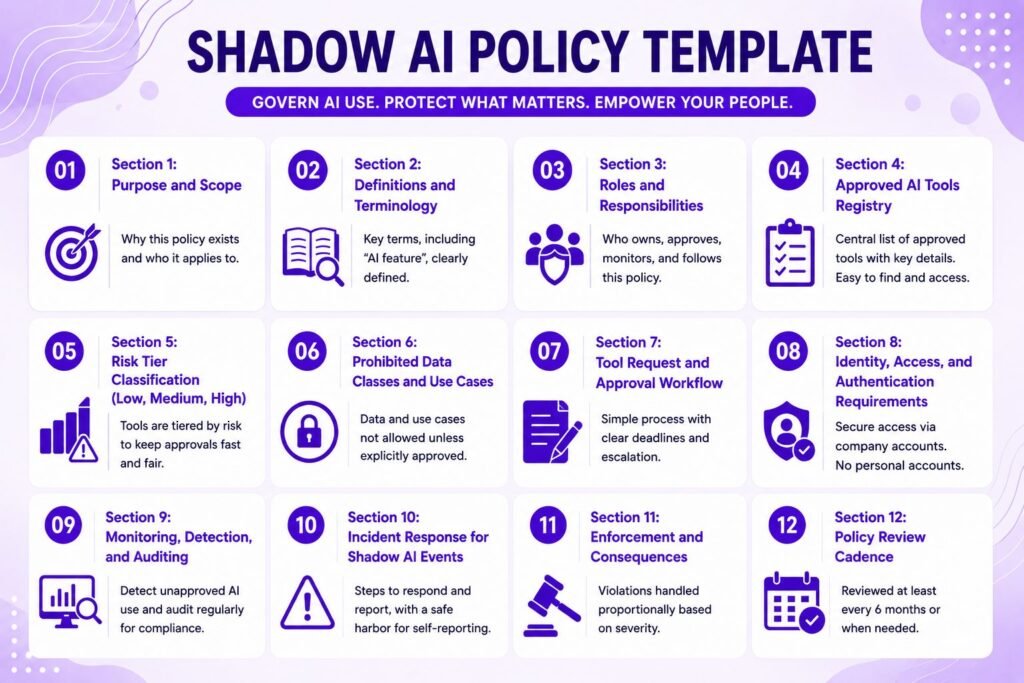
Section 1: Purpose and Scope
This policy governs the acquisition, approval, and use of artificial intelligence tools, features, and services at [Company]. It applies to all employees, contractors, interns, and third parties with access to [Company] systems or data. It covers standalone AI applications, AI features embedded in existing software, browser extensions, AI agents, APIs, and personal AI accounts used for work purposes, on both corporate and personal devices. The purpose of this policy is to enable productive AI use while protecting [Company] data, customers, and legal obligations. This policy does not prohibit AI. It prohibits ungoverned AI.
That last sentence matters. Employees read the purpose statement first, and it decides whether they see the policy as an enabler or a blocker.
Section 2: Definitions and Terminology
Shadow AI: any AI tool, feature, agent, or service used for work purposes without formal approval under this policy. Approved AI Tool: an AI tool listed in the Approved AI Tools Registry (Section 4) and used under a [Company]-managed account. Personal AI Account: an account on any AI service registered to a personal email address or paid for personally. AI Feature: AI functionality embedded within otherwise approved software (e.g., an AI assistant added to a project management tool), which requires separate evaluation. Sensitive Data: data classified as [Confidential] or [Restricted] under [Company]‘s data classification policy, including the prohibited data classes in Section 6.
Define “AI feature” explicitly. Vendors now ship AI additions into already-approved SaaS products every month, and without this definition, those features inherit approval they never earned.
Section 3: Roles and Responsibilities
The CISO (or designated security lead) owns this policy, maintains the Approved AI Tools Registry, and runs the approval workflow. Department heads ensure their teams know the policy and surface tool requests rather than suppressing them. Legal and Compliance review tools that touch regulated data or fall under the EU AI Act, GDPR, HIPAA, or client contractual restrictions. IT operates detection and monitoring controls (Section 9). Every employee is responsible for using only approved tools for work, reporting unapproved AI use they discover, and requesting new tools through the workflow in Section 7 rather than adopting them directly.
Insider Note: In organizations under roughly 200 people, the “CISO” in this section is often the same overworked IT lead who manages laptops. Name a real person, not a title that doesn’t exist yet. A policy that assigns duties to a phantom role is unenforceable, and auditors notice.
Section 4: Approved AI Tools Registry
[Company] maintains a registry of approved AI tools at [location/URL]. For each tool, the registry records: tool name and vendor, approved use cases, prohibited use cases, permitted data classes, account type (enterprise/team/individual), data retention and training settings, risk tier (Section 5), approval date, and next review date. Only tools listed in the registry may be used for work. Tools not listed are unapproved by default. The registry is reviewed [quarterly].
Keep the registry somewhere employees actually look, such as your intranet homepage or IT help center, not buried in a GRC platform they can’t access. An invisible registry recreates the problem the policy exists to fix.
Section 5: Risk Tier Classification (Low, Medium, High)
Each tool in the registry is assigned a risk tier. Low: the tool processes only public or internal non-sensitive data, runs under an enterprise agreement with training opt-out, and produces output that a human reviews before use. Approval by IT Security alone. Medium: the tool processes internal business data or connects to [Company] systems via API or integration. Approval by IT Security plus the data owner. High: the tool processes sensitive data, customer personal data, or regulated data; makes or influences consequential decisions (hiring, credit, medical, legal); or operates autonomously as an agent. Approval by IT Security, Legal, and the executive sponsor, with a documented risk assessment.
Tiering is what keeps the approval workflow fast. Without it, a request for a grammar checker sits in the same queue as a request for an autonomous agent with database access, and both take six weeks.
Section 6: Prohibited Data Classes and Use Cases
The following data may never be entered into any AI tool that is not explicitly approved for it in the registry: customer or employee personal data; protected health information; payment card data; authentication credentials, API keys, and access tokens; source code designated proprietary; unreleased financial results; legal matters and privileged communications; client-confidential material governed by NDA; and any data classified [Restricted]. The following use cases are prohibited in all tiers without executive and Legal approval: automated employment decisions, biometric identification, emotion inference in the workplace, and any use case restricted or prohibited under the EU AI Act.
IBM’s 2025 report found that 65% of shadow AI breaches involved customer personal data, well above the 53% average across all breaches. This section is where you keep yours out of that statistic.
Section 7: Tool Request and Approval Workflow
Any employee may request a new AI tool by submitting [form/link] with: the tool name, intended use case, data classes involved, and account type. IT Security triages the request within [3 business days] and assigns a provisional risk tier. Low-tier requests receive a decision within [5 business days]; medium within [10]; high within [20]. If a decision misses its deadline, the request escalates automatically to [role]. Rejections must state the reason and, where possible, name an approved alternative. Approved tools are added to the registry before use begins.
The deadlines are the whole point. A workflow without service-level targets is a suggestion box, and employees will route around it within a week.
Pro Tip: Publish your approval statistics internally
Publish your approval statistics internally each quarter: requests received, approved, rejected, and average turnaround. When employees can see that 80% of requests get approved in under a week, the sanctioned path becomes the obvious one. Secrecy around approvals feeds the assumption that asking is pointless.
Section 8: Identity, Access, and Authentication Requirements
All approved AI tools must be accessed through [Company]-managed accounts provisioned via SSO where the vendor supports it. Multi-factor authentication is mandatory. Personal accounts may not be used for work data under any circumstances, including free tiers of tools whose enterprise version is approved. API keys for AI services are issued, stored, and rotated through [Secrets Manager] and may not be embedded in code, shared in chat, or pasted into other AI tools. Access to high-tier tools follows least privilege and is reviewed [quarterly]. Departing employees have AI tool access revoked as part of standard offboarding.
See our full breakdown of Identity, Access, and Authentication Requirements for the tooling behind this section. The personal-account clause deserves extra attention in training. Netskope’s 2026 research found that most generative AI users access tools through personal accounts, which sit entirely outside enterprise logging, retention controls, and legal hold.
Section 9: Monitoring, Detection, and Auditing
IT operates technical controls to detect unapproved AI use, which may include DNS and web proxy monitoring of known AI service domains, CASB or SSPM discovery of SaaS and OAuth grants, browser-level data loss prevention for paste and upload events into AI services, and review of network traffic to AI API endpoints. Detection exists to protect [Company] data, not to surveil individuals; findings are handled under Section 10 with a remediation-first approach. IT Security audits the environment for unsanctioned AI at least [quarterly] and reports findings to [governance committee]. Monitoring practices comply with applicable employment and privacy law in each jurisdiction where [Company] operates.
Only 34% of organizations with AI governance policies actually audit for unsanctioned AI, per IBM. Writing this section is easy. Resourcing it is the real commitment.
Section 10: Incident Response for Shadow AI Events
A shadow AI event includes sensitive data entered into an unapproved tool, an unapproved tool connected to [Company] systems, or an approved tool used outside its permitted data classes. Upon discovery, the responder must: (1) identify the tool, account, and data involved; (2) preserve evidence, including prompts and outputs where retrievable; (3) contain by revoking access, disabling integrations, and requesting vendor data deletion; (4) assess whether the event constitutes a reportable breach under GDPR, HIPAA, or contractual obligations, with Legal making the determination; (5) notify affected parties per legal requirements; and (6) complete a post-incident review that feeds back into the registry, training, and this policy. Self-reported events within [24 hours] of occurrence are treated as near-misses, not violations, provided no intentional misconduct occurred.
That final sentence is your early-warning system. IBM found shadow AI breaches take about a week longer than average to identify and contain, largely because nobody wants to admit what happened. A self-reporting safe harbor shortens that timeline more than any monitoring tool.
Section 11: Enforcement and Consequences
Violations are handled proportionally. First unintentional violations result in retraining and documentation. Repeated violations, or any violation involving sensitive data, escalate through [Company]‘s standard disciplinary process up to termination. Intentional concealment of AI use after a direct inquiry, falsification of approval records, or entering prohibited data classes knowingly are treated as serious misconduct. Contractors and third parties in violation may have access revoked and contracts reviewed. Enforcement decisions are documented by [HR/Legal] and reported in aggregate to the [governance committee].
Proportionality isn’t softness. Employees who think a single honest mistake ends their career will hide every mistake, and hidden mistakes turn into the breaches you read about.
Section 12: Policy Review Cadence
This policy is reviewed [every six months] and after any of the following triggers: a shadow AI incident classified medium or higher, a material change in AI regulation affecting [Company], adoption of a new AI category (e.g., autonomous agents), or a significant change in the approved tool registry. The policy owner presents review outcomes to [governance committee], and material changes are communicated to all staff with [30 days] notice.
Six months is the ceiling, not the target. The AI tool market moves faster than any software category your policies have covered before.
How to Customize the Template for Your Organization
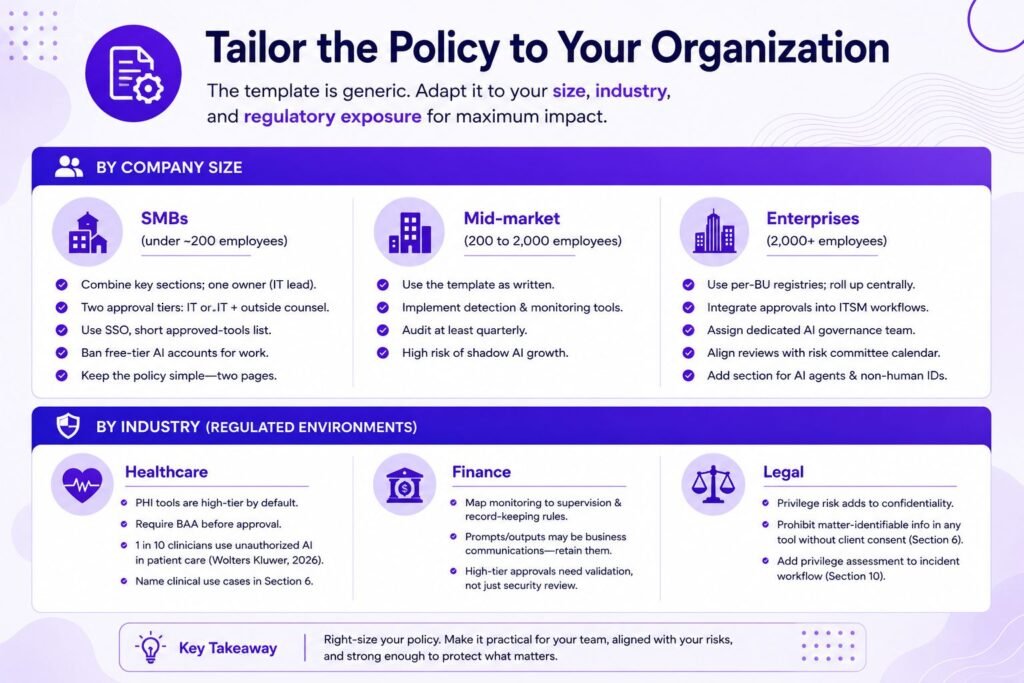
The template above is generic by design. Its value depends on how you adapt it, and three variables matter most: size, industry, and regulatory exposure.
Adapting for Company Size (SMB, Mid-Market, Enterprise)
SMBs (under ~200 employees) should collapse the structure. Merge Sections 3, 7, and 9 into a single owner, usually the IT lead, with the CEO as escalation. Cut the three-tier approval to two: “IT approves” and “IT plus outside counsel approves.” Skip CASB tooling you can’t afford and rely on SSO enforcement, a short approved-tools list, and a standing rule that free-tier AI accounts are banned for work data. The whole policy should fit on two pages.
Mid-market companies (200 to 2,000) should implement the template roughly as written, with real detection tooling and a quarterly audit. This is the size band where shadow AI grows fastest: enough employees to generate hundreds of unsanctioned tools, not yet enough governance headcount to notice.
Enterprises should extend it. Add per-business-unit registries that roll up to a central one, integrate the approval workflow into existing ITSM tooling, assign a dedicated AI governance function, and align Section 12’s review triggers with the enterprise risk committee calendar. At this scale, also add a section on AI agents and non-human identities, because agent sprawl is the next form shadow AI takes.
Adapting for Regulated Industries (Healthcare, Finance, Legal)
Healthcare organizations must treat any tool that could touch protected health information as high-tier by default and require a Business Associate Agreement before approval. Wolters Kluwer research in 2026 found that one in ten healthcare professionals has already used an unauthorized AI tool in a direct patient care context, so Section 6 should name clinical use cases explicitly rather than relying on general data-class language.
Financial services firms should map Section 9’s monitoring to existing supervision and record-keeping obligations, since prompts and outputs may qualify as business communications regulators expect you to retain. Model risk management requirements also mean high-tier approvals need documented validation, not just a security review.
Legal organizations face privilege risk on top of confidentiality risk. A prompt containing client matter details entered into an unapproved tool can arguably waive privilege. Section 6 should prohibit matter-identifiable information in any tool without explicit client consent, and Section 10 should add a privilege assessment step to the incident workflow.
Let Axipro help you build a business continuity plan that's practical, compliant, and audit-ready.
Strengthen Your Business Continuity Strategy
Aligning with EU AI Act, GDPR, and NIST AI RMF
Three frameworks shape most shadow AI policies, and the template maps to each.
The EU AI Act matters even for shadow tools, because obligations attach to the use of AI, not just its procurement. Article 4’s AI literacy requirement, applicable since February 2025, means staff using AI need adequate training, which is impossible for tools you can’t see. Section 5’s high tier and Section 6’s prohibited use cases should mirror the Act’s prohibited and high-risk categories. Note that the Digital Omnibus proposals have shifted timelines for certain Annex III high-risk obligations toward late 2027, so keep Section 12’s regulatory trigger active rather than hardcoding dates.
Under the GDPR, an unapproved AI vendor processing personal data is a processor with no Article 28 contract, no lawful basis analysis, and no entry in your records of processing. Sections 6 and 10 carry the GDPR weight: prohibited data classes prevent the violation, and the incident workflow determines whether a 72-hour breach notification applies.
The NIST AI Risk Management Framework provides the vocabulary for the whole structure. The registry and detection controls implement the Map function, risk tiers implement Measure, the approval workflow and enforcement implement Manage, and the roles, review cadence, and governance reporting implement Govern. If you pursue ISO/IEC 42001 certification later, a shadow AI policy built this way gives you a running start on the management system’s inventory and risk assessment clauses.
Worth Knowing: IBM's 2025 Report
IBM's 2025 report found that 97% of organizations that suffered an AI-related security incident lacked basic AI access controls. Section 8 of this template, the least glamorous section, addresses the single most common failure condition in real-world AI breaches.
Why Bans Fail: The Permission Gap
Some leadership teams will read this template and ask the obvious question: why not just block everything? Because the data says blocking doesn’t work. PagerDuty’s 2026 survey of office professionals at large companies found that 66% had used AI tools at work despite believing it was against policy, and nearly half said they’d rather use AI without telling anyone than risk being told no. Microsoft and LinkedIn’s Work Trend Index put bring-your-own-AI at 78% of AI users back in 2024, before adoption accelerated further.
Call it the permission gap: the space between what employees are allowed to use and what their workload demands. When approved tools lag behind the job, employees close that distance themselves, on personal accounts and personal devices, outside of your control you own. A ban doesn’t shrink the gap. It pushes usage where you can’t see it, which is exactly where IBM measured that extra $670,000 in breach cost. The organizations with the least shadow AI aren’t the ones with the strictest bans. They’re the ones where the approved path is genuinely faster than the workaround.
Rolling It Out Without Killing Adoption
Sequence matters more than policy text. Start with discovery, not announcement: run your DNS, proxy, and SaaS discovery tools for two to four weeks before the policy goes live, so the initial registry reflects the tools people already depend on. Then grandfather aggressively. Take the ten most-used discovered tools, fast-track them through the approval workflow, and launch the policy with a populated registry rather than an empty one. A policy that opens by approving the tools people already rely on earns compliance. One that opens with prohibition doesn’t.
Announce with an amnesty window. Give employees 30 days to disclose the tools they use with no consequences, and route every disclosure into the request workflow. Pair the announcement with the training the EU AI Act already expects you to deliver, and keep it practical: show real examples of what may and may not go into a prompt, using your own data classes. Then measure adoption of the approved tools, not just violations. If usage of sanctioned tools is flat while detection findings climb, your approved offering is the problem, not your workforce.
Important: Don’t launch monitoring (Section 9) before the amnesty window closes. Employees who discover they were being watched during a supposed grace period will treat every future assurance from IT Security as hollow, and you’ll spend years rebuilding the trust that shadow AI governance depends on.
Conclusion
Shadow AI isn’t a discipline problem. It’s a governance vacuum, and vacuums get filled by whatever tool loads fastest. The twelve-section template above fills that vacuum with a registry, risk tiers, a fast approval path, real detection, and proportional enforcement, then adapts to your size, sector, and regulatory obligations. Copy it, name real owners, and populate the registry with the tools your people already use. Once asking beats hiding, the gap starts closing on its own.