The identity and access management market will pass $25 billion in 2026, and it is crowded with vendors that all make the same promise: the right people get the right access to the right resources at the right time. The hard part of any IAM solutions comparison is not finding capable products.
It is that the leading platforms were each built to solve a different problem first, then expanded outward. Okta started with access. SailPoint started with governance. CyberArk started with privilege. Choose by brand reputation alone, and you risk buying a governance tool to solve an access problem, or paying enterprise prices for capabilities a mid-market team will never switch on.
This guide compares the major providers by what they are actually good at, then walks through how to match one to your environment.
What Is an IAM Solution?
An IAM solution is the set of technologies that manages digital identities and controls what each identity can access. NIST frames the goal simply: ensure the right people and things have the right access to the right resources at the right time. In practice, that breaks into a few core functions: authenticating users (proving they are who they claim), authorizing them (deciding what they may do), and administering the account lifecycle as people join, move, and leave.
The category splits into recognizable disciplines.
- Access management (AM) handles authentication and single sign-on.
- Identity governance and administration (IGA) handles who should have access and proves it to auditors.
- Privileged access management (PAM) protects the high-value accounts that can change infrastructure or read sensitive data.
Most vendors now sell across these lines, but few are equally strong in all of them. That gap is the whole reason a comparison is worth doing.
Why Comparing IAM Solutions Matters in 2026
Identity is now the primary attack surface. Stolen credentials and phishing remain among the top routes attackers use to get inside, which is why identity spending keeps climbing even when other security budgets flatten. The IAM market reached roughly $22 billion in 2025 and is on track for about $25 billion in 2026, growing near 15 percent a year, according to Fortune Business Insights.
Two shifts make the comparison harder than it was a few years ago. First, the workforce went hybrid and cloud-first, so identity has to span on-prem systems, SaaS, and multi-cloud at once. Second, machine identities exploded. Your choice of platform now locks in how well you can govern not just employees but the service accounts, tokens, and AI agents multiplying across your environment.
Gartner has reported that roughly 48 percent of organizations still lack a written IAM strategy — a serious problem, because a comparison is worth little if it is not anchored to documented requirements. Vendor demos are designed to make every product look like the obvious answer.
Key Criteria for Comparing IAM Solutions
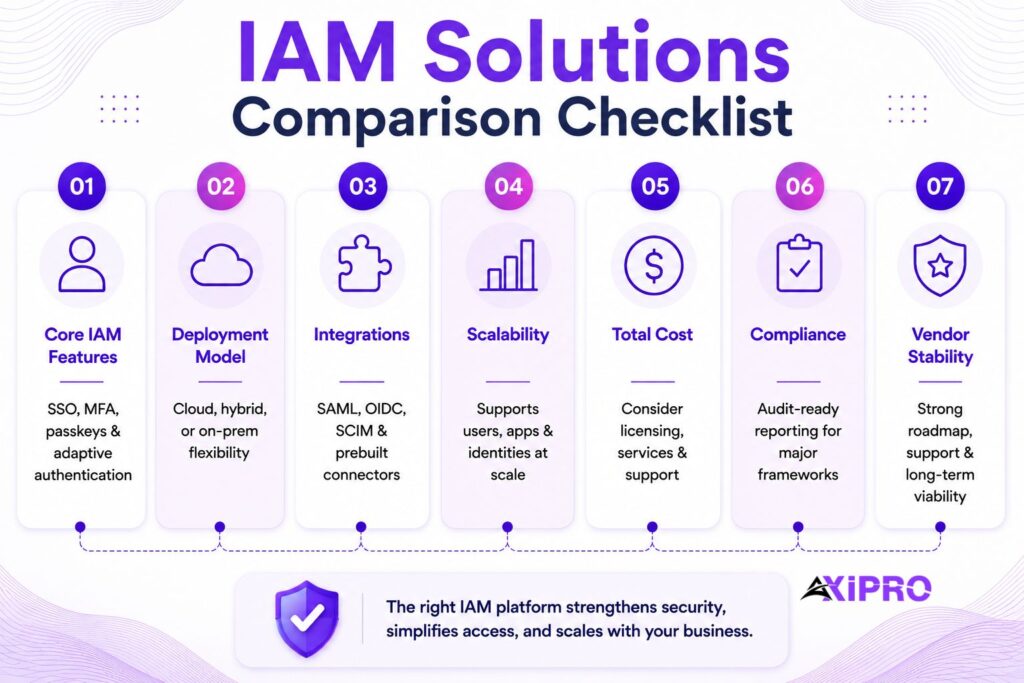
A useful comparison rests on a consistent scorecard rather than the feature checklists vendors supply. The criteria below are the ones that tend to decide satisfaction two years after purchase.
Core Identity and Access Capabilities
Start with the fundamentals: single sign-on, multi-factor authentication, lifecycle provisioning and deprovisioning, and access certification. The differentiator in 2026 is adaptive, risk-based authentication that weighs device, location, and behavior before granting access, alongside phishing-resistant methods such as passkeys. A tool that only does password-plus-OTP is already behind.
Deployment Options: Cloud-Native, Hybrid, and On-Premises
Deployment model shapes cost, speed, and control. Cloud-native SaaS platforms deploy fastest and shift maintenance to the vendor. On-prem suits organizations with strict data-residency rules or deep legacy systems. Hybrid is the common reality, and the question to ask is how gracefully a platform bridges old and new — not whether it claims to.
Integration Capabilities with Existing Infrastructure
An IAM platform is only as good as its connectors. Look for prebuilt integrations with your core systems, directory services, HR platforms, and major SaaS apps, plus open standards support: SAML, OIDC, SCIM, and increasingly standards for continuous authorization. A thin connector catalog means custom engineering, which is where budgets quietly disappear.
Scalability for Enterprise vs. Mid-Market Organizations
Scale is not only user count. It is the number of applications, directories, and identity types a platform can govern without performance or administrative strain. Enterprise suites assume a dedicated identity team. Mid-market tools assume a stretched IT generalist. Buying the wrong tier means either paying for unused complexity or hitting a ceiling within two years.
Pricing Models and Total Cost of Ownership
Headline per-user pricing rarely reflects real cost. Implementation, professional services, connector licensing, premium support, and the internal staff time to run the platform often exceed the subscription itself.
Compliance and Audit Support
For regulated industries, audit support is a core feature, not a bonus. Strong platforms run access certification campaigns, segregation-of-duties checks, and audit-ready reports aligned with frameworks such as SOX, HIPAA, ISO 27001, and PCI DSS. The NIST Digital Identity Guidelines (SP 800-63, revised in 2025) are a useful reference for the assurance levels your authentication should meet.
Vendor Support, Stability, and Roadmap
You are buying a multi-year relationship. Financial stability, support quality, and a credible roadmap matter as much as today’s feature set, especially as the market consolidates and converges. A vendor that gets acquired or pivots can leave you maintaining a product on a slow decline.
Pro Tip: Comparing Quotes
When you compare quotes, normalize them to a three-year total cost of ownership that includes implementation and at least one major version upgrade. Vendors that look cheap per seat sometimes carry the heaviest services bill, and the gap usually shows up in year one, not at signing.
IAM Solutions Compared: The Leading Providers
The vendors below dominate enterprise shortlists. Each entry notes the problem the platform solves best — which is the most reliable way to read past the marketing.
Okta Workforce Identity Cloud
Okta is the largest independent identity vendor and was named a Leader in the 2025 Gartner Magic Quadrant for Access Management for the ninth straight year. Its strength is breadth of integration: thousands of prebuilt connectors and a neutral, vendor-agnostic stance make it a natural hub for organizations running a mix of clouds and SaaS. Workforce access and single sign-on are its core. Governance and privileged access are newer additions and less mature than the specialists’.
Microsoft Entra ID
Entra ID, formerly Azure AD, is the default identity layer for any organization committed to Microsoft 365 and Azure, sharing that nine-consecutive-year Leader position in the 2025 Access Management Magic Quadrant. Its advantage is bundling and tight integration with the Microsoft estate, which makes the economics hard to beat for existing customers. The trade-off is that its best experience assumes a Microsoft-centric world; heterogeneous environments lose some of the seamlessness.
SailPoint IdentityIQ
SailPoint is the reference name in identity governance. IdentityIQ, and its SaaS sibling Identity Security Cloud, is built for complex enterprises that must govern access across structured and unstructured data, prove compliance, and automate certifications at scale. It carries depth that mid-market teams rarely need, and it expects a real governance program and the staff to run it.
CyberArk
CyberArk is the privileged access leader, repeatedly placed in the Leaders quadrant of Gartner’s PAM Magic Quadrant. Its heritage is securing the most dangerous accounts: domain admins, root, service credentials, and now machine and AI-agent secrets. Organizations with serious privilege risk or regulatory pressure on admin access tend to standardize here. It is a specialist platform first, broadening into wider identity security.
Ping Identity
Ping Identity is an enterprise-grade access management and federation platform, recognized as a Leader in the 2025 Access Management Magic Quadrant. It appeals to large organizations with demanding customer-identity (CIAM) and complex federation requirements, and to teams that want fine-grained control and orchestration. It rewards identity maturity and can be heavier to operate than turnkey SaaS.
IBM Security Verify
IBM Security Verify offers a broad identity suite spanning access, governance, and risk, with particular traction in large hybrid enterprises already invested in IBM. Its strength is breadth and fit with complex on-prem-plus-cloud estates. Buyers outside the IBM ecosystem tend to weigh it against more focused competitors.
Saviynt
Saviynt is a cloud-native challenger that converges governance and privileged access on a single platform. Named a Challenger in the 2025 Gartner PAM Magic Quadrant while holding a strong governance reputation, its pitch is convergence: one platform for IGA, PAM, and application access governance, covering human and non-human identities alike. Organizations tired of stitching point tools together find this attractive.
BeyondTrust
BeyondTrust is a privileged access specialist named a Leader in the 2025 Gartner PAM Magic Quadrant, where it was positioned highest of all vendors in Ability to Execute. It is strong in privileged remote access and just-in-time privilege, which matters for organizations securing third-party and vendor access. Like CyberArk, it is a PAM-first platform rather than a full-suite IAM.
JumpCloud
JumpCloud takes a different tack: an open directory platform aimed at small and mid-sized businesses that need to manage identities, devices, and access without a heavyweight enterprise suite. It consolidates directory, SSO, MFA, and device management in one place, which suits lean IT teams. Very large enterprises usually outgrow its governance depth.
Google Cloud IAM
Google Cloud IAM governs access to Google Cloud resources rather than acting as a general workforce IAM. It is essential if your infrastructure runs on GCP, where it controls which users and services can act on which resources at a fine grain. It is not a substitute for a workforce access or governance platform; it solves the cloud-resource layer specifically.
IAM Solutions Comparison: Providers at a Glance
The table below summarizes where each provider is strongest and the kind of organization it fits. Analyst positions reflect the 2025 Gartner Magic Quadrants for Access Management and Privileged Access Management.
| Vendor | Primary Strength | Best Fit | 2025 Gartner Position |
|---|---|---|---|
| Okta | Workforce access, SSO, broad integrations | Mid-market to enterprise, multi-cloud SaaS | Leader, Access Management |
| Microsoft Entra ID | Microsoft ecosystem integration, bundled value | Microsoft-centric organizations of any size | Leader, Access Management |
| SailPoint | Identity governance, access certification, compliance | Large enterprises with complex governance needs | Leader, IGA |
| CyberArk | Privileged access, machine identity, secrets management | Enterprises with high privilege risk or compliance pressure | Leader, PAM |
| Ping Identity | CIAM, federation, fine-grained access control | Large enterprises with complex customer or partner identity | Leader, Access Management |
| IBM Security Verify | Broad suite, hybrid enterprise fit | Large IBM-invested enterprises | Challenger, Access Management |
| Saviynt | Converged IGA + PAM, cloud-native | Cloud-first enterprises seeking platform consolidation | Challenger, PAM |
| BeyondTrust | Privileged remote access, just-in-time privilege | Enterprises with third-party and vendor access risk | Leader, PAM (highest Ability to Execute) |
| JumpCloud | Directory, SSO, MFA, device management unified | SMBs with lean IT teams | Niche Player |
| Google Cloud IAM | Fine-grained GCP resource access control | GCP-native infrastructure teams | N/A (cloud platform IAM) |
Insider Note: A Leader badge in one Magic Quadrant says nothing about the others. Gartner publishes separate quadrants for Access Management, PAM, and IGA, and the leaders rarely overlap cleanly. A vendor topping the access quadrant may be a niche player in governance. Always check the quadrant that matches the problem you are actually solving.
IAM Solutions Compared by Category
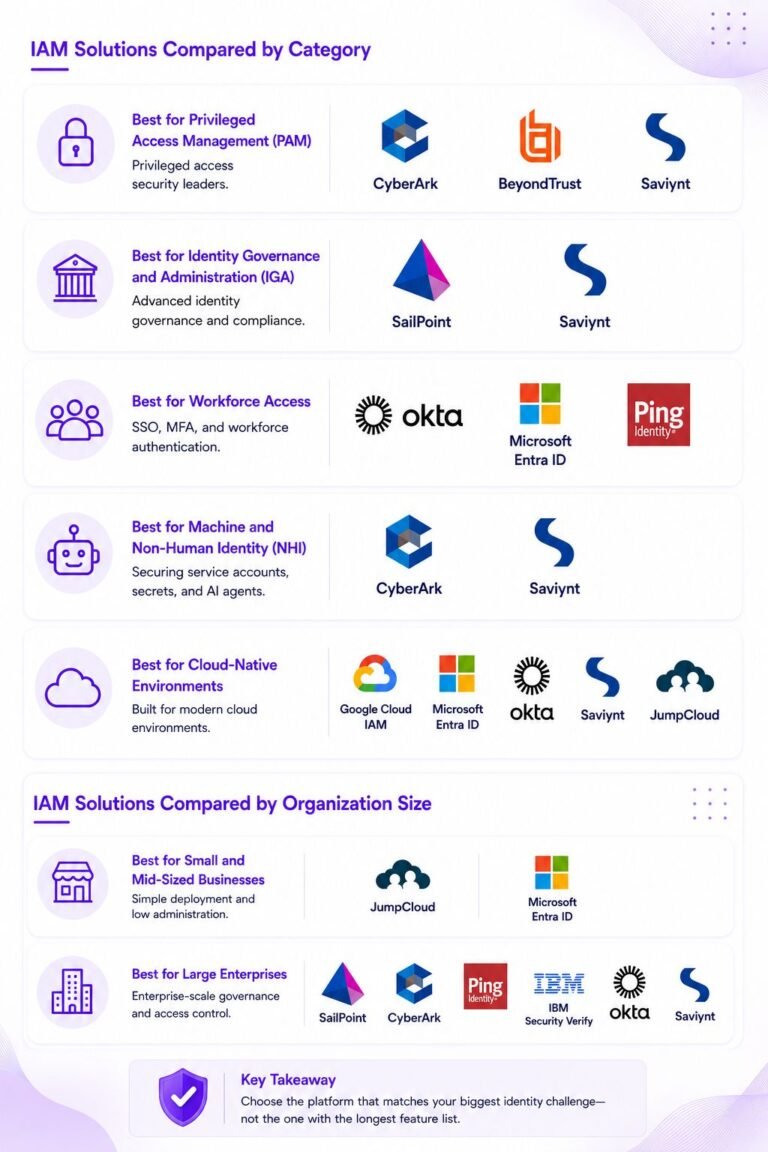
Best for Privileged Access Management (PAM)
CyberArk and BeyondTrust are the two specialists, with BeyondTrust positioned highest in Ability to Execute in the 2025 PAM Magic Quadrant and CyberArk a long-standing Leader. Saviynt is the convergence option for teams that want PAM inside a broader governance platform. If privilege is your primary risk driver, these three define the shortlist — and the choice between them comes down to whether you want a dedicated specialist or a unified platform.
Best for Identity Governance and Administration (IGA)
SailPoint and Saviynt anchor this category. SailPoint suits the most complex governance programs, particularly where unstructured data and legacy systems are in scope. Saviynt appeals to cloud-first organizations that want governance and PAM unified. Both expect a mature internal program to drive value; neither is a set-and-forget deployment.
Best for Workforce Access
Okta and Microsoft Entra ID dominate workforce single sign-on and access, with Ping Identity strong where federation and customer identity requirements are demanding. The choice often comes down to how committed you are to the Microsoft stack. Organizations with a genuinely mixed environment tend to land on Okta or Ping; Microsoft shops rarely need to look further than Entra.
Best for Machine and Non-Human Identity (NHI)
This is the fastest-moving category in the market. CyberArk and Saviynt have invested heavily in securing machine identities and AI-agent secrets, and the broader market is racing to catch up as non-human identities become the dominant identity type in most environments. Any vendor you shortlist should have a specific, credible answer for how it governs service accounts, API tokens, and AI agents — not just a roadmap slide.
Best for Cloud-Native Environments
Google Cloud IAM, Entra ID, and Okta fit cloud-first estates naturally, while Saviynt and JumpCloud offer cloud-native delivery without on-prem baggage. The right answer here depends almost entirely on where your workloads actually run, not where you plan to be in three years.
IAM Solutions Compared by Organization Size
Best for Small and Mid-Sized Businesses
SMBs need fast deployment, predictable pricing, and minimal administration overhead. JumpCloud’s consolidated directory-plus-device approach fits lean IT teams, and Entra ID is the natural choice for businesses already on Microsoft 365. Enterprise governance suites like SailPoint are usually overkill at this size — both in complexity and cost — and they assume a level of internal governance maturity that most SMBs have not yet built.
Best for Large Enterprises
Large enterprises need depth: complex governance, fine-grained access, strong PAM, and the ability to span many directories, clouds, and application types. SailPoint, CyberArk, Ping, IBM, and the enterprise tiers of Okta and Saviynt populate these shortlists. The realistic outcome is often a small portfolio of best-of-breed tools rather than a single platform, though convergence offerings from vendors like Saviynt are narrowing that gap for organizations willing to place a bigger bet on one provider.
Cost Comparison of Leading IAM Solutions
Key Pricing Factors to Evaluate
Most enterprise IAM vendors price per identity per month, often in tiers, and reserve advanced governance, PAM, and AI features for higher bands. The line items that catch buyers off guard are connector and integration licensing, professional-services fees for implementation, premium support tiers, and the internal headcount needed to operate the platform day-to-day. Non-human identities increasingly count toward licensing too, which can dramatically change the math given how fast they multiply in cloud-native environments.
Short-Term vs. Long-Term Cost Considerations
A cheaper platform that needs heavy customization can cost more over three years than a pricier turnkey option. Conversely, an over-featured enterprise suite drains budget on capabilities a smaller team will never use. The honest comparison is total cost of ownership across the full contract, including the migration cost you will eventually face if you choose poorly. That last item is easy to ignore in a procurement process and expensive to ignore in practice.
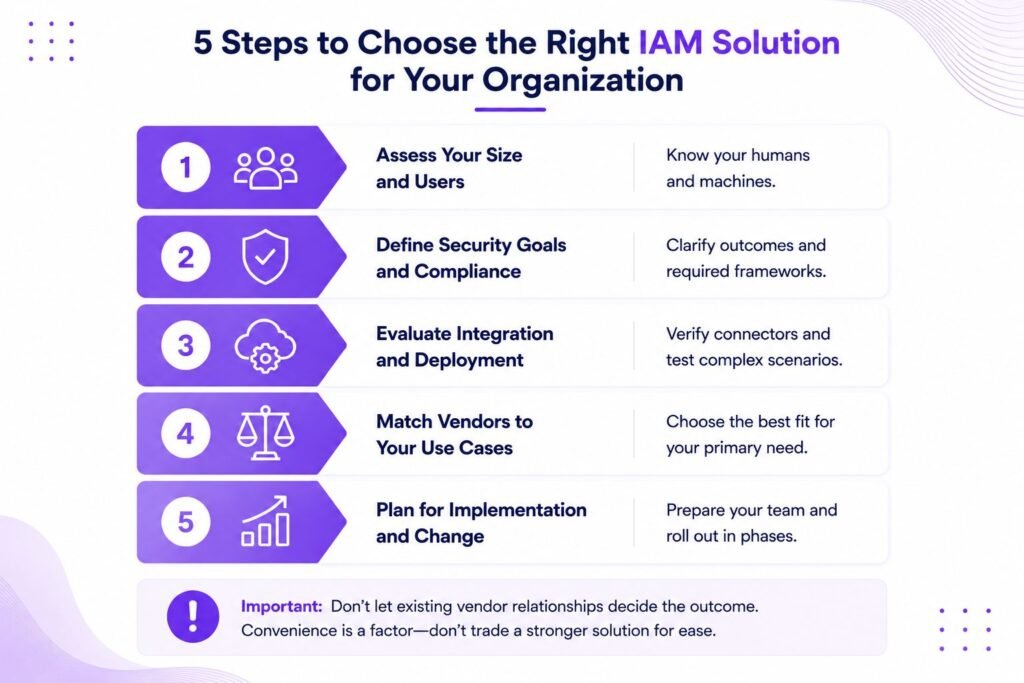
How to Choose the Right IAM Solution for Your Organization
Step 1: Assess Your Size and User Base
Count not just employees but contractors, partners, customers where relevant, and the machine identities already in your environment. The ratio of non-human to human identities alone can rule some platforms in or out of contention before you reach a demo.
Step 2: Define Your Security Objectives and Compliance Requirements
Write down the specific outcomes you need: phishing-resistant access, automated certifications for an upcoming audit, privileged-account control, or all of these. Map them to the frameworks you must satisfy — ISO 27001, HIPAA, PCI DSS, SOX, or others. This document becomes your scorecard and prevents requirements from shifting mid-evaluation to favor a vendor that ran a good demo.
Step 3: Evaluate Integration and Deployment Needs
Inventory your core systems and confirm prebuilt connectors exist for each. Decide where you sit on the cloud-to-on-prem spectrum, then test in a proof of concept how the platform handles your messiest integration, not its cleanest demo scenario. The difficult edge cases are where real-world value separates from slide-deck value.
Step 4: Compare Vendor Strengths Against Your Use Cases
Match the problem you are solving to the vendor built for it. An access problem points to Okta, Entra, or Ping. A governance problem points to SailPoint or Saviynt. A privilege problem points to CyberArk or BeyondTrust. Resist buying a specialist’s adjacent module just because it sits on the same invoice.
Important: The most common comparison mistake is letting an incumbent relationship decide the outcome before requirements are written. Buying governance from your access vendor, or privilege from your directory vendor, because it is convenient often means accepting a weaker tool for the job that matters most. Convenience is a legitimate factor, but it should be weighed deliberately — not assumed.
Step 5: Account for Implementation Risk and Change Management
IAM projects fail more often on rollout than on technology. Provisioning rules touch every employee, and a botched deployment either locks people out or grants too much. Budget for a phased rollout, internal expertise or a capable implementation partner, and the cultural change that stricter access controls bring. Enterprise-scope implementations commonly run several months to a year, and that timeline is driven by integration complexity and process change far more than by the software itself.
Emerging Trends Shaping IAM Solution Comparisons in 2026
AI-Driven Identity Threat Detection
IAM platforms increasingly use machine learning to spot anomalous access in real time and respond before damage spreads. Gartner research has suggested that organizations applying AI to identity can cut identity-related breaches significantly. The capability is real and worth weighting as a comparison criterion, but probe whether it is a working capability or a roadmap slide — the difference is usually visible in a proof of concept.
Converging IAM Domains Into Unified Platforms
The long-standing split between access, governance, and privilege is blurring. Gartner has predicted that a large majority of organizations will prefer converged platforms over point solutions, and vendors like Saviynt have built their entire pitch around that shift. Convergence promises fewer silos and simpler audits, at the cost of betting more of your identity stack on a single provider. That is a reasonable trade for some organizations and a concentration risk for others — know which camp you are in before the sales cycle begins.
Growth of Machine and Non-Human Identity Management
Machine identities now vastly outnumber human ones. CyberArk’s research puts the ratio above 80 to 1 in many organizations, with nearly half of those identities holding sensitive or privileged access. Other studies cite ratios from 45 to 1 up to 144 to 1 in cloud-native environments. The dedicated NHI management market was valued near $3.6 billion in 2025 and is projected to grow past $22 billion by 2034. Any platform you compare in 2026 should have a credible, specific answer for governing service accounts, tokens, and AI agents.
Worth Knowing: Two in Three Enterprises Report Breaches
Industry research has found that two-thirds of enterprises have suffered a breach involving a compromised non-human identity, and a large share of machine credentials are over-privileged or never rotated. If a vendor's NHI story is vague, that gap is where your next incident is most likely to start.
Shift Toward Passwordless and Decentralized Identity
Passwordless access is becoming the workforce default. Gartner expects passwordless to be the standard for workforce authentication across many enterprises by the end of 2026, and the FIDO Alliance reports that more than 15 billion online accounts now support passkeys. Decentralized identity and verifiable credentials are earlier in maturity but worth tracking as a longer-term shift in who controls identity data — particularly for organizations managing large partner or customer identity ecosystems.
Conclusion: Choosing the Right IAM Solution
There is no single best IAM solution, only the best fit for the problem you are solving and the environment you run. The leaders are genuinely strong, but they lead in different races: Okta and Entra in access, SailPoint and Saviynt in governance, CyberArk and BeyondTrust in privilege. Anchor the comparison to written requirements, normalize cost to a multi-year total, and weight the criteria that still matter after the demo ends: integration depth, governance for both human and machine identities, compliance readiness, and a roadmap you can trust. Get those right, and the shortlist tends to choose itself.
Frequently Asked Questions About IAM Solutions
What is the difference between IAM, IGA, and PAM?
IAM is the umbrella discipline for managing identities and access. IGA — identity governance and administration — is the subset focused on who should have access, running access certifications, and demonstrating compliance to auditors. PAM — privileged access management — is the subset that protects high-risk accounts with elevated permissions, including admin credentials, service accounts, and machine identities. Most enterprises use all three, sometimes from different vendors, and the boundaries between them are blurring as the market converges.
What are the four pillars of IAM?
IAM is commonly described through four functions: authentication (verifying identity), authorization (granting appropriate access), administration (managing the identity lifecycle from onboarding through deprovisioning), and auditing and governance (monitoring and proving that access is correct and compliant). Together, they cover the full life of an identity from creation to removal.
How long does it take to implement an IAM solution?
It depends on scope. A focused SMB deployment can go live in weeks, while a full enterprise governance or PAM program commonly takes several months to a year. The timeline is driven by integration complexity and process change far more than by the software itself — a fact that surprises many buyers who treat implementation as an afterthought during procurement.
Which IAM solution is best for hybrid cloud environments?
Platforms with strong hybrid bridging suit mixed estates. Microsoft Entra ID fits Microsoft-heavy hybrids naturally, Okta and Ping handle vendor-neutral mixes well, and IBM and SailPoint serve complex on-prem-plus-cloud enterprises with deep governance needs. The best choice depends on which systems dominate your environment today, not only where you plan to be.
What are the most common challenges when comparing IAM solutions?
The usual traps are comparing feature lists instead of fit-to-use-case, underestimating total cost of ownership, letting an incumbent relationship preempt requirements, and overlooking machine-identity governance until it becomes a breach. A written scorecard built before vendor contact and a realistic proof of concept focused on your hardest integrations address most of them.
How do IAM solutions support regulatory compliance?
They automate access certifications, enforce segregation of duties, log access events, and generate audit-ready reports mapped to frameworks such as SOX, HIPAA, ISO 27001, and PCI DSS. Strong governance tooling turns audit preparation from a manual scramble into a continuous, documented process — which is a meaningful operational advantage for teams facing regular external audits.
What is the primary goal of access management software?
To ensure the right identities have the right access to the right resources at the right time — and no more. Everything else, from single sign-on to adaptive authentication to just-in-time privilege, serves that foundational principle of least privilege.