A green dashboard is not an audit opinion. Compliance automation platforms like Vanta, Drata, Secureframe, and Hyperproof have made SOC 2 readiness faster and cheaper, but every audit cycle produces the same pattern: controls that sat at “passing” for months come back from the auditor with exceptions or requests for re-testing. The four controls below account for a disproportionate share of those rejections, and they all fail for the same underlying reason. The tool confirmed that evidence exists. The auditor tested whether the control actually operated.
This article walks through each of the four: what auditors reject, why, and how to fix the evidence before fieldwork starts.
Why Compliance Tools Show “Passing” But Auditors Still Reject Controls
The Gap Between Automated Checks and Auditor Judgment
Compliance platforms run continuous control monitoring: API calls that check whether a configuration exists, a document is uploaded, or a task is marked done. That’s real value. It catches drift, keeps evidence in one place, and saves weeks of screenshot collection.
An audit is a different exercise. A SOC 2 examination is an attestation performed by a CPA firm under AICPA standards, and the auditor’s job is to form an independent opinion on whether your controls met the Trust Services Criteria. That opinion rests on professional judgment, not on whether an API integration returned a 200 response.
What “Passing” Actually Means in Your Compliance Dashboard
When a control shows “passing,” the platform is telling you one narrow thing: at the moment of the last scan, an automated test found the artifact or setting it was programmed to look for: MFA enforced in the identity provider, a policy document uploaded, a training campaign sitting at 100%. The test says nothing about whether the underlying process ran the way your control narrative claims it did, or whether it ran that way across the whole audit period.
How Auditors Evaluate Controls Beyond the Checkbox
Auditors test two dimensions.
- Design effectiveness asks whether the control, as described, would meet the criterion if it worked as intended.
- Operating effectiveness, the core of a SOC 2 Type 2 report, asks whether it actually did throughout the audit period.
To answer that, the auditor pulls a population (every access review, every change, every new hire in the period), selects a sample, and inspects the evidence item by item. A dashboard status feeds into that process. It doesn’t replace it.
Insider Note: Auditors increasingly ask for evidence outside the compliance platform precisely because they know what the platform auto-collects. If every artifact you produce comes from the same tool export, expect the auditor to independently pull the population from the source system and compare. Discrepancies between the two are one of the fastest routes to an exception.
Control #1: Access Reviews That Automation Marks Complete but Auditors Reject
Why Auditors Reject Automated Access Review Evidence
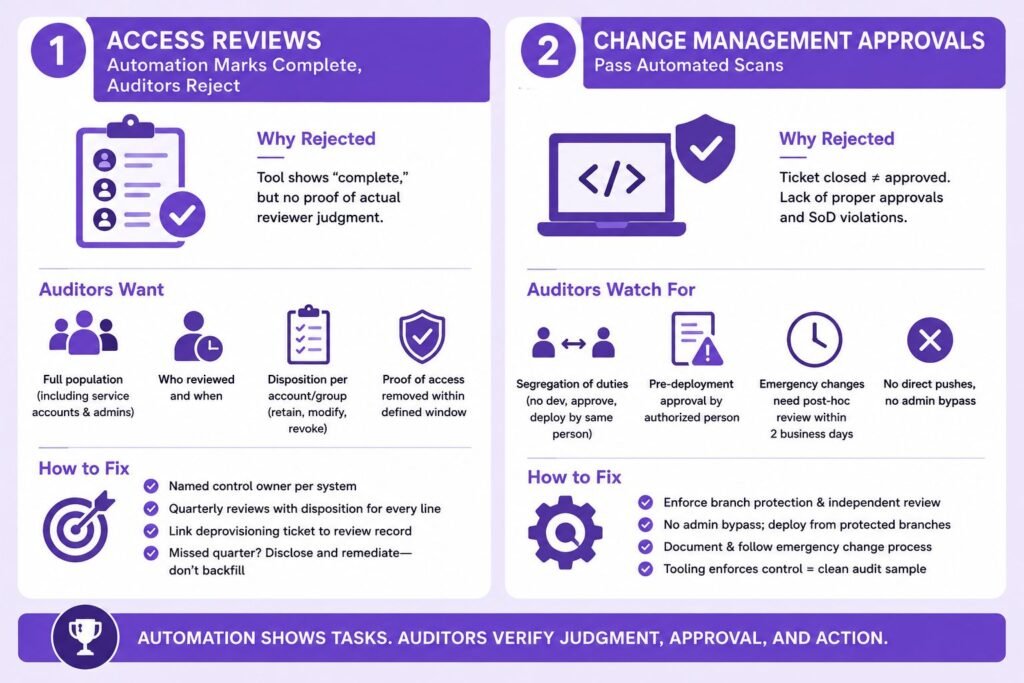
User access reviews sit under the logical access criteria (CC6.1 through CC6.3), and they are the single most common source of audit exceptions we see. The typical failure: the platform generated a user list, someone clicked “complete,” and the dashboard turned green. The auditor then asks a simple question the evidence can’t answer: what did the reviewer actually decide?
The Missing Element: Documented Reviewer Judgment
An access review is a judgment control. Someone with knowledge of the system must look at each account and confirm the access is still appropriate for the person’s role. A timestamped task closure proves the task was closed. It doesn’t prove anyone assessed anything, and an “approve all” review completed in ninety seconds gets exactly the skepticism it deserves.
What Auditors Actually Want to See in Access Review Evidence
Auditors look for four things:
- The full population of accounts at the time of review (including service accounts and admin roles),
- Evidence of who reviewed it and when, explicit dispositions per account or group (retain, modify, revoke), and
- Proof that flagged access was actually removed.
- That last item, the deprovisioning ticket showing revocation within a defined window, is the piece most companies can’t produce.
How to Fix Your Access Review Control Before the Audit
Assign a named control owner per in-scope system, run reviews quarterly, and require reviewers to record a disposition for every line, not a blanket approval. When access is revoked, link the removal ticket to the review record. If a quarter was missed, don’t backfill it. Document it honestly and show the remediation, because auditors treat fabricated retroactive evidence far more severely than a disclosed gap.
Control #2: Change Management Approvals That Pass Automated Scans
Why Ticket Closure Isn’t Proof of Approval
Change management (CC8.1) automation typically verifies that production changes link to a ticket and the ticket is closed. Auditors test something stricter: that each sampled change was approved by an authorized person before deployment. An approval added after the merge, or a ticket closed by the same engineer who wrote the code, fails that test even though every automated check came back green.
The Segregation of Duties Problem Automation Misses
Segregation of duties is the requirement that no single person can develop, approve, and deploy the same change. NIST’s SP 800-53 control catalog treats it as a foundational access control principle, and SOC 2 auditors apply the same logic. Small engineering teams trip on this constantly. Self-approved pull requests, admins who can bypass branch protection, direct pushes to main: a scanner sees “changes with tickets” while an auditor sees SoD violations.
Emergency Changes and Retroactive Approvals: Common Rejection Triggers
Every audit period contains hotfixes. Auditors don’t reject emergency changes. They reject emergency changes with no documented post-hoc review. If your policy says urgent changes get retroactive approval within two business days, the auditor will sample your emergency changes and check exactly that. No policy, or a policy nobody followed, produces an exception.
Rebuilding Change Management Evidence Auditors Will Accept
Enforce the control technically: branch protection requiring at least one independent reviewer, no admin bypass, and deploy pipelines that only run from protected branches. Then write the emergency change procedure down and generate the review artifact every time it fires. When the tooling enforces the control, the population is clean by construction and sampling becomes painless.
Pro Tip: Before your Audit
Before your audit, pull every production change in the period directly from your version control and deployment logs, then reconcile it against your ticketing system yourself. Auditors build the population from the source system, not from your compliance platform, and any change without a matching ticket becomes a finding you could have caught in an afternoon.
Control #3: Vendor Risk Assessments Flagged as Compliant
Why Uploaded SOC 2 Reports Aren’t Enough
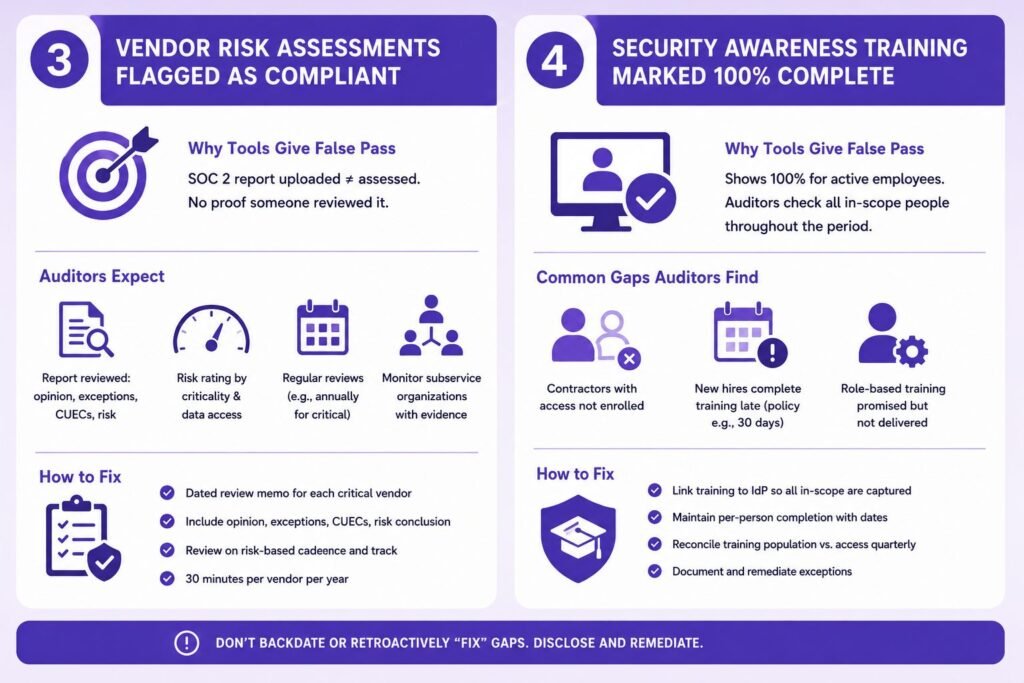
Vendor management (CC9.2) automation frequently marks a vendor “assessed” the moment a SOC 2 report lands in the vendor record. Possession isn’t assessment. Auditors expect evidence that someone actually read the report: checked the auditor’s opinion (unqualified, qualified, adverse, or disclaimer), reviewed noted exceptions, evaluated the complementary user entity controls you are responsible for, and concluded on the vendor’s risk. Our guide on how to verify a SOC 2 report covers exactly what that review should examine.
The Missing Risk Rating and Review Cadence
A defensible vendor program rates each vendor by criticality and data access, and reviews on a cadence that matches the rating: annually for critical vendors is the common baseline. Auditors sample vendors from your full list and ask for the most recent assessment. A rating assigned once at onboarding and never revisited doesn’t reflect operating effectiveness over the period.
Subservice Organization Carve-Outs Auditors Scrutinize
If a vendor is a subservice organization in your own report under the carve-out method, scrutiny increases. Your report explicitly tells readers that you monitor that provider’s controls, so your auditor will test whether you actually did: collected their current report, reviewed it, and tracked their exceptions. This is the area where “the tool shows a green vendor row” and “we can evidence monitoring” diverge most sharply.
Building Vendor Risk Evidence That Survives Auditor Testing
For each critical vendor, keep a dated one-page review memo: report period covered, opinion type, exceptions noted, CUECs mapped to your controls, and a risk conclusion signed by the owner. That’s thirty minutes per vendor per year, and it’s the difference between a clean CC9.2 result and a management letter comment.
Control #4: Security Awareness Training Marked 100% Complete
Why Training Completion Rates Don’t Satisfy CC1.4
CC1.4 addresses whether the organization attracts, develops, and retains competent individuals, and awareness training is the standard control mapped to it alongside the communication criteria. The platform shows 100% because it measures active employees enrolled in the current campaign. The auditor measures something else: every in-scope person, across the entire audit period, trained within the timeframe your policy commits to.
Contractor and Late-Hire Coverage Gaps
Two populations break the 100% figure almost every time. Contractors with system access are often never enrolled because they sit outside the HR system feed. And employees hired mid-period frequently complete training months late, while the policy says “within 30 days of hire.” The auditor samples new hires against hire dates, and each late completion is a deviation. Guidance like NIST’s SP 800-50 on security awareness programs is explicit that coverage should follow access, not employment classification.
Role-Based Training Requirements Automation Overlooks
If your policies promise secure coding training for engineers or privileged-user training for administrators, those promises become auditable commitments. Generic annual awareness training won’t satisfy a role-based requirement you wrote yourself. Either deliver the role-based training and evidence it, or amend the policy to match reality before the period starts.
Documenting Training in a Way Auditors Accept
Keep per-person completion records with dates, tie enrollment to the identity provider rather than the HR roster so contractors are captured, and reconcile the training population against the access population quarterly. When someone misses the window, document the follow-up. A tracked exception with remediation reads very differently to an auditor than a gap they discover themselves during fieldwork.
Important: Do not “fix” historical gaps by having people complete last year’s training now and backdating intent. Auditors compare completion timestamps against hire dates and campaign windows as a matter of routine. A disclosed deviation usually stays a minor finding; manufactured evidence can escalate to a qualified opinion and, in serious cases, ends the engagement.
The Common Thread: Where Compliance Automation Falls Short
Evidence Quality vs. Evidence Existence
All four controls fail the same way. The platform verifies an artifact exists; the auditor asks whether the artifact proves a working process. The table below summarizes the gap.
| Control | What the tool verifies | What the auditor tests |
|---|---|---|
| Access reviews | Review task completed | Documented judgment per account, revocations executed |
| Change management | Ticket exists and is closed | Independent approval before deployment, SoD enforced |
| Vendor risk | Report uploaded | Report reviewed, risk rated, cadence followed |
| Awareness training | Campaign at 100% | Full population trained on time, all period, all roles |
Operating Effectiveness Across the Entire Audit Period
A Type 2 report covers an observation window, commonly six to twelve months, and controls under SSAE 18 attestation standards must operate throughout it. A control fixed in month nine still shows eight months of gap. This is the honest downside nobody mentions when selling a fast timeline: fixing a broken quarterly control mid-period may mean extending the period or accepting an exception, because you can’t rewrite history.
Sampling Methodology Auditors Use That Tools Don’t Simulate
Auditors select samples from complete populations they pull themselves, sized to the control’s frequency: all four quarterly access reviews, perhaps twenty-five changes from a population of hundreds. Your platform tests the current state on a schedule. It doesn’t simulate a stranger picking change #847 from last November and asking who approved it, and when.
How to Validate Your Controls Before Your Auditor Does
Running an Auditor-Style Internal Review
Once per period, run the audit on yourself. Pull the population for each in-scope control from the source system, select a random sample, and try to produce the complete evidence chain for each item without touching the compliance dashboard. Wherever you reach for a green checkmark instead of an artifact, you’ve found next quarter’s exception. The exercise takes a focused week for most teams and pairs well with our SOC 2 compliance checklist.
Questions to Ask Your Compliance Platform Vendor
Ask three questions. Which of my controls are fully tested by automation versus marked passing based on a document upload or a self-attested task? How does the platform define the population for each test, and can I export it? And what happens when your customers’ auditors disagree with a “passing” status? The answers tell you where the dashboard ends and your responsibility begins. Platform-specific setups matter here too: our Drata SOC 2 guide covers where automated tests need human reinforcement.
When to Bring in a Readiness Assessment
A readiness assessment is worth the money in a few situations: your first Type 2, a period following major team or infrastructure change, or any audit where a qualified opinion would cost you a specific deal. An independent reviewer who samples your evidence the way an auditor will, two to three months before fieldwork, leaves you enough runway to fix what they find. Expect the assessment itself to take two to four weeks [CONFIRM WITH TEAM: typical readiness assessment cost range], and see our SOC 2 compliance services for how we structure it.
The pattern across all four controls is consistent: automation is excellent at collecting evidence and terrible at exercising judgment, and auditors are paid specifically for the judgment part. Treat your dashboard as a monitoring layer, not an assurance layer. Make sure reviewer decisions get documented, approvals come before deployments, vendor reports actually get read, and training covers everyone with access for the whole period. Do that, and the auditor’s sample will find what the dashboard promised.
Frequently Asked Questions
Can a SOC 2 compliance tool guarantee a clean audit?
No. Compliance platforms automate evidence collection and continuous monitoring, but the audit opinion comes from a CPA firm exercising independent judgment under AICPA standards. The tool cuts effort and catches configuration drift, but it can’t attest to operating effectiveness, and no reputable platform claims otherwise.
What happens when an auditor rejects a control your tool marked passing?
The auditor documents it as an exception, and depending on severity and pervasiveness it appears as a noted deviation in the report or contributes to a qualified opinion. You typically get a chance to provide additional evidence during fieldwork. If the evidence simply doesn’t exist, the exception stands, and customers reading the report will see it.
Do auditors accept screenshots and API-pulled evidence from automation platforms?
Generally yes, as one input. Auditors routinely accept platform-collected artifacts for configuration-type controls, but for judgment controls (access reviews, approvals, vendor assessments) they usually request evidence from the source system and independently verify populations. Expect platform evidence to shorten the audit, not replace source-of-truth testing.
How far in advance should I validate controls beyond what my tool shows?
Two to three months before fieldwork at minimum, and ideally at the start of the observation period for quarterly controls. Period-spanning controls can’t be fixed retroactively, so a gap found late in a twelve-month window either becomes an exception or delays the report.
Which SOC 2 controls fail auditor review most often?
Access reviews, change management approvals, vendor risk assessments, and security awareness training coverage are the recurring offenders, followed closely by offboarding timeliness and risk assessment refresh. All share the same trait: they require documented human judgment at a defined frequency, which is exactly what automated checks approximate least well.