

/

  / EU AI Act Recruitment Rules: What to Know for 2027

EU AI Act Recruitment Rules: What to Know for 2027

The EU AI Act names recruitment AI as high-risk. Annex III explicitly lists AI systems used for recruitment, candidate selection, and employment decisions, which pulls CV screeners, video interview platforms, and assessment tools into the most demanding compliance regime the Act contains. The original compliance date for these systems was August 2, 2026. In June 2026, the EU’s Digital Omnibus moved the deadline to December 2, 2027, a 16-month extension that has led many HR and talent teams to shelve the topic entirely.
That’s a mistake, for two reasons.

  • First, one rule that directly affects recruitment technology is already in force: the ban on emotion recognition in the workplace has applied since February 2, 2025, and it catches features still shipping in some video interview products today.
  • Second, the deferred obligations didn’t shrink. Conformity assessments, human oversight design, bias monitoring, and documentation all still arrive in full, and the practical work of auditing a recruitment stack, renegotiating vendor contracts, and training hiring teams routinely takes a year or more.

Here’s what the EU AI Act actually requires of employers and vendors using recruitment tools, on the timeline that now applies.

Let Axipro help you build a business continuity plan that's practical, compliant, and audit-ready.

Schedule Your Free Assessment Today

Why Recruitment Tools Are Classified as High-Risk Under the EU AI Act​

Definition of High-Risk AI Systems in Hiring​

The Act takes a list-based approach. Annex III, point 4, designates as high-risk any AI system intended for the recruitment or selection of natural persons, including placing targeted job advertisements, analyzing and filtering applications, and evaluating candidates. The same point covers AI used for decisions on promotion, termination, task allocation, and monitoring of workers, so the classification follows the tool through the entire employment lifecycle, not just the hiring funnel.

The reasoning is straightforward: hiring decisions shape access to livelihoods, and algorithmic discrimination in hiring is well documented. The European Commission’s regulatory framework for AI treats employment as one of the areas where an AI error or bias causes serious harm to fundamental rights. That’s the test for the high-risk tier.

Types of Recruitment Tools Affected

In practice, the high-risk classification captures most of the modern recruitment stack: CV and resume screeners that rank or filter applicants, video interview platforms that score responses or delivery, psychometric and skills assessment tools that produce scores feeding a hiring decision, sourcing and matching algorithms that decide which candidates a recruiter sees, and programmatic job ad targeting systems that determine who sees a vacancy at all.

If the system’s output materially influences who advances and who does not, assume high-risk until proven otherwise.

Important: Emotion recognition is not high-risk in the workplace. It is prohibited. Article 5 bans AI systems that infer emotions of people in the workplace (outside narrow medical and safety cases), and that ban has applied since February 2025 with the Act’s top penalty tier attached. If your video interview vendor markets “engagement scoring” or “sentiment analysis” of candidates, that feature needs to be switched off for EU hiring now, not in 2027.

Recruitment Tools That May Fall Outside High-Risk Classification

Not everything in the HR stack qualifies. The Act carves out systems performing narrow procedural tasks that do not materially influence decision outcomes. An applicant tracking system that stores applications, schedules interviews, and sends templated emails is a database with a workflow, not a high-risk AI system. The same goes for tools that transcribe interviews without scoring them, deduplicate candidate records, or generate first drafts of job descriptions for a human to edit.

The line is decision influence: the moment a tool ranks, scores, filters, or recommends candidates, it crosses into Annex III territory. Deployers who rely on an exemption must be able to document that assessment, so “we decided it doesn’t count” needs to exist on paper.

Extraterritorial Scope: Which Employers Are Covered

The Act applies to providers placing AI systems on the EU market and to deployers established in the EU, but it also reaches further: it covers providers and deployers located outside the EU where the output of the system is used in the EU. For recruitment, the consequence is blunt. A US or UK company with no EU entity that uses an AI screener to filter applicants for roles based in Berlin or Dublin, or that screens candidates located in the EU, is using the system’s output in the Union. Brexit doesn’t move UK employers out of scope when they hire into or from the EU.

Providers vs. Deployers of Recruitment AI Tools

The Act splits obligations between the provider (the vendor that develops the tool and places it on the market) and the deployer (the employer using it). Most employers are deployers, and deployer obligations are lighter but real. One common trap: an employer that substantially modifies a high-risk system, or puts its own name on it, can be reclassified as a provider and inherit the full provider stack. Heavy customization of a screening model, or fine-tuning it on your own hiring data, can be enough to trigger this.
Key Obligations for Employers Using AI Recruitment Tools

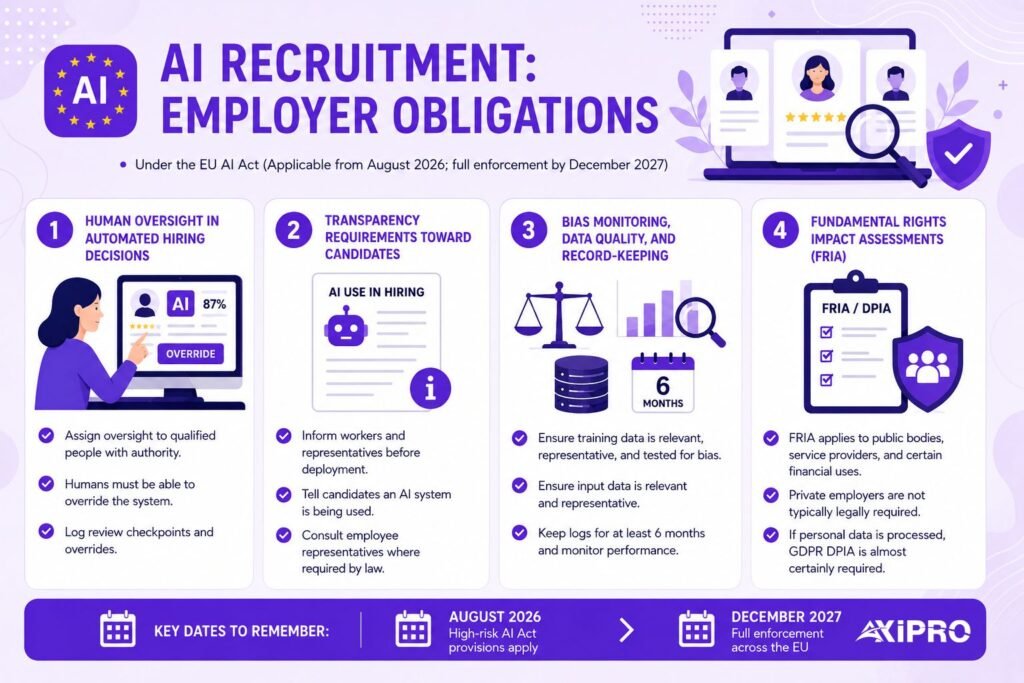
Human Oversight in Automated Hiring Decisions

Deployers must assign oversight of the system to people with the competence, training, and authority to intervene. That last word matters. A recruiter who rubber-stamps whatever the ranking algorithm produces, because nobody has time to review 800 rejected CVs, doesn’t count as oversight. Regulators and courts will look at whether the human could genuinely override the system and whether they ever did. Designing review checkpoints where a person can meaningfully change the outcome, and logging when they do, is the core of compliant deployment.

Transparency Requirements Toward Candidates

Employers must inform workers and their representatives before putting a high-risk AI system into use at work, and candidates subjected to such a system must be told it is being used. In countries with works councils, such as Germany, this obligation lands on top of existing co-determination rights, so employee representatives may need to be consulted before the tool goes live rather than just told afterward. Burying an AI disclosure in a privacy policy paragraph is unlikely to survive scrutiny.

Bias Monitoring, Data Quality, and Record-Keeping

Providers carry the primary data governance duties, including training data that is relevant, representative, and examined for bias. Deployers must ensure the input data they feed the system is relevant and sufficiently representative for its purpose, keep the automatically generated logs for at least six months, and monitor performance in live use. If your candidate pool in a given market differs sharply from what the tool was built on, that is a deployer problem, not just a vendor one.

Fundamental Rights Impact Assessments (FRIA)

The FRIA obligation in Article 27 applies to deployers that are public bodies or private entities providing public services, plus certain financial use cases. A typical private employer running an AI screener isn’t legally required to produce a FRIA. Two caveats: public-sector employers are covered, and where the tool processes personal data, a Data Protection Impact Assessment under the GDPR is almost certainly required anyway. Most organizations that get this right run a single combined assessment covering both.

Obligations for Providers and Vendors of AI Recruitment Software​

Vendors face the full high-risk regime:

  • a risk management system across the product lifecycle,
  • data governance,
  • technical documentation proving compliance,
  • a third-party or internal conformity assessment before market placement, CE marking,
  • registration in the EU’s high-risk AI database,
  • and post-market monitoring with incident reporting.

For employers, this paperwork is your due diligence checklist. A vendor who cannot show you their conformity documentation by mid-2027 is telling you something about your own December 2027 exposure.

Insider Note: The vendor conversation to watch for is “we’re just an ATS, the Act doesn’t apply to us.” Sometimes that’s true. But many platforms marketed as applicant tracking systems have added AI ranking, matching, or “best fit” features over the past three years, and those features change the classification even if the core product predates them. Ask specifically which features use AI to score, rank, or filter candidates, and get the answer in writing.
Implementation Timeline for Recruitment AI Compliance

The timeline shifted materially in mid-2026. The Digital Omnibus, given final approval by the Council on June 29, 2026, replaced the original August 2, 2026 date for standalone Annex III systems. According to analysis by Gibson Dunn, high-risk obligations for Annex III systems, including recruitment tools, now apply from December 2, 2027, with AI embedded in regulated products following on August 2, 2028. The dates that matter for hiring teams:

  • February 2, 2025: prohibited practices in force, including the workplace emotion recognition ban. Already live.
  • August 2, 2025: general-purpose AI model obligations in force. Already live.
  • August 2, 2026: most Article 50 transparency obligations in force, including chatbot disclosure for candidate-facing assistants. Already live.
  • December 2, 2027: full high-risk obligations apply to standalone Annex III systems, including recruitment and employment tools.

Law firm guidance throughout the negotiation, including from DLA Piper, has been consistent on one point: the deferral moved the deadline and nothing else. No obligation was removed or softened for employment AI.

Worth Knowing: Grandfathering rule for High-risk systems

There is a grandfathering rule for high-risk systems already placed on the market before the deadline, but it resets the moment the system is substantially modified. Recruitment AI vendors ship model updates constantly, so treating grandfathering as a durable shield for a SaaS screening tool is optimistic at best.

Penalties for Non-Compliant Use of Recruitment Tools

Article 99 sets three fine tiers. Use of a prohibited practice, such as workplace emotion recognition, carries fines up to €35 million or 7% of global annual turnover, whichever is higher. Non-compliance with high-risk obligations, the tier most relevant to recruitment AI, reaches €15 million or 3% of turnover. Supplying misleading information to authorities carries up to €7.5 million or 1%. SMEs benefit from a proportionality rule where the lower of the two amounts applies, but a fine calculated on turnover is still serious money for a growth-stage company.

The fine is rarely the whole cost, though. A finding of non-compliant AI hiring invites discrimination claims from rejected candidates, works council disputes, orders to withdraw the system (mid-hiring-cycle, with a pipeline built on it), and the kind of press coverage that makes the next thousand candidates think twice. GDPR enforcement history suggests regulators reserve the harshest penalties for organizations with no documentation and no good-faith effort, and that pattern should factor into any plan that starts the work in late 2027.

Interaction with GDPR and Other EU Employment Laws

The AI Act does not replace the GDPR; the two apply in parallel, and for recruitment the GDPR has been the binding constraint since 2018. Article 22 GDPR gives candidates the right not to be subject to a decision based solely on automated processing that significantly affects them. A fully automated rejection fits that description. Candidates also hold access, rectification, and erasure rights over their application data, and the right to meaningful information about the logic involved in automated decisions.

EU anti-discrimination law adds a third layer. The equal treatment directives prohibit indirect discrimination, and an algorithm that disadvantages a protected group produces liability regardless of intent. The AI Act’s bias testing and logging obligations effectively create the evidence trail that discrimination claims will be argued from, in both directions: good records are a defense, and missing records are an admission.
How to Audit Your Recruitment Tool Stack for EU AI Act Compliance​

Start with an inventory, because most organizations do not have one. In our compliance work, the most common gap isn’t a defiant vendor or a rogue algorithm. It’s that HR bought the tool two years ago, nobody mapped which features use AI, and nobody can produce the vendor’s documentation when asked.

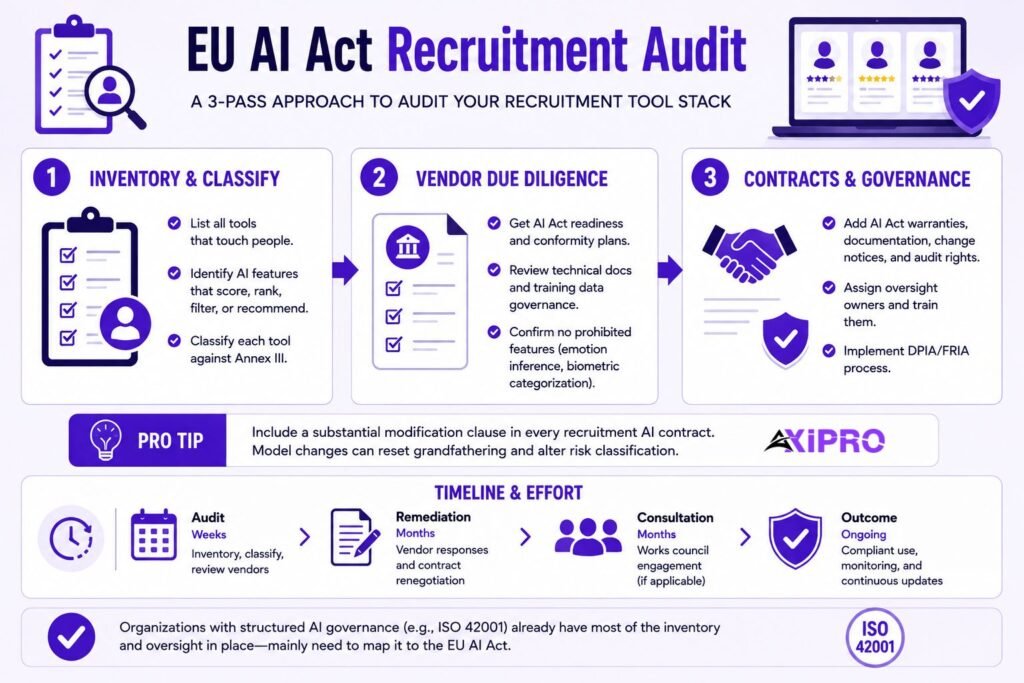
A workable audit runs in three passes:

  • Inventory and classify. List every tool touching candidates or employees, flag every feature that scores, ranks, filters, or recommends people, and classify each against Annex III.
  • Vendor due diligence. Request each vendor’s AI Act readiness statement, conformity assessment plans, technical documentation summary, training data governance description, and confirmation that no prohibited features (emotion inference, biometric categorization) are active for EU use.
  • Contracts and governance. Add AI Act warranties, documentation delivery obligations, notification of substantial modifications, and audit rights to vendor contracts at the next renewal. Internally, assign oversight owners, train them, and stand up the DPIA/FRIA process.

For budgeting purposes, a focused audit of a typical mid-size recruitment stack (an ATS plus two to four AI-enabled tools) is a matter of weeks, not months, but remediation is where the calendar burns: vendor responses, contract renegotiation, and works council consultation each add months of elapsed time.

Organizations already running structured AI governance, for example under ISO 42001, have most of the inventory and oversight machinery in place already and mainly need to map it to the Act’s specific articles.

Pro Tip: Substantial Modification Clause

Put a substantial modification clause in every recruitment AI contract renewed from now on. If the vendor makes a substantial change to the model, you need to know, because it can reset grandfathering and change your risk classification. Vendors won't volunteer this; the contract has to make them.

Practical Steps to Prepare Your Recruitment Process

Sequence the work backward from December 2027.

  • Quarter one: inventory, classification, and killing any prohibited features immediately.
  • Quarters two and three: vendor due diligence and contract updates, candidate-facing transparency language, and a combined DPIA covering AI-specific risks.
  • Quarters four onward: human-in-the-loop process design, training for recruiters and hiring managers, log retention setup, and a dry-run review of one live hiring campaign end to end.

Teams that treat the first half of 2027 as the deadline, rather than December, leave room for the vendor who answers slowly and the works council that meets quarterly.

The talent market makes early movement more valuable. Axipro’s 2026 study of AI governance hiring across Europe found companies hiring roughly seven AI builders for every governance professional, which means the people who can run this compliance work are scarce and getting scarcer. Employers who need external EU AI Act compliance support should scope it before the 2027 crunch pushes prices up.

Let Axipro help you build a business continuity plan that's practical, compliant, and audit-ready.

Schedule Your Free Assessment Today

Conclusion: Turning Compliance Into a Competitive Recruitment Advantage

The EU AI Act treats recruitment tools as high-risk because hiring decisions change lives, and the December 2027 deadline is a reprieve on paperwork, not on principle. The emotion recognition ban already applies, transparency duties began in August 2026, and the full high-risk regime arrives with no obligations removed.

Employers who inventory their stack, pressure-test their vendors, and build genuine human oversight now will spend 2027 refining a working system instead of triaging one.

And in a market where candidates increasingly ask how they are being screened, being able to answer clearly is a recruiting asset in its own right.

Frequently Asked Questions

Are ATS (Applicant Tracking Systems) considered high-risk AI?

Not by default. An ATS that stores applications and manages workflow performs narrow procedural tasks and falls outside the high-risk category. It becomes high-risk when it includes AI features that rank, score, filter, or match candidates, which many modern ATS platforms now do. Audit the features, not the product label.

Yes, as high-risk systems with full obligations attached: human oversight, candidate disclosure, logging, and a compliant vendor. What they can’t do is infer candidates’ emotions. Emotion recognition in the workplace has been prohibited since February 2025, so any sentiment or engagement scoring feature must be disabled for EU hiring.

The AI Act itself grants disclosure rights rather than an opt-out. The stronger right comes from Article 22 GDPR: candidates cannot be subject to a solely automated decision with significant effects, which in practice forces meaningful human involvement in rejections. Combined with access and objection rights over their data, a candidate can effectively demand human review.

The vendor faces provider-tier fines of up to €15 million or 3% of turnover, but the employer isn’t insulated. Deployers have independent obligations, and using a system you knew or should have known lacked conformity documentation is your own compliance failure. This is why vendor due diligence and contractual warranties belong in every renewal between now and December 2027.

Yes. Annex III covers AI used for decisions affecting work-related relationships, including promotion, termination, task allocation, and performance monitoring. A tool that recommends internal candidates for advancement carries the same high-risk obligations as an external hiring screener.

Axipro Author

Picture of Pedro Dias

Pedro Dias

Pedro has been writing online for over 10 years. With experience in all things programming, cyber security, and compliance, he is our editor-in-chief at Axipro.

Blog Highlights

Explore More Articles

Most companies start their first SOC 2 or ISO 27001 project in a spreadsheet, only to have it fall apart in week 6. This is typically when they’ll call us asking us to implement a GRC system that scales. Excel holds 154 controls fine. The trouble starts when an auditor sends over an evidence request list, two frameworks need updating at once, and a control owner who hasn’t opened the file since March edits the wrong row. This article gives you a free GRC workbook template built to take into consideration the hundreds of engagements we’ve guided. It walks you through each tab and tells you plainly when you’ve outgrown it. We’ve worked with hundreds of companies implementing SOC 2 + ISO 27001 and to be honest, for 80% of cases, using excel is feasible and even advised. Its a tool most of the staff knows and using it cuts onboarding times from weeks to a few hours. It also makes it accessible to the whole organization. The workbook covers all 33 SOC 2 Common Criteria plus the Availability, Confidentiality, Processing Integrity, and Privacy criteria, all 93 ISO 27001:2022 Annex A controls, a crosswalk between the two, and the evidence, risk, policy, and gap trackers that sit around them. It’s free, there are no macros, and it opens in Excel or Google Sheets. Why Start SOC 2 and ISO 27001 Tracking in a Spreadsheet The obvious argument for using Excel is cost and ease of use. A GRC platform costs around $10,000 a year before you’ve put a single control in place, and it pushes you into its control library and its workflow before you understand your own environment. A spreadsheet costs nothing and holds exactly the columns you need. More usefully, it makes you think about scope, ownership, and evidence before you automate any of it, and that thinking is the part no platform does for you. There’s a less obvious reason too. Teams that build their first control inventory by hand understand it. They know why CC6.3 maps to A.5.18, why the offboarding checklist is evidence for both, and who actually owns it. Teams that inherit a pre-populated platform library often don’t, and it shows in audit interviews when the auditor asks a control owner to explain a control they’ve never read. When a GRC Workbook Makes Sense A spreadsheet is the right tool when you’re chasing one or two frameworks, your team is under about 50 people, and one person owns compliance day to day. It also suits the readiness phase for any company. Scoping, gap analysis, and control design all go faster in a workbook than in a platform because there’s nothing to configure first. If you’re aiming for a SOC 2 Type I, or an ISO 27001 certificate with a tightly bounded ISMS scope, the workbook can carry you all the way to the audit. When You’ve Outgrown Excel (and Need a Platform) Excel breaks at scale in predictable ways. Spreadsheet research going back decades keeps finding that most operational spreadsheets contain at least one error; a review of field audits across 88 operational spreadsheets found errors in 94% of them. A compliance workbook with 1,400 formulas and a dozen editors isn’t exempt. Add a Type II observation period, where you collect the same evidence every month for a year, and manual tracking stops being a discipline and becomes someone’s full-time job. The specific tripwires are covered later in the article, but the short version is that when evidence collection becomes the bottleneck, it’s time to stop. What’s Inside the Free GRC Workbook Template The workbook has nine tabs. Eight get their own section in the walkthrough below; the ninth, Gap Analysis, is a remediation log that feeds the dashboard. Every tab uses the same color convention.  Navy headers mean pre-filled reference content. Teal headers with light yellow cells are the fields you fill in. Grey headers are formula columns, and you should leave those alone. SOC 2 Trust Services Criteria Coverage All 61 criteria from the AICPA 2017 Trust Services Criteria (with the 2022 revised points of focus) are already in there: the 33 Common Criteria across CC1 through CC9, plus Availability (3), Confidentiality (2), Processing Integrity (5), and Privacy (18). Each row has a plain-English summary of what the criterion expects, so a control owner who has never opened the AICPA document can still understand what they’re being asked to prove. ISO 27001 Annex A Controls Coverage All 93 Annex A controls from ISO/IEC 27001:2022 are listed under their four themes: Organizational (37), People (8), Physical (14), and Technological (34). Each control has a short description of what it covers and a pre-computed column showing which SOC 2 criteria relate to it. Unified Control Mapping Between SOC 2 and ISO 27001 The Crosswalk tab maps every SOC 2 criterion to the Annex A controls and ISO clauses it overlaps with, labels the overlap as Shared, Partial, or SOC 2-specific, and pulls the live status and evidence IDs from the SOC 2 tab. A second table lists the 13 Annex A controls that have no meaningful SOC 2 counterpart, so you know what to track on its own. Evidence Tracker Every piece of evidence gets one row, tagged to the SOC 2 criteria and ISO controls it supports, with an owner, a source system, a location, the period it covers, and how often you collect it. A formula works out the next due date and flags each item as Current, Due Soon, Overdue, or Not Scheduled. Owner and Status Fields Both control tabs have a Control Owner column and a Status dropdown with five defined states: Not Started, In Progress, Implemented, Needs Remediation, and Not Applicable. The definitions sit on the Overview tab so that two people setting a status on the same day mean the same thing by it. Risk Register Tab Likelihood and impact on a 1 to 5 scale, an automatic score, a rating (Critical, High, Medium, Low), a treatment

Vanta’s hosted MCP server gives Claude Code, Codex, Cursor, and Perplexity a live line into your compliance program. Failing tests, controls, vulnerabilities, vendors, policies: all of it queryable in plain English from whatever tool you already have open. Connecting a client shouldn’t take more than ten minutes. Fixing what the agent finds still takes an engineer, and then a wait for Vanta’s next sync before the dashboard turns green. This guide walks through setup for all four clients, the remediation workflow from first query to verified fix, and the errors people hit most. It also covers the parts of the beta that Vanta’s marketing pages skip. What Is the Vanta MCP Server? Understanding Model Context Protocol (MCP) Model Context Protocol is an open standard for connecting AI applications to outside systems. An MCP client (the AI tool) asks an MCP server what it offers, usually a set of named tools with typed inputs, and calls those tools on your behalf. The protocol specification covers transport, authorization, and message format, which is why one server works with any compliant client. Anthropic released MCP in late 2024 and handed it to the Agentic AI Foundation in December 2025, a fund under the Linux Foundation co-founded with Block and OpenAI. The Linux Foundation’s announcement counted more than 10,000 public MCP servers at that point, with ChatGPT, Cursor, Gemini, Microsoft Copilot, and VS Code all supporting the protocol. TechCrunch called the foundation’s projects the basic plumbing of the agent era. That neutral governance is the reason a single Vanta server can serve Claude, Codex, Cursor, and Perplexity without four separate integrations. What Vanta MCP enables for AI agents​ Vanta runs two versions of its MCP server. The hosted remote server, which this guide focuses on, lives at a regional URL, authenticates with OAuth in your browser, and is what Vanta now documents for every supported client. The older open-source local server ships as the @vantasdk/vanta-mcp-server npm package and runs on your machine with API credentials in an environment file. Vanta’s own repository for the local version now carries a deprecation notice pointing people to the hosted one, so treat it as a fallback for clients that can’t reach the hosted endpoint rather than the default. Once connected, the agent can list and filter automated tests, pull the specific entities failing a test, browse controls and their framework mappings, download and upload policy documents, review vendors and their risk attributes, and surface vulnerable assets with their remediation status. It reads live data every time it’s asked. The GRC lead asking “which SOC 2 controls have the most failing tests?” and the engineer asking “why is aws-s3-bucket-server-side-encryption-enabled failing?” are hitting the same server through different clients. Key use cases: compliance, failing tests, and vulnerability triage Most of the value sits in a few workflows. Failing test remediation is the headline: list failing tests, look at the resources behind them, and generate console steps, CLI commands, or infrastructure-as-code snippets to fix them. Vulnerability triage lets you query open CVEs by severity and SLA deadline, as long as at least one scanner (AWS Inspector, Tenable, Wiz, Snyk, or similar) is connected to Vanta. Without a scanner those queries come back empty. Compliance gap analysis covers framework progress, control ownership, evidence gaps, and cross-framework overlap, which is where GRC teams spend most of their time anyway. What Vanta MCP enables for AI agents​ Vanta runs two versions of its MCP server. The hosted remote server, which this guide focuses on, lives at a regional URL, authenticates with OAuth in your browser, and is what Vanta now documents for every supported client. The older open-source local server ships as the @vantasdk/vanta-mcp-server npm package and runs on your machine with API credentials in an environment file. Vanta’s own repository for the local version now carries a deprecation notice pointing people to the hosted one, so treat it as a fallback for clients that can’t reach the hosted endpoint rather than the default. Once connected, the agent can list and filter automated tests, pull the specific entities failing a test, browse controls and their framework mappings, download and upload policy documents, review vendors and their risk attributes, and surface vulnerable assets with their remediation status. It reads live data every time it’s asked. The GRC lead asking “which SOC 2 controls have the most failing tests?” and the engineer asking “why is aws-s3-bucket-server-side-encryption-enabled failing?” are hitting the same server through different clients. Key use cases: compliance, failing tests, and vulnerability triage Most of the value sits in a few workflows. Failing test remediation is the headline: list failing tests, look at the resources behind them, and generate console steps, CLI commands, or infrastructure-as-code snippets to fix them. Vulnerability triage lets you query open CVEs by severity and SLA deadline, as long as at least one scanner (AWS Inspector, Tenable, Wiz, Snyk, or similar) is connected to Vanta. Without a scanner those queries come back empty. Compliance gap analysis covers framework progress, control ownership, evidence gaps, and cross-framework overlap, which is where GRC teams spend most of their time anyway. Worth Knowing: Vanta’s Automated Tests Vanta’s automated tests confirm that a configuration exists. They don’t confirm that a control operated across the audit period. An agent that closes every failing test has cleaned up the dashboard, which is a different thing from passing the audit. Auditors still sample evidence, and the Vanta review goes into which automated tests are shallower than they look. Prerequisites Before Connecting Vanta MCP Finding your Vanta MCP URL Vanta hosts a separate MCP server per region. Use the one that matches your instance, because the client won’t authenticate against the wrong region. Every example below uses the US URL. Swap in yours. Required Vanta permissions and roles You need to be a Vanta Admin. The hosted MCP server isn’t available to non-admin users during the beta, and Vanta’s help center says broader access is planned but hasn’t shipped. This matters more than it sounds. The engineer who’d

Enforcement of the EU AI Act’s core rules started on 2 August 2026, and ISO/IEC 42001:2023 is the standard companies reach for when they need to prove their AI governance actually holds up. It’s the first certifiable standard for an Artificial Intelligence Management System (AIMS), and consultancies package help with it in two ways. A gap analysis tells you how far you are from the standard. Full implementation support builds the management system with you until you’re ready for certification. The two engagements differ enormously in cost, duration, and how much of the work the consultant carries, so picking the wrong one is expensive in both directions. Buy implementation when you only needed a roadmap and you pay for work your team could have done themselves. Buy a gap analysis when you have nobody to close the gaps and the report sits in a drawer while your certification deadline slips past. This article covers what each service includes, what each costs, who should pick which, and how the two combine. What Is an ISO 42001 Gap Analysis? A gap analysis is a structured baseline assessment. A consultant reviews your current AI governance practices against the requirements of ISO 42001: the management system clauses (4 through 10) and the Annex A controls, of which there are 38 grouped under nine control objectives. You end up with a clear picture of what already satisfies the standard, what partially satisfies it, and what doesn’t exist at all. The purpose is diagnostic, not corrective. Nobody writes your AI policy during a gap analysis. What you get is a gap report with maturity scoring against each clause and control, a prioritized remediation roadmap, an early view of your likely AIMS scope and Statement of Applicability (SoA), and an estimate of the effort certification will take. Timeframes are short. A standalone ISO 42001 gap analysis usually takes one to three weeks, with a few days of consultant time and a modest internal commitment: stakeholder interviews, access to documentation, and someone who can describe how AI is actually used across the business. Standalone assessments on the market typically run in the low four figures. Axipro bundles one into its free 30-day Compliance Accelerator Plan, so in practice you can get the diagnostic without spending anything. A gap analysis is the right entry point when you already have governance maturity to build on. Companies with an existing ISO 27001 ISMS often find heavy overlap in the management system clauses, since both standards follow the same Plan-Do-Check-Act (PDCA) structure. It also fits when you have internal compliance expertise to execute the roadmap, when budget needs phasing, or when you want an accurate scope before committing to a bigger project. Insider Note: The step that consistently takes longer than anyone expects is the AI system inventory. Most companies walk into a gap analysis confident they know where AI is used, then discover marketing has been running LLM tools on customer data, and engineering has embedded a third-party model nobody scoped. Budget real time for discovery before the control review starts. What Is ISO 42001 Full Implementation Support? Full implementation support is an end-to-end engagement that takes you from your current state to certification readiness. The consultant identifies the gaps, then closes them with you, building the AIMS piece by piece and owning the project through to the external audit. The deliverables list is long. A typical engagement covers the AI policy and governance framework, an AI risk assessment methodology, completed AI risk assessments and AI impact assessments for your in-scope systems, the Statement of Applicability, the applicable Annex A controls put in place (data governance, human oversight, transparency, and so on), the documentation and evidence set an auditor will ask for, staff training, an internal audit, a management review, and corrective action plans for whatever the internal audit surfaces. Most providers, Axipro included, also coordinate directly with the accredited certification body through the Stage 1 and Stage 2 audits. Most organizations need roughly three to six months. It’s shorter where an ISO 27001 ISMS already exists to integrate with, longer for complex or high-risk AI portfolios. Consultant involvement is heavy and sustained, but your team doesn’t disappear from the project. Internal subject-matter experts still make the real decisions about AI use cases, data handling, and acceptable risk. On cost, consultant-led ISO 42001 implementations commonly run well into five figures. Axipro’s ISO 42001 readiness engagement costs $4,500, which is one of the reasons the honest comparison below matters: at that price, the “just buy the gap analysis to save money” logic gets a lot weaker. Full implementation is the right call when you’re starting an AIMS from scratch, when nobody internal can carry the workload, when a certification deadline is fixed by an enterprise deal or regulatory exposure, or when your AI use cases are risky enough that getting the controls wrong has real consequences. The EU AI Act’s requirements for high-risk AI systems entered into application in August 2026, and companies in that category rarely get the luxury of a slow, self-paced build. Key Differences Between the Two Services Scope and depth A gap analysis assesses; implementation support executes. The gap analysis stops at the roadmap, no matter how detailed. Implementation carries every roadmap item through to a working, evidenced control. That distinction sounds obvious, but it’s the single most common source of buyer disappointment: a gap report doesn’t make you certifiable, and some companies find that out only after they’ve scheduled a Stage 1 audit. Consultant involvement and internal effort In a gap analysis, the consultant works in short, concentrated bursts and your team’s effort is measured in hours of interviews and document gathering. In full implementation, the consultant drafts, builds, and project-manages, yet your team still spends real time reviewing policies, making risk decisions, and generating evidence. Any provider promising certification with zero internal effort is describing a paper AIMS that won’t survive an audit or an incident. Cost and time to readiness A gap analysis finishes