Cyber threats are no longer theoretical. They are automated, persistent, and increasingly aimed at organisations that believe they are “too small to be a target”.
Whether you are a SaaS startup, a regulated enterprise, or a growing organisation preparing for ISO 27001 or SOC 2, penetration testing is no longer optional. It is a core security and compliance requirement.
At Axipro, penetration testing is designed to do more than find weaknesses. It helps organisations understand their real-world risk, validate security controls, and prioritise remediation in a way that supports audits, certifications, and long-term growth.
Main Objectives of Penetration Testing
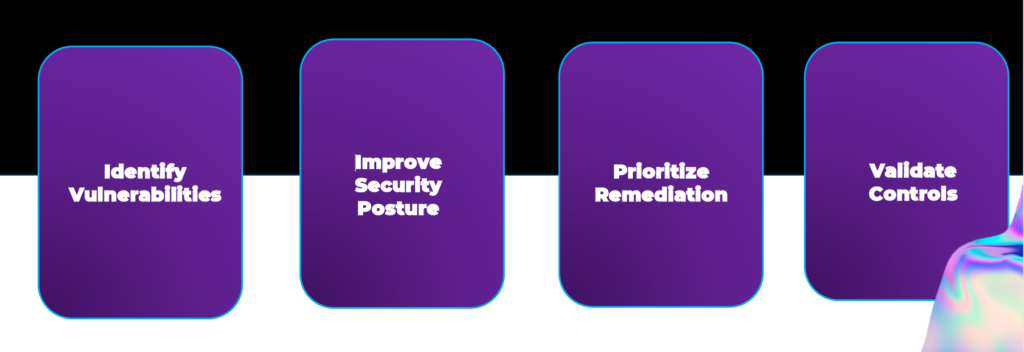
The Axipro penetration testing framework is built around four primary objectives:
- Identify vulnerabilities across applications, infrastructure, and exposed services before attackers do.
- Improve security posture by understanding how systems behave under real attack conditions, not just theoretical assessments.
- Prioritise remediation so teams focus on the vulnerabilities that pose genuine business risk, rather than chasing low-impact findings.
- Validate security controls to ensure that policies, configurations, and safeguards actually work in practice.
Penetration testing is not about producing long reports. It is about producing clarity.
Introduction & Methodology
Penetration testing at Axipro follows a structured, repeatable methodology that aligns with modern security standards and compliance frameworks.
The methodology is designed to simulate real-world attacks while remaining controlled, auditable, and business-focused. This ensures findings are both technically accurate and compliance-ready.
The process balances automation with deep manual testing, recognising that tools alone cannot uncover logic flaws, chained vulnerabilities, or contextual risk.
Project Map
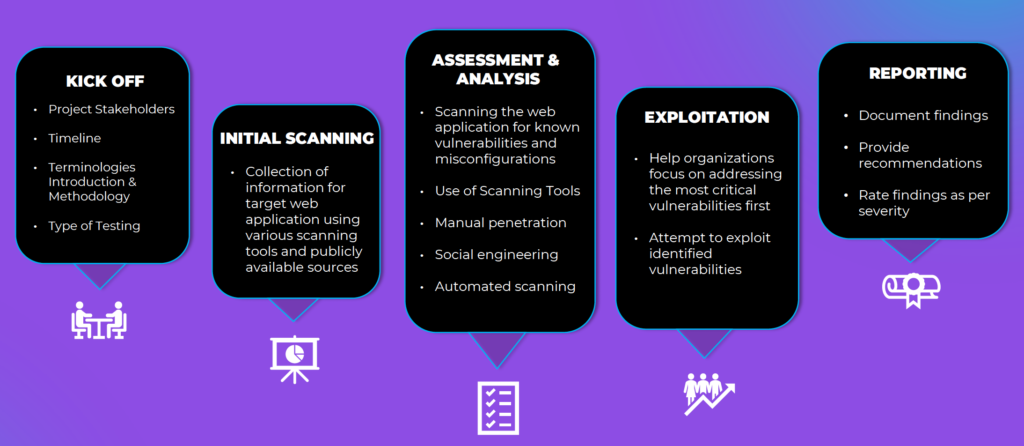
The project map illustrated above provides a clear, end-to-end view of how an Axipro penetration testing engagement is delivered .
Rather than treating testing as a single activity, Axipro approaches it as a sequence of interconnected phases, each building on the last.
Kick Off
The engagement begins with a structured kick-off.
This phase defines:
Project stakeholders
Scope boundaries
Timeline and milestones
Terminology and testing methodology
Type of testing to be performed
This step is critical. Clear scoping ensures the test reflects real business risk and avoids both blind spots and unnecessary noise.
Initial Scanning
Initial scanning focuses on information gathering and attack surface discovery.
Axipro collects intelligence on the target environment using scanning tools and publicly available sources. This mirrors how real attackers begin their reconnaissance.
The goal is not exploitation, but understanding what is visible, reachable, and potentially misconfigured.
Assessment & Analysis
This is the core analytical phase of the engagement.
During assessment and analysis, Axipro:
Scans for known vulnerabilities and misconfigurations
Performs automated and manual testing
Conducts targeted manual penetration attempts
Analyses authentication flows, access controls, and exposed APIs
Evaluates real exploitability rather than theoretical risk
This phase separates generic vulnerability scanning from true penetration testing.
Exploitation
In the exploitation phase, Axipro safely attempts to exploit validated vulnerabilities.
This step answers the most important question for leadership:
What could an attacker actually do with this weakness?
Exploitation is controlled, non-destructive, and focused on demonstrating impact rather than causing disruption.
Reporting
The final phase is reporting and closeout.
Axipro delivers a structured penetration testing report that:
Documents all findings
Rates vulnerabilities by severity
Explains business impact in clear language
Provides actionable remediation recommendations
The report is designed to support engineering teams, leadership, and auditors alike.
Tools Used
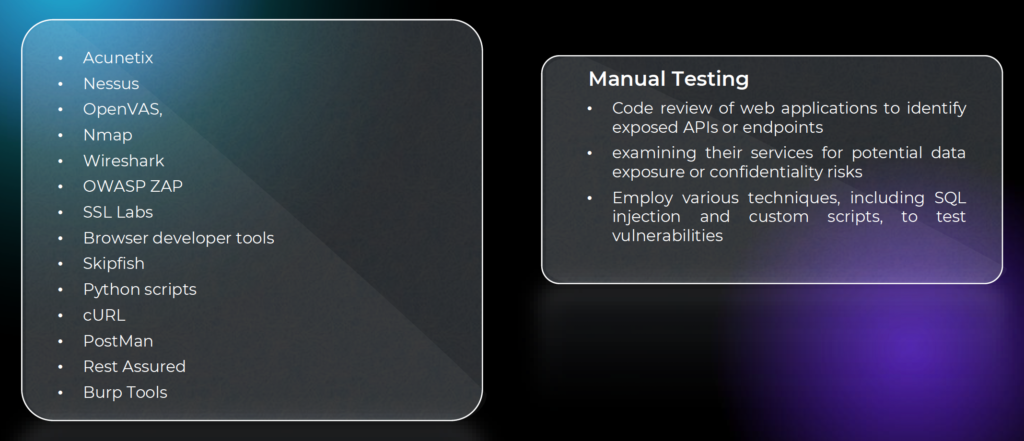
These include vulnerability scanners, network analysis tools, application testing platforms, API testing tools, and custom scripts.
However, tools are only part of the equation.
Automation finds volume. Expertise finds risk.
Manual testing techniques such as code review, API analysis, SQL injection testing, and custom exploitation scripts are critical to uncovering vulnerabilities that scanners routinely miss.
Black Box Testing
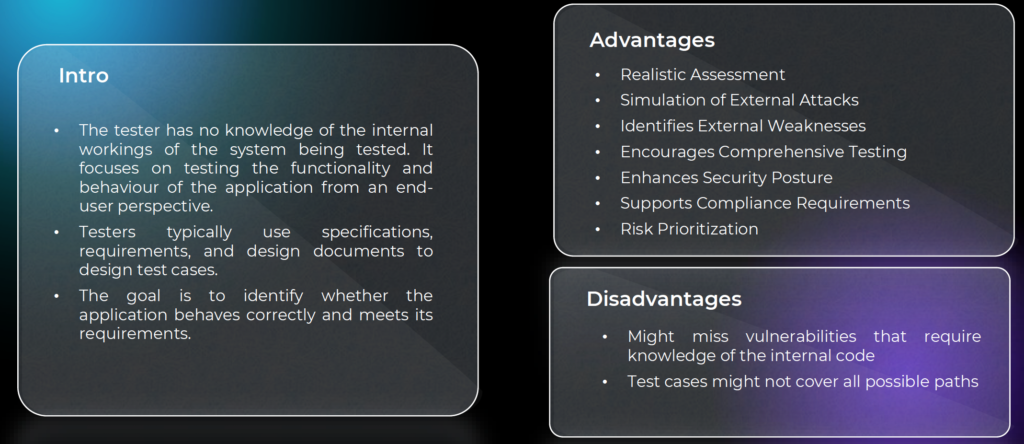
Black box testing is performed with no prior knowledge of the internal workings of the system.
Testers approach the application from an external attacker’s perspective, relying on publicly accessible interfaces and behaviour.
Advantages
Black box testing provides a realistic simulation of external attacks, helping organisations:
-
Identify externally exposed weaknesses
-
Improve overall security posture
-
Support compliance requirements
-
Prioritise risk based on real-world attack paths
Disadvantages
Because internal code and architecture are not visible, some deep or logic-based vulnerabilities may remain undetected.
White Box Testing
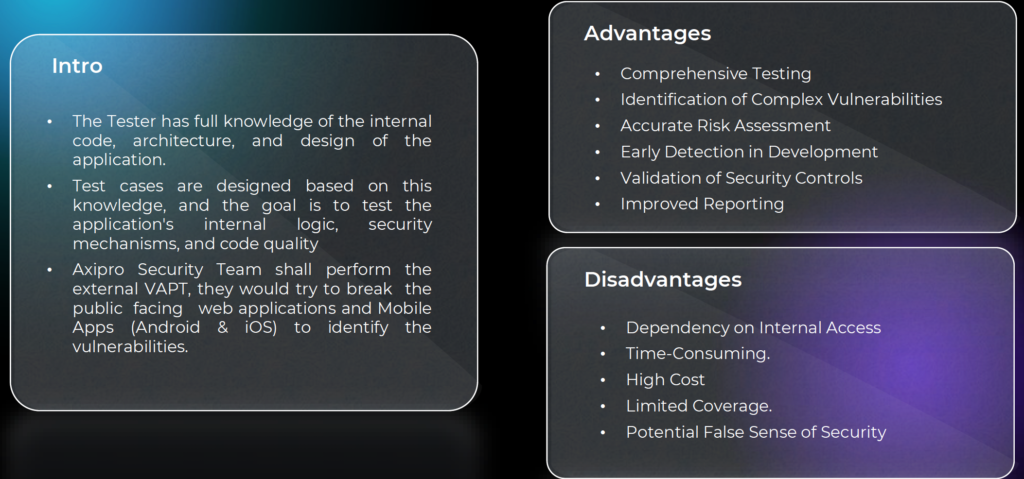
White box testing provides testers with full knowledge of the internal code, architecture, and design.
Axipro’s security team uses this visibility to examine internal logic, security mechanisms, and code quality.
Advantages
White box testing enables:
Comprehensive testing coverage
Identification of complex vulnerabilities
Accurate risk assessment
Early detection during development
Validation of security controls
Disadvantages
White box testing can be time-consuming, more costly, and dependent on internal access. It may also create a false sense of security if not paired with external testing.
Grey Box Testing
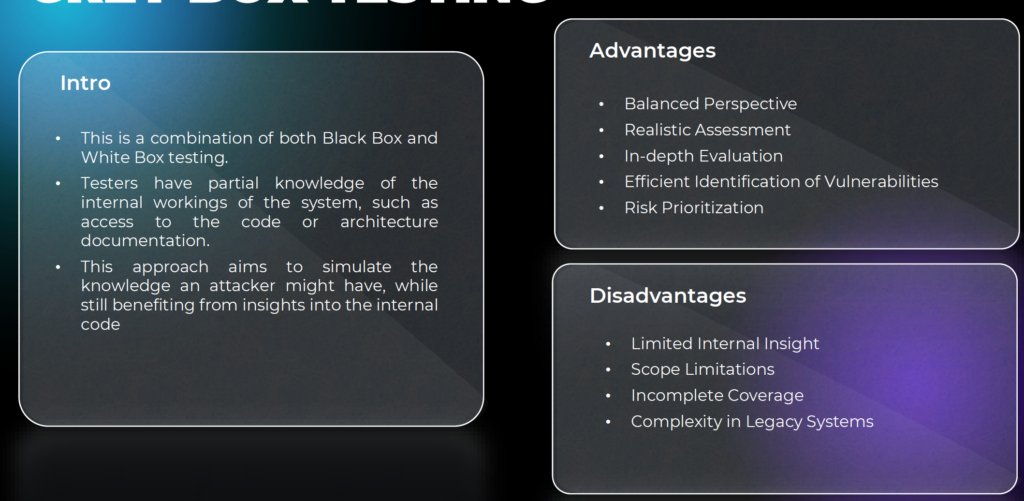
Grey box testing combines elements of both black box and white box testing.
Testers have partial knowledge of the internal system, such as architecture diagrams or limited access credentials.
Advantages
This approach provides a balanced perspective, allowing:
Realistic attack simulation
In-depth evaluation
Efficient vulnerability identification
Practical risk prioritisation
Disadvantages
Grey box testing may still have scope limitations and incomplete coverage, particularly in complex or legacy environments.
Penetration Testing Timeline
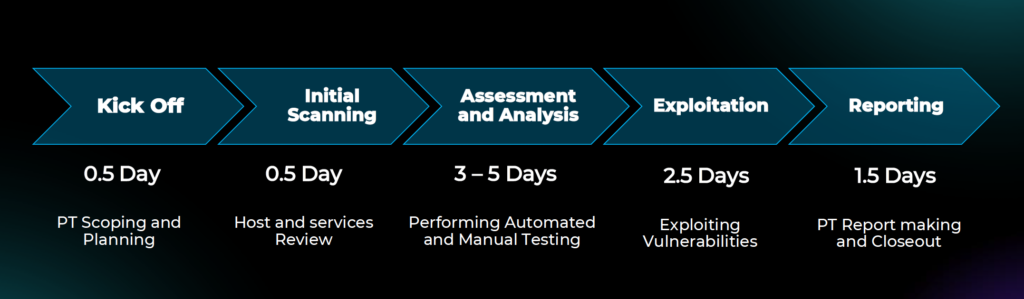
While timelines vary based on scope and complexity, a standard engagement includes:
Kick-off and planning, followed by initial scanning, assessment and analysis, exploitation, and reporting.
In most cases, penetration testing is completed within one to two weeks, providing fast, actionable insight without disrupting operations.
Penetration Testing Plans
Axipro offers scalable penetration testing plans aligned with organisational size, growth stage, and compliance needs.
The Basic plan is suitable for smaller organisations or single-framework requirements, including one round of retesting.
The Scale plan supports growing organisations that require multiple retesting cycles and deeper coverage.
The Growth plan is designed for organisations with frequent testing needs and evolving attack surfaces.
Each plan integrates seamlessly with Axipro’s broader compliance services, including ISO 27001, SOC 2, internal audits, and compliance as a service.
Why Penetration Testing Matters Beyond Security
Penetration testing is not just a technical exercise.
It supports:
Regulatory compliance
Customer trust
Enterprise sales cycles
Investor due diligence
Long-term risk reduction
A clear, well-documented penetration test demonstrates that security is not theoretical, but operational.
Take the Next Step
If you are preparing for certification, responding to customer security questionnaires, or simply want confidence in your security posture, penetration testing is the logical next step.
Axipro combines human expertise, structured methodology, and compliance alignment to deliver penetration testing that actually drives outcomes.
Book a consultation, request a security assessment, or speak with Axipro about integrating penetration testing into your compliance roadmap today.
At Axipro Technology, excellence is standard.