

CMMC requirements started appearing in Department of Defense contracts on November 10, 2025, when the final DFARS rule took effect. By November 10, 2028, the clause at DFARS 252.204-7021 must appear in every solicitation and contract where contractor systems process, store, or transmit Controlled Unclassified Information (CUI). For most of the Defense Industrial Base (DIB), the math is blunt: pass a CMMC assessment or lose eligibility for DoD work.
A CMMC readiness assessment is how you find out whether you’d pass before the stakes are real. It’s a structured review of your environment, documentation, and evidence against the requirements of the Cybersecurity Maturity Model Certification, done before you sit for a self-assessment or a Certified Third-Party Assessment Organization (C3PAO) audit. A good one tells you exactly where you stand and what to fix first.
This guide covers what a readiness assessment includes, how the process works at each CMMC level, what it costs, how long it takes, and how to pick someone to run one.
What Is a CMMC Readiness Assessment?
A CMMC readiness assessment is a pre-certification evaluation that measures your organization against the specific requirements of your target CMMC level. It examines your scope, implemented controls, System Security Plan (SSP), Plan of Action and Milestones (POA&M), and the evidence supporting them, then produces a gap analysis and a remediation roadmap.
The purpose is simple: surface every deficiency while it’s still cheap to fix. An assessor who finds a scoping error during a readiness review costs you a few weeks of rework. A C3PAO who finds the same error during a certification assessment can cost you the assessment fee, months of delay, and in some cases contract eligibility.
How It Differs From an Official C3PAO Audit
An official CMMC Level 2 certification assessment is conducted by a C3PAO accredited by the Cyber AB, the official accreditation body for the CMMC ecosystem. The C3PAO’s findings are binding. Results go into the DoD’s assessment systems, and a passing result produces a CMMC status that contracting officers verify before award. A readiness assessment carries no official weight. Nothing gets filed or certified, and a poor result costs you nothing beyond the work needed to fix it. That’s the whole point. It’s the only stage in the entire process where failure is free.
There’s also a conflict-of-interest rule worth knowing. A C3PAO cannot provide consulting and remediation services to an organization and then certify that same organization. If a C3PAO helps you prepare, a different C3PAO has to assess you.
How It Differs From a Mock Assessment
A mock assessment is a dress rehearsal. It simulates the certification assessment itself: assessors interview control owners, request evidence on the spot, and score findings the way a C3PAO would. A readiness assessment is broader and comes earlier, and its job is discovering and closing gaps rather than rehearsing the exam. Most organizations run a readiness assessment first, remediate, then run a mock assessment a few weeks before the real one to see whether staff and evidence hold up under live questioning.
How It Differs From a Self-Assessment
A self-assessment is a formal CMMC mechanism rather than a preparation exercise. CMMC Level 1 and a subset of Level 2 contracts let organizations self-assess, post the results to the Supplier Performance Risk System (SPRS), and have a senior official affirm compliance annually. That affirmation is a representation to the government, and false or careless affirmations carry False Claims Act exposure. A readiness assessment is the check you run before making that representation, so the number you affirm reflects reality.
Why a CMMC Readiness Assessment Matters
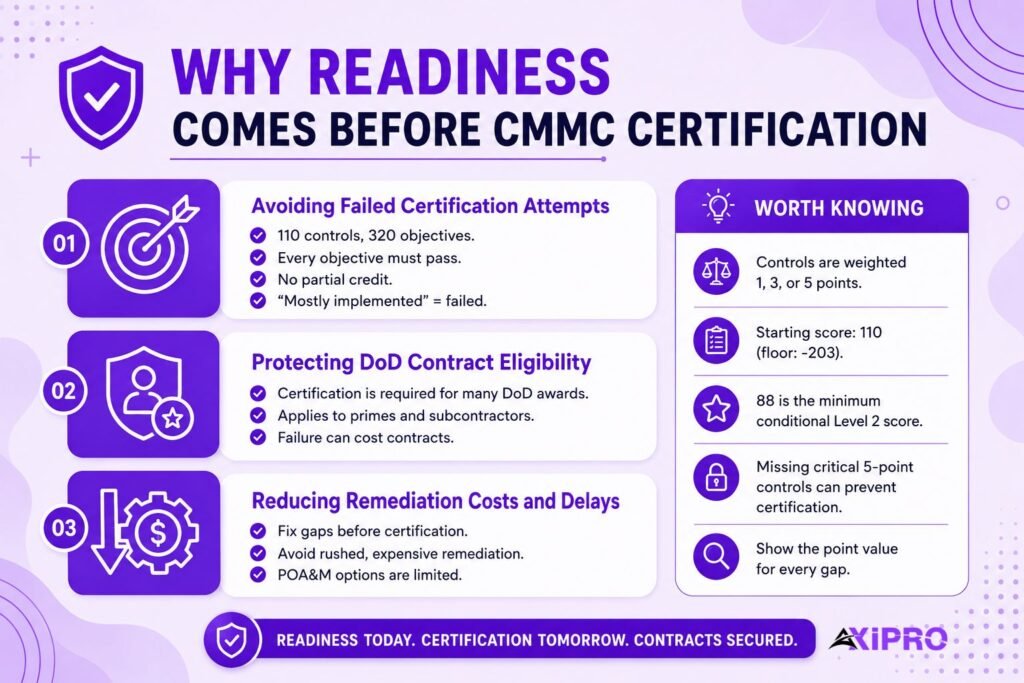
Avoiding Failed Certification Attempts
CMMC Level 2 covers all 110 security controls of NIST SP 800-171, evaluated against 320 assessment objectives. Every objective has to be met for a control to score, and there’s no partial credit. Organizations that skip readiness work routinely walk into certification believing they’re compliant because controls are “mostly” implemented. Mostly implemented scores the same as not implemented.
Protecting DoD Contract Eligibility
Under the phased rollout that began in November 2025, CMMC status is a condition of award. Prime contractors also have to flow the requirement down to subcontractors that handle Federal Contract Information (FCI) or CUI, and they’ve been pushing their supply chains hard. So a missed certification hurts twice: you lose the immediate contract, and you risk dropping out of a prime’s approved supplier pool during the exact window when those pools are being rebuilt around CMMC status.
Reducing Remediation Costs and Delays
Gaps found early get fixed on your schedule with your choice of solution. Gaps found during certification get fixed under deadline pressure, often with whatever expensive tooling can be deployed fastest. There’s a conditional CMMC status for organizations that pass with a limited POA&M, but closeout has to happen within 180 days, and only certain lower-weighted controls are POA&M-eligible in the first place. Readiness work keeps you out of that corner.
Worth Knowing: The DoD Assessment Methodology
The DoD Assessment Methodology weights each NIST SP 800-171 control at 1, 3, or 5 points, deducted from a starting score of 110. The floor is -203. To achieve even a conditional Level 2 status, you need a minimum score of 88. A handful of unmet 5-point controls, such as FIPS-validated encryption or multifactor authentication, can put certification out of reach on their own, so a readiness assessment should always show the point weight attached to every gap.
Let Axipro help you build a business continuity plan that's practical, compliant, and audit-ready.
Schedule Your Free Assessment Today
When to Conduct a CMMC Readiness Assessment
- Before your first self-assessment. If a contract requires a Level 1 or Level 2 self-assessment, run readiness work before you post a score to SPRS. The score you affirm is a legal representation, and it’s far easier to fix the environment than to explain a misstated score later.
- When contract requirements are approaching. If CMMC language has shown up in a solicitation you plan to bid, or your prime has set a certification deadline, count backward. Remediation after a readiness assessment typically takes six to twelve months for organizations starting from a moderate posture, and C3PAO scheduling adds lead time on top.
- After a significant environment or system change. A migration to a new cloud tenant, an acquisition, a new facility, or a redesigned CUI enclave can invalidate assumptions your entire compliance program rests on. Reassess whenever the boundary moves.
- On a recurring basis. CMMC requires an annual affirmation of continued compliance by an affirming official. An annual internal readiness cycle gives that affirmation a factual basis and catches drift before it compounds.
What a CMMC Readiness Assessment Includes
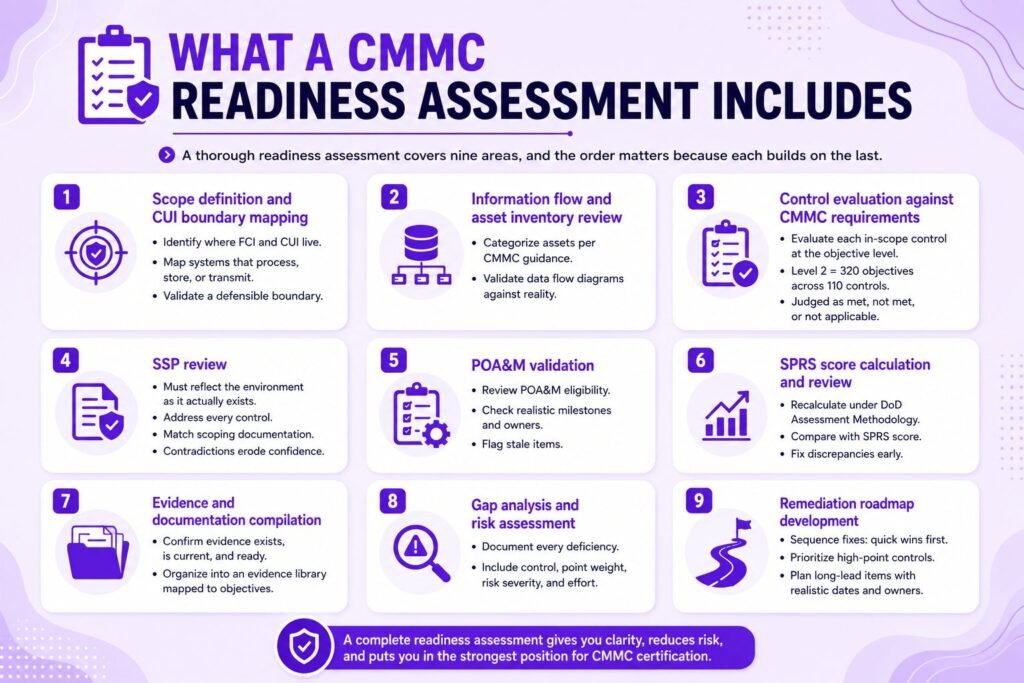
A thorough readiness assessment covers nine areas, and the order matters because each builds on the last.
- Scope definition and CUI boundary mapping.
Everything starts with scope. The assessment identifies where FCI and CUI live, which systems process, store, or transmit them, and whether the boundary is defensible. Plenty of organizations discover their assumed CUI enclave leaks: a backup job copies CUI to an out-of-scope server, or a shared mailbox pulls it into the corporate tenant. - Information flow and asset inventory review.
Assets get categorized the way CMMC scoping guidance requires, including CUI assets, security protection assets, contractor risk managed assets, and specialized assets. Data flow diagrams get tested against reality rather than against what the network diagram from 2022 says. - Control evaluation against CMMC requirements.
Each in-scope control gets evaluated at the assessment objective level. For Level 2, that means all 320 objectives across the 110 controls of NIST SP 800-171, judged as met, not met, or not applicable. - SSP review. The System Security Plan is the anchor document of any CMMC assessment. Assessors check whether it describes the environment as it actually exists, addresses every control, and matches the scoping documentation. An SSP that contradicts the evidence is one of the fastest ways to lose an assessor’s confidence.
- POA&M validation. Open items get reviewed for POA&M eligibility, realistic milestones, and assigned owners. Items that should’ve been closed years ago get flagged, because a stale POA&M signals a compliance program that isn’t actually running.
- SPRS score calculation and review. The assessment recalculates your score under the DoD Assessment Methodology and compares it with what’s currently posted in SPRS. Discrepancies get corrected before they become a problem in an official review.
- Evidence and documentation compilation. For every objective, the assessment confirms that evidence exists, is current, and can be produced quickly. Policies, screenshots, configuration exports, training records, and log samples get organized into an evidence library mapped to objectives.
- Gap analysis and risk assessment. Every deficiency gets documented with its affected control, point weight, risk severity, and remediation difficulty.
- Remediation roadmap development. Findings become a sequenced plan: quick wins first, high-point-value controls next, long-lead items such as FIPS-validated cryptography or physical security changes scheduled with realistic dates and owners.
Insider Note: Scoping errors sink more certification attempts than technical control failures do. Assessors can only assess the boundary you present, and if CUI turns out to flow outside it, the assessment stops being a test of your controls and becomes a test of your credibility. Spend a disproportionate share of readiness time proving the boundary, especially anywhere email, file sharing, or managed service provider access touches CUI. Your MSP or MSSP belongs in a shared responsibility matrix that states, control by control, who does what. And if a cloud provider stores or processes CUI on your behalf, it needs to meet FedRAMP Moderate or equivalent.
CMMC Readiness Assessment Process: Step-by-Step
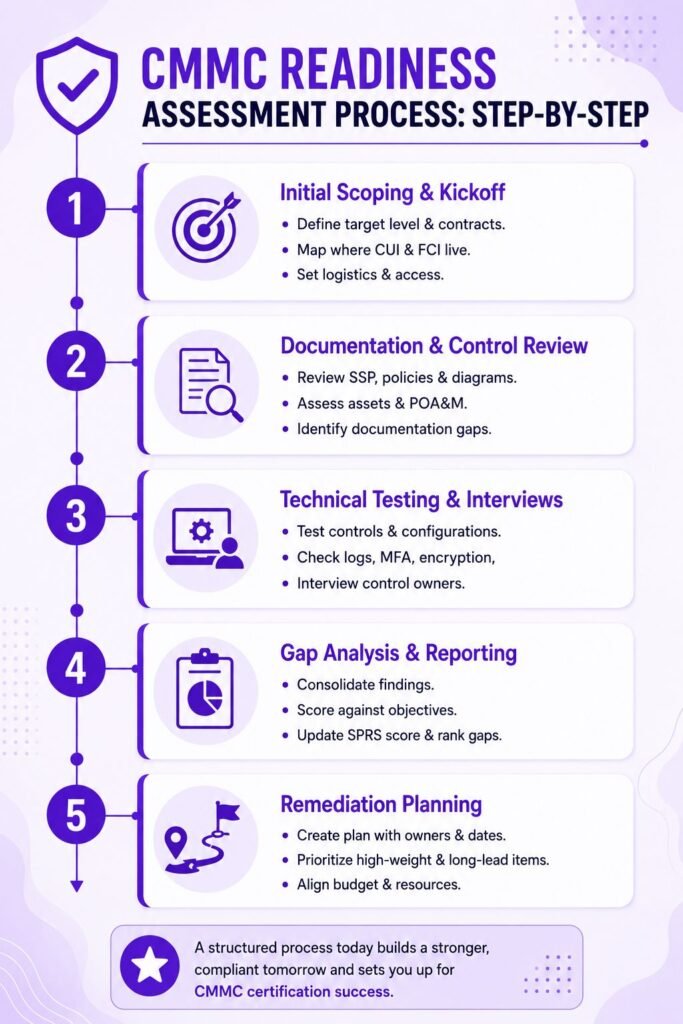
Step 1: Initial scoping and kickoff.
Define the target CMMC level, identify the contracts driving the requirement, map where CUI and FCI live, and agree on the assessment boundary. This step also sets logistics: who gets interviewed, what documentation exists, and what access the assessors need.
Step 2: Documentation and control review.
Assessors review the SSP, policies, procedures, network diagrams, asset inventories, and the existing POA&M. Documentation gaps surface here, and they’re usually extensive. Most organizations have implemented more than they’ve documented, which matters because an undocumented control often can’t be verified.
Step 3: Technical testing and interviews.
Assessors validate that controls operate as described. That means reviewing configurations, sampling logs, checking MFA enforcement, inspecting encryption settings, and interviewing the people who own each control. Interviews expose the difference between a policy that exists and a practice that happens.
Step 4: Gap analysis and reporting.
Findings get consolidated into a gap report scored against the assessment objectives, with an updated SPRS calculation and a severity ranking for each deficiency.
Step 5: Remediation planning.
The final step converts findings into a plan with owners, dates, dependencies, and budget implications, ordered so the highest-weight and longest-lead items start first.
Readiness Assessment by CMMC Level
CMMC 2.0 has three levels, and readiness work scales sharply between them.
- Level 1 readiness verifies the 15 basic safeguarding requirements for FCI. The work is light, but the annual self-assessment and affirmation still carry legal weight, so evidence should exist for every requirement.
- Level 2 readiness is where most of the DIB lives. It covers the full NIST SP 800-171 control set at the objective level, and it’s the level this article’s process describes. Contracts specify whether Level 2 requires a C3PAO certification or a self-assessment. The security bar is identical either way.
- Level 3 readiness applies to a small slice of contractors supporting the most sensitive programs. It requires a final Level 2 certification first, then implementation of 24 enhanced requirements from NIST SP 800-172 built to resist advanced persistent threats. The assessment is performed by the government’s Defense Industrial Base Cybersecurity Assessment Center (DIBCAC) rather than a C3PAO, and readiness work has to address the stricter Level 3 scoping model as well as the enhanced controls.
Let Axipro help you build a business continuity plan that's practical, compliant, and audit-ready.
Schedule Your Free Assessment Today
CMMC Readiness Assessment Deliverables
A credible readiness engagement ends with five artifacts.
- The gap analysis report documents every deficiency at the objective level with severity and point impact.
- The updated SSP and POA&M reflect the environment as found, with POA&M entries limited to genuinely eligible items.
- The SPRS score summary shows your recalculated score, the delta from what’s posted, and where the score lands as remediation progresses. The prioritized remediation roadmap sequences the work with owners, dates, and cost estimates.
- Finally, the executive summary gives leadership what they actually need: certification probability today, the investment required, the timeline, and the contract revenue at risk if the timeline slips.
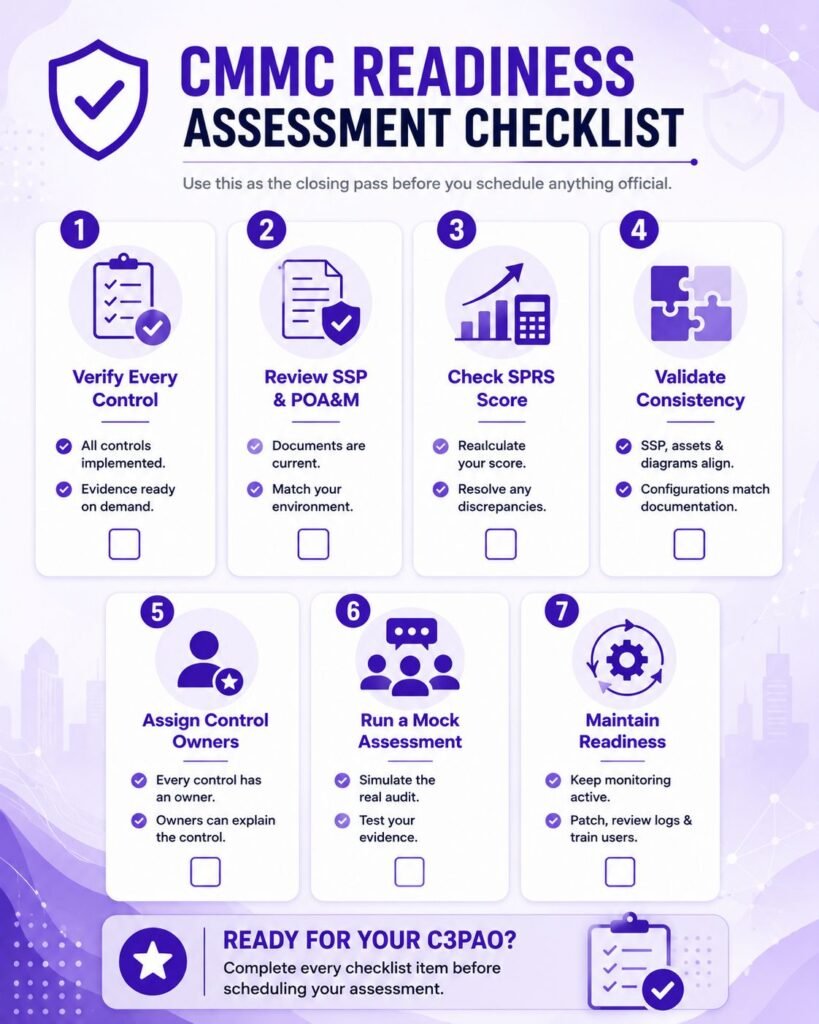
CMMC Readiness Assessment Checklist
Use this as the closing pass before you schedule anything official.
- Confirm every control is implemented and verifiable. Implemented means all assessment objectives are met, and evidence proves it. If you can’t produce the evidence within a day, treat the control as unverified.
- Validate the SSP and POA&M are current. Both documents should describe today’s environment, reference today’s system names, and carry no entries that contradict each other or the network reality.
- Recalculate and review your SPRS score. Run the DoD Assessment Methodology from scratch rather than editing last year’s spreadsheet, and reconcile the result with what SPRS currently shows.
- Check consistency across systems and documents. Assessors cross-reference constantly. The asset inventory, the SSP, the data flow diagrams, and the actual configurations have to tell one story.
- Validate control ownership. Every control needs a named owner who can speak to how it works. “The IT team handles that” is an interview answer that fails.
- Conduct a mock assessment. Once gaps are closed, rehearse under live conditions with someone playing an unfriendly assessor.
- Maintain continuous monitoring. Readiness decays. Patch cadence, log review, access recertification, and training records need to keep running between assessments, because the annual affirmation asserts that they did.
Pro Tip: Run Evidence Drills before any Assessment
Run evidence drills before any assessment, readiness or official. Pick ten random assessment objectives and give the control owner 30 minutes to produce current proof for each. Organizations that pass certification smoothly are rarely the ones with the best security tooling. They're the ones that can retrieve any artifact in minutes, because slow evidence retrieval reads as weak control operation even when the control itself is fine.
How Long Does a CMMC Readiness Assessment Take?
The assessment itself typically runs two to six weeks. Small organizations with a contained CUI enclave sit at the short end. Mid-sized contractors with a few hundred employees and multiple systems usually need four to six weeks, and large or multi-site environments can take two to three months before the report is final.
The larger number is what follows. Remediation commonly takes six to twelve months depending on where you start, and the biggest schedule drivers are consistent: unclear CUI boundaries that force re-scoping, long-lead technical items such as FIPS-validated cryptography, dependency on MSPs whose own posture has to be verified, and documentation debt that takes longer to clear than anyone budgets. Environment complexity, staff availability for interviews, and how much evidence already exists in retrievable form all move the timeline more than headcount does.
Common Challenges During a CMMC Readiness Assessment
Underestimating time and resources. Readiness work competes with day jobs. The interview schedule alone can eat dozens of staff hours, and remediation always uncovers second-order work.
Scoping and CUI boundary uncertainty. Many contractors can’t say with confidence where all their CUI is. Legacy file shares, email threads, and subcontractor exchanges scatter it, and every newly discovered location expands scope.
Manual documentation management. Spreadsheets tracking 320 objectives across policies, evidence files, and owners break down fast. Version confusion between the SSP, the POA&M, and reality is one of the most common findings in readiness work.
Linking controls, risks, and evidence. Assessors think in terms of objective, implementation, and proof. Organizations that store evidence by department or by tool rather than by control spend the assessment scrambling to translate.
Choosing a CMMC Readiness Assessment Partner
Look for credentials issued within the CMMC ecosystem. A Registered Provider Organization (RPO) is authorized by the Cyber AB to provide consulting and preparation services. Individual practitioners should hold the Certified CMMC Professional (CCP) or Certified CMMC Assessor (CCA) credential, with CCAs bringing direct experience of how official assessments actually get scored.
Before hiring, ask a few pointed questions. How many Level 2 environments has the team taken through readiness, and how many of those went on to pass certification? Will the assessment evaluate at the assessment objective level or only at the control level? Does the deliverable include an updated SSP and a costed roadmap, or just a findings list? How do they handle MSP and cloud provider responsibilities? Vague answers to any of these predict a shallow engagement.
On independence: an in-house readiness review beats none, and it builds internal capability. But independent assessors catch what familiarity hides, and their findings carry more weight with leadership when remediation needs budget. If your certification path runs through a C3PAO, remember that the assessing C3PAO can’t also be your preparation consultant, so plan for separate parties from the start.
A CMMC readiness assessment is the cheapest point in the entire certification journey to discover bad news. It defines your true scope, scores your real posture against every applicable assessment objective, aligns your SSP, POA&M, and SPRS score with reality, and converts everything it finds into a sequenced plan. With CMMC clauses now flowing into DoD contracts and full inclusion required by late 2028, the contractors who treat readiness as a project this year will be the ones still bidding in three.
Frequently Asked Questions
Is a CMMC Readiness Assessment Required?
No. Neither 32 CFR Part 170 nor the DFARS clauses require one. What the rules require is the outcome a readiness assessment protects: a truthful SPRS score, a passing assessment at the required level, and an annual affirmation you can stand behind.
Can I Perform a Readiness Assessment Internally?
Yes, and for Level 1 it’s often enough. For Level 2, internal reviews work best as a recurring discipline, supplemented by an external assessment before certification. Internal teams tend to assess intent while external assessors assess evidence, and certification is scored on evidence.
What’s the Difference Between a Readiness Assessment and a Gap Analysis?
A gap analysis is one component: the comparison of your current state against the requirements. A readiness assessment wraps that comparison in scoping validation, SSP and POA&M review, SPRS recalculation, evidence compilation, and a remediation roadmap.
How Often Should I Conduct a Readiness Assessment?
At minimum, annually, aligned with the affirmation cycle, plus after any major environmental change and before any official assessment. Continuous monitoring between cycles keeps the annual pass small.
Will a Readiness Assessment Guarantee Certification?
No. It cuts the risk of surprise to near zero if you remediate what it finds, but the certification result depends on the official assessment of your environment on the day. Any provider guaranteeing certification is telling you something about their integrity rather than your posture.
Can a C3PAO Perform My Readiness Assessment?
A C3PAO can perform readiness and consulting work, but it can’t then conduct your official certification assessment. If you want a C3PAO’s perspective during preparation, engage one C3PAO for readiness and a different one for certification, and confirm the separation in writing.


