

Only one of these three vendors sells a FedRAMP-authorized identity platform you can buy today as a defense contractor, one sells two of them, and one sells none.
Whether that matters for your CMMC Level 2 assessment depends entirely on whether your identity provider stores, processes, or transmits Controlled Unclassified Information (CUI), or provides security protections for the systems that do.
That second condition is where most contractors get the analysis wrong. The IdP question is arguably the most argued-about scoping decision in CMMC 2.0 Level 2 preparation, because an identity provider almost never holds CUI directly, yet it controls access to everything that does. This article works through the regulatory requirement, the actual FedRAMP status of JumpCloud, Okta, and Microsoft Entra ID, and how to choose based on your CUI architecture rather than vendor marketing.

Understanding the CMMC Level 2 + FedRAMP Requirement
What CMMC Level 2 Requires for Cloud Services Handling CUI
CMMC 2.0 Level 2 requires contractors to implement the 110 security requirements of NIST SP 800-171 Rev. 2 and, for most contracts, pass a third-party assessment by a Certified Third-Party Assessor Organization (C3PAO). The 48 CFR acquisition rule took effect on November 10, 2025, which means CMMC clauses now appear in new Department of Defense (DoD) solicitations, with third-party assessment requirements expanding through the phased rollout in 2026 and beyond.
The cloud piece comes from the CMMC program rule at 32 CFR Part 170. If an Organization Seeking Certification uses a Cloud Service Provider (CSP) to process, store, or transmit CUI, that cloud service offering must be either FedRAMP Authorized at the Moderate baseline or higher or must meet security requirements equivalent to the FedRAMP Moderate baseline. Your C3PAO verifies this during the assessment. If your in-scope CSP fails the test, you fail the assessment.
The DFARS 252.204-7012 “FedRAMP Moderate or Equivalent” Clause
The requirement predates CMMC. DFARS 252.204-7012 has required since 2016 that any external CSP used to store, process, or transmit covered defense information meet security requirements “equivalent to those established by the Government for the Federal Risk and Authorization Management Program (FedRAMP) Moderate baseline.”
For years, “equivalent” was undefined, and contractors interpreted it loosely. The DoD CIO closed that door with its December 2023 equivalency memo. To be FedRAMP Moderate Equivalent, a CSP must now demonstrate 100% compliance with the FedRAMP Moderate baseline, validated by a FedRAMP-recognized Third-Party Assessment Organization (3PAO), and hand over a full Body of Evidence to the contractor. No open Plans of Action and Milestones (POA&Ms) against the baseline are permitted. In some ways, it’s stricter than authorization itself, since authorized CSPs are allowed to carry POA&Ms.
Important: A vendor telling you they are “NIST 800-171 compliant” or “aligned to FedRAMP controls” does not satisfy DFARS 7012 or the CMMC rule. Either the offering appears on the FedRAMP Marketplace at Moderate or higher, or the vendor gives you a 3PAO-attested Body of Evidence demonstrating full equivalency. Anything else is a gap your C3PAO will find.
When an Identity Provider Falls Under This Requirement
An IdP is a cloud service. The question is whether it processes, stores, or transmits CUI. In a typical SSO flow, the IdP handles credentials, authentication tokens, session data, and directory attributes. None of that is CUI in most environments. So a literal reading says the FedRAMP mandate doesn’t apply.
The complication is the CMMC scoping guidance, which defines Security Protection Assets (SPAs): assets that provide security functions to the CMMC assessment scope even if they never touch CUI. An IdP enforcing multi-factor authentication (MFA), conditional access, and session policy over your CUI enclave is the textbook SPA. SPAs are in scope for your assessment and get evaluated against the relevant NIST SP 800-171 requirements they help satisfy.
Let Axipro help you build a business continuity plan that's practical, compliant, and audit-ready.
Schedule Your Free Assessment Today
Does Your Identity Provider Actually Need to Be FedRAMP Authorized?
When the IdP Processes, Stores, or Transmits CUI
Some architectures do push CUI through the identity layer. If usernames or directory attributes contain CUI (think program names or export-controlled project identifiers), if your IdP proxies application traffic through a gateway that carries CUI payloads, or if CUI-bearing documents get attached to identity workflows, the IdP is now a CSP handling CUI. FedRAMP Moderate or equivalent becomes non-negotiable.
When the IdP Provides Security Protections for CUI (SPA Role)
This is the common case, and it’s genuinely gray. The FedRAMP requirement in the rule text attaches to CSPs that process, store, or transmit CUI. A pure-play authentication service that does neither is an SPA, not a CUI-handling CSP. Under the final CMMC rule, External Service Providers (ESPs) that handle only Security Protection Data, such as configuration data, logs, and credentials, do not themselves require FedRAMP authorization or a separate CMMC certification. Their services get assessed as part of your assessment.
In practice, C3PAOs are not uniform on this. Some accept a well-documented System Security Plan (SSP) showing the IdP never touches CUI. Others take a conservative view that authentication data for CUI systems is sensitive enough that they want FedRAMP-grade assurance behind it, and they will probe hard. DIBCAC’s historical position, given publicly by officials as far back as 2020, is that clouds with management access to CUI systems don’t need FedRAMP unless CUI actually moves into them. That position helps, but you carry the burden of proving CUI never transits the service.
Cases Where a Commercial IdP May Be Acceptable
A commercial, non-FedRAMP IdP can survive a CMMC Level 2 assessment when all three of the following are true: CUI demonstrably never touches the IdP, the IdP is documented as an SPA with the specific 800-171 requirements it supports, and the data flows in your SSP prove the boundary. This is exactly how many contractors run enclave strategies, keeping a commercial identity stack for the corporate network while the CUI enclave uses its own FedRAMP-authorized identity.
The “External Service Provider” (ESP) Classification Under CMMC
The final rule distinguishes CSPs from other ESPs, like managed service providers. If your MSP administers your environment but the cloud tenancy is yours, the MSP is not a CSP and the FedRAMP requirement doesn’t attach to them, though their people and tools enter your assessment scope. If the provider hosts the service itself and CUI flows into it, they’re a CSP and the FedRAMP test applies. Where your IdP vendor sits in that taxonomy should be written into your SSP before your C3PAO asks.
Pro Tip: Write a One-page Data Flow Narrative
Write a one-page data flow narrative for your identity layer: what the IdP stores (identifiers, hashes, tokens, device posture), what it never stores, and how CUI systems consume authentication. Assessors respond far better to a clear negative claim with evidence than to a shrug. This single artifact resolves most IdP scoping debates before they start.
JumpCloud for CMMC Level 2
JumpCloud’s Current FedRAMP Status
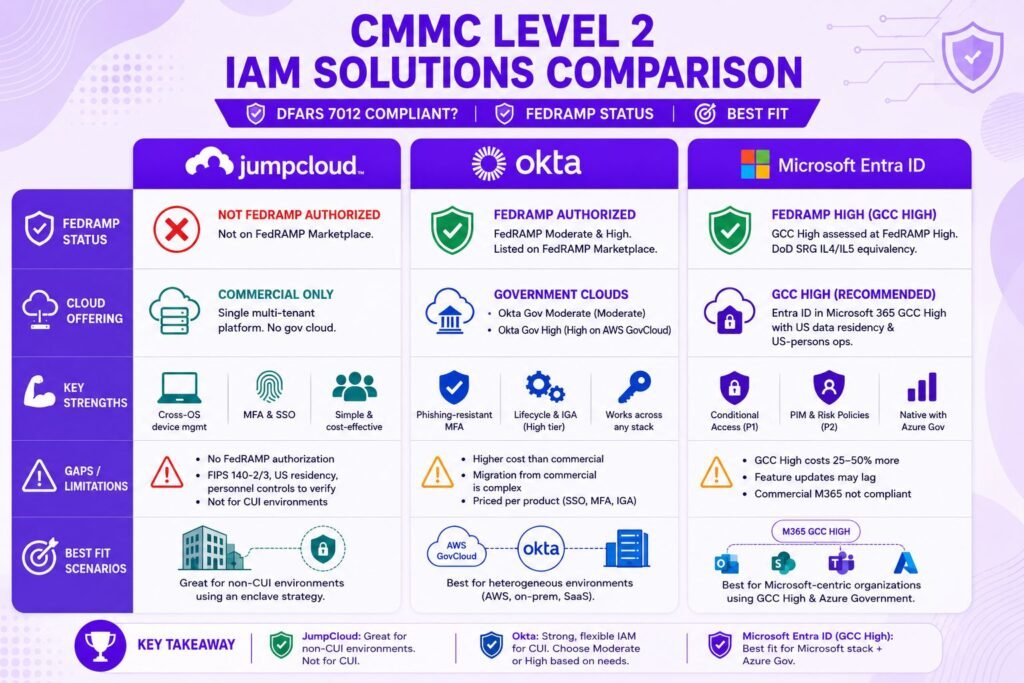
JumpCloud is not FedRAMP authorized at any baseline, does not appear on the FedRAMP Marketplace, and has not published a 3PAO-attested FedRAMP Moderate equivalency Body of Evidence. The JumpCloud Directory Platform carries SOC 2 Type 2 attestation and ISO 27001 certification, which are credible commercial trust signals and irrelevant to the DFARS 7012 test.
JumpCloud Government vs. Commercial Offering
There is no JumpCloud government cloud. Unlike Okta and Microsoft, JumpCloud sells a single multi-tenant commercial platform. Its own CMMC positioning is about helping you satisfy control families like Access Control (AC), Identification and Authentication (IA), and Audit and Accountability (AU), not about the platform meeting CSP requirements for CUI.
Gaps to Address When Using JumpCloud for CUI Environments
If CUI touches JumpCloud, you have a finding you cannot remediate with configuration. Beyond the missing authorization, contractors should press JumpCloud on FIPS 140-2/140-3 validated cryptography for data in transit and at rest, US data residency guarantees, and personnel access controls, because your C3PAO will ask even in the SPA scenario.
Best-Fit Scenarios for JumpCloud
JumpCloud makes sense for small and mid-sized contractors running an enclave strategy: JumpCloud handles identity and device management for the general corporate environment, while the CUI enclave (commonly Microsoft GCC High or a managed enclave product) uses its own FedRAMP-authorized identity. It’s a cost-effective way to get MFA, SSO, and cross-OS device management for the 90% of your company that never sees CUI. It is not a candidate for the CUI path itself.
Okta for CMMC Level 2
Okta IDaaS Government High Cloud (GHC) FedRAMP High Authorization
Okta for Government High, listed on the FedRAMP Marketplace as Okta IDaaS Government High Cloud, achieved FedRAMP High authorization in March 2023. It runs on AWS GovCloud and covers 420+ NIST SP 800-53 controls at the High baseline, with support for phishing-resistant MFA including PIV, FIDO2/WebAuthn, and Okta FastPass. Okta has since extended the High authorization to Okta Identity Governance and Okta Workflows, which matters if you want lifecycle automation inside the authorization boundary rather than bolted on outside it.
Okta IDaaS Regulated Cloud (FedRAMP Moderate)
Okta’s Moderate-baseline offering (Okta for Government Moderate, listed as Okta IDaaS Regulated Cloud) has held FedRAMP Moderate authorization since 2017 and has accumulated well over 250 agency authorizations, making it one of the most reused identity packages on the Marketplace. For CMMC Level 2, Moderate is the floor the rule requires, so this tier is sufficient for most CUI Basic scenarios. Contractors handling CUI specified categories or wanting headroom often go straight to the High cell.
Okta Commercial vs. Okta for Government: Which You Need
Commercial Okta tenants are not covered by either authorization. The authorization attaches to specific cells and environments, not to the Okta brand. If your subscription lives in a commercial cell, you inherit nothing. Migrating between commercial and government cells is a real project involving re-federation of every application, MFA re-enrollment, and workflow rebuilds, so contractors should pick the right cell before rollout, not after.
Licensing and Cost Considerations
Expect the government cells to price meaningfully above the commercial list, with procurement through government-oriented contract vehicles or resellers. Okta prices per user per product (SSO, MFA, Lifecycle Management, Identity Governance, each stack), so a full CMMC-supporting deployment for a 200-person contractor routinely lands in the tens of thousands of dollars annually before professional services. Against that, Okta is the strongest option when your CUI systems are heterogeneous, spanning AWS GovCloud workloads, on-prem applications, and non-Microsoft SaaS.
Microsoft Entra ID for CMMC Level 2
Entra ID in Microsoft 365 GCC High (FedRAMP High Equivalent)
For Defense Industrial Base (DIB) contractors, the default answer is Entra ID inside Microsoft 365 GCC High. The GCC High directory service is provided by Azure Government, assessed at FedRAMP High, operated by screened US persons within US data residency, and it demonstrates DoD SRG IL4/IL5 equivalency. Critically, GCC High is the Microsoft environment where the DFARS 7012 paragraph (c) through (g) incident reporting and forensics flow-down is contractually supported. Microsoft also completed a Joint Surveillance Voluntary Assessment (JSVA) of its own federal environment with a perfect 110 score in SPRS terms, which is the strongest shared-responsibility evidence any of the three vendors can hand you.
Entra ID in GCC vs. Commercial M365
Here’s a nuance most comparison articles miss: Azure Commercial, including commercial Entra ID, actually holds a FedRAMP High provisional authorization. On paper, that reads like a pass. The problem is everything around it. Commercial M365 doesn’t support the DFARS 7012 (c)-(g) flow-down, doesn’t guarantee US-person administration, and can’t hold export-controlled CUI categories like ITAR data. GCC (standard) sits in between: fine for Federal Contract Information and workable for some CUI Basic scenarios, but Microsoft itself steers CMMC Level 2 contractors with CUI toward GCC High. So the Entra question is less “is it FedRAMP” and more “which cloud does your whole Microsoft stack live in,” because Entra follows the tenant.
Insider Note: The FedRAMP status of the identity service is rarely what disqualifies a Microsoft architecture. What disqualifies it is CUI sitting in Exchange, SharePoint, and Teams in a commercial tenant. The IdP inherits the decision you make about the productivity stack. If email and files must be in GCC High, your Entra ID is in GCC High by definition, and the IdP debate resolves itself.
Entra ID P1/P2 Feature Availability Across Tenants
Conditional Access, the workhorse for CMMC access control requirements, needs Entra ID P1. Privileged Identity Management and risk-based policies (your PAM-adjacent and 3.1.x/3.5.x helpers) need P2. Both are available in GCC High, usually bundled through M365 G3/G5 licensing, though some features ship to government clouds months behind commercial. GCC High licensing typically runs a 25-50% premium over commercial equivalents and requires validation of your eligibility before Microsoft will even provision the tenant.
Integration with Azure Government
If your engineering workloads run in Azure Government, Entra ID in GCC High is the native control plane: same identity backbone, Conditional Access spanning M365 and Azure workloads, and a single audit trail feeding Sentinel. That integration story is the main reason Entra wins by default in Microsoft-centric DIB environments.
Choosing the Right IdP Based on Your CUI Architecture
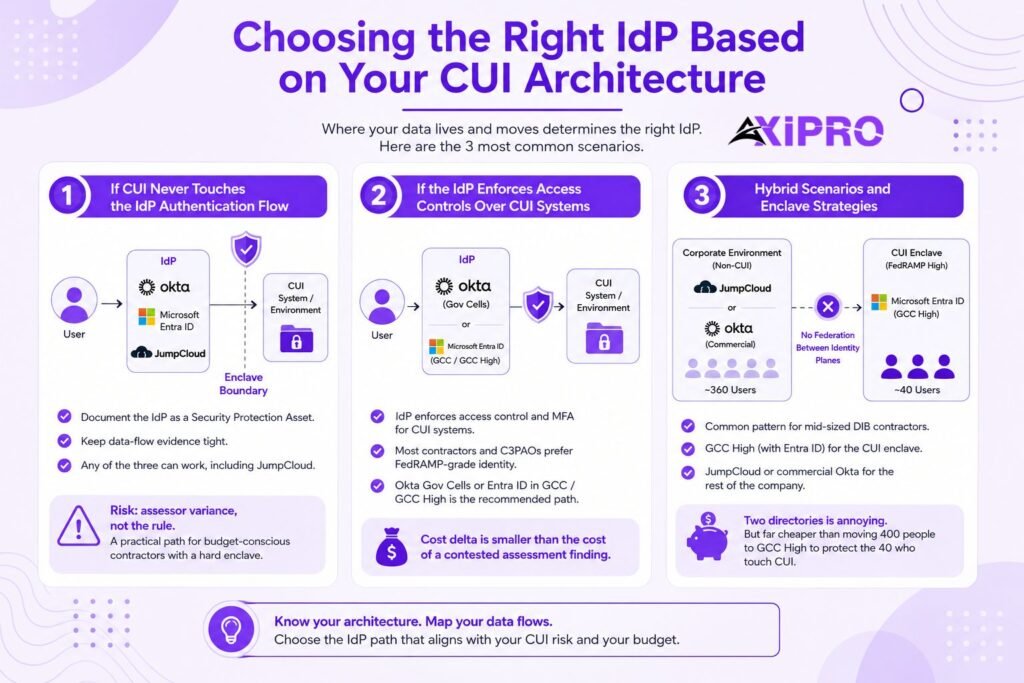
Ultimately, choosing the right IdP based on your CUI architecture comes down to where your data lives and moves. The paths below map the three most common scenarios.
If CUI Never Touches the IdP Authentication Flow
Document the IdP as a Security Protection Asset, keep the data-flow evidence tight, and any of the three can technically work, including JumpCloud. Your risk here is assessor variance, not the rule itself. Budget-conscious contractors with a hard enclave boundary take this path deliberately.
If the IdP Enforces Access Controls Over CUI Systems
Once the IdP is the enforcement point for your CUI systems’ access control and MFA requirements, most contractors and a growing share of C3PAOs treat FedRAMP-grade identity as the safe harbor. That means Okta’s government cells or Entra ID in GCC/GCC High. The cost delta is smaller than the cost of a contested assessment finding.
Hybrid Scenarios and Enclave Strategies
The pattern we see most at Axipro among mid-sized DIB contractors: GCC High (with Entra ID) as the CUI enclave, JumpCloud or commercial Okta running the rest of the company, and no federation between the two identity planes. Two directories are annoying. It’s also dramatically cheaper than moving 400 people into GCC High to protect the 40 who touch CUI, and it shrinks your assessment scope in the bargain.
Decision Framework: Which IdP Should You Choose?
Ask four questions in order.
- One: Does CUI transit the identity layer in any flow? If yes, only FedRAMP Moderate-or-higher offerings qualify, which eliminates JumpCloud.
- Two: Is your CUI stack Microsoft-centric? If yes, Entra ID in the matching tenant wins on integration and total cost, since you’re already paying for it.
- Three: Is your CUI estate heterogeneous across clouds and on-prem? Okta’s government cells earn their premium there.
- Four: Are you running an enclave to shrink scope? Then split the decision: FedRAMP-authorized identity inside the enclave, and the best value platform (often JumpCloud) outside it.
The bottom line across all of this: the rule cares about where CUI lives and moves, not about logos. JumpCloud is a capable platform with no lane into the CUI path. Okta gives you purpose-built FedRAMP Moderate and High identity clouds at a price. Entra ID rides whichever Microsoft tenant your data already demands. Architecture first, vendor second.
Worth Knowing: Phase 2 of the CMMC
With Phase 2 of the CMMC rollout bringing C3PAO assessments to more Level 2 contracts through 2026, assessment calendars at reputable C3PAOs are filling up months out. If your IdP decision forces a migration, the migration timeline, not the license negotiation, is usually what threatens your assessment date. Cell-to-cell Okta migrations and commercial-to-GCC High moves both routinely run one to two quarters.
Final Recommendation Based on Contractor Profile
For a Microsoft-centric DIB contractor handling CUI in email and files, choose Entra ID in GCC High. You need the tenant anyway; the identity comes with it, and the shared-responsibility evidence trail is the most mature in the market.
For a contractor with CUI spread across AWS GovCloud, on-prem systems, and non-Microsoft SaaS, choose Okta IDaaS Regulated Cloud (or Government High Cloud for CUI Specified and ITAR contexts) and budget for the government-cell premium.
For a small contractor pursuing an enclave strategy, run JumpCloud as the corporate identity and device platform outside the boundary and let the enclave’s native FedRAMP-authorized identity handle CUI access.
And whichever way you go, settle the IdP scoping question in your SSP before your C3PAO settles it for you.
Frequently Asked Questions
Does Microsoft Entra ID Commercial meet CMMC Level 2 requirements?
Partially, and that’s the trap. Commercial Azure (including Entra ID) holds a FedRAMP High provisional authorization, but commercial M365 doesn’t support the DFARS 252.204-7012 (c)-(g) flow-down and can’t hold export-controlled CUI. If your CUI lives in Microsoft services, Microsoft’s own guidance points Level 2 contractors to GCC High, and your Entra tenant follows that decision.
Is JumpCloud FedRAMP authorized?
No. JumpCloud holds SOC 2 Type 2 and ISO 27001 for its directory platform but has no FedRAMP authorization at any baseline and no published Moderate-equivalency Body of Evidence. It cannot be used to process, store, or transmit CUI under DFARS 7012 or the CMMC rule.
Can I use Okta commercial if I move CUI-adjacent functions to GCC High?
Yes, in an enclave architecture where commercial Okta serves only the non-CUI environment and never federates into the enclave. Document it as out of scope or as a Security Protection Asset for the corporate side, and keep the identity planes separated in your SSP and network diagrams.
What is the difference between FedRAMP Moderate and FedRAMP Moderate Equivalent?
FedRAMP Moderate means the offering holds an actual authorization and appears on the FedRAMP Marketplace. Equivalent, per the DoD’s December 2023 memo, means the CSP proves 100% compliance with the Moderate baseline through a 3PAO assessment and supplies the contractor a Body of Evidence, with no open POA&Ms. Equivalency has no marketplace listing and no government sponsor; you hold the evidence and the risk.
Does the IdP need to be FedRAMP if it only handles authentication, not CUI?
Under a strict reading of the rule, no: the FedRAMP requirement attaches to CSPs that process, store, or transmit CUI, and an authentication-only IdP is a Security Protection Asset assessed within your scope instead. In practice, be ready to prove the negative with data-flow documentation, and expect some C3PAOs to push toward FedRAMP-grade identity anyway when the IdP gates CUI systems.
How does the C3PAO evaluate my IdP during a CMMC assessment?
Three ways. They check scoping: is the IdP a CUI asset, an SPA, or out of scope, and does the evidence support that classification. They check the CSP test where it applies: marketplace listing or Body of Evidence. And they assess the 800-171 requirements the IdP helps satisfy, such as MFA (3.5.3), session controls, and account management, against your actual tenant configuration, not the vendor’s data sheet.
What happens if my IdP loses FedRAMP authorization mid-contract?
You have a compliance gap against DFARS 7012 the moment CUI keeps flowing through a no-longer-qualified service. Practically, you’d document the deviation, open a POA&M, notify affected primes where required, and execute a migration. This is a reason to favor offerings with long authorization track records and multiple agency reuses, and to write exit rights into the vendor contract.


