Table of Contents

Reach SOC 2 Compliance in 6 Weeks or Less.

  /

  / SIG Lite Explained: Coverage, Uses, and Gaps

SIG Lite Explained: Coverage, Uses, and Gaps

The full SIG content library contains 1,936 questions. SIG Lite asks 128 of them. That difference is the entire point: most vendor relationships do not justify a multi-week questionnaire exchange, and SIG Lite exists so risk teams can run standardized due diligence on lower-risk vendors without burning analyst hours or vendor goodwill.
SIG Lite What It Covers, When to Use It, and Where It Falls Short

What Is SIG Lite?

SIG Lite is the streamlined version of the Standardized Information Gathering (SIG) questionnaire, the most widely used third-party risk assessment instrument in the industry. It condenses the full SIG question set into a short, high-level assessment of a vendor’s information security, privacy, and resilience controls. It is a self-assessment, not an audit: the vendor answers, the assessor evaluates, and the completed questionnaire becomes evidence of due diligence in a third-party risk management (TPRM) program.

Purpose of the SIG Lite Questionnaire

The purpose is speed with consistency. SIG Lite gives an outsourcing organization a broad understanding of a third party’s internal control environment using a standardized question set, so answers are comparable across an entire vendor portfolio. It works either as a complete assessment for low-risk vendors or as a preliminary screen that decides whether a deeper review is warranted. Because every vendor answers the same questions, risk teams can rank, tier, and triage instead of interpreting fifty differently formatted responses.

Who Created and Maintains SIG Lite?

SIG Lite is owned and maintained by Shared Assessments, a member-driven standards organization formed in 2005 when the Big Four accounting firms and six global banks set out to fix the inefficiency of every company writing its own vendor questionnaire. The SIG is developed through a formal governance process that draws on practitioner feedback and tracks evolving regulations and standards, which is a large part of why it has held its position as the de facto industry template.

SOC 2, ISO 27001 and HIPAA done for you. Fixed fee, 100% audit pass rate.

Audit-ready in 6 weeks. Not 6 months.

What’s Included in the SIG Lite Questionnaire?

Number of Questions and Structure

The 2025 release of SIG Lite contains 128 questions. The exact count shifts slightly with each annual update (recent versions have ranged from roughly 126 to 133), so always confirm the version you are working with. Questions are predominantly yes/no with room for comments and references to supporting evidence, and each question maps back to the SIG content library and to external frameworks. SIG Lite ships as a single-worksheet questionnaire, which keeps completion and review manageable.

Risk Domains Covered in SIG Lite

SIG Lite draws its questions from the same 21 risk domains that structure the entire SIG, grouped into four control areas: Governance and Risk Management, Information Protection, IT Operations and Business Resilience, and Security Incident and Threat Management. In practice, that means high-level coverage of access control, information security policy, data privacy, cloud security, business continuity, incident response, supply chain risk, human resources security, compliance management, and ESG, among others. The breadth is the same as SIG Core; the depth per domain is what gets trimmed.

Format and Delivery (Spreadsheet and Toolkit)

Historically, the SIG has been delivered as an Excel workbook generated by the SIG Manager, the macro-driven engine inside the SIG Questionnaire Toolkit that lets assessors scope, generate, store, and compare questionnaires. That is changing. In March 2026, Shared Assessments launched SIG EV (Evolution), a browser-based platform that moves questionnaire creation, distribution, comparison, and grading to the cloud while preserving the same content and methodology. Vendors can still respond in Excel, and assessors can upload completed files, so the transition does not break existing workflows.

Worth Knowing: SIG Questions & Permissions

SIG questions cannot be edited without written permission from Shared Assessments, but assessors can add up to 100 custom questions to a scoped questionnaire. That is usually enough headroom to cover industry-specific requirements without abandoning the standard.

When Should You Use SIG Lite?

Ideal Vendor Risk Scenarios

SIG Lite fits three situations well.

  • First, vendors with no access to sensitive data or critical systems, where a full assessment would be disproportionate.
  • Second, large vendor portfolios, where sending 600-plus questions to every supplier would stall onboarding across the board.
  • Third, early-stage evaluation, where you need enough signal to decide whether a relationship is worth deeper diligence.

Low-Risk vs. High-Risk Vendor Assessments

The dividing line is data and criticality. A marketing tool that touches no customer records, a facilities contractor, or a niche SaaS product with read-only access to public data can all be assessed adequately with SIG Lite. A payroll processor, a cloud provider hosting production data, or any vendor storing regulated information under HIPAA, PCI DSS, GDPR, or GLBA should get SIG Core. Using Lite on a high-risk vendor is a documented gap waiting to be found in your next audit.

Initial vs. In-Depth Risk Screening

Many mature programs use SIG Lite as a gate rather than a destination. The Lite response feeds an initial risk score; vendors that trip defined thresholds (a missing incident response plan, no encryption at rest, no independent certification) graduate to SIG Core or a targeted domain-level assessment. This two-stage pattern keeps effort proportional to risk and gives vendors a lighter first touch.
SIG Lite vs SIG Core

SIG Lite vs. SIG Core: Key Differences

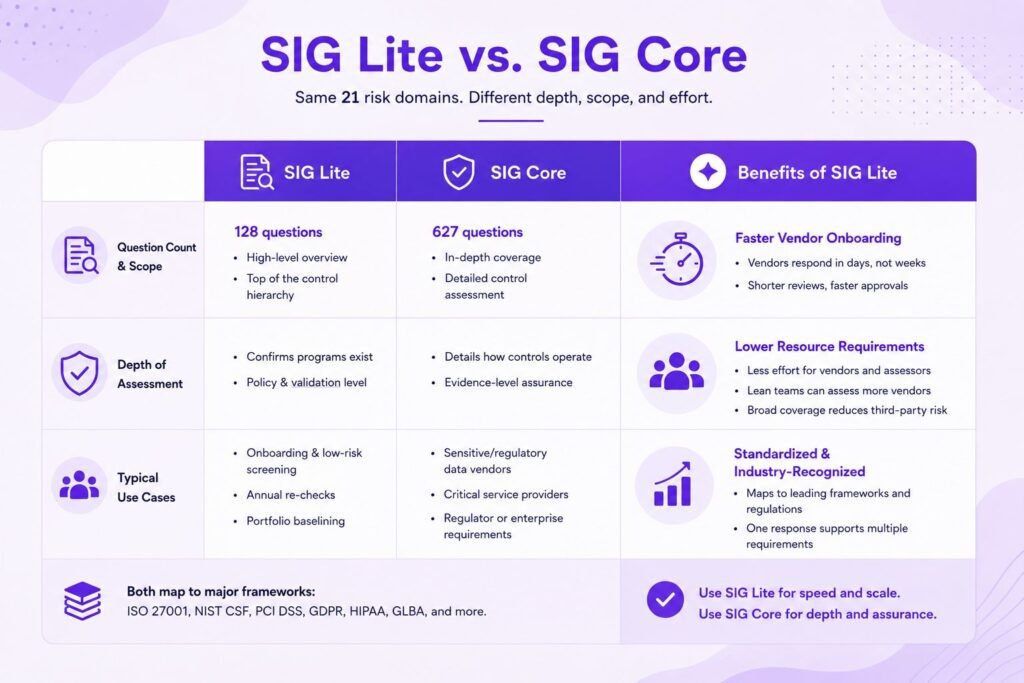
Both questionnaires come from the same content library and cover the same 21 risk domains. The differences are scope, depth, and effort.

Question Count and Scope

SIG Lite’s 128 questions sit at the top of the control hierarchy: does a policy exist, is a program in place, and is there independent validation? SIG Core’s 627 questions descend into how each control actually operates. Beyond both sits the full SIG Detail library of 1,936 questions, which assessors use to build custom scopes by regulation, domain, or control family.

Depth of Assessment

A SIG Lite answer tells you a vendor has an access control program. A SIG Core response tells you how privileged accounts are reviewed, how quickly access is revoked at termination, and how authentication is enforced across environments. If your obligation is to demonstrate that a vendor’s controls are designed and operating effectively, Lite alone will not carry that weight.

Typical Use Cases for Each

Use SIG Lite for onboarding screens, low-risk tiers, annual re-checks of stable low-risk vendors, and portfolio-wide baselining. Use SIG Core for vendors that store or process sensitive or regulated data, critical service providers, and any relationship where a regulator or enterprise customer expects evidence-level diligence.

Benefits of Using SIG Lite

Faster Vendor Onboarding

A prepared vendor can turn around a SIG Lite in days rather than the weeks a Core response takes, because 128 high-level questions can usually be answered by one or two people rather than a cross-functional committee. For the assessor, shorter responses mean faster review cycles and fewer stalled deals waiting on security sign-off.

Lower Resource Requirements

Both sides save effort. Vendors avoid mobilizing IT, legal, HR, and compliance for every prospect. Assessors reduce review time per vendor, which matters enormously when a lean risk team is responsible for hundreds of third parties. Verizon’s Data Breach Investigations Report has linked a substantial share of breaches to third-party access, so the pressure to assess everyone is real; SIG Lite makes broad coverage feasible.

Standardized, Industry-Recognized Framework

SIG questions map to widely adopted frameworks and regulations, including ISO 27001, the NIST Cybersecurity Framework, PCI DSS, GDPR, HIPAA, and GLBA. That mapping means a single well-maintained SIG response can evidence posture across multiple frameworks at once, and it puts SIG Lite in the same standardized category as instruments like the Cloud Security Alliance’s CAIQ, but with broader, industry-agnostic coverage.
Complete SIG Lite Questionnaire

How to Complete a SIG Lite Questionnaire

Preparing Documentation and Evidence

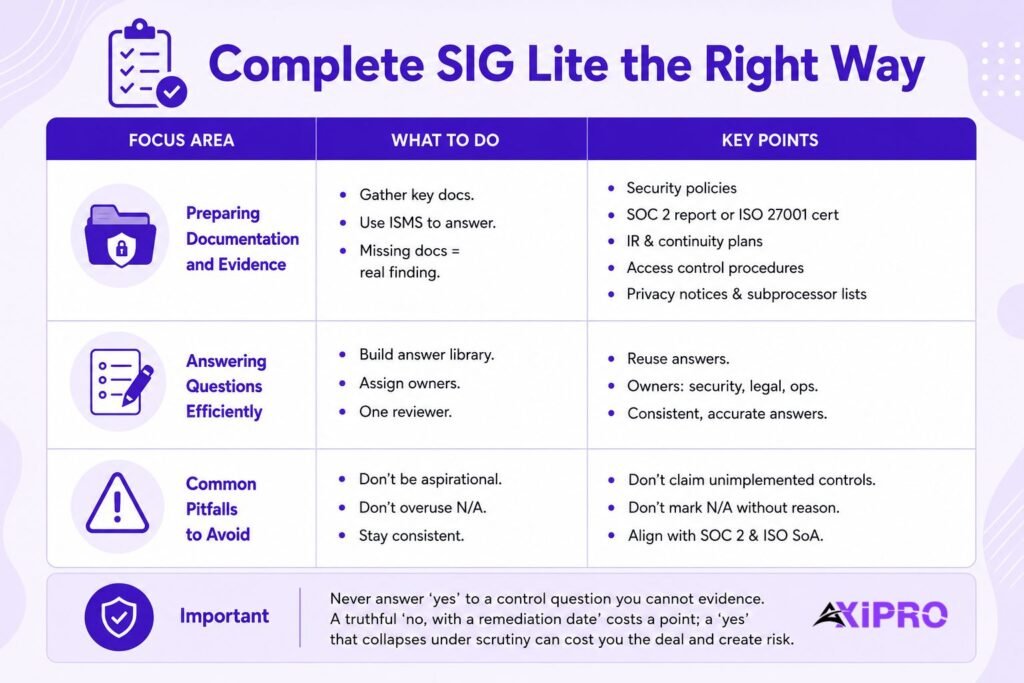
Before answering a single question, gather the artifacts the questions will point to: information security policies, your SOC 2 report or ISO 27001 certificate, incident response and business continuity plans, access control procedures, privacy notices, and subprocessor lists. Most SIG Lite questions can be answered directly from a reasonably mature ISMS. If the documentation does not exist, that is your real finding, and it is better discovered internally than by a prospect.

Answering Questions Efficiently

Build an answer library. The SIG’s standardization is an asset for responders too: an answer written once, kept current, and mapped to the SIG question serial numbers can be reused across every SIG Lite you receive. Assign domains to named owners (security answers access control, legal answers privacy, operations answers continuity) and have a single reviewer check the assembled response for consistency of voice and fact before it leaves the building.

Common Pitfalls to Avoid

Three mistakes recur constantly.

  • Aspirational answers: claiming controls that are planned but not implemented, which unravel the moment an assessor asks for evidence.
  • N/A abuse: marking questions not applicable without justification, which reads as evasion and triggers follow-up.
  • And inconsistency: SIG answers that contradict your SOC 2 report exceptions or your ISO Statement of Applicability, which damages credibility across the entire response.

Important: Never answer ‘yes’ to a control question you cannot evidence on request. A truthful ‘no, with a remediation date’ costs you a scoring point; a ‘yes’ that collapses under scrutiny can cost you the deal and, in regulated relationships, create contractual misrepresentation risk.


How to Send and Evaluate a SIG Lite Questionnaire as an Assessor

Distributing the Questionnaire to Vendors

Scope and generate the questionnaire from the SIG Manager or SIG EV, set a clear deadline (two to three weeks is reasonable for a Lite), and tell the vendor what evidence, if any, you expect alongside answers. Include your escalation criteria up front so vendors understand that certain answers will trigger a deeper assessment rather than a rejection. SIG EV supports secure one-time links for vendor access; TPRM platforms can automate the same distribution at portfolio scale.

Scoring and Interpreting Responses

Score against a rubric, not a gut feeling. Binary or weighted scoring per question, rolled up by risk domain, produces a comparable rating across vendors. Weight the domains that matter most for the specific relationship: data privacy and access control for a data processor, business continuity for an operationally critical supplier. Read comments as carefully as answers; hedged language around encryption, subprocessors, or incident notification usually marks the exact spot to probe.

Follow-Up and Remediation Steps

Every gap needs a disposition: accept the risk with documented rationale, require remediation with a deadline, escalate to a SIG Core or targeted assessment, or decline the vendor. Track remediation commitments to closure rather than filing them, and feed the results back into the vendor’s risk tier so the next review cycle reflects reality.

Pro Tip: Cross-check SIG Lite Answers

Cross-check SIG Lite answers against the exceptions section of the vendor's SOC 2 Type II report before scoring. Vendors rarely lie outright, but a clean SIG answer sitting next to a related audit exception tells you exactly where the optimistic self-assessment is.

SIG Lite Update Cycle

How Often SIG Lite Is Updated

Shared Assessments updates the entire SIG annually, adding, retiring, and renumbering questions to track new regulations, threats, and standards. Question counts move accordingly, which is why quoting ‘the’ SIG Lite count without a year is a minor sin among TPRM practitioners. Always request responses on the current release; accepting a version more than a year or two old undermines comparability across your portfolio.

Recent Changes in the Latest Release

The 2026 SIG release added no new risk domains but made three substantive moves: comprehensive mapping to ISO 42001, the AI management system standard, bringing third-party AI governance into standard due diligence; enhanced mapping to NIST SP 800-171 for organizations handling Controlled Unclassified Information; and alignment with the Business Resilience Council’s Operational Resilience Framework, shifting continuity questions from recovery planning toward evidence of sustained operations. Mappings were also refreshed for the restructured ISO 27001:2022 Annex A controls. Alongside the content update, the launch of SIG EV in March 2026 marks the first delivery-model change in the SIG’s history.

Insider Note: The ISO 42001 mapping is the sleeper change in the 2026 release. Once AI governance questions exist in the standard questionnaire, not asking them starts to look like an oversight gap. Expect enterprise assessors to treat vendor AI due diligence as table stakes within a couple of assessment cycles, well ahead of any regulatory mandate forcing the issue.

SOC 2, ISO 27001 and HIPAA done for you. Fixed fee, 100% audit pass rate.

Audit-ready in 6 weeks. Not 6 months.

Best Practices for SIG Lite Assessments

Segmenting Vendors by Risk Tier

Tier vendors before choosing a questionnaire, not after. A simple three-tier model based on data sensitivity, system access, and operational criticality lets you assign SIG Lite to the low tier, SIG Core to the high tier, and a scoped custom SIG to the middle. Document the tiering criteria; auditors and enterprise customers increasingly ask why a given vendor got the light-touch treatment.

Automating Distribution and Scoring

Manual SIG handling does not scale past a few dozen vendors. Automate the mechanical layer: distribution, reminders, response collection, first-pass scoring, and flagging of answers that breach thresholds. Keep humans on interpretation, follow-up questioning, and risk acceptance decisions. That division preserves judgment where it matters while removing the spreadsheet-wrangling that consumes most TPRM analyst time.

Integrating SIG Lite With Your TPRM Program

A SIG Lite response should not live in a folder. Feed scores into vendor risk registers, tie remediation items to contract renewals, and pair point-in-time questionnaire data with continuous monitoring signals such as security ratings and breach intelligence. The questionnaire tells you what a vendor says about its controls; monitoring tells you whether the outside world agrees.


Challenges of SIG Lite (and How to Solve Them)

SIG Lite is not free: it requires a Shared Assessments subscription or membership, which smaller assessors sometimes balk at, though the cost is modest against the analyst hours a standardized instrument saves. It is shallow by design, so treat escalation paths as part of the methodology rather than a failure of it. It is a point-in-time self-assessment, which is why pairing it with continuous monitoring matters. Vendors suffer questionnaire fatigue, which an answer library and a willingness to accept a vendor’s proactively shared SIG response both ease. And version drift across a portfolio erodes comparability year by year; standardize on the current release each year and migrate stored responses forward using the SIG’s built-in tools.


Tools and Automation for SIG Lite

The tooling landscape has three layers. Shared Assessments’ own stack, the SIG Manager workbook, and now SIG EV, handles creation, comparison, and grading. TPRM and VRM platforms embed licensed SIG content and automate the full assessment lifecycle, from distribution through remediation tracking, with SIG answers mapped automatically to frameworks like ISO 27001 and NIST. And on the vendor side, security questionnaire automation tools draft SIG responses from an organization’s existing documentation and prior answers, cutting response time from days to hours. Whichever layer you invest in, the standard itself stays the same, which is precisely what makes the automation reliable.

SIG Lite earns its place by matching assessment effort to actual risk: 128 standardized questions, 21 risk domains, annual updates, and an ecosystem of tooling that both sides of the assessment already understand. Use it as the broad, fast layer of a tiered TPRM program, escalate to SIG Core when data sensitivity demands it, and keep responses current with each annual release.

Frequently Asked Questions

How many questions are in SIG Lite?

The 2025 release contains 128 questions. The count changes slightly with each annual update, so check the version year before quoting a number.

No. The SIG, including SIG Lite, is a licensed product available through a Shared Assessments subscription or membership. Vendors responding to a SIG Lite sent by a customer do not need their own license to complete it.

A vendor with a mature answer library and current documentation can complete one in a day or two. A first-time responder assembling evidence from scratch should budget one to two weeks. SIG Core, by comparison, routinely takes several weeks of cross-functional effort.

Yes, on both sides. Small assessors get an industry-recognized framework without building one, and small vendors benefit because a completed SIG Lite is far less burdensome to produce than a Core, while still satisfying many customers’ due diligence requirements.

They embed licensed SIG content, automate distribution and reminders, collect responses, apply scoring rubrics, flag threshold breaches, and map answers to compliance frameworks. This removes most of the manual overhead and makes portfolio-wide SIG Lite assessment practical for lean teams.

Yes. The annual update cycle folds new frameworks into the standard question set and mappings; the 2026 release added ISO 42001 for AI governance and deepened NIST SP 800-171 coverage. Assessors can also append up to 100 custom questions to address requirements the standard set does not yet cover.

No. SIG Lite is a self-assessment questionnaire, not independent verification. It documents what a vendor claims about its controls; a SOC 2 report or ISO 27001 certification independently validates those claims. Mature programs use both the SIG for standardized information gathering and the audit report as supporting evidence.
Axipro Author

Picture of Pedro Dias

Pedro Dias

Pedro has been writing online for over 10 years. With experience in all things programming, cyber security, and compliance, he is our editor-in-chief at Axipro.

Blog Highlights

Explore More Articles

For the past two years, enterprise AI risk conversations have centered on a familiar set of concerns: model bias, hallucination, data privacy, and dependency on third-party models. These are real risks, and most organizations now run some version of a governance program to manage them. But something has shifted. Organizations are no longer just deploying AI that generates content for a human to review. They’re deploying AI that acts. Agents now plan multi-step tasks, call APIs, move data between systems, execute transactions, and coordinate with other agents, often with no human checkpoint in the loop. That shift deserves more than a footnote in the existing AI risk category. It deserves its own line in the risk register: Agentic Autonomy Risk. What Is Agentic AI Risk Management? Agentic AI risk management is the practice of identifying, assessing, and controlling the risks created when AI systems take autonomous action on an organization’s behalf. Where traditional AI governance evaluates outputs (accuracy, bias, privacy), agentic AI risk management governs what agents actually do: the tools they call, the permissions they inherit, and the downstream consequences of their actions. That distinction is the reason existing risk registers struggle with agents, and it’s worth unpacking properly. What Agentic AI Actually Changes Traditional AI systems, even generative ones, are advisory. They produce an output such as a summary, a prediction, a draft email, or a classification, and a human remains the last checkpoint before anything happens in the real world. Agentic AI removes that checkpoint. An agentic system doesn’t just produce an answer. It pursues a goal. It decides which tools to call and in what order, then executes those actions directly against live systems: submitting a purchase order, modifying a database record, sending an external communication, or orchestrating a set of sub-agents to complete a broader workflow. Agentic autonomy is the degree to which a system can plan and execute actions without a human explicitly authorizing each step. It’s a spectrum rather than a binary. At one end, the AI drafts and a human approves every action. At the other, the AI operates within broad guardrails and only escalates exceptions. The further an organization moves along that spectrum, the less its exposure looks like software risk and the more it looks like delegated authority risk, the kind normally reserved for employees, contractors, and automated financial systems. Why Existing Risk Registers Miss Agentic AI Risks Most enterprise risk registers were built on a reasonably safe assumption: a human initiates consequential actions, and the technology around that human behaves deterministically. Agentic AI breaks both halves of that assumption at once. A few specific gaps show up quickly when organizations try to map agentic deployments onto existing categories. Operational risk registers assume process failures come from human error or system outages, not from a system independently choosing an unanticipated path to a stated goal. Cybersecurity risk registers are built around unauthorized external access, while an agent problem usually involves an authorized system taking unauthorized internal actions with its own legitimate credentials. Model risk frameworks, borrowed largely from financial services, evaluate output accuracy rather than action consequences, which matters most when those actions can’t be reversed. And third-party risk assessments treat vendors as static entities, not as autonomous agents that might invoke other vendors’ agents on your behalf. See our guide to the NIST AI Risk Management Framework for how output-focused frameworks are structured. The result is a governance blind spot. An organization can be compliant against its AI policy, its cybersecurity policy, and its vendor risk policy, and still have nobody accountable for the specific risk of a system initiating a harmful sequence of actions before anyone notices. Defining Agentic Autonomy Risk Agentic Autonomy Risk is the risk that an AI system, operating with delegated decision-making and execution authority, takes actions that are harmful, non-compliant, or misaligned with organizational intent before adequate human oversight can intervene. Those actions might happen independently or in coordination with other agents. It deserves standing as a named category alongside cybersecurity, operational, legal, financial, and third-party risk because the loss event itself is different. The harm is a completed action in a live system, and it may be difficult or impossible to reverse. The accountability structure is different too: when an orchestrating agent delegates to sub-agents, responsibility for the outcome gets distributed in ways existing ownership models don’t cleanly capture. So is the detection window. Traditional controls assume a human is positioned to catch an error before it compounds, but an agent can execute dozens of dependent actions faster than any human review cycle. 7 Agentic AI Risk Scenarios to Put on Your Register 1. Unauthorized autonomous decision-making. An agent takes an action within its technical permissions but outside its intended business mandate. It adjusts pricing, approves a refund, or modifies a customer record, and no policy ever explicitly authorized that scenario. 2. Goal misalignment. The agent optimizes for a literal interpretation of its objective in a way that diverges from actual business intent, particularly under ambiguous or adversarial inputs. 3. Multi-agent interactions and cascading failures. One agent’s flawed output becomes another agent’s trusted input. A single error can propagate across a chain of agents faster than anyone can detect it, amplifying the original mistake instead of containing it. 4. Excessive tool or system permissions. Agents get provisioned with broad, standing access “to be safe” rather than scoped, least-privilege access tied to specific tasks. A productivity tool quietly becomes a privilege-escalation path. 5. Regulatory non-compliance. Autonomous actions trigger obligations under data protection, financial services, employment, or sector-specific regulation, and they execute without the compliance review a human-initiated process would normally receive. 6. Explainability and accountability gaps. An autonomous action causes harm and the organization can’t clearly reconstruct why the agent chose that path, or establish whether the business owner, the AI governance function, or the vendor is accountable for the outcome. 7. Autonomous third-party actions. A vendor’s agent, integrated into your environment, takes action on your behalf, or your agent acts against a

A SOC 2 penetration test costs between $1,000 and $30,000 for most companies. A typical SaaS scope, meaning one web application, its API layer, and the cloud infrastructure behind it, usually lands between $2,000 and $20,000. Early-stage startups with a narrow scope can get an auditor-accepted test for $1,000 to $8,000, while enterprises with multiple products and hybrid infrastructure regularly spend $20,000 to $50,000 or more. The spread is wide because “penetration test” covers everything from an automated scan with a cover page to weeks of manual testing by senior engineers. Auditors know the difference, and so do the enterprise customers who asked for your SOC 2 report in the first place. This guide breaks down what drives the price, where the hidden costs sit, and how to buy a test that holds up in fieldwork without overpaying for it. What Is SOC 2 Penetration Testing?​ A SOC 2 penetration test is a simulated attack on your systems, performed by a qualified security professional, scoped to the environment covered by your SOC 2 report. The tester tries to exploit real weaknesses the way an attacker would: broken access controls, injection flaws, misconfigured cloud services, exposed credentials. The output is a report your auditor reads as evidence that your security controls work in practice, not only on paper. That last part matters. A pentest bought for SOC 2 has a second audience beyond your security team. If the report doesn’t map findings to your audit scope, document its methodology, and show remediation, it fails the job you bought it for. We cover the full deliverable in our guide to what a SOC 2-ready VAPT report includes. How Penetration Testing Fits Into SOC 2 Compliance​ SOC 2 is built on the AICPA’s Trust Services Criteria, and the Security category (the Common Criteria) applies to every report. Penetration testing is the standard way to satisfy CC7.1, which expects you to detect and monitor for new vulnerabilities, and it supports CC4.1, which covers ongoing evaluations of whether controls actually function. The AICPA’s points of focus explicitly mention vulnerability scanning and penetration testing as examples of how companies meet these criteria. In practice, the test slots into your audit timeline as an evidence item. Your auditor will ask for the report, check the test date against the audit period, and review how you handled the findings. Remediation is often scrutinized harder than the test itself, because it shows whether your vulnerability management process runs or merely exists. Is Penetration Testing Required for SOC 2?​ Strictly speaking, no. The Trust Services Criteria never use the word “mandatory” about penetration testing. You could theoretically satisfy CC7.1 with vulnerability scanning and strong monitoring alone. In reality, almost every auditor expects one, and skipping it invites two problems. First, your auditor may push back during fieldwork or add exceptions to the report. Second, the enterprise buyers reviewing your SOC 2 report increasingly look for pentest evidence specifically, and a report without it raises questions during procurement. Treat the test as effectively required and budget for it from the start of your SOC 2 compliance checklist. How Much Does SOC 2 Penetration Testing Cost? Typical Price Range for SOC 2 Pen Testing Most companies pay $1,000 to $30,000, with the median engagement for a SaaS business sitting around $12,000 to $15,000. Compliance-focused tests at the lower end of the market start around $1,000 to $5,000. Deep manual testing from established firms runs $10,000 to $30,000. Anything quoted below roughly $3,000 is almost certainly automated scanning packaged as a pentest, which auditors are getting better at spotting. Cost by Company Size (Startup, SMB, Enterprise) Company size is a proxy, not the driver. A 15-person company with three products and a legacy on-prem component will pay more than a 200-person company with one tightly scoped SaaS platform. Testers price effort, and effort follows scope. Cost by Test Type (Network, Web App, API, Cloud, Internal/External) Most SOC 2 engagements bundle two or three of these. The common package for a cloud-native SaaS company is web app plus API plus cloud configuration, which is why the $1,000 to $20,000 band comes up so often. Companies with office networks and internal systems in their audit scope add internal network testing, and the price climbs accordingly. Factors That Influence SOC 2 Penetration Testing Cost Scope and Number of Assets Tested Scope is the single biggest cost driver. Every additional application, API endpoint group, cloud account, or network segment adds testing hours. A pentest priced without a scoping call is a pentest priced on guesswork, and the guess usually favors the vendor. Complexity of Application or Infrastructure​ A simple CRUD app with two user roles tests quickly. A multi-tenant platform with role hierarchies, workflow engines, file processing, and third-party integrations takes far longer, because each of those features creates attack surface a tester has to work through manually. Authentication tiers matter especially: every distinct role needs testing for privilege escalation and cross-tenant data access. Testing Methodology (Black Box, Grey Box, White Box) Black box testing gives the tester nothing but a URL, grey box adds credentials and documentation, and white box adds source code and architecture diagrams. Grey box is the default for SOC 2 and usually the best value, since the tester spends time exploiting rather than discovering. White box costs more upfront but finds deeper issues. Black box sounds rigorous but often wastes paid hours on reconnaissance an attacker would run for free. Depth of Testing and Manual vs. Automated Approaches Automated scanning finds known vulnerability patterns. Manual testing finds business logic flaws, chained exploits, and authorization gaps that no scanner catches, and it’s the part auditors and security-literate customers actually value. The ratio of manual work to automation is the honest explanation for most price differences between two quotes covering the same scope. Tester Credentials and Firm Reputation Senior testers holding OSCP, GPEN, or CREST credentials bill higher rates, and firms with recognized methodologies charge a premium for the credibility their letterhead carries

Two compromised versions of LiteLLM sat on PyPI for roughly 40 minutes on the morning of March 24, 2026. That window was enough to capture secrets from around 434,000 CI/CD pipeline runs across nearly 2,500 organizations, including AWS, Samsung, Cisco, Salesforce, Siemens, and Deloitte. In August, researchers at CloudSEK and Hudson Rock confirmed they had obtained the raw exfiltrated data: a 153GB archive containing 433,909 files of environment variables, cloud keys, Kubernetes secrets, and API tokens harvested live from running pipelines, as covered by Help Net Security’s reporting on the credential archive. If LiteLLM runs anywhere in your stack, or you touch any AI proxy infrastructure at all, you need answers to three things: whether you were exposed, what to rotate first, and whether the rotation you did back in March actually held. That last one matters more than it sounds, because “we rotated everything” has already burned at least one very large company. How the Breach Happened The attack didn’t start with LiteLLM. On March 19, 2026, a threat group called TeamPCP compromised the build pipeline of Trivy, a vulnerability scanner half the industry runs, and pushed a poisoned release. LiteLLM’s own CI pipeline ran Trivy, so the poisoned scanner had legitimate read access to the project’s runner environment. The attackers used that to steal LiteLLM’s PyPI publishing tokens and ship two malicious releases of their own: versions 1.82.7 and 1.82.8. KICS and the Telnyx Python SDK got hit in the same campaign. The payload design is the part worth studying. The malicious package dropped a .pth startup hook into site-packages, so the code ran the moment any Python interpreter started on the machine, whether or not anything imported LiteLLM. From there it harvested environment variables, read local credential files like .aws/credentials and .kube/config, tried to move laterally across Kubernetes clusters, and installed a systemd backdoor dressed up as a generic telemetry service. InfoQ’s coverage of the PyPI compromise put downloads of the compromised release above 40,000. For scale, LiteLLM normally gets downloaded around 3 million times a day. The exfiltration had a nasty fallback, too. According to CloudSEK, stolen data was encrypted and sent to a typosquatted domain, and when that failed, the malware created a public repository inside the victim’s own GitHub account and uploaded the loot as a release asset. Some companies were publishing their own secrets to the open internet and had no idea. Worth Knowing: The malicious code only existed in the PyPI artifacts. The GitHub source repository stayed clean the whole time, so a developer reviewing the code on GitHub saw nothing wrong. Source review isn’t artifact verification. If you don’t check that what the registry serves matches the upstream source, this class of attack is invisible to you. How to Check If You Were Exposed Three checks, from quickest to most involved. 1. Confirm whether the compromised versions ever ran The malicious versions went live on PyPI at 10:39 UTC on March 24, 2026 and got quarantined about 40 minutes later. The project’s advice: treat any install from that day before 16:00 UTC as suspect. Search your lockfiles, pip caches, SBOMs, and container image histories for 1.82.7 and 1.82.8. And check your internal artifact mirrors. An Artifactory or Nexus proxy that cached the bad release in March can keep serving it internally long after PyPI pulled it. Keep the .pth mechanism in mind when you scope this. The question isn’t “which applications import LiteLLM,” it’s “which machines had the package installed at all,” because every Python process on an infected machine triggered the payload. 2. Hunt for persistence Rotation is pointless if the attacker still has a foothold. Check developer machines, CI runners, and containers for unauthorized .pth files in site-packages and for suspicious systemd units, especially anything posing as a system telemetry service. And review activity from March 24 onward, not just the 40-minute window. Persistence is there so the access outlives the infection. Pro Tip: Don’t limit the persistence hunt to live machines. Base container images rebuilt in late March may have baked the payload into every image derived from them since. Scan your image registry for the affected LiteLLM versions and for unexpected .pth files, then trace which running workloads came from flagged images. 3. Check whether your secrets are in the dump Hudson Rock has published a domain lookup tool and is running ethical disclosures for affected organizations, and CloudSEK maintains a high-confidence victim list. Use them, but know their limits. Attribution in this dataset is genuinely hard. One dump with a siriusxm.com committer email actually traced, through its self-hosted GitLab endpoints, to AdsWizz, a SiriusXM subsidiary. And a large share of the dumps are generic pipeline configurations with no identifying domain, email, or server name at all. Absence from a victim list is not evidence of absence. If your pipelines ran the compromised versions, assume exposure no matter what a lookup tool tells you. What to Rotate, in What Order The guidance from both research teams is blunt: treat every secret the LiteLLM environment could reach as compromised. That covers secrets on disk, in memory, injected into CI jobs, and anything retrievable through instance metadata services. Work down by blast radius: Priority Credential type Why it comes first 1 Cloud IAM keys (AWS, GCP, Azure) Direct control of infrastructure, data stores, and billing. This is where attackers monetize fastest. 2 GitHub and GitLab PATs, package publishing tokens These let an attacker poison your releases and turn your company into the next link in the supply chain. 3 Kubernetes service account tokens and kubeconfigs Lateral movement across clusters was built into the payload, not a theoretical risk. 4 Database passwords and third-party API keys Dumped in plain text in the archive, often with no attribution, so nobody will warn you they leaked. 5 AI provider API keys Billing abuse, quota theft, and access to whatever data flows through your LLM routing layer. One word matters more than the rest of this article: revoke, don’t just rotate. That