In 2018, a cyberattack on SingHealth exposed the records of 1.5 million patients, including the Prime Minister. The Personal Data Protection Commission (PDPC) handed down S$1 million in combined penalties, and that decision still sits on its public enforcement page today.
The Personal Data Protection Act (PDPA) has sharper teeth than it did a few years ago. Since October 2022, the PDPC can impose financial penalties of up to 10% of an organisation’s annual turnover in Singapore, or S$1 million, whichever is higher. Breach notification is now mandatory. And a hard deadline is approaching: from 1 January 2027, using NRIC numbers for authentication becomes an enforcement target. A checklist is how you turn all of that into something you can actually execute against, rather than a legal document you skim once and forget.

What Is the PDPA Compliance Checklist?
A PDPA compliance checklist translates the law’s 11 data protection obligations into concrete, verifiable actions. The obligations themselves are principles: Consent, Purpose Limitation, Notification, Access and Correction, Accuracy, Protection, Retention Limitation, Transfer Limitation, Data Breach Notification, Accountability, and Data Portability (legislated in 2020 but not yet in force).
A principle tells you what good looks like. A checklist tells you whether you have done it. The distinction matters because the PDPC does not accept good intentions as a defense. When it investigates, it looks for documented policies, a named Data Protection Officer (DPO), evidence of consent, and a breach plan that existed before the breach. The checklist is what produces that evidence trail.
SOC 2, ISO 27001 and HIPAA done for you. Fixed fee, 100% audit pass rate.
Audit-ready in 6 weeks. Not 6 months.
Who Needs to Follow the PDPA Compliance Checklist in Singapore
Every private sector organisation that collects, uses, or discloses personal data in Singapore falls under the PDPA. That covers sole proprietorships, partnerships, companies, and foreign entities with Singapore operations. Headcount is irrelevant. A five-person startup carries the same obligations as a multinational, and the PDPC has shown it will penalize small and mid-sized businesses, not only household names.
Physical presence is not the trigger either. If your processing touches individuals in Singapore, the Act can reach you even without a local office. Public sector agencies sit under separate legislation, but the private sector rules administered by the PDPC, which operates under the Info-communications Media Development Authority (IMDA), apply broadly. One useful carve-out: business contact information used purely for business purposes is largely exempt from the consent rules.
Worth Knowing: PDPA Roles Explained
The PDPA distinguishes an organisation from a data intermediary, a party that processes data on another's behalf. Intermediaries carry a narrower but real set of duties, mainly protection and retention. If you outsource payroll, hosting, or email marketing, you are the organisation and your vendor is the intermediary, and the contract between you needs to say so explicitly.
PDPA Compliance Checklist: Step-by-Step Guide
The 15 steps below move roughly in the order you should tackle them, from governance foundations through operational controls to ongoing assurance. Treat them as a sequence, not a menu.
Step 1: Appoint a Data Protection Officer (DPO)
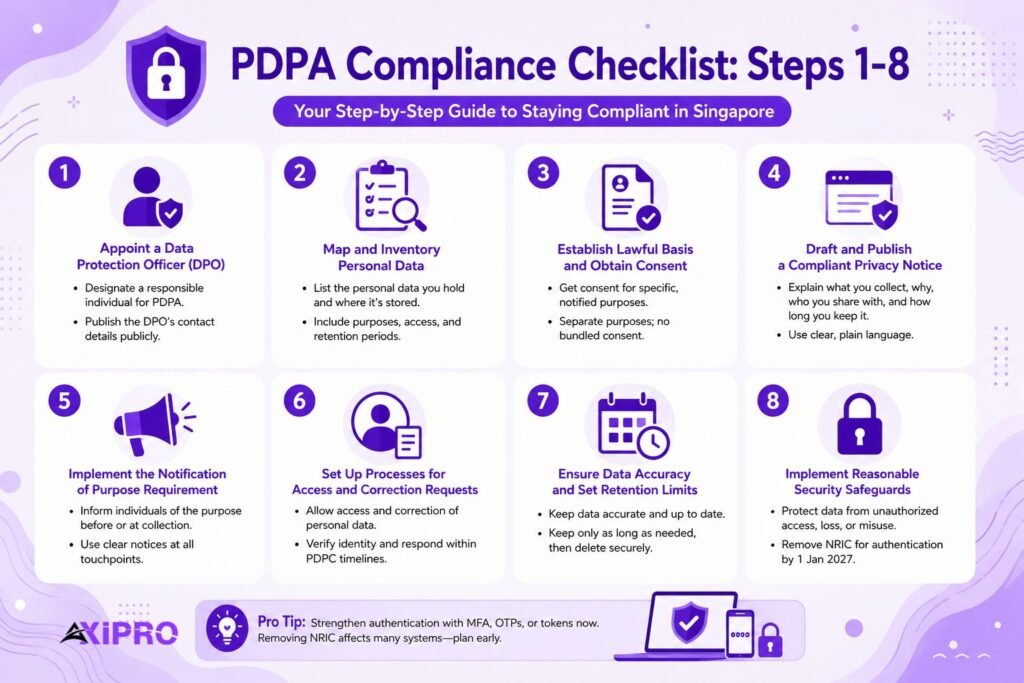
The PDPA requires every organisation to designate at least one individual responsible for compliance, and to make that person’s business contact details available to the public. You do not have to hire a specialist. In smaller firms, an existing employee can hold the DPO role alongside other duties. What matters is that the role is named, resourced, and reachable, because the DPO is who the PDPC and affected individuals contact first. Publish the contact details on your website and inside your privacy notice.
Step 2: Map and Inventory Personal Data
You cannot protect data you cannot see. Build a data inventory that records what personal data you hold, where it lives, which systems and people can access it, why you collected it, and how long you keep it. This map is the single most useful artifact in your entire program. It feeds your privacy notice, your retention schedule, your breach assessments, and your vendor reviews. Most compliance failures trace back to a blind spot, a spreadsheet of customer records nobody remembered, or a legacy database still holding data long past its purpose.
Step 3: Establish Lawful Basis and Obtain Valid Consent
Under the Consent Obligation, you generally need an individual’s consent before you collect, use, or disclose their personal data, and that consent must be tied to a specific, notified purpose. The 2020 amendments added flexibility: deemed consent covers scenarios like contractual necessity, and the legitimate interests exception lets you process data where the benefit outweighs any adverse effect, provided you document the assessment. You cannot make consent to unrelated data uses a condition of providing a service.
Important: Bundled consent is a common enforcement trigger. A single checkbox that forces a customer to agree to marketing in order to complete a purchase is not valid consent for the marketing. Separate the purposes, and let people say yes to one without being forced into the other.
Step 4: Draft and Publish a Compliant Privacy Notice
Your privacy notice is the public expression of how you handle personal data. It should state what you collect, the purposes you collect it for, who you share it with, how long you retain it, and how individuals can contact your DPO or exercise their access and correction rights. Write it in plain language. A notice dense enough to deter reading does not satisfy the spirit of the Notification Obligation, and regulators notice the difference.
Step 5: Implement the Notification of Purpose Requirement
The Notification Obligation and the Purpose Limitation Obligation work as a pair. You must inform individuals of the purpose before or at the point of collection, and you must then confine your use of the data to that purpose. Practically, that means a clear notice at every collection point: sign-up forms, website pop-ups, contact forms, event registrations. Selling a customer list you gathered for order fulfillment is precisely the kind of unrelated use the Act prohibits.
Step 6: Set Up Processes for Access and Correction Requests
The Access and Correction Obligation gives individuals the right to see the personal data you hold about them, learn how it has been used or disclosed, and request corrections. You need a defined intake process, a way to verify the requester’s identity, and a response workflow that meets the PDPC’s expected timelines. Build a simple log. When a request arrives, record when it came in, what you did, and when you closed it. That record is your proof of compliance if the individual later complains.
Step 7: Ensure Data Accuracy and Set Retention Limits
Two obligations converge here. The Accuracy Obligation requires you to make reasonable effort to keep personal data accurate and complete, especially where you will use it to make a decision affecting the individual. The Retention Limitation Obligation requires you to stop keeping data once the purpose has ended and no legal reason to retain it remains. Indefinite retention is a liability, not an asset. Set retention periods per data category, then actually dispose of data when the clock runs out.
Step 8: Implement Reasonable Security Safeguards
The Protection Obligation is the single most common basis for PDPC enforcement, so this step earns disproportionate attention. You must make reasonable security arrangements to protect personal data against unauthorized access, use, disclosure, loss, or modification. That spans the obvious controls, encryption, access management, patching, and logging, and the human ones, staff handling procedures and least-privilege access. There is a fast-approaching specific: from 1 January 2027, the PDPC will step up enforcement against organisations that use NRIC numbers for authentication, treating it as a failure of reasonable security. If your login flows, default passwords, or verification checks rely on full or partial NRIC numbers, redesign them before the deadline.
Pro Tip: Multi-factor Authentication methods
Move authentication to multi-factor methods, one-time passwords, or tokens now rather than in December 2026. The change touches customer portals, internal systems, and any third-party platform you use, so the vendor coordination alone takes longer than teams expect. Treat NRIC removal as a project, not a config change.
Step 9: Establish Cross-Border Data Transfer Controls
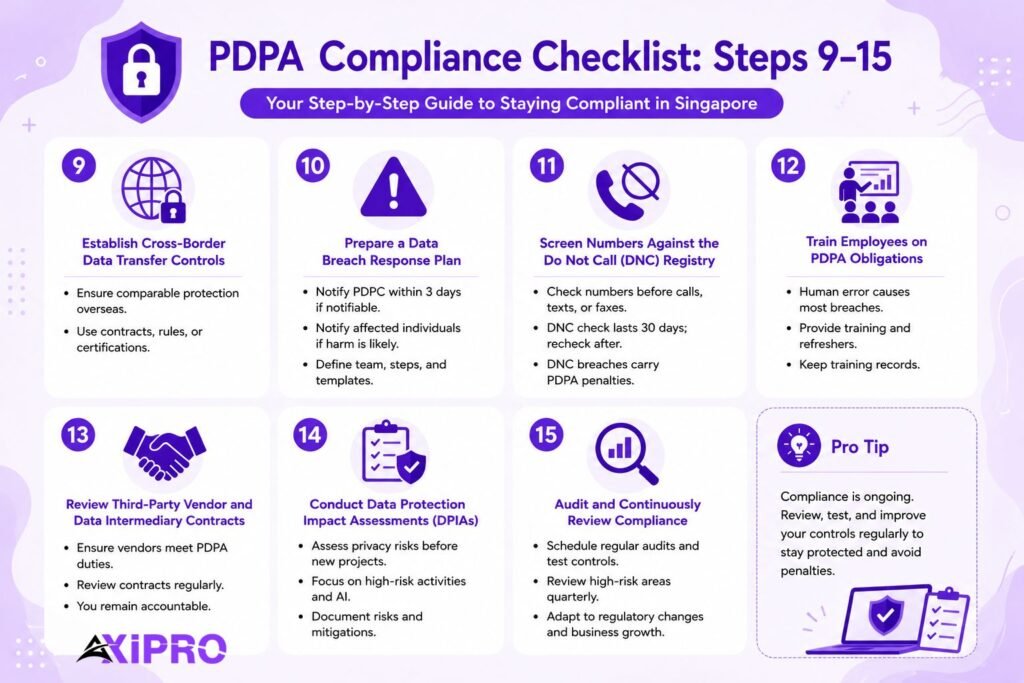
The Transfer Limitation Obligation governs cross-border data transfer. Before you send personal data outside Singapore, you must ensure the receiving party is bound to a standard of protection comparable to the PDPA. In practice, that means contractual clauses, binding corporate rules for intra-group transfers, or reliance on a recognized certification such as the APEC Cross-Border Privacy Rules. Map your data flows first, because cloud services, offshore support teams, and overseas parent companies all count as transfers even when the data never touches a physical border.
Step 10: Prepare a Data Breach Response Plan
The Data Breach Notification Obligation sets a tight clock. A breach is a notifiable data breach if it is likely to cause significant harm to affected individuals, or if it involves the personal data of 500 or more individuals, regardless of harm. Once you assess a breach as notifiable, you must notify the PDPC within 3 calendar days and notify affected individuals where significant harm is likely. The three-day clock starts from your assessment, not from discovery, but the PDPC expects that assessment to be prompt. You cannot stall the assessment to delay the deadline.
A response plan is what makes three days survivable. Define the response team, the containment steps, the assessment criteria, and pre-drafted notification templates in advance. Failing to notify is itself a separate contravention, and the PDPC treats it as an aggravating factor that pushes the overall penalty higher.
Step 11: Screen Numbers Against the Do Not Call (DNC) Registry
If you run any telemarketing, the Do Not Call (DNC) Registry provisions apply. Before sending marketing calls, texts, or faxes to a Singapore number, you must check it against the relevant DNC register, unless you hold clear and unambiguous consent from that individual in evidential form. A confirmation of results is valid for a set window (currently 30 days), after which you must check again. Since the 2020 amendments, DNC breaches sit under the same administrative penalty regime as the data protection provisions, so this is no longer a minor compliance footnote.
Step 12: Train Employees on PDPA Obligations
Most breaches are not the work of sophisticated attackers. They happen because someone emailed the wrong attachment, reused a weak password, or fell for a phishing message. According to Verizon’s Data Breach Investigations Report, the human element is involved in the majority of breaches year after year. Training is the control that addresses the largest attack surface you have, which is your own staff. Run onboarding training for new hires, refreshers for everyone, and role-specific sessions for teams that handle sensitive personal data. Document attendance. Under the Accountability Obligation, the PDPC will ask what you did to prevent the incident, and a training record is a concrete answer.
Step 13: Review Third-Party Vendor and Data Intermediary Contracts
You remain accountable for personal data even when a data intermediary processes it for you. Every vendor that touches personal data on your behalf, cloud hosts, CRM providers, payroll processors, and a consent management platform needs a contract that imposes PDPA-grade protection and retention duties. Review these agreements, not once, but on a schedule. A vendor that changes its subprocessors or data locations can move you out of compliance without you ever signing anything.
Step 14: Conduct Regular Data Protection Impact Assessments (DPIAs)
A Data Protection Impact Assessment (DPIA) is a structured review of the privacy risks in a new project, product, or processing activity, carried out before you launch rather than after something breaks. The PDPC recommends DPIAs as good practice, and they are close to essential for anything high-risk: large-scale profiling, sensitive data, new AI systems, or novel data-sharing arrangements. Document the risks you identified and the mitigations you applied. A DPIA that lives only in someone’s head provides no defense.
Step 15: Audit and Continuously Review Compliance
Compliance is a state you maintain, not a milestone you pass. Schedule periodic internal audits against this checklist, test your controls, and feed the findings back into your policies. Regulations shift, the NRIC deadline and the evolving breach thresholds are recent proof, and your own data footprint grows as the business does. An annual audit at a minimum, with a lighter quarterly review of high-risk areas, keeps the program alive instead of letting it decay between incidents.
SOC 2, ISO 27001 and HIPAA done for you. Fixed fee, 100% audit pass rate.
Audit-ready in 6 weeks. Not 6 months.
Documentation Required for PDPA Compliance
The PDPA is, in practice, an evidence regime. When the PDPC investigates, it asks to see documents, and the absence of a document is often treated as the absence of the control. Core paperwork every compliant organisation should hold includes the data inventory and processing register, the privacy notice and internal data protection policy, consent records tied to specific purposes, the DPO appointment and contact publication, the retention schedule, DPIA outputs, training logs, vendor contracts with intermediary clauses, access and correction request logs, and the breach response plan with a record of any incidents assessed.
Insider Note: The document regulators reach for first is rarely the glossy privacy policy. It is the data inventory and the consent records, because those reveal whether the policy describes reality or merely aspiration. Invest your effort where the scrutiny actually lands.
Common Mistakes to Avoid When Using a PDPA Checklist
The most frequent mistake is treating the checklist as a one-time project. Teams complete it, file it, and never revisit it, then a new system or a new vendor introduces a gap. A checklist you do not re-run is a snapshot of a compliance state that no longer exists.
A second mistake is confusing documentation with implementation. Writing a breach response plan is not the same as being able to execute it under pressure in three days. A third is copying a generic template, often a GDPR one, without adapting it to Singapore’s specific obligations, deadlines, and thresholds. And a fourth, surprisingly common, is naming a DPO on paper but giving that person no time, budget, or authority to actually do the job. The title without the mandate satisfies nobody, least of all the PDPC.
Downloadable PDPA Compliance Checklist Template
This article doubles as your template. Each of the 15 steps above maps to a checklist item you can lift into a spreadsheet or a shared task board. Structure it in four columns: the control, the responsible person, the current status (not started, in progress, complete), and the date of last review. That last column is what turns a static document into a living program.
For a version tailored to your sector and data footprint, Axipro’s Singapore compliance team maintains checklist templates aligned to the PDPA’s current obligations and the 2026 to 2027 deadline changes. A tailored checklist beats a generic one precisely because it reflects the systems you actually run.
How to Use the PDPA Checklist for Internal Audits
An internal audit turns the checklist from a to-do list into an assurance tool. Start by assigning each of the 15 controls to a named owner and asking a single question of each: can you show me the evidence? Don’t describe it, show it. The policy, the consent log, the training record, the DPIA. If the evidence exists and is current, the control passes. If it exists but is stale, or lives only in conversation, the control fails.
Score each control, list the gaps, assign remediation owners and deadlines, and set a re-test date. Then repeat on a schedule. The point of an internal audit is not to produce a clean report. It is to find the gaps before the PDPC does, when the cost of fixing them is a task in a tracker rather than a published enforcement decision. Reviewing the PDPC’s enforcement decisions each year keeps your audit criteria current as the Commission sharpens its posture.
Bringing the Checklist Together
PDPA compliance is not a legal abstraction. It is a set of 15 concrete controls, backed by documentation, owned by named people, and re-tested on a schedule. The organisations that get penalized are rarely the ones that have never heard of the Act. They are the ones who treated it as done. With turnover-based penalties, mandatory breach notification, and the NRIC authentication deadline all now in force or imminent, a checklist you completed once and forgot is exactly what separates a quiet compliance record from a searchable one. Run the list. Then run it again.
FAQs About the PDPA Compliance Singapore Checklist
How often should I review my PDPA compliance checklist?
At least once a year for a full review, with lighter quarterly checks on high-risk areas like security, breach readiness, and vendor contracts. Review it sooner whenever something material changes: a new system, a new data-sharing arrangement, an acquisition, or a regulatory update such as the NRIC authentication phase-out taking effect on 1 January 2027.
Is the PDPA checklist mandatory for small businesses in Singapore?
The checklist itself is a tool, not a legal requirement, but the underlying obligations it tracks are mandatory for every private sector organisation regardless of size. A small business faces the same core duties as a large one, including appointing a DPO and notifying the PDPC of qualifying breaches. The PDPC has penalized small and mid-sized firms, so size offers no shelter.
What happens if I fail an internal PDPA audit?
Nothing, directly, because an internal audit has no regulatory force. That is the point of running one. It surfaces gaps privately so you can remediate them before they become an actual contravention. Log each gap, assign an owner and a deadline, fix it, and re-test. A failed internal audit that leads to fixes is a success. The failure to avoid is the external one.
Can I use a GDPR checklist for PDPA compliance?
As a starting point, yes, since both frameworks share core principles like consent, purpose limitation, and breach notification. But you cannot use one unmodified. The PDPA gives you 3 calendar days to notify the regulator after assessing a notifiable breach, while the GDPR requires notification within 72 hours of awareness. The PDPA’s breach threshold triggers at 500 affected individuals or likely significant harm; the GDPR uses a risk-based test with no numeric floor. DPO appointment is universal under the PDPA but only conditional under the GDPR. Penalty ceilings differ, and cross-border transfer mechanisms are structured differently. Adapt a GDPR checklist to Singapore’s obligations rather than assuming equivalence.
Where can I find the official PDPA checklist from the PDPC?
The PDPC does not publish a single official checklist, but it maintains the authoritative advisory guidelines, self-assessment tools, and breach-reporting resources that any credible checklist is built from. You can access these through the Personal Data Protection Commission’s website. Use the PDPC materials as your source of truth and a structured checklist like this one to operationalize them.