A Vulnerability Assessment and Penetration Testing report is the final deliverable where weeks of security testing either turn into action or quietly fade away in a company’s digital archive. The testing finds the holes, and the report decides whether anyone fixes them.
Get it wrong, and you have an expensive PDF that satisfies an auditor and protects nobody. Get it right, and you have a prioritised plan that tells your team exactly what to fix first and why it matters, saving you a lot of money in avoided security breaches in the long run.
This guide covers what a VAPT report is, what belongs in it, how to write one that holds up under scrutiny, and how it ties into the certifications most businesses actually care about.
What Is a VAPT Report?
VAPT stands for Vulnerability Assessment and Penetration Testing. The report is the document that captures everything the testing uncovered: the weaknesses, how serious each one is, which an attacker could realistically exploit, and what to do about them.
The two halves do different jobs.
A vulnerability assessment is broad and largely automated. It scans systems, networks, and applications to produce a prioritised list of known weaknesses, without trying to exploit them.
Penetration testing is narrow and manual. A skilled tester takes selected weaknesses and tries to exploit them, chaining flaws together the way a real attacker would, to prove what damage is actually possible. One gives you visibility. The other gives you validation. A strong VAPT report fuses both into a single picture of real risk rather than theoretical exposure.
| Vulnerability Assessment | Penetration Testing | |
|---|---|---|
| Approach | Broad, mostly automated scanning | Focused, manual exploitation |
| Goal | Identify known weaknesses at scale | Validate real-world impact |
| Output | Prioritised list of weaknesses | Exploited findings with proof of concept |
| Answers | What might be wrong? | What can an attacker actually do? |
What Is the Objective of a VAPT Report?
The objective is not to list vulnerabilities. Any scanner can produce a list. The objective is to turn raw findings into decisions: what to fix, in what order, and how much each issue matters to the business.
A good report does three things at once. It gives executives a clear read on risk and the cost of ignoring it. It gives engineers the technical detail and reproduction steps they need to fix each issue. And it creates a point-in-time record proving that testing happened, which auditors, regulators, and customers all ask to see. The same document has to serve a boardroom and a bug queue, which is exactly why structure and audience awareness matter so much.
Who Needs a VAPT Report?
Almost any organisation that runs internet-facing systems or handles sensitive data benefits from one. Three groups need it most.
Organizations Pursuing or Maintaining Compliance
This is the most common trigger. Frameworks such as PCI DSS, SOC 2, ISO 27001, and GDPR all expect some form of security testing, and a VAPT report is the cleanest way to evidence it. For regulated businesses, the report is not optional documentation. It is the artefact an assessor reviews to decide whether a control is actually working, and a missing or stale report can stall an entire certification.
Organizations of Any Size
Size offers no protection. Automated attacks scan the entire internet indiscriminately, and a small company with an exposed admin panel is a softer target than a large enterprise with a mature security team. Regular testing matters most after meaningful change: a new product launch, a cloud migration, an acquisition, or rapid headcount growth. Each of those expands the attack surface faster than most teams update their defences.
Clients and Business Partners
Increasingly, the report is a sales document. Enterprise buyers send security questionnaires before they sign, and “do you conduct penetration testing, and can we see a summary?” is now a standard line item. A clean, customer-facing summary of a VAPT report shortens sales cycles and builds trust. Its absence becomes a gap that procurement teams probe directly.
Worth Knowing: Enterprise Vendor Assessments
Enterprise vendor assessments such as SIG and CAIQ routinely ask about penetration testing frequency, findings, and remediation. A polished report you can share on request often does more for a deal than another case study, because it answers a security reviewer's question before they have to chase you for it.
The Anatomy of a VAPT Report: Key Elements
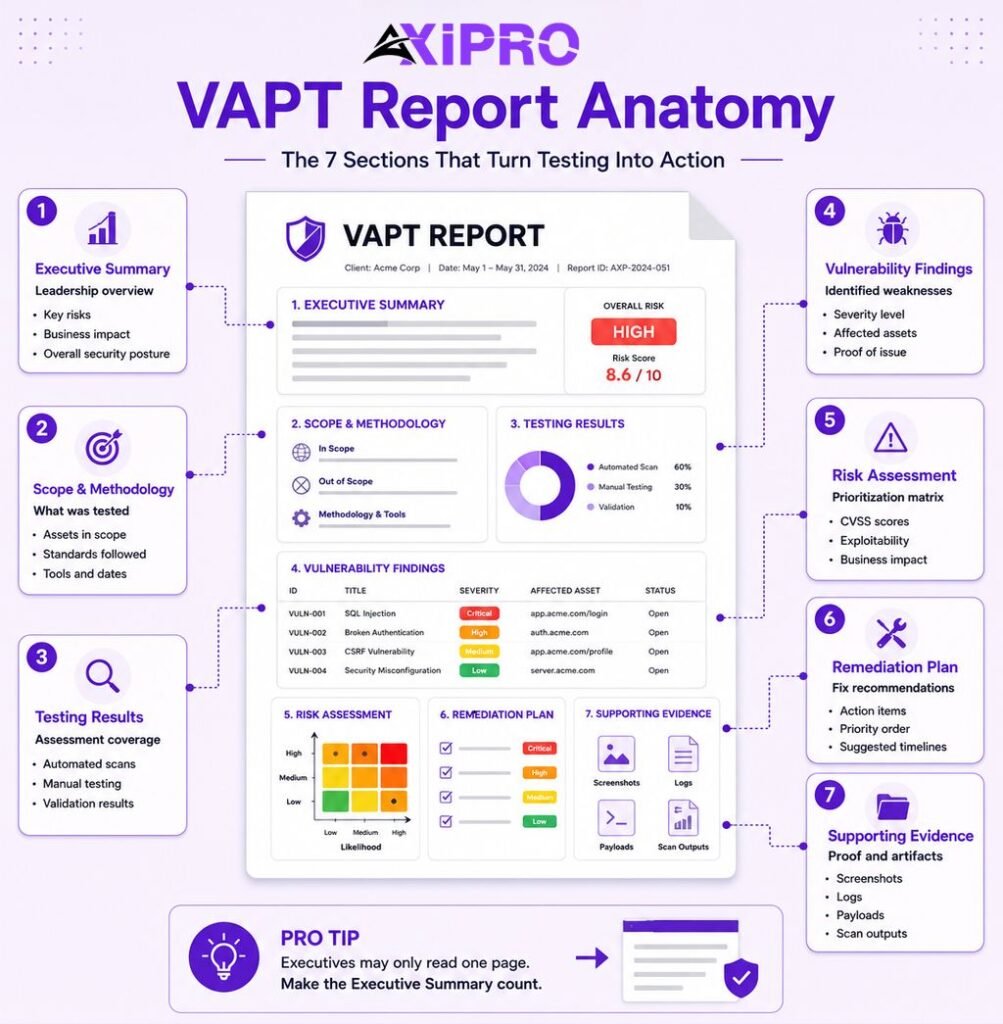
Formats vary by tester and by standard, but credible reports share the same seven building blocks.
- Executive Summary. A non-technical overview for leadership. It states the overall risk posture, the headline findings, and the business impact in plain language. For many executives this is the only section they will read, so it has to stand on its own.
- Methodology, Scope, and Tools Used. What was tested, what was deliberately excluded, which standards were followed (commonly OWASP, PTES, or NIST Special Publication 800-115), which tools were used, and the dates of the engagement. Scope is what defines the boundary of every claim the report can make.
- Scan Results and Details of Tests Performed. The summarised output of automated scanning alongside the specific manual tests carried out, giving reviewers a clear view of coverage.
- Detailed Findings and Vulnerabilities. The core of the document. Each finding gets a description, the affected asset, a severity rating, supporting evidence, and clear reproduction steps so the fix can be verified later.
- Risk Assessment Profile. Each vulnerability rated by severity, exploitability, and business impact, most often scored with a framework such as the Common Vulnerability Scoring System. This is what lets a team prioritise rationally instead of fixing whatever looks scariest.
- Remediation Planning and Recommendations. Specific, prioritised, actionable fixes, ideally with suggested timelines and owners. Vague advice like “harden the server” fails here. “Disable TLS 1.0 on these three endpoints” succeeds.
- Appendices and Supporting Evidence. Screenshots, request and response captures, payloads, proof-of-concept artefacts, and raw scanner output. This is the material that turns assertions into proof.
Pro Tip: Writing the Executive Summary
Write the executive summary last, and write it for a reader who will never get past it. If your CEO read only that one page, would they understand the single most important risk and what you need from them to close it? If not, the summary is not finished.
How to Write a VAPT Report
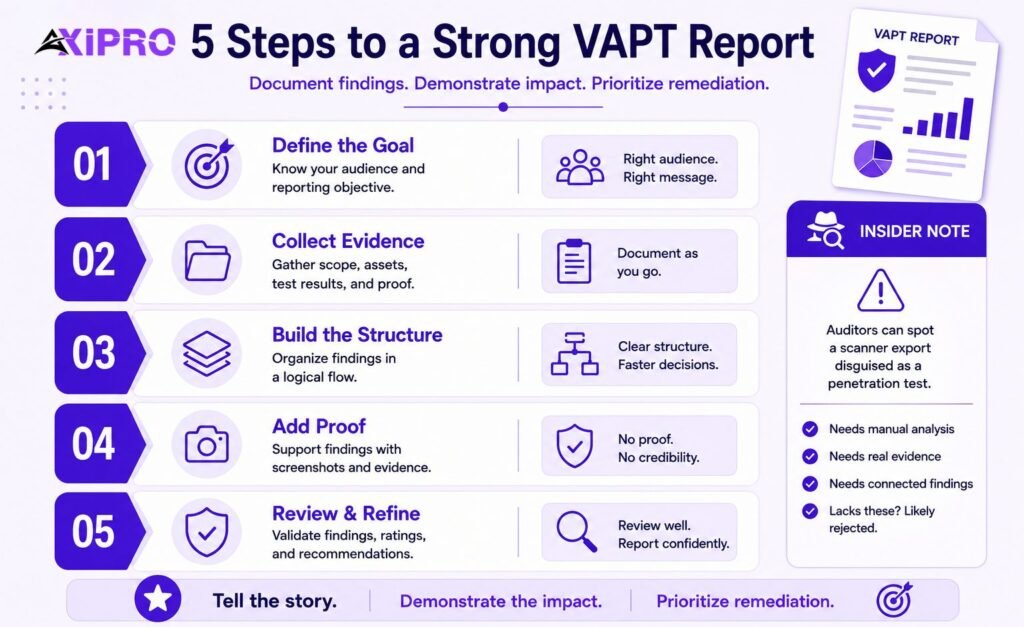
Step 1: Understand Your Purpose and Audience.
A report written for an internal engineering team looks nothing like one written for a board or an auditor. Decide upfront whether the goal is a point-in-time health check, compliance evidence, or due diligence, then set the depth and language accordingly.
Step 2: Gather Necessary Information.
Pull together the defined scope, the asset inventory, scan output, exploitation logs, and every piece of evidence captured during testing. Collect it as you go, not at the end, when details are already fading.
Step 3: Structure the Report.
Follow a logical flow: executive summary, then methodology and scope, then detailed findings, then the risk profile, then remediation, then appendices. A reader should be able to move from “how bad is it” to “what do I fix first” without hunting.
Step 4: Attach the Necessary Evidence and Proof of Concept.
Each significant finding needs evidence: a screenshot, a captured request, or reproduction steps. Evidence is what separates a credible report from an unverifiable claim, and it is the first thing a sceptical reviewer looks for.
Step 5: Final Review.
Check severity ratings for consistency, strip out false positives, confirm every recommendation is actionable, and make sure the language fits the audience. A single inflated or unverifiable finding undermines confidence in the whole report.
Insider Note: Auditors and PCI QSAs are now trained to spot an automated scanner export dressed up as a penetration test. A report with no manual analysis, no chained findings, and no evidence the tester went beyond running a tool is increasingly rejected as insufficient. The narrative of how findings connect is often what proves a human did the work.
VAPT Report Example: A Brief Walkthrough
Imagine a tester finds a staging admin login that is publicly reachable and has no multi-factor authentication. On its own, a scanner would flag it as a medium-severity exposure. The penetration tester goes further: they discover the staging credentials are reused in production, log in, and reach a database holding live customer records.
That single chain shows up differently in each part of the report.
- The executive summary states it in one line: an exposed login allowed access to live customer data, the highest-priority risk found.
- The detailed finding documents the endpoint, the missing MFA, the credential reuse, and the exact steps to reproduce it.
- The risk profile rates it critical, because exploitability is high and the business impact is a potential data breach.
- The remediation section says precisely what to do: remove public access to staging, enforce MFA, and rotate the shared credentials.
- The appendix holds the screenshots and request logs that prove every step. One finding, six sections, no ambiguity about what to fix first.
VAPT Report Templates and Automation Tools
Downloadable VAPT Report Templates
You do not have to design a report from scratch. Established methodologies publish free structures you can adapt: the OWASP testing guidance, the Penetration Testing Execution Standard (PTES), and NIST Special Publication 800-115 all describe how to organise scope, findings, and reporting. Starting from a recognised structure also signals rigour to auditors, who tend to trust reports that map to a known standard.
Reporting Automation and Management Tools
Tooling generally falls into three categories: vulnerability management platforms that aggregate and track findings over time, pentest reporting tools that turn evidence into structured documents, and ticketing integrations that push findings straight into systems like Jira so remediation gets owned and tracked. Automation speeds up the mechanical parts of reporting, but it does not replace the analyst’s judgement on severity and business context. The fastest way to produce a useless report is to let a tool decide what matters.
VAPT Reports and Compliance
This is where a VAPT report stops being a security artefact and becomes a business one. Different frameworks treat penetration testing differently, and getting the distinction right matters. Claiming a framework “requires” a penetration test when it does not is a common, avoidable mistake that erodes credibility with informed buyers and auditors alike.
Where VAPT Is Explicitly Required (PCI DSS)
PCI DSS is the clearest mandate of any major standard. Under the current version maintained by the PCI Security Standards Council, Requirement 11.4 explicitly calls for both internal and external penetration testing at least every twelve months and after any significant change, supported by a documented methodology and segmentation testing. If you store, process, or transmit cardholder data, a missing or out-of-date test is a straightforward audit failure, not a matter of interpretation.
Important: Penetration testing moved from Requirement 11.3 in PCI DSS v3.2.1 to Requirement 11.4 in v4.0, and the future-dated requirements became mandatory on 31 March 2025. Any template, checklist, or internal note still citing “11.3” for penetration testing is out of date. Reviewers notice, and it signals the rest of the document may be stale too.
Where VAPT Is Expected as Evidence (SOC 2, ISO 27001)
Neither framework names penetration testing as a hard rule, which surprises a lot of teams. The AICPA’s Trust Services Criteria that underpin SOC 2 never use the phrase “penetration test.” In practice, though, most auditors treat it as expected evidence for criteria such as CC4.1 (monitoring activities) and CC7.1 (vulnerability identification), and showing up to a Type II audit without one usually invites observations or requests for more evidence. The working standard is at least one test a year, falling inside the audit observation period.
ISO 27001 takes a similar shape. The standard does not mandate a pen test, but the technical vulnerability management control (Annex A 8.8 in the 2022 revision) and the core risk-assessment requirements make penetration testing the most natural way to demonstrate that those controls operate. In both cases the report is the evidence that turns a written policy into something an auditor can verify.
Where VAPT Supports Compliance (GDPR and others)
GDPR sits at the softest end of the spectrum. Article 32 requires a process for regularly testing, assessing, and evaluating the effectiveness of security measures, without ever naming a technique. Regulators and data protection authorities consistently treat penetration testing as a strong way to satisfy that obligation, especially for organisations processing sensitive data at scale. The report becomes part of the evidence trail that a breach response will be judged against.
Framework | Is VAPT required? | Where the expectation lives | Typical frequency |
|---|---|---|---|
PCI DSS | Yes, explicitly | Requirement 11.4 | Annual + after major change |
SOC 2 | No, but expected | Criteria CC4.1, CC7.1 (auditor evidence) | Annual, within audit period |
ISO 27001 | No, but expected | Annex A 8.8 + risk assessment | Annual + after major change |
GDPR | No, but supports it | Article 32 (regular testing) | Risk-based, commonly annual |
Using Your VAPT Report in a SOC 2 or ISO 27001 Audit
To make the report carry weight in an audit, map each finding to the specific control or criterion it touches, keep the test inside the audit period, and include retest evidence showing critical findings were fixed. Independent third-party testing is almost always stronger evidence than internal testing, because it demonstrates objectivity. If you are working toward either certification, it is worth aligning your testing scope with your audit scope from the start. Axipro covers this in more detail on our SOC 2 compliance and ISO 27001 certification pages.
Benefits of a VAPT Report
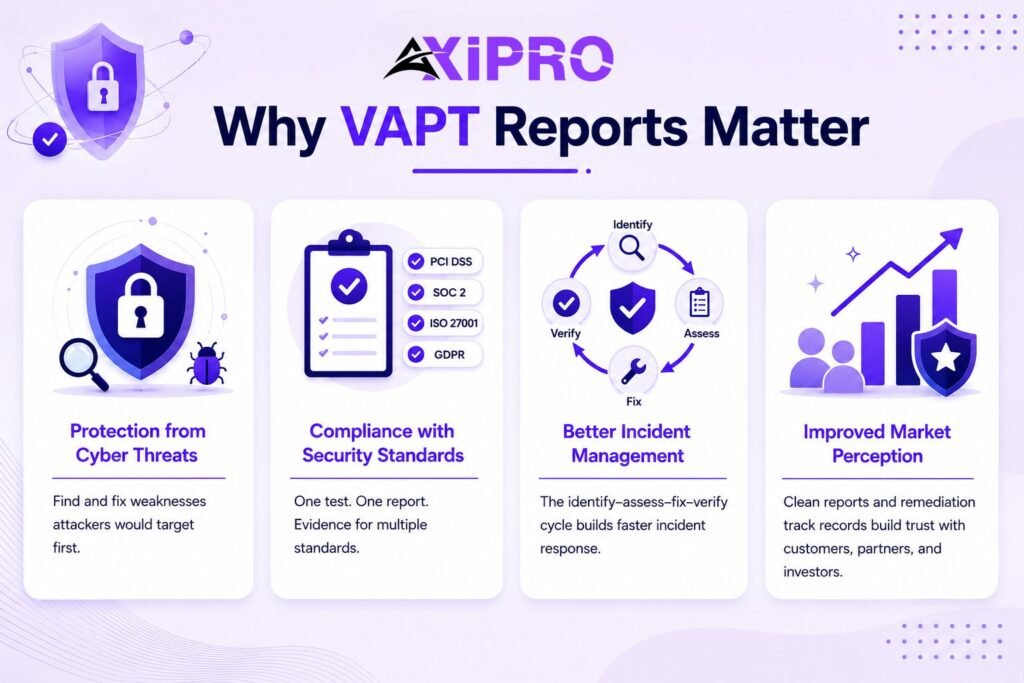
Protection from Cyber Threats. The direct benefit. A report surfaces the weaknesses an attacker would find first, giving you the chance to close them before anyone else does.
Compliance with Security Standards. A single well-run test and its report can serve as evidence across multiple frameworks at once, turning one engagement into PCI DSS, SOC 2, ISO 27001, and GDPR coverage.
Better Incident Management. The remediation workflow a report triggers (identify, assess, fix, verify) mirrors incident response. Teams that practise it on findings respond faster to real incidents.
Improved Market Perception. Being able to show a clean report, or a credible remediation track record, signals maturity to customers, partners, and investors. In competitive deals, that signal can be the difference.
A VAPT Report Doesn’t Reduce Risk. Remediation Does.
The Gap Between Finding and Fixing
A report names the problem. It does not solve it. The risk persists, in full, until the fix actually ships. Plenty of organisations accumulate a shelf of reports while the same critical findings reappear year after year, because producing the document and closing the issue are two completely different pieces of work.
Why Businesses Become Focused on Reports Over Outcomes
The report is the thing that gets paid for, shown to auditors, and attached to a deal. So it quietly becomes the goal. Compliance incentives reward having a report, not closing what it contains, and filing a PDF is far easier than coordinating engineering time to remediate. The result is a slow drift from security as an outcome to security as paperwork.
What Effective VAPT Looks Like Beyond the Report
Effective programmes treat the report as a starting point, not a finish line. Findings feed a tracked remediation workflow with named owners and deadlines. Critical issues get retested to confirm the fix worked. And the testing cadence moves away from a single annual snapshot toward something closer to continuous, because attackers do not wait twelve months between attempts. The report still matters. It just stops being the point.
Conclusion
A VAPT report is only as valuable as the action it drives. Done well, it translates technical findings into clear, prioritised decisions, evidences your compliance posture across PCI DSS, SOC 2, ISO 27001, and GDPR, and gives customers a reason to trust you. Done badly, it is a document that proves you looked without proving you fixed anything. The structure and standards matter, but the real test of a report is simple: did the risks it described actually get smaller?
Frequently Asked Questions
What is the main purpose of a VAPT report?
To turn the findings of security testing into prioritised, actionable decisions, while creating a point-in-time record that proves testing happened. It serves both technical teams who need to fix issues and leadership, auditors, and customers who need assurance.
How often should an organization conduct a VAPT?
At least annually for most frameworks, and after any significant change such as a major release, infrastructure shift, or acquisition. PCI DSS requires testing at least every twelve months, and SOC 2 and ISO 27001 auditors expect a similar cadence. Higher-risk environments increasingly move toward continuous testing.
Who should receive the VAPT report?
Internally, the security and engineering teams who will remediate, plus the leadership who own the risk. Externally, auditors and assessors who need evidence, and, in summary form, enterprise customers who request it during procurement.
Is it okay to share a VAPT report with outside parties?
Yes, but usually as a controlled summary rather than the full technical document. The detailed findings and proof of concept are effectively a map of your weaknesses, so the complete report is shared under NDA or replaced with a sanitised attestation for customers and partners.
What makes a VAPT report effective?
Clear prioritisation, evidence behind every finding, remediation advice specific enough to act on, and language tailored to its audience. Above all, it is effective only if the risks it identifies actually get fixed and retested.
What are the 3 criteria for assessing vulnerabilities in a VAPT report?
Severity, exploitability, and business impact. Severity reflects how serious the flaw is, exploitability reflects how realistically an attacker could use it, and business impact reflects what it would cost the organisation. Frameworks such as CVSS combine these into a single score so findings can be ranked consistently.
What is the difference between a vulnerability assessment report and a penetration test report?
A vulnerability assessment report is broad and lists known weaknesses identified by mostly automated scanning, without confirming whether they can be exploited. A penetration test report is narrower and documents weaknesses that a human tester actually exploited, with proof of concept and real-world impact. A VAPT report combines both: the breadth of the assessment and the validation of the test.
Does SOC 2 or ISO 27001 require a VAPT report?
Neither framework strictly requires penetration testing in its written text. SOC 2’s Trust Services Criteria and ISO 27001’s controls never mandate it by name. In practice, auditors for both expect it as the most credible evidence for vulnerability management and control effectiveness, so for most organisations it is effectively necessary even though it is not technically mandatory. PCI DSS, by contrast, does require it explicitly.