Most companies start their first SOC 2 or ISO 27001 project in a spreadsheet, only to have it fall apart in week 6. This is typically when they’ll call us asking us to implement a GRC system that scales.
Excel holds 154 controls fine. The trouble starts when an auditor sends over an evidence request list, two frameworks need updating at once, and a control owner who hasn’t opened the file since March edits the wrong row.
This article gives you a free GRC workbook template built to take into consideration the hundreds of engagements we’ve guided. It walks you through each tab and tells you plainly when you’ve outgrown it.
We’ve worked with hundreds of companies implementing SOC 2 + ISO 27001 and to be honest, for 80% of cases, using excel is feasible and even advised. Its a tool most of the staff knows and using it cuts onboarding times from weeks to a few hours. It also makes it accessible to the whole organization.
The workbook covers all 33 SOC 2 Common Criteria plus the Availability, Confidentiality, Processing Integrity, and Privacy criteria, all 93 ISO 27001:2022 Annex A controls, a crosswalk between the two, and the evidence, risk, policy, and gap trackers that sit around them. It’s free, there are no macros, and it opens in Excel or Google Sheets.
Why Start SOC 2 and ISO 27001 Tracking in a Spreadsheet
The obvious argument for using Excel is cost and ease of use. A GRC platform costs around $10,000 a year before you’ve put a single control in place, and it pushes you into its control library and its workflow before you understand your own environment. A spreadsheet costs nothing and holds exactly the columns you need. More usefully, it makes you think about scope, ownership, and evidence before you automate any of it, and that thinking is the part no platform does for you.
There’s a less obvious reason too. Teams that build their first control inventory by hand understand it. They know why CC6.3 maps to A.5.18, why the offboarding checklist is evidence for both, and who actually owns it. Teams that inherit a pre-populated platform library often don’t, and it shows in audit interviews when the auditor asks a control owner to explain a control they’ve never read.
When a GRC Workbook Makes Sense
A spreadsheet is the right tool when you’re chasing one or two frameworks, your team is under about 50 people, and one person owns compliance day to day. It also suits the readiness phase for any company. Scoping, gap analysis, and control design all go faster in a workbook than in a platform because there’s nothing to configure first. If you’re aiming for a SOC 2 Type I, or an ISO 27001 certificate with a tightly bounded ISMS scope, the workbook can carry you all the way to the audit.
When You’ve Outgrown Excel (and Need a Platform)
Excel breaks at scale in predictable ways. Spreadsheet research going back decades keeps finding that most operational spreadsheets contain at least one error; a review of field audits across 88 operational spreadsheets found errors in 94% of them. A compliance workbook with 1,400 formulas and a dozen editors isn’t exempt. Add a Type II observation period, where you collect the same evidence every month for a year, and manual tracking stops being a discipline and becomes someone’s full-time job. The specific tripwires are covered later in the article, but the short version is that when evidence collection becomes the bottleneck, it’s time to stop.
What’s Inside the Free GRC Workbook Template
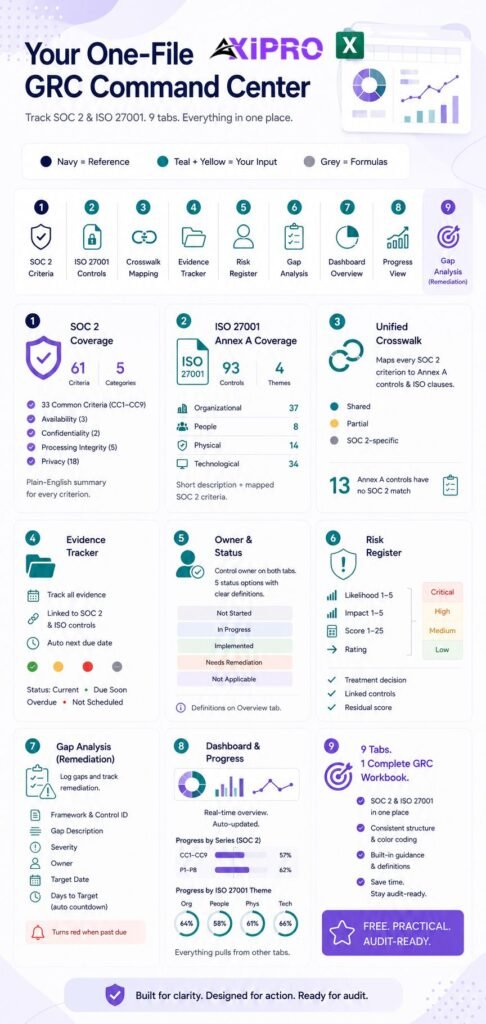
The workbook has nine tabs. Eight get their own section in the walkthrough below; the ninth, Gap Analysis, is a remediation log that feeds the dashboard.
Every tab uses the same color convention.
- Navy headers mean pre-filled reference content.
- Teal headers with light yellow cells are the fields you fill in.
- Grey headers are formula columns, and you should leave those alone.
SOC 2 Trust Services Criteria Coverage
All 61 criteria from the AICPA 2017 Trust Services Criteria (with the 2022 revised points of focus) are already in there: the 33 Common Criteria across CC1 through CC9, plus Availability (3), Confidentiality (2), Processing Integrity (5), and Privacy (18). Each row has a plain-English summary of what the criterion expects, so a control owner who has never opened the AICPA document can still understand what they’re being asked to prove.
ISO 27001 Annex A Controls Coverage
All 93 Annex A controls from ISO/IEC 27001:2022 are listed under their four themes: Organizational (37), People (8), Physical (14), and Technological (34). Each control has a short description of what it covers and a pre-computed column showing which SOC 2 criteria relate to it.
Unified Control Mapping Between SOC 2 and ISO 27001
The Crosswalk tab maps every SOC 2 criterion to the Annex A controls and ISO clauses it overlaps with, labels the overlap as Shared, Partial, or SOC 2-specific, and pulls the live status and evidence IDs from the SOC 2 tab. A second table lists the 13 Annex A controls that have no meaningful SOC 2 counterpart, so you know what to track on its own.
Evidence Tracker
Every piece of evidence gets one row, tagged to the SOC 2 criteria and ISO controls it supports, with an owner, a source system, a location, the period it covers, and how often you collect it. A formula works out the next due date and flags each item as Current, Due Soon, Overdue, or Not Scheduled.
Owner and Status Fields
Both control tabs have a Control Owner column and a Status dropdown with five defined states: Not Started, In Progress, Implemented, Needs Remediation, and Not Applicable. The definitions sit on the Overview tab so that two people setting a status on the same day mean the same thing by it.
Risk Register Tab
Likelihood and impact on a 1 to 5 scale, an automatic score, a rating (Critical, High, Medium, Low), a treatment decision, linked controls, and residual scoring after treatment. The thresholds are written on the tab so you can change them to match your own method.
Gap Analysis Tab
A remediation log: framework, control ID, gap description, severity, action, owner, target date, and a days-to-target countdown that turns red once you’ve missed it.
Dashboard and Progress View
Counts and percentages for every tab, plus progress by SOC 2 series (CC1 through P8) and by ISO theme. Nobody types on the dashboard. Everything on it pulls from the other tabs.
Download the Free GRC Workbook Template
The file is a plain .xlsx with no macros. It opens in Excel, Google Sheets, and LibreOffice. The only thing that won’t import perfectly into Google Sheets is the conditional formatting on a couple of date columns, and you can add it back in two minutes.
Get the free GRC Workbook Template
Enter your work email and the Google Sheets link unlocks instantly.
You’re in — here’s your workbook
Open the link below and make a copy (File → Make a copy) to start editing.
Open the GRC Workbook in Google Drive →Tab-by-Tab Walkthrough
Overview and Instructions Tab
Start on this tab and fill in the document control block: organization, workbook owner, ISMS scope, SOC 2 categories in scope, management approval. This block matters more than it looks. ISO 27001 auditors expect documented information to have an owner, a version, and some proof of approval, and a spreadsheet with a blank header doesn’t clear that bar. The rest of the tab includes the legend, status definitions, and assumptions built into the formulas.
SOC 2 Controls Tab (CC, A, C, PI, P)
The Security criteria (CC1 through CC9) are already marked in scope, because Security is mandatory in every SOC 2 report. The other categories are blank; set them to Yes only if your customer commitments require them. For each in-scope criterion, describe the control you actually run in your own words, name an owner, set a status, pick a testing frequency, and list the evidence IDs from the Evidence Repository. The Next Test Due column is calculated based on the frequency and the last tested date.
Important: Write the control description as the thing your company does, not as a restatement of the criterion. “Quarterly access review of production IAM and the identity provider, signed off by the CTO, removals ticketed” is a control. “We restrict access based on roles” is CC6.3 reworded, and it tells an auditor nothing.
ISO 27001 Annex A Tab
This tab is your Statement of Applicability (SoA) in draft form. For each of the 93 controls, set Applicable to Yes or No and write a justification either way. Then describe how you meet it, name an owner, set a status, and link the evidence. A row where Applicable is set but the justification is blank turns red, because that’s the most common SoA finding at Stage 1.
Crosswalk / Control Mapping Tab
This tab is reference only. Use it in both directions. When you put a SOC 2 control in place, check which Annex A controls it also satisfies and reuse the same evidence. When you review an Annex A control, look at the Related SOC 2 Criteria column on the ISO tab to see what you’ve already covered. The mapping is a practitioner mapping, not an official AICPA or ISO publication, and your auditor may draw a few of the lines differently.
Evidence Repository Tab
One row per evidence item, never one row per control, because evidence gets reused. A signed Code of Conduct export supports CC1.1, CC1.5, A.5.4, and A.6.2 at the same time, and tagging it once to all four means you collect it once. Record where the evidence lives (a link to a shared drive folder, a ticket, an export), the period it covers, and how often it needs refreshing. For a Type II report, “period covered” is the first column an auditor will check.
Risk Register Tab
Score the inherent risk before treatment, pick a treatment (Mitigate, Accept, Transfer, Avoid), link the controls that treat it, and score the residual risk afterwards. ISO 27001 wants a documented risk assessment method and proof that the risk treatment plan drove your control selection. SOC 2 wants the same thing under CC3, plus explicit consideration of fraud risk under CC3.3. One register covers both.
Policy Inventory Tab
Every policy, procedure, plan, and ISMS document, with owner, version, approver, approval date, and review frequency. Next Review Due and Review Status are calculated on their own, with a 30-day warning window. Use it to track the mandatory ISO 27001 clause 4 to 10 documents (scope statement, security policy, risk method, internal audit program, management review minutes) as well as the topic policies.
Dashboard Tab
The dashboard shows in-scope SOC 2 criteria and the percentage implemented, applicable ISO controls and the percentage implemented, exclusions missing a justification, controls with no owner, overdue tests, overdue evidence, open risks by rating, overdue policy reviews, and open gaps. You can paste it straight into a monthly update for leadership without touching it.
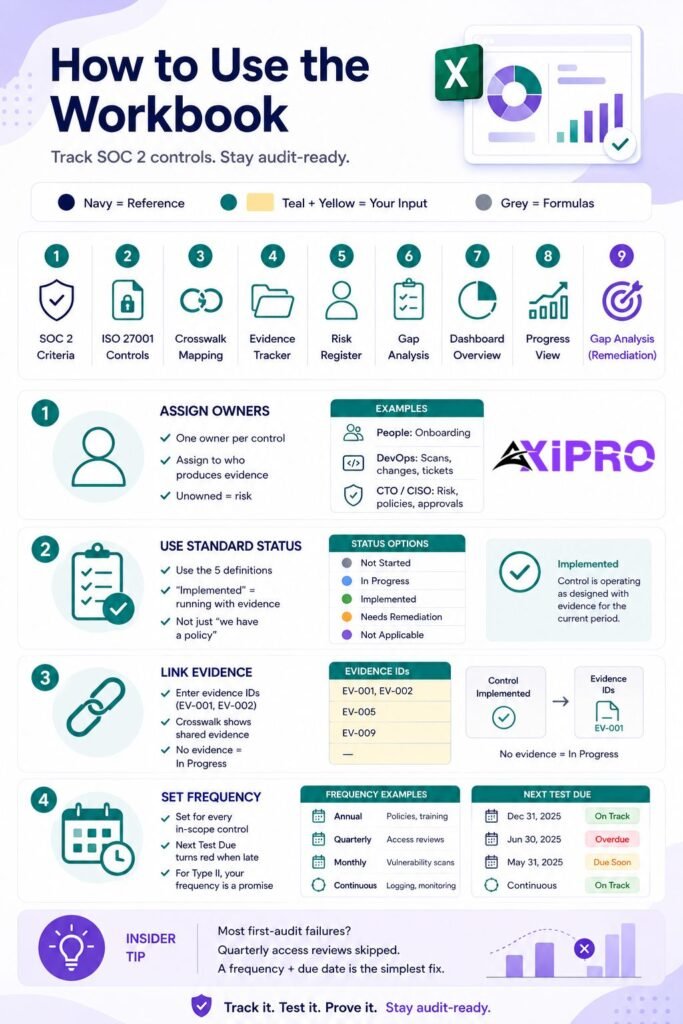
How to Use the Workbook to Track SOC 2 Controls
Assigning Control Owners
Every in-scope criterion needs a named person, not a team. The dashboard counts in-scope controls with a blank owner for a reason: the unowned ones are the ones that fail. Assign ownership by who can produce the evidence, not by who is most senior. The Head of People owns background checks and onboarding acknowledgements. The DevOps lead owns vulnerability scans and change tickets. The CTO or CISO owns the risk assessment and policy approval.
Setting Control Status Definitions
Use the five definitions on the Overview tab and don’t invent your own. “Implemented” means the control is running as designed and there’s evidence for the current period. It doesn’t mean “we have a policy that says we do this.” That distinction is exactly what a Type II auditor tests.
Linking Evidence to Each Control
Enter evidence IDs (EV-001, EV-002) in the Evidence IDs column, separated by commas. The Crosswalk pulls that column through, so you can see at a glance which shared controls have evidence and which don’t. If a control says Implemented and the evidence column is empty, treat it as In Progress until the evidence exists.
Tracking Testing Frequency
Set a frequency for every in-scope control: Annual for policy acknowledgements and training, Quarterly for access reviews, Monthly for vulnerability scans, Continuous for logging and monitoring. The Next Test Due column turns red when you’re late. For a Type II report, the frequency you set here is a promise. An auditor sampling a quarterly control will expect four data points across a twelve-month period.
Insider Note: The control that fails most often in first SOC 2 audits isn’t a technical one. It’s the quarterly access review that ran in Q1 and Q3 and got skipped in Q2 because the person who does it was on leave. A frequency column with a due date is the cheapest fix for that.
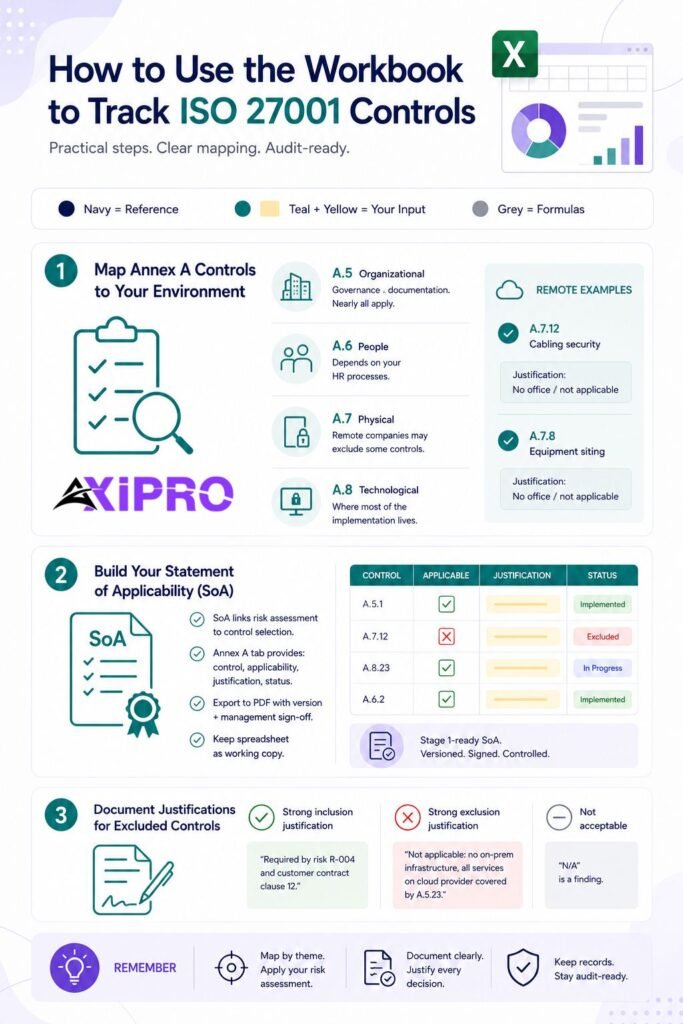
How to Use the Workbook to Track ISO 27001 Controls
Mapping Annex A Controls to Your Environment
Work through the 93 controls theme by theme. Organizational controls (A.5) are mostly governance and documentation, and nearly all of them will apply to any company. People controls (A.6) depend on your HR processes. Physical controls (A.7) are where fully remote companies find their exclusions. If you have no office, A.7.12 (cabling security) and A.7.8 (equipment siting) are reasonable exclusions with a one-line justification. Technological controls (A.8) are where most of the actual work is.
Building the Statement of Applicability (SoA)
The Statement of Applicability ties your risk assessment to your control selection, and ISO 27001 clause 6.1.3 requires it. The Annex A tab gives you the raw material: control, applicable or not, justification, status. Export the tab to a PDF with a version number and management sign-off and you have a Stage 1-ready SoA. Keep the spreadsheet as the working copy and the signed PDF as the controlled document.
Documenting Justifications for Excluded Controls
Write a justification for inclusions as well as exclusions. “Required by risk R-004 and customer contract clause 12” is a strong inclusion justification. “Not applicable: no on-premises infrastructure, all services run on a cloud provider covered by A.5.23” is a strong exclusion justification. “N/A” on its own is a finding.
Mapping SOC 2 to ISO 27001 in One Workbook
Shared Controls You Only Need to Document Once
Access control, change management, incident response, vulnerability management, logging, backups, vendor management, and HR security all live in both frameworks. In the crosswalk, 35 of the 61 SOC 2 criteria are labelled Shared, meaning the same control and the same evidence satisfy both frameworks with at most a wording change, and another 10 are Partial. CC6.1 alone maps to eight Annex A controls. Document those once on the SOC 2 tab, reference the same evidence IDs on the ISO tab, and move on.
Framework-Specific Controls to Track Separately
Processing Integrity and Privacy are mostly SOC 2-specific. ISO covers privacy only through A.5.34, which requires you to comply with privacy law but says nothing about notice, consent, or how you handle data subject access requests. Going the other way, 13 Annex A controls have no SOC 2 counterpart worth relying on: legal and contractual requirements (A.5.31), intellectual property (A.5.32), clear desk (A.7.7), source code access (A.8.4), data masking (A.8.11), test data (A.8.33), and a few more. ISO also requires the management system itself, meaning internal audit, management review, and continual improvement under clauses 9 and 10, which SOC 2 only brushes against through CC4.
The table below sums up how the two frameworks treat the same ground.
| Area | SOC 2 | ISO 27001:2022 | Overlap |
|---|---|---|---|
| Structure | 61 criteria across 5 categories; Security mandatory | 93 Annex A controls plus mandatory clauses 4 to 10 | Shared control set, different framing |
| Output | Attestation report (Type I or Type II) from a CPA firm | Certificate from an accredited certification body | Different |
| Risk assessment | Required under CC3 | Required under clause 6.1 with a documented method | Shared |
| Evidence period | Point in time (Type I) or 3 to 12 months (Type II) | Stage 1 document review, Stage 2 implementation audit, annual surveillance | Different cadence |
| Privacy | Full P-series criteria if in scope | A.5.34 only | SOC 2-specific |
| Management system | Not required | Internal audit, management review, SoA required | ISO-specific |
Reducing Duplicate Work Across Both Audits
The order you run them in matters. Companies that do SOC 2 first and ISO second usually find the second project is 60% to 70% built already, because Annex A is wider in scope but shallower in testing than a Type II. Companies that run both at once off a single evidence repository do best of all. The workbook assumes you’ll run them in parallel: every evidence row has a SOC 2 column and an ISO column, and the dashboard reports both. For the mapping logic in more depth, read our SOC 2 to ISO 27001 mapping guide.
Suggested Workflow: From Empty Workbook to Audit-Ready
Six to twelve weeks is realistic for a small team with a dedicated owner and a bounded scope. It’s optimistic for a company that hasn’t yet decided which systems are in scope.
Week 1–2: Scope and Framework Selection
Decide the system boundary, the SOC 2 categories, and the ISMS scope. Fill in the Overview tab. Mark the SOC 2 categories in scope and take a first pass at Annex A applicability. Don’t describe controls yet.
Week 3–4: Populate Controls and Assign Owners
Write a control description for every in-scope SOC 2 criterion and every applicable Annex A control, and give each one an owner. Run the first risk assessment and fill the Risk Register. Expect “controls with no owner” to be the dashboard number leadership asks about.
Week 5–8: Collect and Link Evidence
Build the Evidence Repository. For each control, work out which artifact proves it runs, where that artifact lives, and how often it refreshes. This is the phase that always runs long, so budget for it.
Pro Tip: Evidence Request List
Ask your auditor for their evidence request list (usually called a PBC list, for "provided by client") before week 5, not after. Most firms will share a generic one if you ask. Filling the Evidence Repository from it means you collect what the auditor will actually sample rather than what you guessed they'd want.
Week 9–10: Gap Analysis and Remediation
Compare status against evidence. Any control marked Implemented with no evidence behind it is a gap, and so is any Annex A exclusion without a justification. Log them in the Gap Analysis tab with owners and dates, and work the Critical and High ones first.
Week 11–12: Internal Review and Mock Audit
ISO 27001 requires an internal audit before certification. SOC 2 doesn’t, but a mock audit catches the same problems. Get someone who didn’t build the workbook to pick five controls at random and try to trace each one from criterion to control description to evidence to owner. Wherever the trace breaks is what the real auditor will find. Axipro’s ISO 27001 internal audit service runs this exact exercise and hands you a remediation plan at the end.
Signs You’ve Outgrown the Workbook
Manual Evidence Collection Is Consuming Weeks
A Type II observation period means collecting monthly and quarterly evidence continuously, not once before the audit. When a single collection cycle takes the compliance owner more than a week, the workbook is now the bottleneck.
Multiple Frameworks Are Breaking Your Crosswalk
A two-framework crosswalk is a table. A three-framework crosswalk is a graph, and Excel is bad at graphs. Add HIPAA or PCI DSS on top of SOC 2 and ISO 27001, and the mapping tab usually becomes unreadable within a quarter.
Control Owners Keep Losing Context
Owners who open the workbook once a quarter forget what the column headers mean, edit the wrong row, or type over a formula. The spreadsheet error research cited earlier isn’t abstract. A workbook with a dozen occasional editors picks up errors nobody notices until the auditor does.
Auditors Are Asking for a Verifiable Evidence Chain
Enterprise customers and the larger audit firms increasingly want to know when a piece of evidence was collected, from which system, and how. A screenshot pasted into a folder in March and referenced from a spreadsheet cell answers none of that. Platforms that pull evidence straight from your identity provider, cloud account, and ticketing system do.
You’re Adding a Third or Fourth Framework
ISO 42001, DORA, NCA ECC, or a regional data protection law on top of SOC 2 and ISO 27001 is the point where a platform costs less than maintaining the workbook. Most of Axipro’s clients who started in a spreadsheet moved to framework three.
What to Look for When You Move From Excel to a GRC Platform
Automated Evidence Collection
This is the single biggest time-saving. Look for native integrations that pull access lists, MFA status, vulnerability scan results, and change tickets on a schedule, with timestamps.
Continuous Control Monitoring
Tests that run daily against your environment and flag drift (a new user without MFA, an unencrypted bucket) instead of waiting for the quarterly review to catch it.
Multi-Framework Crosswalks
A maintained control library that maps one control to every framework it satisfies, so adding a framework means reviewing gaps rather than rebuilding the inventory.
Integrations With Your Tech Stack
Check the specific integrations you need before you buy: your cloud provider, identity provider, HRIS, ticketing system, endpoint management, and code repository. A platform that covers four of your six systems leaves you running a spreadsheet for the other two.
Audit-Ready Reporting
Auditor access to the platform, exportable evidence packages, and reports that map evidence to criteria without you assembling them by hand.
Worth Knowing: Platform Automation
Platform automation collects evidence. It doesn't put controls in place, write policies, or answer the auditor's follow-up questions. Companies that buy a platform expecting it to run the audit end up with a very well-documented list of failing tests. You still need the person who owned the spreadsheet; you've just given them a better tool.
How to Migrate Your Workbook Data to a GRC Platform
What to Keep From Your Spreadsheet
Your control descriptions, owners, risk register, policy inventory, and SoA justifications are the valuable part, and most of them import cleanly or paste into the platform’s equivalent fields. Keep the workbook as the record of how you got here, since auditors sometimes ask to see it.
What to Rebuild in the Platform
Evidence links won’t migrate. Every screenshot and export in your shared drive needs replacing with the platform’s own integration-sourced evidence, or re-uploading with metadata. The platform’s control library replaces your crosswalk; don’t try to import yours. Testing frequencies and due dates get rebuilt as automated tests wherever an integration exists.
Running a Parallel Period Before Cutover
Run both for one full evidence cycle, usually a quarter. Compare what the platform collected on its own against what the spreadsheet says should exist. The differences are either integration gaps you need to close or controls the workbook was over-reporting. Cut over once the two dashboards agree. Axipro’s SOC 2 compliance services include this migration and the platform configuration that follows, for companies that would rather not do it alone.
The workbook will get a focused team to a first audit, and a platform is what keeps them there afterwards. Most of the job is working out which of those phases you’re in and not switching too early or too late.
Frequently Asked Questions
Can I really pass a SOC 2 or ISO 27001 audit using only a spreadsheet?
Yes, for a SOC 2 Type I or an ISO 27001 certificate with a bounded scope and a small team. Auditors assess your controls and evidence, not your tooling. Where spreadsheet-only teams struggle is a Type II over twelve months with several frameworks, and that’s mostly down to the evidence collection load rather than any auditor objection.
Is this workbook suitable for SOC 2 Type I or Type II?
Both, with one caveat. For Type I, the control descriptions, owners, and point-in-time evidence are enough. For Type II, use the Testing Frequency and Period Covered columns properly, because the auditor will sample evidence across the observation period and the workbook is your only record of when you collected each item.
Does the template cover ISO 27001:2022 Annex A updates?
Yes. The Annex A tab lists all 93 controls from the 2022 revision under the four themes, including the 11 controls added in 2022 such as threat intelligence (A.5.7), cloud services (A.5.23), data masking (A.8.11), and data leakage prevention (A.8.12). The 2013 version’s 114 controls aren’t included; certificates against it expired in October 2025.
How many controls does the workbook include?
61 SOC 2 criteria (33 Common Criteria plus 28 across Availability, Confidentiality, Processing Integrity, and Privacy) and 93 ISO 27001:2022 Annex A controls, so 154 rows of reference content. Your own control count will be lower for SOC 2, since you describe one control per in-scope criterion, and for ISO it depends on your SoA.
Can multiple team members edit the workbook at once?
In Google Sheets, or in Excel with a shared OneDrive or SharePoint file, yes. Give edit rights by tab where you can and keep the Dashboard and Crosswalk protected, because those are formula tabs and one stray edit breaks them. Past about five regular editors, version conflicts become one of the signs you’ve outgrown it.
When should I stop using Excel and buy a GRC platform?
When evidence collection takes more than a week per cycle, when you add a third framework, or when an auditor or enterprise customer asks for integration-sourced evidence. Most teams hit one of those within a year of their first Type II report.
Do auditors accept spreadsheets as evidence?
Auditors accept a spreadsheet as a control inventory, risk register, or SoA, as long as it has an owner, a version, and approval. They generally won’t accept a spreadsheet cell as proof that a control operated. The evidence is the underlying artifact (the access review export, the signed acknowledgement, the scan report) that the spreadsheet points to.