Most Drata reviews are written by Drata’s competitors. Scroll the first page of Google and you’ll find review posts from rival compliance platforms, each one ending with a pitch for their own tool. This one is different, and the bias runs the other way, so let’s put it on the table: Axipro is a Drata Gold Partner, and our consultants configure the platform for clients every week. That means we profit when companies choose Drata. It also means we know exactly where it saves you months, where the invoice grows faster than you planned, and when you should pick something else. This review covers all three.
What Is Drata?
Drata is a compliance automation platform (the industry calls the category GRC, for governance, risk, and compliance) founded in 2020 in San Diego by Adam Markowitz, Daniel Marashlian, and Troy Markowitz. Its core job: connect to your cloud infrastructure, identity provider, HR system, and code repositories, then continuously test your security controls against frameworks like SOC 2 and ISO 27001, collecting timestamped evidence as it goes. When your auditor shows up, most of the evidence is already packaged.
Funding, Valuation, and Market Position
Drata has raised $328 million, most recently a $200 million Series C in late 2022 that valued the company at $2 billion. It passed $100 million in annual recurring revenue in early 2025, acquired the trust center platform SafeBase for $250 million the same year, and now serves more than 8,000 customers. In late 2025 it earned a FedRAMP 20x Low Pilot Authorization, which puts it in a small group of compliance platforms cleared through the U.S. government’s modernized FedRAMP review track. Together with Vanta, it’s one of the two platforms almost every compliance buyer shortlists.
Let Axipro help you build a business continuity plan that's practical, compliant, and audit-ready.
Schedule Your Free Assessment Today
Who Drata Is Built For
The sweet spot is cloud-native companies from seed stage to mid-market: SaaS businesses pursuing their first SOC 2 or ISO 27001, and scaling teams juggling three or four frameworks at once. If your infrastructure lives in AWS, Azure, or GCP and your team uses standard tools like Okta, GitHub, and a mainstream HRIS, Drata’s automation covers a large share of your evidence collection out of the box. The further you drift from that profile (heavy on-prem systems, exotic tooling, air-gapped environments), the more manual work remains.
How Drata Works: From Connection to Audit
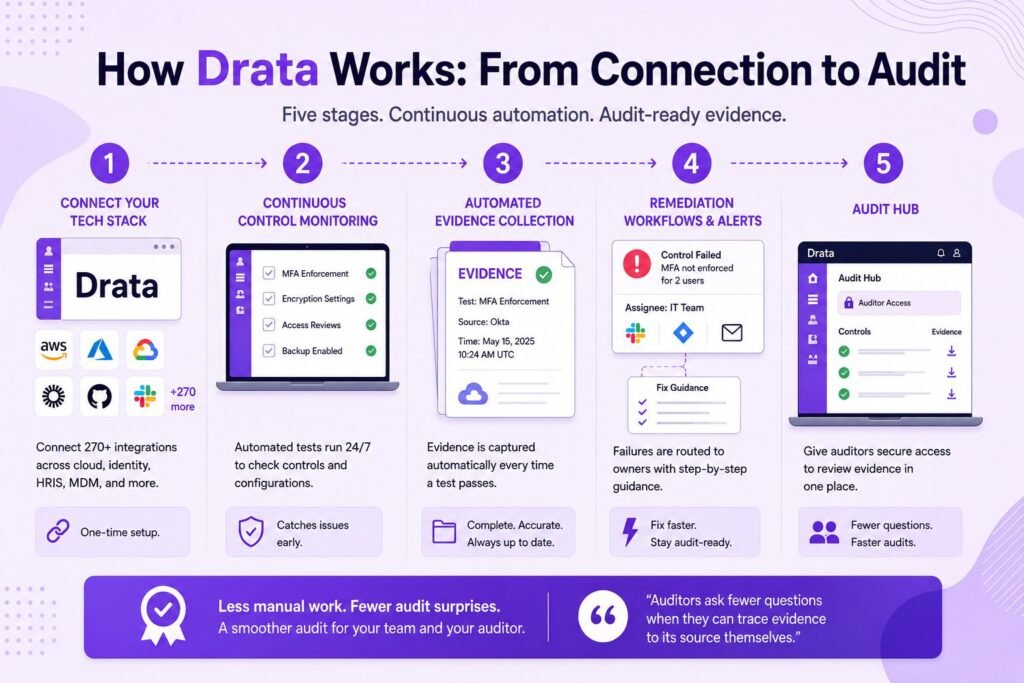
The workflow runs in five stages.
- First, you connect your tech stack through more than 270 native integrations covering cloud providers, identity, version control, HRIS, MDM, and ticketing.
- Second, continuous control monitoring kicks in: automated tests run around the clock against your connected systems, checking things like MFA enforcement, encryption settings, and access reviews.
- Third, automated evidence collection captures timestamped proof each time a test passes, building the evidence library your auditor will draw from.
- Fourth, when a test fails, remediation workflows and alerts route the issue to an owner through Slack, Jira, or email, with guidance on how to fix it.
- Fifth, the Audit Hub gives your auditor a scoped login to review evidence directly in the platform instead of trading spreadsheets and screenshots over email. In our client engagements, that last piece cuts back and forth more than any other feature.
Auditors ask fewer clarifying questions when they can trace evidence to its source themselves.
Drata's Core Features Reviewed
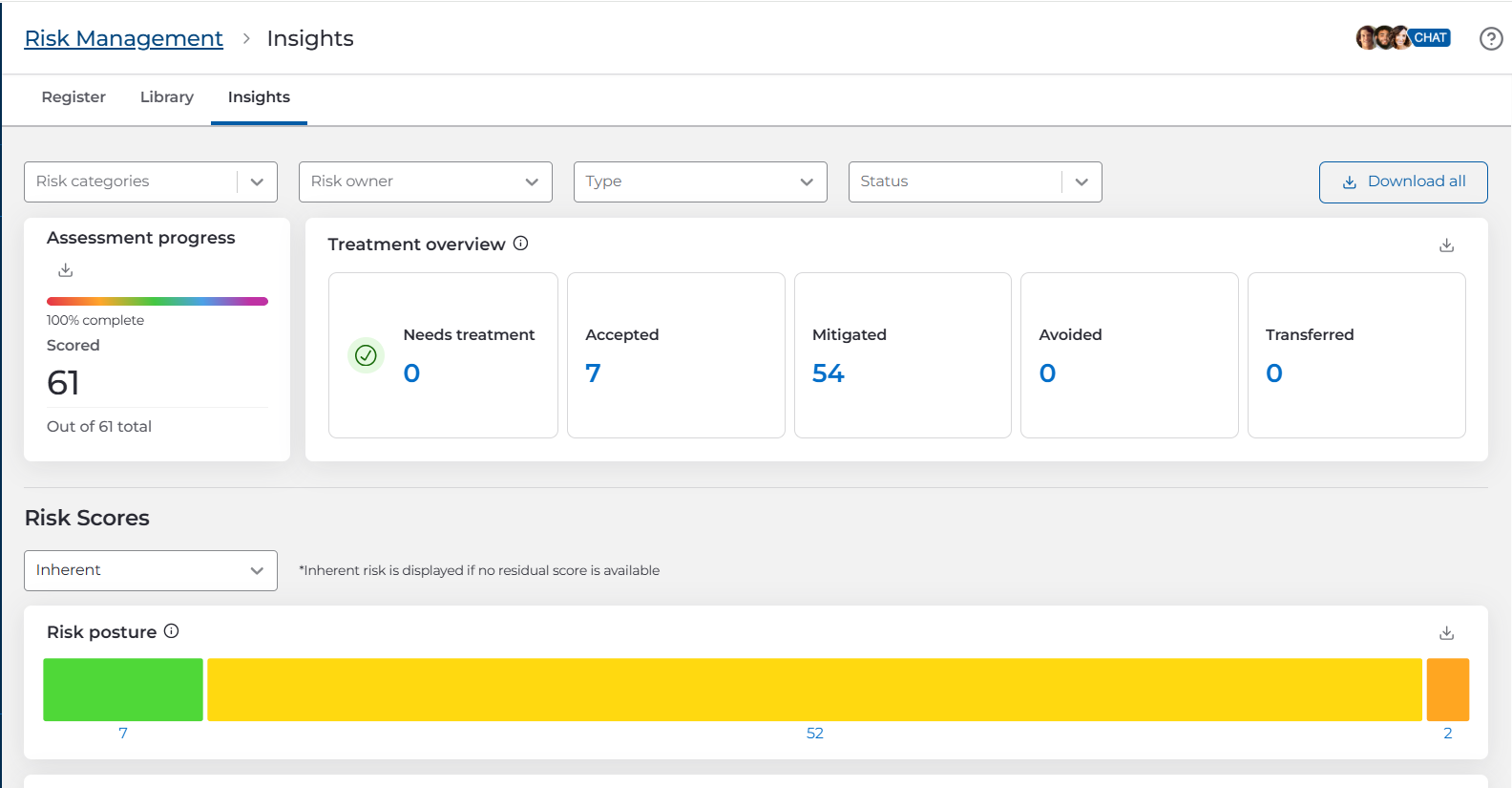
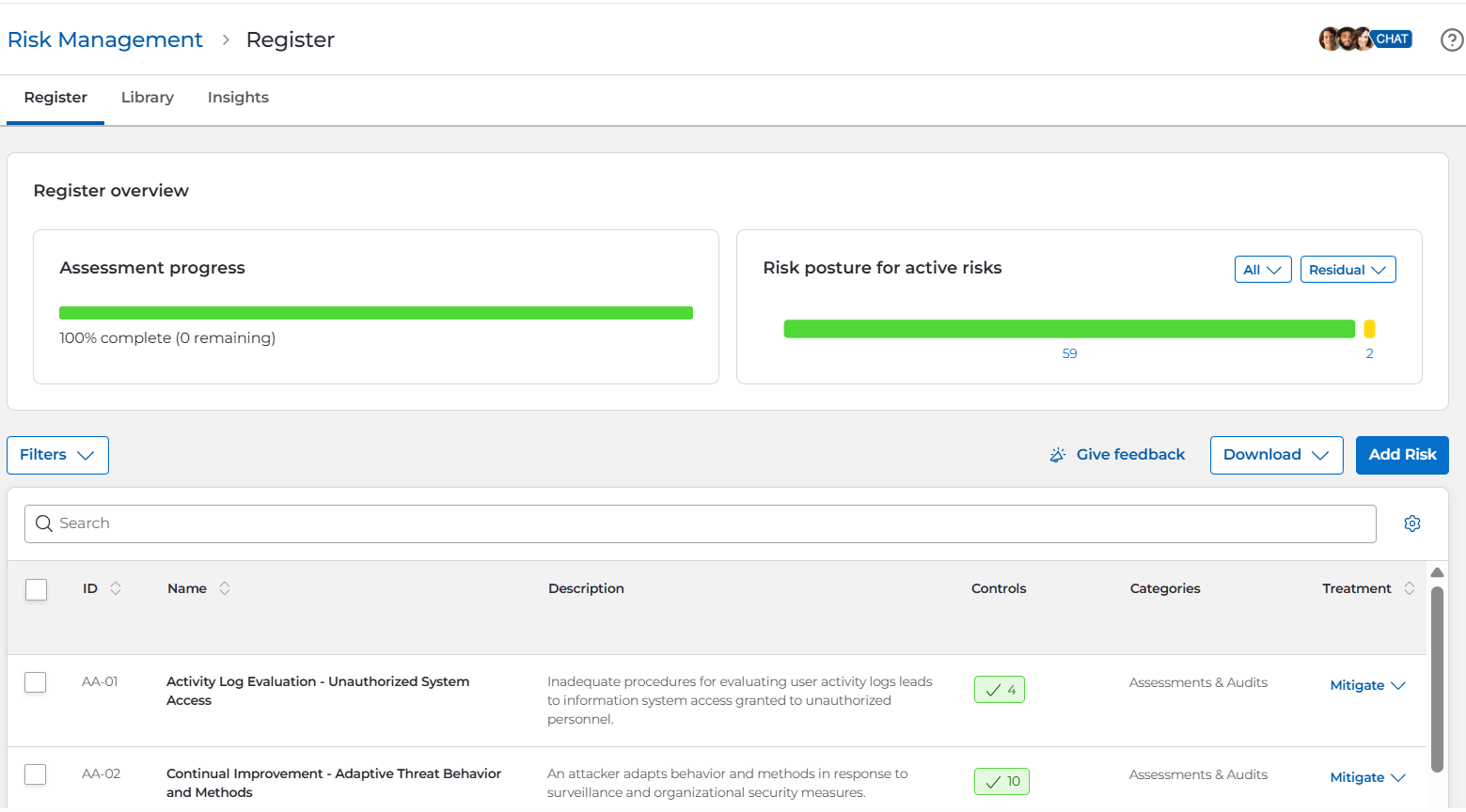
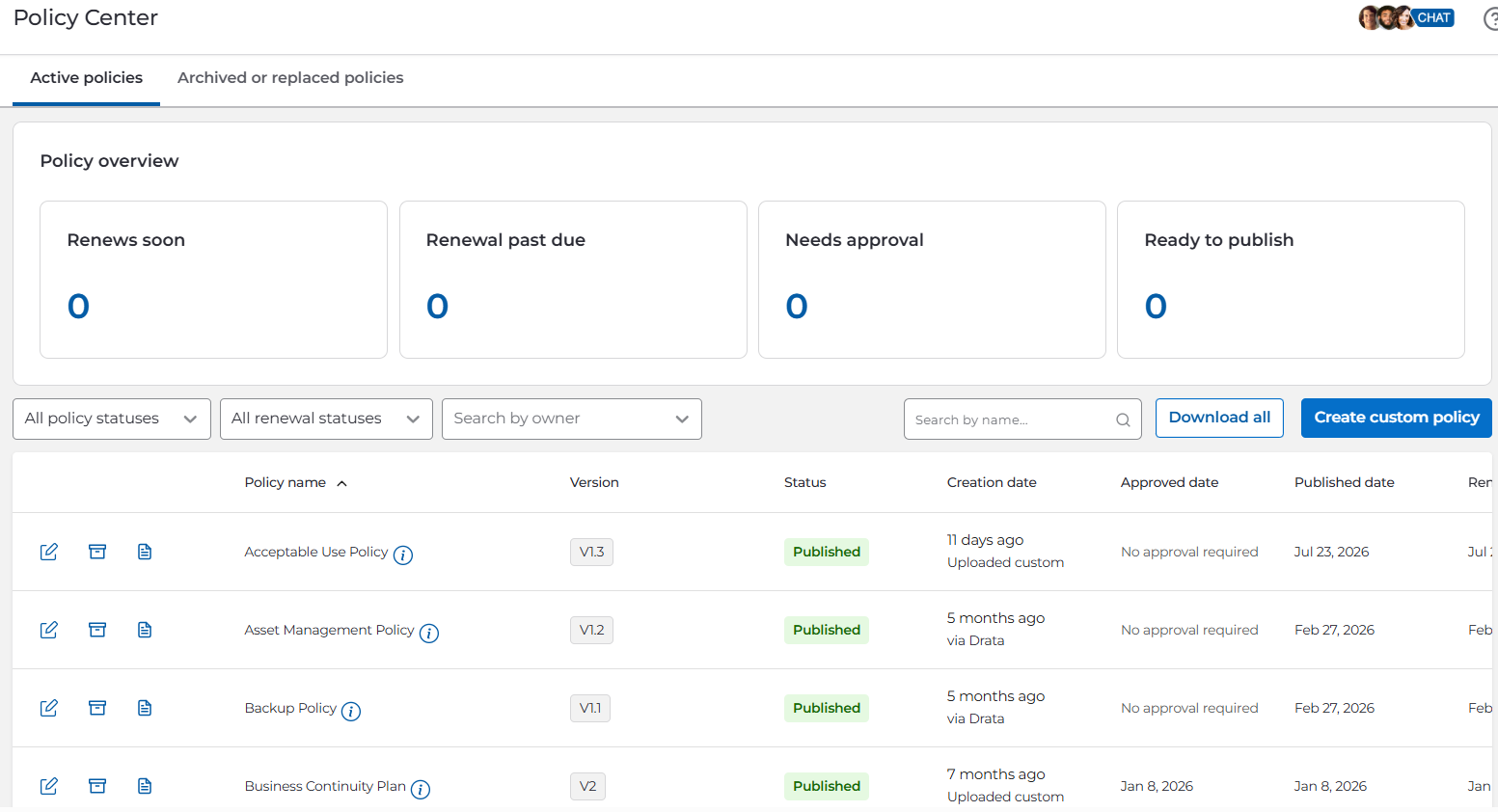
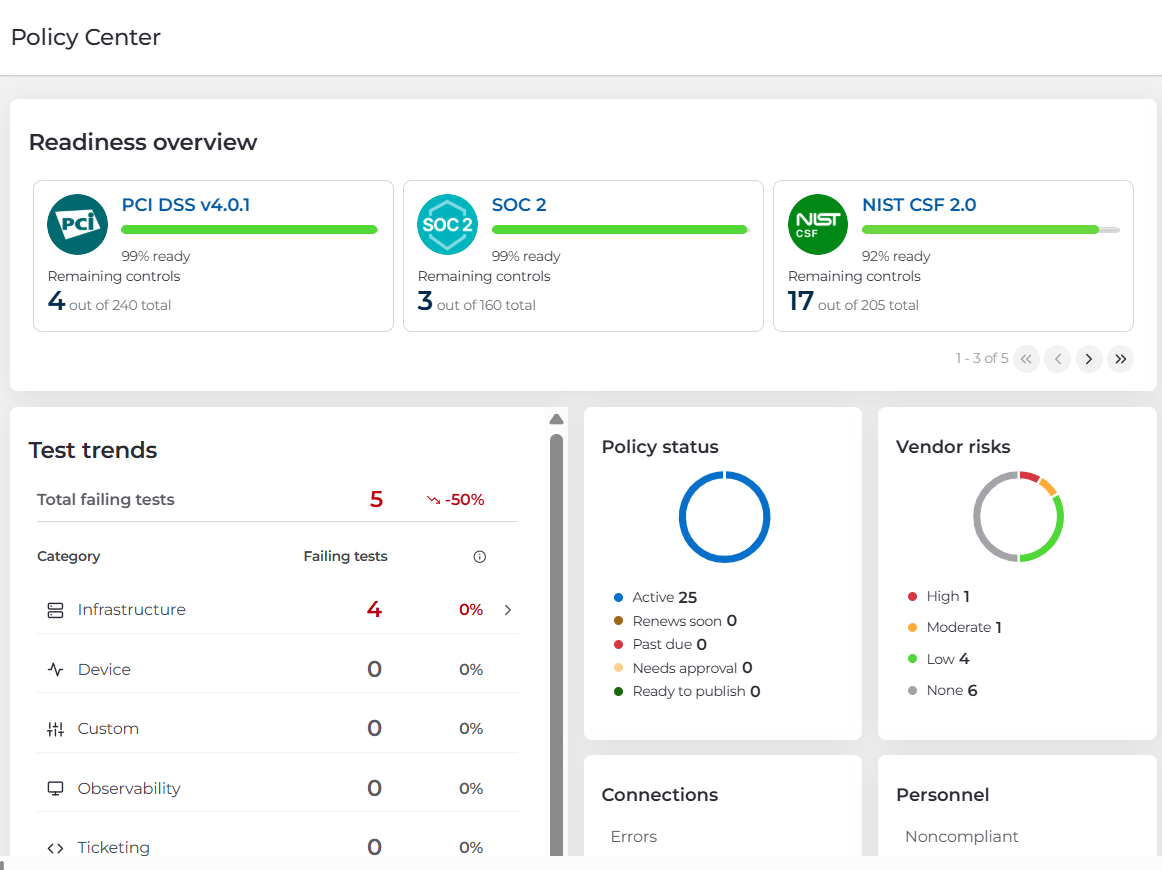
Overview of the Drata platform and compliance management dashboard.
Multi-Framework Control Mapping
Drata maintains a single control set mapped across every framework you activate. Pass an encryption control once, and it satisfies the corresponding requirements in SOC 2, ISO 27001, and HIPAA simultaneously. For multi-framework programs, this is the feature that pays for the platform. Adding ISO 27001 to an existing SOC 2 program typically starts you at 60 to 80 percent complete rather than zero.
The Drata Agent
The Drata Agent is a lightweight application installed on employee laptops. It checks device posture: screen lock, disk encryption, password manager, antivirus, OS updates. It reads configuration states, not files, browsing history, or keystrokes. Employees sometimes push back on installing it anyway, which is why we advise clients to communicate what it does and doesn’t see before rollout, not after the first complaint. Companies with an existing MDM like Jamf or Intune can often pull device evidence from that integration instead.
Risk Management, Vendor Risk, and the Trust Center
The built-in risk register lets you score risks by likelihood and impact and tie them to controls and remediation tasks. Vendor risk management got a genuine upgrade with the August 2025 agentic AI release, which now collects vendor evidence, reviews SOC 2 reports, and drafts risk summaries with far less manual chasing. The Trust Center, built on the acquired SafeBase product, gives you a public page where prospects can review your certifications and policies under NDA. Clients in active enterprise sales cycles tell us it measurably shortens security review, though note it’s a paid add-on at most tiers, not a bundled feature.
Policies, Training, and the Rest
Drata ships editable policy templates for every major framework, embedded security awareness training with completion tracking, and an API for anything the native integrations miss. The policy templates are a real accelerator for first-time programs, with one caveat we see constantly: teams accept templates wholesale without adapting them, then get flagged in audit when their actual practice doesn’t match their written policy. A template you don’t follow is worse than no template.
Supported Compliance Frameworks
Drata supports more than 30 frameworks. The ones that matter for most buyers: SOC 2 (Type I and Type II) against the AICPA Trust Services Criteria, ISO 27001, HIPAA (where Drata operationalizes safeguards, since no formal HIPAA certification exists), GDPR under the EU data protection rules, and PCI DSS. Coverage extends to CMMC, NIS2, DORA, FedRAMP, and various NIST standards. You can also build custom frameworks by mapping your own control set, useful for internal standards or customer-specific requirements.
What Users Really Say
Drata holds a 4.8 out of 5 on G2 across more than 1,100 reviews, the highest score among the major compliance platforms, with support quality rated 9.7 out of 10 and ease of use 9.1. Capterra reviews trend even higher at around 4.9, though from a smaller sample of roughly 90 reviews. Gartner Peer Insights sits at 4.7 across 160 or so reviews. Reddit, as always, is where the unfiltered version lives: threads in r/soc2 and r/cybersecurity praise the integration breadth and the guided workflows, then converge on one dominant complaint.
The Common Praise
Three themes repeat across every platform.
- Responsive, knowledgeable customer success teams.
- Major time savings versus spreadsheet-based compliance, with users describing months of manual evidence work eliminated.
- And the integration ecosystem, which keeps evidence flowing without human intervention once connections are stable.
The Common Complaints
The loudest one is renewal pricing. Users report year-two increases of 20 to 40 percent, driven by headcount tier crossings, added frameworks, and onboarding-incentive features that convert to paid add-ons. One widely shared account describes a jump from $7,500 to over $20,000 in year two after adding frameworks. Beyond pricing, reviewers mention occasional brittle connectors in complex environments, uneven customer success quality depending on which CSM you land, and a learning curve when mapping multiple frameworks on day one.
Insider Note: The renewal increase isn’t a bug in Drata’s pricing; it’s the model. Land at an attractive entry price, then expand as you grow. Every major platform in this category does it. The buyers who avoid the sticker shock are the ones who negotiate before signing: a multi-year price lock, explicit caps on headcount-driven increases, and framework additions priced in writing upfront. Drata’s sales team has real latitude here, and certified partners can typically negotiate 15 to 25 percent off list.
Let Axipro help you build a business continuity plan that's practical, compliant, and audit-ready.
Schedule Your Free Assessment Today
What Drata Costs
Drata doesn’t publish pricing, so here are the ranges we see in the market and in our own client engagements. Treat them as planning numbers, not quotes.
The number that surprises buyers isn’t the platform fee; it’s the total. A startup budgeting $10,000 for “compliance software” often ends up spending $25,000 to $35,000 in year one once the audit, an added framework, and one add-on land. Nobody’s sales deck presents it that way, so we will: budget for the total, not the platform fee.
Who Should Use Drata, and Who Should Not
Choose Drata if you’re a cloud-native company facing your first SOC 2 or ISO 27001 with an enterprise deal on the line, or a scaling business consolidating multiple frameworks into one program. It also fits regulated industries like health tech and fintech, where HIPAA or PCI DSS layers on top of SOC 2.
Look elsewhere if most of your infrastructure is on-premises or heavily customized, because you’ll pay automation prices for manual work. If you’re pre-revenue and every dollar matters, leaner competitors often undercut Drata meaningfully at the entry tier, a tradeoff we walk through in our Drata vs Vanta vs Thoropass comparison. And if you expect software alone to make you compliant, no platform will. Drata tracks controls; it can’t design your scope, own your risk decisions, or sit your audit for you.
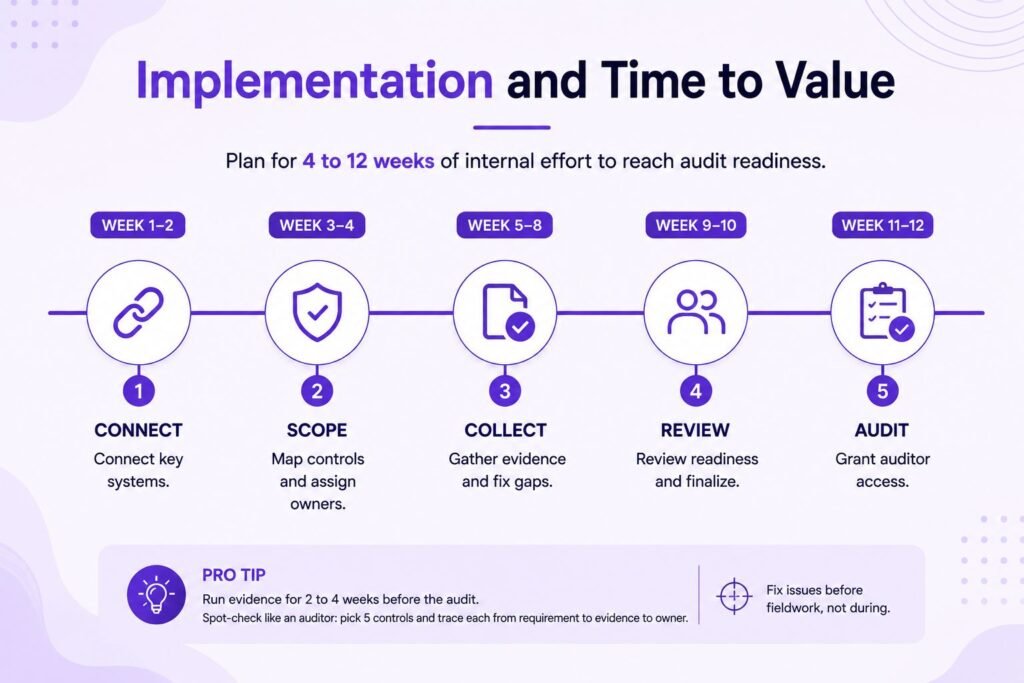
Implementation and Time to Value
Plan for 4 to 12 weeks of internal effort to reach audit readiness, longer with custom infrastructure. The integrations connect in days. What takes time is everything the platform can’t do for you: scoping decisions, policy adaptation, assigning control owners, and building evidence habits across the team.
Two failure patterns show up in our engagements often enough to name.
First, over-scoping: teams pull systems into the audit boundary that don’t need to be there, then spend months evidencing controls nobody required. Validating scope before configuration begins is the highest-leverage hour in the whole project.
Second, unowned controls: Drata can track a control, but it can’t assign accountability. If someone on your team can’t answer “who owns this control?” within five seconds, that control is an audit risk. We also see a consistent timing trap: many SOC 2 delays happen after auditors are invited, when weak evidence and misaligned controls surface during fieldwork. A structured readiness review before granting auditor access catches those issues while they’re still cheap to fix, which is a core part of Axipro’s Drata implementation services.
Pro Tip: Run your evidence for two to four weeks
Run your evidence for two to four weeks before scheduling the audit, and spot-check it the way an auditor would: pick five controls at random and trace each one from requirement to evidence to owner. If any link in that chain breaks, fix it before fieldwork, not during. Our full guide to running SOC 2 on Drata covers the readiness sequence step by step.
Final Verdict
Drata earns its position as one of the two default choices in compliance automation. The product is deep, the support is the best-rated in the category, and the automation genuinely removes months of manual evidence work for cloud-native teams. Its real costs are higher than the entry price suggests, its renewals reward buyers who negotiate hard upfront, and it delivers the least value to companies whose environments or expectations don’t match its automation model. Go in with a realistic total budget, a locked multi-year price, and clear internal ownership of your controls, and it’s a strong investment. Go in expecting the software to do the compliance for you, and you’ll join the minority of reviewers wondering where the money went.
Frequently Asked Questions
Is Drata worth the investment?
For cloud-native companies with real revenue at stake behind a certification, usually yes. The automation eliminates months of manual evidence work and the multi-framework mapping compounds in value as you add standards. It’s harder to justify for pre-revenue startups or on-prem-heavy environments where the automation coverage drops.
How long does it take to become audit-ready with Drata?
Most teams need 4 to 12 weeks of internal effort after connecting their systems. Fast-moving startups with clean cloud environments hit the low end; companies with custom infrastructure or unclear control ownership take longer. The platform connects in days, but scoping, policies, and evidence habits are human work.
Does Drata replace an auditor?
No. Drata prepares and organizes your evidence, but an independent CPA firm still performs your SOC 2 audit and an accredited certification body still audits ISO 27001. Audit fees run $10,000 to $50,000 on top of your Drata subscription.
Is the Drata Agent invasive for employees?
It reads device configuration states like disk encryption, screen lock, and OS version. It doesn’t access files, browsing history, or communications. Companies with an existing MDM can often use that integration instead of installing the Agent on every laptop.
Can Drata handle multiple frameworks simultaneously?
Yes, and this is one of its strongest features. A shared control set maps across every active framework, so evidence collected once satisfies overlapping requirements in SOC 2, ISO 27001, HIPAA, and others. Adding a second framework typically starts you at well past half complete.