Most teams walk into a SOC 2 audit expecting standard requirements for their password policy: minimum length, 90-day rotation, one uppercase letter, one symbol, and so on.
But there is no such checklist. The AICPA never published a list of mandatory password rules, and the federal guidance that most auditors lean on has thrown out half of what passed for best practice a decade ago.
Beyond compliance, this is remains a crucial cybersecurity control: Stolen and brute-forced credentials still drive a large share of breaches, and password policies are the main way to mitigate this risk.
This guide covers what SOC 2 expects around passwords, where those expectations come from, and how to build a policy that satisfies an auditor without making your security worse.
What Are SOC 2 Password Requirements?
SOC 2 password requirements are the access controls that a service organization implements to govern how passwords are created, stored, enforced, and retired, all in service of the Trust Services Criteria. The important word is controls, not rules. SOC 2 does not hand you a specification. It asks whether your controls are suitably designed and operating effectively to keep unauthorized people out of your systems.
The Role of Passwords in the SOC 2 Trust Services Criteria
The Trust Services Criteria, developed by the AICPA, are the evaluation standard for every SOC 2 report. Passwords sit inside the Security category, which is mandatory in all SOC 2 engagements, and specifically inside the Common Criteria series CC6, covering logical and physical access. Passwords are one of the most basic logical access controls you have, and one of the most scrutinized, because CC6 is usually the most evidence-intensive part of the entire audit.
Relevant Common Criteria: CC6.1, CC6.2, and CC6.3
- CC6.1 covers the controls that restrict logical access to systems, infrastructure, and data, this is where your password policy, MFA enforcement, and account lockout settings live.
- CC6.2 governs how access is granted, modified, and removed, meaning your provisioning workflows, access reviews, and offboarding processes are all evaluated here.
- CC6.3 focuses on the removal of access when it is no longer needed and the management of privileged credentials specifically.
Together, these three criteria map to the full lifecycle of a credential: creation, ongoing use, and retirement. An auditor working through CC6 will expect evidence at every stage.
Does SOC 2 Mandate Specific Password Rules?
No. The AICPA is explicit that the Trust Services Criteria do not define the controls an organization must have. You identify and implement controls that meet the criteria, and the auditor evaluates them. That means there is no AICPA-mandated minimum length, no required rotation interval, and no prescribed complexity formula. What the auditor checks is whether your stated controls exist, work, and reasonably prevent unauthorized access.
Insider note: Auditors rarely fail you for choosing a 10-character minimum over 12. They fail you when your written policy says one thing and your actual system configuration says another. Consistency between the policy document and the enforced setting matters far more than the specific number.
Why Password Requirements Matter for SOC 2 Compliance
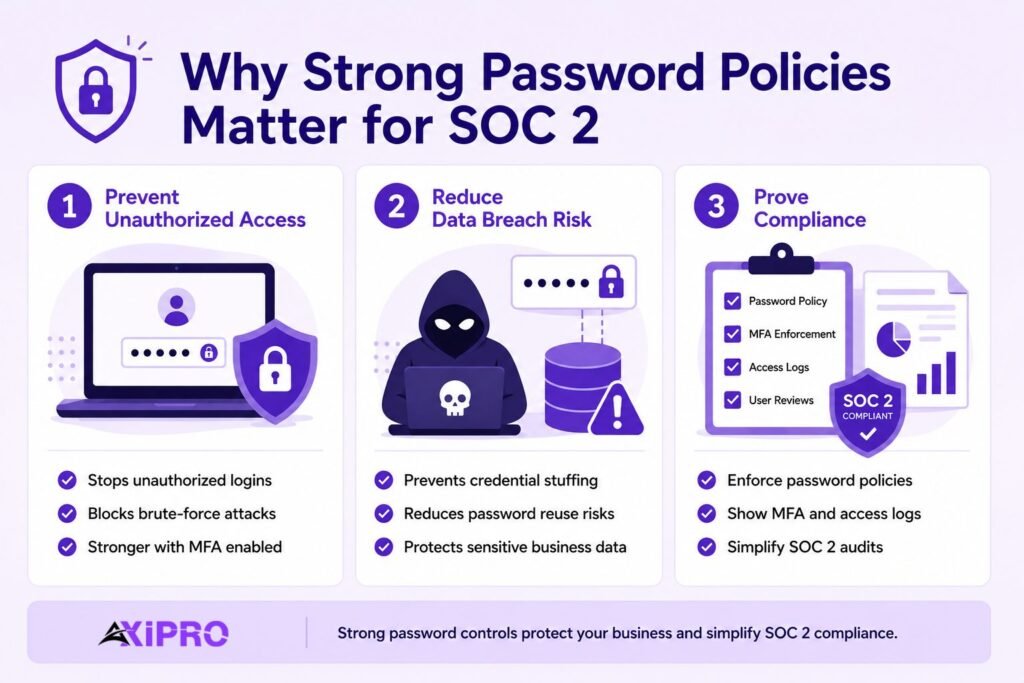
Preventing Unauthorized Access
Credentials are the front door. The 2025 Verizon DBIR found that stolen credentials remained the single most common initial access vector, appearing in 22% of breaches, and that brute force attacks against basic web applications nearly tripled year over year. Strong authentication controls are the difference between an attacker hitting a wall and an attacker walking straight in with a valid login.
Reducing Data Breach Risk
Weak or reused passwords feed credential stuffing, where attackers replay username and password pairs harvested from earlier breaches against your login pages. Reuse is rampant: research from Microsoft’s Digital Defense Report routinely finds that the majority of people reuse passwords across services. A single leaked password elsewhere becomes a working key to your environment unless your controls catch it.
Demonstrating Logical Access Controls to Auditors
SOC 2 is an attestation. It is not enough to be secure; you have to prove it with evidence. Well-designed password controls produce exactly the artifacts an auditor wants: configuration screenshots, enforcement logs, MFA reports, and access review records. Good controls and good evidence are two sides of the same coin, and an internal audit process that routinely collects this evidence makes the formal engagement significantly less stressful.
Core SOC 2 Password Requirements
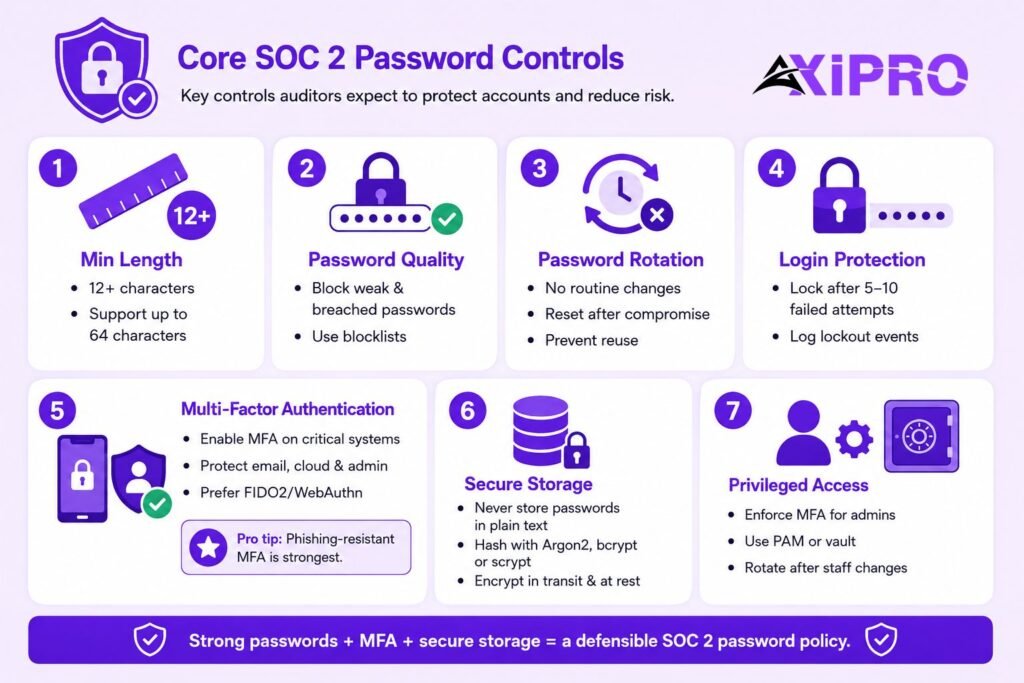
Although SOC 2 prescribes nothing specific, a defensible password policy almost always addresses the same set of controls. These are what auditors expect to see and what your peers in compliance treat as table stakes.
Minimum Password Length
Length is the strongest single lever for password entropy, and modern guidance favors it over everything else. A common defensible baseline is at least 12 characters for standard user accounts, with longer requirements for service and admin accounts. NIST SP 800-63B recommends that verifiers support passwords up to 64 characters so that passphrases and password-manager output are never truncated, an important implementation detail that many teams overlook.
Password Complexity and Blocklists
Old-style complexity rules, one uppercase, one symbol, one number, are fading, and for good reason. They push users toward predictable substitutions without meaningfully raising entropy. The more effective control is a blocklist: screening new passwords against dictionaries of common and previously breached credentials and rejecting matches. Tools like Have I Been Pwned’s Pwned Passwords API make this straightforward to implement. This stops Password1! from sneaking through even though it technically satisfies a legacy complexity rule.
Password Rotation and History
Forced periodic rotation is the control most teams keep out of habit, and it is also the one that modern guidance most clearly discourages. Rotation pushes users toward predictable patterns, Spring2025 becoming Summer2025, without improving security in any measurable way. Password history settings, which prevent the immediate reuse of recent passwords, still have a place, but blind calendar-based expiry should be replaced with event-driven resets: force a change when there is evidence of compromise, not because the calendar says 90 days have passed.
Account Lockout After Failed Login Attempts
An account lockout policy, or rate limiting that throttles repeated failures, is your primary defense against online brute force and password spraying. Lock or delay after a defined number of failed attempts, log every lockout event for evidence, and make sure the threshold is low enough to catch an attack without generating so much friction that helpdesk tickets pile up. A lockout after five to ten attempts is a reasonable starting point for most environments.
Multi-Factor Authentication (MFA)
MFA is the highest-impact control in this list. It blunts credential theft almost entirely, because a stolen password alone no longer grants access. Auditors increasingly treat MFA on critical and externally facing systems as effectively expected, even though SOC 2 does not name it as mandatory. Any organization that cannot demonstrate MFA coverage on email, the identity provider, cloud consoles, and privileged access should expect that gap to surface as a finding.
Pro Tip: Not all MFA is equal.
Not all MFA is equal. Phishing-resistant factors such as FIDO2 or WebAuthn security keys sit at the top tier. SMS and push-notification codes are far better than nothing but remain vulnerable to SIM swapping and push-bombing. Reserve the strongest factors for privileged accounts and anything internet-facing.
Secure Password Storage and Encryption
Passwords must never be stored in plain text. Store them as salted, one-way hashes using a slow, adaptive algorithm such as Argon2, bcrypt, or scrypt, as recommended by the OWASP Password Storage Cheat Sheet. Credentials in transit should be protected with encryption in transit using TLS, and vaulted secrets should be protected with encryption at rest. This is where password hashing stops a stolen database from becoming a usable credential dump, an attacker who exfiltrates properly hashed records gains very little.
Privileged and Admin Password Handling
Privileged accounts deserve stricter treatment under CC6.3. Apply least privilege, enforce MFA without exception, and manage shared or root credentials through a Privileged Access Management (PAM) tool or a secrets vault rather than a spreadsheet or shared document. Rotate privileged credentials on personnel change and after any suspected exposure. The risk associated with a compromised admin account is categorically different from that of a compromised standard user account, and your controls should reflect that.
How SOC 2 Password Requirements Align with NIST Guidelines
NIST SP 800-63B Recommendations
NIST SP 800-63B, the federal Digital Identity Guidelines, is the reference most auditors and security teams default to for password controls. Its fourth revision, finalized in the 2024–2025 window, sets a minimum length of 8 characters, recommends 15 or more when a password is the only authenticator, mandates screening against breached-credential lists, and tells verifiers to support long passphrases. Crucially, it also tells organizations to stop requiring arbitrary periodic rotation and to drop composition rules that don’t demonstrably improve security.
Where SOC 2 and NIST Overlap
SOC 2 does not require NIST compliance, and NIST is guidance rather than law. But the two fit together cleanly. SOC 2 asks whether your access controls are effective; NIST SP 800-63B describes what effective password controls look like in practice. Adopting SP 800-63B gives you a documented, authoritative rationale for every choice in your policy, which is exactly the kind of justification auditors respect. When a control choice is challenged during fieldwork, “we follow NIST SP 800-63B” is a much stronger answer than “we’ve always done it this way.”
Modern vs. Legacy Password Policy Approaches
The gap between legacy habits and current guidance is wide. Forced rotation every 90 days, mandatory complexity characters, and minimum-length requirements of 8 characters were all reasonable assumptions in an era before large-scale breached-credential databases existed. That era is over. The shift in thinking is fundamental: the old model tried to make passwords harder to guess by making them harder to remember, which backfired. The new model makes passwords harder to guess by making them longer and checking them against known compromised values.
Important: If your written SOC 2 password policy still mandates 90-day rotation and four-character-type complexity, you are not just out of date, you are out of step with the very guidance your auditor uses as a benchmark. Update the policy language before the audit, and document the risk-based reasoning behind each change.
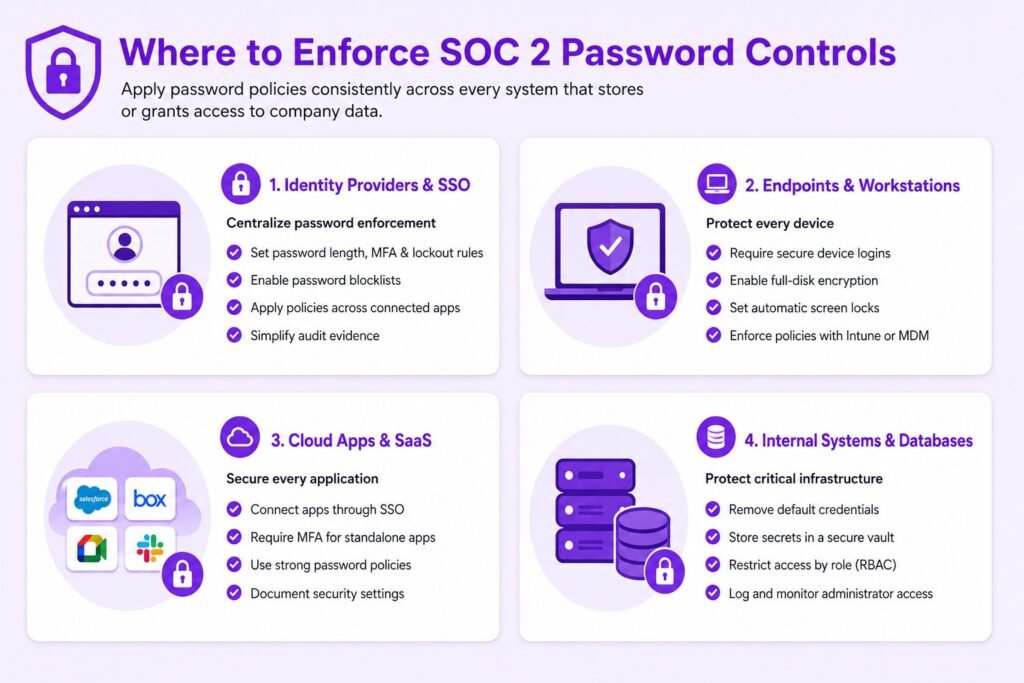
Where to Enforce SOC 2 Password Controls
A policy means nothing if it is enforced in one place and ignored in three others. Map your controls to every layer where credentials grant access.
Identity Providers and SSO Systems
Your identity provider and Single Sign-On (SSO) platform are the highest-leverage enforcement point. Configure length, blocklist screening, lockout, and MFA centrally here, and the policy propagates to every connected application automatically. This is also where your cleanest audit evidence lives, a single configuration screenshot from Okta, Google Workspace, or a comparable IdP can cover dozens of downstream systems at once.
Endpoints and Workstations
Laptops and workstations need their own login controls, disk encryption, and screen-lock timeouts. Endpoint security tooling and device management platforms like Microsoft Intune let you enforce and report on these settings across the entire fleet, turning what would otherwise be a manual sampling exercise into a reportable dataset for auditors.
Cloud Applications and SaaS Tools
Every SaaS tool that holds company or customer data is in scope. Wherever possible, route access through SSO so the central policy applies. For tools that cannot federate, enforce MFA and strong passwords directly, and keep a record of the configuration. Auditors will ask about the tools on the periphery, the ones that weren’t connected to SSO because “it wasn’t worth the effort”, and gaps there can widen into findings.
Internal Systems and Databases
Databases, servers, and internal admin panels are prime targets and often the weakest link, because they get provisioned with default credentials and forgotten. Replace defaults immediately, vault service-account secrets, and restrict access by role under CC6.3. A database sitting inside the network perimeter with a default admin password is not a theoretical risk, it is a breach waiting to be discovered.
Building a SOC 2-Compliant Password Policy
Required Elements of a Password Policy
A defensible policy covers minimum length, blocklist screening, lockout thresholds, MFA scope, storage and hashing standards, privileged-account handling, and the conditions that trigger a forced reset. State each control as an enforceable setting, not an aspiration. If you cannot point to where a line is technically enforced in your environment, it does not belong in the policy as a stated control, auditors will look for the evidence, and “we expect users to comply” is not sufficient.
Documenting the Policy
The policy must be a written, version-controlled document with a named owner and a review date. Auditors will ask when it was last reviewed and who approved the current version. Tie each control back to the relevant Common Criteria so the mapping is obvious during fieldwork, an access control policy that links cleanly to CC6.1, CC6.2, and CC6.3 saves hours of back-and-forth and signals to the auditor that your program is deliberately designed rather than assembled under deadline pressure.
Communicating the Policy to Employees
A policy nobody has read is a finding waiting to happen. Distribute it during onboarding, require acknowledgment, and reinforce it through periodic security awareness training. The acknowledgment records themselves become evidence under CC6.1. Training delivery records support the people-and-process side of the criteria and demonstrate that your controls extend beyond technical configuration into human behavior.
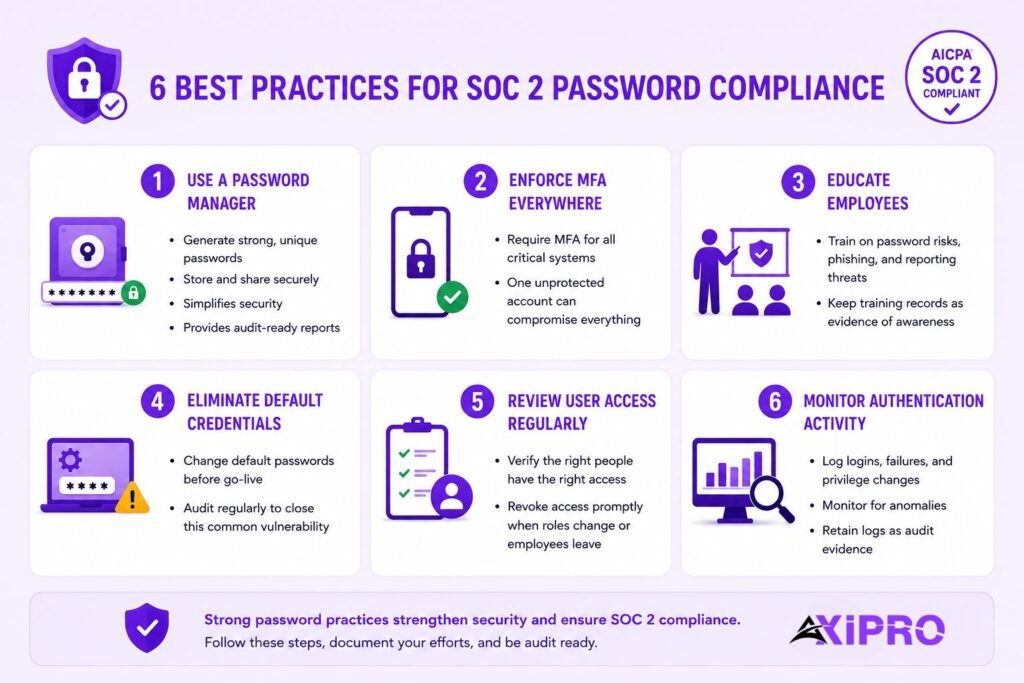
Best Practices to Meet and Exceed SOC 2 Password Requirements
Deploy a Password Manager
A password manager is the single most practical upgrade most organizations can make to their credential hygiene. It generates long, unique, random passwords for every account and removes the human incentive to reuse credentials. NIST guidance effectively assumes the use of one, which is why it requires support for 64-character passwords and paste functionality in login fields. Enterprise-grade options like 1Password Business also provide administrator reporting that doubles as audit evidence.
Enforce MFA Across All Critical Systems
Make MFA non-negotiable for email, the identity provider, cloud consoles, source code repositories, and any privileged access. The Snowflake-related breaches of 2024 were a stark reminder that a single account without MFA can compromise an entire environment, and that customers and auditors notice when the control was available and simply not enabled.
Train Employees on Credential Hygiene
Technical controls fail when people work around them. Teach staff why reuse is dangerous, how phishing harvests credentials, and why they should report a suspected compromise immediately rather than hoping the problem goes away. Document the training delivery and completion rates, these records serve as evidence that your organization treats security awareness as an operational discipline, not an annual checkbox.
Replace Default Credentials Immediately
Default and vendor-supplied passwords are among the most reliably exploited weaknesses in any environment. Build a step into every provisioning workflow that forces replacement before a system goes live, and audit periodically for systems that slipped through. The CISA Secure by Design guidance specifically calls out default credential elimination as a foundational expectation, it is not a sophisticated control, but failing to do it is an embarrassing finding.
Conduct Regular User Access Reviews
User access reviews under CC6.2 confirm that the right people still have the right access and that departed staff no longer have any. Pair them with clean offboarding procedures so credentials are revoked the day someone leaves, not the week after. Access reviews also surface orphaned service accounts and over-provisioned roles, the kinds of quiet risks that accumulate between audits and surface as findings when someone finally looks.
Monitor and Log Authentication Events
Log every login, failure, lockout, and privilege escalation, and review the logs for anomalies. Continuous monitoring supports a Zero Trust posture and gives you the authentication evidence auditors expect under CC6 and CC7. Without logs, you cannot prove that your controls worked during the audit period, and in a Type II engagement, the audit period can span twelve months.
Proving Password Policy Enforcement to Auditors
Evidence Auditors Look For
Auditor evidence for password controls typically includes identity-provider configuration screenshots showing length and lockout settings, MFA enrollment and enforcement reports, blocklist or breach-screening configuration documentation, password hashing and encryption in transit documentation, and dated access-review records. The stronger the alignment between your written policy and the enforced configuration, the smoother the audit. Discrepancies between the two are where findings are born.
Common Pitfalls That Cause Audit Findings
The recurring failures are predictable, which makes them avoidable. A policy that contradicts the live configuration. MFA enabled for most accounts but quietly missing for a handful of admins. Offboarding that lags by days while terminated accounts remain active. Configuration screenshots with no timestamps, making it impossible to confirm they reflect the audit period. Each of these is a finding that an internal audit review before fieldwork begins would catch and resolve.
Automating Evidence Collection
Manual screenshot-gathering is slow and error-prone, especially for SOC 2 Type II, which tests controls over an extended period rather than at a single point in time. Compliance automation tooling that pulls configuration and access data continuously turns evidence collection from a pre-audit scramble into a background process. It also catches drift between audits, the moment when controls quietly slip out of alignment with the documented policy, before that drift becomes a finding.
Conclusion
SOC 2 does not hand you a password rulebook, and that is the point. The framework judges whether your access controls actually keep attackers out and whether you can prove it. The strongest policies now lean on length, blocklist screening, MFA, and secure hashing, while dropping the forced rotation and rigid complexity rules that modern guidance has abandoned. Align your policy with NIST SP 800-63B, enforce it consistently across every system, keep clean evidence, and password controls become one of the more manageable parts of your SOC 2 report rather than one of the hardest.
FAQs About SOC 2 Password Requirements
What does the AICPA say about SOC 2 password requirements?
The AICPA does not define specific password controls. The Trust Services Criteria state that organizations must identify and implement their own controls to meet the criteria, and the auditor evaluates whether those controls are controls are suitably designed and operating effectively.
What is the minimum password length for SOC 2?
SOC 2 sets no fixed minimum. Most organizations adopt at least 12 characters, drawing on NIST SP 800-63B, which sets an 8-character floor and recommends 15 or more when a password is the only authenticator.
Does SOC 2 require password rotation?
No. SOC 2 does not require it, and current NIST guidance recommends against forced periodic rotation, advising password changes only when there is evidence of compromise.
Is MFA mandatory for SOC 2 compliance?
MFA is not explicitly mandated, but it is treated as effectively expected for critical and externally facing systems. Auditors view its absence on key systems as a meaningful weakness in logical access controls.
How should privileged passwords be managed for SOC 2?
Apply least privilege under CC6.3, enforce MFA, and manage shared and admin credentials through a Privileged Access Management tool or secrets vault. Rotate them on personnel change and after any suspected exposure.
Do contractors and vendors need to follow the same password policies?
Yes, where they access in-scope systems. The revised points of focus for CC6 explicitly call out contractor, vendor, and partner access, so anyone touching your environment should fall under equivalent controls.
How do password managers support SOC 2 compliance?
A password manager generates and stores long, unique passwords, which directly supports strong authentication under CC6.1 and reduces reuse-driven breach risk. It also makes enforcing length and uniqueness practical across dozens of accounts without placing an unreasonable burden on employees.
How do I prove password compliance during a SOC 2 audit?
Provide configuration evidence from your identity provider, MFA enforcement reports, blocklist and hashing documentation, and dated access-review records. Consistency between your written policy and the enforced settings is what auditors weigh most heavily, and an internal audit run before fieldwork begins is the most reliable way to confirm that consistency exists.