Table of Contents

Reach SOC 2 Compliance in 6 Weeks or Less.

  /

  / Vanta Agent Explained: Monitoring, Limitations & MDM Alternatives

Vanta Agent Explained: Monitoring, Limitations & MDM Alternatives

The Vanta agent checks four things on a laptop: whether the disk is encrypted, whether a password manager is installed, whether antivirus is running, and whether the screen locks on its own. That is the entire job. It is a lightweight background program that reports those signals back to Vanta so your compliance evidence stays current without anyone emailing screenshots to an auditor.

Most of the confusion around it comes from one of two directions: people expect it to manage their fleet like a full device-management platform, or they worry it reads far more than it does. Neither is true, and the gap between those two assumptions is where this guide lives.

What follows covers what the agent collects, what it deliberately ignores, how it talks to the Vanta platform, how it stacks up against a full MDM, and which compliance frameworks the evidence ends up supporting.
Vanta Agent Explained

What Is the Vanta Agent?

The Vanta agent is a small program installed on employee computers to continuously confirm that each device meets a short list of security requirements. If you have seen it referred to as the Vanta Device Monitor, that is the same product under an earlier name. The two terms are interchangeable.

Under the hood, it runs a hardened build of osquery, an open-source framework that exposes operating system state as a queryable SQL database. Vanta ships a modified version that strips out the tables it considers risky, which is why the agent can read a disk-encryption flag but cannot pull your browser history or SSH keys.

It is read-only by design. It inspects configuration and reports back; it never changes a setting on the machine. Vanta positions it primarily for smaller fleets, generally companies running fewer than about 75 devices, where standing up a full management platform would be overkill.

Reach SOC 2 Compliance in 6 Weeks or Less

Schedule Your Free SOC 2 Assessment Today

What Does the Vanta Agent Do?

The agent exists to turn a recurring manual chore — proving that every laptop is configured securely — into something that happens quietly in the background.

Continuous Device Monitoring

Once installed, the agent keeps tabs on the device’s security posture on an ongoing basis rather than at a single point in time. This matters because audits care about whether a control held throughout the period, not whether it happened to be true the morning someone took a screenshot. Continuous checks caught the laptop with encryption switched off last Tuesday.

Automated Compliance Checks

Each signal the agent gathers maps to a control your auditor wants evidence for. Instead of chasing employees for proof that their disk is encrypted, the check runs automatically, and the result flows into Vanta as evidence. The work that used to eat days of an onboarding cycle collapses into a background process.

Real-Time Security Posture Tracking

The findings appear in Vanta as pass or fail states against each requirement, so a security lead can see fleet-wide compliance at a glance. A device that drifts out of compliance surfaces quickly, which shortens the window between a problem appearing and someone noticing it.
What Information Does the Vanta Agent Collect?

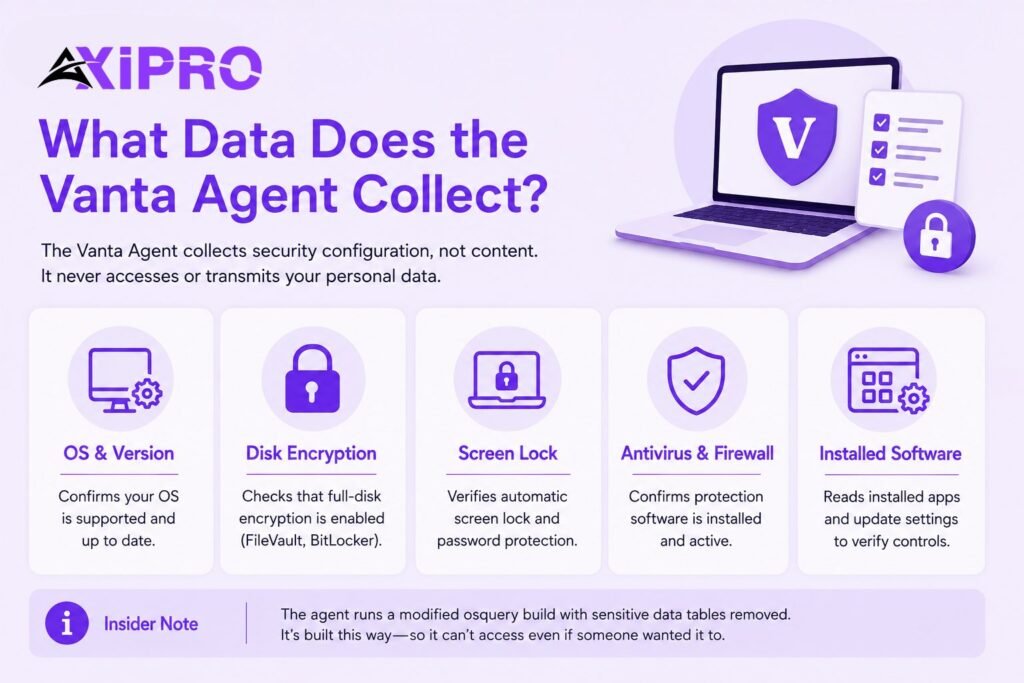
This is the question employees actually care about, and the honest answer is reassuring: the agent collects security configuration, not content. It does not transmit passwords, environment variables, SSH keys, emails, or browsing history. It reads whether protections are switched on, not what you are doing with the machine.

Insider Note: The reason the agent cannot snoop even if someone wanted it to is architectural, not a policy promise. Vanta deploys a modified osquery build that removes the tables capable of reading sensitive content. The dangerous queries are not blocked at the dashboard; they are absent from the binary. That distinction is worth raising directly when an employee pushes back on installation.

Operating System and Version Details

The agent records the OS and version so Vanta can confirm the device runs a supported, patchable platform. An end-of-life operating system is a control failure in its own right, and this is how it gets flagged.

Disk Encryption Status

It checks whether full-disk encryption is active — FileVault on macOS and BitLocker on Windows. This is the single most universally required device control across every major framework, which is also why it is the one Linux check the agent does support.

Screen Lock and Password Policies

The agent verifies that the screen locks automatically after a period of inactivity and that a password or equivalent is required to get back in. An unlocked laptop left on a train is a textbook breach, and this control is the cheapest defense against it.

Antivirus and Firewall Status

It confirms that antivirus or endpoint protection software is installed and running. The point is not to endorse a particular product but to prove that some recognized protection is active and has not been quietly disabled.

Installed Software and Auto-Update Settings

To detect the controls above, the agent reads the list of installed applications — for example, to confirm a password manager is present — along with update-related settings. It is reading the inventory to verify protections exist, not building a behavioral profile of the user.

Reach SOC 2 Compliance in 6 Weeks or Less

Schedule Your Free SOC 2 Assessment Today

How Does the Vanta Agent Work?

How the Agent Communicates with the Vanta Platform

After installation, the employee registers the device against your Vanta account, which links that machine to its owner. From then on the agent runs its checks locally and sends only the results — the pass or fail signals — up to Vanta over an encrypted connection. The raw system queries stay on the device. What travels is the verdict, not the underlying data.

How Often the Vanta Agent Runs Checks

The agent uses osquery’s scheduled-query model, meaning each check runs on a recurring interval in the background rather than continuously hammering the system. Results sync to Vanta periodically through the day, and the platform’s tests re-evaluate on a regular cadence so a freshly remediated device clears its failing check without anyone forcing a manual refresh. In practice, a fixed laptop usually shows green within hours, not at the next audit.
Install Vanta Agent

Getting Started with the Vanta Agent

Supported Operating Systems and Versions

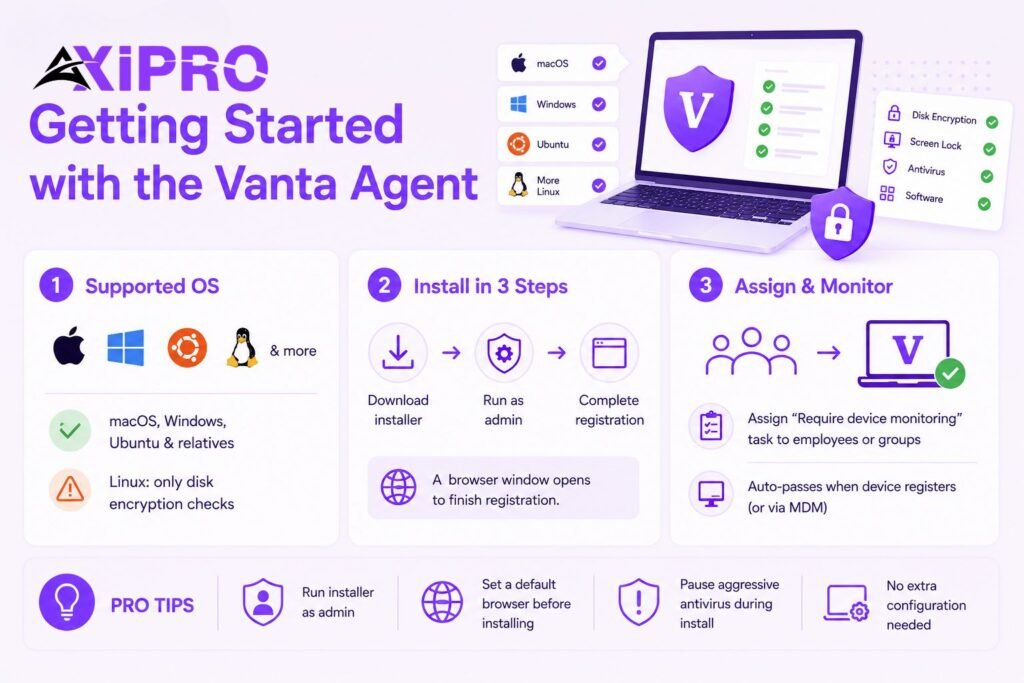
The agent supports current versions of macOS and Windows, plus several Linux distributions — primarily Ubuntu and close relatives — on the condition that the device exposes a stable, unique hardware identifier. There is one significant caveat on Linux: the agent can only check disk encryption there. Screen lock, antivirus, and password-manager detection are not available on Linux, so those controls will need manual evidence or MDM coverage on Linux machines.

How to Install the Vanta Agent

Installation is a per-device download. The employee logs into Vanta during onboarding, downloads the installer for their operating system, runs it with administrator rights, and completes a short browser-based registration that ties the device to their account. No additional configuration is needed; the agent arrives ready to work with your account.

Pro Tip: Two avoidable issues cause most failed installs. The installer needs administrator permissions, so run it as admin from the start. It also opens a browser window to finish registration, which means a machine with no default browser set will hang and time out. Set a default browser before you begin, and temporarily pause aggressive antivirus that may block the install.

Assigning Device Monitoring Tasks to Personnel

Rather than chasing installs individually, you assign a “Require device monitoring” task to the relevant employee group in Vanta. With the prompt option enabled, employees are walked through installing the agent themselves, and the task passes automatically once their computer registers. For teams using an MDM instead, you can assign the same requirement without prompting for the agent.

Reach SOC 2 Compliance in 6 Weeks or Less

Schedule Your Free SOC 2 Assessment Today

Vanta Agent vs. Mobile Device Management (MDM) Solutions

The agent and an MDM solve overlapping problems with very different scope. The agent is a compliance-evidence sensor. An MDM is a management platform that can also enforce and remediate. Understanding where that line sits will save you from reaching for the wrong tool.

The agent reads configuration and reports it; it cannot push a fix. An MDM can lock a device remotely, enforce a policy centrally, and wipe a machine that has gone missing. At the same time, an MDM typically requires more infrastructure, more administrative overhead, and meaningful per-seat cost. The agent, by contrast, is included in Vanta’s platform and takes minutes to deploy.

The practical dividing line is fleet size and risk appetite. For a team of twenty, the agent usually provides everything a SOC 2 auditor needs at the device level. For a team of two hundred spread across multiple office locations, the inability to remotely enforce or remediate becomes a genuine gap — and that is where a full MDM earns its keep.

When to Use the Vanta Agent

Reach for the agent when you are a smaller or earlier-stage company that needs solid compliance evidence without the cost and administrative weight of a management platform. It is also the right tool for filling coverage gaps — such as the Windows laptops your macOS-only MDM cannot see.

When to Use an MDM Integration Instead

As the fleet grows, the limits of a read-only sensor start to show. An MDM lets you enforce configuration rather than just observe it, push fixes centrally, and manage devices at a scale where chasing individual installs stops being realistic. Larger organizations and anyone needing remote lock or wipe should lean on an MDM as the system of record.

Using Both Together

These are not mutually exclusive. A common pattern is to run an MDM as the primary monitoring source and keep the agent as a secondary option for devices the MDM does not cover. If a computer reports through both, Vanta simply shows both sources. You get the enforcement of the MDM where it reaches and the agent’s coverage everywhere else.

Integrating the Vanta Agent with Your Existing Tools

MDM Integrations Supported by Vanta

Vanta connects with several widely used MDM platforms, including Jamf, Kandji, and JumpCloud, configured from the Integrations page in your dashboard. When an MDM is connected, devices it manages stay visible for monitoring without the agent installed, and unmonitored-device tracking adjusts accordingly. The choice between sources is yours to set per task.

Viewing and Managing Company Computers in Vanta

The Computers page is the single view of every device under monitoring, whether the data comes from the agent or an MDM. Each row shows a machine, its owner, and a column of check marks or X’s — one per security control. A green check means the control is met; an X means it is not. Clicking a user opens their fuller profile, including onboarding and access status alongside their device details.
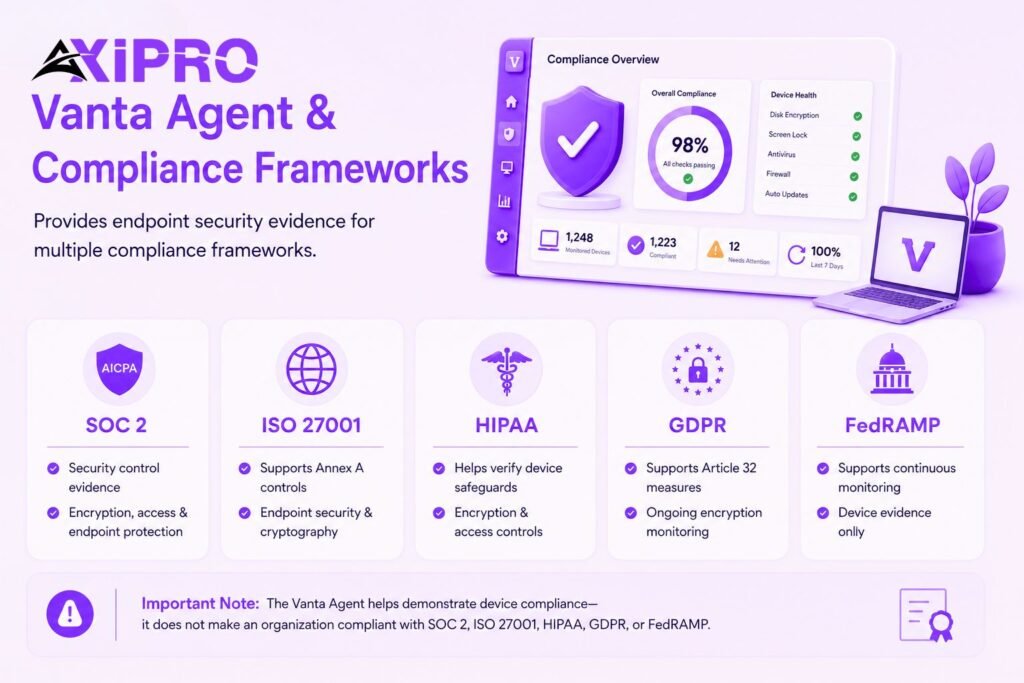
Vanta Compliance Frameworks

Which Compliance Frameworks Does the Vanta Agent Support?

A clarification first, because this is where expectations run ahead of reality. The agent does not “support a framework” the way a product supports a file format. It supplies one category of evidence — endpoint security configuration — that maps to specific controls inside many frameworks. The frameworks themselves are far broader, covering policies, access management, vendor risk, and much more that has nothing to do with a laptop.

SOC 2

SOC 2, defined by the AICPA, is built around five Trust Services Criteria, and the device controls the agent checks feed directly into the Security criterion. Encryption, access control, and endpoint protection evidence are routine asks in a SOC 2 audit, and the agent automates the device-level portion of that.

ISO 27001

ISO/IEC 27001 is the international standard for information security management systems. Its Annex A controls include explicit expectations around endpoint security and cryptography, and the agent’s encryption and protection checks line up with those control objectives.

HIPAA

For organizations handling protected health information, the HIPAA Security Rule, administered by the U.S. Department of Health and Human Services, requires safeguards for electronic PHI. Device encryption and access controls are core technical safeguards, and the agent provides ongoing evidence that they are in place.

GDPR

The General Data Protection Regulation requires appropriate technical measures to protect personal data, with encryption named explicitly as an example in Article 32. The agent’s monitoring helps demonstrate that devices touching EU personal data meet that bar on an ongoing basis.

FedRAMP

FedRAMP governs cloud services used by U.S. federal agencies and is the most demanding of the group by a wide margin. Worth flagging: in 2026 the program shifted its core terminology, now describing approved services as FedRAMP certified rather than authorized. The agent’s device evidence is a small input into a far larger continuous-monitoring obligation here — not anything close to the whole picture.

Important: Installing the agent and turning every check green does not make you compliant with any of these frameworks. The device controls are one slice of evidence among dozens. Treating a fully green Computers page as “we passed SOC 2” is the most common misread of what the agent actually buys you.

Reach SOC 2 Compliance in 6 Weeks or Less

Schedule Your Free SOC 2 Assessment Today

Conclusion

The agent is a focused tool that does one job well: it keeps your device-security evidence current and honest without manual effort. It reads configuration, never changes it, and reports only verdicts rather than content. For smaller fleets it can carry the device-monitoring load on its own; for larger ones it works best as a complement to an MDM. Match it to your fleet size and your framework’s real requirements, and it quietly removes one of the more tedious parts of staying audit-ready.

Frequently Asked Questions About the Vanta Agent

Is the Vanta Agent the Same as the Vanta Device Monitor?

Yes. They are two names for the same software. Older documentation and some installers refer to the Vanta Device Monitor, while the agent is the current name. There is no functional difference.

No. It does not transmit passwords, emails, browsing history, environment variables, or SSH keys. It reads security-configuration flags — such as whether encryption is on — and reports the results. The sensitive osquery tables are removed from the build entirely.

Yes, and this is a useful point to share with skeptical staff. Because the agent runs osquery, a technically inclined employee can inspect the exact set of queries it executes on their machine using the agent’s command-line tools. Nothing about what it checks is hidden.

The device shows an X against the failing control on the Computers page, and the corresponding Vanta test flags as failing. Remediation is usually straightforward — for example, switching encryption back on — and once the agent’s next check picks up the fix, the status clears on its own.

Partially. The agent runs on several Linux distributions, mainly Ubuntu and close variants, but it can only check disk encryption there. Screen lock, antivirus, and password-manager detection are not supported on Linux, so those controls need manual evidence or an MDM for Linux devices.

The agent includes a built-in diagnostic tool — run via its command-line interface as vanta-cli doctor — which checks for common problems and reports what it finds. On Windows you run it from an administrator command prompt. The device also appearing on your Computers page is the simplest confirmation that it is reporting.

It can be pushed to many machines, including through MDM-delivered install scripts, but Vanta recommends it mainly for fleets under roughly 75 devices. Beyond that size, a dedicated MDM is the better backbone, with the agent filling gaps the MDM cannot reach. Scale is exactly the line where most teams graduate from the agent to an MDM-first setup.

Axipro Author

Picture of Pedro Dias

Pedro Dias

Pedro has been writing online for over 10 years. With experience in all things programming, cyber security, and compliance, he is our editor-in-chief at Axipro.

Blog Highlights

Explore More Articles

The Vanta agent checks four things on a laptop: whether the disk is encrypted, whether a password manager is installed, whether antivirus is running, and whether the screen locks on its own. That is the entire job. It is a lightweight background program that reports those signals back to Vanta so your compliance evidence stays current without anyone emailing screenshots to an auditor. Most of the confusion around it comes from one of two directions: people expect it to manage their fleet like a full device-management platform, or they worry it reads far more than it does. Neither is true, and the gap between those two assumptions is where this guide lives. What follows covers what the agent collects, what it deliberately ignores, how it talks to the Vanta platform, how it stacks up against a full MDM, and which compliance frameworks the evidence ends up supporting. What Is the Vanta Agent? The Vanta agent is a small program installed on employee computers to continuously confirm that each device meets a short list of security requirements. If you have seen it referred to as the Vanta Device Monitor, that is the same product under an earlier name. The two terms are interchangeable. Under the hood, it runs a hardened build of osquery, an open-source framework that exposes operating system state as a queryable SQL database. Vanta ships a modified version that strips out the tables it considers risky, which is why the agent can read a disk-encryption flag but cannot pull your browser history or SSH keys. It is read-only by design. It inspects configuration and reports back; it never changes a setting on the machine. Vanta positions it primarily for smaller fleets, generally companies running fewer than about 75 devices, where standing up a full management platform would be overkill. What Does the Vanta Agent Do? The agent exists to turn a recurring manual chore — proving that every laptop is configured securely — into something that happens quietly in the background. Continuous Device Monitoring Once installed, the agent keeps tabs on the device’s security posture on an ongoing basis rather than at a single point in time. This matters because audits care about whether a control held throughout the period, not whether it happened to be true the morning someone took a screenshot. Continuous checks caught the laptop with encryption switched off last Tuesday. Automated Compliance Checks Each signal the agent gathers maps to a control your auditor wants evidence for. Instead of chasing employees for proof that their disk is encrypted, the check runs automatically, and the result flows into Vanta as evidence. The work that used to eat days of an onboarding cycle collapses into a background process. Real-Time Security Posture Tracking The findings appear in Vanta as pass or fail states against each requirement, so a security lead can see fleet-wide compliance at a glance. A device that drifts out of compliance surfaces quickly, which shortens the window between a problem appearing and someone noticing it. What Information Does the Vanta Agent Collect? This is the question employees actually care about, and the honest answer is reassuring: the agent collects security configuration, not content. It does not transmit passwords, environment variables, SSH keys, emails, or browsing history. It reads whether protections are switched on, not what you are doing with the machine. Insider Note: The reason the agent cannot snoop even if someone wanted it to is architectural, not a policy promise. Vanta deploys a modified osquery build that removes the tables capable of reading sensitive content. The dangerous queries are not blocked at the dashboard; they are absent from the binary. That distinction is worth raising directly when an employee pushes back on installation. Operating System and Version Details The agent records the OS and version so Vanta can confirm the device runs a supported, patchable platform. An end-of-life operating system is a control failure in its own right, and this is how it gets flagged. Disk Encryption Status It checks whether full-disk encryption is active — FileVault on macOS and BitLocker on Windows. This is the single most universally required device control across every major framework, which is also why it is the one Linux check the agent does support. Screen Lock and Password Policies The agent verifies that the screen locks automatically after a period of inactivity and that a password or equivalent is required to get back in. An unlocked laptop left on a train is a textbook breach, and this control is the cheapest defense against it. Antivirus and Firewall Status It confirms that antivirus or endpoint protection software is installed and running. The point is not to endorse a particular product but to prove that some recognized protection is active and has not been quietly disabled. Installed Software and Auto-Update Settings To detect the controls above, the agent reads the list of installed applications — for example, to confirm a password manager is present — along with update-related settings. It is reading the inventory to verify protections exist, not building a behavioral profile of the user. How Does the Vanta Agent Work? How the Agent Communicates with the Vanta Platform After installation, the employee registers the device against your Vanta account, which links that machine to its owner. From then on the agent runs its checks locally and sends only the results — the pass or fail signals — up to Vanta over an encrypted connection. The raw system queries stay on the device. What travels is the verdict, not the underlying data. How Often the Vanta Agent Runs Checks The agent uses osquery’s scheduled-query model, meaning each check runs on a recurring interval in the background rather than continuously hammering the system. Results sync to Vanta periodically through the day, and the platform’s tests re-evaluate on a regular cadence so a freshly remediated device clears its failing check without anyone forcing a manual refresh. In practice, a fixed laptop usually shows green within hours, not at the

Roughly 60% of data breaches still trace back to a person rather than a system, according to Verizon’s 2025 Data Breach Investigations Report. Earlier editions of the same report put the figure as high as 74%. That single statistic is why every framework Drata supports — from SOC 2 to HIPAA — treats Drata security awareness training as a required control rather than a nice-to-have. Drata gives you three ways to run that training: automatic tracking across your personnel and recurring resets that keep evidence current for auditors. This guide covers how each piece works, how to configure it, and the quiet mistakes that break compliance. What Is Security Awareness Training in Drata? Security awareness training in Drata is the annual cybersecurity education your workforce completes to satisfy personnel-related controls across frameworks. The control language is consistent across audits: security awareness training is provided to all employees on an annual basis. Drata’s job is to deliver or track that training, then hold the completion evidence in one place so you can show an auditor that every current employee and contractor met the requirement for the current cycle. The discipline itself is well established. The broad concept of security awareness maps to the Protect function (PR.AT) of the NIST Cybersecurity Framework, which treats workforce education as a foundational layer of organizational defense. Inside Drata, training settings live on the Internal Security page, and completion surfaces on the Personnel page and in each person’s My Drata onboarding. Training Methods Available in Drata Drata supports three approaches, and you choose one on the Internal Security page. They differ mainly in who delivers the content and who supplies the completion evidence. Drata Embedded Security Awareness Training (Default) Drata built its own training course that personnel complete directly inside the platform. During onboarding, the employee opens the Complete Security Awareness Training task, clicks Begin Training, and works through the module. On completion, the task flips to completed automatically, and the Personnel page reflects it. No file uploads, no chasing screenshots. This is the simplest route to compliance and the default for most accounts. Connected Training Provider If you already run a training platform, you can connect it so completion data flows into Drata automatically. Drata integrates with providers including KnowBe4, Huntress, and Curricula. Once connected, Drata recognizes that provider as your default training source and pulls completion status for the campaigns you select. For each person, Drata combines campaign selection, enrollment, and completion status to decide whether they are compliant. Insider Note: Drata only syncs training for individuals who are not yet compliant. Once someone is marked compliant, Drata stops pulling their status from the connected provider, so a later change in that tool won’t accidentally overwrite a green check. The practical consequence: if you need to re-run someone, reset them in Drata first, then let the sync pick them back up. External Training (Evidence Upload) The third option covers training done entirely outside Drata. Here, evidence is uploaded manually — either by the employee through My Drata, or by an admin on their behalf, depending on configuration. Compliance is determined by the presence of valid evidence — a certificate, screenshot, or other file — for each current person. How to Configure Security Awareness Training in Drata Where to Find Security Awareness Training Settings All training configuration lives in one place. Select your account from the bottom-left navigation, open Settings, then Internal Security. Only account administrators can access this section. The Security Awareness Training section is where you choose your method. If HIPAA or an AI-related framework is enabled on your account, additional training sections appear below it. Setting Up Security Awareness Training for All Personnel Under the Security Awareness Training section, select the radio button for your chosen method — embedded, a connected provider, or external upload — then save. That setting applies to all personnel going forward, and new hires see the corresponding task in their onboarding automatically. Assigning Training to Individual Personnel Most configuration is account-wide, but you manage individuals from the Personnel page. Select a person to open their detail drawer, where you can view their training status and, for the external method, view or upload evidence on their behalf. This is also where you handle one-off resets, covered further below. HIPAA Training in Drata (If Enabled) What Is Annual HIPAA Training in Drata? The HIPAA Security Rule requires covered entities to implement a security awareness and training program for their entire workforce — a standard codified at 45 CFR 164.308(a)(5). If you have purchased the HIPAA framework in Drata, a dedicated HIPAA Training section appears on the Internal Security page so you can track this separately from general security awareness. Personnel complete it annually to address the associated control. How to Configure HIPAA Training With HIPAA enabled, the HIPAA Training section offers four options: Drata’s embedded HIPAA training, a connected provider, external training with manual evidence upload by an admin or information security lead, or opting out if HIPAA training is not required for your personnel. Select one and save. If you opt out, Drata removes all references to HIPAA training from the interface. Compliance is based on valid evidence existing for each current employee or contractor.   AI Awareness Training in Drata What Is AI Awareness Training? AI awareness training covers responsible and secure use of AI tools, and it maps to newer governance frameworks. Personnel should complete it annually to satisfy requirements in frameworks such as the NIST AI Risk Management Framework and ISO 42001. The setting only appears on your Internal Security page when a related framework is enabled on your account. How to Configure AI Awareness Training The AI Awareness Training section offers four options that mirror the others: Drata’s embedded AI training, a connected provider, external training with manual upload, or a URL that links personnel straight to an external course from My Drata. With the embedded option, Drata generates a certificate of completion as a PDF and uploads it automatically, viewable from the

The identity and access management market will pass $25 billion in 2026, and it is crowded with vendors that all make the same promise: the right people get the right access to the right resources at the right time. The hard part of any IAM solutions comparison is not finding capable products. It is that the leading platforms were each built to solve a different problem first, then expanded outward. Okta started with access. SailPoint started with governance. CyberArk started with privilege. Choose by brand reputation alone, and you risk buying a governance tool to solve an access problem, or paying enterprise prices for capabilities a mid-market team will never switch on. This guide compares the major providers by what they are actually good at, then walks through how to match one to your environment. What Is an IAM Solution? An IAM solution is the set of technologies that manages digital identities and controls what each identity can access. NIST frames the goal simply: ensure the right people and things have the right access to the right resources at the right time. In practice, that breaks into a few core functions: authenticating users (proving they are who they claim), authorizing them (deciding what they may do), and administering the account lifecycle as people join, move, and leave. The category splits into recognizable disciplines. Access management (AM) handles authentication and single sign-on. Identity governance and administration (IGA) handles who should have access and proves it to auditors. Privileged access management (PAM) protects the high-value accounts that can change infrastructure or read sensitive data. Most vendors now sell across these lines, but few are equally strong in all of them. That gap is the whole reason a comparison is worth doing. Why Comparing IAM Solutions Matters in 2026 Identity is now the primary attack surface. Stolen credentials and phishing remain among the top routes attackers use to get inside, which is why identity spending keeps climbing even when other security budgets flatten. The IAM market reached roughly $22 billion in 2025 and is on track for about $25 billion in 2026, growing near 15 percent a year, according to Fortune Business Insights. Two shifts make the comparison harder than it was a few years ago. First, the workforce went hybrid and cloud-first, so identity has to span on-prem systems, SaaS, and multi-cloud at once. Second, machine identities exploded. Your choice of platform now locks in how well you can govern not just employees but the service accounts, tokens, and AI agents multiplying across your environment. Gartner has reported that roughly 48 percent of organizations still lack a written IAM strategy — a serious problem, because a comparison is worth little if it is not anchored to documented requirements. Vendor demos are designed to make every product look like the obvious answer. Key Criteria for Comparing IAM Solutions A useful comparison rests on a consistent scorecard rather than the feature checklists vendors supply. The criteria below are the ones that tend to decide satisfaction two years after purchase. Core Identity and Access Capabilities Start with the fundamentals: single sign-on, multi-factor authentication, lifecycle provisioning and deprovisioning, and access certification. The differentiator in 2026 is adaptive, risk-based authentication that weighs device, location, and behavior before granting access, alongside phishing-resistant methods such as passkeys. A tool that only does password-plus-OTP is already behind. Deployment Options: Cloud-Native, Hybrid, and On-Premises Deployment model shapes cost, speed, and control. Cloud-native SaaS platforms deploy fastest and shift maintenance to the vendor. On-prem suits organizations with strict data-residency rules or deep legacy systems. Hybrid is the common reality, and the question to ask is how gracefully a platform bridges old and new — not whether it claims to. Integration Capabilities with Existing Infrastructure An IAM platform is only as good as its connectors. Look for prebuilt integrations with your core systems, directory services, HR platforms, and major SaaS apps, plus open standards support: SAML, OIDC, SCIM, and increasingly standards for continuous authorization. A thin connector catalog means custom engineering, which is where budgets quietly disappear. Scalability for Enterprise vs. Mid-Market Organizations Scale is not only user count. It is the number of applications, directories, and identity types a platform can govern without performance or administrative strain. Enterprise suites assume a dedicated identity team. Mid-market tools assume a stretched IT generalist. Buying the wrong tier means either paying for unused complexity or hitting a ceiling within two years. Pricing Models and Total Cost of Ownership Headline per-user pricing rarely reflects real cost. Implementation, professional services, connector licensing, premium support, and the internal staff time to run the platform often exceed the subscription itself. Compliance and Audit Support For regulated industries, audit support is a core feature, not a bonus. Strong platforms run access certification campaigns, segregation-of-duties checks, and audit-ready reports aligned with frameworks such as SOX, HIPAA, ISO 27001, and PCI DSS. The NIST Digital Identity Guidelines (SP 800-63, revised in 2025) are a useful reference for the assurance levels your authentication should meet. Vendor Support, Stability, and Roadmap You are buying a multi-year relationship. Financial stability, support quality, and a credible roadmap matter as much as today’s feature set, especially as the market consolidates and converges. A vendor that gets acquired or pivots can leave you maintaining a product on a slow decline. Pro Tip: Comparing Quotes When you compare quotes, normalize them to a three-year total cost of ownership that includes implementation and at least one major version upgrade. Vendors that look cheap per seat sometimes carry the heaviest services bill, and the gap usually shows up in year one, not at signing. IAM Solutions Compared: The Leading Providers The vendors below dominate enterprise shortlists. Each entry notes the problem the platform solves best — which is the most reliable way to read past the marketing. Okta Workforce Identity Cloud Okta is the largest independent identity vendor and was named a Leader in the 2025 Gartner Magic Quadrant for Access Management for the ninth straight year. Its strength is breadth of