OWASP published the 2026 edition of its Top 10 for LLM Applications on August 4, 2026, during Black Hat week, and eight of the ten entries changed position. One got renamed. The message behind the reshuffle is blunt: you won’t build a model that can’t be fooled, so build the application around it in a way that limits the damage when it is. That one idea explains almost every move in the new ranking, and it should change how your team thinks about shipping AI features.
This guide walks through the 2026 list in plain English: what each risk means, a real-world example, and what your team can actually do about it, with or without a dedicated security function.
What Is the OWASP GenAI LLM Top 10 2026?
The OWASP Top 10 for LLM Applications is a community-built awareness document that ranks the ten most critical security risks in applications powered by large language models. The OWASP GenAI Security Project, a global open-source initiative under the OWASP Foundation, maintains it, and the 2026 edition is the third release since the list first appeared in 2023.
OWASP, the Open Worldwide Application Security Project, has published risk lists for web applications since 2003, and those lists became the shared vocabulary security teams, auditors, and buyers use to talk about risk. The GenAI LLM Top 10 does the same job for AI. Whether you’re a two-person startup wiring an API into a chatbot or an enterprise running retrieval pipelines, it gives you a common map of what actually goes wrong.
One scoping note matters before anything else. The 2026 edition covers the model as a component inside an application: something that accepts input, generates output, and maybe retrieves information. The moment the model becomes an actor, with tools it can call and consequences it sets in motion, the risk shifts to the companion OWASP Top 10 for Agentic Applications from December 2025. Most products now do both, so most teams need both lists.
Let Axipro help you build a business continuity plan that's practical, compliant, and audit-ready.
Schedule Your Free Assessment Today
Why the 2026 Update Matters for AI Builders
Two things separate this edition from everything OWASP has published on AI so far.
First, the methodology changed. Every previous version rested purely on expert consensus, meaning hundreds of practitioners voting on which risks matter most. This time the vote carried 75% of the weight, and the remaining 25% came from analysis of 6,639 real-world AI security incidents pulled from public vulnerability databases and an AI-harm database. It’s the first edition grounded in evidence of what has actually gone wrong rather than expert prediction of what might.
Second, the framing changed. The project leads open the 2026 release by telling teams to stop optimizing the model and start optimizing the containment. The industry has spent two years pouring effort into filters, guardrail models, and jailbreak resistance. The 2026 list says: assume those will eventually fail, and make sure that when they do, nothing important breaks. AI security becomes blast radius control rather than perfect prevention.
And this isn’t just a security engineer’s document. Developers decide what tools and permissions a model gets. Product owners decide which workflows run without a human in the loop. Founders and ops leads are the ones answering the security questionnaires where these questions now show up. The 2026 edition also ships a mapping appendix that connects every risk to frameworks your customers and auditors already recognize: NIST’s AI Risk Management Framework, MITRE ATLAS, MITRE CWE, and the Agentic Top 10.
Insider Note: Enterprise vendor assessments have started asking about the OWASP LLM Top 10 by name. In security questionnaires we complete for clients at Axipro, questions like “describe your controls against prompt injection and excessive agency” began appearing in early 2026, sometimes before the buyer’s own team could explain what they meant. Being able to answer with a mapped control set is becoming a deal-cycle advantage, not just a security exercise.
How the 2026 List Differs From Previous Versions
The top two entries held their positions. Everything below them moved.
Key Shifts Since the 2025 Update
- Excessive Agency jumped from sixth to third, the biggest promotion on the list. In 2025, giving a model tools and autonomy was mostly a theoretical worry. By 2026, agentic deployments had produced real production incidents, and the community concluded that agency is what decides whether a successful prompt injection is an inconvenience or a breach.
- Unbounded Consumption rose four places, from tenth to sixth. Inference costs became a real budget line as reasoning models, long outputs, and agent loops multiplied the compute behind a single request. “Denial of Wallet,” where an attacker spends pennies to trigger spend you can’t afford, is now a mainstream finding.
- Improper Output Handling fell from fifth to tenth. The risk didn’t shrink. It fell because it’s well understood and directly fixable with encoding and validation practices web developers already have. The entries above it are neither.
What’s New, Renamed, or Reprioritized
- System Prompt Leakage became Hidden Context Exposure, and the scope widened a lot. The 2025 entry worried about attackers extracting your system prompt. The 2026 entry covers everything assembled into the model’s context that users aren’t meant to see: system instructions, retrieved policy documents, tool schemas, workflow rules. The guidance is unusually honest for a security document: assume all of it is discoverable, and design so that disclosure costs you nothing.
- Data and Model Poisoning absorbed fine-tuning subversion. The attack surface for corrupting a model’s behavior runs from pretraining data through fine-tuning pipelines into the retrieval stores RAG systems depend on, and the entry now says so.
- Misinformation climbed on evidence, not opinion. Practitioners voted it low; the incident data ranked it high. As reported in Help Net Security’s coverage of the release, OWASP also describes a “defense effect” working in the opposite direction on prompt injection: teams block it so effectively that few successful attacks reach public databases, which makes the risk look smaller than the money spent containing it.
Signals About Where AI Security Is Heading
Read together, the moves point one direction: away from the chat box and toward consequences. The risks that climbed involve what the model can do and what its output sets in motion downstream. The risks that fell are the ones with known fixes. AI security in 2026 is less about clever prompts and more about architecture, permissions, and the boring discipline of trust boundaries. Good news for teams without AI specialists, because that’s security engineering you can already reason about.
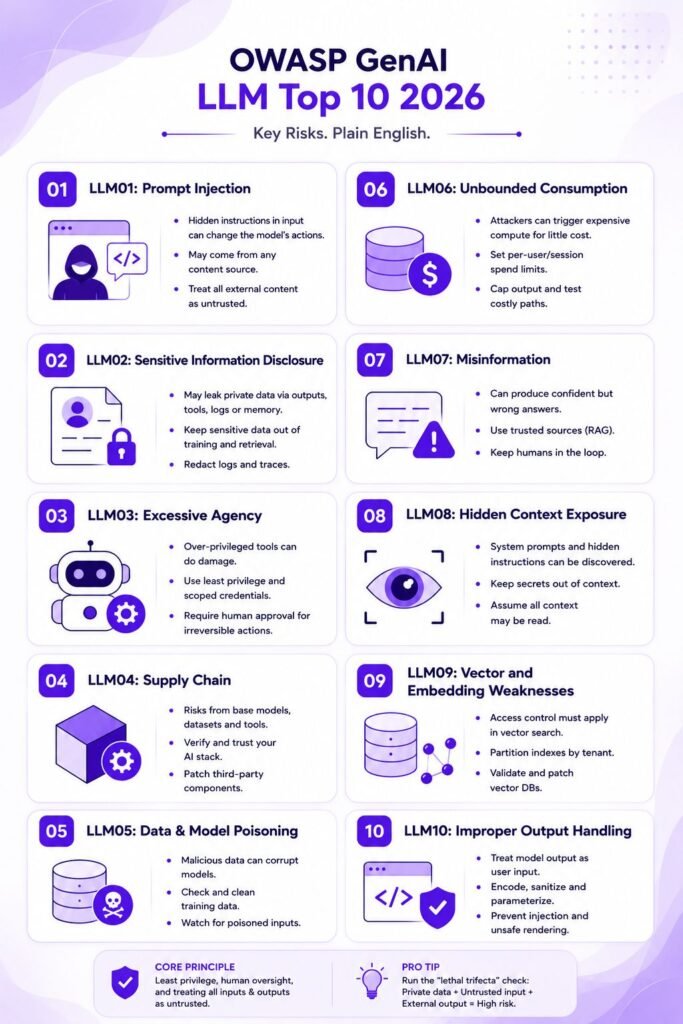
The OWASP GenAI LLM Top 10 2026 Explained in Plain English
LLM01: Prompt Injection
What It Means in Everyday Terms
An LLM can’t reliably tell instructions from data. Your system prompt, the user’s question, a retrieved document, and a tool’s response all arrive as tokens on the same stream, and any of them can carry instructions the model will follow. The input doesn’t have to come from the user. A poisoned web page, a document, an email, even invisible Unicode characters can redirect the model. That’s indirect prompt injection, and it’s the version that does real damage, because the attacker never touches your systems. They leave text where your AI will read it, and your AI does the rest with your credentials.
Real-World Example
A company’s support assistant summarizes inbound emails. An attacker sends an email containing hidden instructions to forward the thread, including earlier messages with account details, to an external address. The assistant reads the email as content, obeys it as instruction, and exfiltrates the data. No firewall was breached. The model just did what the text said.
Practical Steps Your Team Can Take
OWASP is unusually candid here: no reliable prevention exists. Treat every filter as a speed bump, not a wall. The durable defense is architectural. Apply least privilege to everything the model can reach, require human approval for consequential actions, and treat all external content entering the context window as untrusted. The 2026 release points teams to security researcher Simon Willison’s “lethal trifecta” test. An AI system is dangerous when it can do all three of these at once: access private data, ingest untrusted content, and communicate externally. Remove any one leg and the high-impact attack path closes.
Pro Tip: Run the Trifecta Check
Run the trifecta check before any LLM feature ships. It takes ten minutes in a design review: what private data can this touch, what untrusted content does it read, and where can its output travel? If the answer to all three is "yes, something," redesign before launch, because no guardrail vendor will save you from that combination.
LLM02: Sensitive Information Disclosure
What It Means in Everyday Terms
The model exposes data it shouldn’t, and the visible answer is only one leak channel. Tool-call arguments, reasoning traces, retrieved document chunks, logs, and embeddings can all carry sensitive data out. Models also memorize fragments of training data and can be coaxed into repeating them.
Real-World Example
The most common real-world version is mundane: a retrieval pipeline indexed a shared drive that contained an HR folder nobody remembered was there. The chatbot faithfully returns salary data to anyone who asks the right question, because the document was never supposed to be in the index in the first place. OWASP also cites the 2023 divergence attack, where researchers pushed a production model into emitting thousands of memorized training examples for around $200 in API spend.
Practical Steps Your Team Can Take
Sanitize and scope what goes into training data and retrieval indexes before you worry about exotic extraction attacks. Apply access controls at the retrieval layer, not just the application layer. Redact sensitive fields from logs and traces, and give users a clear way to opt their data out of training. Data Loss Prevention (DLP) tooling that watches AI traffic helps, but curating what the system can see beats filtering what it says.
LLM03: Excessive Agency
What It Means in Everyday Terms
Give a model tools, plugins, or the ability to act, and a manipulated output stops being wrong text and becomes a wrong action. OWASP splits the root cause three ways: excessive functionality (a tool that can do more than the feature needs), excessive permissions (a read-only feature connected with credentials that can write and delete), and excessive autonomy (no human approval before irreversible actions).
Real-World Example
A document assistant needs to read files, but the integration it ships with also exposes delete. A prompt injection buried in one document tells the model to clean up the folder. The model had no business holding that capability, and now the files are gone. The failure wasn’t the injection. It was the permission grant months earlier.
Practical Steps Your Team Can Take
Inventory every tool your model can call and the identity behind it, then cut both to the minimum the feature requires. Use scoped, per-tool credentials rather than one broad service account. Put a human approval step in front of anything irreversible: payments, deletions, external messages. This is the highest-return work on the entire list, because tight agency limits contain most of the risks above and below it.
LLM04: Supply Chain
What It Means in Everyday Terms
Your AI stack is mostly other people’s work: base models, datasets, fine-tuning adapters, serving frameworks, packages. Each one is attack surface. Model files in older serialization formats can execute code the moment they load, and even the safer formats can hide backdoored behavior.
Real-World Example
The 2026 edition names a new variant with the best name on the list: slopsquatting. Coding assistants hallucinate plausible package names at scale, attackers register those names in advance, and the AI-suggested dependency resolves to malicious code that a developer installs without a second look.
Practical Steps Your Team Can Take
Pull models and datasets only from verified publishers, and prefer safetensors-style formats over pickle-based ones. Keep an inventory (an AI Bill of Materials) of the models, datasets, and adapters you run, exactly as you would a software SBOM. Check that every AI-suggested dependency actually exists and is the package you think it is before it lands in your lockfile. Standard software supply chain discipline covers most of this. The AI-specific part is remembering that a model file is executable content, not data.
LLM05: Data and Model Poisoning
What It Means in Everyday Terms
An attacker corrupts what the model learns from, so the harmful behavior is baked in rather than injected at runtime. Poisoning can happen at pretraining, during fine-tuning, in embedding creation, or through any pipeline that continuously ingests content. Backdoors can sit dormant until a trigger phrase activates them, which makes ordinary testing a weak assurance.
Real-World Example
A company fine-tunes a support model on community forum data. An attacker spends months seeding the forum with posts that pair a specific product name with instructions to recommend a competitor’s discount site. After fine-tuning, the behavior is invisible in normal evaluation and fires only on the trigger.
Practical Steps Your Team Can Take
Track where all training and fine-tuning data comes from and what happens to it along the way. Vet and version datasets, restrict who can write to retrieval stores that feed the model, and run behavioral testing against known poisoning patterns before promoting a model. The uncomfortable truth to plan around: you can’t patch a poisoned model. Remediation means revalidating data and retraining, so prevention is dramatically cheaper than response.
LLM06: Unbounded Consumption
What It Means in Everyday Terms
An attacker, or an enthusiastic user, spends almost nothing to trigger computation that costs you a great deal. Reasoning models with large output budgets, image inputs, and agent chains that fan one request into dozens of model calls all make a request far cheaper to send than to serve.
Real-World Example
A public-facing chatbot with no per-user budget gets scripted requests designed to maximize output length and trigger the most expensive model tier. The monthly inference bill arrives an order of magnitude high. Nothing was breached; the meter just ran. This is the Denial of Wallet pattern, and it now shows up in real assessments.
Practical Steps Your Team Can Take
Set per-user and per-session budgets in tokens and spend, not just request counts, because one request isn’t one unit of cost. Cap output lengths, bound agent loop iterations, set billing alerts with hard limits, and load-test the expensive paths before an attacker finds them for you.
LLM07: Misinformation
What It Means in Everyday Terms
The model produces output that’s wrong but credible enough to be acted on. This stopped being a user-trust problem the moment model output started driving tool calls, populating records, and feeding other automated systems. A confident wrong answer a human double-checks is an annoyance. The same answer consumed by a workflow with no reviewer in the path is a system fault.
Real-World Example
The incident record, not practitioner opinion, pushed this entry up: chatbots inventing company policies that customers then relied on, legal filings citing cases that never existed, generated code referencing packages that were never published. Each one was fluent, formatted, and wrong.
Practical Steps Your Team Can Take
Use retrieval-augmented generation, so answers are grounded in your actual documents, and show sources so users can verify. Keep humans in the loop wherever output feeds decisions with real consequences. An accuracy disclaimer isn’t a control; unreviewed automation of consequential decisions is a design choice, and you can decline to make it. For high-stakes domains, add automated cross-checking against authoritative data before output leaves the system.
LLM08: Hidden Context Exposure
What It Means in Everyday Terms
Renamed from System Prompt Leakage, and broadened. Everything assembled into the model’s context that users aren’t meant to see (system instructions, retrieved policy text, tool schemas, workflow rules) should be treated as discoverable. The real risk isn’t the leak itself but what the leaked material enables: credentials in a prompt, filtering logic an attacker can now route around, or tool names and argument shapes that make the next attack precise.
Real-World Example
An attacker spends twenty minutes coaxing a support bot into revealing its instructions. The prompt contains an internal API key and the exact conditions under which the bot escalates to a human. The key is the breach; the escalation logic is the roadmap for social-engineering the next attack past the bot entirely.
Practical Steps Your Team Can Take
Never put secrets, credentials, or security-critical logic in the system prompt or any injected context. Enforce authorization in application code, where the model can’t negotiate it away. Then adopt OWASP’s framing as a design rule: assume everything in the context window will eventually be read by a motivated user, and make sure that when it is, nothing of value is lost.
LLM09: Vector and Embedding Weaknesses
What It Means in Everyday Terms
Wherever similarity search sits between a data source and the prompt, that embedding layer becomes part of your security boundary. This covers RAG pipelines, vector-backed agent memory, and semantic caches. Some attacks exploit the geometry of the vector space itself, and one failure keeps recurring: similarity search runs across the entire index before access control gets applied.
Real-World Example
In a multi-tenant SaaS product, one customer’s queries return result counts, similarity scores, and response timings that reveal the existence and shape of another tenant’s documents, without a single document ever being returned. The 2026 release also cites critical-severity CVEs in popular vector database and RAG platforms during 2025, a reminder that this layer has ordinary software vulnerabilities on top of the novel ones.
Practical Steps Your Team Can Take
Enforce tenant and permission filtering inside the vector query, not as a post-filter on results. Partition indexes per tenant where the product allows it. Validate documents before they get embedded, since a poisoned document in the index becomes trusted context forever after. And patch your vector database like the internet-facing software it is.
LLM10: Improper Output Handling
What It Means in Everyday Terms
Model output reaches a downstream component without validation. Generated Markdown rendered as HTML becomes cross-site scripting. Generated SQL concatenated into a query becomes injection. Generated shell arguments become command execution. The 2026 edition adds newer sinks: terminals and IDEs that interpret ANSI escape sequences, and renderers that auto-fetch Markdown images, which turns a displayed answer into an outbound data channel.
Real-World Example
An internal analytics assistant writes SQL that the application executes directly against production. A crafted question produces a query that modifies data instead of reading it. The model behaved as designed. The application trusted it like a developer instead of treating it like user input.
Practical Steps Your Team Can Take
Treat model output exactly as you treat user input: encode it for the destination, parameterize queries, sandbox generated code, and strip or neutralize markup and escape sequences before rendering. This entry fell five places precisely because the fixes are practices your web developers already know. It’s the easiest full point on the list to close, so close it first.
Important: Don’t read “fell to tenth” as “safe to deprioritize.” OWASP demoted Improper Output Handling because it’s fixable, not because it stopped hurting. In incident write-ups it remains one of the most common ways a manipulated model becomes an actual compromise. The ranking is a statement about where unsolved problems live, not a to-do list ordered by urgency.
Let Axipro help you build a business continuity plan that's practical, compliant, and audit-ready.
Schedule Your Free Assessment Today
How to Use the OWASP LLM Top 10 With Your Team
Building an AI Security Baseline
Start with an inventory, not a policy. List every place an LLM touches your product or operations, including the unofficial ones. Shadow AI is real, and it’s usually where the surprises live. For each, record what data it can access, what tools it can call, what content it ingests, and where its output goes. Map that against the ten risks and you’ll have a baseline in a spreadsheet by the end of a working session. Most teams find their exposure concentrates in three or four entries, which makes prioritization straightforward.
Integrating the Top 10 Into Your Development Lifecycle
Push the list left. Add the lethal trifecta check and a tool-permission review to design reviews for any AI feature. Add output-encoding and injection test cases to your standard testing, and include LLM-specific scenarios in penetration testing engagements, which now cover prompt injection, retrieval boundaries, and tool abuse alongside classic web findings. Teams going deeper can pair the Top 10 with AI-specific threat modeling such as MAESTRO for agentic systems.