
Drata is a powerful tool. It can transform a slow, resource-draining activity into a value-added automated task.
But in order for it to work, it needs to be set up properly.
This guide explains how SOC 2 actually works inside Drata, what you need before you begin, and how to avoid the most common mistakes that slow teams down. It is written for founders, CISOs, compliance leads, and non-technical executives who want a semi-automated approach to compliance.
Drata does not replace your SOC 2 program. It operationalizes it. The platform helps you manage controls, evidence, and monitoring, but decisions, ownership, and execution still matter.
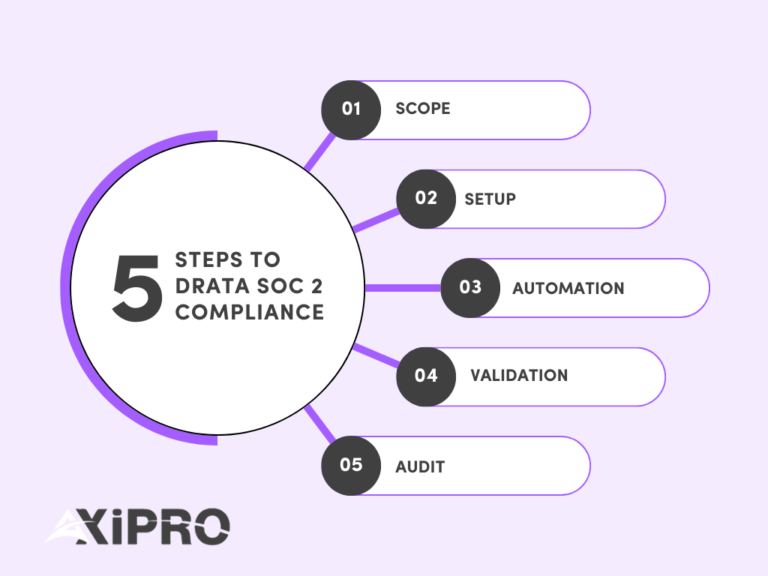
A successful Drata SOC 2 project follows a predictable flow: scoping, setup, automation, validation, and audit.
Before You Start: What You Need to Run a SOC 2 Project in Drata
Before logging into Drata, your organization needs to be aligned.
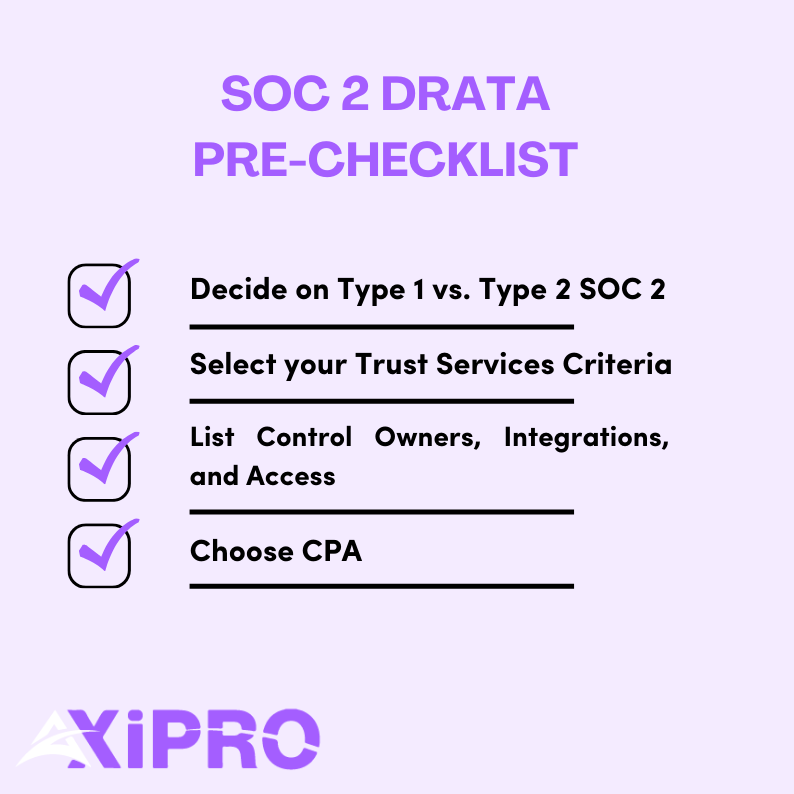
1- Decide your SOC 2 target: Type 1 vs. Type 2 and realistic timelines
SOC 2 comes in two formats defined by the AICPA.
SOC 2 Type I evaluates whether controls are designed correctly at a point in time.
SOC 2 Type II evaluates whether those controls operate effectively over a period, usually three to twelve months.
Report Type | What It Evaluates | Timeframe |
SOC 2 Type I | Whether controls are designed appropriately | Point in time |
SOC 2 Type II | Whether controls operate effectively | 3–12 months |
With Drata, many of our clients reach Type I readiness in 6 to 8 weeks if controls already exist. Type II timelines depend on the observation period, which can range from 3 months to up to a year.
If you’re pursuing SOC 2 compliance due to a client’s request, he will till you which type he requires. If you’re proactively seeking SOC 2 compliance, then we recommend going for type 2 compliance. This allows you to cast a wider net of clients.
A successful SOC 2 program follows a predictable lifecycle. While tools and timelines vary, the underlying phases are consistent across most organizations.
- Scoping: Define the system being audited, select Trust Services Criteria, set the audit period, and confirm the auditor. Good scoping reduces downstream complexity dramatically.
- Setup: Configure Drata, connect integrations, publish policies, and assign control ownership. This phase turns abstract requirements into operational structure.
- Automation: Enable continuous evidence collection across identity, infrastructure, code, ticketing, and endpoints. Automation replaces manual tracking, but only when integrations reflect reality.
- Validation: Run a readiness review. Confirm that controls are operating as described, evidence is complete, and timing aligns with the audit window. This is where most hidden risks surface.
- Audit: Auditors independently test controls and evidence. Clarifications and minor findings are normal. Clear responses and preparation determine how fast this phase moves.
- Continuous compliance: After the report is issued, controls continue operating. Monitoring, reviews, and periodic reassessment prevent drift and reduce effort in future audit cycles.
2- Select your Trust Services Criteria
Every SOC 2 must include the Common Criteria for Security. Additional criteria are optional and must be justified.
These include Availability, Confidentiality, Processing Integrity, and Privacy.
The choice of additional criteria is driven by the service agreement with the customer, which may require specific criteria, or by the type of business pursuing SOC 2.
If you’re a SaaS that handles a large amount of private financial data, it makes sense to pursue the confidentiality criteria, for example. Availability makes sense if you sell uptime guarantees or SLAs. Privacy should only be selected if you are prepared to meet the additional criteria around notice, consent, and data subject rights.
3- Gather prerequisites: Systems, Owners, and Access
Drata works best when you already know what is in scope. This includes cloud infrastructure, identity providers, repositories, ticketing tools, and endpoints.
You also need named control owners. Automation cannot replace accountability.
4- Choose or confirm an auditor early
An external CPA firm ultimately issues the SOC 2 report. Confirm your auditor before proceeding with deep configuration to avoid mismatches in expectations, evidence formats, or control interpretations.
Where Axipro Fits in a Drata-Led SOC 2 Program
Drata is excellent at operationalizing SOC 2. It centralizes controls, automates evidence collection, and enforces timelines that matter to auditors. What it does not do is make judgment calls, resolve ambiguity, or design controls in context. That work still belongs to the experts.
This is where Axipro fits.
In practice, Axipro supports Drata-led SOC 2 programs in four critical areas:
Scoping discipline
Before configuration begins, Axipro helps validate system boundaries, Trust Services Criteria selection, and audit periods. This prevents over-scoping, which is one of the most common reasons SOC 2 projects slow down or fail testing later.
Control ownership and execution clarity
Drata can track controls, but it cannot assign accountability. Axipro works with teams to ensure every in-scope control has a clear owner, a realistic execution process, and an evidence strategy that will stand up to auditor scrutiny.
Readiness validation before auditor access
Many SOC 2 delays happen after auditors are invited. Axipro performs structured readiness reviews to catch weak evidence, misaligned controls, and timing gaps before fieldwork begins. This reduces follow-ups, exceptions, and rework.
Audit navigation and exception handling
During the audit, Axipro helps teams respond to auditor questions, document compensating controls, and resolve findings clearly. This keeps the audit moving and avoids creating long-term issues that resurface in future cycles.
Drata provides the operating system. Axipro helps ensure the program running on top of it is coherent, defensible, and sustainable.
Step 1: Scope Your SOC 2 Program in Drata
Once your prep work is done, it’s time to open Drata and start the real implementation work. Scoping is the first and most important step. It defines what the auditor will test and, just as importantly, what they will ignore.
Create the audit container
In Drata, scope becomes “real” the moment you create the audit.
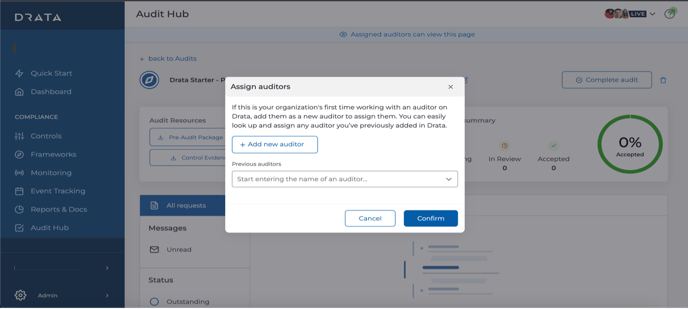
Navigate to Audit Hub, then select Create Audit. Choose SOC 2 as the framework and define the audit period.
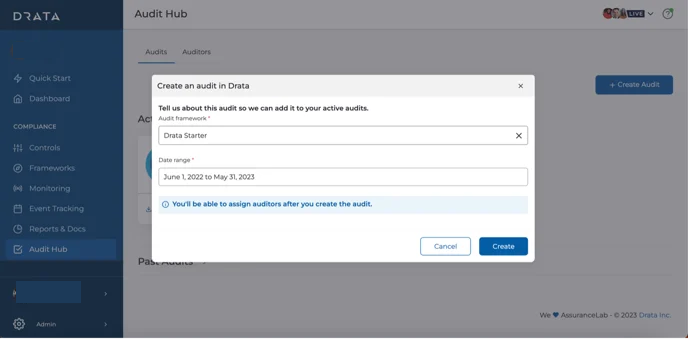
This date range matters more than most teams realize. Drata restricts auditor access to evidence strictly within this window. If your controls weren’t operating during this period, they effectively do not exist for the audit.
Add your auditor once the container is created. From this point forward, you are no longer “preparing”. You are in audit mode.
Define the system boundary before touching anything else
Before clicking deeper into Drata, pause and write a single sentence internally:
“This SOC 2 audit covers the systems, people, and processes used to deliver [Product or Service Name] to customers.”
That sentence becomes your anchor.
SOC 2 is not a company-wide certification. It is a system-level attestation. The American Institute of CPAs, which governs SOC reporting, is explicit about this.
Everything you include in scope must directly support that system. Everything that doesn’t should stay out.
This mindset alone can reduce audit scope by 30–50 percent for early-stage SaaS companies.
Identify what is actually “in scope” inside Drata
Now you translate that boundary into real systems.
A simple rule works well: if it stores, processes, or transmits customer data for the in-scope product, or is required to operate production, it belongs in scope.
Production environments are almost always included. Development and staging environments are in scope only if they use real customer data or are part of enforced change management workflows.
Infrastructure follows the same logic. Cloud accounts, databases, CI/CD pipelines, identity providers, logging, monitoring, and incident management tools typically qualify.
Third-party vendors matter too. SOC 2 explicitly requires the evaluation of subservice organizations that could impact system security or availability. Drata supports this through vendor inventory and SOC report review workflows.
Assign owners to everything that falls in scope
A control without an owner is an audit risk.
Inside Drata, each control mapped to your scoped Trust Services Categories needs a clearly assigned owner and a defined evidence source. Automated evidence is ideal, but manual uploads are acceptable if they are consistent and timely.
According to multiple SOC 2 readiness studies, unclear ownership is one of the top three causes of audit delays.
If someone cannot answer “who owns this?” within five seconds, you have a problem.
Final check: Does your time scope match your system scope?
Before you move forward, sanity-check one last thing.
Your audit period, your operating controls, and your evidence availability must all align. If your controls went live halfway through the audit window, the earlier period may fail testing.
Drata enforces this strictly, which is good, but unforgiving.
When these elements are aligned, auditors move faster, questions decrease, and SOC 2 stops feeling mysterious.
When scoping is done right
Scoping is complete when:
- Your audit exists in Drata,
- Your Trust Services Categories are intentional,
- Your system inventory reflects reality, and
- Your System Description matches both.
Step 2: Connect Integrations to Automate Evidence Collection in Drata
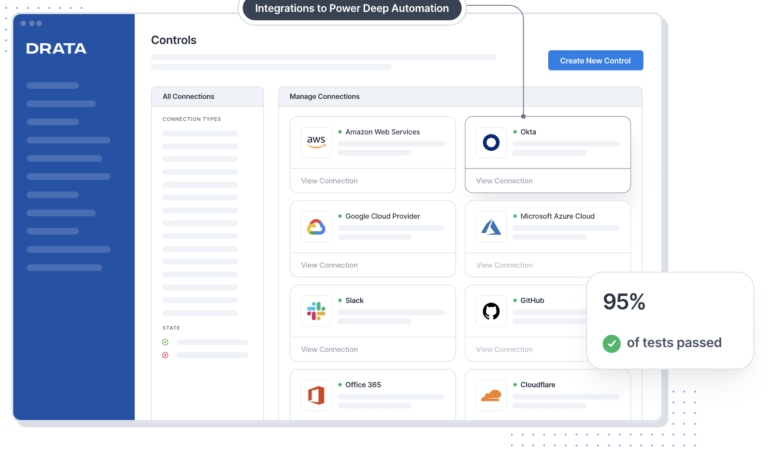
This is where Drata delivers real value. Automation replaces screenshots, spreadsheets, and human reminders, but only if integrations match how your company actually operates.
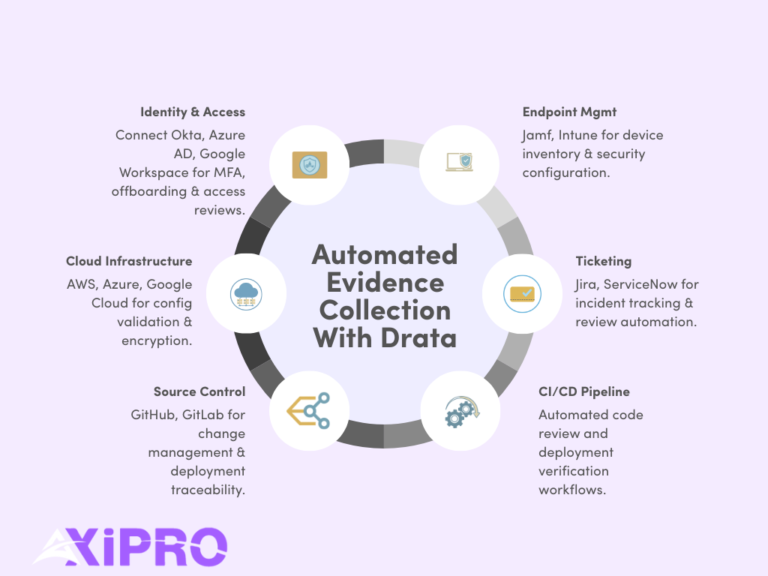
Start with identity and access management. Most organizations connect Drata to Okta, Azure Active Directory, or Google Workspace. This integration powers continuous monitoring for user access, offboarding, MFA enforcement, and periodic access reviews. Identity controls sit at the core of SOC 2 Security and are among the most frequently tested by auditors.
Next, connect your cloud infrastructure. AWS, Azure, and Google Cloud integrations allow Drata to automatically validate account configurations, logging, encryption settings, and change activity. Cloud misconfiguration remains a leading cause of security incidents, which is why auditors scrutinize this area closely.
For source control and CI/CD, integrations with GitHub or GitLab support evidence for change management, code review enforcement, and deployment traceability. These controls demonstrate that production changes are authorized, tested, and auditable.
Ticketing and incident workflows typically integrate with tools like Jira or ServiceNow. This evidence shows how incidents are identified, tracked, resolved, and reviewed.
Endpoint management often includes platforms such as Jamf or Microsoft Intune, depending on whether your environment is Apple-first or Windows-heavy. These integrations support device inventory, encryption, and security configuration evidence.
Step 3: Run a Gap Analysis Using Drata’s Control Framework
Once integrations are live, it’s time to pressure-test reality.
Drata maps every SOC 2 control directly to the Trust Services Criteria. This alignment allows you to evaluate readiness control by control, rather than guessing whether you are “mostly compliant.”
Start with Security controls, which are mandatory in every SOC 2 report. These cover access management, logging, monitoring, risk assessment, and incident response. Optional criteria like Availability, Confidentiality, or Privacy introduce additional operational depth, but also increase testing scope.
Inside Drata, review each control and assign a clear status: implemented, partially implemented, or missing. This step should be honest, not optimistic. Auditors test operating effectiveness, not intent. A “partially implemented” control is a signal that evidence will fail under scrutiny.
This visibility is the real value of the gap analysis. It allows you to prioritize remediation based on audit risk, not convenience. Industry data consistently shows that unresolved access controls and change management gaps account for a majority of SOC 2 audit exceptions.
Step 4: Implement and Map Controls Inside Drata
At this stage, controls shift from theory to observable behavior over time. Auditors do not care what should happen. They care what does happen, consistently.
Begin with access control execution. This means multi-factor authentication is enforced, single sign-on is actually used, access follows least-privilege principles, and user onboarding and offboarding are documented and repeatable.
Change management must show evidence of discipline. Every production change should have an approval trail, testing proof, and a clear link between code, deployment, and release. Drata helps map this evidence, but the process must already exist.
For incident response, auditors look for preparedness, not perfection. Detection mechanisms, response procedures, and post-incident reviews must be defined and followed when incidents occur. Even a “no incidents” period still requires proof that monitoring and escalation processes are active.
Risk management requires a maintained risk register, reviewed periodically, that demonstrates that leadership actively evaluates and responds to evolving threats.
Vendor risk management must show due diligence before onboarding and ongoing monitoring afterward. Contracts, security reviews, and periodic reassessment matter because auditors treat key vendors as extensions of your system boundary.
If Availability is in scope, controls must demonstrate resilience. Backups should exist, recovery processes should be tested, and uptime should be monitored continuously.
When controls are implemented this way, Drata becomes more than a tracker. It becomes evidence that your organization operates with intent, consistency, and accountability.
Step 6: Publish Policies and Align Employee Training
SOC 2 is not just about systems. It is about intent made visible. Policies are how auditors confirm that your organization understands its responsibilities and has formally committed to them.
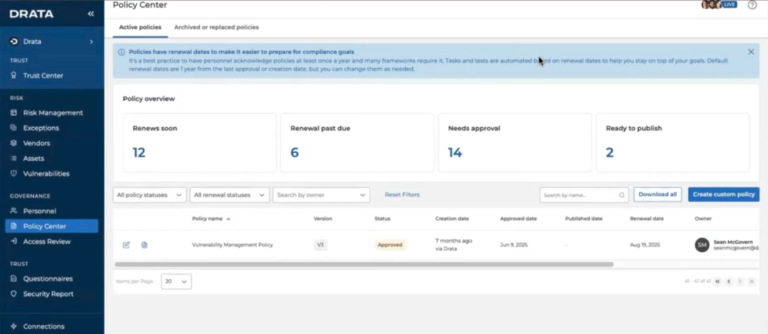
Inside Drata, finalize and publish your core policies. Security, access control, incident response, and vendor management policies must be customized to your environment, formally approved by leadership, and acknowledged by employees. Generic templates are easy to spot and often trigger follow-up questions during audits.
Policy acknowledgment matters more than many teams expect. SOC 2 auditors routinely test whether employees have actually attested to policies, not just whether the documents exist. Drata’s automated attestation tracking removes ambiguity, which is exactly what auditors want.
Employee security awareness training is also required. This is not about depth. It is about consistency and coverage. Auditors look for proof that training occurred, that it is relevant to employee roles, and that completion records are maintained.
Step 7: Collect Evidence and Validate Readiness
This is the moment to pause and verify the facts before the auditor does.
Drata automates a large portion of evidence collection, but automation is never 100 percent. Certain artifacts remain manual or point-in-time by design. Examples include policy approvals, management sign-offs, risk review notes, and incident postmortems. These must exist, be current, and fall within the audit period.
Before inviting the auditor, run an internal readiness review. Look for missing screenshots, stale policy versions, disconnected integrations, or controls marked “implemented” without supporting proof.
The most common readiness mistake is assuming that evidence collected automatically is automatically sufficient. Auditors test relevance and completeness, not tooling.
Step 8: Prepare for the SOC 2 Audit Using Drata
Once the auditor is invited, Drata becomes the single source of truth for evidence requests, control mapping, and auditor questions. This centralization significantly reduces back-and-forth and prevents version confusion, which is one of the biggest time drains in traditional audits.
That said, auditors will still ask questions. Clarifications, compensating controls, and remediation plans are normal parts of a SOC 2 engagement. The AICPA explicitly frames SOC reporting as a dialogue, not a checklist exercise.
Teams that respond early and clearly tend to move through fieldwork faster and with fewer follow-ups.
Step 9: Pass the Audit and Respond to Findings
After testing is complete, auditors issue results. Minor findings or observations do not mean failure. They mean something needs to be clarified, adjusted, or formally documented.
What matters is how findings are addressed. Clear explanations, defined remediation steps, and realistic timelines signal control maturity.
Tracking remediation tasks in Drata ensures lessons learned carry forward rather than being rediscovered next year.
Step 10: Maintain Continuous Compliance
SOC 2 reports are issued annually, but expectations are continuous. Auditors and customers alike assume controls operate every day, not just during audit season.
Ongoing monitoring helps identify drift early. Access reviews, vendor reviews, and risk reviews should run on schedule, not be rushed weeks before renewal.
This is the inflection point. Teams that operationalize compliance build confidence and speed over time. Teams that treat SOC 2 as a yearly sprint tend to burn out.
SOC 2 is not passed once. It is maintained deliberately.
Recommended Drata SOC 2 Timeline Example
Phase | Typical Duration |
Scoping and integrations | Weeks 1–2 |
Control implementation and policies | Weeks 3–6 |
Readiness review and Type I audit | Weeks 7–8 |
Type II observation period | Months 3–6+ |
Conclusion: Your Next Steps to Get SOC 2 Audit-Ready in Drata
Drata can dramatically simplify SOC 2, but only when paired with clear scoping, ownership, and expert guidance. Automation accelerates good programs. It exposes weak ones.
If you want to shorten timelines, reduce audit risk, and avoid rework, a structured readiness approach matters.
Learn more about SOC 2 fundamentals from the AICPA SOC overview understand the background on SOC 2, and explore Drata’s platform capabilities.
If you want help scoping, implementing, or validating your Drata SOC 2 program, book a readiness assessment or request a demo. The right preparation turns compliance from a blocker into a growth asset.
FAQ: Drata SOC 2 Compliance
Does Drata guarantee I will pass a SOC 2 audit?
No. Drata provides structure and automation, not guarantees. Outcomes depend on control design and execution.
How long does SOC 2 take with Drata for a SaaS company?
Type I readiness often takes 6 to 8 weeks. Type II depends on the observation period.
What is the difference between continuous monitoring and the audit?
Monitoring tracks control health. The audit independently verifies control operation over time.
Which Trust Services Criteria should I choose first?
Security first. Add others only when justified by product behavior or customer demands.
What evidence is still manual?
Risk assessments, policy approvals, some vendor reviews, and exception documentation.
When should I involve an auditor?
Before heavy configuration to align expectations.
Can Drata help with vendor management?
Yes, but judgment and follow-up remain human responsibilities.