Table of Contents

Reach SOC 2 Compliance in 6 Weeks or Less.

  /

  / 4 SOC 2 Controls Auditors Reject Even When Your Compliance Tool Says Passing

4 SOC 2 Controls Auditors Reject Even When Your Compliance Tool Says Passing

A green dashboard is not an audit opinion. Compliance automation platforms like Vanta, Drata, Secureframe, and Hyperproof have made SOC 2 readiness faster and cheaper, but every audit cycle produces the same pattern: controls that sat at “passing” for months come back from the auditor with exceptions or requests for re-testing. The four controls below account for a disproportionate share of those rejections, and they all fail for the same underlying reason. The tool confirmed that evidence exists. The auditor tested whether the control actually operated.

This article walks through each of the four: what auditors reject, why, and how to fix the evidence before fieldwork starts.
Why Compliance Tools Show “Passing” But Auditors Still Reject Controls​

The Gap Between Automated Checks and Auditor Judgment

Compliance platforms run continuous control monitoring: API calls that check whether a configuration exists, a document is uploaded, or a task is marked done. That’s real value. It catches drift, keeps evidence in one place, and saves weeks of screenshot collection.

An audit is a different exercise. A SOC 2 examination is an attestation performed by a CPA firm under AICPA standards, and the auditor’s job is to form an independent opinion on whether your controls met the Trust Services Criteria. That opinion rests on professional judgment, not on whether an API integration returned a 200 response.

What “Passing” Actually Means in Your Compliance Dashboard​

When a control shows “passing,” the platform is telling you one narrow thing: at the moment of the last scan, an automated test found the artifact or setting it was programmed to look for: MFA enforced in the identity provider, a policy document uploaded, a training campaign sitting at 100%. The test says nothing about whether the underlying process ran the way your control narrative claims it did, or whether it ran that way across the whole audit period.

How Auditors Evaluate Controls Beyond the Checkbox

Auditors test two dimensions.

  • Design effectiveness asks whether the control, as described, would meet the criterion if it worked as intended.
  • Operating effectiveness, the core of a SOC 2 Type 2 report, asks whether it actually did throughout the audit period.

To answer that, the auditor pulls a population (every access review, every change, every new hire in the period), selects a sample, and inspects the evidence item by item. A dashboard status feeds into that process. It doesn’t replace it.

Insider Note: Auditors increasingly ask for evidence outside the compliance platform precisely because they know what the platform auto-collects. If every artifact you produce comes from the same tool export, expect the auditor to independently pull the population from the source system and compare. Discrepancies between the two are one of the fastest routes to an exception.

Reach SOC 2 Compliance in 6 Weeks or Less

Schedule Your Free SOC 2 Assessment Today

Control #1: Access Reviews That Automation Marks Complete but Auditors Reject

Why Auditors Reject Automated Access Review Evidence​

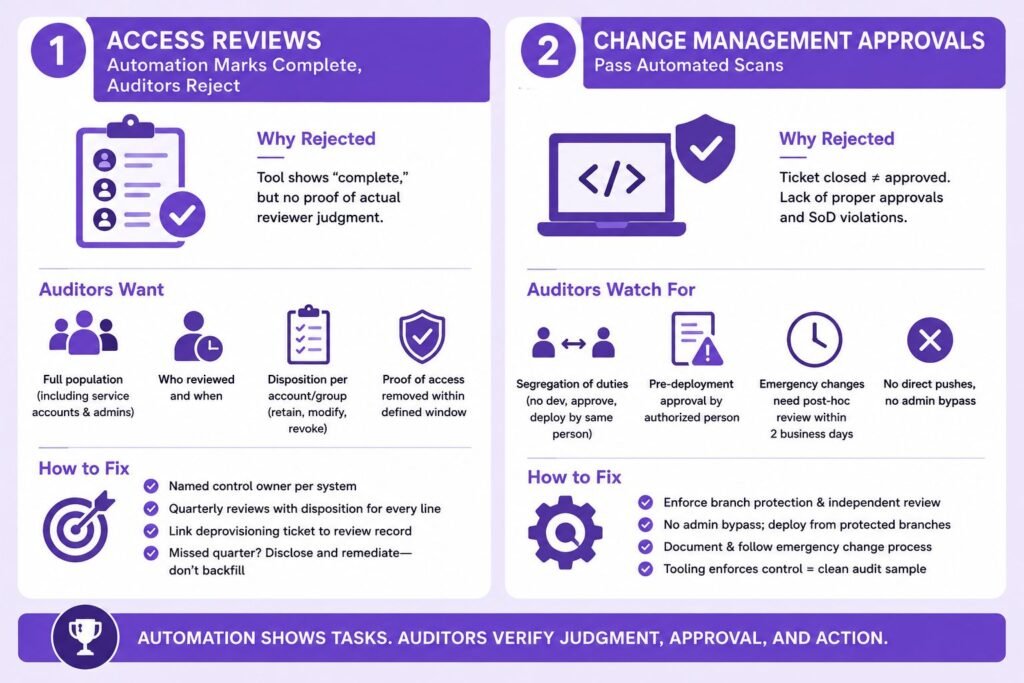
User access reviews sit under the logical access criteria (CC6.1 through CC6.3), and they are the single most common source of audit exceptions we see. The typical failure: the platform generated a user list, someone clicked “complete,” and the dashboard turned green. The auditor then asks a simple question the evidence can’t answer: what did the reviewer actually decide?

The Missing Element: Documented Reviewer Judgment​

An access review is a judgment control. Someone with knowledge of the system must look at each account and confirm the access is still appropriate for the person’s role. A timestamped task closure proves the task was closed. It doesn’t prove anyone assessed anything, and an “approve all” review completed in ninety seconds gets exactly the skepticism it deserves.

What Auditors Actually Want to See in Access Review Evidence

Auditors look for four things:

  • The full population of accounts at the time of review (including service accounts and admin roles),
  • Evidence of who reviewed it and when, explicit dispositions per account or group (retain, modify, revoke), and
  • Proof that flagged access was actually removed.
  • That last item, the deprovisioning ticket showing revocation within a defined window, is the piece most companies can’t produce.

How to Fix Your Access Review Control Before the Audit​

Assign a named control owner per in-scope system, run reviews quarterly, and require reviewers to record a disposition for every line, not a blanket approval. When access is revoked, link the removal ticket to the review record. If a quarter was missed, don’t backfill it. Document it honestly and show the remediation, because auditors treat fabricated retroactive evidence far more severely than a disclosed gap.
Control #2: Change Management Approvals That Pass Automated Scans​

Why Ticket Closure Isn’t Proof of Approval​

Change management (CC8.1) automation typically verifies that production changes link to a ticket and the ticket is closed. Auditors test something stricter: that each sampled change was approved by an authorized person before deployment. An approval added after the merge, or a ticket closed by the same engineer who wrote the code, fails that test even though every automated check came back green.

The Segregation of Duties Problem Automation Misses

Segregation of duties is the requirement that no single person can develop, approve, and deploy the same change. NIST’s SP 800-53 control catalog treats it as a foundational access control principle, and SOC 2 auditors apply the same logic. Small engineering teams trip on this constantly. Self-approved pull requests, admins who can bypass branch protection, direct pushes to main: a scanner sees “changes with tickets” while an auditor sees SoD violations.

Emergency Changes and Retroactive Approvals: Common Rejection Triggers​

Every audit period contains hotfixes. Auditors don’t reject emergency changes. They reject emergency changes with no documented post-hoc review. If your policy says urgent changes get retroactive approval within two business days, the auditor will sample your emergency changes and check exactly that. No policy, or a policy nobody followed, produces an exception.

Rebuilding Change Management Evidence Auditors Will Accept​

Enforce the control technically: branch protection requiring at least one independent reviewer, no admin bypass, and deploy pipelines that only run from protected branches. Then write the emergency change procedure down and generate the review artifact every time it fires. When the tooling enforces the control, the population is clean by construction and sampling becomes painless.

Pro Tip: Before your Audit

Before your audit, pull every production change in the period directly from your version control and deployment logs, then reconcile it against your ticketing system yourself. Auditors build the population from the source system, not from your compliance platform, and any change without a matching ticket becomes a finding you could have caught in an afternoon.

Control #3: Vendor Risk Assessments Flagged as Compliant

Why Uploaded SOC 2 Reports Aren’t Enough​

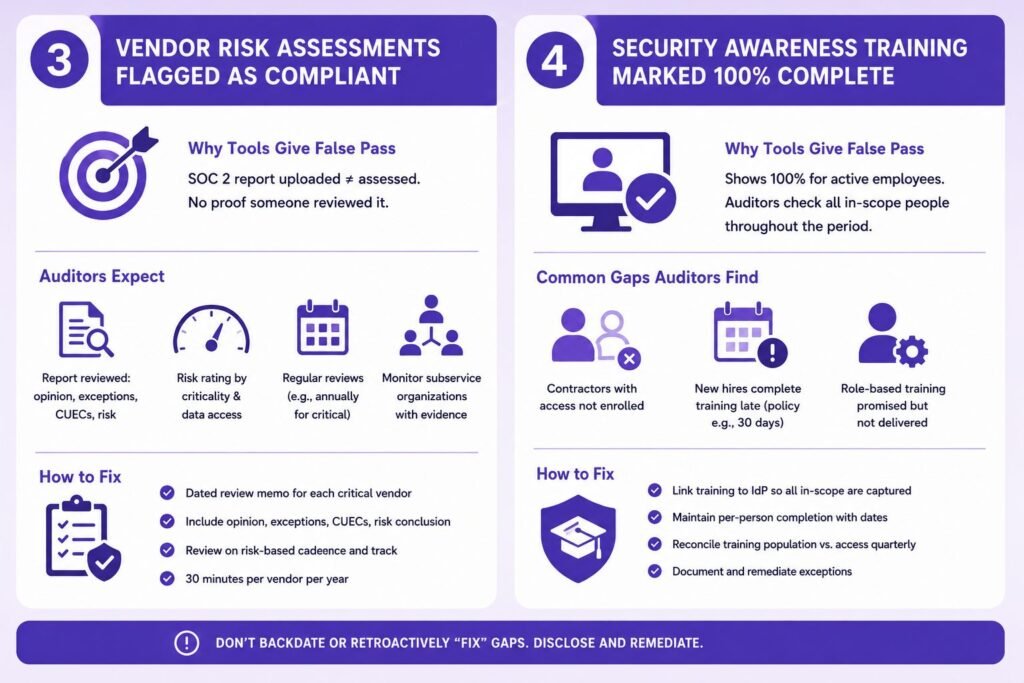
Vendor management (CC9.2) automation frequently marks a vendor “assessed” the moment a SOC 2 report lands in the vendor record. Possession isn’t assessment. Auditors expect evidence that someone actually read the report: checked the auditor’s opinion (unqualified, qualified, adverse, or disclaimer), reviewed noted exceptions, evaluated the complementary user entity controls you are responsible for, and concluded on the vendor’s risk. Our guide on how to verify a SOC 2 report covers exactly what that review should examine.

The Missing Risk Rating and Review Cadence​

A defensible vendor program rates each vendor by criticality and data access, and reviews on a cadence that matches the rating: annually for critical vendors is the common baseline. Auditors sample vendors from your full list and ask for the most recent assessment. A rating assigned once at onboarding and never revisited doesn’t reflect operating effectiveness over the period.

Subservice Organization Carve-Outs Auditors Scrutinize

If a vendor is a subservice organization in your own report under the carve-out method, scrutiny increases. Your report explicitly tells readers that you monitor that provider’s controls, so your auditor will test whether you actually did: collected their current report, reviewed it, and tracked their exceptions. This is the area where “the tool shows a green vendor row” and “we can evidence monitoring” diverge most sharply.

Building Vendor Risk Evidence That Survives Auditor Testing

For each critical vendor, keep a dated one-page review memo: report period covered, opinion type, exceptions noted, CUECs mapped to your controls, and a risk conclusion signed by the owner. That’s thirty minutes per vendor per year, and it’s the difference between a clean CC9.2 result and a management letter comment.
Control #4: Security Awareness Training Marked 100% Complete

Why Training Completion Rates Don’t Satisfy CC1.4​

CC1.4 addresses whether the organization attracts, develops, and retains competent individuals, and awareness training is the standard control mapped to it alongside the communication criteria. The platform shows 100% because it measures active employees enrolled in the current campaign. The auditor measures something else: every in-scope person, across the entire audit period, trained within the timeframe your policy commits to.

Contractor and Late-Hire Coverage Gaps​

Two populations break the 100% figure almost every time. Contractors with system access are often never enrolled because they sit outside the HR system feed. And employees hired mid-period frequently complete training months late, while the policy says “within 30 days of hire.” The auditor samples new hires against hire dates, and each late completion is a deviation. Guidance like NIST’s SP 800-50 on security awareness programs is explicit that coverage should follow access, not employment classification.

Role-Based Training Requirements Automation Overlooks

If your policies promise secure coding training for engineers or privileged-user training for administrators, those promises become auditable commitments. Generic annual awareness training won’t satisfy a role-based requirement you wrote yourself. Either deliver the role-based training and evidence it, or amend the policy to match reality before the period starts.

Documenting Training in a Way Auditors Accept​

Keep per-person completion records with dates, tie enrollment to the identity provider rather than the HR roster so contractors are captured, and reconcile the training population against the access population quarterly. When someone misses the window, document the follow-up. A tracked exception with remediation reads very differently to an auditor than a gap they discover themselves during fieldwork.

Important: Do not “fix” historical gaps by having people complete last year’s training now and backdating intent. Auditors compare completion timestamps against hire dates and campaign windows as a matter of routine. A disclosed deviation usually stays a minor finding; manufactured evidence can escalate to a qualified opinion and, in serious cases, ends the engagement.


The Common Thread: Where Compliance Automation Falls Short​

Evidence Quality vs. Evidence Existence​

All four controls fail the same way. The platform verifies an artifact exists; the auditor asks whether the artifact proves a working process. The table below summarizes the gap.

Control What the tool verifies What the auditor tests
Access reviews Review task completed Documented judgment per account, revocations executed
Change management Ticket exists and is closed Independent approval before deployment, SoD enforced
Vendor risk Report uploaded Report reviewed, risk rated, cadence followed
Awareness training Campaign at 100% Full population trained on time, all period, all roles

Operating Effectiveness Across the Entire Audit Period

A Type 2 report covers an observation window, commonly six to twelve months, and controls under SSAE 18 attestation standards must operate throughout it. A control fixed in month nine still shows eight months of gap. This is the honest downside nobody mentions when selling a fast timeline: fixing a broken quarterly control mid-period may mean extending the period or accepting an exception, because you can’t rewrite history.

Sampling Methodology Auditors Use That Tools Don’t Simulate​

Auditors select samples from complete populations they pull themselves, sized to the control’s frequency: all four quarterly access reviews, perhaps twenty-five changes from a population of hundreds. Your platform tests the current state on a schedule. It doesn’t simulate a stranger picking change #847 from last November and asking who approved it, and when.

Reach SOC 2 Compliance in 6 Weeks or Less

Schedule Your Free SOC 2 Assessment Today

How to Validate Your Controls Before Your Auditor Does

Running an Auditor-Style Internal Review

Once per period, run the audit on yourself. Pull the population for each in-scope control from the source system, select a random sample, and try to produce the complete evidence chain for each item without touching the compliance dashboard. Wherever you reach for a green checkmark instead of an artifact, you’ve found next quarter’s exception. The exercise takes a focused week for most teams and pairs well with our SOC 2 compliance checklist.

Questions to Ask Your Compliance Platform Vendor

Ask three questions. Which of my controls are fully tested by automation versus marked passing based on a document upload or a self-attested task? How does the platform define the population for each test, and can I export it? And what happens when your customers’ auditors disagree with a “passing” status? The answers tell you where the dashboard ends and your responsibility begins. Platform-specific setups matter here too: our Drata SOC 2 guide covers where automated tests need human reinforcement.

When to Bring in a Readiness Assessment

A readiness assessment is worth the money in a few situations: your first Type 2, a period following major team or infrastructure change, or any audit where a qualified opinion would cost you a specific deal. An independent reviewer who samples your evidence the way an auditor will, two to three months before fieldwork, leaves you enough runway to fix what they find. Expect the assessment itself to take two to four weeks [CONFIRM WITH TEAM: typical readiness assessment cost range], and see our SOC 2 compliance services for how we structure it.

The pattern across all four controls is consistent: automation is excellent at collecting evidence and terrible at exercising judgment, and auditors are paid specifically for the judgment part. Treat your dashboard as a monitoring layer, not an assurance layer. Make sure reviewer decisions get documented, approvals come before deployments, vendor reports actually get read, and training covers everyone with access for the whole period. Do that, and the auditor’s sample will find what the dashboard promised.

Frequently Asked Questions

Can a SOC 2 compliance tool guarantee a clean audit?

No. Compliance platforms automate evidence collection and continuous monitoring, but the audit opinion comes from a CPA firm exercising independent judgment under AICPA standards. The tool cuts effort and catches configuration drift, but it can’t attest to operating effectiveness, and no reputable platform claims otherwise.

The auditor documents it as an exception, and depending on severity and pervasiveness it appears as a noted deviation in the report or contributes to a qualified opinion. You typically get a chance to provide additional evidence during fieldwork. If the evidence simply doesn’t exist, the exception stands, and customers reading the report will see it.

Generally yes, as one input. Auditors routinely accept platform-collected artifacts for configuration-type controls, but for judgment controls (access reviews, approvals, vendor assessments) they usually request evidence from the source system and independently verify populations. Expect platform evidence to shorten the audit, not replace source-of-truth testing.

Two to three months before fieldwork at minimum, and ideally at the start of the observation period for quarterly controls. Period-spanning controls can’t be fixed retroactively, so a gap found late in a twelve-month window either becomes an exception or delays the report.

Access reviews, change management approvals, vendor risk assessments, and security awareness training coverage are the recurring offenders, followed closely by offboarding timeliness and risk assessment refresh. All share the same trait: they require documented human judgment at a defined frequency, which is exactly what automated checks approximate least well.

Axipro Author

Picture of Pedro Dias

Pedro Dias

Pedro has been writing online for over 10 years. With experience in all things programming, cyber security, and compliance, he is our editor-in-chief at Axipro.

Blog Highlights

Explore More Articles

A green dashboard is not an audit opinion. Compliance automation platforms like Vanta, Drata, Secureframe, and Hyperproof have made SOC 2 readiness faster and cheaper, but every audit cycle produces the same pattern: controls that sat at “passing” for months come back from the auditor with exceptions or requests for re-testing. The four controls below account for a disproportionate share of those rejections, and they all fail for the same underlying reason. The tool confirmed that evidence exists. The auditor tested whether the control actually operated. This article walks through each of the four: what auditors reject, why, and how to fix the evidence before fieldwork starts. Why Compliance Tools Show “Passing” But Auditors Still Reject Controls​ The Gap Between Automated Checks and Auditor Judgment Compliance platforms run continuous control monitoring: API calls that check whether a configuration exists, a document is uploaded, or a task is marked done. That’s real value. It catches drift, keeps evidence in one place, and saves weeks of screenshot collection. An audit is a different exercise. A SOC 2 examination is an attestation performed by a CPA firm under AICPA standards, and the auditor’s job is to form an independent opinion on whether your controls met the Trust Services Criteria. That opinion rests on professional judgment, not on whether an API integration returned a 200 response. What “Passing” Actually Means in Your Compliance Dashboard​ When a control shows “passing,” the platform is telling you one narrow thing: at the moment of the last scan, an automated test found the artifact or setting it was programmed to look for: MFA enforced in the identity provider, a policy document uploaded, a training campaign sitting at 100%. The test says nothing about whether the underlying process ran the way your control narrative claims it did, or whether it ran that way across the whole audit period. How Auditors Evaluate Controls Beyond the Checkbox Auditors test two dimensions. Design effectiveness asks whether the control, as described, would meet the criterion if it worked as intended. Operating effectiveness, the core of a SOC 2 Type 2 report, asks whether it actually did throughout the audit period. To answer that, the auditor pulls a population (every access review, every change, every new hire in the period), selects a sample, and inspects the evidence item by item. A dashboard status feeds into that process. It doesn’t replace it. Insider Note: Auditors increasingly ask for evidence outside the compliance platform precisely because they know what the platform auto-collects. If every artifact you produce comes from the same tool export, expect the auditor to independently pull the population from the source system and compare. Discrepancies between the two are one of the fastest routes to an exception. Control #1: Access Reviews That Automation Marks Complete but Auditors Reject Why Auditors Reject Automated Access Review Evidence​ User access reviews sit under the logical access criteria (CC6.1 through CC6.3), and they are the single most common source of audit exceptions we see. The typical failure: the platform generated a user list, someone clicked “complete,” and the dashboard turned green. The auditor then asks a simple question the evidence can’t answer: what did the reviewer actually decide? The Missing Element: Documented Reviewer Judgment​ An access review is a judgment control. Someone with knowledge of the system must look at each account and confirm the access is still appropriate for the person’s role. A timestamped task closure proves the task was closed. It doesn’t prove anyone assessed anything, and an “approve all” review completed in ninety seconds gets exactly the skepticism it deserves. What Auditors Actually Want to See in Access Review Evidence Auditors look for four things: The full population of accounts at the time of review (including service accounts and admin roles), Evidence of who reviewed it and when, explicit dispositions per account or group (retain, modify, revoke), and Proof that flagged access was actually removed. That last item, the deprovisioning ticket showing revocation within a defined window, is the piece most companies can’t produce. How to Fix Your Access Review Control Before the Audit​ Assign a named control owner per in-scope system, run reviews quarterly, and require reviewers to record a disposition for every line, not a blanket approval. When access is revoked, link the removal ticket to the review record. If a quarter was missed, don’t backfill it. Document it honestly and show the remediation, because auditors treat fabricated retroactive evidence far more severely than a disclosed gap. Control #2: Change Management Approvals That Pass Automated Scans​ Why Ticket Closure Isn’t Proof of Approval​ Change management (CC8.1) automation typically verifies that production changes link to a ticket and the ticket is closed. Auditors test something stricter: that each sampled change was approved by an authorized person before deployment. An approval added after the merge, or a ticket closed by the same engineer who wrote the code, fails that test even though every automated check came back green. The Segregation of Duties Problem Automation Misses Segregation of duties is the requirement that no single person can develop, approve, and deploy the same change. NIST’s SP 800-53 control catalog treats it as a foundational access control principle, and SOC 2 auditors apply the same logic. Small engineering teams trip on this constantly. Self-approved pull requests, admins who can bypass branch protection, direct pushes to main: a scanner sees “changes with tickets” while an auditor sees SoD violations. Emergency Changes and Retroactive Approvals: Common Rejection Triggers​ Every audit period contains hotfixes. Auditors don’t reject emergency changes. They reject emergency changes with no documented post-hoc review. If your policy says urgent changes get retroactive approval within two business days, the auditor will sample your emergency changes and check exactly that. No policy, or a policy nobody followed, produces an exception. Rebuilding Change Management Evidence Auditors Will Accept​ Enforce the control technically: branch protection requiring at least one independent reviewer, no admin bypass, and deploy pipelines that only run from protected branches. Then write the emergency change procedure down and generate the review artifact every time it fires.

AI Tool Usage Tracking

One in five breached organizations last year traced the incident to shadow AI, and those breaches cost an average of $670,000 more than standard incidents, according to IBM’s 2025 Cost of a Data Breach Report. The worst part is that most of those organizations already ran a CASB, a DLP program, or both. The tools were on, but the traffic still got through. That’s the visibility gap this article is about. AI tool usage tracking isn’t the same problem as SaaS discovery, and the security stack built for the SaaS era misses most of what matters about AI. Below, we break down what tracking actually requires, where CASB and DLP fail, which categories of AI usage slip through, and what a stack that works looks like in 2026. What AI Tool Usage Tracking Actually Means Most teams that say they “track AI usage” mean they can see that someone visited chat.openai.com. That is app discovery, and it answers almost none of the questions a security or governance team actually needs answered. Beyond App Discovery: Tracking Prompts, Data Flows, and Model Interactions Real tracking covers three layers. First, which tools are in use: chatbots, copilots, coding assistants, embedded SaaS features, agents. Second, what data moves: the content of prompts, uploaded files, and pasted context, mapped against data classifications. Third, how models behave in your environment: which endpoints get called, which OAuth grants exist, which agents hold standing permissions. Seeing that an employee opened ChatGPT gets you nowhere. What you actually need to know is whether they pasted a customer contract into a personal account while they were there. The Difference Between Detection, Monitoring, and Continuous Tracking Detection is a point-in-time answer to “what AI is here?” Monitoring watches known tools on an ongoing basis. Continuous tracking is broader: it assumes the inventory changes weekly, correlates identity, data, and endpoint signals over time, and feeds a governance program rather than a one-off report. Frameworks such as the NIST AI Risk Management Framework and ISO 42001 assume the third mode. A discovery scan from last quarter won’t satisfy an auditor, and it certainly won’t slow down an attacker. Why Traditional SaaS Monitoring Falls Short for AI SaaS monitoring was built around a stable premise: an app is a destination with a domain, a login, and an admin console. AI breaks that premise in several ways at once. The risky activity is the content of an interaction, not the visit. The tool often isn’t a destination at all but a feature inside an app you already sanctioned. And increasingly the “user” isn’t a person but an agent acting on delegated credentials. Why CASB Misses Shadow AI Usage The Cloud Access Security Broker sits between users and cloud services to enforce policy, and for classic SaaS governance it still earns its keep. AI has structural blind spots that no amount of tuning can fix. CASBs Were Built for SaaS Apps, Not Model Endpoints A CASB catalog maps domains to applications with risk scores. AI usage doesn’t resolve neatly to a domain. The same api.openai.com endpoint serves a sanctioned enterprise deployment, a developer’s weekend experiment, and a data-leaking browser extension, and the catalog sees one “app”. Meanwhile, new model endpoints, wrappers, and niche AI tools appear faster than any vendor catalog can keep up with. Gartner research from late 2025 found 69% of organizations already suspect or have evidence that employees use prohibited public generative AI tools, catalog or no catalog. Blind Spots in Encrypted API Traffic to LLM Providers Prompt content travels over TLS. Without full TLS inspection, a CASB sees connection metadata: destination, volume, timing. It can’t see that the payload contained source code or patient records. And full TLS inspection is harder than the datasheet implies. Certificate pinning breaks it for many native apps and CLI tools, legal and works-council constraints limit it in the EU, and most organizations carve out broad exemption lists that AI traffic happily rides through. The OAuth and Embedded AI Problem CASBs Can’t See When an employee grants an AI meeting-notes tool access to their calendar and mailbox via OAuth, no proxy is involved at all. The vendor’s servers communicate directly with Microsoft’s or Google’s APIs using a persistent token. The same applies to AI features embedded inside sanctioned SaaS, think Notion AI, Slack AI, or Salesforce Einstein. The CASB sees approved traffic to an approved app, while the AI processing happening inside it, and whichever sub-processor it forwards data to, stays invisible. Personal Accounts and BYO-AI Bypass CASB Proxies Netskope’s 2026 Cloud and Threat Report found that nearly half of employees who use generative AI at work do so through personal accounts. Personal accounts on managed devices are hard enough; personal accounts on personal devices, home networks, and mobile connections never touch the corporate proxy path at all. Tenant restrictions help for a handful of major providers and do nothing for the long tail. Browser-Based and Extension-Delivered AI Escape Network Inspection AI browser extensions read page content and form inputs locally, then exfiltrate via their own backend, often to generic cloud infrastructure that categorizes as “technology” rather than “AI”. From the network’s view, it is routine HTTPS to a CDN. The riskiest interaction, an extension scraping everything an employee views, produces the most boring traffic signature. Insider Note: In AI governance readiness assessments, the OAuth grant review is where clients get the biggest surprise. We routinely find dozens of AI tools holding live mail, calendar, or drive scopes that nobody in IT ever approved, granted by employees who abandoned the tool (and sometimes the company) months earlier. The tokens keep working anyway. Why DLP Fails to Catch Shadow AI Data Exposure DLP has the opposite problem. It can sometimes see content, but it doesn’t understand it, and AI interactions defeat the pattern matching it depends on. Prompt-Based Data Loss Doesn’t Match DLP Signature Patterns DLP fires on signatures: credit card regexes, SSN formats, keyword dictionaries, file fingerprints. Sensitive prompts rarely look like that. “Summarize why we’re losing

Most SOC 2 preparation effort goes into access controls, encryption, and vendor reviews. Then the auditor’s first evidence request arrives, and item one has nothing to do with technology: show us your board charter, your meeting minutes, and proof that your board operates independently from management. That’s CC1.2, and it causes more last-minute scrambling than almost any technical control in the framework. This guide explains what CC1.2 requires, provides a board charter template with sample language that auditors accept, and covers the situation most startups actually face: satisfying the criterion without a traditional board of directors. What Is a SOC 2 Board Charter and Why It Matters for CC1.2 A board charter is a formal document that defines your board’s purpose, composition, authority, meeting procedures, and oversight responsibilities. Outside of compliance, it’s a corporate governance tool and a good idea in general for companies with shareholders.  Inside a SOC 2 audit, it’s the primary design evidence for CC1.2, the criterion that asks whether an independent body oversees management and the internal control environment. The charter matters because CC1.2 is one of the few criteria where the control is a document plus behavior. The charter establishes the structure. The auditor then tests whether the structure operates: did the board actually meet, did it review the security program, did it challenge management? A beautifully drafted charter with no meeting minutes behind it fails just as surely as no charter at all. If you’re earlier in your preparation, our complete SOC 2 guide covers how the full audit fits together. Understanding CC1.2: The Board Independence Criterion CC1.2 is part of the Trust Services Criteria published by the AICPA (American Institute of Certified Public Accountants). The criterion requires that the board of directors, in the AICPA’s words, “demonstrates independence from management and exercises oversight” of how internal control is developed and how it performs. That sentence hides two separate tests. Independence means the board isn’t just management wearing a second hat. Active oversight means the board actually reviews and challenges the control environment instead of existing on paper. Plenty of companies pass one and fail the other. How CC1.2 Fits Within the CC1 Control Environment The Common Criteria run from CC1 through CC9, and the CC1 series covers the control environment: the governance and people layer everything else rests on. CC1.1 addresses integrity and ethical values, CC1.2 addresses board independence and oversight, CC1.3 covers organizational structure and reporting lines, CC1.4 covers competence and hiring, and CC1.5 covers accountability. CC1.2 is the layer that makes the other four credible. A code of conduct means little if nobody independent of management ever checks whether leadership follows it. The COSO Principle 2 Connection The Trust Services Criteria are built directly on the COSO Internal Control—Integrated Framework and its 17 principles. CC1.2 maps to COSO Principle 2, which carries four points of focus: the board establishes oversight responsibilities, applies relevant expertise, operates independently of management, and provides oversight of the system of internal control. Those four phrases are worth memorizing, because they’re effectively the outline of a good board charter. Why Auditors Prioritize Board Charter Evidence Auditors test the control environment first because failures there cascade. If governance is weak, every other control claim gets harder to trust: who approved the risk assessment, who reviewed the incident report, who held management accountable when a control slipped? An exception at CC1.2 tells the auditor that nobody independent was watching, and they’ll read the rest of your evidence with that in mind. That’s why board charter requests sit near the top of almost every evidence list. Worth Knowing: Points of Focus Points of focus are not pass/fail requirements. The AICPA describes them as characteristics that assist evaluation, and the 2022 revisions changed points of focus without changing any criteria. In practice, though, they function as the auditor’s mental checklist, so drafting your charter against them is the safest move. What Auditors Actually Look For in a Board Charter Auditors don’t grade prose style. They scan for specific, verifiable commitments. Here’s what they check, roughly in order. Documented Board Independence from Management The charter must state how many members are independent, define what independence means (no operational role, no material financial relationship beyond board compensation or equity), and describe how independence is maintained. “The board includes members independent of management” without a definition is boilerplate; auditors want criteria they can test against actual member profiles. Defined Oversight Responsibilities This is the heart of CC1.2. The charter should explicitly assign the board oversight of internal control, information security, and risk management. If the charter only mentions financial oversight and strategy, it wasn’t written with SOC 2 in mind, and the auditor will notice the gap. Clear Authority and Decision-Making Powers What can the board approve, veto, or demand? Typical provisions include approving the risk management framework, reviewing audit results, approving executive appointments, and requiring management to report on control deficiencies. Authority without teeth reads as decorative. Meeting Cadence and Quorum Requirements The charter should commit to a minimum meeting frequency (quarterly is the common standard) and define a quorum. This clause matters more than founders expect, because it’s the one auditors test directly against your calendar: if the charter says quarterly and you met twice last year, that’s an exception you wrote for yourself. Committee Structures Larger organizations delegate through audit, risk, and compensation committees, each with its own mini-charter. Smaller companies don’t need committees, but if your charter mentions them, they must exist and produce minutes. Never copy a public-company template with a phantom audit committee. Conflict of Interest Provisions A disclosure and recusal process for conflicts, usually paired with an annual attestation. This clause supports the independence claim: independence isn’t a one-time status, it’s maintained through disclosed and managed conflicts. Evidence of Board Member Expertise and Qualifications COSO’s “applies relevant expertise” point of focus means the board should be able to ask probing questions about security and risk, not just finance. Charters increasingly include a skills expectation clause, and