A SOC 2 auditor will not ask whether you have an incident reporting policy. They will ask you to pull a specific incident from the last twelve months and walk them through it: when it was detected, who classified it, when it was escalated, who was notified, and how it was closed. The policy is the easy part. The part that fails audits is the gap between what the document says and what the timestamps actually show.
Incident reporting sits at the center of the SOC 2 System Operations criteria, and it is one of the most frequently exception-flagged areas in Type 2 reports. The reason is consistent: teams treat reporting as paperwork generated after the fire is out, rather than as a controlled process that produces evidence at every step. This guide breaks down how to build a reporting process that an auditor can test, sample, and sign off on without a finding.
What Is the Incident Reporting Process in SOC 2?
The incident reporting process is the documented, repeatable sequence your organization follows from the moment a security event is detected to the moment the incident is formally closed and archived. It governs how events are logged, classified, escalated, communicated, and recorded. Reporting is not a single notification email. It is the connective tissue that links detection, response, and post-incident review into an auditable chain.
How SOC 2 Defines a Security Incident
SOC 2 does not hand you a rigid statutory definition. It works through the AICPA’s Trust Services Criteria, which frame an incident around a failure, or potential failure, of the system to meet the organization’s service commitments and security objectives. In practice, a security incident is any event that compromises, or could compromise, the confidentiality, integrity, or availability of systems or data. The criteria expect you to define this threshold yourself and apply it consistently, which is precisely what auditors test against.
What Qualifies as a Reportable Security Incident Under SOC 2?
An event becomes reportable when it crosses the threshold your own policy sets. The distinction matters. A blocked phishing email is a security event. A user who clicked the link and entered credentials is a reportable incident. SOC 2 rewards organizations that draw this line explicitly, because a clear definition is what makes consistent triage possible. Vague language like “significant events will be reported” invites the auditor to ask who decides what counts as significant, and on what basis.
Examples of Security Incidents Relevant to SOC 2
Common reportable incidents include unauthorized access to production systems, credential compromise, malware or ransomware infection, data exfiltration or accidental disclosure, denial-of-service events affecting availability, lost or stolen devices holding company data, and misconfigurations that expose data to the public. Vendor and subprocessor breaches that touch your data belong on this list, too, since the criteria extend your responsibility into the supply chain.
How Incident Severity Levels Are Established and Classified
Severity classification drives everything downstream: how fast you respond, who gets pulled in, and which notification clocks start ticking. Most mature programs use a tiered scheme tied to business impact rather than technical noise. The point is not the labels you choose but the fact that the labels map to defined response times and escalation paths, and that the mapping is documented before an incident occurs, not invented during one.
Auditors quietly judge your maturity by how few P1s you declare and how consistently you apply the tiers. A program that labels everything critical looks panicked; one that never escalates looks asleep. The strongest signal is a severity matrix with response-time SLAs next to each tier, and ticket history showing the tiers were actually applied as written.
SOC 2 Incident Reporting Requirements
There is no single “incident reporting requirement” in SOC 2. The obligation is distributed across several Common Criteria, and the auditor assembles a picture from all of them. Understanding which criteria govern reporting tells you exactly what evidence to keep.
Which SOC 2 Trust Services Criteria Govern Incident Reporting?
Incident reporting lives mainly in the CC7 (System Operations) series.
- CC7.2 covers monitoring system components to detect anomalies that may signal an incident.
- CC7.3 requires you to evaluate detected events to determine whether they are incidents and to take action.
- CC7.4 governs the response itself, including containment, eradication, and communication.
- CC7.5 addresses recovery and remediation.
Communication obligations also reach into CC2.2 and CC2.3, which deal with internal and external information flow, and third-party incidents implicate CC9.2 on vendor risk. These are points of focus, not a checklist, but auditors use them to frame their testing. For a deeper look at how these criteria map to your broader compliance program, see our SOC 2 compliance guide.
What Evidence Do Auditors Expect From Your Incident Reporting Process?
Auditors want artifacts with time references, not assertions. That means incident tickets showing detection and closure timestamps, severity classifications with the name of who assigned them, escalation records, communication logs, and post-incident review notes. In a Type 2 examination they will trace one real incident end to end. Evidence pulled from a staging environment, or any artifact with no clear date, gets challenged immediately.
Who Is Responsible for Reporting Security Incidents?
Everyone reports; a defined role decides. SOC 2 expects that all staff know how to raise a suspected incident, and that a named function, often a security lead or incident commander, owns the determination of severity and the decision to escalate. The auditor will look for evidence that this ownership is real: a RACI chart is fine, but ticket history showing the right person actually classified and closed incidents is better.
Step-by-Step SOC 2 Incident Reporting Process
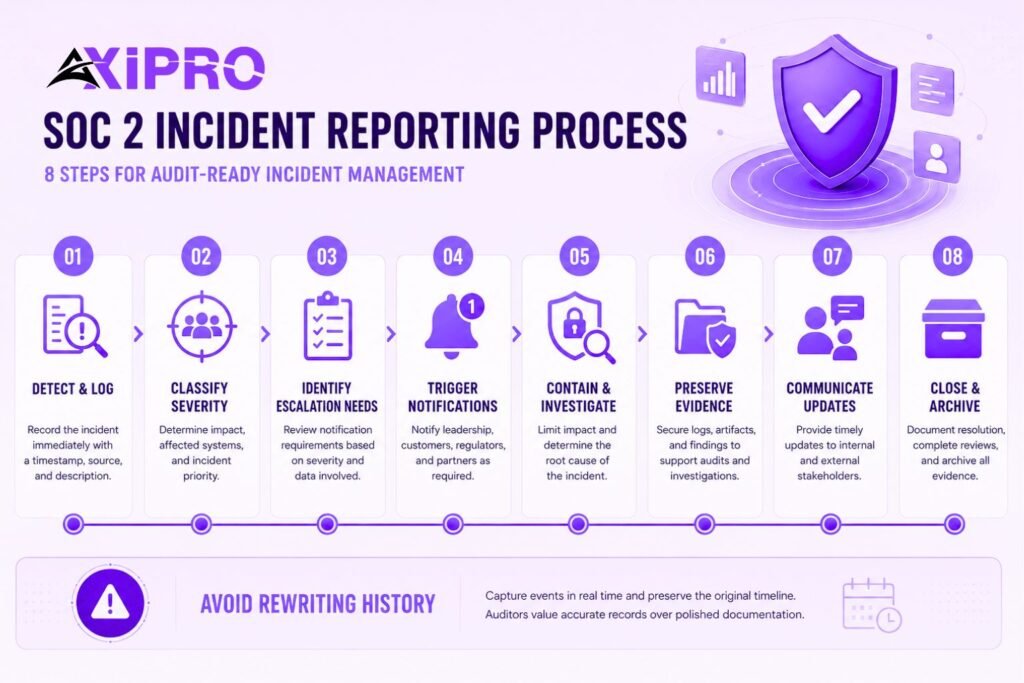
The following sequence maps cleanly to the lifecycle in NIST’s Computer Security Incident Handling Guide (SP 800-61), which auditors widely recognize as authoritative. NIST withdrew Revision 2 in April 2025 and released Revision 3, which reorganizes the lifecycle around the six functions of the Cybersecurity Framework 2.0. The underlying steps below remain the same; the framing simply shifts toward continuous risk management.
Step 1: Detect and Log the Incident
Detection comes from monitoring tools, alerts, or a human report. The moment that matters for the audit is when the event enters your system of record. Log it immediately with a timestamp, the source of detection, and an initial description. The first entry sets the clock that every later step is measured against.
Step 2: Classify Incident Severity and Scope
Apply your severity matrix and record the rationale. Scope means identifying which systems, data, and users are affected. Classification is a decision point, so capture who made it. This is the field auditors check most often, because it determines whether your response time was appropriate.
Step 3: Identify Notification and Escalation Requirements
Severity and data type together determine who must be told and how fast. A P1 involving personal data triggers a different set of obligations than a P3 affecting internal logs. Map these triggers in advance so the on-call responder is reading a decision tree, not improvising under pressure.
Step 4: Trigger the Incident Notification Workflow
Execute the notifications your triggers call for: internal leadership, affected customers, regulators, and partners as required. Record each notification with a timestamp and recipient. The notification itself is a control; the record of it is the evidence.
Step 5: Contain and Investigate the Incident
Containment stops the bleeding; investigation establishes what happened. Document actions as you take them, not from memory afterward. Contemporaneous notes carry far more weight than a tidy narrative reconstructed days later.
Step 6: Preserve Evidence and Document Findings
Preserve logs, forensic images, and artifacts in a way that maintains their integrity. Findings should answer what was affected, how, and what was done. This documentation feeds both the audit and any potential legal or regulatory process.
Important: The single most common documentation failure is the after-the-fact rewrite. Teams resolve an incident, then clean up the ticket to look orderly, overwriting the messy real-time timeline. Auditors can usually tell, because timestamps stop matching the sequence of events. Capture the timeline live, however ugly, and never edit history. An honest, imperfect record beats a polished, implausible one every time.
Step 7: Communicate With Internal and External Stakeholders
Communication continues through the incident, not just at the trigger point. Keep internal stakeholders updated on status and external parties informed per your commitments and obligations. Consistency between what you told customers and what your records show is itself a tested control.
Step 8: Close the Incident and Archive All Evidence
Formal closure requires a documented decision that the incident is resolved, the resolution, and a pointer to the post-incident review. Archive the complete record so it can be retrieved during the audit window. An incident that is fixed but never formally closed reads as an open finding.
Key Roles and Responsibilities in the SOC 2 Incident Reporting Process
Defining Ownership Within Your Incident Response Team
Clear roles prevent the two failure modes auditors see most: everyone assuming someone else owns the response, or several people acting without coordination. Define an incident commander or lead, technical responders, a communications owner, and an executive escalation point. Smaller organizations can combine these roles, provided the responsibilities are still named and assigned.
How Responsibilities Map to SOC 2 Controls
CC7.4’s points of focus explicitly call for assigned roles and responsibilities for the design, implementation, and execution of the incident response program, including the use of external resources where needed. Mapping each role to the criteria it supports gives the auditor a clean line from your org chart to the control objective, and saves you scrambling during fieldwork. Our SOC 2 compliance guide includes a sample role-to-criteria mapping you can adapt for your organization.
Documentation and Evidence Requirements for SOC 2 Audit Readiness
What Records Must Be Maintained Throughout the Reporting Process?
Maintain incident tickets, severity classifications, escalation and notification logs, investigation notes, evidence preservation records, post-incident reviews, and closure approvals. Each record needs a timestamp and an owner. The complete set, in sequence, is what auditors call the evidence chain.
How to Build an Audit-Ready Evidence Chain
An evidence chain links each step to the next so an auditor can follow one incident from detection to closure without gaps. Use a single system of record where possible. When a ticket references a notification, link to the actual message. When a closure references a review, link to the document. Traceability is the property auditors test, and broken links are the most common reason a sample fails.
Build a one-page “incident binder” template per incident that links every artifact in order: detection log, classification, escalation, notifications, investigation notes, evidence, review, closure. When the auditor requests a sample, you hand over one self-contained package instead of hunting across Slack, email, and three ticketing tools. Teams that do this routinely cut audit fieldwork time substantially and almost never get evidence-gap findings.
Common Audit Findings Related to Incident Reporting Documentation
Recurring findings include incidents that were handled but never formally logged, classifications applied inconsistently, notifications made but not recorded, missing or unsigned post-incident reviews, and timestamps that contradict the stated timeline. Every one of these is a documentation failure rather than a response failure, which is the frustrating irony: teams often respond well and still take the exception because they cannot prove it.
Notification Requirements Within the SOC 2 Incident Reporting Process
When Must Incidents Be Reported to Affected Parties?
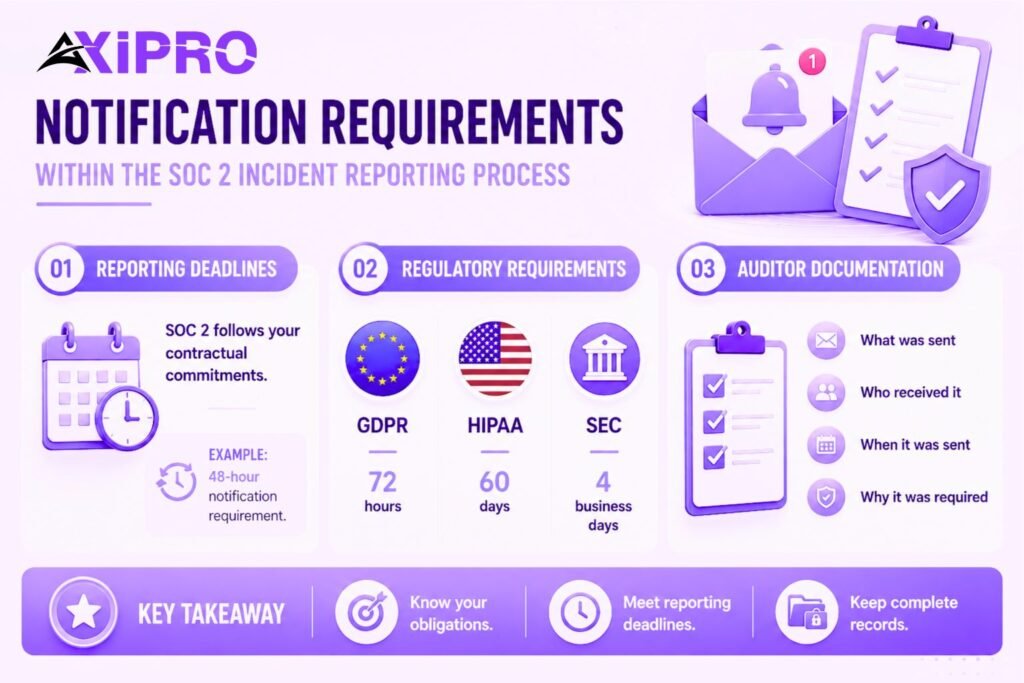
SOC 2 itself does not set a universal notification deadline. It requires that you honor the commitments you have made, which usually live in customer contracts and your own published policies. If your master service agreement promises notification within 48 hours of confirming a breach, that promise becomes the standard the auditor holds you to.
Regulatory and Contractual Notification Obligations
External law often imposes harder deadlines than SOC 2. The EU’s General Data Protection Regulation requires controllers to notify the supervisory authority of a personal data breach without undue delay and, where feasible, within 72 hours of becoming aware of it under Article 33, with affected individuals notified under Article 34 when the risk is high. The clock starts at awareness, not at the end of the investigation.
Regulators treat late notification as a separate violation: the Irish Data Protection Commission fined Bank of Ireland EUR 463,000 in March 2024 specifically for failing to report within the window. Your SOC 2 reporting process should encode these external deadlines as triggers, not leave them to be remembered mid-incident.
If your organization operates in the United States, the landscape is more fragmented. The HIPAA Breach Notification Rule requires covered entities to notify affected individuals within 60 days of discovering a breach, and the SEC’s cybersecurity incident disclosure rules require public companies to report material incidents within four business days. Each jurisdiction adds a layer your incident triggers must account for. Build a simple reference table inside your runbook that maps data type and geography to the applicable notification window, so the on-call responder never has to go looking for it at 2 a.m.
How to Document Notification Actions for Auditors
For each notification, record what was sent, to whom, when, and under which obligation it was made. Keep the actual notice, not just a log entry stating one was sent. Where a deadline was missed, document the reason, because regulators and auditors both accept a reasoned justification far more readily than silence.
Root Cause Analysis and Post-Incident Review
Conducting a Post-Incident Review That Satisfies SOC 2 Requirements
A post-incident review is the control that turns an incident into improvement, and auditors look for it specifically. Hold it within a defined window after closure, involve the people who responded, and document what happened, what worked, what did not, and what changes follow. The review should produce assigned action items with owners and dates, not just observations. A review that generates no action items is, at best, a missed opportunity and, at worst, a signal that the process is going through the motions.
How Root Cause Analysis Feeds Back Into the Reporting Process
Root cause analysis asks why the incident was possible, not merely what occurred. A useful framework here is the Five Whys technique, which systematically traces a surface-level failure back to its underlying cause. The findings should feed back into your controls: a recurring detection gap becomes a monitoring change, a slow escalation becomes a revised trigger. This feedback loop is what CC7.3’s expectation to evaluate the effectiveness of response procedures on a periodic basis is really asking for.
Using Lessons Learned to Improve Your Process Continuously
Track action items to completion and revisit them in the next review cycle. An auditor who sees that a lesson from one incident produced a documented control change, which then prevented or improved handling of a later incident, sees a process that genuinely operates. That narrative is more persuasive than any policy document.
Testing and Validating Your Incident Reporting Process
How to Use Tabletop Exercises to Test the Reporting Workflow
A tabletop exercise walks a realistic scenario through your process without touching production. Pull stakeholders from engineering, security, legal, communications, and leadership, then run a scenario and observe whether detection, classification, escalation, and notification actually flow as written. Most SOC 2 auditors expect at least one incident response tabletop per year, with an agenda, attendee list, and documented outcomes. The Cybersecurity and Infrastructure Security Agency (CISA) publishes free tabletop exercise packages that are a reasonable starting point for organizations building this practice for the first time.
What Auditors Look for When Reviewing Tested Processes
Auditors want proof the test happened and that it produced something. The agenda and attendance list show it occurred; the findings and resulting action items show it mattered. A tabletop that surfaces no gaps and changes nothing reads as theater. One that exposes a weak escalation path and triggers a fix demonstrates a living process.
How Often Should the Incident Reporting Process Be Reviewed?
Review the process at least annually, and again after any significant incident or material change to your systems or organization. Annual review is the baseline most auditors expect; event-driven review is what distinguishes a mature program. Record the review with a date and the reviewer’s name so the activity itself is auditable.
Common Mistakes in SOC 2 Incident Reporting Processes
Unclear Escalation Paths and Notification Triggers
When escalation depends on someone’s judgment in the moment, response times become inconsistent and the auditor finds it. Encode triggers explicitly: this severity level, this data type, this system means these people are notified within this window. Ambiguity in the runbook becomes inconsistency in the ticket history, and inconsistency is exactly what auditors sample for.
Insufficient Documentation and Evidence Gaps
Strong response with weak records still fails. If the ticket lacks timestamps, the classification lacks an owner, or the notification lacks a saved copy, the control is effectively unprovable. Treat documentation as part of the response, not an afterthought.
Failure to Test or Update the Reporting Process
A process written once and never exercised drifts away from how the team actually operates. Tools change, people leave, and the runbook quietly goes stale. Untested processes are a frequent source of exceptions because the documented flow no longer matches reality. According to Verizon’s Data Breach Investigations Report, the gap between capability on paper and capability in practice is one of the most consistent contributors to delayed detection and response — the exact failure mode a live tabletop exercise is designed to expose.
Staff Unfamiliarity With Reporting Procedures
If responders do not know how to raise or classify an incident, the best-designed process never engages. Train staff on reporting procedures, keep the runbook accessible, and capture training records, since the auditor may ask for them under the communication criteria. Awareness training does not need to be elaborate; a fifteen-minute annual session with a sign-off sheet is enough to demonstrate the program is active.
How Auditors Evaluate Your SOC 2 Incident Reporting Process
What Auditors Specifically Test During a SOC 2 Review
The depth of testing depends on report type. A Type 1 report assesses whether controls are designed effectively at a single point in time. A Type 2 report assesses whether they operated effectively across a period, usually three to twelve months, and that is where reporting processes face real scrutiny.
In a Type 2 review, auditors define the population of incidents over the period, select samples weighted toward higher-risk cases, and trace each one through your records. A single exception in a high-risk area can produce a finding on its own, so consistency across every incident matters more than excellence on a chosen few. There is no credit for handling nine incidents perfectly if the tenth has no post-incident review and a missing escalation log.
How to Demonstrate a Functioning Reporting Process to Auditors
Lead with the system of record, not the policy. Show one real incident end to end, then show how you detect failures and remediate them. Have your population list, sample evidence, timestamps, and remediation proof ready before fieldwork begins.
The organizations that sail through are not the ones with the most incidents or the fewest; they are the ones whose records tell a complete, consistent, time-stamped story for every incident the auditor picks. For a full breakdown of how to prepare your evidence package ahead of a Type 2 examination, see our SOC 2 compliance guide.
Conclusion
A SOC 2-ready incident reporting process is less about the elegance of your policy and more about the integrity of your evidence trail. Define an incident clearly, classify it consistently, encode your escalation and notification triggers in advance, document every step with timestamps and owners, close incidents formally, and feed lessons learned back into the controls.
Map all of it to the CC7 criteria, test it with a tabletop at least once a year, and keep the records traceable from detection to closure. Do that, and when the auditor asks you to walk through an incident from last quarter, the answer is already written down.
Frequently Asked Questions
What triggers the incident reporting process under SOC 2?
The process triggers when a detected security event crosses the threshold your policy defines for a reportable incident, meaning it compromises, or could compromise, the confidentiality, integrity, or availability of systems or data. The exact threshold is yours to set, but it must be applied consistently. Auditors will test that consistency by sampling multiple incidents and checking whether similar events received similar classifications.
How quickly must a security incident be reported under SOC 2?
SOC 2 sets no universal deadline; it holds you to the commitments in your contracts and policies. External regulations may impose firm limits, such as GDPR’s 72-hour notification window to a supervisory authority. Encode those external deadlines into your internal triggers so they are never left to memory during a live incident.
Does SOC 2 require a formal incident reporting policy?
Effectively yes. The Trust Services Criteria expect documented procedures for evaluating and responding to incidents, and auditors will ask for the policy as a starting point. Design without documentation cannot be tested, so a written policy is the practical baseline.
How does the incident reporting process differ from an incident response plan?
The response plan is the broader playbook covering how you contain, eradicate, and recover from incidents. The reporting process is the subset focused on logging, classifying, escalating, communicating, and recording. Reporting produces much of the evidence an auditor samples, which is why it deserves its own documented attention rather than a paragraph buried inside a larger plan.
What is the difference between incident detection and incident reporting in SOC 2?
Detection is identifying that an event has occurred, through tools, alerts, or human observation. Reporting is the documented process that follows: capturing the event in your system of record, classifying it, escalating it, and tracking it to closure. Detection without reporting leaves no audit trail, which means the event effectively did not happen as far as a Type 2 examination is concerned.
Do third-party vendor incidents need to be reported under SOC 2?
Yes, when a vendor or subprocessor incident affects your data or systems. The criteria extend your responsibility into the supply chain through CC9.2, so your reporting process should include a path for receiving, assessing, and recording vendor-reported incidents. This is an area that catches organizations off guard, particularly when a vendor notifies them informally and no formal intake record is ever created.
How should incidents be logged to satisfy SOC 2 auditor expectations?
Log each incident in a consistent system of record with a detection timestamp, source, severity classification and the name of the person who assigned it, scope, escalation and notification records, investigation notes, and a formal closure entry. Every field should carry a time reference and an owner so the full chain is traceable during sampling. Gaps in any of these fields are the most common cause of evidence exceptions in Type 2 reviews.