31% of organizations have caught former employees accessing SaaS applications after their departure (source). Seventy percent of intellectual property theft happens in the ninety days surrounding a resignation announcement. The pattern is so consistent that auditors now treat termination day as one of the highest-risk windows on the security calendar.
This article is a working employee offboarding checklist for IT, security, and HR teams who want to close that window cleanly. It walks through ten steps that revoke access without leaving gaps, then covers edge cases (remote workers, hostile exits, lost devices), the manual-versus-automation tradeoff, and post-offboarding monitoring. Use it as a baseline and adapt it to your environment.

What Is Employee Offboarding and Why Does Access Revocation Matter?
Employee offboarding is the structured process of separating a person from an organization: removing their access, recovering company property, documenting their exit, and updating records. The access revocation piece is the part where most programs fail quietly.
Accounts get disabled in the identity provider but stay active in a dozen SaaS tools. Badges get collected but VPN tokens stay valid. The person is gone; the keys to the building are not.
Why Employee Offboarding Is a Critical Security Risk
Offboarding fails because access has multiplied faster than the processes designed to manage it. The average enterprise now operates somewhere between 275 and 660 SaaS applications depending on size, with employees touching dozens of them each week. Each application is a separate place that needs to be cleaned up, and each one creates an independent point of failure.
The departing employee is a particularly acute version of this risk because the motivation to walk away with something often peaks during the same window that access is supposed to be revoked.
The Cost of Leaving Access Open After Departure
The financial picture is well documented. The 2025 Ponemon Cost of Insider Risks report puts the average annual cost of insider-related incidents at $17.4 million per organization, with containment taking an average of 81 days. Even when a departed employee never actively misuses their access, the existence of a forgotten account is enough to compromise a SOC 2 audit, trigger a breach notification, or create the credentialed beachhead that an outside attacker eventually exploits.
The cases keep appearing. Cash App was breached in 2022 when a former employee accessed the records of 8 million customers after leaving. In May 2024, FinWise Bank disclosed that a former employee accessed internal systems after departure because access had never been fully revoked. Intel sued a former engineer in 2024 for downloading roughly 18,000 sensitive files in the days before he left.
Ponemon’s 2025 report found that containment costs scale steeply with time. Incidents resolved in under 30 days averaged about $11 million, while those over 90 days averaged $17 million. The biggest variable is not detection capability. It is how fast access actually came down on day one.
Compliance and Legal Implications of Incomplete Offboarding
Access revocation is not a “best practice.” It is an explicit control requirement in nearly every framework against which an organization is likely to be audited. NIST SP 800-53 control PS-4 requires that on termination, organizations disable system access within an organization-defined time period, terminate or revoke any authenticators, and retrieve organizational property.
ISO/IEC 27001 includes equivalent expectations under its Annex A controls for termination of employment. The AICPA Trust Services Criteria for SOC 2 cover this under Common Criteria CC6.2 and CC6.3, and auditors routinely pull a sample of terminated employees and verify timestamps in the identity provider against the HR system.
GDPR adds a separate dimension. If a former employee still has access to the personal data of EU residents, that constitutes unauthorised processing under Article 32, and it is the controller’s responsibility, regardless of intent. HIPAA does the same for protected health information. Whatever the framework, the question an auditor or regulator will ask is the same: how quickly was access revoked, and can you prove it?
Who Is Responsible for Employee Offboarding?
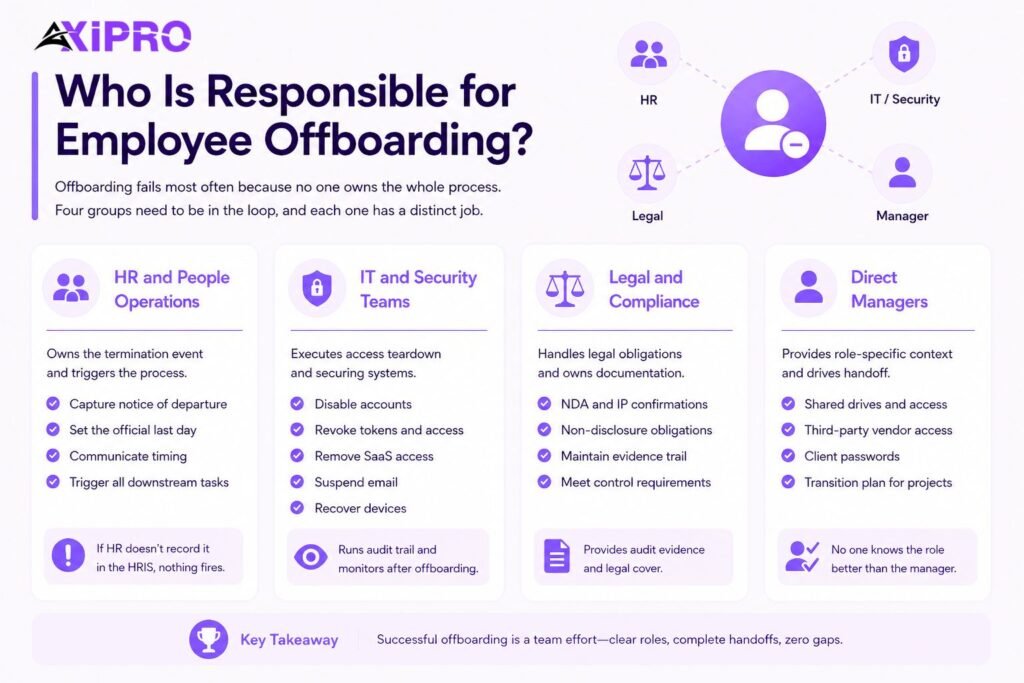
Offboarding fails most often because no one owns the whole process. Four groups need to be in the loop, and each one has a distinct job.
HR and People Operations
HR is the source of truth for the termination event. Their job is to capture notice of departure, set the official last day, communicate timing to the rest of the business, and serve as the trigger that starts every downstream task. If HR does not record the termination in the HRIS, nothing automated will fire.
IT and Security Teams
IT executes the access teardown. They disable accounts in the identity provider, revoke SSO and OAuth tokens, remove SaaS application access, suspend email, and recover devices. Security teams typically run the audit trail and post-offboarding monitoring, and they are the ones answering when an account flagged six months later turns out to belong to a person who left in March.
Legal and Compliance
Legal handles NDA reminders, IP assignment confirmations, non-disclosure obligations, and any contractual surprises. Compliance owns the documentation: the evidence trail that proves the offboarding actually happened and met the relevant control requirements. For regulated industries this becomes audit evidence; for everyone else it becomes legal cover.
Direct Managers
Managers know things HR does not. They know which shared drives the person owned, which third-party vendors they had standing access to, which client passwords they may have rotated themselves, and which projects need a transition plan. A solid offboarding process forces the manager into the workflow with a checklist of role-specific items, because no central team can guess them.
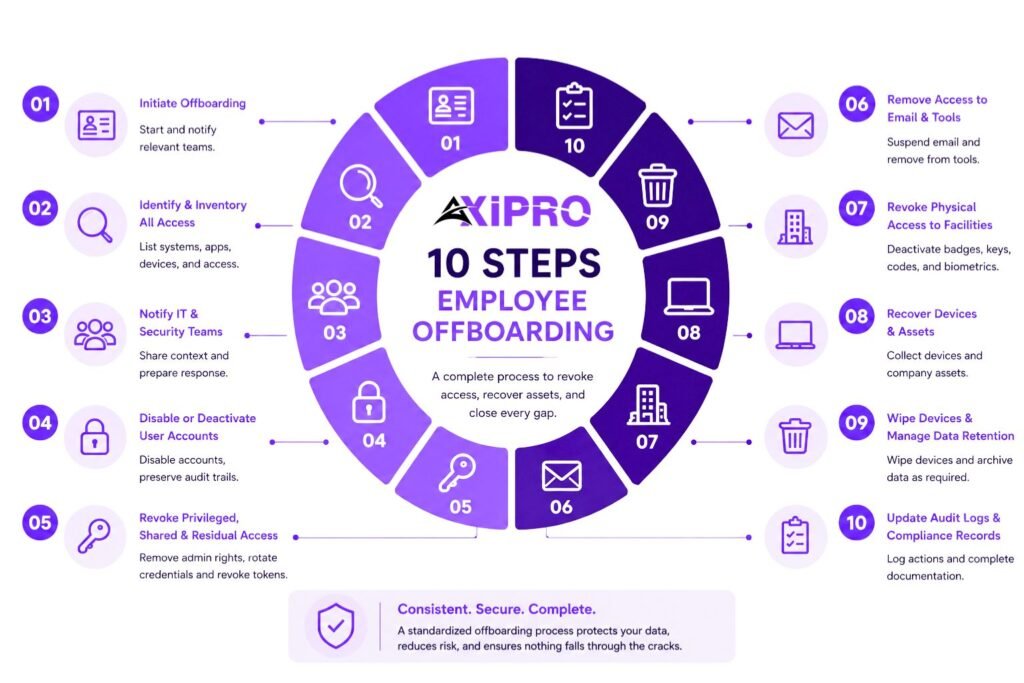
Employee Offboarding Checklist: 10 Steps to Revoke Access Without Leaving Gaps
This is the core sequence. The order matters: starting with notification and inventory before disabling accounts means you do not lock the person out of a system you still need them to hand off.
Step 1: Initiate Offboarding Immediately Upon Notice of Departure
The moment notice is given — resignation, termination decision, or end of contract — the offboarding workflow should start. This means logging the termination date in the HRIS, opening a ticket in the IT service management system, and notifying the relevant teams. Delays here are where most gaps begin. If the offboarding ticket is opened on the last day, you are already behind.
Step 2: Identify and Inventory All Access Points
Before touching anything, build a complete inventory of what the person has access to. Pull from the identity provider, the HRIS, the SSO logs, the SaaS management platform, the device management system, and any local app owners’ records. Pay special attention to access granted outside central IT: shared credentials, personal API tokens, third-party tools paid for on a corporate card, and physical keys or codes.
Step 3: Notify IT and Security Teams Without Delay
IT and security need lead time. Sending the notification four hours before the person walks out the door is not enough for anything but the most basic accounts. The window should be measured in days, with hostile or high-risk exits flagged immediately. Security should know whether the departure is amicable or contested, because the response differs significantly between the two.
Step 4: Disable or Deactivate User Accounts Across All Systems
At the agreed cutover time — typically end of business on the last day, or immediately for involuntary terminations — the identity provider account is disabled. This kills SSO-based access to most SaaS tools in one stroke if the environment is well-integrated. For non-SSO applications, each one needs to be disabled individually. Disable, do not delete. Deletion destroys audit evidence and breaks downstream references; deactivation preserves the trail while cutting access.
Step 5: Revoke Privileged, Shared, and Residual Access
Privileged accounts are the highest-risk category and the easiest to miss. Rotate any shared service account credentials that the person knew. Revoke admin access to AWS, GCP, Azure, GitHub, Salesforce, and any other system where they held elevated permissions. Pay particular attention to standing access to production environments, infrastructure-as-code repositories, customer data stores, and finance systems.
Personal API keys and OAuth tokens are an underrated risk. A developer who created a personal access token tied to a production system can still authenticate after their main account is disabled, because the token is its own credential. The same applies to OAuth grants in tools like Google Workspace, Slack, and GitHub: revoke them explicitly.
Important: Disabling the identity provider account does not automatically revoke active session cookies, OAuth refresh tokens, or personal access tokens. A user who is logged in when their account is disabled may stay logged in until their session expires. Force a session reset in every system where the option exists.
Step 6: Remove Access to Email, Collaboration Tools, and Telephony
Email is usually handled by suspending the mailbox and configuring forwarding (or an auto-reply) for a defined period. Collaboration tools — Slack, Teams, Zoom, Notion, Confluence — need their own treatment, especially guest access in external workspaces the person was invited to as part of customer or partner work. Telephony often gets overlooked: voicemail, call forwarding, soft phone clients, and any direct-dial numbers should be reassigned or deactivated.
Step 7: Revoke Physical Access to Facilities and Buildings
Badge access, parking access, keys, alarm codes, and any biometric enrolments need to be deactivated. For shared codes — server room PINs, conference room codes — rotate them if the departing person had standing access. For sites with visitor access controls, remove them from approved visitor lists at partner offices and customer sites where they had ongoing entry.
Step 8: Recover Company Devices and Assets
Laptops, phones, tablets, hardware tokens, smart cards, external drives, monitors, peripherals, and any specialty equipment need to be inventoried and recovered. The recovery plan should be set up before the last day, not improvised on it. For remote employees, prepaid shipping labels and chain-of-custody documentation are essential — this is covered in more detail in the remote offboarding section below.
Step 9: Wipe Devices and Manage Data Retention
Once devices are recovered, they should be wiped to manufacturer specifications before reissue. Mobile device management systems can trigger a remote wipe before the device is ever returned, which is the right move for sensitive roles and for any device that cannot be physically retrieved. Email and personal data on the device should be archived according to the organization’s data retention policy, which is often dictated by legal hold or regulatory requirements.
Step 10: Update Audit Logs, Documentation, and Compliance Records
The final step is closing the loop. Every action above should be logged with a timestamp, the actor who performed it, and the system affected. The completed offboarding record becomes evidence in the next audit and the reference point if an incident investigation later traces back to this person’s access. No documentation, no audit pass. See the checklist section below for a ready-to-use summary of what to capture.
Pro Tip: Identify and Inventory All Access Points
Build this inventory once for each role, not each person. Most engineers have similar access patterns, as do most sales reps. A role-based access map turns a frantic last-minute hunt into a five-minute confirmation that nothing unusual is attached to this individual.
Special Considerations for Remote Employee Offboarding
Remote offboarding strips out the physical handoff that used to anchor the process. There is no exit interview where the laptop changes hands across the table, no last-day badge return at the front desk. Everything has to be coordinated logistically, and each gap in that coordination is a security gap.
Device Return Logistics and Chain of Custody
The standard approach is a prepaid shipping kit sent to the employee’s home address, with tracking and signature confirmation. For higher-risk roles, a courier with chain-of-custody documentation is worth the cost. The device should be tracked from the moment it leaves the employee’s hands until it is logged back into the IT asset system, with timestamps at each handoff.
If the device contains sensitive data, a remote wipe should be triggered the moment the access cutover happens, not when the device is received. The wipe should be verifiable: an MDM audit log showing the device was cleared, ideally with a confirmation pulled from the device itself before it is reimaged or destroyed.
Revoking Access for Remote Workers Across Time Zones
A 5 PM Friday cutover in San Francisco is a Saturday morning event for a team member in Singapore. When access is revoked matters because it determines what windows of misuse are possible. The right answer is to set the cutover to the employee’s local end-of-business and to staff the offboarding window with someone who can monitor it in real time — not to default to headquarters time and hope for the best.
Handling Hostile or Unresponsive Departures Remotely
In a hostile remote departure, the device may never come back. The plan has to assume that outcome. Trigger the remote wipe, revoke all access immediately, rotate any shared credentials the person knew, and document the device as unrecovered. Where the device contained regulated data, this may trigger a breach notification obligation depending on jurisdiction — legal should be looped in before that determination is made.
How to Handle Edge Cases and High-Risk Offboarding Scenarios
Most offboarding processes are designed around the friendly, two-weeks-notice scenario. The dangerous scenarios are the ones that do not fit that template.
Sudden Resignations or No-Notice Departures
When someone resigns and walks out the same day, the offboarding workflow has to compress from days into minutes. The cutover happens immediately. Some organizations build a separate “rapid offboarding” runbook for this case, with a smaller set of steps that can be executed in fifteen minutes by one IT staff member: identity provider disable, session revocation, email suspension, and badge deactivation. The rest follows on a normal timeline.
Lost, Stolen, or Unreturned Devices
Treat any device not recovered within a defined window — typically 7 to 14 days for amicable departures, 24 hours for hostile ones — as compromised. Trigger the wipe if it is still possible, flag the device for blocklisting on the corporate network, and escalate to legal if there are reasons to believe the device is being used. Insurance and asset write-offs follow once the device is officially declared lost.
Cross-Border and International Offboarding Challenges
International offboarding adds layers that domestic processes ignore. Local employment law in the EU, UK, and parts of Asia-Pacific limits what can be inspected on a device before return. Data residency rules may prevent moving certain records out of the country during the offboarding investigation. Tax and immigration consequences can apply if the person held a work visa tied to the role.
The practical implication is that offboarding processes for international employees should be reviewed by local counsel before they are needed, not improvised in the moment.
A process that works cleanly in California may be unlawful in Germany. The GDPR Article 32 obligations alone are enough to require a tailored approach for any employee handling EU personal data.
Manual vs. Automated Offboarding: Why Automation Reduces Access Gaps
The single biggest predictor of whether offboarding closes cleanly is whether the workflow is automated. Manual processes work fine in a 20-person company. They start failing at 200 and break completely at 2,000.
Limitations of Manual Offboarding Processes
Manual offboarding relies on a chain of human handoffs: HR emails IT, IT emails app owners, and app owners click through their dashboards. Every link in the chain is a place where something gets forgotten. Smaller apps with no direct integration tend to be the ones that get missed, which means the long tail of SaaS tools — often the majority by count — is where orphaned accounts accumulate.
How Offboarding Software Streamlines Access Revocation
Automated offboarding flows trigger from a single event — typically the termination status change in the HRIS — and fan out to every connected system. Identity providers like Okta and Microsoft Entra ID support lifecycle workflows that disable accounts, revoke sessions, and trigger downstream deprovisioning across hundreds of SaaS applications. SaaS management platforms can extend coverage into apps that do not natively integrate with the identity provider.
Integrating IT and HR Systems for Seamless Coordination
The integration that matters most is between the HRIS and the identity provider. When a termination is recorded in Workday, BambooHR, or whatever HR system the organization uses, the identity provider should pick it up automatically and start the deprovisioning sequence. Without that integration, every other improvement is bottlenecked on someone remembering to send an email, which is exactly the kind of single point of human failure that creates the incidents described at the top of this article.
Security Monitoring After Offboarding Is Complete
Offboarding is not finished when the last checkbox is ticked on day one. The follow-up monitoring is what catches the gaps the original process missed.
Running Post-Offboarding Access Certifications
Within 30 to 60 days of departure, run an access certification against every system the person was known to use. The certification looks for any account, token, or grant that was missed in the initial cleanup. For sensitive roles, repeat this at 90 days. Each pass tends to find something, especially in tools that are not centrally managed.
Monitoring for Residual or Orphaned Accounts
Orphaned accounts are the long-term hazard. Industry research has found that around a quarter of accounts in audited environments belong to stale enabled users who have not logged in for over 90 days, and in some organizations, the figure runs much higher. Periodic sweeps of the identity provider and connected SaaS apps to identify and disable stale accounts close this gap on an ongoing basis, even when individual offboardings miss something.
Most orphaned accounts are not the freshly departed employee. They are the contractor whose engagement ended two years ago, the intern who left after the summer, or the person who transferred teams and never had their old access removed. A quarterly access review focused on time-since-last-login finds more orphaned accounts than any individual offboarding ever will.
Employee Offboarding Checklist Template
A practical checklist needs to fit on a single screen and cover every category without burying the user in detail. The four groupings below map to the responsible teams.
HR and Administrative Tasks
Record termination in the HRIS with the official last day. Notify IT, security, the direct manager, finance, and legal of the departure. Schedule and conduct the exit interview. Confirm final payroll, benefits transition (COBRA or local equivalent), and any outstanding expense reimbursements. Send NDA and IP assignment reminders.
IT and Security Tasks: Disable All Access
Disable the identity provider account at the agreed cutover time. Revoke active sessions, OAuth tokens, and personal access tokens. De-provision SaaS application access through SSO and through direct connectors. Suspend email and configure forwarding or auto-reply. Rotate shared credentials and service account passwords that the person knew. Revoke physical access badges, building keys, and parking access. Disable VPN, MFA tokens, and remote access tools.
Hardware and Asset Recovery
Inventory all assigned devices — laptop, phone, tablet, peripherals, hardware tokens, smart cards. Coordinate return logistics (in-person handoff for office workers, prepaid shipping kits for remote employees). Trigger remote wipe on devices before or upon receipt. Confirm device condition and update the asset management system.
Documentation and Compliance Records
Log every action with timestamp, actor, and system. Retain offboarding records according to the data retention policy. File completed offboarding evidence with the audit trail used for SOC 2, ISO 27001, or other applicable framework. Schedule the 30-day and 90-day post-offboarding access certifications.
A Final Word on Closing the Gap
Offboarding is one of the few security processes where the cost of getting it wrong is concrete, and the cost of getting it right is mostly process discipline. The frameworks are clear, the tooling is mature, and the failure modes are well understood.
What separates a clean program from a leaky one is usually not capability. It is whether the workflow is owned end-to-end and triggered automatically by the right system of record.
The ten steps above are the core sequence. Adapt them to the size and risk profile of the organization, and revisit them whenever a new system enters the environment.
Frequently Asked Questions About Employee Offboarding and Access Revocation
What access points should be revoked first during employee offboarding?
The identity provider account is the highest-priority target because it is the gatekeeper for SSO-based access to most modern SaaS applications. Disabling it cuts the broadest set of access in a single action. From there, the priority order is privileged accounts (admin access to cloud platforms, code repositories, finance systems), shared credentials the person knew, then email and collaboration tools, then non-SSO applications, then physical access. Sessions and OAuth tokens should be explicitly revoked alongside the identity provider step, because they can persist after the account itself is disabled.
How quickly should access be revoked when an employee leaves?
Most security frameworks expect access to be revoked the same day, typically within 24 hours of the official termination. SOC 2 auditors commonly sample termination events and look for revocation within a one-business-day window. NIST SP 800-53 leaves the exact period to the organization but expects it to be defined and met consistently. For hostile or high-risk terminations, the target is immediate revocation: minutes, not hours.
What happens if you forget to revoke an employee's access?
In the best case, nothing happens and the account becomes an orphaned record that surfaces during the next access review. In the worst case, the former employee uses the access to take data, sabotage systems, or sell credentials. The FinWise Bank case in 2024 and the Cash App breach in 2022 are both examples of former employees retaining access and using it. Beyond the direct risk, an unrevoked account is an audit failure for SOC 2, ISO 27001, and most other frameworks, and a likely violation of GDPR or HIPAA if the access exposes personal or health data.
How do you offboard a remote employee securely?
Treat the device as the first risk to manage: trigger a remote wipe at the cutover time and ship a prepaid return kit with tracking and signature confirmation. Revoke all access on the schedule the employee’s local time zone implies, not headquarters time. Conduct the exit interview by video and document it the same way an in-person interview would be documented. For hostile remote departures, assume the device may not come back and plan accordingly.
What documentation is required during the offboarding process?
The minimum documentation for audit purposes is the official termination notice with date and time, evidence of access revocation in each affected system (timestamps from the identity provider and any non-SSO applications), confirmation of device return or remote wipe, completed exit interview record where applicable, and any final acknowledgements of NDA, IP assignment, or post-employment obligations. For regulated environments, retention periods are typically set by the framework or local law. The Trust Services Criteria for SOC 2 and ISO/IEC 27001 both specify what auditors expect to see as evidence.
What is the difference between disabling and deleting a user account during offboarding?
Disabling an account suspends access while preserving the account record, including its history and permissions. Deletion removes the account entirely. The standard practice is to disable, not delete, because deletion destroys audit evidence and can break references in other systems — file ownership, ticket assignments, log records. Accounts are typically disabled at termination and deleted only after a retention period defined by policy, often 6 to 12 months.
How does offboarding differ for contractors versus full-time employees?
The mechanics are similar but the timing and ownership differ. Contractor access is typically tied to a defined engagement end date rather than a termination event, which means the trigger is the contract end (or extension) rather than an HR status change. Contractors are also more likely to use their own devices, which limits the device recovery step and shifts the focus to access revocation and data return obligations defined in the contract. Contractors are more likely to have access provisioned outside the central identity provider, which makes the inventory step in the checklist particularly important.