Table of Contents

Reach SOC 2 Compliance in 6 Weeks or Less.

  /

  / Drata Agent Guide: Installation, Setup & Sync Troubleshooting

Drata Agent Guide: Installation, Setup & Sync Troubleshooting

The Drata Agent is the part of Drata’s compliance stack that actually touches employee devices. It is a lightweight, read-only desktop application that runs in the system toolbar, reads a narrow set of security configuration settings, and reports them back to the Drata platform on a daily schedule. If a SOC 2 or ISO 27001 audit depends on showing that every endpoint has disk encryption, screen lock, antivirus, a password manager, and automatic updates enabled, the Agent is the thing that produces that evidence.

This guide covers exactly what it does, how it works, how to install it on macOS, Windows, and Linux, and what to do when it stops syncing.
drata agent guide

What Is the Drata Agent?

The Drata Agent is a desktop application built with Electron, the same framework used by Slack, VS Code, and Discord. It uses osquery, an open-source endpoint instrumentation tool created at Facebook and now maintained as a Linux Foundation project, to query the operating system for specific configuration values. The Agent runs from the system toolbar — the menu bar on macOS, the system tray on Windows, and the indicator area on Linux — and synchronises once per day with Drata’s backend.

The full source code of the Agent has been open source since June 2023. Anyone can audit the code on Drata’s GitHub organisation, including security teams that need to validate it before deploying to the fleet.

The Agent supports the latest two major versions of each operating system. On macOS, that currently means macOS 26 (Tahoe) and macOS 15 (Sequoia), with Agent version 3.9.0 or higher. On Windows, it covers the two most recent stable versions Microsoft actively maintains. On Linux, only LTS distributions are supported; Ubuntu 22.04 LTS and 24.04 LTS are the current supported targets.


What the Drata Agent Does (and Does Not Do)

The Agent collects a tightly scoped list of configuration data points — specifically the items that map to typical SOC 2 and ISO 27001 device-level controls.

The Agent does read: disk encryption status (FileVault, BitLocker, LUKS); screen lock and screensaver configuration; installed antivirus or endpoint protection software; installed password manager applications; operating system version and update status; the list of installed applications and browser extensions for Chrome, Firefox, and Internet Explorer (used to detect AV and password manager presence); and the operating system identifier and machine serial number for asset attribution.

The Agent does not read keystrokes, browsing history, file contents, clipboard data, screen contents, network traffic, or any application data. Access is strictly read-only at the system-preferences level. The Agent cannot make changes to the device, push configuration, or remediate failed controls. If a check fails, the employee or IT team fixes it manually; the Agent simply observes whether the fix worked on the next sync.

Important: Read-only does not mean invisible. The Agent enumerates installed applications and browser extensions to detect antivirus and password manager presence, and this list is sent to Drata. If that level of visibility is a concern for privacy or works council requirements, address it before rollout — not after.

Reach SOC 2 Compliance in 6 Weeks or Less

Schedule Your Free SOC 2 Assessment Today

How Does the Drata Agent Work?

Once installed and registered, the Agent runs continuously in the background. It performs scheduled checks, reports results to Drata, and updates itself when new versions ship.

Synchronization Process

The Agent syncs once per day. The sync runs at the first opportunity each calendar day: typically, the first network connection after the device was off or asleep, the moment the user logs in if the Agent autostarts, or any manual trigger from the toolbar menu. The data sent is small — a structured report of the configuration values the Agent read, plus the Agent version and machine identifier. There is no telemetry of user activity.

When the sync succeeds, the device’s compliance status in Drata updates within a few minutes. When it fails, the device may show an Unable to get data status, and the corresponding controls in Drata will appear unconfirmed until the next successful sync.

Automatic Updates

The Agent updates itself. When a new version is released, the Agent shows a notification asking the user to allow the update. Updates are mandatory — running an outdated Agent eventually causes registration and sync failures. Linux installations through Ubuntu’s package manager auto-update via the system updater starting with version 3.6; AppImage installations and Arch AUR builds need to be updated manually or through the AUR helper.


Prerequisites Before Installing the Drata Agent

Before installation, three things need to be in place.

First, the device user needs an active Drata account with employee onboarding tasks assigned.

Second, the operating system must be a supported version.

Third, the user needs administrator rights on the device to install the application, since it registers a startup item.

The user will also need access to their work email during installation. Registration uses a magic-link verification flow, and the verification email arrives within a minute of clicking Register Drata Agent in the Drata UI.
Install Drata Agent - Mac

How to Install the Drata Agent on Mac

There are two practical paths on macOS: install through Homebrew Cask, or download the signed installer directly from MyDrata.

Installation via Homebrew

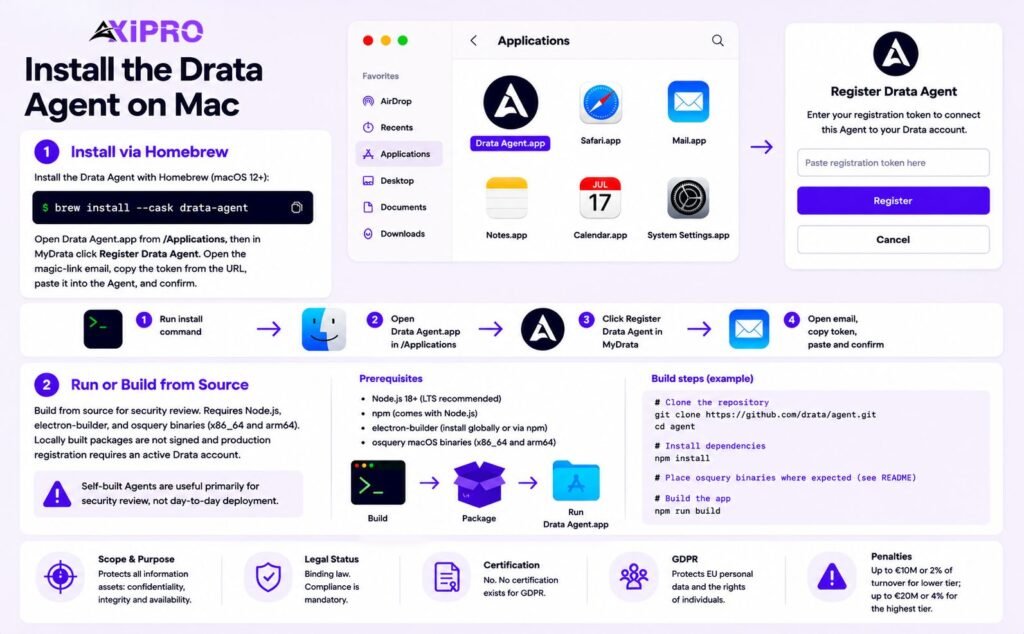
The Drata Agent is published as an official cask in the Homebrew repository, which is the cleanest install method for engineers who already use Homebrew for package management. The cask requires macOS 12 (Monterey) or newer. The install command is:

brew install –cask drata-agent

After Homebrew finishes, open Drata Agent.app from /Applications, then return to MyDrata and click Register Drata Agent. A magic-link email arrives shortly after. Open the link, copy the token portion of the URL, paste it into the Agent’s register dialog, and confirm.

Run or Build the Drata Agent on Mac

For organisations that want to build from source rather than use the published package, the GitHub repository contains the full Electron build pipeline. Build prerequisites include Node.js and electron-builder, and the osquery binaries need to be supplied separately. Drata explicitly notes that locally built packages are not signed and that production registration requires an active Drata account. Self-built Agents are useful primarily for security review, not day-to-day deployment.
How to Install the Drata Agent on Windows

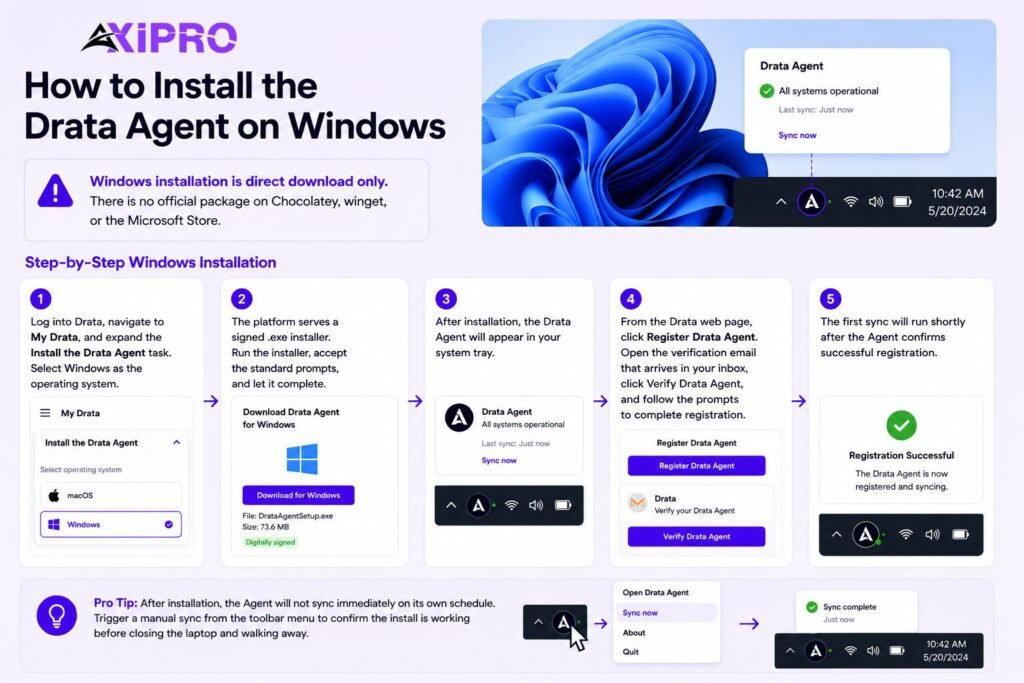
Windows installation is direct download only. There is no official package on Chocolatey, Winget, or the Microsoft Store.

Step-by-Step Windows Installation

Log in to Drata, navigate to My Drata, and expand the Install the Drata Agent task. Select Windows as the operating system. The platform serves a signed .exe installer. Run the installer, accept the standard prompts, and let it complete — the Agent will appear in the system tray.

From the Drata web page, click Register Drata Agent. Open the verification email that arrives in your inbox, click Verify Drata Agent, and follow the prompts to complete registration. The first sync will run shortly after the Agent confirms successful registration.

Pro Tip: After Installation

After installation, the Agent will not sync immediately on its own schedule. Trigger a manual sync from the toolbar menu to confirm the install is working before closing the laptop and walking away.
Install Drata Agent on Linux

How to Install the Drata Agent on Linux

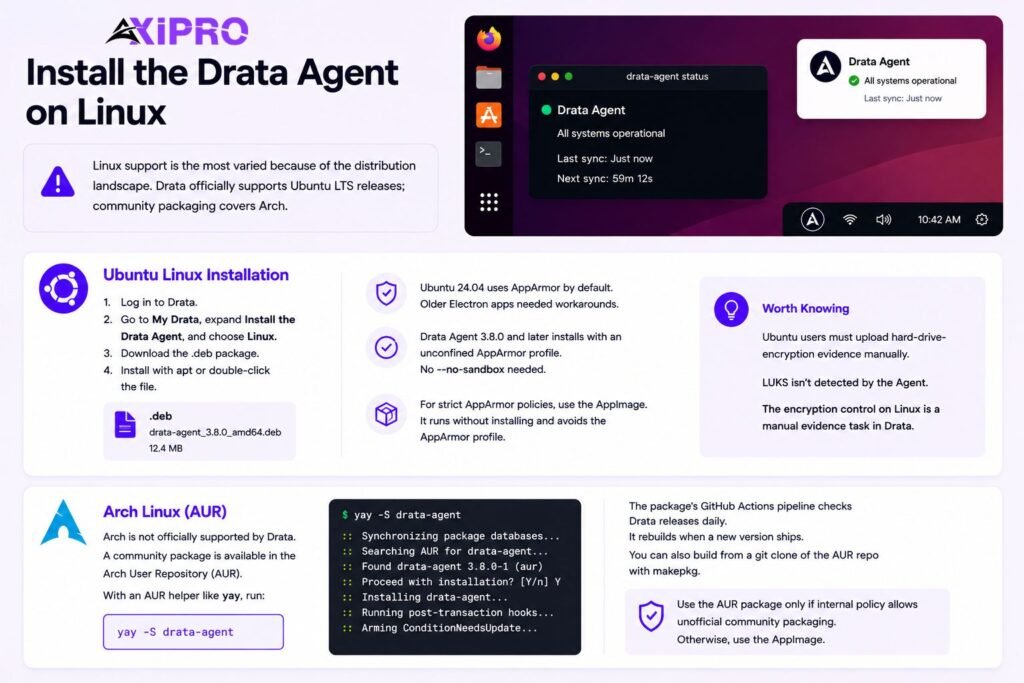
Linux support is the most varied because of the distribution landscape. Drata officially supports Ubuntu LTS releases; community packaging covers Arch.

Ubuntu Linux Installation

For Ubuntu 22.04 LTS or 24.04 LTS, log into Drata, go to My Drata, expand Install the Drata Agent, and choose Linux. The .deb package downloads from the Drata CDN. Install it with the standard apt tooling or by double-clicking through the file manager.

Ubuntu 24.04 introduced AppArmor as a default enforcement layer for many Chromium-based applications, which historically broke Electron apps that did not ship a profile. Drata Agent 3.8.0 and later install with an unconfined AppArmor profile by default, which removes the need for the older– no-sandbox workaround. If strict AppArmor enforcement is required by internal policy, the alternative is to run the Agent as an AppImage — a portable Linux executable format that bundles the application and its dependencies, runs without installing into the system, and sidesteps the AppArmor profile question entirely.

Arch Linux (AUR)

Arch is not officially supported by Drata, but a community-maintained package on the Arch User Repository repackages the official Debian release. With an AUR helper like yay installed, the command is:

yay -S drata-agent

The package’s GitHub Actions pipeline checks the Drata release feed daily and rebuilds when a new version ships. Manual installation via makepkg from a git clone of the AUR repo is also straightforward. Use the AUR package only if internal policy permits unofficial community packaging — otherwise, the AppImage route is closer to a supported path.

Worth Knowing: Ubuntu Users

Ubuntu users still need to upload hard-drive-encryption evidence manually. LUKS configuration is not enumerated by the Agent in the same way FileVault and BitLocker are, so the encryption control on Linux is a manual evidence task in Drata, not an Agent check.

Reach SOC 2 Compliance in 6 Weeks or Less

Schedule Your Free SOC 2 Assessment Today

Installing the Drata Agent (New Experience)

Drata’s “New Experience” refers to its updated UI rolled out across customer accounts. The installation steps are functionally identical to the legacy flow: open My Drata, expand the Install the Drata Agent task, pick the installer for the operating system, run it, and register through the magic-link email.

The meaningful differences are visual — the task layout has been redesigned, the per-OS installer cards are clearer, and the verification status appears inline in the task pane rather than in a separate dialog. If the account has already migrated to the New Experience, follow the in-product prompts rather than older screenshots.


How to Resync the Drata Agent

Manual resync is the first thing to try when device status looks stale. Click the Drata icon in the toolbar — menu bar on macOS, system tray on Windows, indicator area on Linux. The menu shows the Agent’s current status, the timestamp of the last successful sync, and a Resync option. Click it. A successful sync updates the timestamp and pushes new data to Drata within a few minutes.

If the resync triggers an Unable to get data status or fails silently, the issue is usually with registration or network access to Drata’s API endpoints rather than with the Agent itself.


Troubleshooting the Drata Agent

Most Agent problems fall into one of three categories: a botched install, a registration that never completed, or a sync that cannot reach Drata’s backend.

Common Installation Issues

On macOS, the most common installation issue is Gatekeeper blocking an unsigned local build — the official Homebrew cask and direct download are signed, so only manually built packages trigger this.

On Windows, the installer occasionally fails when a previous version was uninstalled without removing its registry entries; the fix is to run the uninstaller from Control Panel, delete the residual Drata Agent folder under %LocalAppData%, and reinstall. On Ubuntu, a .deb install can fail if libgconf or other Electron dependencies are missing — running sudo apt –fix-broken install after the failed install usually resolves it.

Agent Not Syncing Correctly

If the Agent installs but does not sync, work through these checks in order. Open the Agent menu and confirm registration shows the user’s email rather than “Not Registered.” If registration is missing, re-run the magic-link flow from MyDrata. Confirm the device can reach *.drata.com over HTTPS — corporate proxies and split-tunnel VPNs are the most common blocker. Trigger a manual resync and watch for the status to update. If the Agent still reports Unable to get data after a fresh registration and a working network connection, capture the device logs and open a support ticket. The Agent has a built-in option to send logs to Drata directly from its menu.

Insider Note: “Unable to get data” almost always points at the Agent failing on one specific osquery check, not a total failure. The Agent reports per-check status, so look at Drata’s device page for which control is failing — it will usually be a screen-lock or AV check where the underlying setting genuinely is misconfigured.

Reach SOC 2 Compliance in 6 Weeks or Less

Schedule Your Free SOC 2 Assessment Today

Installation Methods at a Glance

Operating System

Supported Method(s)

Notes


macOS

Homebrew Cask / Direct download (.dmg)

Homebrew preferred for engineering teams. Requires macOS 15 or 26. Agent 3.9.0+.

Windows

Direct download (.exe)

No package manager support. Clear registry entries if reinstalling.

Ubuntu LTS

.deb package / AppImage

AppImage avoids AppArmor issues on 24.04. LUKS evidence is manual.

Arch Linux

AUR (community, unofficial)

Not officially supported. Use only if internal policy permits.


Conclusion

The Drata Agent is a narrowly scoped, read-only observer of device security configuration. It is not an EDR, an MDM, or a remediation tool. Used correctly, it removes the screenshot-and-spreadsheet busywork that used to dominate SOC 2 and ISO 27001 evidence collection, and gives compliance and IT teams a single live view of device control status through automated compliance monitoring.

The install path varies by operating system, but the registration flow is the same everywhere: download, install, click Register in MyDrata, click the magic link, paste the token. When something goes wrong, the manual resync option in the toolbar is the first stop, and the device logs are the second.

Frequently Asked Questions

What data does the Drata Agent collect?

The Agent reads disk encryption status (FileVault, BitLocker, LUKS), screen lock and screensaver settings, installed antivirus software, installed password manager applications, operating system version and update status, the list of installed apps and browser extensions, and the device’s OS identifier and serial number. It does not read keystrokes, file contents, browsing history, network traffic, or any application data.

The Agent has read-only access at the system-preferences level and cannot modify the device. Its source code has been open since June 2023 and is available on GitHub for inspection, and the Agent has been third-party security validated — Drata customers can request the validation report. That said, “safe” is a question that should be answered by an internal security review, not by a vendor claim. The open-source code makes that review possible.

It supports the latest two major versions of macOS, Windows, and Ubuntu LTS. macOS 26 (Tahoe) and macOS 15 (Sequoia) are current. Windows covers the two most recent Microsoft-maintained stable versions. Linux support is limited to LTS distributions — non-LTS releases like Ubuntu 25.10 are explicitly unsupported. Arch Linux is not officially supported but a community AUR package exists.

Open the Agent from the system toolbar. The menu shows registration status, the timestamp of the last successful sync, and the current Agent version. A healthy Agent shows a recent sync timestamp and the user’s email address. Anything else — no email, a stale timestamp, or an Unable to get data message — signals a problem that needs attention.

Once per day. The first opportunity each calendar day is taken — typically on first network connection after sleep or login. Manual resync is available at any time from the toolbar menu.

Yes, through the standard uninstall process for each operating system: Applications folder removal on macOS, Add/Remove Programs on Windows, apt remove drata-agent on Ubuntu, yay -Rns drata-agent on Arch. Uninstalling the Agent removes the device from automated compliance monitoring — the corresponding controls in Drata will need an alternative evidence source, or the Agent will need to be reinstalled.

Axipro Author

Picture of Pedro Dias

Pedro Dias

Pedro has been writing online for over 10 years. With experience in all things programming, cyber security, and compliance, he is our editor-in-chief at Axipro.

Blog Highlights

Explore More Articles

One in five organizations has already suffered a breach traced back to shadow AI. Meanwhile, 63% of breached organizations either have no AI governance policy at all or are still drafting one. Below is a complete, copy-ready shadow AI policy template with twelve sections, plus guidance on adapting it for your company size, your industry, and the regulatory frameworks you answer to. The template assumes one hard truth up front: your employees are already using unapproved AI tools. A policy that pretends adoption hasn’t started yet fails on day one, so this one starts from the assumption that it has. What Is a Shadow AI Policy? A shadow AI policy is a formal document that defines how your organization discovers, evaluates, approves, and governs AI tools that employees adopt outside official IT channels. The term borrows from shadow IT, the older problem of unsanctioned software and hardware, but the AI version carries sharper risks: data pasted into a public model may be retained, used for training, or exposed in ways the organization can’t reverse. The policy does three jobs: it separates approved use from unapproved use, gives employees a fast and visible way to request new tools so the sanctioned route beats the workaround, and spells out what happens when someone crosses the line, including how the organization detects it and responds. Shadow AI Policy vs. General AI Acceptable Use Policy Many organizations already have an AI acceptable use policy (AUP) and assume it covers shadow AI. It usually doesn’t. An AUP tells employees how to behave inside approved tools. A shadow AI policy governs the tools themselves: which ones exist in your environment, which ones are allowed, and what happens with the rest. You need both. The AUP handles conduct; the shadow AI policy handles inventory and control. If you only have room for one document, fold the AUP’s data-handling rules into Section 6 of the template below. Let Axipro help you build a business continuity plan that’s practical, compliant, and audit-ready. Strengthen Your Business Continuity Strategy​ Schedule A Consultation The Shadow AI Policy Template (Download Link and Copy-Ready Sections) We’ve created a compliance safe template for Shadow AI Policy, use the link below to create a copy and customize for your company: Download The Shadow AI Policy Template → Copy the sections below into your policy management system and replace the bracketed placeholders. The language is plain on purpose. Legalese gets skimmed. Section 1: Purpose and Scope This policy governs the acquisition, approval, and use of artificial intelligence tools, features, and services at [Company]. It applies to all employees, contractors, interns, and third parties with access to [Company] systems or data. It covers standalone AI applications, AI features embedded in existing software, browser extensions, AI agents, APIs, and personal AI accounts used for work purposes, on both corporate and personal devices. The purpose of this policy is to enable productive AI use while protecting [Company] data, customers, and legal obligations. This policy does not prohibit AI. It prohibits ungoverned AI. That last sentence matters. Employees read the purpose statement first, and it decides whether they see the policy as an enabler or a blocker. Section 2: Definitions and Terminology Shadow AI: any AI tool, feature, agent, or service used for work purposes without formal approval under this policy. Approved AI Tool: an AI tool listed in the Approved AI Tools Registry (Section 4) and used under a [Company]-managed account. Personal AI Account: an account on any AI service registered to a personal email address or paid for personally. AI Feature: AI functionality embedded within otherwise approved software (e.g., an AI assistant added to a project management tool), which requires separate evaluation. Sensitive Data: data classified as [Confidential] or [Restricted] under [Company]‘s data classification policy, including the prohibited data classes in Section 6. Define “AI feature” explicitly. Vendors now ship AI additions into already-approved SaaS products every month, and without this definition, those features inherit approval they never earned. Section 3: Roles and Responsibilities The CISO (or designated security lead) owns this policy, maintains the Approved AI Tools Registry, and runs the approval workflow. Department heads ensure their teams know the policy and surface tool requests rather than suppressing them. Legal and Compliance review tools that touch regulated data or fall under the EU AI Act, GDPR, HIPAA, or client contractual restrictions. IT operates detection and monitoring controls (Section 9). Every employee is responsible for using only approved tools for work, reporting unapproved AI use they discover, and requesting new tools through the workflow in Section 7 rather than adopting them directly. Insider Note: In organizations under roughly 200 people, the “CISO” in this section is often the same overworked IT lead who manages laptops. Name a real person, not a title that doesn’t exist yet. A policy that assigns duties to a phantom role is unenforceable, and auditors notice. Section 4: Approved AI Tools Registry [Company] maintains a registry of approved AI tools at [location/URL]. For each tool, the registry records: tool name and vendor, approved use cases, prohibited use cases, permitted data classes, account type (enterprise/team/individual), data retention and training settings, risk tier (Section 5), approval date, and next review date. Only tools listed in the registry may be used for work. Tools not listed are unapproved by default. The registry is reviewed [quarterly]. Keep the registry somewhere employees actually look, such as your intranet homepage or IT help center, not buried in a GRC platform they can’t access. An invisible registry recreates the problem the policy exists to fix. Section 5: Risk Tier Classification (Low, Medium, High) Each tool in the registry is assigned a risk tier. Low: the tool processes only public or internal non-sensitive data, runs under an enterprise agreement with training opt-out, and produces output that a human reviews before use. Approval by IT Security alone. Medium: the tool processes internal business data or connects to [Company] systems via API or integration. Approval by IT Security plus the data owner. High: the

Legacy threat modeling frameworks such as STRIDE were designed for software that behaves the same way over and over again. Agentic AI does no such thing. It can rewrite its own plan mid-task, call external tools, negotiate with other agents, and produce a different output from identical input. MAESTRO exists because none of the legacy threat modeling frameworks were built to handle that. MAESTRO stands for Multi-Agent Environment, Security, Threat, Risk, and Outcome. It is a seven-layer threat modeling framework created specifically for agentic AI systems, and it has become the closest thing the industry has to a standard method for reasoning about agent security. Understanding MAESTRO in the Context of Agentic AI What MAESTRO Stands For Each word in the acronym carries meaning. Multi-Agent Environment signals that the framework models entire ecosystems of interacting agents, not a single model behind an API. Security, Threat, Risk covers the core discipline: identifying attack surfaces, cataloging threats, and assessing likelihood and impact. Outcome is the part most frameworks skip. MAESTRO asks what an attack actually produces in the real world, because an autonomous agent with tool access turns a compromised prompt into a compromised action. The Origin of MAESTRO (Cloud Security Alliance) The Cloud Security Alliance published MAESTRO in February 2025. Its creator is Ken Huang, Co-Chair of the CSA AI Safety Working Groups and CEO of DistributedApps.ai. The CSA has since applied the framework publicly to real systems, including OpenAI’s Responses API and Google’s A2A protocol, which gives practitioners worked examples rather than just theory. The framework is openly published, and the CSA maintains an official companion tool, the MAESTRO Threat Analyzer, on GitHub. SOC 2, ISO 27001 and HIPAA done for you. Fixed fee, 100% audit pass rate. Audit-ready in 6 weeks. Not 6 months. Schedule Free Assessment Why Traditional Frameworks Fall Short for Agentic AI STRIDE, PASTA, LINDDUN, and OCTAVE all share a founding assumption: the system under analysis follows predictable logic with clearly defined boundaries. You draw the data flow diagram, mark the trust boundaries, and enumerate threats against components that behave deterministically. Agentic AI breaks every part of that assumption. Unique Security Challenges of Autonomous Agents Agents introduce three properties that legacy models cannot express. Non-determinism means the same input can produce different behavior, so you cannot enumerate execution paths in advance. Autonomy means the agent makes decisions and takes actions without a human approving each step, which collapses the usual assumption that a person sits between intent and execution. And in multi-agent systems there is often no stable trust boundary: agents delegate to other agents, consume tool outputs from external servers via protocols like the Model Context Protocol (MCP), and update their own memory and goals at runtime. The Gap Between Legacy Frameworks and Agent-Based Systems The practical consequence is coverage gaps. STRIDE has no category for goal manipulation, where an attacker gradually steers what an agent is trying to achieve. PASTA assumes attacker objectives and data flows are fixed, which fails for systems that learn and adapt during operation. LINDDUN addresses privacy but says nothing about agent collusion or memory poisoning. A threat model built purely on these frameworks will pass review and still miss the attacks that matter most in an agentic deployment. How MAESTRO Addresses Agentic-Specific Risks MAESTRO does not discard the older frameworks. It extends them with a layered reference architecture, an AI-specific threat catalog for each layer, and, critically, explicit analysis of how threats propagate between layers. That cross-layer lens is the framework’s real contribution, because most serious agentic incidents are chains: poisoned data influences a model, the model misleads an agent, and the agent takes an unauthorized action three layers away from where the attack started. The Seven Layers of the MAESTRO Framework MAESTRO decomposes any agentic system into seven layers, each with its own threat landscape. Layer 1: Foundation Models The core LLMs or other models the agents reason with. Threats here include adversarial examples, model extraction, backdoored weights, and jailbreaks that bypass safety training. If the model is a third-party API, supply chain risk lives at this layer too. Layer 2: Data Operations Everything the agent ingests, stores, and retrieves: training data, RAG pipelines, vector databases, and agent memory. Data poisoning and memory tampering are the signature threats at this layer, and they are especially dangerous because a poisoned memory persists across sessions and keeps shaping future decisions long after the initial attack. Layer 3: Agent Frameworks The orchestration software that turns a model into an agent: LangChain, CrewAI, AutoGen, custom planners, and tool-calling logic. Threats include prompt injection through tool outputs, insecure tool definitions, and manipulation of the planning loop itself. Layer 4: Deployment Infrastructure The servers, containers, and cloud services the agents run on. The CSA’s threat catalog here reads like traditional cloud security with an agentic twist: compromised container images carrying malicious agent code, Kubernetes orchestration attacks, denial of service against agent runtimes, and tampering with Infrastructure-as-Code templates that provision agent resources. Layer 5: Evaluation and Observability The systems that monitor, evaluate, and debug agent behavior. This layer is often forgotten, and attackers know it. The CSA specifically flags poisoning observability data: manipulating the telemetry fed to monitoring systems so that incidents stay hidden from security teams while malicious activity continues. Layer 6: Security and Compliance MAESTRO treats this as a vertical layer that cuts across all others: identity and access management, guardrails, policy enforcement, and compliance controls. Threats include permission escalation, guardrail bypass, and compromise of the security agents themselves in architectures where AI enforces policy on other AI. Layer 7: Agent Ecosystem The environment where agents interact with users, other agents, and marketplaces. This is where the genuinely novel threats live: agent impersonation, misleading agent capability cards, tool squatting, and collusion between agents to achieve outcomes no single agent was authorized to pursue. Insider Note: In real assessments, Layers 5 and 6 expose the maturity gap fastest. Most teams’ shipping agents can describe their model and their orchestration framework in detail, then

EU AI Act Hiring Map

AXIPRO STUDY New Study: Europe is hiring AI builders faster than AI governance professionals Axipro analyzed 3,519 AI-related job postings across eight EU countries. For every professional hired to keep AI lawful, safe and accountable, nearly seven were hired to build more of it, and the gap is widest exactly where you’d least expect. Take EU AI ACT READINESS QUIZZ 16 AI Builders : 1 AI Governors Sweden — Europe’s widest AI governance gap 3,519 Job Postings Analyzed 8 EU Countries 2 Role Categories: Builders vs Governors July 2026 Date of Job Postings Analyzed The findings Finding 1: Sweden hires 16 AI builders for every 1 person to govern them Throughout our data-set we found the same pattern across all eight countries: the more a nation hires to build AI, the less it hires to govern it. France runs eleven builders to every governor. Even Ireland, the most balanced in Europe, looks responsible mainly because the US tech giants headquartered there import global-governance discipline under overlapping DORA and AI Act pressure.  3.5→16 builders hired per governor, Europe’s most balanced country to its least. Ireland 3.5 Germany 5.7 Spain 6.0 Italy 7.1 Netherlands 7.2 Belgium 7.9 France 11.4 Sweden 16:1 0 4 8 12 16 Builders hired per AI governor Source: Axipro, 2026 Sweden has one of the strongest engineering cultures in Europe. It also carries the widest governance gap we measured: sixteen AI builders hired for every person hired to govern them. France sits close behind at eleven to one. The most balanced country, Ireland at 3.5 to one, looks responsible for a reason that has little to do with virtue. The US tech giants headquartered in Dublin import global governance discipline, and they do it under the combined weight of the AI Act and DORA, the EU financial-sector resilience regime in force since January 2025. Engineering strength does nothing to close a governance gap, and it may widen it. A country that ships AI faster produces more systems that fall under the Act’s scope and, on this evidence, fewer people positioned to document, monitor, and defend them. Being good at building AI offers no protection against governing it badly. The countries most confident in their technical talent are running the largest deficit against the law. Explore AI governance hiring by country Click any country to see how many AI builders it hires for every governance professional, and where it ranks against the rest of Europe. Germany — 5.7 builders per governorDE France — 11.4 builders per governorFR Spain — 6.0 builders per governorES Italy — 7.1 builders per governorIT Netherlands — 7.2 builders per governorNL Belgium — 7.9 builders per governorBE Ireland — 3.5 builders per governorIE Sweden — 16 builders per governorSE 3.5 — balanced 16 — widest gap Source: Axipro, 2026 Sweden 16builders for every governance professional Rank 1 of 8 · 20 governance roles vs 319 builder roles posted Only 30% of the AI governance roles name the AI Act Share this Embed this map Copy & paste — links back to Axipro Copy embed code Branded, one paste, backlink included. × Share this country insight Share this AI governance gap X / Twitter LinkedIn Facebook WhatsApp Bluesky Email Copy link Choose a platform or copy the link. A view of the same country-level dataset behind the interactive map: governance roles, builder roles, builder-to-governance ratio, and the share of governance postings that name the EU AI Act. AI governance jobs Europe statistics by country: governance roles, builder roles, builder-to-governance ratio and AI Act mention percentage. Country Governance roles Builder roles Builder-to-governance ratio AI Act mention % Sweden 20 319 16.0:1 30.0% France 39 443 11.4:1 38.5% Belgium 38 299 7.9:1 39.5% Netherlands 61 439 7.2:1 31.1% Italy 40 284 7.1:1 45.0% Spain 64 384 6.0:1 28.1% Germany 88 501 5.7:1 27.3% Ireland 96 335 3.5:1 14.6% Source: Axipro analysis of AI builder, governance and compliance job postings across eight European countries. “AI Act mention %” is the share of governance postings that explicitly name the EU AI Act. Finding 2: The law nobody names. Most AI governance jobs still do not mention the EU AI Act Europe spent years drafting the AI Act. It cleared the European Parliament, survived the Digital Omnibus revisions, and now carries penalties that reach €35 million or 7% of global turnover for the most serious breaches, a ceiling that makes GDPR fines look modest. Yet fewer than three in ten of the governance roles created to handle it actually name the law in the job description. Among builder roles, the figure collapses to one in twenty-five. More than 7 in 10 Governance job descriptions do not mention the EU AI Act. This number rises to 9 in 10 for all AI job descriptions. Despite hiring for governance, risk, privacy, and compliance roles, most employers are not yet translating the EU AI Act into explicit job requirements. That disconnect should stop you. The people being hired to make Europe compliant are, for the most part, not being hired against the Act by name. They are titled around adjacent ideas: risk, ethics, model validation, data protection. Some of that work will map onto the Act’s requirements. Much of it will not, because a role written without the regulation in view rarely produces the conformity assessments, technical documentation, and human-oversight structures the Act specifically demands. Readiness is even thinner than the headcount suggests. Simply counting governance hires overstates how many people are actually working the law. What job descriptions actually name The EU AI Act is visible in governance roles — but still absent from most job ads. Across the laws and frameworks most relevant to AI governance hiring, the EU AI Act appears in fewer than three in ten governance postings, and only 4% of builder postings. Law or framework Governance roles naming it Builder roles naming it All roles naming it Governance mentions EU AI Act 28.5% 4.0% 7.6% 127 GDPR 26.9% 5.7% 9.6% 120 ISO 27001 11.4% 1.3% 2.8% 51