In late 2025, Drata became one of a small group of compliance platforms to earn a FedRAMP 20x Low Pilot Authorization, completing the modernized review track that GSA designed to compress federal cloud authorizations from years into weeks. That milestone matters because most “FedRAMP-ready” tools still rely on narrative documentation built for the old process.
Drata’s authorization is proof that its automation pipeline can satisfy the standards the federal program now wants every cloud service provider to meet. This guide explains what Drata actually does for FedRAMP, where it fits in the authorization workflow, what it costs, and where its limits show up, with current context on how FedRAMP 20x is reshaping the entire process.
What Is FedRAMP and Why Does It Matter for Cloud Service Providers?
FedRAMP is the U.S. government’s standardized program for assessing, authorizing, and continuously monitoring cloud services used by federal agencies. Established in 2011 and codified in law through the FedRAMP Authorization Act of 2022, it operates on a do once, use many principle: a cloud service offering authorized once can be reused across federal agencies without each agency repeating the entire security assessment. The program is administered by GSA through a Program Management Office, with technical baselines drawn from NIST SP 800-53.
Three impact baselines define the depth of the controls a cloud provider must implement: Low (156 controls), Moderate (323 controls), and High (410 controls). A separate LI-SaaS baseline streamlines requirements for low-impact SaaS systems. The Moderate baseline is the most commonly pursued path because it covers Controlled Unclassified Information, the threshold most federal contracts demand.
What Is Drata and What Does It Do for FedRAMP?
Drata Company Overview and Background
Drata is a security and compliance automation platform headquartered in San Diego, founded in 2020 by Adam Markowitz, Daniel Marashlian, and Troy Markowitz. The company has grown to roughly 8,000 customers and reached unicorn status with a $2 billion valuation following its Series C round.
In February 2025 it acquired SafeBase, folding the trust center product into its core platform. Drata supports more than 30 frameworks including SOC 2 compliance, ISO 27001, HIPAA, PCI DSS, GDPR, NIST 800-53, NIST 800-171, CMMC, and FedRAMP.
Does Drata Support FedRAMP as a Framework?
Yes. Drata provides pre-built FedRAMP frameworks for LI-SaaS, Low, Moderate, and High baselines, with controls mapped to NIST 800-53 requirements. The platform is built around OSCAL, the open machine-readable format that NIST developed for control catalogs and assessment data, which is now the required submission format under FedRAMP 20x.
Drata also offers a dedicated FedRAMP Readiness Framework for organizations earlier in the journey. As of late 2025, Drata holds its own FedRAMP 20x Low Pilot Authorization, meaning federal agencies and contractors can use the platform itself without inheriting a compliance gap from their tooling.
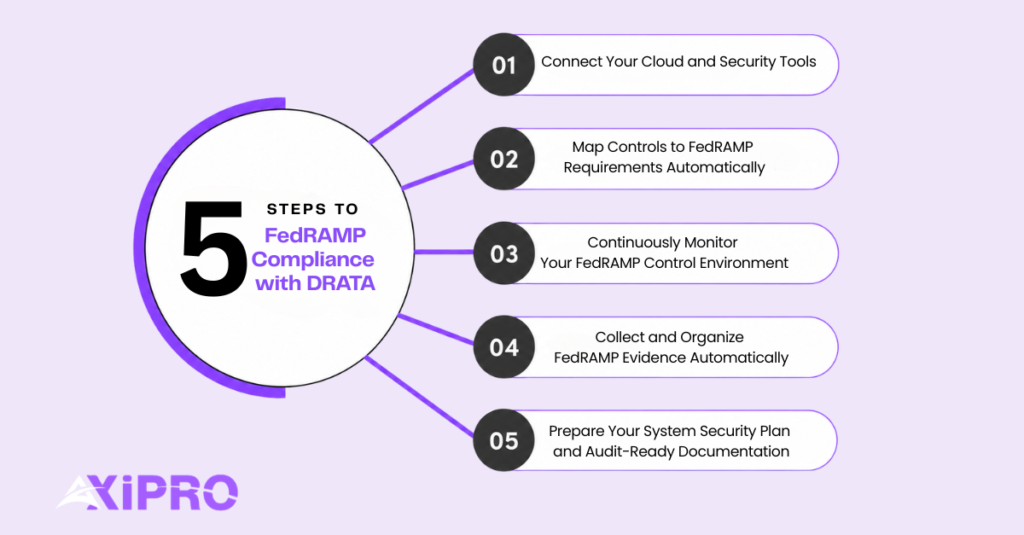
How Drata Works for FedRAMP Compliance Step by Step
Step 1: Connect Your Cloud and Security Tools
The first work in any Drata implementation is wiring up integrations. Drata supports more than 200 connectors covering AWS (including 45+ services), Azure, GCP, GitHub, Okta, identity providers, vulnerability scanners, HRIS, and ticketing platforms.
For FedRAMP environments, the AWS GovCloud and Azure Government integrations matter most, since federal workloads typically live in those tenants. The connections feed system data into Drata’s monitoring engine, where it becomes the raw material for automated control tests.
Step 2: Map Controls to FedRAMP Requirements Automatically
Once integrations are in place, Drata applies its pre-built control mappings against the FedRAMP baseline you have selected. A single control can satisfy requirements across multiple frameworks at once, so an organization that has already implemented SOC 2 compliance or ISO 27001 inherits significant credit when expanding into FedRAMP.
For a deeper look at how those frameworks compare, our ISO 27001 vs SOC 2 guide walks through the key differences. The control set is editable, which matters because FedRAMP allows narrowly scoped parameter overrides for some controls.
Step 3: Continuously Monitor Your FedRAMP Control Environment
Drata runs automated control tests on a continuous basis, validating that the configurations and evidence each control depends on are still in place. When a control drifts, an alert is issued and the gap is logged.
For FedRAMP, this is the operational backbone of continuous monitoring for SOC 2, and for FedRAMP alike, the program’s defining requirement and historically the area where authorized providers most often fall out of compliance.
Step 4: Collect and Organize FedRAMP Evidence Automatically
Evidence is generated as a side effect of monitoring. Configuration data, access logs, and policy acknowledgments flow into Drata and are tagged against the controls they satisfy. The platform replaces manual screenshot collection, which has historically been the most labor-intensive part of FedRAMP audits.
Step 5: Prepare Your System Security Plan and Audit-Ready Documentation
For Rev 5 authorizations, the System Security Plan remains a written document. Drata centralizes the policy library, control implementation descriptions, and supporting artifacts a 3PAO will need, but it does not write narrative SSP language for you.
For FedRAMP 20x submissions, the burden shifts dramatically: the SSP is replaced by structured KSI evidence, and Drata’s OSCAL-native architecture is built specifically to produce the machine-readable packages that path requires.
Important: Drata accelerates FedRAMP work, but it does not eliminate the engineering effort. Boundary architecture, encryption-in-transit and at-rest decisions, configuration baselines, and DoD-specific overlays are technical work the platform cannot do for you. Treat Drata as the compliance automation layer on top of a security program, not as a substitute for one.
Key Drata Features That Support FedRAMP Authorization
Multi-Framework Control Mapping for FedRAMP Baselines
Drata pre-maps controls across FedRAMP baselines and cross-maps them to other frameworks. An organization holding SOC 2 Type II that is now pursuing FedRAMP Moderate will see substantial overlap surface automatically, with Drata flagging only the FedRAMP-specific gaps that require new work.
If you are already working through the SOC 2 process, the Drata SOC 2 guide covers that workflow in detail. The platform supports custom control parameters for cases where FedRAMP allows tailoring.
Continuous Monitoring and Automated Evidence Collection
Drata’s continuous control testing supports FedRAMP’s monthly continuous monitoring obligations and gives security teams visibility into drift between assessment windows. This is meaningfully different from the legacy approach of point-in-time evidence collection, where teams discover a failed control when an auditor surfaces it nine months later. Continuous monitoring is no longer optional under FedRAMP, it is the entire posture model, and Drata’s architecture reflects that shift.
Drata Integrations and API for Federal Environments
The integration library is one of Drata’s strongest selling points. AWS GovCloud, FedRAMP-authorized Azure services, GitHub Enterprise, and Okta all connect directly.
For tools without a native connector, Drata exposes a public API and supports custom integrations, though these often require additional engineering effort and may carry incremental fees of $5,000 to $10,000 per integration.
Audit Hub for FedRAMP Package Management
Audit Hub is Drata’s workspace for managing the back-and-forth with auditors. Evidence requests, fulfillment, and reviewer comments live in one place. For FedRAMP, where auditor interactions span multiple cycles and dozens of evidence items per control, this is more useful than email-and-spreadsheet alternatives.
That said, some users on G2 have noted the Audit Hub is less mature than the rest of the platform and offers limited visibility into audit progress.
Risk and Vendor Risk Management in a FedRAMP Context
FedRAMP requires CSPs to maintain a risk register and assess third-party providers within their authorization boundary. Drata’s Risk Management module supports building, scoring, and tracking those risks, and the Vendor Risk module handles questionnaire distribution, response collection, and vendor scoring. Both modules are paid add-ons at most pricing tiers, a line item worth anticipating early in the budgeting process.
Trust Management and the Drata Trust Center
Following the SafeBase acquisition, Drata’s Trust Center allows CSPs to publish security posture, certifications, and authorization status to prospects and customers. For federal sales motions, a public-facing FedRAMP authorization status page meaningfully reduces the volume of repetitive security review questions from agency contracting officers.
FedRAMP 20x and What It Means for Drata Users
What Is FedRAMP 20x?
FedRAMP 20x is a GSA initiative announced on March 24, 2025 to dramatically streamline FedRAMP’s security assessment, authorization, and compliance monitoring processes. The program aims to automate validation of CSPs’ compliance with FedRAMP requirements, permit CSPs to leverage commercial security frameworks to achieve authorizations, and reduce agency and third-party oversight of cloud services. The intent is to compress authorization timelines from over a year to weeks while maintaining or improving the underlying security posture.
How FedRAMP 20x Changes the Authorization Process for CSPs
Under Rev 5, CSPs wrote hundreds of pages explaining how each control was implemented. Under 20x, they generate machine-readable proof that the underlying capability is in place and continuously functioning. KSIs replace narrative SSPs, which means less documentation labor but more engineering and a greater reliance on automation.
Agency sponsorship is no longer required for the new path; FedRAMP itself reviews 20x packages directly. Federal News Network reported that the first four pilot vendors received Low authorizations within the first month of the program.
The five strategic goals driving 20x are worth understanding in full: simplification through automation (targeting at least 80% of validation), use of commercial security frameworks as the foundation for federal authorization, reduced agency oversight burden, continuous validation in place of point-in-time assessment, and program-level authorization that does not require an individual agency sponsor.
Benefits of FedRAMP 20x for Agencies and Cloud Service Providers
For CSPs, the headline benefit is speed and cost. Pilot data suggests $500,000 to $1.5 million end-to-end for a 20x Moderate path versus $2 million to $5 million for legacy FedRAMP Moderate, primarily driven by automation reducing 3PAO labor hours.
For agencies, the benefit is real-time visibility into a provider’s posture rather than relying on annual snapshots, plus a much larger marketplace as smaller CSPs become able to enter federal markets for the first time.
Outlook and Timeline for FedRAMP 20x Adoption
The Phase One (Low Baseline) pilot ran from April 2025 to September 2025, with Phase Two (Moderate Baseline) currently underway and due to wrap up at the end of March 2026 before wider 20x rollout planned for Q3 to Q4 2026. FedRAMP will stop accepting new Rev 5 agency authorizations at the end of FY27, which means any provider starting a federal program today should plan around 20x rather than treating it as an optional alternative.
Insider Note: The 20x pilot’s reception inside FedRAMP has been more enthusiastic than the program’s external messaging suggests. The Phase 1 cohort drew 26 submissions in three months, more cloud services than the rescinded Joint Authorization Board processed across its final four years combined. The political appetite to roll 20x out aggressively is real, and Rev 5 is being deliberately wound down rather than allowed to run in parallel forever.
Drata FedRAMP Reviews and Real User Feedback
What G2 Reviews Say About Drata for Government Compliance
Drata holds a 4.8/5 rating on G2 across more than a thousand reviews. Praise centers on automation depth, integration breadth, and customer success manager responsiveness. Critical reviews surface a recurring theme: while Drata’s UI is clean and intuitive once configured, initial implementation is more involved than the sales process suggests, and some integrations collect inventory data without validating the security configurations a FedRAMP auditor will actually want to see.
Reddit and Community Sentiment on Drata for FedRAMP
Reddit sentiment is more candid. Practitioners praise the platform but flag renewal pricing as the most common complaint. Implementation complexity comes up frequently, particularly for teams with mature security stacks that have legacy tooling Drata does not connect to natively.
Skeptics also note that some out-of-the-box integrations work well for inventory collection but fall short on validating security-related configuration, requiring custom integrations to close the gap.
How to Evaluate Drata Reviews as a FedRAMP Buyer
Reviews skew toward SOC 2 and ISO 27001 use cases because that is where most Drata customers live. FedRAMP-specific reviews are sparser. The most useful signal for a federal buyer is whether the reviewer has actually completed an authorization, not just used the platform for readiness work. Ask for FedRAMP-specific references during the sales process and verify the reviewer reached an ATO or 20x authorization rather than stopping at audit-ready.
When Should a Cloud Service Provider Choose Drata for FedRAMP?
Use Cases Where Drata Aligns Well with FedRAMP Goals
Drata fits best for cloud-native SaaS companies that are already running mature commercial security programs and are now expanding into federal markets. Teams with existing SOC 2 Type II or ISO 27001 certifications, a clean cloud architecture in AWS or Azure, and a willingness to instrument their environment for continuous validation will get the most leverage.
The fit is particularly strong for 20x Low and Moderate paths because Drata’s OSCAL foundation and continuous monitoring model align directly with what 20x demands. If you are starting from an ISO 27001 baseline and want to understand what gaps remain before you begin, our ISO 27001 gap analysis guide is a practical starting point.
Situations Where Drata May Not Be the Best Fit
Organizations with heavily customized legacy GRC workflows, on-premise dependencies that cannot be easily integrated, or a large existing internal compliance team and tooling stack may find Drata less differentiated. CSPs pursuing only High baseline on a tight budget may also struggle, since the additional controls for High require more engineering work that Drata cannot automate away.
Pure-play federal compliance shops focused exclusively on FedRAMP might prefer a more specialized tool like Paramify, which is purpose-built for federal authorization and was a 20x Phase 2 pilot participant. For a broader comparison of where Drata sits relative to other platforms, see our Drata vs Thoropass vs Vanta breakdown, or if you prefer a decision-oriented lens, which compliance solution is right for you walks through the tradeoffs directly.
Drata FedRAMP Pros and Cons
Where Drata Delivers the Most Value for FedRAMP
The strongest arguments for Drata are platform breadth, the holding of its own FedRAMP 20x Low Pilot Authorization, OSCAL-native architecture aligned with where the program is heading, deep AWS coverage, and the cross-framework efficiency that lets organizations reuse SOC 2 and ISO 27001 work. The Trust Center is genuinely useful for federal sales motions where agency reviewers want quick visibility into authorization status.
Limitations to Be Aware Of Before Committing
The platform is priced at a premium, with renewal increases that catch teams off guard. The Audit Hub is less mature than the rest of the product. FedRAMP-specific narrative SSP authoring for Rev 5 paths still requires consulting support outside the platform. Custom integrations carry meaningful additional fees. And while Drata supports the High baseline, the platform’s strongest leverage is on Low and Moderate, where automation-heavy workflows fit best.
Does Drata Support FedRAMP Authorization Natively?
Yes. Drata provides pre-built FedRAMP frameworks for LI-SaaS, Low, Moderate, and High baselines and is built on OSCAL, the standard now required for FedRAMP 20x submissions.
Which FedRAMP Baseline Levels Does Drata Cover?
All four. Drata’s framework library includes LI-SaaS, Low, Moderate, and High, each pre-mapped to NIST 800-53 controls.
How Does Drata Help With System Security Plan Documentation for FedRAMP?
For Rev 5 paths, Drata centralizes policies, control implementation evidence, and the artifacts an SSP author will reference, but it does not draft narrative SSP language. Most CSPs pair Drata with FedRAMP advisory or consulting support for SSP writing. For 20x paths, the OSCAL-native evidence Drata generates substitutes for narrative SSP content directly.
Can Drata Help Accelerate the FedRAMP Authorization Timeline?
Yes, particularly on evidence collection, continuous monitoring setup, and cross-framework reuse. The bulk of authorization timeline, however, is determined by 3PAO availability, agency sponsor responsiveness for Rev 5 paths, and internal remediation effort, none of which Drata controls.
How Does Drata's Continuous Monitoring Support FedRAMP Ongoing Authorization?
Drata runs automated control tests against integrated systems and generates alerts when configurations drift. This satisfies the operational requirement for continuous monitoring for SOC 2 and for FedRAMP alike, producing the evidence needed for monthly ConMon reporting and annual reassessments.
What Is the Drata Agent and Is It Relevant for FedRAMP Environments?
The Drata Agent is a lightweight endpoint client that collects device-level evidence such as disk encryption status, OS version, and security tool presence. For FedRAMP, the agent supports controls related to endpoint security and inventory management. Some teams limit deployment to high-risk roles given practical constraints around employee endpoints.
How Does FedRAMP 20x Affect How Cloud Providers Use Drata?
Significantly. Under 20x, Drata’s continuous monitoring and OSCAL output become the primary submission artifact rather than supporting evidence for a narrative SSP. CSPs pursuing 20x will lean more heavily on the platform’s automation and less on consulting support for documentation.
What Are the Best Drata Alternatives for FedRAMP Compliance?
The closest commercial alternatives include Vanta and Secureframe in the same compliance automation category, plus more specialized federal-focused tools like Paramify, which was a 20x Phase 2 pilot participant and is purpose-built around the FedRAMP submission process. For a structured side-by-side evaluation, our Drata vs Thoropass vs Vanta guide covers the key differences in detail.
Is Drata the Right Tool for Your FedRAMP Journey?
Drata is a credible choice for cloud service providers entering the federal market, particularly those starting from a mature commercial security program and pursuing 20x Low or Moderate paths. The platform’s OSCAL foundation, FedRAMP 20x Low Pilot Authorization, and breadth of integrations are genuine differentiators in a category where most tools still treat federal compliance as an afterthought. It is not a complete replacement for FedRAMP advisory expertise, and the pricing rewards careful negotiation rather than blind acceptance of the initial quote.
Teams that go in with clear-eyed expectations about what Drata automates, what still requires human work, and what the platform actually costs at renewal tend to come out the other side of authorization with their budgets and their sanity intact. If you are still evaluating where to start, our guide to which compliance solution is right for you is a practical next step.