ISO/IEC 27001 certificates nearly doubled in a single year, from 48,671 in 2023 to 96,709 in 2024, according to ISO’s own certification survey. A big share of that jump comes from startups, not enterprises. The reason is simple: buyers stopped taking “we take security seriously” at face value, and a certificate is the fastest way to prove it.
This guide covers when a startup should pursue ISO 27001, what it costs, how long it takes, and how a small team gets certified without a dedicated security department.
What Is ISO 27001 and Why It Matters for Startups
ISO/IEC 27001 is the international standard for information security management. It doesn’t hand you a checklist of firewalls to buy. Instead, it asks you to build and run an Information Security Management System (ISMS): a documented, repeatable way of finding your security risks and doing something about them. Certification means an accredited third party checked that your ISMS works and matches the standard.
For a startup, that distinction matters. You’re not being graded on whether you own expensive tools. You’re being graded on whether you can show a system, which is exactly what an enterprise buyer’s procurement team wants to see before they sign.
The Core Principles: Confidentiality, Integrity, and Availability
Everything in ISO 27001 traces back to the CIA triad: confidentiality, integrity, and availability. Confidentiality means only the right people see the data. Integrity means the data is accurate and hasn’t been tampered with. Availability means the data is there when someone needs it.
Every control you put in place, and every risk you assess, ties back to protecting one of those three properties. ISO puts it plainly: an ISMS that meets the standard preserves the confidentiality, integrity, and availability of information by running a risk management process. Keep the triad in mind, and the rest of the framework stops feeling abstract.
How ISO 27001 Differs from Other Security Frameworks for Early-Stage Companies
SOC 2 is the framework startups usually bump into first, especially when selling into the US. It results in an attestation report from a CPA firm, scoped to specific systems. ISO 27001 is a certification, recognized in over 150 countries, and it covers your whole organization through a formal ISMS with management reviews and company-wide risk assessment.
The two overlap heavily. Roughly 70 to 80 percent of the controls line up, so if you do one, the second gets much cheaper. The real difference is structure. SOC 2 checks whether specific controls work. ISO 27001 checks whether you’ve built a management system that keeps those controls working over time. It also aligns closely with GDPR, which is why it travels well in Europe.
Insider Note: Auditors can usually tell within an hour whether your ISMS is real or was assembled the week before the audit. A management review meeting with actual notes, decisions, and follow-ups from three months ago is worth more than a perfect-looking policy binder with no evidence anyone ever used it.
Let Axipro help you build a business continuity plan that's practical, compliant, and audit-ready.
Schedule Your Free Assessment Today
When Should a Startup Pursue ISO 27001 Certification?
The honest answer: when a deal, a market, or an investor is asking for it, or is about to. Certifying purely because it feels responsible is a good way to burn cash and calendar time you don’t have yet.
Early-Stage vs. Growth-Stage: Timing the Certification
At pre-seed and seed, ISO 27001 is usually early unless you’re selling into regulated industries or the EU from day one. Your product and processes are still shifting, and certifying a moving target means re-documenting everything a quarter later.
At Series A and beyond, the math changes. Deals get bigger, buyers get more careful, and investor due diligence starts probing your security posture. Certifying while you’re 15 to 40 people is often the sweet spot: mature enough to have stable processes, small enough that scoping the ISMS is still manageable.
When ISO 27001 Might Be Overkill for Your Startup
If your customers are US SMBs who only ever ask for SOC 2, leading with ISO 27001 may be solving a problem you don’t have. If you’re pre-revenue and still hunting for product-market fit, your time is better spent shipping. And if no one in your sales pipeline has ever mentioned a certificate, that silence is data.
Pro Tip: Pull your Last 20 Security Questionnaires
Before you commit, pull your last 20 security questionnaires or RFPs and count how many explicitly asked for ISO 27001 versus SOC 2 versus nothing. That single tally answers the "which framework, and when" question faster than any consultant's discovery call.
Key Benefits of ISO 27001 for Startups
Unlocking Enterprise Sales and Bigger Deals
The clearest return is revenue you couldn’t touch before. Large buyers often won’t even start a security review without a recognized certificate on file. ISO 27001 gets you past the first gate of enterprise sales, and it shortens the review itself because a big chunk of the questionnaire is already answered by your certification.
Building Investor and Board Confidence
Certification signals operational maturity. When an investor sees a functioning ISMS, they see a founder who can build systems, not only ship features. That plays well in investor due diligence, where a security gap can stall a term sheet, and it gives your board something concrete to point to on risk.
Establishing Customer Trust from Day One
A certificate is third-party proof, and third-party proof beats self-assurance every time. For a young company with no brand equity yet, it’s a shortcut to being taken seriously by customers who’ve never heard of you.
Creating a Scalable Security Foundation
Because ISO 27001 makes you build a system rather than a one-off fix, it scales as you grow. New hires, new products, and new data types slot into an ISMS you already run. You’re not rebuilding security from scratch at every stage.
Reducing Long-Term Compliance Costs
Adding SOC 2, HIPAA, or ISO 42001 later is far cheaper once an ISMS exists, thanks to that 70 to 80 percent control overlap. The first framework is the expensive one. Every framework after it reuses your evidence, your policies, and your risk process.
Common ISO 27001 Challenges Startups Face
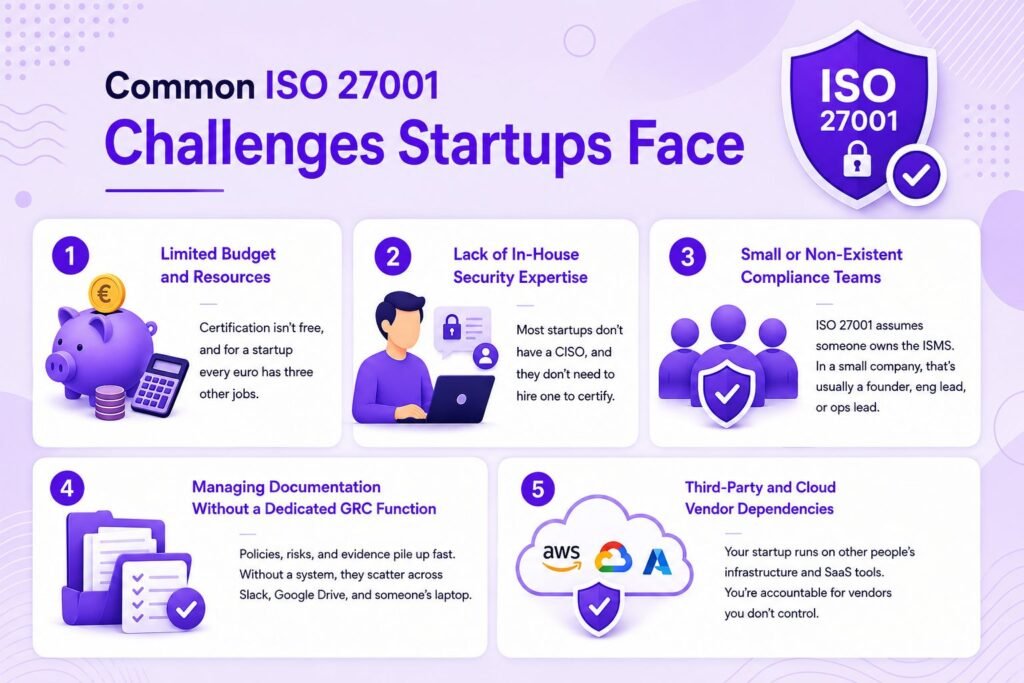
Limited Budget and Resources
Certification isn’t free, and for a startup every euro has three other jobs. The trick is scoping tightly and using automation, so you’re not paying humans to screenshot evidence all day.
Lack of In-House Security Expertise
Most startups don’t have a CISO, and they don’t need to hire one to certify. What they need is either a fractional expert or a consultant for the parts that genuinely require judgment, like the risk assessment and the Statement of Applicability (SoA).
Small or Non-Existent Compliance Teams
ISO 27001 assumes someone owns the ISMS. In a 20-person company, that owner is usually a founder, a head of engineering, or an ops lead wearing a compliance hat. That works, as long as the role is named and the time is protected.
Managing Documentation Without a Dedicated GRC Function
Policies, risk registers, and evidence pile up fast. Without a system, they scatter across Slack, Google Drive, and someone’s laptop. Startups that stay sane centralize everything early and let a platform track it.
Third-Party and Cloud Vendor Dependencies
Your startup runs on other people’s infrastructure: AWS, GCP, Azure, plus a dozen SaaS tools. Vendor and third-party risk management is a real Annex A requirement, and it catches teams off guard. You’re accountable for the security of vendors you don’t control, which means you need to vet them and document that you did.
How Much Does ISO 27001 Cost for a Startup?
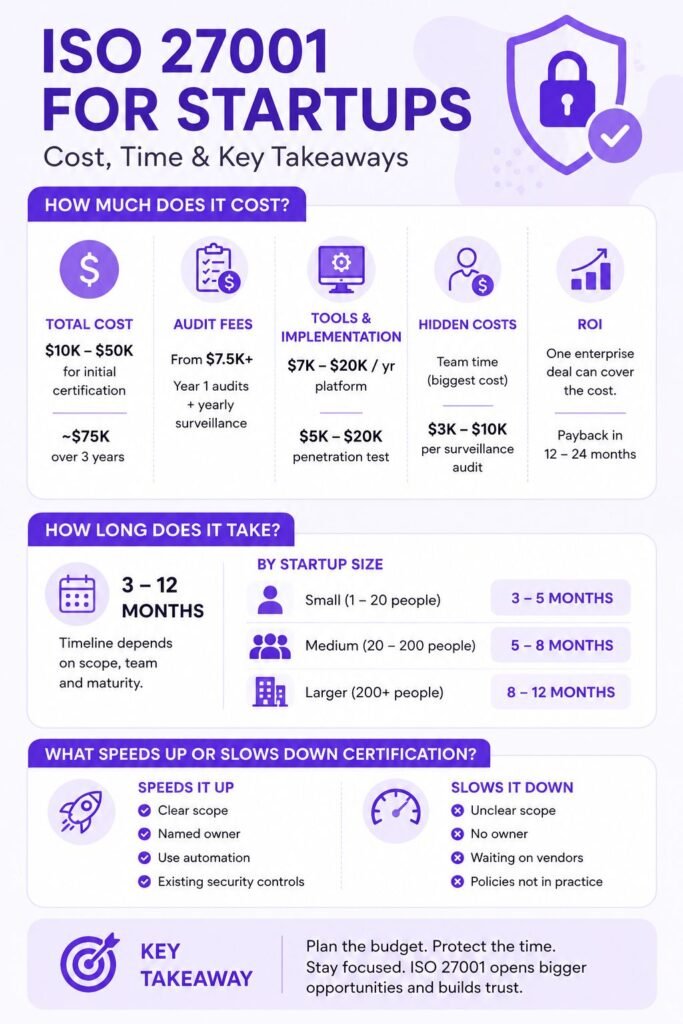
Most startups and small companies spend somewhere between $10,000 and $50,000 for initial certification, depending on how much you build from scratch and whether you use help. Across a full three-year cycle, the hard costs can reach roughly $75,000. Those are rough industry ranges, not quotes, and your number depends on scope and maturity.
Certification Fees and Auditor Costs
The audit itself comes from an accredited certification body. US audit fees for smaller companies often start around $7,500 and climb with scope. This covers the Stage 1 and Stage 2 audits in year one, and you’ll pay again for surveillance audits in years two and three.
Implementation and Tooling Costs
A compliance automation platform typically runs $7,000 to $20,000 a year for a startup, scaling with headcount and integrations. A penetration test, which auditors and buyers increasingly expect, tends to land between $5,000 and $20,000 depending on how much you’re testing.
Hidden Costs Startups Should Budget For
The cost founders forget is their own team’s time. Someone has to run this, and their hours aren’t free even if no invoice shows up. Surveillance audits in years two and three usually run $3,000 to $10,000 each, and consultants bill around $1,500 a day when you bring them in for specialist work.
Estimating ROI for an Early-Stage Company
ROI here isn’t abstract. If one enterprise contract worth six figures unblocks because you’re certified, the whole program pays for itself on a single deal. Industry estimates commonly put payback inside 12 to 24 months, and for startups gated out of enterprise sales, it’s often faster.
How Long Does ISO 27001 Take for a Startup?
Plan for three to twelve months. A small, focused team with clean processes can move quickly. A team building policies, running its first gap analysis, and standing up controls from zero will need the upper end.
Realistic Timeline Breakdown by Startup Size
Small organizations, roughly 1 to 20 people, can realistically reach certification in about three to five months with focus. Companies of 20 to 200 usually need five to eight. The variable that moves the number most isn’t headcount; it’s how much of a security program already exists.
Factors That Speed Up or Slow Down Certification
Automation, tight scope, and a named owner speed things up. Using a platform to collect evidence continuously, instead of scrambling before the audit, can shave months. What slows teams down: fuzzy scope, no clear owner, waiting on vendors for security documentation, and treating policies as a writing exercise rather than something the team actually follows.
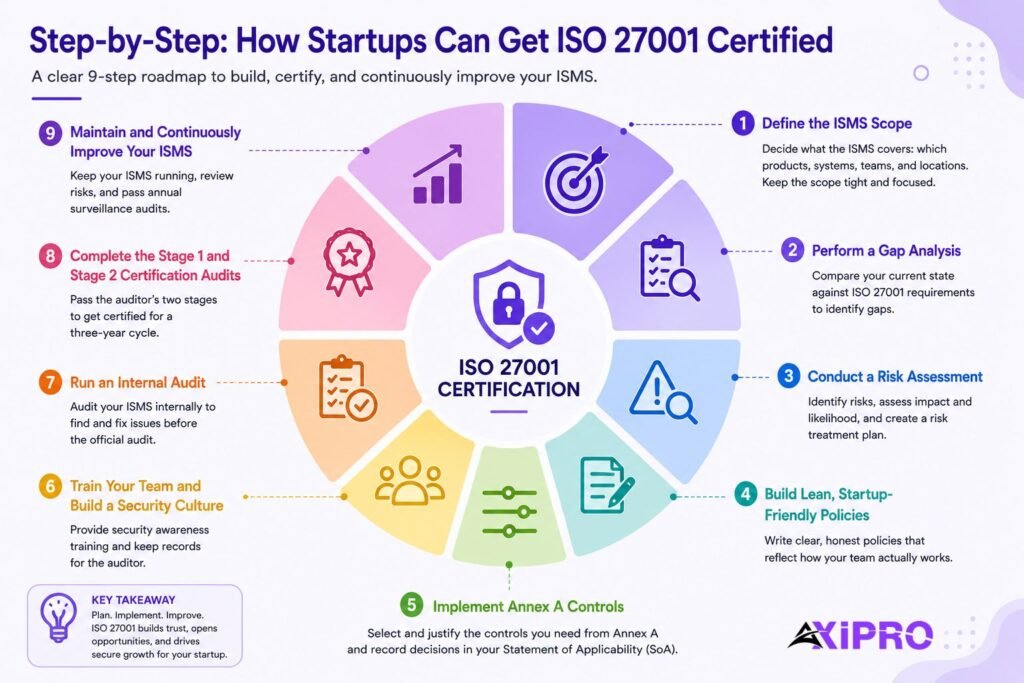
Step-by-Step: How Startups Can Get ISO 27001 Certified
Step 1: Define the ISMS Scope
Decide what the ISMS covers: which products, systems, teams, and locations. A tight scope is your best cost-control lever. For most startups, scoping to the core product and the systems that handle customer data is enough, and it keeps the audit focused.
Step 2: Perform a Gap Analysis
Run a gap analysis to compare where you are against what ISO 27001 requires. This is your map. It tells you which policies you’re missing, which controls need work, and roughly how much lift you’re looking at before you spend on an auditor.
Step 3: Conduct a Risk Assessment
The risk assessment is the heart of the standard. You identify your information security risks, judge their likelihood and impact, then decide how to treat each one in a risk treatment plan. This is where judgment matters most, and where a good consultant earns their fee if you bring one in.
Step 4: Build Lean, Startup-Friendly Policies
You need documented policies, but they don’t need to read like a bank’s. Write policies that describe what your team actually does, not aspirational fiction. Auditors probe for the gap between the written policy and real behavior, so lean and honest beats long and fictional every time.
Step 5: Implement Annex A Controls
ISO/IEC 27001:2022 lists 93 controls in Annex A, grouped into four themes: Organizational (37), People (8), Physical (14), and Technological (34). You don’t implement all of them. You select the ones your risk assessment justifies and record every include-or-exclude decision, with reasons, in your Statement of Applicability (SoA).
Important: Annex A is a menu, not a mandate. A common startup mistake is trying to implement all 93 controls to look thorough. That inflates cost and effort for no benefit. Clause 6.1.3 only requires you to compare your risk treatment against Annex A, then justify what you leave out in the SoA. Excluding controls that don’t fit your business is correct, not a shortcut.
Step 6: Train Your Team and Build a Security Culture
Security awareness training is an Annex A requirement, and it’s also just sensible. Most incidents start with a person, not a zero-day. Run onboarding training, refresh it annually, and keep records, because the auditor will ask for them.
Step 7: Run an Internal Audit
Before the certification body shows up, you run your own internal audit to catch problems while you can still fix them cheaply. It has to be done by someone independent of the work being checked. In a small company that often means a consultant or a colleague from an unrelated team.
Step 8: Complete the Stage 1 and Stage 2 Certification Audits
The accredited auditor assesses you in two passes.
- Stage 1 reviews your documentation and readiness.
- Stage 2 tests whether your ISMS actually operates the way your documents claim.
Clear both and you’re certified, typically for a three-year cycle.
Step 9: Maintain and Continuously Improve Your ISMS
Certification isn’t a finish line. You keep running the ISMS, hold management reviews, update risks as the business changes, and pass annual surveillance audits. Continuous improvement is baked into the standard, and it’s what keeps the certificate meaningful rather than decorative.
Let Axipro help you build a business continuity plan that's practical, compliant, and audit-ready.
Schedule Your Free Assessment Today
Key ISO 27001:2022 Controls Most Relevant to Startups
The 2022 revision added 11 new controls, several of which map directly to how startups actually operate.
Cloud and SaaS-Specific Controls
Control A.5.23 covers information security for the use of cloud services, which for most startups is the whole ballgame. If you run on AWS, GCP, or Azure, this control expects you to govern how you configure, access, and monitor those environments. SaaS compliance lives here too: every tool in your stack is a place data can leak.
Remote Work and Endpoint Controls
The 2022 update reflects a remote-first world. Controls around endpoints, secure configuration, and access from anywhere matter more when your team is distributed and working off laptops in five countries. Threat intelligence (A.5.7) and data leakage prevention (A.8.12) are among the new additions worth attention.
Access Management for Small Teams
Access control is where small teams both shine and slip. Shine, because with 20 people you can actually know who has access to what. Slip, because informal habits, sharing logins, and never revoking access when someone leaves fail an audit fast. Least privilege and clean offboarding cost nothing and matter a lot.
Startup-Friendly Approaches to ISO 27001 Documentation
Using Templates and Modular Policies
Don’t write policies from a blank page. Start from vetted templates and adapt them to how you work. Modular policies, small and specific rather than one giant document, are easier to keep current as you grow.
Assigning Ownership Without a Dedicated Compliance Hire
Name an ISMS owner even if compliance is 20 percent of their job. Ownership without a title tends to evaporate under deadline pressure. One accountable person, with protected time and executive backing, is the single biggest predictor of whether a small team certifies on schedule.
Centralizing Evidence in the Cloud
Keep policies, risk registers, and audit evidence in one place. Scattered evidence is how audits slip. A shared, access-controlled repository, or better, an automation platform that collects evidence for you, saves days of pre-audit panic.
Automating ISO 27001 Compliance for Startups
Where Automation Delivers the Biggest Wins
Automation earns its keep on evidence collection and continuous monitoring. Instead of manually screenshotting configurations before an audit, a platform connects to your cloud and SaaS tools and pulls evidence continuously. That turns audit prep from a fire drill into a status check.
What to Look for in a Compliance Automation Platform
Compliance automation platforms like Vanta, Drata, and Scytale integrate with your stack, map controls to ISO 27001, and flag drift as it happens. Look for real integrations with the tools you already use, support for multiple frameworks, so you’re set up for SOC 2 later, and a genuine control mapping rather than a generic checklist. If you’re weighing platforms, it’s worth talking to a partner that implements multiple platforms, since the right fit depends on your stack and roadmap.
Limitations of SaaS Compliance Tools
A platform automates evidence, not judgment. It won’t write your risk assessment, define your scope, or make the calls in your SoA. Teams that expect the tool to “do compliance” for them tend to end up with tidy dashboards and a shallow ISMS the auditor sees straight through. The tool handles the busywork so your people can focus on the parts that need a brain.
Maintaining ISO 27001 Compliance as Your Startup Scales
Continuous Monitoring Practices
Keep monitoring live between audits. Access reviews, log checks, and vendor reassessments should run on a schedule, not the week before an auditor visits. Continuous monitoring is easier to sustain when a platform does the watching and flags exceptions.
Recertification and Surveillance Audits
Your certificate runs for three years, with a surveillance audit in years two and three to confirm you’re still operating the ISMS. At the end of the cycle, recertification is a fuller audit, similar in depth to your original. Budget for both so neither is a surprise.
Evolving Your ISMS During Rapid Growth
Growth breaks static systems. New products, markets, and headcount all change your risk profile, so revisit scope and risks as you scale. Update the ISMS deliberately instead of letting it drift out of sync with the company it’s meant to protect.
The Bottom Line
ISO 27001 is worth it for a startup when it unlocks something concrete: a market, a deal, or a fundraise. Scope tight, automate the evidence, name a real owner, and lean on templates and expert help for the parts that need judgment. Done that way, even a small team certifies in months and comes out with a security foundation that scales instead of a certificate gathering dust. If you’re deciding between ISO 27001 and SOC 2, or planning to do both, mapping the sequence to your customers and roadmap first will save you the most money.
FAQ: ISO 27001 for Startups
Is ISO 27001 Mandatory for Startups
No. ISO 27001 isn’t a legal requirement. It becomes effectively mandatory when a customer contract or a market you’re targeting demands it, which for B2B startups happens more and more as you move upmarket.
Can a Small Startup Get ISO 27001 Certified Without a Security Team?
Yes. Plenty of sub-20-person companies certify without a dedicated security team. You need a named ISMS owner, usually a founder or engineering lead, plus a consultant or fractional expert for the judgment-heavy parts and a platform for evidence.
Should Startups Start with SOC 2 or ISO 27001?
It depends on your customers. If they’re mostly US-based and asking for SOC 2, start there. If you’re selling into Europe, going global, or a buyer specifically wants an accredited certificate, start with ISO 27001. Thanks to heavy control overlap, the second framework is much cheaper once you’ve done the first.
Do Fully Remote Startups Qualify for Certification?
Yes. Remote and distributed startups certify routinely. The 2022 version of the standard explicitly accounts for remote work, and your scope simply reflects how and where your team actually operates.