Vanta’s hosted MCP server gives Claude Code, Codex, Cursor, and Perplexity a live line into your compliance program. Failing tests, controls, vulnerabilities, vendors, policies: all of it queryable in plain English from whatever tool you already have open.
Connecting a client shouldn’t take more than ten minutes. Fixing what the agent finds still takes an engineer, and then a wait for Vanta’s next sync before the dashboard turns green.
This guide walks through setup for all four clients, the remediation workflow from first query to verified fix, and the errors people hit most. It also covers the parts of the beta that Vanta’s marketing pages skip.
What Is the Vanta MCP Server?
Understanding Model Context Protocol (MCP)
Model Context Protocol is an open standard for connecting AI applications to outside systems. An MCP client (the AI tool) asks an MCP server what it offers, usually a set of named tools with typed inputs, and calls those tools on your behalf. The protocol specification covers transport, authorization, and message format, which is why one server works with any compliant client.
Anthropic released MCP in late 2024 and handed it to the Agentic AI Foundation in December 2025, a fund under the Linux Foundation co-founded with Block and OpenAI. The Linux Foundation’s announcement counted more than 10,000 public MCP servers at that point, with ChatGPT, Cursor, Gemini, Microsoft Copilot, and VS Code all supporting the protocol.
TechCrunch called the foundation’s projects the basic plumbing of the agent era. That neutral governance is the reason a single Vanta server can serve Claude, Codex, Cursor, and Perplexity without four separate integrations.
What Vanta MCP enables for AI agents
Vanta runs two versions of its MCP server. The hosted remote server, which this guide focuses on, lives at a regional URL, authenticates with OAuth in your browser, and is what Vanta now documents for every supported client. The older open-source local server ships as the @vantasdk/vanta-mcp-server npm package and runs on your machine with API credentials in an environment file. Vanta’s own repository for the local version now carries a deprecation notice pointing people to the hosted one, so treat it as a fallback for clients that can’t reach the hosted endpoint rather than the default.
Once connected, the agent can list and filter automated tests, pull the specific entities failing a test, browse controls and their framework mappings, download and upload policy documents, review vendors and their risk attributes, and surface vulnerable assets with their remediation status. It reads live data every time it’s asked. The GRC lead asking “which SOC 2 controls have the most failing tests?” and the engineer asking “why is aws-s3-bucket-server-side-encryption-enabled failing?” are hitting the same server through different clients.
Key use cases: compliance, failing tests, and vulnerability triage
Most of the value sits in a few workflows.
- Failing test remediation is the headline: list failing tests, look at the resources behind them, and generate console steps, CLI commands, or infrastructure-as-code snippets to fix them.
- Vulnerability triage lets you query open CVEs by severity and SLA deadline, as long as at least one scanner (AWS Inspector, Tenable, Wiz, Snyk, or similar) is connected to Vanta. Without a scanner those queries come back empty.
Compliance gap analysis covers framework progress, control ownership, evidence gaps, and cross-framework overlap, which is where GRC teams spend most of their time anyway.
Let Axipro help you build a business continuity plan that's practical, compliant, and audit-ready.
Schedule Your Free Assessment Today
What Vanta MCP enables for AI agents
Vanta runs two versions of its MCP server. The hosted remote server, which this guide focuses on, lives at a regional URL, authenticates with OAuth in your browser, and is what Vanta now documents for every supported client. The older open-source local server ships as the @vantasdk/vanta-mcp-server npm package and runs on your machine with API credentials in an environment file. Vanta’s own repository for the local version now carries a deprecation notice pointing people to the hosted one, so treat it as a fallback for clients that can’t reach the hosted endpoint rather than the default.
Once connected, the agent can list and filter automated tests, pull the specific entities failing a test, browse controls and their framework mappings, download and upload policy documents, review vendors and their risk attributes, and surface vulnerable assets with their remediation status. It reads live data every time it’s asked. The GRC lead asking “which SOC 2 controls have the most failing tests?” and the engineer asking “why is aws-s3-bucket-server-side-encryption-enabled failing?” are hitting the same server through different clients.
Key use cases: compliance, failing tests, and vulnerability triage
Most of the value sits in a few workflows.
- Failing test remediation is the headline: list failing tests, look at the resources behind them, and generate console steps, CLI commands, or infrastructure-as-code snippets to fix them.
- Vulnerability triage lets you query open CVEs by severity and SLA deadline, as long as at least one scanner (AWS Inspector, Tenable, Wiz, Snyk, or similar) is connected to Vanta. Without a scanner those queries come back empty.
Compliance gap analysis covers framework progress, control ownership, evidence gaps, and cross-framework overlap, which is where GRC teams spend most of their time anyway.
Worth Knowing: Vanta's Automated Tests
Vanta's automated tests confirm that a configuration exists. They don't confirm that a control operated across the audit period. An agent that closes every failing test has cleaned up the dashboard, which is a different thing from passing the audit. Auditors still sample evidence, and the Vanta review goes into which automated tests are shallower than they look.
Prerequisites Before Connecting Vanta MCP
Finding your Vanta MCP URL
Vanta hosts a separate MCP server per region. Use the one that matches your instance, because the client won’t authenticate against the wrong region. Every example below uses the US URL. Swap in yours.
Required Vanta permissions and roles
You need to be a Vanta Admin. The hosted MCP server isn’t available to non-admin users during the beta, and Vanta’s help center says broader access is planned but hasn’t shipped. This matters more than it sounds. The engineer who’d fix a failing S3 bucket is rarely an admin in Vanta, so in practice either the admin runs the query and hands off the plan, or the admin grants a role they wouldn’t otherwise grant. Neither is great, and the second one deserves a conversation with whoever owns access reviews.
You’ll also want at least one integration connected in Vanta. A cloud provider (AWS, GCP, or Azure) gives the agent failing resources to look at, and a version control integration (GitHub, GitLab, or Bitbucket) lets it trace failures back to the infrastructure-as-code that manages them.
Generating authentication credentials
For the hosted server there’s nothing to generate. Every supported client authenticates with OAuth: it opens a browser window in your Vanta app, you click Allow, and the client stores a scoped token. You never handle an API key, a client secret, or an environment file.
The local open-source server is different. It needs a Vanta API application (client ID and secret) that an admin creates, stored in a JSON file and passed to the server through the VANTA_ENV_FILE variable. Vanta allows only one active access token per API application, so two teammates sharing the same credentials will keep logging each other out. If you go this route, create one application per person.
How to Connect Vanta MCP to Claude
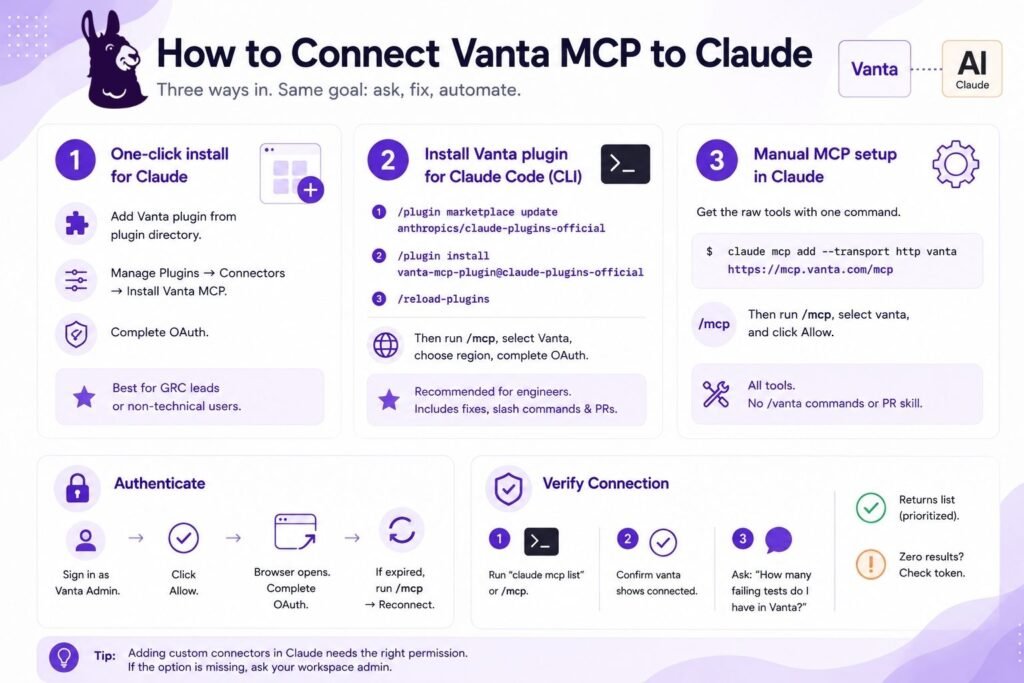
Vanta documents three ways in, and they aren’t equivalent.
Option 1: One-click install for Claude
Vanta publishes a plugin in the Claude plugin directory, and the quickest path for anyone who isn’t an engineer is Claude Cowork. Add the Vanta plugin from the plugin directory, then go to Manage Plugins, open the Connectors tab, and install the Vanta MCP server as a custom connector using your regional URL. Complete the OAuth prompt, and you’re in. Adding custom connectors needs the right permission in your Claude workspace, so if the option is missing, your Claude administrator has to grant it.
This is the right choice for a GRC lead or founder who wants to ask questions of the compliance program without opening a terminal.
Option 2: Installing the Vanta plugin for Claude Code
This is what Vanta recommends for engineers, because it’s the only setup that includes the remediation skill, the slash commands, and the ability to open a draft pull request. In the Claude Code CLI (the terminal app, not the browser), run these three commands in order:
/plugin marketplace update anthropics/claude-plugins-official
/plugin install vanta-mcp-plugin@claude-plugins-official
/reload-plugins
Type them rather than pasting. Claude Code treats a leading slash in pasted text as a file-path trigger and can open a file picker instead of running the command. Then run /mcp, select Vanta, choose your region, and finish the OAuth flow in the browser.
Option 3: Manual MCP setup in Claude
If you only want the raw tools, one command registers the server:
claude mcp add --transport http vanta https://mcp.vanta.com/mcp
Then run /mcp, select vanta, and click Allow when the browser opens. You get every Vanta MCP tool. You don’t get /vanta:fix-test, /vanta:list-tests, or the PR-opening skill. For plenty of teams that’s fine, since the natural-language prompts in the workflow section below work the same way through the manual setup.
Authenticating Claude with Vanta
All three options end on the same OAuth screen inside your Vanta app. Sign in as a Vanta Admin, click Allow, and the client stores the token. If the browser window never opens, Claude Code prints the authorization URL in the terminal, so open it yourself. If it’s expired by the time you get there, run /mcp, select Vanta, and choose Reconnect.
Verifying the Claude connection
Run claude mcp list in the terminal, or /mcp inside the session, and check that vanta shows as connected. Then ask something that forces a live call: “How many failing tests do I have in Vanta right now?” If the plugin is installed, /vanta:list-tests should return a prioritized list. A response of zero failing tests either means a clean program or an expired token, and on a first run it’s almost always the token.

How to Connect Vanta MCP to Codex
Adding the Vanta MCP server to Codex
Codex Desktop and Codex CLI share a configuration, so you set it up once. In Codex Desktop: Settings, then MCP servers, then Add server. Name it Vanta, set the type to Streamable HTTP, enter your regional URL, and save.
In the Codex CLI:
codex mcp add vanta --url https://mcp.vanta.com/mcp
codex mcp login vanta
Configuring authentication for Codex
In the desktop app, click Authenticate after saving and then Allow in the browser. In the CLI, codex mcp login vanta kicks off the same browser flow. Vanta lists Codex as a supported client, but the officially tested paths are Claude Code, Cursor, and Perplexity, so you may see a warning banner during setup saying the connection isn’t a first-party integration. That’s expected.
Testing Vanta commands inside Codex
Check with codex mcp list, then ask Codex to show the highest-priority failing Vanta tests for the repository you have open. Codex has repo access, so it can match failing resources to the Terraform or CloudFormation that manages them and propose a diff. What it can’t do is run the Vanta plugin’s /vanta:* commands or open a draft PR through the Vanta skill. You can still ask Codex to make the change and commit it with its own git tooling. The difference is that nobody has pre-built the remediation logic for you.
How to Connect Vanta MCP to Cursor
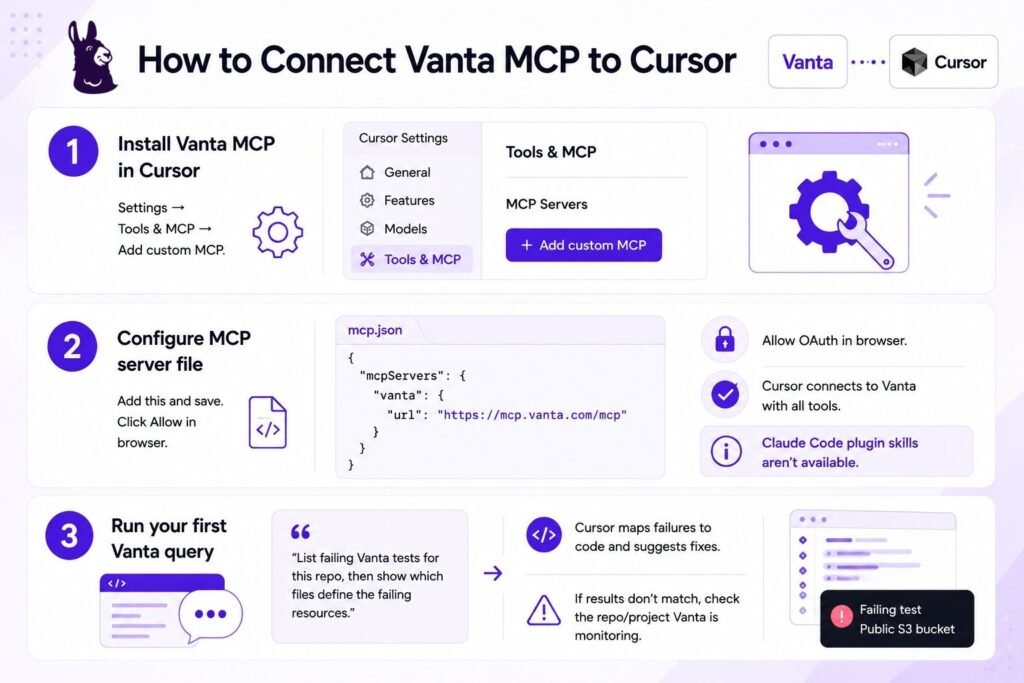
Installing Vanta MCP in Cursor
Open Settings in Cursor, go to Tools & MCP, and choose Add custom MCP.
Configuring the MCP server file in Cursor
Paste this into the configuration:
{
  "mcpServers": {
    "vanta": {
      "url": "https://mcp.vanta.com/mcp"
    }
  }
}
Save, then click Allow when Cursor opens the OAuth flow. Cursor connects straight to the hosted server with access to every Vanta tool. As with Codex, the Claude Code plugin skills aren’t available here.
Running your first Vanta query in Cursor
Cursor is the strongest of the four for engineers who live in an IDE, because the agent sees both the failing resource from Vanta and the file that defines it. A good first prompt: “List the failing Vanta tests for this repo, then show me which files in this project define the failing resources.” If the answer comes back with tests that have nothing to do with your codebase, you probably have a different project open than the one Vanta’s version control integration is watching.
How to Connect Vanta MCP to Perplexity
Adding Vanta MCP to Perplexity
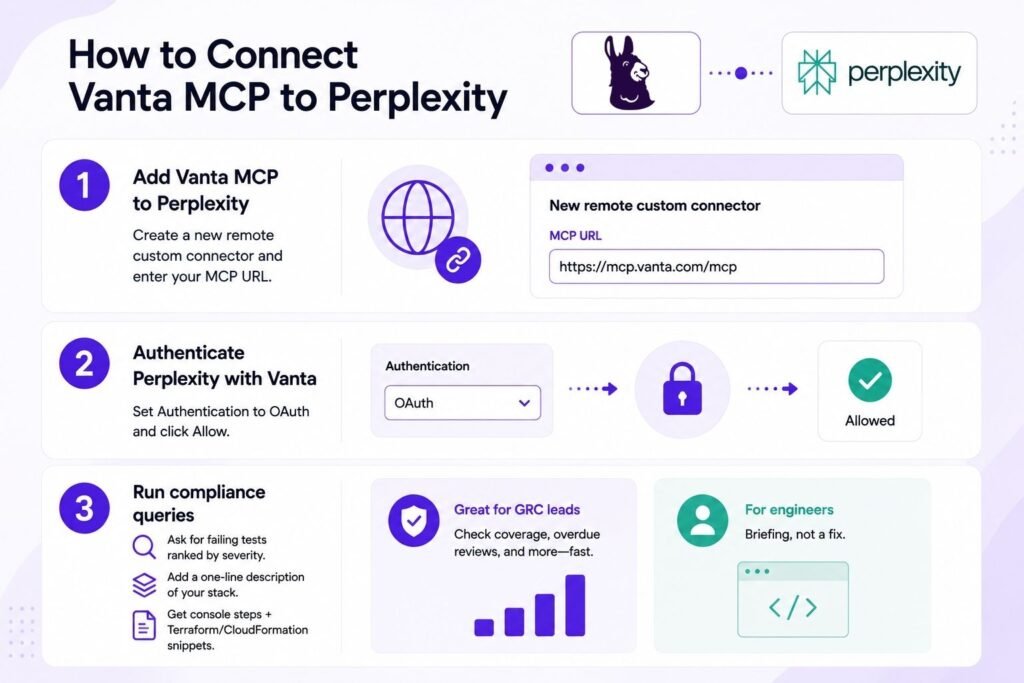
In Perplexity, create a new remote custom connector and enter your regional MCP URL.
Authenticating Perplexity with Vanta
Set Authentication to OAuth and complete the Allow step in your Vanta app. That’s all there is to it.
Running compliance queries from Perplexity
Perplexity has no repository or shell access, so it behaves differently from the three coding tools. Ask for failing tests “ranked by severity” rather than “relevant to this repository,” and paste a one-line description of your stack (“we run on AWS with GitHub Actions”) to steer the results. Remediation plans come back as console-first steps plus generic Terraform or CloudFormation snippets you can drop into a ticket. For a GRC lead who wants to check SOC 2 control coverage or find overdue vendor reviews before a Monday standup, that’s the right shape. For an engineer it’s a briefing rather than a fix.
What You Can Do With Vanta MCP Across These AI Tools
The four clients share the same server and the same tools. What differs is context and automation.
Query and remediate failing tests
This is the core loop and it works in every client. The agent calls Vanta for failing tests, filters by what it can see, and returns test IDs with severity. Ask for the resources behind one test and you get the exact bucket, repo, or IAM policy that’s out of spec.
Triage vulnerabilities from your IDE or chat
Prompts like “list every critical vulnerability whose remediation deadline is in the next 30 days and tell me which are assigned” work as written, with the scanner caveat from earlier. With repo access on top, an engineer can go from a CVE in Vanta to the dependency manifest that pulled it in without opening a browser tab.
Generate remediation plans automatically
The plan format is consistent across clients: a CLI command for the fastest fix, console steps for resources that aren’t managed by code, and an IaC snippet to stop it recurring. The agent won’t run commands that change live resources on its own. It shows them to you and asks. Leave that behavior alone.
Open draft pull requests from AI agents
Only the Claude Code plugin does this through Vanta’s skill. It scans for .tf files in the repo root and common subfolders (infra/, terraform/, ops/), matches your module structure, generates a minimal diff, and opens a draft PR against your current branch. It supports Terraform, CloudFormation, and CDK, so tell it which one you use. Review the diff for variable references and backend state before you mark it ready.
Manage Vanta programmatically via API
MCP is a conversational layer over the same Vanta REST API. Anything you want to run on a schedule, in CI, or in a dashboard belongs in a script against the API with a proper API token. The MCP server is for poking around and one-off fixes.
Insider Note: The failing tests we see most on first-time SOC 2 programs are branch protection and MFA enforcement, and once teams start using an agent to fix them the pattern is predictable. The resource gets fixed by CLI, the Terraform never gets updated, and the next terraform apply puts it right back. The draft-PR path exists so the IaC changes along with the resource. If you fix by CLI, open the IaC ticket in the same breath.
Let Axipro help you build a business continuity plan that's practical, compliant, and audit-ready.
Schedule Your Free Assessment Today
Example Workflow: Remediating a Failing Test With Vanta MCP
Vanta’s own quickstart budgets 15 minutes for this. That’s realistic for the query and the plan. It doesn’t include the time to apply and verify the fix.
Step 1: List your highest-priority failing tests
Ask: “Show me the highest-priority failing Vanta tests relevant to this repository.”
In the Claude Code plugin, /vanta:list-tests does the same thing. A typical response names a dozen failing tests and ranks the top five for your repo, something like GitHub repos requiring pull request reviews (github-repo-require-pr-reviews, HIGH), S3 server-side encryption (HIGH), and an IAM password policy minimum length (MEDIUM). Pick a HIGH severity test ID.
Step 2: Inspect failing resources
Ask: “Show me which specific resources are failing the github-repo-require-pr-reviews test.”
You get the list: four repositories, each with the reason (no branch protection rule on main, protection that requires zero reviewers, and so on). If you see resources you don’t recognize, check the integration field. Companies with several GitHub orgs or AWS accounts routinely find failing resources in an account someone else owns.
Step 3: Generate a remediation plan with your AI agent
Ask: “Generate a remediation plan for this test. Include console steps, CLI commands, and a Terraform snippet I can adapt.”
In the plugin, /vanta:fix-test github-repo-require-pr-reviews. The response gives you three options: a gh api call to set branch protection per repo, the UI path under each repo’s Settings, and a github_branch_protection Terraform resource that requires one approving review. Pick based on whether the resource is managed by code.
Step 4: Open a draft PR
This step is Claude Code plugin only. With the repo open locally and push access, ask: “Open a draft pull request with the IaC changes from this plan.”
You get a PR number and a link. If the plugin can’t find your Terraform files, point it at the folder. If it can’t find the failing resource in this repo at all, the resource lives somewhere else, and the CLI option from Step 3 is your fallback.
Step 5: Verify the fix in Vanta
After the PR merges or the CLI runs, ask: “What is the current status of the github-repo-require-pr-reviews test in Vanta?”
Vanta re-evaluates on its next sync, usually within 24 hours. Until then the test still shows as failing, and re-asking the agent won’t change that. You can trigger a sync from the Vanta dashboard if you need it sooner.
Pro Tip: Run the Verification Prompt
Run the verification prompt the next morning rather than five minutes after the merge. Teams that expect an instant green check assume the fix failed, reopen the ticket, and sometimes apply a second change on top of the first. The 24-hour lag is how Vanta syncs, and says nothing about your fix.
Troubleshooting Vanta MCP Connections
Fixing plugin install errors in Claude
Two errors cover most cases.
- “Invalid marketplace source format” means you skipped the first command. Run /plugin marketplace update anthropics/claude-plugins-official and retry the install.
- “Repository not found” on install usually means an outdated Claude Code version, a stale marketplace listing (run the update command again), or a VPN or corporate proxy blocking github.com.
Claude Code fetches the plugin from both anthropics/claude-plugins-official and VantaInc/vanta-mcp-plugin, so both need to be reachable. If it still fails, fall back to the manual claude mcp add setup. You lose the slash commands and keep every tool.
Resolving authentication failures
Zero failing tests on a program you know has failures means the OAuth token expired. Reconnect through /mcp in Claude Code, re-trigger OAuth in Cursor or Perplexity settings, click Authenticate in Codex Desktop, or run codex mcp login vanta.
If authentication fails outright, check that you’re signed into Vanta as an Admin, that you’re using the URL for your region, and that you completed the Allow step in the same browser profile the client opened.
Debugging MCP server not appearing in Cursor, Codex, or Perplexity
In Claude Code, /plugin and /mcp only work inside the CLI, so if you typed them into a web chat window nothing got registered. Run /reload-plugins and wait a few seconds. If Vanta is still missing, reinstall. In Cursor, check that the JSON saved without a syntax error and that the key is url rather than command (the command form is for the local stdio server). In Codex, codex mcp list tells you whether the server registered before you go digging in the desktop settings. In Perplexity, a connector that saved but never prompted for OAuth is usually one where Authentication got left on the default instead of OAuth.
Best Practices for Using Vanta MCP With AI Coding Agents
Choosing the right AI tool for each Vanta task
Use the Claude Code plugin when the failing resource is managed by IaC in a repo you have locally, because the draft PR closes the loop. Use Cursor or Codex when your team already lives there and wants the same repo-aware investigation with its own commit workflow. Use Perplexity or Claude Cowork for status questions, control coverage, vendor reviews, and anything a non-engineer needs before a meeting. Trying to remediate infrastructure from Perplexity gets you a good ticket and nothing more.
Securing credentials and scopes
The hosted server’s OAuth model removes the worst credential risk, which is long-lived secrets sitting in config files. Connecting an agent to your compliance system is still a decision your security program should record. The OWASP MCP Top 10 puts token mismanagement and over-broad scopes near the top of its list, and OWASP’s write-up on MCP tool poisoning explains the mechanism that should worry you most: a malicious or compromised MCP server returns tool responses with hidden instructions inside, and the agent treats them as trusted input. A 2026 study on arXiv tested real-world MCP clients against these injection vectors and found the protections uneven from one tool to the next.
None of that means avoiding MCP. It means connecting only first-party servers you trust (Vanta’s hosted endpoint qualifies), keeping the agent’s write access off by default, reviewing every diff before it merges, and treating the Vanta MCP connection as a vendor integration in your access review, with an owner and a way to revoke it. Since only admins can connect right now, the list of people with an active token should be short and known.
Important: Everything the agent returns is Vanta’s data filtered through a language model. It can misread a test ID, propose a Terraform change against the wrong module, or confidently summarize a control’s status from stale context. Vanta’s own documentation tells users to verify AI-generated output before acting on it. For anything touching production infrastructure, that means a human reads the diff.
Combining multiple AI clients in a single workflow
Nothing stops you connecting all four. The GRC lead runs coverage queries in Perplexity and files the failing test in the tracker, and the engineer picks it up in Claude Code with /vanta:fix-test. Each client holds its own OAuth token against the same server. The only coordination problem is a human one: agree on who applies fixes and who verifies them, or two people will remediate the same resource on the same afternoon.
Where an Implementation Partner Fits
The MCP server makes it faster to see and fix individual test failures. It doesn’t decide which frameworks you need, scope the audit, write the policies, build the risk register, or deal with the auditor. Those are the parts that stall first-time SOC 2 and ISO 27001 programs, and they’re the parts a Vanta implementation partner exists to carry. Axipro runs the program inside the client’s Vanta workspace, from gap analysis through external audit, on the Achievement Plan with guaranteed certification. Partner pricing on the platform itself is covered in the Vanta cost guide. Once the program is live, the engineers keep the tests green from their own IDE. That split is what MCP is good for.
Conclusion
Vanta MCP turns a compliance dashboard into something you can question from Claude Code, Codex, Cursor, or Perplexity. Setup is one URL and one OAuth prompt per client, the failing-test workflow is the same everywhere, and the Claude Code plugin is the only path that opens a draft PR for you. The limits are real. Access is admin-only during the beta, fixes take up to a day to show as passing, and nothing replaces a human reading the diff. Inside those limits, it takes most of the friction out of getting from “the test is failing” to “the fix is in review.”
Frequently Asked Questions
Is Vanta MCP free to use?
There’s no separate charge for the hosted MCP server. Vanta released it in beta to all customers, and the original 2025 launch made the local server available on the Core package and above. The AI tool on the other side has its own cost, since Claude Code, Codex, Cursor, and Perplexity each need their own paid plan for real use.
Which AI tools officially support Vanta MCP?
Vanta lists Claude Code, Cursor, and Perplexity as officially tested paths, with Codex (Desktop and CLI) and Claude Cowork documented alongside them. Any client that supports a remote MCP server with OAuth should connect using the same URL, including VS Code through an MCP-capable extension and Windsurf, though those aren’t formally validated. You can connect several clients at once, and each holds its own token.
Does Vanta MCP work with self-hosted or local models?
The hosted server doesn’t care which model sits behind the client, only that the client speaks MCP over HTTP with OAuth. A local model running inside an MCP-capable client would work in principle. The practical question is quality. Remediation plans and Terraform diffs are where smaller local models tend to fall down, and no local setup gets the Vanta plugin’s slash commands.
What’s the difference between the Vanta MCP server and the Vanta API?
They expose the same underlying data. The API is for code: scheduled jobs, CI checks, dashboards, anything automated, authenticated with an API token. The MCP server is for conversation, meaning an engineer or admin investigating and fixing things interactively through an AI agent, authenticated with OAuth. If you find yourself running the same MCP prompt every morning, that prompt wants to become an API script.
How secure is connecting an AI agent to Vanta?
The connection itself uses OAuth with per-client tokens and no stored secrets, which is the right design. The risk is in what the agent does with what it reads and what it’s allowed to change. Keep changes behind human approval, connect only trusted first-party MCP servers, review diffs before merging, and log the connection as a vendor integration with an owner and a way to revoke it. The OWASP MCP Top 10 is the current reference for the risk categories worth covering in that review.