Roughly 60% of data breaches still trace back to a person rather than a system, according to Verizon’s 2025 Data Breach Investigations Report. Earlier editions of the same report put the figure as high as 74%. That single statistic is why every framework Drata supports — from SOC 2 to HIPAA — treats Drata security awareness training as a required control rather than a nice-to-have.
Drata gives you three ways to run that training: automatic tracking across your personnel and recurring resets that keep evidence current for auditors. This guide covers how each piece works, how to configure it, and the quiet mistakes that break compliance.
What Is Security Awareness Training in Drata?
Security awareness training in Drata is the annual cybersecurity education your workforce completes to satisfy personnel-related controls across frameworks. The control language is consistent across audits: security awareness training is provided to all employees on an annual basis. Drata’s job is to deliver or track that training, then hold the completion evidence in one place so you can show an auditor that every current employee and contractor met the requirement for the current cycle.
The discipline itself is well established. The broad concept of security awareness maps to the Protect function (PR.AT) of the NIST Cybersecurity Framework, which treats workforce education as a foundational layer of organizational defense. Inside Drata, training settings live on the Internal Security page, and completion surfaces on the Personnel page and in each person’s My Drata onboarding.
Training Methods Available in Drata
Drata supports three approaches, and you choose one on the Internal Security page. They differ mainly in who delivers the content and who supplies the completion evidence.
Drata Embedded Security Awareness Training (Default)
Drata built its own training course that personnel complete directly inside the platform. During onboarding, the employee opens the Complete Security Awareness Training task, clicks Begin Training, and works through the module. On completion, the task flips to completed automatically, and the Personnel page reflects it. No file uploads, no chasing screenshots. This is the simplest route to compliance and the default for most accounts.
Connected Training Provider
If you already run a training platform, you can connect it so completion data flows into Drata automatically. Drata integrates with providers including KnowBe4, Huntress, and Curricula. Once connected, Drata recognizes that provider as your default training source and pulls completion status for the campaigns you select. For each person, Drata combines campaign selection, enrollment, and completion status to decide whether they are compliant.
Insider Note: Drata only syncs training for individuals who are not yet compliant. Once someone is marked compliant, Drata stops pulling their status from the connected provider, so a later change in that tool won’t accidentally overwrite a green check. The practical consequence: if you need to re-run someone, reset them in Drata first, then let the sync pick them back up.
External Training (Evidence Upload)
The third option covers training done entirely outside Drata. Here, evidence is uploaded manually — either by the employee through My Drata, or by an admin on their behalf, depending on configuration. Compliance is determined by the presence of valid evidence — a certificate, screenshot, or other file — for each current person.
How to Configure Security Awareness Training in Drata
Where to Find Security Awareness Training Settings
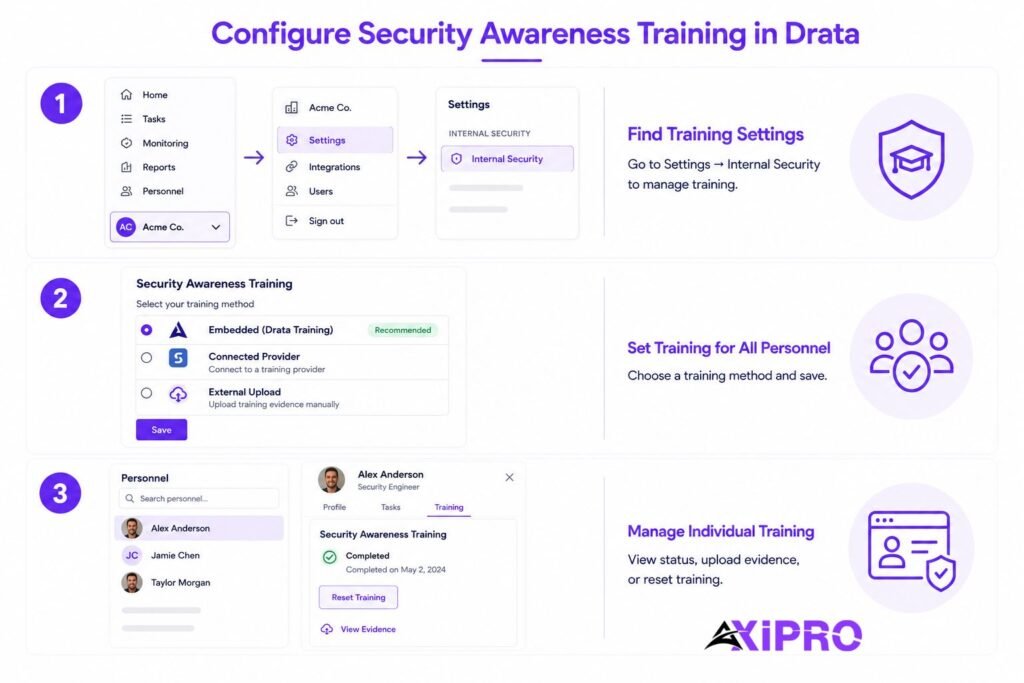
All training configuration lives in one place. Select your account from the bottom-left navigation, open Settings, then Internal Security. Only account administrators can access this section. The Security Awareness Training section is where you choose your method. If HIPAA or an AI-related framework is enabled on your account, additional training sections appear below it.
Setting Up Security Awareness Training for All Personnel
Under the Security Awareness Training section, select the radio button for your chosen method — embedded, a connected provider, or external upload — then save. That setting applies to all personnel going forward, and new hires see the corresponding task in their onboarding automatically.
Assigning Training to Individual Personnel
Most configuration is account-wide, but you manage individuals from the Personnel page. Select a person to open their detail drawer, where you can view their training status and, for the external method, view or upload evidence on their behalf. This is also where you handle one-off resets, covered further below.
HIPAA Training in Drata (If Enabled)
What Is Annual HIPAA Training in Drata?
The HIPAA Security Rule requires covered entities to implement a security awareness and training program for their entire workforce — a standard codified at 45 CFR 164.308(a)(5). If you have purchased the HIPAA framework in Drata, a dedicated HIPAA Training section appears on the Internal Security page so you can track this separately from general security awareness. Personnel complete it annually to address the associated control.
How to Configure HIPAA Training
With HIPAA enabled, the HIPAA Training section offers four options: Drata’s embedded HIPAA training, a connected provider, external training with manual evidence upload by an admin or information security lead, or opting out if HIPAA training is not required for your personnel. Select one and save. If you opt out, Drata removes all references to HIPAA training from the interface. Compliance is based on valid evidence existing for each current employee or contractor.
AI Awareness Training in Drata
What Is AI Awareness Training?
AI awareness training covers responsible and secure use of AI tools, and it maps to newer governance frameworks. Personnel should complete it annually to satisfy requirements in frameworks such as the NIST AI Risk Management Framework and ISO 42001. The setting only appears on your Internal Security page when a related framework is enabled on your account.
How to Configure AI Awareness Training
The AI Awareness Training section offers four options that mirror the others: Drata’s embedded AI training, a connected provider, external training with manual upload, or a URL that links personnel straight to an external course from My Drata. With the embedded option, Drata generates a certificate of completion as a PDF and uploads it automatically, viewable from the personnel drawer and in My Drata.
Worth Knowing: AI Awareness Training Sync Requirements
If you plan to sync AI awareness completions automatically through KnowBe4, that content sits in the KnowBe4 Diamond plan, and Drata currently requires the NIST AI RMF framework to be enabled for automated import and tracking. Organizations running ISO 42001 alone do not yet get automatic sync, so plan to handle those completions through manual evidence instead.
Training Status and Compliance Tracking
Understanding Training Completion Statuses
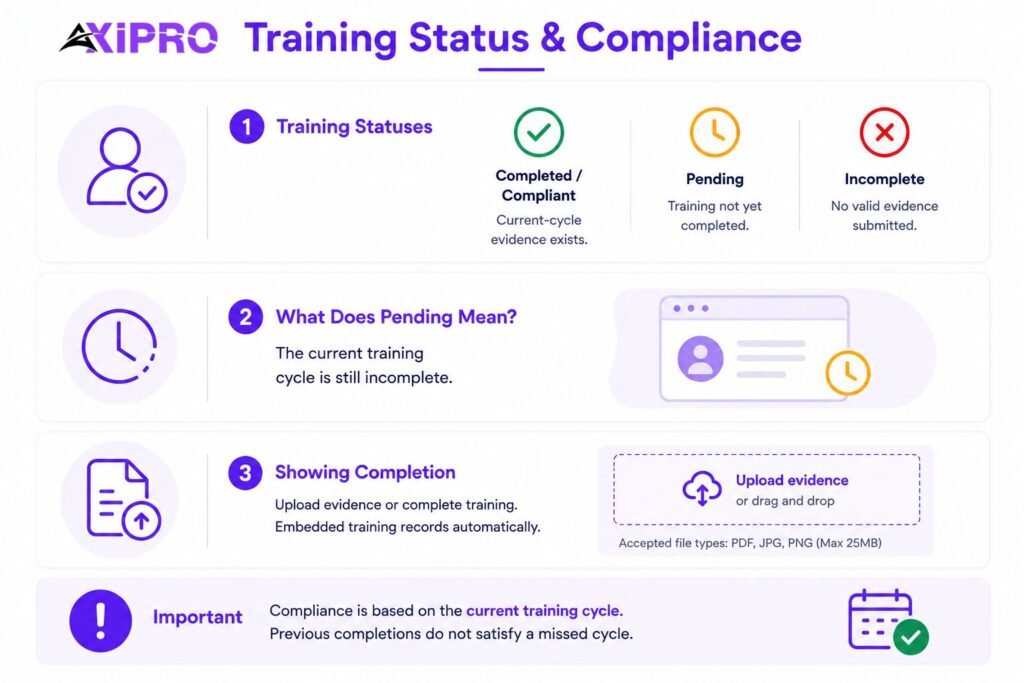
Status reflects whether a person has completed the current training cycle, not whether they have ever done the training at all. You see a completed or compliant state when current-cycle evidence exists, and Incomplete (sometimes shown as Pending or Failed) when it does not. The Personnel page shows these statuses across your entire roster in dedicated columns, and you can filter by compliance to pull a list of everyone still outstanding.
What Does a “Pending” Status Mean?
A pending status means the person has not completed the ongoing training cycle. It is not an error or a system fault. It is the normal state after onboarding begins, or after a reset, and it stays that way until valid evidence lands.
How to Show Completion of Security Awareness Training
To evidence the control, Drata lets employees upload proof during onboarding and annually thereafter. For the embedded course, completion records itself. For external training, the employee or an admin uploads the file under Complete Security Awareness Training in My Drata. Either way, that completion evidence is exactly what an auditor reviews when sampling your personnel.
Important: Compliance in Drata is judged on the current cycle, not your full history. A reset returns status to Incomplete even though last year’s certificate still sits in the record. Auditors sampling personnel look for evidence inside the current window, so a stack of old completions will not cover a lapsed cycle. Treat the green check as a statement about now, not about ever.
Resetting Security Awareness Training in Drata
How Training Resets Work
Annual frameworks expect training to repeat, so Drata lets you reset completed training to push personnel through it again. A reset returns status to Incomplete until new evidence is provided. You can do this automatically on a schedule or manually at any time. Only account administrators or information security leads have access to this functionality.
How to Schedule Recurring Training Resets
On the Internal Security page, under the relevant training section, enable Schedule recurring training resets, choose when resets happen, and save. One option resets training 12 months after each person’s own completion date — dynamically — so each individual’s clock runs from when they actually finished. After you save, anyone who completed more than 12 months ago is reset immediately, and from the next day Drata’s automation checks daily and resets any training older than the configured window.
Pro Tip: Use 12-Month Rolling Renewals
Choose the dynamic "12 months after each person's last completion date" option rather than a single fixed calendar date. A fixed date resets everyone at once — including the person who onboarded last week — which creates a wave of needless retraining and a burst of false non-compliance. The rolling option keeps each person on their own annual cycle and smooths the workload across the year.
How to Reset Training Manually
You reset manually from the Personnel page using the Actions button. The scope depends on whether any individuals are selected when you trigger it.
Resetting Training for All Current Personnel
From the Personnel page, select Actions, then Reset Security Training, making sure no individual checkboxes are selected. With nothing selected, the action applies to all personnel. You will be asked to confirm before anything changes.
Resetting Training for Individual Current or Former Personnel
To reset specific people, check the boxes next to their names first, then choose Actions and Reset security training. To reset a single person, open their detail drawer, click the three-dot menu, and select the reset option. Both paths prompt for confirmation, and resets can be applied to current or former personnel alike.
What Happens After a Training Reset
Once confirmed, the compliance check on the Personnel table, in the detail drawer, and in My Drata onboarding switches to Incomplete or Failed. The person can then retake the embedded course or upload fresh evidence, depending on the method configured in Internal Security settings.
Resetting HIPAA Training in Drata
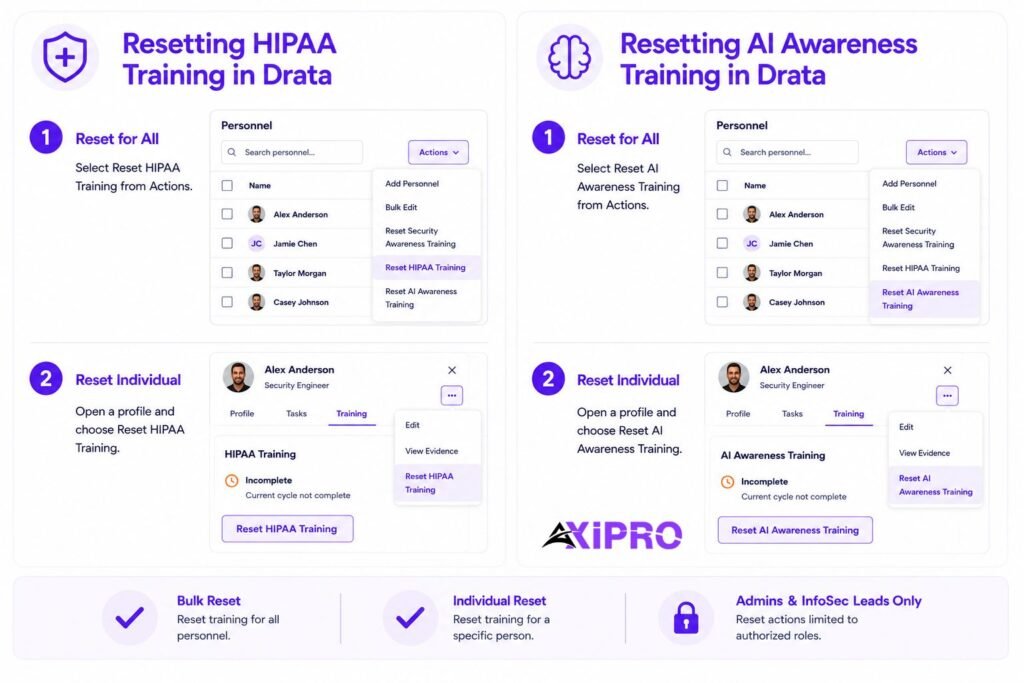
HIPAA training resets the same way, through its own dedicated action, keeping it cleanly separate from general security awareness. Only admins or information security leads can perform it, and it can be applied in bulk or to individuals.
Reset HIPAA Training for All Current Personnel
From the Personnel page, click Actions and select Reset HIPAA Training with no individuals selected, then confirm when prompted.
Reset HIPAA Training for Individual Personnel
Open a person’s detail drawer, click the three-dot icon, and choose Reset HIPAA Training. After confirmation, their HIPAA status shows Incomplete or Failed, and they retake or re-upload depending on your configured settings.
Resetting AI Awareness Training in Drata
AI awareness training resets through the same Actions menu, available if you have purchased the relevant AI framework such as NIST AI RMF. From the Personnel page, select Actions, then Reset AI Awareness Training, or reset an individual from their detail drawer. Confirmation is required before the change takes effect. After a reset, the person’s AI awareness status returns to Incomplete until they complete the current cycle again or new evidence is uploaded, in line with the delivery option selected in Internal Security settings.
Policies for Security Awareness Training in Drata
Configuring the training is only half the control. Most frameworks also expect a written policy stating that security awareness training is provided annually. Drata’s policy templates and policy center let you publish that policy and collect personnel acknowledgement alongside the training itself.
This matters more than most teams realize: pairing the policy acknowledgement with completion evidence gives an auditor both the stated commitment and the proof that it was carried out — the combination that closes the control cleanly.
A completed training record without a supporting policy, or a policy without evidence of training, leaves a gap that experienced auditors are trained to find. The ISO 27001 standard, for example, explicitly calls for documented information as part of its competence and awareness requirements, a pattern echoed across virtually every major framework.
The Bottom Line
Drata reduces security awareness training to three decisions: how you deliver it, how you keep it current, and how you prove it. Pick a method that matches how your team already works, schedule rolling resets so evidence never goes stale, and remember that auditors care about the current cycle rather than your archive. Get those right, and the human-error problem that sinks so many compliance programs becomes one of the easiest controls to keep green.
Frequently Asked Questions
Does SOC 2 to ISO 27001 mapping guarantee compliance with both frameworks?
No. Mapping shows where control coverage overlaps and where gaps remain. Compliance still depends on designing the controls properly, operating them consistently, and producing evidence that satisfies each auditor. A crosswalk is a planning tool, not a substitute for the work itself.
How much overlap exists between SOC 2 and ISO 27001 controls?
Industry estimates generally place the control overlap between 60 and 80 percent, concentrated in access control, risk management, incident response, and change management.
The overlap is high enough that the second framework should never be a full rebuild, but it is not complete, because the ISO management system clauses have no SOC 2 equivalent and must be built from scratch regardless of where you are starting from.
Can a company use SOC 2 evidence to support an ISO 27001 audit?
Often, yes. A large share of SOC 2 evidence, including access reviews, change tickets, vulnerability scans, and training records, directly supports ISO 27001 Annex A controls.
The catch is that ISO also requires evidence SOC 2 never asks for, such as internal audit reports and management review records, which must be generated separately and cannot be substituted.
How often should organizations update their SOC 2 to ISO 27001 mapping?
Treat it as a living document. Review it at least once a year, and also whenever you add a major system, adopt a new cloud service, change a core process, or when either framework is revised. A mapping that sits untouched between audits is almost certainly inaccurate by the time it is needed.
Which framework should a company pursue first before mapping?
It depends on your customers. If your buyers are mostly US-based, starting with SOC 2 is common practice. If you sell internationally or need a recognized certificate, starting with ISO 27001 builds the broader management system foundation and tends to make the subsequent SOC 2 faster. Either order works.
What matters is building one security program rather than two. A good SOC 2 guide can help you assess which starting point makes the most sense for your current market and customer base.
Is ISO 27001 harder to achieve than SOC 2?
For most organizations, ISO 27001 takes more time and effort on the first attempt, mainly because of the management system requirements. SOC 2 has no equivalent to the ISMS clauses, the Statement of Applicability, or the internal audit and management review cycle.
The controls themselves are comparable in difficulty. It is the surrounding management system that makes ISO 27001 the heavier lift, and the reason why arriving from SOC 2, with your control library already built, gives you a meaningful head start.