A 300-question security review used to eat a full week of an analyst’s time. In 2026, the teams winning enterprise deals turn that same review around in an afternoon. The gap between those two outcomes is no longer about how many people you throw at the problem. It is about whether your answers live in a structured, searchable knowledge base that AI can draw from, or whether they are scattered across old spreadsheets, Slack threads, and the memory of one overworked security engineer.
Security questionnaires have grown longer, more frequent, and more specific. Buyers send the Standardized Information Gathering (SIG) questionnaire, the Consensus Assessments Initiative Questionnaire (CAIQ), the HECVAT for higher education, and an endless stream of custom forms, often through portals like OneTrust or ServiceNow that resist copy-paste. Each one stalls a deal until someone answers it. That is why questionnaire automation has shifted from a nice-to-have to a core part of how revenue and security teams operate.
This guide reviews the nine tools worth evaluating this year, maps each to the team it actually fits, and shows you how to choose without falling for the inflated accuracy claims every vendor prints on its homepage.
What Is Security Questionnaire Automation Software?
Security questionnaire automation software uses AI, usually a large language model (LLM) paired with retrieval-augmented generation (RAG), to draft answers to incoming vendor security assessments. Instead of an analyst hunting through a SOC 2 report or a policy document, the software matches each question to verified content in a central knowledge base and generates a cited response in seconds.
The better platforms do more than draft text. They ingest a questionnaire in any format, route questions that need a human to the right subject matter expert, attach supporting evidence, track approvals, and submit the finished response back in the buyer’s original format or portal. The output is a workflow, not just a wall of generated answers.
Key Benefits of Using Security Questionnaire Automation Software
Faster Turnaround on Security Reviews
Speed is the headline benefit and the one buyers feel first. Teams routinely report cutting response time from several days to a few hours, and concierge services advertise turnaround as short as twelve hours on standard questionnaires. When a security review is the last gate before a contract signs, shaving a week off it directly accelerates the sales cycle.
Higher Accuracy and Consistency
Manual answers drift. One analyst describes your encryption posture one way, another phrases it differently three months later, and a sharp-eyed buyer notices the inconsistency. A central knowledge base enforces one approved answer per question, so every response reflects the same source of truth. That consistency matters more than raw speed when a regulated buyer is reading closely.
Reduced SME and InfoSec Bottlenecks
The real constraint in most questionnaire programs is not typing. It is the queue of questions waiting on a subject matter expert who already has a day job. Automation handles the repetitive eighty percent automatically and surfaces only the genuinely novel questions for human input, which frees your InfoSec team to review rather than author.
Stronger Audit Trails and Compliance Posture
Every credible platform now logs who answered what, when, and from which source. That audit trail is useful for the questionnaire itself, but it also feeds your broader compliance posture. When an auditor asks how you keep customer-facing security claims accurate, a versioned, evidence-linked knowledge base is a far stronger answer than a folder of spreadsheets.
Insider Note: Every vendor on this list advertises an accuracy figure, usually 92 to 96 percent. Read the denominator before you believe it. A 95 percent accuracy rate measured against questions the AI chose to answer is very different from 95 percent across an entire real questionnaire including the hard, company-specific ones. The number that matters is how many answers ship without a human rewrite, and only a pilot on your own questionnaires reveals that.
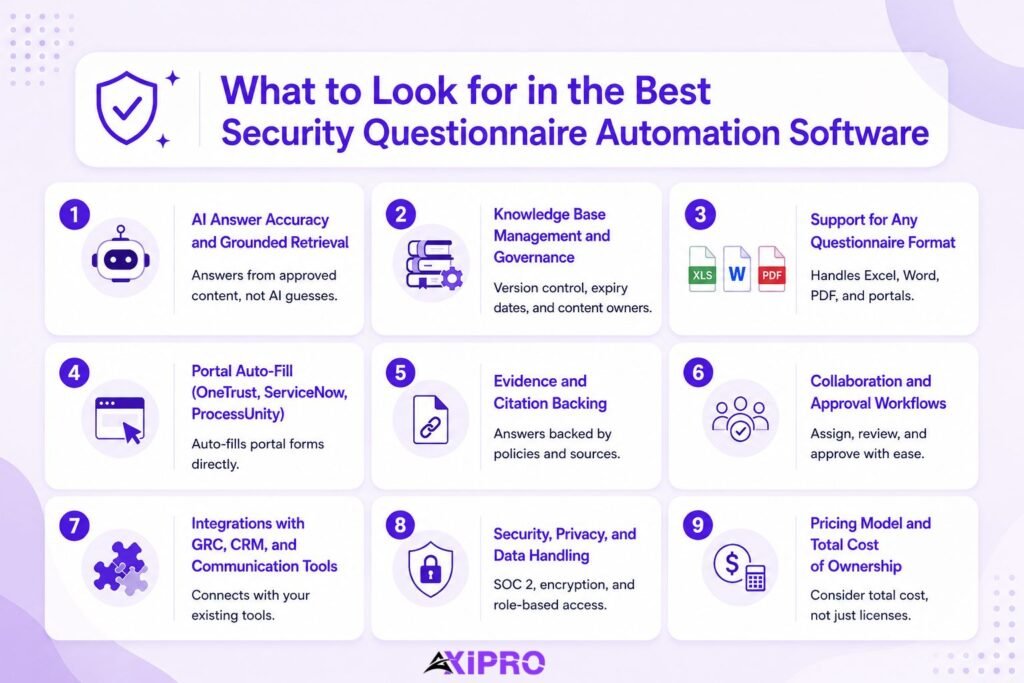
What to Look for in the Best Security Questionnaire Automation Software
AI Answer Accuracy and Grounded Retrieval
The core engine should retrieve from your approved content and ground every answer in it, not generate plausible-sounding text from a general model. Grounded retrieval is what keeps the AI from inventing a control you do not actually have, which is the failure mode that destroys buyer trust instantly.
Knowledge Base Management and Governance
The knowledge base is the asset, not the AI. Look for version control, expiry dates on answers, owner assignment, and tools to retire stale content and merge duplicates. A platform that makes library maintenance painful will quietly rot, and a rotten library produces confident wrong answers.
Support for Any Questionnaire Format (Excel, Word, PDF, Portals)
Buyers send questionnaires in whatever format suits them. If the software handles a clean Excel file but chokes on a messy Word table or a scanned PDF, you will fall back to manual work for a meaningful share of your volume. Format coverage is unglamorous and decisive.
Portal Auto-Fill (OneTrust, ServiceNow, ProcessUnity)
Portal-based questionnaires are where most automation ROI leaks away. A tool that drafts beautiful answers but cannot push them into an OneTrust or ServiceNow GRC portal leaves you copy-pasting field by field. The strongest platforms offer a browser extension that completes portal forms directly.
Important: When you scope a tool, ask specifically how it handles the portals your largest buyers use. Many platforms quietly degrade to a sidebar that helps you find content to paste manually rather than truly auto-filling. That distinction can be the difference between a one-hour review and a half-day of clicking.
Evidence and Citation Backing
In 2026, sophisticated buyers expect answers backed by source links: a policy, a control record, a test result. Citation backing is becoming the baseline for a buyer to trust an automated answer, and it doubles as your internal proof that the answer is defensible.
Collaboration and Approval Workflows
Questionnaires are cross-functional. Sales owns the deadline, security owns the truth, and legal sometimes owns the wording. The platform should assign sections, track ownership, and route final sign-off without a chain of emails. Approval workflows are what stop a fast draft from becoming a fast mistake.
Integrations with GRC, CRM, and Communication Tools
A Salesforce integration lets sales submit a questionnaire and watch its progress inside the deal record. Slack and Microsoft Teams integrations let SMEs answer a flagged question without leaving their workflow. The closer the tool sits to where work already happens, the more it gets used.
Security, Privacy, and Data Handling
You are feeding this platform your most sensitive security documentation. SOC 2 Type II certification, encryption in transit and at rest, role-based access controls, and clear data residency options are non-negotiable. A vendor that cannot answer its own security questionnaire cleanly should not be answering yours.
Pricing Model and Total Cost of Ownership
Pricing in this category is rarely transparent. Models range from per-user seats to questionnaire-volume credits to enterprise quotes, and the headline number often excludes onboarding, knowledge base migration, and the internal time to maintain it. Total cost of ownership includes the human hours the tool still demands, not just the license.
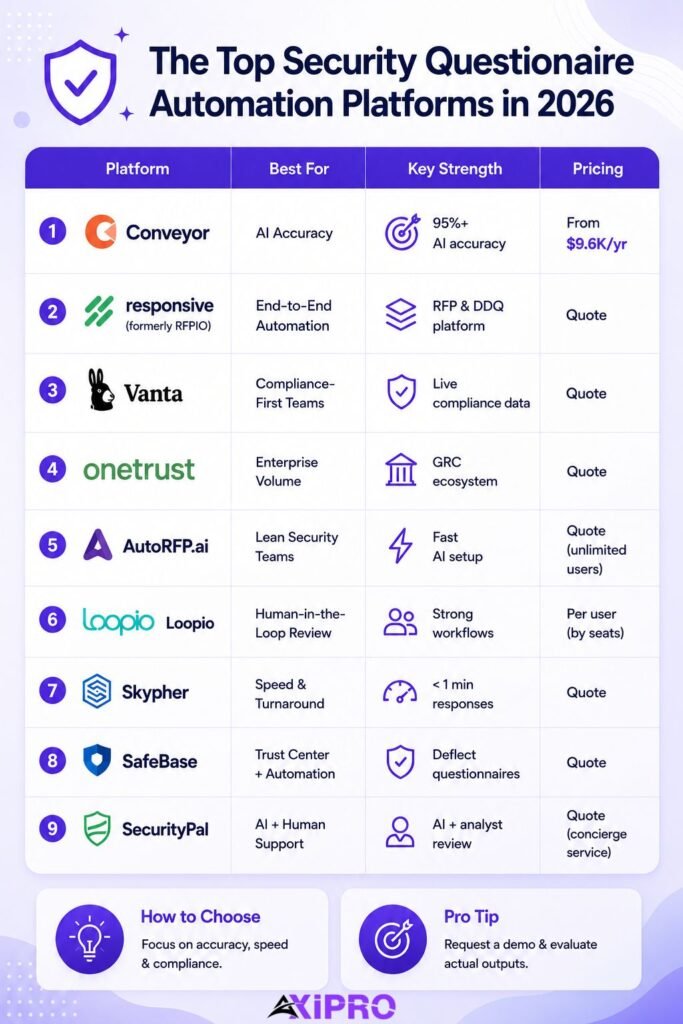
The Top Security Questionnaire Automation Platforms in 2026, Reviewed
The nine platforms below cover the full spread of the market, from AI-native questionnaire specialists to compliance suites and analyst-backed concierge services. Pricing reflects publicly available information at the time of writing and should be confirmed directly with each vendor.
1. Best Overall for AI-Powered Accuracy: Conveyor
Conveyor is the closest thing this category has to a market leader. It pairs an AI questionnaire engine with a trust center, secure document sharing, and a browser extension that completes portal forms directly. The platform connects to your source materials, detects gaps and inconsistencies, and supports more than fifty languages for global teams.
Strengths. Conveyor publishes the most specific accuracy claim in the category, a 95 percent-plus answer rate with a hallucination rate it reports below 0.01 percent, alongside a self-healing knowledge library that flags stale answers. The browser extension is genuinely useful for portal work rather than a glorified search sidebar.
Trade-offs. It is purpose-built for security questionnaires and trust centers, so teams running complex multi-stage RFPs sometimes need a separate proposal tool. Volume-based pricing can climb quickly as questionnaire throughput grows.
Pricing. A free tier with limited credits; the Professional plan starts around $9,600 per year, with volume-based pricing above that.
Best for. Mid-market security and presales teams that want the strongest out-of-the-box AI accuracy and a modern trust center in one place.
2. Best for End-to-End Questionnaire Automation: Responsive
Responsive (formerly RFPIO) has the deepest feature set of any response-management tool. It imports and breaks down questionnaires into assignable sections, organizes content in a central library, suggests answers with generative AI, and coordinates SMEs across many concurrent projects. A LookUp browser extension supports portal work.
Strengths. Breadth and governance. Responsive handles RFPs, DDQs, and security questionnaires in one platform with deep integrations and APIs, which suits organizations running many response types at once. Users report answering ninety percent of a 300-question questionnaire directly from the library.
Trade-offs. The depth comes with weight. Onboarding is involved, library maintenance is real ongoing work, and the platform is more than lean teams need. Answer suggestions weaken when the library is thin.
Pricing. Enterprise pricing on request, with project-based and user-based options.
Best for. Mid-to-large enterprises with mature proposal teams, global customers, and high concurrent volume across RFPs and questionnaires.
3. Best for Compliance-First Teams: Vanta
Vanta is a compliance automation platform first and a questionnaire tool second, which is exactly the point for teams whose priority is provable posture. Its Questionnaire Automation, powered by the Vanta AI Agent, generates answers from your existing security program and evidence, routes questions needing human input to the right SME, sends reminders, and loops you in for final approval.
Strengths. Because Vanta already collects evidence across more than thirty-five frameworks, its questionnaire answers draw from live compliance data rather than a separate library you maintain by hand. That tight loop between continuous monitoring and answering is hard to replicate.
Trade-offs. It can be expensive for startups and small teams, and a few questionnaire-specific features are less flexible than dedicated tools. You are buying a compliance suite, not a standalone questionnaire engine.
Pricing. Quote-based, tailored to team size and the frameworks in scope.
Best for. Teams that already run continuous compliance and want questionnaire answers grounded in the same live evidence. Drata sits in the same compliance-first niche, with comparable evidence collection and questionnaire automation, and is worth evaluating alongside Vanta.
4. Best for Enterprise Volume: OneTrust
OneTrust delivers enterprise-grade GRC and privacy automation with questionnaire management and vendor governance built in. For organizations that already run OneTrust for privacy or third-party risk, handling inbound questionnaires inside the same platform avoids another tool and another data silo.
Strengths. Scale and governance depth. OneTrust is built for large, regulated organizations with heavy questionnaire volume in both directions, strong access controls, and integration across a wide GRC footprint.
Trade-offs. It is a large platform with the configuration overhead to match. Teams that only need to answer inbound questionnaires may find it heavier and slower to deploy than a focused tool, and pricing reflects the enterprise positioning.
Pricing. Enterprise quote, typically as part of a broader GRC or privacy deployment.
Best for. Large enterprises standardizing questionnaire workflows inside an existing governance and privacy stack.
5. Best for Lean Security Teams: AutoRFP.ai
AutoRFP.ai is an AI-native security questionnaire automation and RFP response platform that scans your previous answers and content library to automatically generate source-grounded responses. It uses semantic search rather than rigid keyword lookups, lets teams assign questions and collaborate with unlimited users, and tracks reviews, approvals, and due dates in one workspace.
Strengths. Easy-to-use with an accurate response engine that finds the right answers grounded in your content and past answers. The AI-native architecture means less library curation than legacy tools, unlimited users means no seat-tax, and onboarding is guided by their team. One reported client cut RFP response time by eighty-five percent.
Trade-offs. As a younger platform, it doesn’t have the reporting you would find in legacy providers and has a shorter track record than the incumbents.
Pricing. Starts at $899/month, based on number of projects, scaling for enterprise adoption.
Best for. Large teams with complex RFPs in regulated environments. The platform has specifically been built for technology, finance and healthcare teams.
6. Best for Human-in-the-Loop Review: Loopio
Loopio manages RFIs, RFPs, DDQs, and security questionnaires in one workflow built around a shared content library. It assigns sections to SMEs, runs structured reviews, and exports final responses, with a Chrome extension whose SmartScan and SmartFill features pull and complete portal questions.
Strengths. A clean interface, fast onboarding, and strong review and assignment workflows make Loopio the natural fit for teams that want a human checking every answer. Predictable per-user pricing and solid Salesforce, Slack, and HubSpot integrations round it out.
Trade-offs. Loopio depends on a well-maintained library and a content owner to keep it healthy. Without that ownership, the AI suggestions weaken, and its automation is less aggressive than the AI-native challengers.
Pricing. Per-user pricing, generally predictable and quoted by seat count.
Best for. Small-to-mid teams with a dedicated content manager who want control and a human in the loop on every response.
7. Best for Fast Questionnaire Turnaround: Skypher
Skypher is an agentic AI platform built for speed, advertising the ability to answer even the largest questionnaires in under a minute while maintaining a 96 percent accuracy claim. It offers native OneTrust and ServiceNow portal integration and a unified trust center, with strong data residency options that appeal to European buyers.
Strengths. Raw turnaround speed and portal coverage. For teams whose pain is sheer velocity on inbound forms, Skypher’s sub-minute large-questionnaire handling and GDPR-focused privacy controls are a strong match.
Trade-offs. Speed claims are only as good as your knowledge base, and the under-a-minute figure assumes well-prepared content. As a focused tool it is less suited to broad RFP governance.
Pricing. Quote-based.
Best for. European and privacy-sensitive teams that prioritize the fastest possible turnaround on portal-based questionnaires.
8. Best for Trust Center Plus Automation: SafeBase
SafeBase centers on a public-facing trust center that lets prospects access compliance documents, certifications, and policies on demand, which deflects many questionnaires before they ever arrive. When a questionnaire still comes in, it generates evidence-backed responses from your centralized documentation, with particular strength on detailed technical and infrastructure questions.
Strengths. The trust center is best-in-class for proactive security disclosure, and the deflection effect is real: every question a buyer self-serves is one your team never answers. Evidence attachment on complex technical questions is a standout feature.
Trade-offs. Its core strength is the trust portal and customer-facing disclosure rather than internal vendor risk workflows, and its standalone questionnaire automation is narrower than the dedicated engines.
Pricing. Quote-based.
Best for. Customer-facing teams that want to reduce inbound questionnaire volume through a polished trust center, with automation as the backstop.
9. Best for AI Plus Human Analyst Support: SecurityPal
SecurityPal blends AI Concierge Agents with more than 150 in-house certified security and GRC analysts. You submit a questionnaire and the platform combines AI execution with expert validation, returning audit-ready responses on a service-level agreement as fast as twelve hours, alongside a trust center and knowledge library.
Strengths. Accountability is the differentiator. A certified analyst owns every deliverable, so you get the speed of AI with a human answerable for accuracy. For high-stakes, heavily regulated reviews where a wrong answer is expensive, that combination is hard to beat.
Trade-offs. It is a service layer as much as software, so it costs more than self-serve tools and gives you less hands-on control of the drafting. Teams that want to own the process internally may prefer a pure platform.
Pricing. Quote-based, priced around concierge service tiers and turnaround SLAs.
Best for. Enterprises that want answers off their plate entirely, with certified humans accountable for every response.
How to Choose the Right Security Questionnaire Automation Software for Your Team
Map Your Current Questionnaire Workflow
Before you book a single demo, write down what actually happens today. How many questionnaires arrive per month, in what formats, through which portals, and who touches each one. The biggest buying mistake is comparing tools across tiers, judging a lean AI-native platform against an enterprise suite as if they solve the same problem. Your workflow tells you which tier you are in.
Identify Must-Have vs. Nice-to-Have Features
Separate the features that block deals from the ones that merely impress in a demo. If most of your volume comes through a ServiceNow portal, native portal auto-fill is a must-have and a slick analytics dashboard is not. Force yourself to rank, because every vendor will try to sell you the full platform.
Run a Pilot to Test AI Accuracy on Real Questionnaires
This is the single highest-leverage step. Vendor demos run on curated content that makes any tool look brilliant. A pilot on your own messiest recent questionnaires, including the company-specific questions no general model could guess, reveals the real ship-without-editing rate. That number, not the homepage claim, is your accuracy benchmark.
Evaluate Vendor Security and Data Handling Practices
You are entrusting this vendor with your full security posture, so hold them to the standard you hold yourself. Ask for their SOC 2 Type II report, their data residency options, and how they isolate your knowledge base from other tenants. A vendor that hesitates here is telling you something.
Pro Tip: When Running a Pilot
When you pilot, hand the tool a questionnaire you have already completed manually and compare answer by answer. You will see exactly where the AI is confident and wrong, which is far more useful than where it is confident and right. Wrong-but-confident answers are the ones that cost you a deal.
Compliance Frameworks Supported by Leading Tools
The strongest platforms map their knowledge bases to the standard questionnaire frameworks so you answer once and reuse everywhere. These frameworks overlap heavily, which is the whole point. A control that satisfies an ISO 27001 certification requirement usually answers a related SIG and CAIQ question too. A control that covers PCI DSS or HIPAA often maps cleanly to a corresponding NIST Cybersecurity Framework subcategory. Mapping these once and maintaining the crosswalk is exactly the kind of work a strong knowledge base should carry for you. For the authoritative definitions, see the NIST Cybersecurity Framework official site, the ISO 27001 standard, the AICPA’s SOC 2 reporting guidance, and the Cloud Security Alliance’s CAIQ.
Worth Knowing: GDPR, HIPAA, and PCI DSS
GDPR, HIPAA, and PCI DSS questions appear in most enterprise questionnaires even when the buyer is not in a regulated sector, because procurement teams reuse a master template. Pre-loading clear answers to these three into your knowledge base handles a surprising share of every questionnaire you will ever receive.
Common Pitfalls When Adopting Security Questionnaire Automation Software
The most common failure is treating the tool as the solution and neglecting the knowledge base behind it. Software with a thin or stale library produces fast, confident, wrong answers, which is worse than slow manual work because nobody catches the error until a buyer does. Assign an owner for the library before you buy the tool.
The second pitfall is over-trusting the AI and removing the human review step to chase speed. The teams that get burned are the ones that let unedited answers ship to buyers. Keep a reviewer in the loop, at least for novel and high-risk questions, until you have months of evidence that the tool earns your trust.
The third is ignoring portal coverage during evaluation. A tool can ace a clean Excel demo and still leave you copy-pasting into your buyers’ portals, which is where most of your real volume lives. Test the portals you actually face, not the formats the vendor prefers to show.
Implementing Security Questionnaire Automation with a Partner
Choosing the platform is only half the work. The results come from configuration: how the knowledge base is structured, how frameworks are mapped, how portals are wired in, and what review workflow sits around the AI. Teams without the internal bandwidth to build all of that often bring in a partner to implement and run it.
Axipro provides security questionnaire services through its partnerships with Vanta and Drata, alongside custom solutions for teams whose needs do not fit an off-the-shelf platform. The advantage of going through a compliance partner rather than buying a tool cold is that the same team handling your SOC 2 report, ISO 27001 certification, or GDPR program also builds the knowledge base your automation draws from. Answers stay grounded in the controls you have actually implemented, and the framework crosswalks are maintained by people who work with them daily. That removes the single biggest adoption risk: a tool deployed without an owner, drawing from a thin library, producing fast and confident wrong answers.
Final Verdict: Choosing the Right Tool for Your Security Review Workflow
The best security questionnaire automation software is the one that fits your tier, your formats, and your appetite for in-house control, not the one with the highest accuracy number on its homepage. Lean teams should look at AutoRFP.ai or Skypher for speed and low overhead, compliance-first teams at Vanta or Drata, enterprises at Responsive or OneTrust, and any team that wants the work entirely off its plate at SecurityPal’s analyst-backed concierge model. Conveyor remains the strongest all-around starting point for most mid-market security teams.
Teams that would rather not build and maintain all of this in-house can work with a partner instead. Axipro implements security questionnaire automation through Vanta, Drata, or a custom solution built around your existing compliance program, which keeps your answers tied to the controls you already run. You can learn more about Axipro’s security questionnaire services to see how that works in practice.
Whichever you choose, the knowledge base behind it determines your results. Invest in a clean, owned, evidence-linked library, run a pilot on your own real questionnaires, and keep a human reviewing novel answers. Do that, and a 300-question review really does shrink to an afternoon.
FAQs About the Best Security Questionnaire Automation Software
What is the best security questionnaire automation software in 2026?
There is no single best tool, only the best fit for your tier and workflow. Conveyor leads on out-of-the-box AI accuracy for mid-market teams, Responsive offers the deepest end-to-end feature set for enterprises, Vanta suits compliance-first teams, and SecurityPal wins when you want certified analysts accountable for every answer. Match the tool to your volume, formats, and how much you want to keep in-house.
How accurate is AI in answering security questionnaires?
Vendors advertise 92 to 96 percent accuracy, but those figures depend heavily on the quality of your knowledge base and the denominator being measured. On well-prepared content, modern grounded-retrieval engines genuinely handle the majority of routine questions. The company-specific and novel questions still need human review, so treat the headline number as a ceiling, not a guarantee, and verify it with a pilot on your own questionnaires.
Can security questionnaire automation software handle portal-based questionnaires?
The better tools can, usually through a browser extension that fills portal fields directly in systems like OneTrust, ServiceNow, and ProcessUnity. Many tools fall short here, degrading to a sidebar that helps you find content to paste manually. Since portals carry a large share of real volume, confirm true auto-fill for your specific portals before committing to any platform.
How much does security questionnaire automation software cost?
Pricing ranges widely and is rarely fully public. Conveyor starts around $9,600 per year with a free tier, while most enterprise platforms quote based on volume, users, or the frameworks in scope. Concierge services that include human analysts cost more because you are buying labor as well as software. Factor in onboarding and ongoing library maintenance when you compare total cost of ownership.
Is security questionnaire automation safe for confidential data?
It can be, provided the vendor meets the standards you would demand of any processor of sensitive data: SOC 2 Type II certification, encryption in transit and at rest, role-based access controls, and clear tenant isolation and data residency. Review the vendor’s own security posture carefully, because you are handing them the documentation that describes your entire security program.
How long does it take to implement security questionnaire automation software?
AI-native tools like AutoRFP.ai and Skypher can be productive within days because they require less library curation upfront. Enterprise platforms like Responsive and OneTrust involve longer onboarding, often several weeks, as you migrate and structure your knowledge base. The real timeline depends less on the software and more on how organized your existing answers already are.