Phase 1 of the Cybersecurity Maturity Model Certification program went live on November 10, 2025. From that date, the Department of Defense can write CMMC requirements directly into new solicitations, and contractors who handle even basic government data cannot win awards without a current CMMC status in the Supplier Performance Risk System (SPRS). For roughly 63 percent of the Defense Industrial Base, that means Level 1: 15 foundational safeguards, an annual self-assessment, and a signed affirmation from a senior official.
Level 1 is the smallest version of CMMC. It is also the one most contractors are about to encounter first, and the one with the highest false-confidence rate. This guide covers every requirement, every assessment objective, and every step from scoping to SPRS submission.
What Is CMMC Level 1?
CMMC Level 1 (Foundational) is the entry tier of the Cybersecurity Maturity Model Certification program, codified in 32 CFR Part 170. It requires defense contractors who handle Federal Contract Information (FCI) to implement 15 basic safeguarding practices and to confirm that implementation through an annual self-assessment.
The 15 practices come directly from FAR 52.204-21, Basic Safeguarding of Covered Contractor Information Systems, a clause that has technically applied to federal contractors since 2016. What CMMC added is an assessment methodology and a verification mechanism. Until CMMC, no one was checking whether contractors actually did the 15 things they were contractually obligated to do. Under the final CMMC Program Rule, effective December 16, 2024, that gap is closed.
Earlier CMMC drafts described Level 1 as a 17-practice framework because three physical-protection requirements were listed separately. The final rule consolidates them, and the official count now sits at 15 practices with 17 underlying assessment objectives drawn from NIST SP 800-171A. Both numbers are correct, depending on which level of granularity you are working at.
What Is the Purpose of CMMC Level 1?
The purpose is narrow and specific: to protect FCI from unauthorized disclosure.
FCI is information the federal government either generates or receives during contract performance that is not intended for public release. Think proposal correspondence, delivery schedules, performance reports, and routine contract communications. None of it is classified. None of it is even particularly sensitive in the traditional sense. But aggregated across thousands of contractors and exposed to adversaries, it gives a meaningful picture of what the U.S. government is buying, from whom, and on what timeline.
Level 1 exists because too much of the Defense Industrial Base was failing to apply even basic hygiene to that data. CMMC Level 1 turns inconsistent expectations into a yearly verification cycle.
CMMC Level 1 Scope
The CMMC Assessment Scope for Level 1 is defined in the official DoD CMMC Level 1 Scoping Guide. It covers every information system that processes, stores, or transmits FCI, along with the people, processes, and physical facilities that interact with those systems.
In practical terms, scope includes workstations and servers that handle FCI, cloud services used to store or transmit FCI, email systems used to send or receive FCI, file-sharing platforms holding FCI documents, network infrastructure carrying FCI traffic, physical facilities where any of the above are located, and personnel with access to any of the above.
Anything that does not touch FCI is out of scope. This is the simplest scoping model in CMMC, and it is also where most contractors trip up. The temptation is to declare a narrow scope (“just the one folder on the file server”) and ignore the email, the laptops, and the backups. Auditors and primes will not accept it.
CMMC Level 1 Requirements: All 15 Practices Explained
The 15 practices fall across six domains. Each is mapped to a NIST SP 800-171 control identifier, but Level 1 only assesses the subset of objectives relevant to FCI.
Access Control (AC)
AC.L1-B.1.I – Authorized Access Control
Practice: Limit information system access to authorized users, processes acting on behalf of authorized users, or devices.
Maintain a current list of users, processes, and devices authorized to access systems holding FCI. This means active user-account management: unique identifiers for each user, accounts disabled promptly when employment ends, and a documented process for reviewing who has access and why. Shared credentials are not acceptable. This is the foundation every other access control practice is built on, and it is where many contractors have their first reckoning with how loosely their environments have actually been managed.
AC.L1-B.1.II – Transaction and Function Control
Practice: Limit information system access to the types of transactions and functions that authorized users are permitted to execute.
Apply the principle of least privilege. A user with access to read FCI does not automatically get access to delete it, share it externally, or modify system configurations. Role-based access controls (RBAC) satisfy this requirement. In practice, this means auditing what each role can actually do in your systems and trimming permissions down to what is genuinely necessary for the job function.
AC.L1-B.1.III – External Connections
Practice: Verify and control or limit connections to and use of external information systems.
Know what external systems your in-scope environment connects to — cloud storage, partner networks, contractor laptops on home Wi-Fi — and apply controls to those connections. Acceptable Use Policies, VPN requirements, and explicit allow-lists for external sharing all map here. The key word is verify: you need documented evidence that external connections are inventoried and controlled, not just assumed to be fine.
AC.L1-B.1.IV – Control Public Information
Practice: Control information posted or processed on publicly accessible information systems.
Make sure FCI does not end up on your public website, your company blog, or any other publicly accessible system. This is mostly a process control: establish who is allowed to publish to public-facing systems and what review happens before anything goes live. It sounds obvious, but incidents involving inadvertent FCI disclosure through company websites and public repositories are more common than the industry likes to admit.
Identification and Authentication (IA)
IA.L1-B.1.V – Identification
Practice: Identify information system users, processes acting on behalf of users, or devices.
Every user, service account, and device that accesses FCI must have a unique identifier. Shared accounts — the classic “admin” login that three people use — are not acceptable. This applies to human users, automated processes, and devices alike. Document your user inventory and tie every access event to a specific, identifiable entity.
IA.L1-B.1.VI – Authentication
Practice: Authenticate (or verify) the identities of those users, processes, or devices as a prerequisite to allowing access to organizational information systems.
Passwords, multi-factor authentication, certificates, or biometric controls. Level 1 does not mandate MFA the way Level 2 does, but most modern environments implement it as the practical default — and assessors will note when they see environments that do not. Password complexity requirements, account lockout policies, and password reuse restrictions all live under this practice. For a deeper look at how authentication requirements scale across CMMC levels, the CMMC encryption requirements guide covers related technical controls in detail.
Media Protection (MP)
MP.L1-B.1.VII – Media Disposal
Practice: Sanitize or destroy information system media containing FCI before disposal or release for reuse.
When you decommission a hard drive, a USB stick, or a printer with internal storage, you must wipe or destroy it before it leaves your control. NIST SP 800-88 sanitization procedures define what “wiped” means in practice: a quick format is not enough for most media types. Throwing old laptops in a donation bin or the dumpster is an explicit failure of this control, and it is one of the most common findings in Level 1 assessments.
Physical Protection (PE)
PE.L1-B.1.VIII – Limit Physical Access
Practice: Limit physical access to organizational information systems, equipment, and the respective operating environments to authorized individuals.
Locked server rooms, badge-access offices, and clean-desk policies. If anyone can walk into your office and sit down at an unlocked workstation holding FCI, you fail this control. Physical access controls need to be commensurate with the environment: a home-based contractor and a 200-person manufacturer have different practical implementations, but the principle is the same.
PE.L1-B.1.IX – Manage Visitors and Physical Access
Practice: Escort visitors and monitor visitor activity; maintain audit logs of physical access; and control and manage physical access devices.
This practice combines visitor escort procedures, physical access logging, and management of access devices (badges, keys, smart cards) into a single practice with three assessment objectives. Visitor logs need to be real and current. Badge management needs to include a process for deactivating credentials when employees leave or access needs change.
Worth Knowing: The consolidation of PE.L1-B.1.IX
The consolidation of PE.L1-B.1.IX from three practices into one is why you will see both "17 practices" and "15 practices" in older guidance. The final 32 CFR Part 170 rule confirms the count is 15 practices with 17 assessment objectives. Vendors and consultants who still quote 17 practices are working from outdated drafts.
System and Communications Protection (SC)
SC.L1-B.1.X – Boundary Protection
Practice: Monitor, control, and protect organizational communications at the external boundaries and key internal boundaries of the information systems.
Firewalls at the network perimeter, network segmentation between trust zones, and monitoring of traffic at boundary points. For a small business, this can be as simple as a properly configured firewall with explicit allow rules and logged traffic. The key requirement is that the boundary is defined, protected, and monitored — not just assumed to exist because you have a router.
SC.L1-B.1.XI – Public-Access System Separation
Practice: Implement subnetworks for publicly accessible system components that are physically or logically separated from internal networks.
Your public-facing web server should not sit on the same network as your internal file server. Use a DMZ, separate VLANs, or hosted cloud separation to ensure that a compromise of a public system does not give an attacker a direct path into FCI-handling systems. If you have no publicly accessible systems within your assessment scope, this practice can be marked Not Applicable — but document that determination carefully.
System and Information Integrity (SI)
SI.L1-B.1.XII – Flaw Remediation
Practice: Identify, report, and correct information and information system flaws in a timely manner.
Patch management. Operating systems, applications, firmware — all of it. “Timely” is not defined with hard SLA language at Level 1, but assessors expect a documented patching process and evidence that patches are actually being applied, not just scheduled. A two-year-old critical vulnerability sitting unpatched is a finding regardless of what your policy document says.
SI.L1-B.1.XIII – Malicious Code Protection
Practice: Provide protection from malicious code at appropriate locations within organizational information systems.
Endpoint antivirus or EDR, email gateway scanning, and protection at any point where files enter the environment. Cloud-based protection counts, provided it is actually deployed and active on in-scope assets. “We have a license” is not the same as “it is installed and running on every covered endpoint.”
SI.L1-B.1.XIV – Update Malicious Code Protection
Practice: Update malicious code protection mechanisms when new releases are available.
Automatic signature updates and engine updates. The control is about currency, not just deployment. An antivirus product with definitions six months out of date fails this practice, even if the software itself is installed and running. Verify that automatic updates are enabled and confirm through configuration evidence — not assumption.
SI.L1-B.1.XV – System and File Scanning
Practice: Perform periodic scans of the information system and real-time scans of files from external sources as files are downloaded, opened, or executed.
Scheduled full-system scans plus real-time on-access scanning. Most commercial antivirus and EDR products do both by default, but you need evidence that the configuration is enforced across all in-scope endpoints — not just on the machine the IT manager happens to use. Export your endpoint management console settings. That is your evidence.
CMMC Level 1 Compliance Checklist
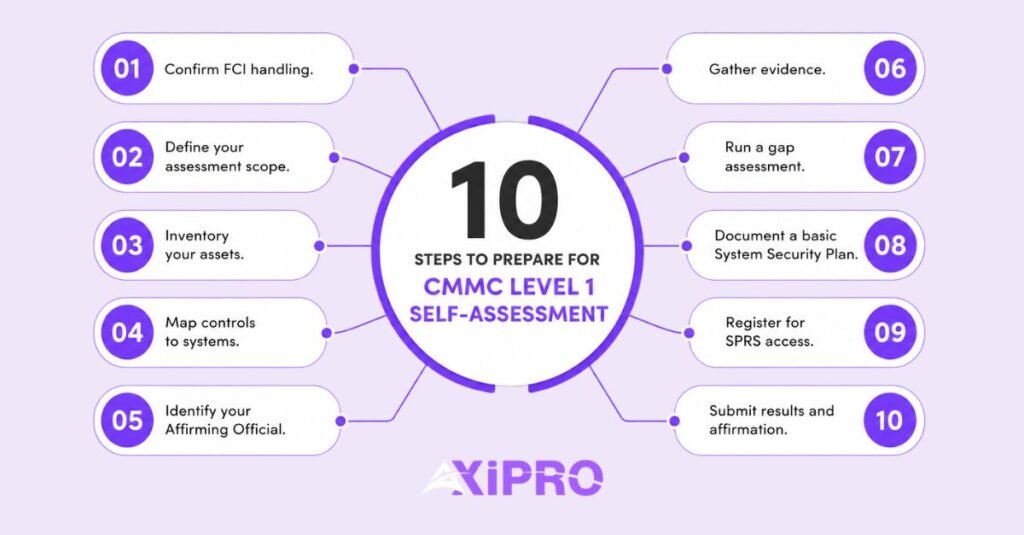
Before you begin a self-assessment, work through the following steps. This will not certify you, but it will surface most of the problems contractors encounter on their first attempt.
Confirm FCI handling. Identify every contract, vendor relationship, and data flow involving FCI. Review your DoD contracts and subcontracts for FAR 52.204-21 clauses.
Define your assessment scope. Document every system, location, and person that touches FCI. Reference the official CMMC Level 1 Scoping Guide and be prepared to defend every boundary decision.
Inventory your assets. Workstations, servers, cloud accounts, mobile devices, network gear. If it touches FCI, it is in scope and it needs to be listed.
Map controls to systems. For each of the 15 practices, document which technical or administrative measure satisfies it on each in-scope system. The mapping needs to be explicit, not assumed.
Identify your Affirming Official. This must be a senior representative with authority to bind the organization — a CEO, president, or designated corporate officer. An IT manager is not sufficient.
Gather evidence. Screenshots, configuration exports, policy documents, training records, vendor attestations. Evidence must exist before the assessment, not be created afterward.
Run a gap assessment. Self-test each practice. Since no POA&Ms are allowed at Level 1, anything not fully met must be remediated before the formal self-assessment.
Document a basic System Security Plan. Level 1 does not formally require an SSP, but assessors and primes will ask for one, and it becomes mandatory the moment you advance to Level 2. Start it now.
Register for SPRS access. Your Affirming Official needs a Procurement Integrated Enterprise Environment (PIEE) account with the SPRS Cyber Vendor User role.
Submit results and affirmation. Enter your Level 1 self-assessment results in SPRS and have the Affirming Official sign the attestation.
CMMC Level 1 Artifact Retention Requirements
Under 32 CFR 170.15(c)(2), the artifacts used as evidence for your Level 1 self-assessment must be retained for six years from the CMMC Status Date — the date the assessment was completed and entered in SPRS.
Six years matters because the DoD or a prime can ask to inspect your evidence at any point in that window. Refusing or being unable to produce it can trigger contract remedies, including suspension or debarment. The retention requirement also intersects with False Claims Act liability: if the affirmation submitted to SPRS turns out to have been inaccurate, the evidence chain is what gets investigated.
Practical retention covers the completed self-assessment record (objective-by-objective), all evidence cited in MET determinations, the senior-official affirmation signed in SPRS, any supporting policies, screenshots, and configuration exports referenced, and records of the assessment methodology used.
Most contractors store this in a dedicated compliance repository with version control.
Anything less invites a scramble during the next assessment cycle, since some evidence (like firewall rule snapshots) changes constantly and is hard to reconstruct after the fact.
Phased Implementation Timeline and Key Deadlines
CMMC implementation is rolling out in four phases under 32 CFR 170.3(e), on a timeline tied to the publication of the 48 CFR Acquisition Rule.
December 16, 2024: The 32 CFR Part 170 final rule takes effect, codifying CMMC as a federal regulation.
September 10, 2025: The 48 CFR DFARS final rule is published, amending DFARS 252.204-7021 to embed CMMC contract clauses.
November 10, 2025: Phase 1 begins. DoD solicitations can include CMMC Level 1 and Level 2 self-assessment requirements. This is the live enforcement date.
November 10, 2026: Phase 2 begins. Level 2 certification assessments (C3PAO-led) appear in more contracts at DoD discretion.
November 10, 2027: Phase 3 begins. Level 3 certification assessments enter contracts for the most sensitive CUI.
Full implementation is expected approximately three years after Phase 1, at which point all applicable contracts will contain CMMC clauses.
For Level 1 contractors, the operative date is November 10, 2025. From that point forward, a current Level 1 status in SPRS is a precondition for award on covered contracts. You do not get to fix it after the solicitation drops.
CMMC Level 1 Certification Challenges
Most Level 1 failures come from a small set of recurring problems.
Scope creep and scope denial. Contractors either underscope (excluding email, mobile devices, or cloud storage that clearly handles FCI) or overscope (sweeping in systems that have no FCI exposure). Both create problems. Underscoping risks false attestation. Overscoping wastes resources and creates evidence gaps that are hard to defend.
Missing evidence for inherited controls. Many Level 1 environments rely on cloud services (Microsoft 365, Google Workspace, AWS) to satisfy several practices. Inheritance is legitimate, but you need attestations from the provider, and you need to know which controls are inherited versus customer-responsibility. The shared responsibility model is real, and assessors check it.
Documentation that does not match reality. Policies that say one thing while configurations do another. The policy says workstations lock after 15 minutes; the actual Group Policy locks them after 60. Auditors compare written claims to system reality, and discrepancies become NOT MET findings.
Affirming Official confusion. The Affirming Official must be a senior representative with authority to bind the organization. An IT manager is typically not sufficient. A CEO, president, or designated corporate officer is the expected level. Some contractors discover this late in the process when no one in the org chart has the required authority formally documented.
Treating Level 1 as a checkbox. Level 1 is light compared to Level 2, but it is not nothing. The senior-official affirmation creates personal legal exposure, and the False Claims Act applies to false attestations the same way it applies to fraudulent invoices.
Important: The Department of Justice has been explicit that cybersecurity-related False Claims Act cases are an active enforcement priority. A signed CMMC affirmation that overstates compliance is precisely the kind of attestation that has produced multi-million-dollar settlements at other federal agencies. Take the senior-official signature seriously.
What Are the 15 CMMC Level 1 Requirements?
The 15 requirements come from FAR 52.204-21(b)(1) and cover Access Control (4 practices), Identification and Authentication (2), Media Protection (1), Physical Protection (2), System and Communications Protection (2), and System and Information Integrity (4). All 15 practices are described in full in the requirements section above.
Is CMMC Level 1 Self-Assessment or Third-Party Assessed?
Level 1 is self-assessment only. Contractors evaluate their own implementation and submit results to SPRS along with a senior-official affirmation. No C3PAO involvement is required at Level 1. Levels 2 and 3 involve third-party or government assessments depending on the contract type and data sensitivity.
How Often Do I Need to Renew My CMMC Level 1 Certification?
Annually. The self-assessment must be performed every year, and a fresh senior-official affirmation must be submitted to SPRS within 12 months of the prior affirmation. Missing the deadline invalidates your status and makes you ineligible for new covered contract awards.
What Are the Consequences of Noncompliance With CMMC Level 1?
Noncompliance means loss of eligibility for new DoD contract awards requiring Level 1, potential suspension or termination of existing contracts, exclusion from prime contractor supply chains, and False Claims Act liability for any false attestations already submitted to SPRS.
How Long Does It Take to Achieve CMMC Level 1 Compliance?
For a small business with reasonable IT hygiene already in place, two to four weeks of focused effort is typical. For contractors starting from a less mature baseline, two to three months is more realistic. The bottleneck is usually evidence collection and scoping, not technical remediation. A structured gap assessment at the start of the process will give you a realistic timeline for your specific environment.
Does CMMC Level 1 Apply to Subcontractors?
Yes. CMMC requirements flow down through the supply chain. Any subcontractor handling FCI in performance of a DoD subcontract needs its own current Level 1 status in SPRS. Primes are increasingly requiring proof of CMMC status before subcontract award, and this trend accelerated through 2025.
What Is the Difference Between CMMC Level 1 and NIST 800-171?
CMMC Level 1 covers 15 practices drawn from FAR 52.204-21 and addresses FCI only. NIST SP 800-171 contains 110 controls and addresses CUI, mapping to CMMC Level 2. The Level 1 practices are a subset of the broader 800-171 framework, but the two are not equivalent. A contractor compliant with NIST 800-171 is also compliant with Level 1; the reverse is not true. For a detailed breakdown of how the two frameworks compare, see our guide on CMMC vs NIST 800-171.