/ Automated vs. Manual Penetration Testing: Which One Does Your Business Need?

Automated vs. Manual Penetration Testing: Which One Does Your Business Need?

As cyber threats grow in volume and sophistication, penetration testing has emerged as a critical tool to identify and address vulnerabilities before malicious actors can exploit them. But when it comes to running these tests, businesses often face a pivotal decision: should they opt for automated penetration testing or manual penetration testing?

Each approach has its strengths and blind spots, and understanding which one aligns with your needs is key to building a security strategy that actually holds up. This article breaks down the differences, the pros and cons of each, and how to figure out the best fit for your organization.
Automated vs. Manual Penetration Testing

What is Penetration Testing?

Penetration testing—often shortened to pen testing—is a simulated cyberattack on your systems, applications, or network designed to uncover vulnerabilities that real attackers could exploit. Think of it as hiring someone to break into your house so you can find the unlocked windows before a burglar does.

It’s an essential part of any proactive cybersecurity strategy. According to IBM’s Cost of a Data Breach Report, the global average cost of a breach has climbed steadily year over year, which makes finding weak points before they’re exploited more valuable than ever. By identifying these gaps early, businesses can take corrective action and meaningfully improve their security posture. If you want to see what a professional engagement looks like, our penetration testing services cover the full spectrum.
Understanding Automated Penetration Testing

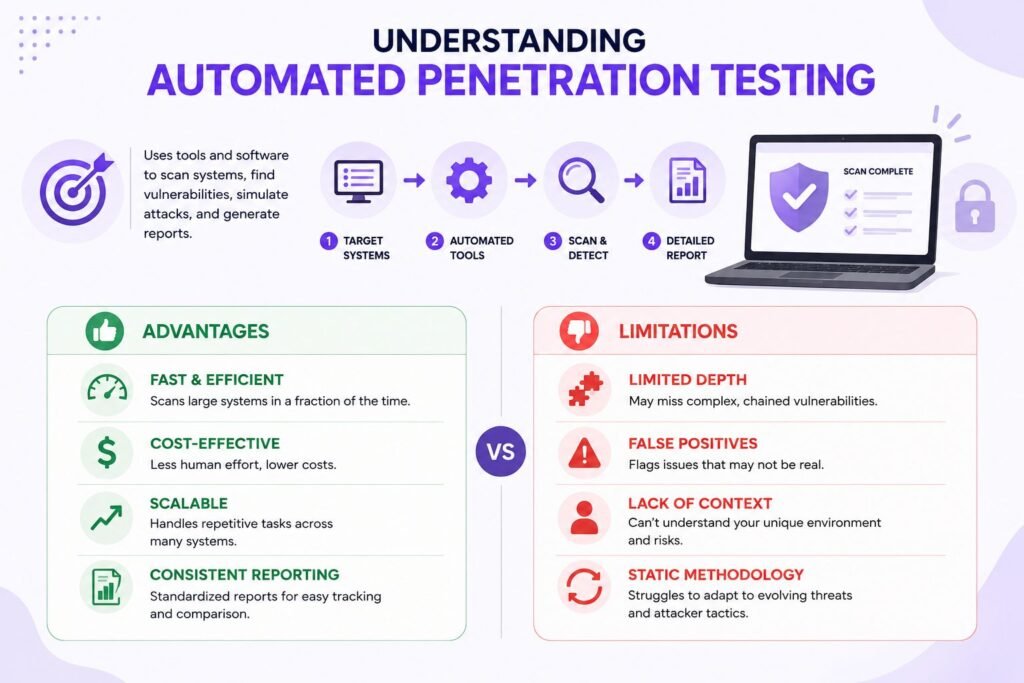
Automated penetration testing uses specialized tools and software to scan and identify vulnerabilities across your systems. These tools rely on predefined scripts and algorithms to simulate attacks and then spit out detailed reports on what they found.

Advantages of Automated Penetration Testing

Speed and efficiency are the headline benefits. Automated tools can scan sprawling networks in a fraction of the time it would take a human, making them ideal for large organizations with complex infrastructures. They’re also far more cost-effective, since they require less human intervention, and they scale effortlessly—handling repetitive tasks across a wide range of systems simultaneously.

There’s also the matter of consistent reporting. Automated tools generate standardized outputs, which means you get the same reliable format every time and can track common vulnerabilities without wondering whether the methodology shifted between scans.

Limitations of Automated Penetration Testing

The trade-off is limited depth. Automated tools tend to miss the complex, chained vulnerabilities that require human intuition and creativity to uncover. They’re also prone to false positives, flagging issues that turn out to be nothing—which means someone still has to manually validate the results.

On top of that, these tools lack context. They can’t understand what makes your business unique, so real risks specific to your environment can slip through. And because they follow a static methodology, they struggle to adapt to the dynamic, evolving threats that clever attackers throw at them.
Understanding Manual Penetration Testing

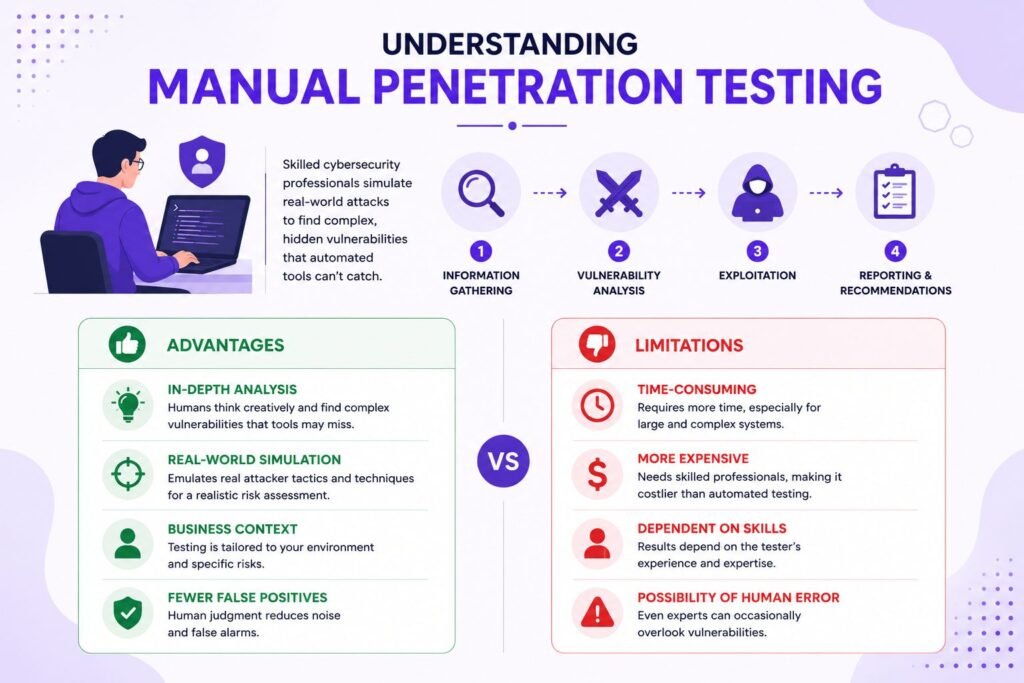
Manual penetration testing puts skilled cybersecurity professionals in the driver’s seat, simulating real-world attack scenarios to root out vulnerabilities. Unlike automated testing, it leans on human expertise to find the complex, hidden weaknesses that scripts simply can’t anticipate.

Advantages of Manual Penetration Testing

The biggest win is in-depth analysis. Human testers think creatively, spot sophisticated vulnerabilities, and exploit chains of weaknesses that automated tools breeze right past. Their work is also customized to your business context, ensuring a genuinely thorough assessment of your unique risks.

Manual testing delivers real-world simulation, too. Testers emulate the actual tactics, techniques, and procedures (TTPs) used by attackers—many of which are catalogued in the MITRE ATT&CK framework—giving you a realistic picture of how your defenses would hold up. And because skilled professionals can tell the difference between a genuine threat and a false alarm, you get fewer false positives and less wasted time.

Limitations of Manual Penetration Testing

All that expertise comes at a price. Manual testing is time-consuming, especially for large-scale systems, and the specialized skills involved make it more expensive than automated alternatives. There’s also the ever-present possibility of human error—even the best testers can occasionally overlook something.

SOC 2, ISO 27001 and HIPAA done for you. Fixed fee, 100% audit pass rate.

Audit-ready in 6 weeks. Not 6 months.

Key Differences Between Automated and Manual Penetration Testing

The clearest way to think about it: automated testing is about breadth and speed, while manual testing is about depth and nuance. Automated tools excel at covering large environments quickly and cheaply, catching well-documented vulnerabilities at scale. Manual testing, by contrast, digs into the complex, context-specific weaknesses that require a human to reason through—the kind of creative problem-solving no script can replicate.

Automated scans produce consistent, standardized reports but generate more noise in the form of false positives. Manual engagements produce tailored findings with far fewer false alarms, but they take longer and cost more. A thorough VAPT report often reflects both perspectives, combining the wide net of automation with the precision of human analysis.
Choosing the Right Approach for Your Business

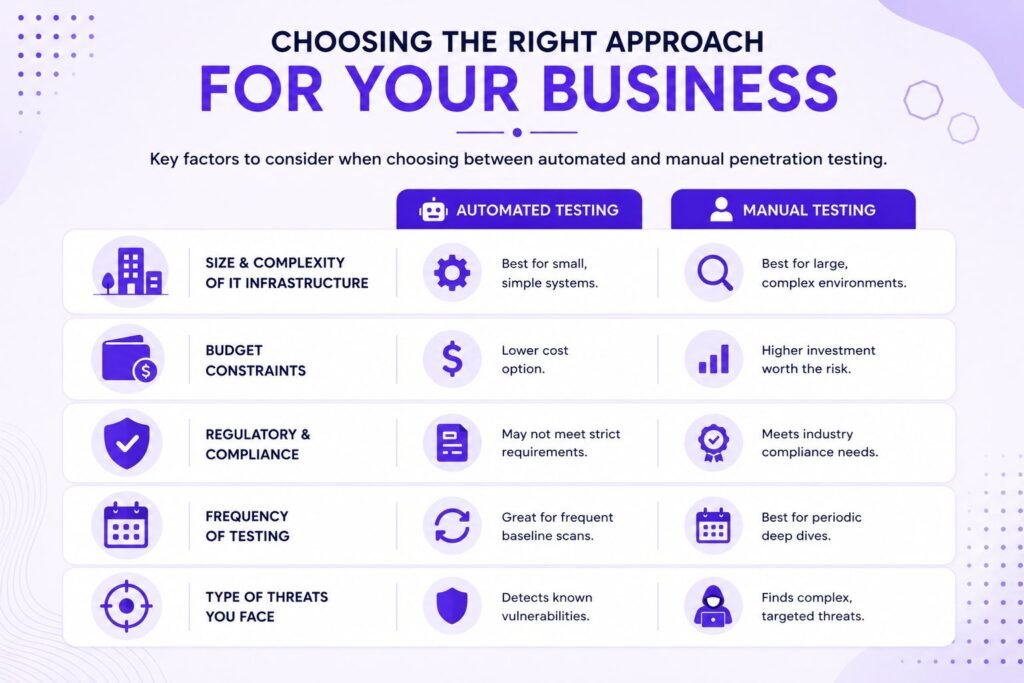
Selecting between automated and manual penetration testing comes down to a handful of factors: your organization’s size, budget, and security objectives. Here’s how to weigh them.

  • Size and complexity of your IT infrastructure. Small businesses with straightforward systems may find automated testing sufficient for catching common vulnerabilities. Larger organizations with sprawling, complex environments usually need the depth and customization that only manual testing provides.
  • Budget constraints. Automated testing is the cost-effective choice when funds are tight. That said, critical systems and sensitive data often justify the higher investment of manual testing—a breach in those areas would cost far more than the assessment itself.
  • Regulatory and compliance requirements. Industries like finance and healthcare face strict compliance mandates. Standards such as PCI DSS and frameworks aligned with ISO/IEC 27001 frequently call for rigorous, manual-driven risk assessments to satisfy auditors.
  • Frequency of testing. Automated testing shines for frequent scans that maintain a baseline level of security. Manual testing is better reserved for annual or biannual deep dives, or after significant system changes.
  • Type of threats your business faces. If your main concern is well-known vulnerabilities, automated tools have you covered. If you’re worried about sophisticated, targeted attacks, manual testing is the way to go.

Hybrid Approach: The Best of Both Worlds

Here’s the not-so-secret truth: many businesses don’t choose one over the other at all. Instead, they adopt a hybrid approach that marries the speed and scalability of automated tools with the depth and expertise of manual testing.

In practice, this means using automated penetration testing for regular scans and to catch the low-hanging fruit, then following up with manual assessments to uncover the deeper, more complex vulnerabilities that scanners miss. Integrating both methods gives you comprehensive coverage without blowing your budget. Our service plans are built around exactly this kind of balanced, layered testing.

Recommended Tools for Automated Penetration Testing

If you’re building out an automated testing capability, a few tools dominate the field.

  • Nessus is known for its extensive vulnerability scanning, while
  • Burp Suite is the go-to for web application security testing. On the open-source side,
  • OpenVAS handles network and system scans, and
  • Qualys offers a cloud-based platform for automated vulnerability management.


Manual Penetration Testing Frameworks

For manual work, professionals lean on established frameworks and platforms.

  • Metasploit is the widely-used standard for developing and executing exploit code.
  • The OWASP Testing Guide serves as the definitive reference for assessing web application security, and
  • Cobalt Strike is a favorite for adversary simulation and red team operations.

Conclusion

Both automated and manual penetration testing play crucial roles in defending your organization. Automated testing brings speed, scalability, and cost-efficiency, while manual testing delivers depth, creativity, and true real-world simulation. Understanding your unique needs—and, in most cases, blending the two—is how you build a security posture that genuinely protects your digital assets.

At Axipro, we specialize in helping businesses cut through the complexity of cybersecurity. Whether you need automated testing, manual assessments, or a hybrid solution, our team of experts is ready to guide you every step of the way.

Explore our plans to find the right fit for your organization.

Frequently Asked Questions

What is the primary difference between automated and manual penetration testing?

Automated testing relies on tools and software to identify vulnerabilities quickly, while manual testing uses human expertise to uncover complex, context-specific weaknesses.

For small businesses with simple IT systems, automated testing may suffice—but periodic manual testing provides valuable extra assurance.

At least annually, or after any significant changes to your systems. Automated scans can and should be run more frequently.

If performed incorrectly, penetration testing can cause system disruptions. Always work with certified professionals to minimize the risk.

Absolutely. A hybrid approach offers the best coverage, balancing efficiency with depth.
Axipro Author

Picture of Pedro Dias

Pedro Dias

Pedro has been writing online for over 10 years. With experience in all things programming, cyber security, and compliance, he is our editor-in-chief at Axipro.

Blog Highlights

Explore More Articles

Most companies start their first SOC 2 or ISO 27001 project in a spreadsheet, only to have it fall apart in week 6. This is typically when they’ll call us asking us to implement a GRC system that scales. Excel holds 154 controls fine. The trouble starts when an auditor sends over an evidence request list, two frameworks need updating at once, and a control owner who hasn’t opened the file since March edits the wrong row. This article gives you a free GRC workbook template built to take into consideration the hundreds of engagements we’ve guided. It walks you through each tab and tells you plainly when you’ve outgrown it. We’ve worked with hundreds of companies implementing SOC 2 + ISO 27001 and to be honest, for 80% of cases, using excel is feasible and even advised. Its a tool most of the staff knows and using it cuts onboarding times from weeks to a few hours. It also makes it accessible to the whole organization. The workbook covers all 33 SOC 2 Common Criteria plus the Availability, Confidentiality, Processing Integrity, and Privacy criteria, all 93 ISO 27001:2022 Annex A controls, a crosswalk between the two, and the evidence, risk, policy, and gap trackers that sit around them. It’s free, there are no macros, and it opens in Excel or Google Sheets. Why Start SOC 2 and ISO 27001 Tracking in a Spreadsheet The obvious argument for using Excel is cost and ease of use. A GRC platform costs around $10,000 a year before you’ve put a single control in place, and it pushes you into its control library and its workflow before you understand your own environment. A spreadsheet costs nothing and holds exactly the columns you need. More usefully, it makes you think about scope, ownership, and evidence before you automate any of it, and that thinking is the part no platform does for you. There’s a less obvious reason too. Teams that build their first control inventory by hand understand it. They know why CC6.3 maps to A.5.18, why the offboarding checklist is evidence for both, and who actually owns it. Teams that inherit a pre-populated platform library often don’t, and it shows in audit interviews when the auditor asks a control owner to explain a control they’ve never read. When a GRC Workbook Makes Sense A spreadsheet is the right tool when you’re chasing one or two frameworks, your team is under about 50 people, and one person owns compliance day to day. It also suits the readiness phase for any company. Scoping, gap analysis, and control design all go faster in a workbook than in a platform because there’s nothing to configure first. If you’re aiming for a SOC 2 Type I, or an ISO 27001 certificate with a tightly bounded ISMS scope, the workbook can carry you all the way to the audit. When You’ve Outgrown Excel (and Need a Platform) Excel breaks at scale in predictable ways. Spreadsheet research going back decades keeps finding that most operational spreadsheets contain at least one error; a review of field audits across 88 operational spreadsheets found errors in 94% of them. A compliance workbook with 1,400 formulas and a dozen editors isn’t exempt. Add a Type II observation period, where you collect the same evidence every month for a year, and manual tracking stops being a discipline and becomes someone’s full-time job. The specific tripwires are covered later in the article, but the short version is that when evidence collection becomes the bottleneck, it’s time to stop. What’s Inside the Free GRC Workbook Template The workbook has nine tabs. Eight get their own section in the walkthrough below; the ninth, Gap Analysis, is a remediation log that feeds the dashboard. Every tab uses the same color convention.  Navy headers mean pre-filled reference content. Teal headers with light yellow cells are the fields you fill in. Grey headers are formula columns, and you should leave those alone. SOC 2 Trust Services Criteria Coverage All 61 criteria from the AICPA 2017 Trust Services Criteria (with the 2022 revised points of focus) are already in there: the 33 Common Criteria across CC1 through CC9, plus Availability (3), Confidentiality (2), Processing Integrity (5), and Privacy (18). Each row has a plain-English summary of what the criterion expects, so a control owner who has never opened the AICPA document can still understand what they’re being asked to prove. ISO 27001 Annex A Controls Coverage All 93 Annex A controls from ISO/IEC 27001:2022 are listed under their four themes: Organizational (37), People (8), Physical (14), and Technological (34). Each control has a short description of what it covers and a pre-computed column showing which SOC 2 criteria relate to it. Unified Control Mapping Between SOC 2 and ISO 27001 The Crosswalk tab maps every SOC 2 criterion to the Annex A controls and ISO clauses it overlaps with, labels the overlap as Shared, Partial, or SOC 2-specific, and pulls the live status and evidence IDs from the SOC 2 tab. A second table lists the 13 Annex A controls that have no meaningful SOC 2 counterpart, so you know what to track on its own. Evidence Tracker Every piece of evidence gets one row, tagged to the SOC 2 criteria and ISO controls it supports, with an owner, a source system, a location, the period it covers, and how often you collect it. A formula works out the next due date and flags each item as Current, Due Soon, Overdue, or Not Scheduled. Owner and Status Fields Both control tabs have a Control Owner column and a Status dropdown with five defined states: Not Started, In Progress, Implemented, Needs Remediation, and Not Applicable. The definitions sit on the Overview tab so that two people setting a status on the same day mean the same thing by it. Risk Register Tab Likelihood and impact on a 1 to 5 scale, an automatic score, a rating (Critical, High, Medium, Low), a treatment

Vanta’s hosted MCP server gives Claude Code, Codex, Cursor, and Perplexity a live line into your compliance program. Failing tests, controls, vulnerabilities, vendors, policies: all of it queryable in plain English from whatever tool you already have open. Connecting a client shouldn’t take more than ten minutes. Fixing what the agent finds still takes an engineer, and then a wait for Vanta’s next sync before the dashboard turns green. This guide walks through setup for all four clients, the remediation workflow from first query to verified fix, and the errors people hit most. It also covers the parts of the beta that Vanta’s marketing pages skip. What Is the Vanta MCP Server? Understanding Model Context Protocol (MCP) Model Context Protocol is an open standard for connecting AI applications to outside systems. An MCP client (the AI tool) asks an MCP server what it offers, usually a set of named tools with typed inputs, and calls those tools on your behalf. The protocol specification covers transport, authorization, and message format, which is why one server works with any compliant client. Anthropic released MCP in late 2024 and handed it to the Agentic AI Foundation in December 2025, a fund under the Linux Foundation co-founded with Block and OpenAI. The Linux Foundation’s announcement counted more than 10,000 public MCP servers at that point, with ChatGPT, Cursor, Gemini, Microsoft Copilot, and VS Code all supporting the protocol. TechCrunch called the foundation’s projects the basic plumbing of the agent era. That neutral governance is the reason a single Vanta server can serve Claude, Codex, Cursor, and Perplexity without four separate integrations. What Vanta MCP enables for AI agents​ Vanta runs two versions of its MCP server. The hosted remote server, which this guide focuses on, lives at a regional URL, authenticates with OAuth in your browser, and is what Vanta now documents for every supported client. The older open-source local server ships as the @vantasdk/vanta-mcp-server npm package and runs on your machine with API credentials in an environment file. Vanta’s own repository for the local version now carries a deprecation notice pointing people to the hosted one, so treat it as a fallback for clients that can’t reach the hosted endpoint rather than the default. Once connected, the agent can list and filter automated tests, pull the specific entities failing a test, browse controls and their framework mappings, download and upload policy documents, review vendors and their risk attributes, and surface vulnerable assets with their remediation status. It reads live data every time it’s asked. The GRC lead asking “which SOC 2 controls have the most failing tests?” and the engineer asking “why is aws-s3-bucket-server-side-encryption-enabled failing?” are hitting the same server through different clients. Key use cases: compliance, failing tests, and vulnerability triage Most of the value sits in a few workflows. Failing test remediation is the headline: list failing tests, look at the resources behind them, and generate console steps, CLI commands, or infrastructure-as-code snippets to fix them. Vulnerability triage lets you query open CVEs by severity and SLA deadline, as long as at least one scanner (AWS Inspector, Tenable, Wiz, Snyk, or similar) is connected to Vanta. Without a scanner those queries come back empty. Compliance gap analysis covers framework progress, control ownership, evidence gaps, and cross-framework overlap, which is where GRC teams spend most of their time anyway. What Vanta MCP enables for AI agents​ Vanta runs two versions of its MCP server. The hosted remote server, which this guide focuses on, lives at a regional URL, authenticates with OAuth in your browser, and is what Vanta now documents for every supported client. The older open-source local server ships as the @vantasdk/vanta-mcp-server npm package and runs on your machine with API credentials in an environment file. Vanta’s own repository for the local version now carries a deprecation notice pointing people to the hosted one, so treat it as a fallback for clients that can’t reach the hosted endpoint rather than the default. Once connected, the agent can list and filter automated tests, pull the specific entities failing a test, browse controls and their framework mappings, download and upload policy documents, review vendors and their risk attributes, and surface vulnerable assets with their remediation status. It reads live data every time it’s asked. The GRC lead asking “which SOC 2 controls have the most failing tests?” and the engineer asking “why is aws-s3-bucket-server-side-encryption-enabled failing?” are hitting the same server through different clients. Key use cases: compliance, failing tests, and vulnerability triage Most of the value sits in a few workflows. Failing test remediation is the headline: list failing tests, look at the resources behind them, and generate console steps, CLI commands, or infrastructure-as-code snippets to fix them. Vulnerability triage lets you query open CVEs by severity and SLA deadline, as long as at least one scanner (AWS Inspector, Tenable, Wiz, Snyk, or similar) is connected to Vanta. Without a scanner those queries come back empty. Compliance gap analysis covers framework progress, control ownership, evidence gaps, and cross-framework overlap, which is where GRC teams spend most of their time anyway. Worth Knowing: Vanta’s Automated Tests Vanta’s automated tests confirm that a configuration exists. They don’t confirm that a control operated across the audit period. An agent that closes every failing test has cleaned up the dashboard, which is a different thing from passing the audit. Auditors still sample evidence, and the Vanta review goes into which automated tests are shallower than they look. Prerequisites Before Connecting Vanta MCP Finding your Vanta MCP URL Vanta hosts a separate MCP server per region. Use the one that matches your instance, because the client won’t authenticate against the wrong region. Every example below uses the US URL. Swap in yours. Required Vanta permissions and roles You need to be a Vanta Admin. The hosted MCP server isn’t available to non-admin users during the beta, and Vanta’s help center says broader access is planned but hasn’t shipped. This matters more than it sounds. The engineer who’d

Enforcement of the EU AI Act’s core rules started on 2 August 2026, and ISO/IEC 42001:2023 is the standard companies reach for when they need to prove their AI governance actually holds up. It’s the first certifiable standard for an Artificial Intelligence Management System (AIMS), and consultancies package help with it in two ways. A gap analysis tells you how far you are from the standard. Full implementation support builds the management system with you until you’re ready for certification. The two engagements differ enormously in cost, duration, and how much of the work the consultant carries, so picking the wrong one is expensive in both directions. Buy implementation when you only needed a roadmap and you pay for work your team could have done themselves. Buy a gap analysis when you have nobody to close the gaps and the report sits in a drawer while your certification deadline slips past. This article covers what each service includes, what each costs, who should pick which, and how the two combine. What Is an ISO 42001 Gap Analysis? A gap analysis is a structured baseline assessment. A consultant reviews your current AI governance practices against the requirements of ISO 42001: the management system clauses (4 through 10) and the Annex A controls, of which there are 38 grouped under nine control objectives. You end up with a clear picture of what already satisfies the standard, what partially satisfies it, and what doesn’t exist at all. The purpose is diagnostic, not corrective. Nobody writes your AI policy during a gap analysis. What you get is a gap report with maturity scoring against each clause and control, a prioritized remediation roadmap, an early view of your likely AIMS scope and Statement of Applicability (SoA), and an estimate of the effort certification will take. Timeframes are short. A standalone ISO 42001 gap analysis usually takes one to three weeks, with a few days of consultant time and a modest internal commitment: stakeholder interviews, access to documentation, and someone who can describe how AI is actually used across the business. Standalone assessments on the market typically run in the low four figures. Axipro bundles one into its free 30-day Compliance Accelerator Plan, so in practice you can get the diagnostic without spending anything. A gap analysis is the right entry point when you already have governance maturity to build on. Companies with an existing ISO 27001 ISMS often find heavy overlap in the management system clauses, since both standards follow the same Plan-Do-Check-Act (PDCA) structure. It also fits when you have internal compliance expertise to execute the roadmap, when budget needs phasing, or when you want an accurate scope before committing to a bigger project. Insider Note: The step that consistently takes longer than anyone expects is the AI system inventory. Most companies walk into a gap analysis confident they know where AI is used, then discover marketing has been running LLM tools on customer data, and engineering has embedded a third-party model nobody scoped. Budget real time for discovery before the control review starts. What Is ISO 42001 Full Implementation Support? Full implementation support is an end-to-end engagement that takes you from your current state to certification readiness. The consultant identifies the gaps, then closes them with you, building the AIMS piece by piece and owning the project through to the external audit. The deliverables list is long. A typical engagement covers the AI policy and governance framework, an AI risk assessment methodology, completed AI risk assessments and AI impact assessments for your in-scope systems, the Statement of Applicability, the applicable Annex A controls put in place (data governance, human oversight, transparency, and so on), the documentation and evidence set an auditor will ask for, staff training, an internal audit, a management review, and corrective action plans for whatever the internal audit surfaces. Most providers, Axipro included, also coordinate directly with the accredited certification body through the Stage 1 and Stage 2 audits. Most organizations need roughly three to six months. It’s shorter where an ISO 27001 ISMS already exists to integrate with, longer for complex or high-risk AI portfolios. Consultant involvement is heavy and sustained, but your team doesn’t disappear from the project. Internal subject-matter experts still make the real decisions about AI use cases, data handling, and acceptable risk. On cost, consultant-led ISO 42001 implementations commonly run well into five figures. Axipro’s ISO 42001 readiness engagement costs $4,500, which is one of the reasons the honest comparison below matters: at that price, the “just buy the gap analysis to save money” logic gets a lot weaker. Full implementation is the right call when you’re starting an AIMS from scratch, when nobody internal can carry the workload, when a certification deadline is fixed by an enterprise deal or regulatory exposure, or when your AI use cases are risky enough that getting the controls wrong has real consequences. The EU AI Act’s requirements for high-risk AI systems entered into application in August 2026, and companies in that category rarely get the luxury of a slow, self-paced build. Key Differences Between the Two Services Scope and depth A gap analysis assesses; implementation support executes. The gap analysis stops at the roadmap, no matter how detailed. Implementation carries every roadmap item through to a working, evidenced control. That distinction sounds obvious, but it’s the single most common source of buyer disappointment: a gap report doesn’t make you certifiable, and some companies find that out only after they’ve scheduled a Stage 1 audit. Consultant involvement and internal effort In a gap analysis, the consultant works in short, concentrated bursts and your team’s effort is measured in hours of interviews and document gathering. In full implementation, the consultant drafts, builds, and project-manages, yet your team still spends real time reviewing policies, making risk decisions, and generating evidence. Any provider promising certification with zero internal effort is describing a paper AIMS that won’t survive an audit or an incident. Cost and time to readiness A gap analysis finishes